climate control NISSAN ROGUE 2018 Owner´s Manual
[x] Cancel search | Manufacturer: NISSAN, Model Year: 2018, Model line: ROGUE, Model: NISSAN ROGUE 2018Pages: 547, PDF Size: 6.42 MB
Page 9 of 547
Table of
ContentsIllustrated table of contents
Safety—Seats, seat belts and supplemental restraint system
Instruments and controls
Pre-driving checks and adjustments
Monitor, climate, audio, phone and voice recognition systems
Starting and driving
In case of emergency
Appearance and care
Do-it-yourself
Maintenance and schedules
Technical and consumer information
Index
0
1
2
3
4
5
6
7
8
9
10
11
Page 114 of 547
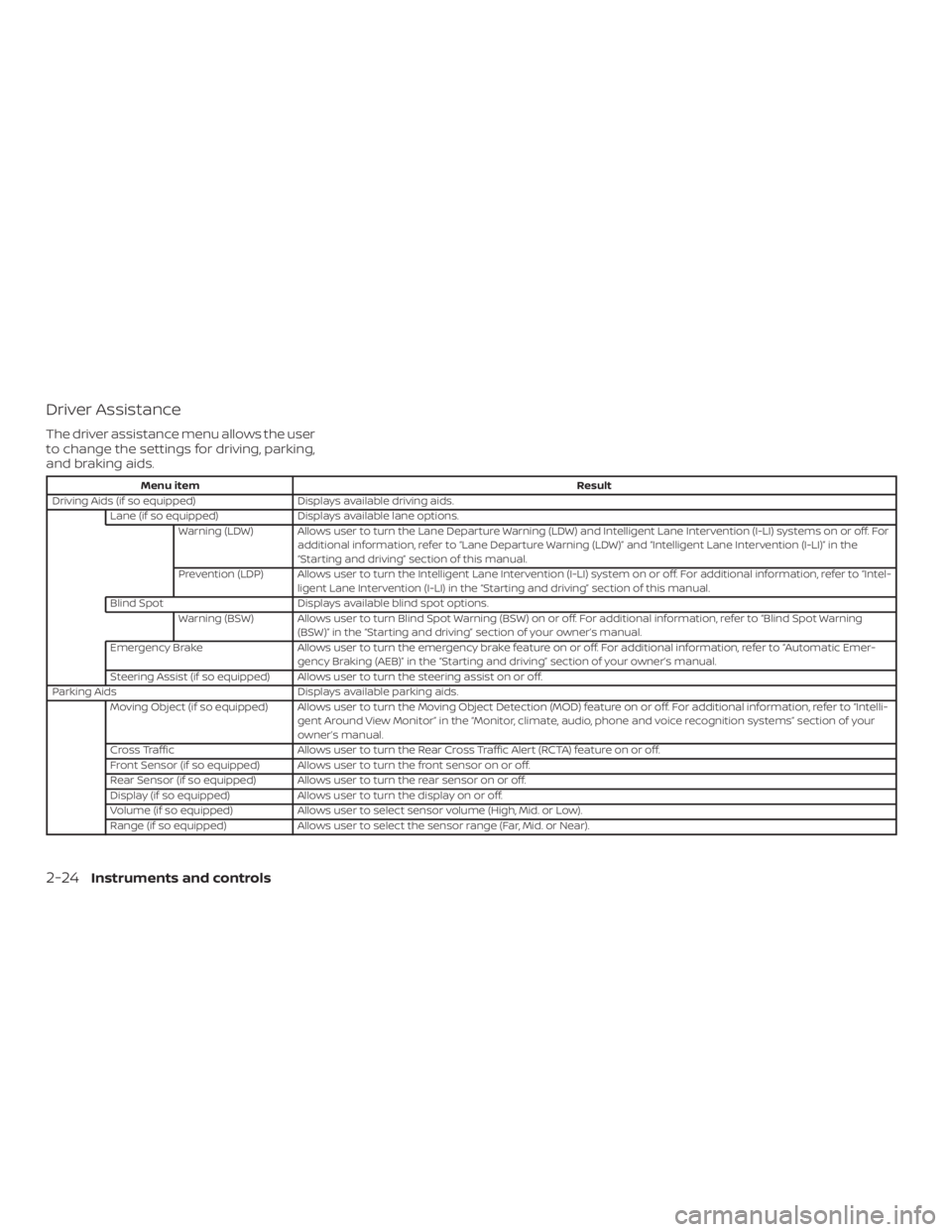
Driver Assistance
The driver assistance menu allows the user
to change the settings for driving, parking,
and braking aids.
Menu itemResult
Driving Aids (if so equipped) Displays available driving aids.
Lane (if so equipped) Displays available lane options.
Warning (LDW) Allows user to turn the Lane Departure Warning (LDW) and Intelligent Lane Intervention (I-LI) systems on or off. For additional information, refer to “Lane Departure Warning (LDW)” and “Intelligent Lane Intervention (I-LI)” in the
“Starting and driving” section of this manual.
Prevention (LDP) Allows user to turn the Intelligent Lane Intervention (I-LI) system on or off. For additional information, refer to “Intel- ligent Lane Intervention (I-LI) in the “Starting and driving” section of this manual.
Blind Spot Displays available blind spot options.
Warning (BSW) Allows user to turn Blind Spot Warning (BSW) on or off. For additional information, refer to “Blind Spot Warning (BSW)” in the “Starting and driving” section of your owner’s manual.
Emergency Brake Allows user to turn the emergency brake feature on or off. For additional information, refer to “Automatic Emer-
gency Braking (AEB)” in the “Starting and driving” section of your owner’s manual.
Steering Assist (if so equipped) Allows user to turn the steering assist on or off.
Parking Aids Displays available parking aids.
Moving Object (if so equipped) Allows user to turn the Moving Object Detection (MOD) feature on or off. For additional information, refer to “Intelli- gent Around View Monitor” in the “Monitor, climate, audio, phone and voice recognition systems” section of your
owner’s manual.
Cross Traffic Allows user to turn the Rear Cross Traffic Alert (RCTA) feature on or off.
Front Sensor (if so equipped) Allows user to turn the front sensor on or off.
Rear Sensor (if so equipped) Allows user to turn the rear sensor on or off.
Display (if so equipped) Allows user to turn the display on or off.
Volume (if so equipped) Allows user to select sensor volume (High, Mid. or Low).
Range (if so equipped) Allows user to select the sensor range (Far, Mid. or Near).
2-24Instruments and controls
Page 116 of 547
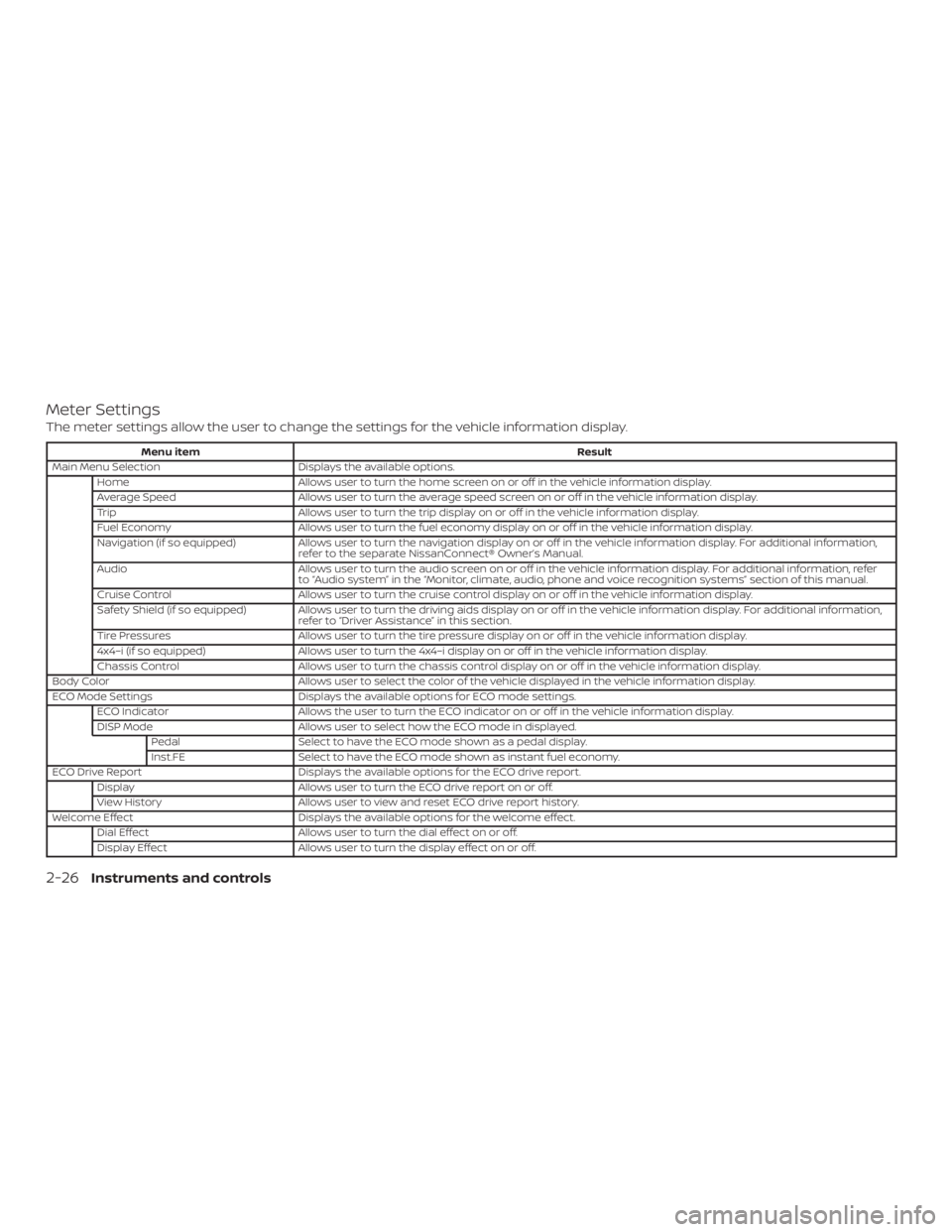
Meter Settings
The meter settings allow the user to change the settings for the vehicle information display.
Menu itemResult
Main Menu Selection Displays the available options.
Home Allows user to turn the home screen on or off in the vehicle information display.
Average Speed Allows user to turn the average speed screen on or off in the vehicle information display.
Trip Allows user to turn the trip display on or off in the vehicle information display.
Fuel Economy Allows user to turn the fuel economy display on or off in the vehicle information display.
Navigation (if so equipped) Allows user to turn the navigation display on or off in the vehicle information display. For additional information,
refer to the separate NissanConnect® Owner’s Manual.
Audio Allows user to turn the audio screen on or off in the vehicle information display. For additional information, refer
to “Audio system” in the “Monitor, climate, audio, phone and voice recognition systems” section of this manual.
Cruise Control Allows user to turn the cruise control display on or off in the vehicle information display.
Safety Shield (if so equipped) Allows user to turn the driving aids display on or off in the vehicle information display. For additional information, refer to “Driver Assistance” in this section.
Tire Pressures Allows user to turn the tire pressure display on or off in the vehicle information display.
4x4–i (if so equipped) Allows user to turn the 4x4–i display on or off in the vehicle information display.
Chassis Control Allows user to turn the chassis control display on or off in the vehicle information display.
Body Color Allows user to select the color of the vehicle displayed in the vehicle information display.
ECO Mode Settings Displays the available options for ECO mode settings.
ECO Indicator Allows the user to turn the ECO indicator on or off in the vehicle information display.
DISP Mode Allows user to select how the ECO mode in displayed.
Pedal Select to have the ECO mode shown as a pedal display.
Inst.FE Select to have the ECO mode shown as instant fuel economy.
ECO Drive Report Displays the available options for the ECO drive report.
Display Allows user to turn the ECO drive report on or off.
View History Allows user to view and reset ECO drive report history.
Welcome Effect Displays the available options for the welcome effect.
Dial Effect Allows user to turn the dial effect on or off.
Display Effect Allows user to turn the display effect on or off.
2-26Instruments and controls
Page 194 of 547
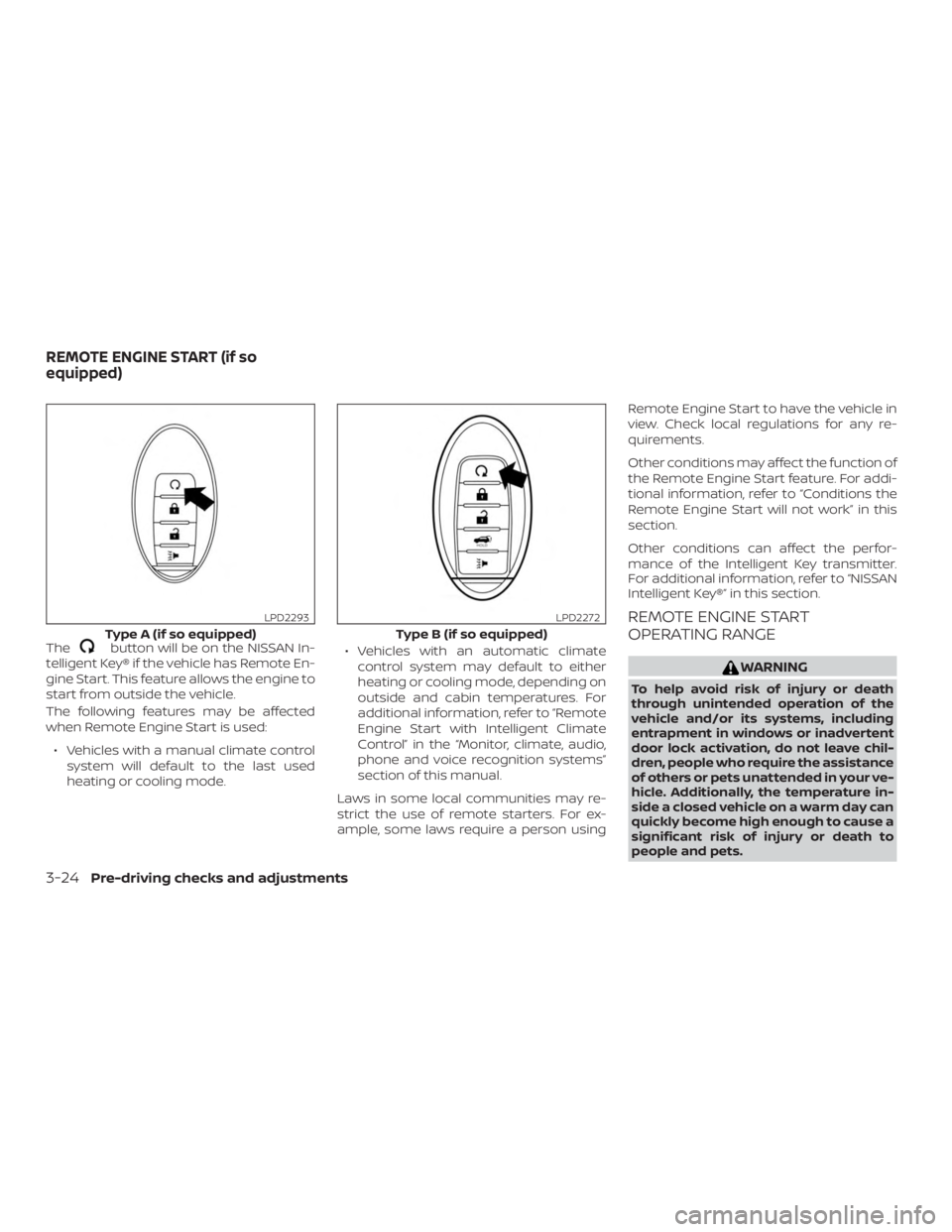
Thebutton will be on the NISSAN In-
telligent Key® if the vehicle has Remote En-
gine Start. This feature allows the engine to
start from outside the vehicle.
The following features may be affected
when Remote Engine Start is used:
∙ Vehicles with a manual climate control system will default to the last used
heating or cooling mode. ∙ Vehicles with an automatic climate
control system may default to either
heating or cooling mode, depending on
outside and cabin temperatures. For
additional information, refer to “Remote
Engine Start with Intelligent Climate
Control” in the “Monitor, climate, audio,
phone and voice recognition systems”
section of this manual.
Laws in some local communities may re-
strict the use of remote starters. For ex-
ample, some laws require a person using Remote Engine Start to have the vehicle in
view. Check local regulations for any re-
quirements.
Other conditions may affect the function of
the Remote Engine Start feature. For addi-
tional information, refer to “Conditions the
Remote Engine Start will not work” in this
section.
Other conditions can affect the perfor-
mance of the Intelligent Key transmitter.
For additional information, refer to “NISSAN
Intelligent Key®” in this section.
REMOTE ENGINE START
OPERATING RANGE
WARNING
To help avoid risk of injury or death
through unintended operation of the
vehicle and/or its systems, including
entrapment in windows or inadvertent
door lock activation, do not leave chil-
dren, people who require the assistance
of others or pets unattended in your ve-
hicle. Additionally, the temperature in-
side a closed vehicle on a warm day can
quickly become high enough to cause a
significant risk of injury or death to
people and pets.
Type A (if so equipped)
LPD2293
Type B (if so equipped)
LPD2272
REMOTE ENGINE START (if so
equipped)
3-24Pre-driving checks and adjustments
Page 195 of 547
CAUTION
When the Intelligent Key battery is dis-
charged or other strong radio wave
sources are present near the operating
location, the Intelligent Key operating
range becomes narrower, and the Intel-
ligent Key may not function properly.
The Remote Engine Start function can only
be used when the Intelligent Key is within
the specified operating range from the ve-
hicle.
The Remote Engine Start operating range
is approximately 197 f t (60 m) from the ve-
hicle.
REMOTE STARTING THE VEHICLE
To use the Remote Engine Start feature
perform the following: 1. Aim the Intelligent Key at the vehicle.
2. Press the
button to lock all
doors.
3. Within 5 seconds press and hold the
button until the turn signal
lights flash and the tail lamps turn on. If
the vehicle is not within view press and
hold the
button for at least 2 sec-
onds. The following events will occur when the
engine starts:
∙ The parking lights will turn on and re- main on as long as the engine is run-
ning.
∙ The doors will be locked and the climate control system may come on.
∙ The engine will continue to run for 10 minutes. Repeat the steps to extend
the time for an additional 10 minutes.
For additional information, refer to “Ex-
tending engine run time” in this section.
Press and hold the brake pedal while
switching the ignition to the ON position
before driving. For additional information,
refer to “Driving the vehicle” in the “Starting
and driving” section of this manual.
EXTENDING ENGINE RUN TIME
The Remote Engine Start feature can be
extended one time by performing the
steps listed in “Remote starting the vehicle”
in this section. Run time will be calculated
as follows: ∙ The first 10 minute run time will start when the Remote Engine Start function
is performed. ∙ The second 10 minutes will start imme-
diately when the Remote Engine Start
function is performed again. For ex-
ample, if the engine has been running
for 5 minutes, and 10 minutes are
added, the engine will run for a total of
15 minutes.
∙ Extending engine run time will bring you to the two Remote Engine Start limit.
A maximum of two Remote Engine Starts,
or a single Remote Engine Start with an
extension, are allowed between ignition
cycles. The ignition switch must be cycled
to the ON position and then back to the
OFF position before the Remote Engine
Start procedure can be used again.
CANCELING A REMOTE ENGINE
START
To cancel a Remote Engine Start, perform
one of the following: ∙ Aim the Intelligent Key at the vehicle and press
until the parking lights
turn off.
∙ Turn on the hazard warning flashers.
∙ Cycle the ignition switch on and then off.
Pre-driving checks and adjustments3-25
Page 216 of 547
4 Monitor, climate, audio, phone and
voice recognition systems
NissanConnect® Owner’s Manual................4-2
RearView Monitor (if so equipped) ...............4-3
RearView Monitor system operation ..........4-4
How to read the displayed lines ...............4-5
Difference between predicted and
actual distances ..............................4-5
How to park with predicted course
lines ..........................................4-7
Adjusting the screen .........................4-8
How to turn on and off predicted
course lines (if so equipped) ..................4-9
RearView Monitor system limitations .........4-9
System maintenance ........................ 4-10
Intelligent Around View Monitor
(if so equipped) .................................. 4-11
Intelligent Around View Monitor system
operation .................................... 4-12
Difference between predicted and
actual distances ............................. 4-16
How to park with predicted course
lines ......................................... 4-18
How to switch the display ...................4-19Adjusting the screen
........................ 4-20
Intelligent Around View Monitor system
limitations ................................... 4-20
System maintenance ........................ 4-22
Moving Object Detection (MOD)
(if so equipped) ................................. 4-23
MOD system operation ......................4-24
Turning MOD on and off (if so equipped) .....4-26
MOD system limitations .....................4-26
System maintenance ........................ 4-27
Vents ........................................... 4-28
Heater and air conditioner (manual)
(if so equipped) ................................. 4-29
Controls ..................................... 4-30
Heater operation ............................ 4-30
Air conditioner operation ....................4-32
Air flow charts ............................... 4-33
Heater and air conditioner (automatic)
(if so equipped) ................................. 4-37
Automatic operation ........................ 4-38
Manual operation ........................... 4-39
Operating tips ............................... 4-40
Page 245 of 547
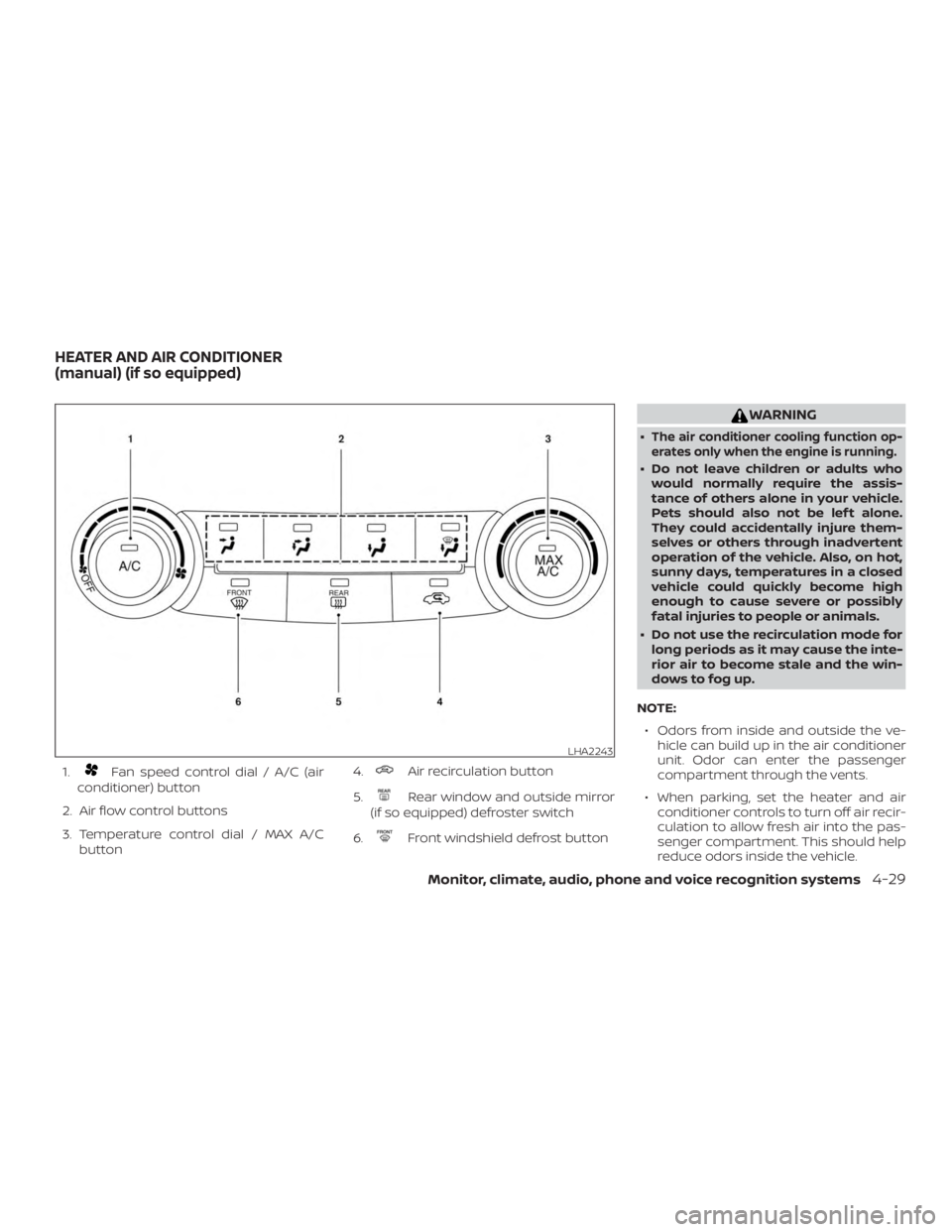
1.Fan speed control dial / A/C (air
conditioner) button
2. Air flow control buttons
3. Temperature control dial / MAX A/C button 4.Air recirculation button
5.
Rear window and outside mirror
(if so equipped) defroster switch
6.
Front windshield defrost button
WARNING
∙The air conditioner cooling function op-
erates only when the engine is running.
∙ Do not leave children or adults who would normally require the assis-
tance of others alone in your vehicle.
Pets should also not be lef t alone.
They could accidentally injure them-
selves or others through inadvertent
operation of the vehicle. Also, on hot,
sunny days, temperatures in a closed
vehicle could quickly become high
enough to cause severe or possibly
fatal injuries to people or animals.
∙ Do not use the recirculation mode for long periods as it may cause the inte-
rior air to become stale and the win-
dows to fog up.
NOTE: ∙ Odors from inside and outside the ve- hicle can build up in the air conditioner
unit. Odor can enter the passenger
compartment through the vents.
∙ When parking, set the heater and air conditioner controls to turn off air recir-
culation to allow fresh air into the pas-
senger compartment. This should help
reduce odors inside the vehicle.
LHA2243
HEATER AND AIR CONDITIONER
(manual) (if so equipped)
Monitor, climate, audio, phone and voice recognition systems4-29
Page 246 of 547
CONTROLS
Fan control dial
Thefan control dial allows you to ad-
just the fan speed for the outlet air flow. To
turn the fan off, turn the
fan control
dial to the OFF position.
Air flow control buttons
The air flow control buttons allow you to
select the air flow outlets.
MAX
A/C — Air flows mainly from center
and side vents with maximum
cooling and
turns on.— Air flows mainly from centerand side vents.
— Air flows mainly from centerand side vents and foot
outlets.
— Air flows mainly from foot out-lets and partly from defroster.
— Air flows mainly from de-froster outlets and foot
outlets.
— Air flows mainly from de-froster outlets.
Temperature control dial
The temperature control dial allows you to
adjust the temperature of the outlet air. To
lower the temperature, turn the dial to the
lef t. To increase the temperature, turn the
dial to the right.
Air recirculation button
On position (Indicator light on):
Interior air is recirculated inside the vehicle.
Press the
button to the ON position
when:
∙ driving on a dusty road.
∙ to prevent traffic fumes from entering passenger compartment.
∙ for maximum cooling when using the air conditioner.
Off position (Indicator light off ):
Outside air is drawn into the passenger
compartment and distributed through the
selected outlet.
Use the off position for normal heater or air
conditioner operation.
Air conditioner button
Start the engine, turn thefan control
dial to the desired position and press
the
button to turn on the air condi-
tioner. To turn off the air conditioner, press
the
button again.
The air conditioner cooling function op-
erates only when the engine is running.
Rear window and outside mirror
(if so equipped) defroster switch
For additional information, refer to “Rear
window and outside mirror (if so equipped)
defroster switch” in the “Instruments and
controls” section of this manual.
HEATER OPERATION
Heating
This mode is used to direct heated air to
the foot outlets. Some air also flows from
the defrost outlets and the side vent out-
lets.
1. Press the
button to change to
fresh air intake mode. The
indica-
tor light will turn off for normal heating.
2. Press the
air flow control button.
4-30Monitor, climate, audio, phone and voice recognition systems
Page 247 of 547
3. Turn thefan control dial to the
desired position.
4. Turn the temperature control dial to the desired position between the
middle and the hot position.
Ventilation
This mode directs outside air to the side
and center vents.
1. Press the
button to change to
fresh air intake mode. The
indica-
tor light will turn off.
2. Press the
air flow control button.
3. Turn the
fan control dial to the
desired position.
4. Turn the temperature control dial to the desired position.
Defrosting or defogging
This mode directs the air to the defrost
outlets to defrost/defog the windows.
1. Press the
defroster button.
2. Turn the
fan control dial to the
desired position. 3. Turn the temperature control dial to
the desired position between the
middle and the hot position.
∙ To quickly remove ice or fog from the windows, turn the fan control dial to the
highest setting and the temperature
control to the full HOT position.
∙ When the
position is selected, the
air conditioner automatically turns on if
the outside temperature is more than
36°F (2°C). This dehumidifies the air
which helps defog the windshield.
The
indicator automatically turns
off, allowing outside air to be drawn into
the passenger compartment to further
improve the defogging performance.
The recirculation mode cannot be acti-
vated in the
position.
Bi-level heating
The bi-level mode directs warmed air to
the side and center vents and to the front
and rear floor outlets.
1. Press the
button to change to
fresh air intake mode. The
will
turn off.
2. Press the
air flow control button. 3. Turn the
fan control dial to the de-
sired position.
4. Turn the temperature control dial to the desired position.
Heating and defogging
This mode heats the interior and defogs
the windshield.
1. Press the
air flow control button.
2. Turn the
fan control dial to the
desired position.
3. Turn the temperature control dial to the desired position between the
middle and the hot position.
∙ When the
position is selected, the
air conditioner automatically turns on if
the outside temperature is more than
36°F (2°C). This dehumidifies the air
which helps defog the windshield.
The
indicator automatically turns
off, allowing outside air to be drawn into
the passenger compartment to further
improve the defogging performance.
Monitor, climate, audio, phone and voice recognition systems4-31
Page 248 of 547
Operating tips
Clear snow and ice from the wiper blades
and air inlet in front of the windshield.
This improves heater operation.
AIR CONDITIONER OPERATION
Start the engine, turn thefan control
dial to the desired position, and press
the
button to activate the air condi-
tioner. When the air conditioner is on, cool-
ing and dehumidif ying functions are
added to the heater operation.
The air conditioner cooling function op-
erates only when the engine is running.
Cooling
This mode is used to cool and dehumidif y
the air.
1. Press the
air flow control button.
2. Turn the
fan control dial to the
desired position.
3. Press the
button.
4. Turn the temperature control dial to the desired position. ∙ For quick cooling, press the MAX A/C
button. When the MAX A/C button is
pressed, it will activate the
mode.
The amount of air coming through the
vents is the highest it can go when in
MAX A/C mode regardless of the posi-
tion of the
fan control dial.
Dehumidified heating
This mode is used to heat and dehumidif y
the air.
1. Press the
button to the OFF posi-
tion.
2. Press the
air flow control button.
3. Turn the
fan control dial to the
desired position.
4. Press the A/C button. The indicator light comes on.
5. Turn the temperature control dial to the desired position.
Dehumidified defogging
This mode is used to defog the windows
and dehumidif y the air.
1. Press the
front defrost button. 2. Turn the
fan control dial to the de-
sired position.
∙ When the
orare selected,
the air conditioner automatically turns
on if the outside temperature is more
than 36°F (2°C). This dehumidifies the air
which helps defog the windshield.
The
mode automatically turns off,
allowing outside air to be drawn into the
passenger compartment to further im-
prove the defogging performance.
∙ The air conditioner is always on in
ormode, regardless of whether
the indicator light is on or off.
3. Turn the temperature control dial to the desired position.
Operating tips
∙ Keep the windows and moonroof (if soequipped) closed while the air condi-
tioner is in operation.
∙ Af ter parking in the sun, drive for two or three minutes with the windows open
to vent hot air from the passenger
compartment. Then, close the win-
dows. This allows the air conditioner to
cool the interior more quickly.
4-32Monitor, climate, audio, phone and voice recognition systems