light NISSAN ROGUE 2019 Owner´s Manual
[x] Cancel search | Manufacturer: NISSAN, Model Year: 2019, Model line: ROGUE, Model: NISSAN ROGUE 2019Pages: 564, PDF Size: 6.97 MB
Page 79 of 564
NOTE:
This vehicle’s occupant classification
sensor system generally keeps the clas-
sification locked during driving, so it is
important that you confirm that the
front passenger is properly classified
prior to driving. However, the occupant
classification sensor may recalculate the
weight of the occupant under some con-
ditions (both while driving and when
stopped), so front passenger seat occu-
pants should continue to remain seated
as outlined above.
Troubleshooting
If you think the front passenger air bag
status light is incorrect:1. If the light is ON with an adult occupying the front passenger seat:
∙ Occupant is a small adult — the air bag light is functioning as intended. The
front passenger air bag is suppressed. However, if the occupant is not a small
adult, then this may be due to the following
conditions that may be interfering with the
weight sensors:
∙ Occupant is not sitting upright, leaning against the seatback, and centered on
the seat cushion with his/her feet com-
fortably extended to the floor.
∙ A child restraint or other object pressing against the rear of the seatback.
∙ A rear passenger pushing or pulling on the back of the front passenger seat.
∙ Forcing the front seat or seatback against an object on the seat or floor
behind it.
∙ An object placed under the front pas- senger seat.
∙ An object placed between the seat cushion and center console or between
the seat cushion and the door.
If the vehicle is moving, please come to a
stop when it is safe to do so. Check and
correct any of the above conditions. Re-
start the vehicle and wait 1 minute. NOTE:
A system check will be performed during
which the front passenger air bag status
light will remain lit for about 7 seconds
initially.
If the light is still ON af ter this, the person
should be advised not to ride in the front
passenger seat and the vehicle should be
checked as soon as possible. It is recom-
mended that you visit a NISSAN dealer for
this service.
2. If the light is OFF with a small adult, child or child restraint occupying the
front passenger seat.
This may be due to the following con-
ditions that may be interfering with the
weight sensors:
∙ Small adult or child is not sitting upright, leaning against the seatback, and cen-
tered on the seat cushion with his/her
feet comfortably extended to the floor.
∙ The child restraint is not properly in- stalled, as outlined in the “Child re-
straints” section of this manual.
∙ An object weighing over 9.1 lbs. (4 kg) hanging on the seat or placed in the
seatback pocket.
Safety—Seats, seat belts and supplemental restraint system1-59
Page 80 of 564
∙ A child restraint or other object pressingagainst the rear of the seatback.
∙ A rear passenger pushing or pulling on the back of the front passenger seat.
∙ Forcing the front seat or seatback against an object on the seat or floor
behind it.
∙ An object placed under the front pas- senger seat.
∙ An object placed between the seat cushion and center console.
If the vehicle is moving, please come to a
stop when it is safe to do so. Check and
correct any of the above conditions. Re-
start the vehicle and wait 1 minute.
NOTE:
A system check will be performed during
which the front passenger air bag status
light will remain lit for about 7 seconds
initially.
If the light is still OFF af ter this, the small
adult, child or child restraint should be re-
positioned in the rear seat and the vehicle
should be checked as soon as possible. It is
recommended that you visit a NISSAN
dealer for this service. 3. If the light is OFF with no front passen-
ger and no objects on the front pas-
senger seat, the vehicle should be
checked. It is recommended that you
visit a NISSAN dealer as soon as pos-
sible.
Other supplemental front-impact air
bag precautions
WARNING
∙ Do not place any objects on the steer- ing wheel pad or on the instrument
panel. Also, do not place any objects
between any occupant and the steer-
ing wheel or instrument panel. Such
objects may become dangerous pro-
jectiles and cause injury if the front air
bags inflate.
∙ Immediately af ter inflation, several front air bag system components will
be hot. Do not touch them; you may
severely burn yourself.
∙ No unauthorized changes should be made to any components or wiring of
the supplemental air bag system. This
is to prevent accidental inflation of
the supplemental air bag or damage
to the supplemental air bag system. ∙ Do not make unauthorized changes
to your vehicle’s electrical system,
suspension system or front end struc-
ture. This could affect proper opera-
tion of the front air bag system.
∙ Tampering with the front air bag sys- tem may result in serious personal in-
jury. Tampering includes changes to
the steering wheel and the instru-
ment panel assembly by placing ma-
terial over the steering wheel pad and
above the instrument panel or by in-
stalling additional trim material
around the air bag system.
∙ Removing or modif ying the front pas- senger seat may affect the function of
the air bag system and result in seri-
ous personal injury.
1-60Safety—Seats, seat belts and supplemental restraint system
Page 82 of 564
other type of collision are similar to those of
a higher severity impact. They are de-
signed to inflate on the side where the ve-
hicle is impacted. They may not inflate in
certain side collisions.
Curtain air bags are also designed to inflate
in certain types of rollover collisions or near
rollovers. As a result, certain vehicle move-
ments (for example, during severe off-
roading) may cause the curtain air bags to
inflate.
Vehicle damage (or lack of it) is not always
an indication of proper side air bag and
curtain air bag operation.
When the side air bags and curtain air bags
inflate, a fairly loud noise may be heard,
followed by release of smoke. This smoke is
not harmful and does not indicate a fire.
Care should be taken not to inhale it, as it
may cause irritation and choking. Those
with a history of a breathing condition
should get fresh air promptly.
Side air bags, along with the use of seat belts,
help to cushion the impact force on the
chest of the front occupants. Curtain air
bags help to cushion the impact force to the
head of occupants in the front and rear out-
board seating positions in all rows. They can
help save lives and reduce serious injuries.However, an inflating side air bag or curtain
air bag may cause abrasions or other inju-
ries. Side air bags and curtain air bags do not
provide restraint to the lower body.
The seat belts should be correctly worn
and the driver and front passenger seated
upright as far as practical away from the
side air bag. Rear seat passengers should
be seated as far away as practical from the
door finishers and side roof rails. The side
air bags and curtain air bags inflate quickly
in order to help protect the occupants. Be-
cause of this, the force of the side air bags
and curtain air bags inflating can increase
the risk of injury if the occupant is too close
to, or is against, these air bag modules dur-
ing inflation. The side air bag will deflate
quickly af ter the collision is over.
The curtain air bag will remain inflated for a
short time.
The side air bags and curtain air bags
operate only when the ignition switch is
placed in the ON position.
Af ter placing the ignition switch in the
ON position, the supplemental air bag
warning light illuminates. The supple-
mental air bag warning light will turn off
af ter about 7 seconds if the system is
operational.
WARNING
∙Do not place any objects near the seat-
back of the front seats. Also, do not
place any objects (an umbrella, bag,
etc.) between the front door finisher
and the front seat. Such objects may
become dangerous projectiles and
cause injury if a side air bag inflates.
∙ Right af ter inflation, several side air bag and curtain air bag system com-
ponents will be hot. Do not touch
them; you may severely burn yourself.
∙ No unauthorized changes should be made to any components or wiring of
the side air bag and curtain air bag
systems. This is to prevent damage to
or accidental inflation of the side air
bag and curtain air bag systems.
∙ Do not make unauthorized changes to your vehicle’s electrical system,
suspension system or side panel. This
could affect proper operation of the
curtain air bag systems.
1-62Safety—Seats, seat belts and supplemental restraint system
Page 84 of 564
When pretensioner(s) activate, smoke is re-
leased and a loud noise may be heard. This
smoke is not harmful and does not indi-
cate a fire. Care should be taken not to
inhale it, as it may cause irritation and
choking. Those with a history of a breath-
ing condition should get fresh air promptly.
Af ter the pretensioner(s’) activation, load
limiters allow the seat belt to release web-
bing (if necessary) to reduce forces against
the chest.
The supplemental air bag warning
light
is used to indicate malfunctions
in the pretensioner system. For additional
information, refer to "Supplemental air bag
warning light" in this section. If the opera-
tion of the supplemental air bag warning
light indicates there is a malfunction, have
the system checked. It is recommended
that you visit a NISSAN dealer for this ser-
vice.
When selling your vehicle, we request that
you inform the buyer about the preten-
sioner system and guide the buyer to the
appropriate sections in this Owner’s
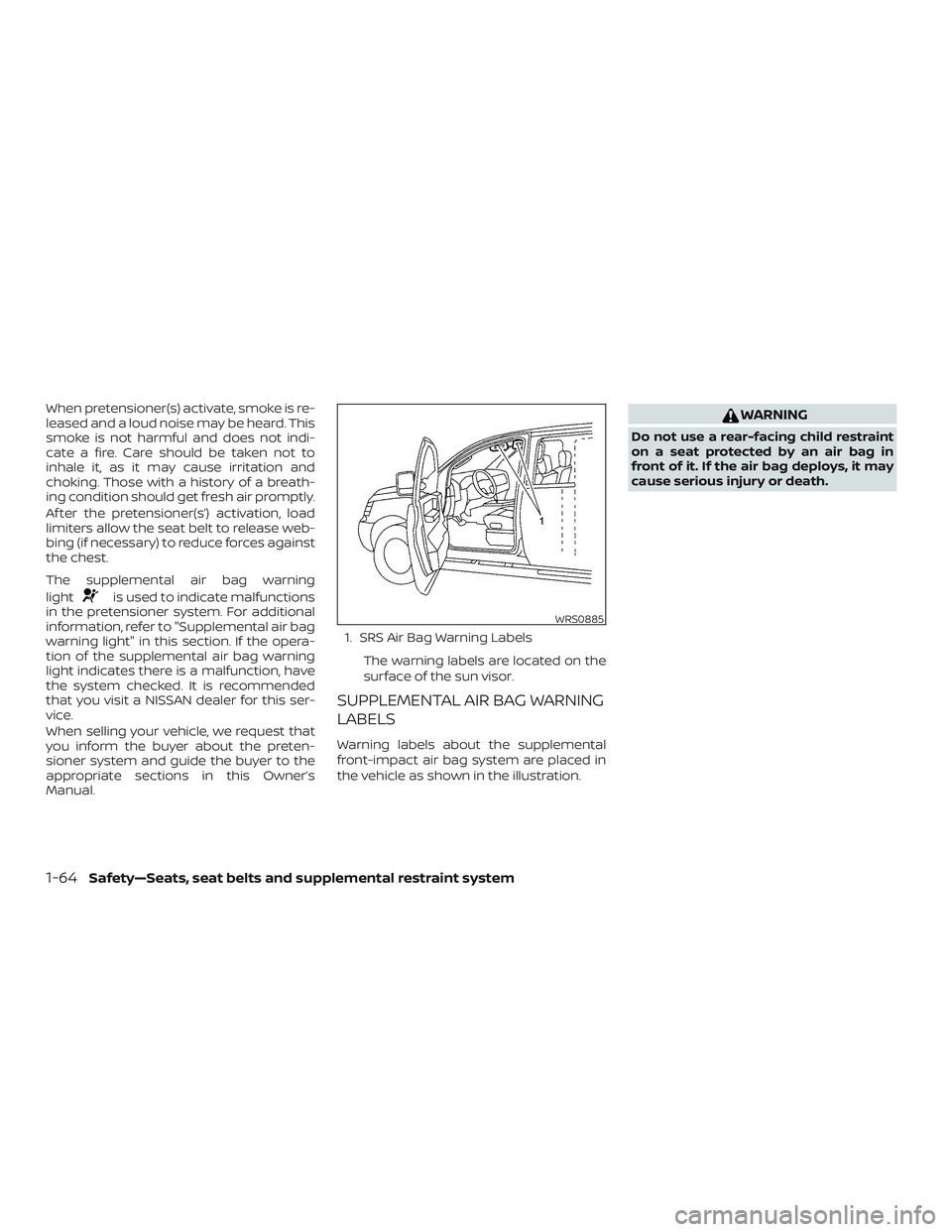
Manual. 1. SRS Air Bag Warning Labels
The warning labels are located on the
surface of the sun visor.
SUPPLEMENTAL AIR BAG WARNING
LABELS
Warning labels about the supplemental
front-impact air bag system are placed in
the vehicle as shown in the illustration.
WARNING
Do not use a rear-facing child restraint
on a seat protected by an air bag in
front of it. If the air bag deploys, it may
cause serious injury or death.
WRS0885
1-64Safety—Seats, seat belts and supplemental restraint system
Page 85 of 564
SUPPLEMENTAL AIR BAG WARNING
LIGHT
The supplemental air bag warning light,
displaying
in the instrument panel,
monitors the circuits for the air bag sys-
tems, pretensioner(s) and all related wiring.
When the ignition switch is placed in the ON
position, the supplemental air bag warning
light illuminates for about 7 seconds and
then turns off. This means the system is
operational. If any of the following conditions occur, the
front air bag, side air bag, curtain air bag
and pretensioner systems need servicing:
∙ The supplemental air bag warning light remains on af ter approximately 7 sec-
onds.
∙ The supplemental air bag warning light flashes intermittently.
∙ The supplemental air bag warning light does not come on at all.
Under these conditions, the front air bag,
side air bag, curtain air bag or pretensioner
systems may not operate properly. They
must be checked and repaired. It is recom-
mended that you visit a NISSAN dealer for
this service.WARNING
If the supplemental air bag warning
light is on, it could mean that the front
air bag, side air bag, curtain air bag
and/or pretensioner systems will not
operate in an accident. To help avoid
injury to yourself or others, have your
vehicle checked as soon as possible. It is
recommended that you visit a NISSAN
dealer for this service.
Repair and replacement
procedure
The front air bags, side air bags, curtain air
bags and pretensioner(s) are designed to
inflate on a one-time-only basis. As a re-
minder, unless it is damaged, the supple-
mental air bag warning light remains illu-
minated af ter inflation has occurred. These
systems should be repaired and/or re-
placed as soon as possible. It is recom-
mended that you visit a NISSAN dealer for
this service.
When maintenance work is required on the
vehicle, the front air bags, side air bags,
curtain air bags, pretensioner(s) and re-
lated parts should be pointed out to the
person performing the maintenance. The
ignition switch should always be placed in
the LOCK position when working under the
hood or inside the vehicle.
LRS0100
Safety—Seats, seat belts and supplemental restraint system1-65
Page 88 of 564
2 Instruments and controls
Instrument panel................................2-2
Meters and gauges ..............................2-4
Speedometer and odometer .................2-4
Tachometer ..................................2-6
Engine coolant temperature gauge ..........2-6
Fuel gauge ................................... 2-7
Distance To Empty (DTE) ...................... 2-7
Compass (if so equipped) .......................2-8
Compass display .............................2-8
Warning lights, indicator lights and audible
reminders ....................................... 2-11
Checking lights .............................. 2-12
Warning lights ............................... 2-12
Indicator lights .............................. 2-18
Audible reminders ........................... 2-21
Vehicle information display .....................2-22
How to use the vehicle information
display ...................................... 2-22
Startup display .............................. 2-22
Resetting the drive computer ................2-23
Settings ..................................... 2-23
Vehicle information display warnings
and indicators ............................... 2-34Security systems
............................... 2-42
Vehicle security system .....................2-42
NISSAN Vehicle Immobilizer System .........2-44
Wiper and washer switch .......................2-45
Switch operation ............................ 2-45
Rear switch operation .......................2-46
Rear window and outside mirror
(if so equipped) defroster switch ................2-47
Headlight and turn signal switch ...............2-48
Headlight control switch .....................2-48
LED Daytime Running Lights (DRL)
system ...................................... 2-52
Instrument brightness control ...............2-53
Turn signal switch ........................... 2-53
Fog light switch (if so equipped) .............2-54
Horn ........................................... 2-55
Heated seat switches (if so equipped) ..........2-55
Heated steering wheel switch (if so equipped) . . 2-56
Dynamic driver assistance switch
(f
or vehicles without ProPILOT Assist)
(if so equipped) ................................. 2-57
Steering Assist switch (for vehicles with
ProPILOT Assist) (if so equipped) ................2-57
Page 89 of 564
Vehicle Dynamic Control (VDC) OFF switch......2-58
All-Wheel Drive (AWD) LOCK switch
(if so equipped) ................................. 2-58
Rear Door Alert ................................. 2-59
E-call (SOS) button (if so equipped) .............2-60
Power outlets .................................. 2-60
12v outlets ................................... 2-60
Extended storage switch .......................2-62
Storage ........................................ 2-63
Front-door pockets .......................... 2-63
Seatback pockets ........................... 2-63
Glovebox.................................... 2-64
Console box ................................. 2-64
Overhead sunglasses storage ...............2-65
Cup holders ................................. 2-65
Divide-N-Hide® adjustable floor ..............2-67
Luggage hooks (if so equipped) .............2-68
Cargo cover (if so equipped) .................2-68
Roof rack (if so equipped) ....................2-70
Windows ....................................... 2-71Power windows
............................. 2-71
Power moonroof (if so equipped) ...............2-73
Interior lights ................................... 2-75
Console light ................................ 2-76
Map lights ................................... 2-76
Personal lights (if so equipped) ..............2-77
Room light (if so equipped) ..................2-77
Luggage compartment light ................2-78
HomeLink® Universal Transceiver
(if so equipped) ................................. 2-78
Programming HomeLink® ...................2-79
Programming HomeLink® for Canadian
customers and gate openers ................2-81
Operating the HomeLink® Universal
Transceiver .................................. 2-81
Programming trouble-diagnosis ............2-81
Clearing the programmed information ......2-82
Reprogramming a single HomeLink®
b
utton....................................... 2-82
If your vehicle is stolen .......................2-82
Page 90 of 564
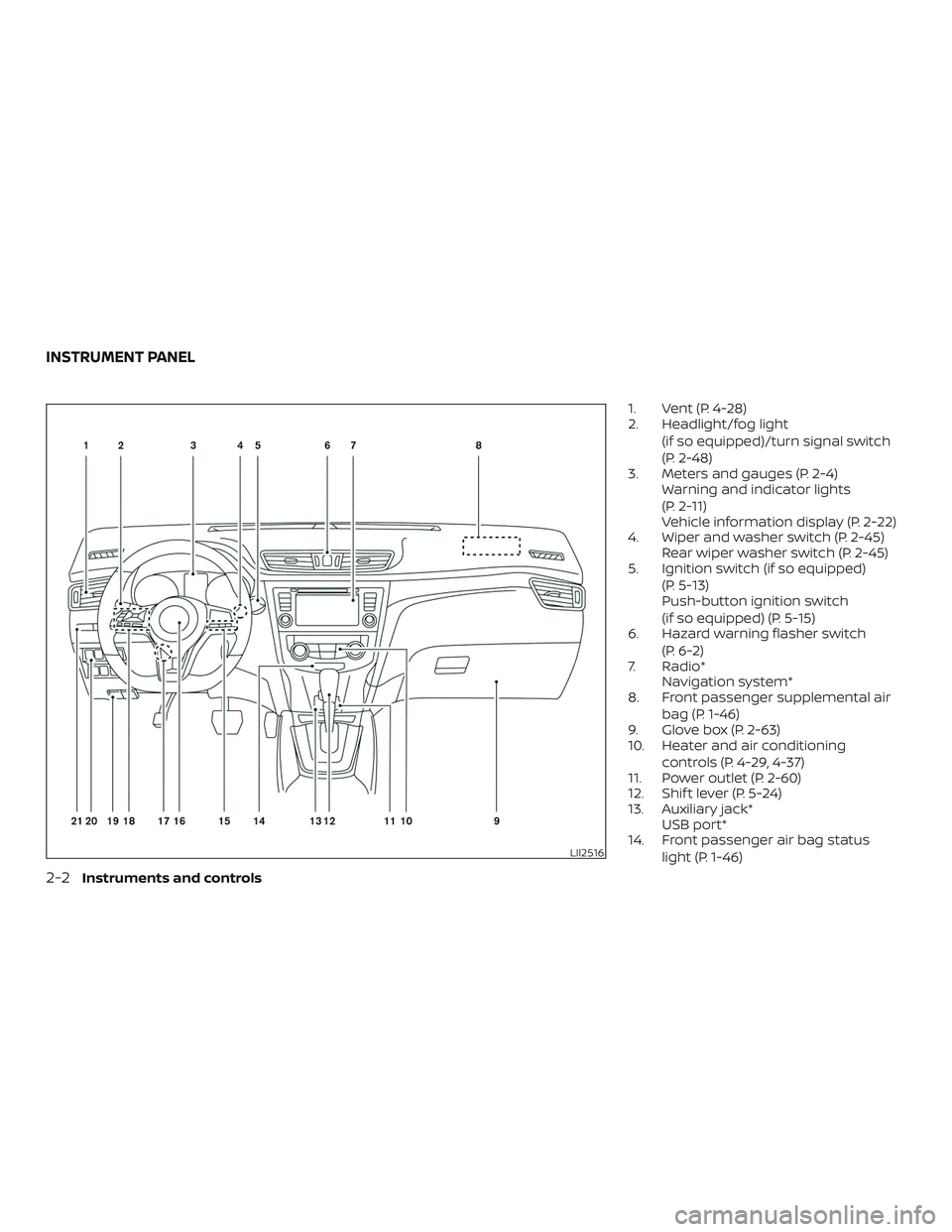
1. Vent (P. 4-28)
2. Headlight/fog light(if so equipped)/turn signal switch
(P. 2-48)
3. Meters and gauges (P. 2-4) Warning and indicator lights
(P. 2-11)
Vehicle information display (P. 2-22)
4. Wiper and washer switch (P. 2-45) Rear wiper washer switch (P. 2-45)
5. Ignition switch (if so equipped)
(P. 5-13)
Push-button ignition switch
(if so equipped) (P. 5-15)
6. Hazard warning flasher switch
(P. 6-2)
7. Radio* Navigation system*
8. Front passenger supplemental air
bag (P. 1-46)
9. Glove box (P. 2-63)
10. Heater and air conditioning
controls (P. 4-29, 4-37)
11. Power outlet (P. 2-60)
12. Shif t lever (P. 5-24)
13. Auxiliary jack* USB port*
14. Front passenger air bag status
light (P. 1-46)
LII2516
INSTRUMENT PANEL
2-2Instruments and controls
Page 92 of 564
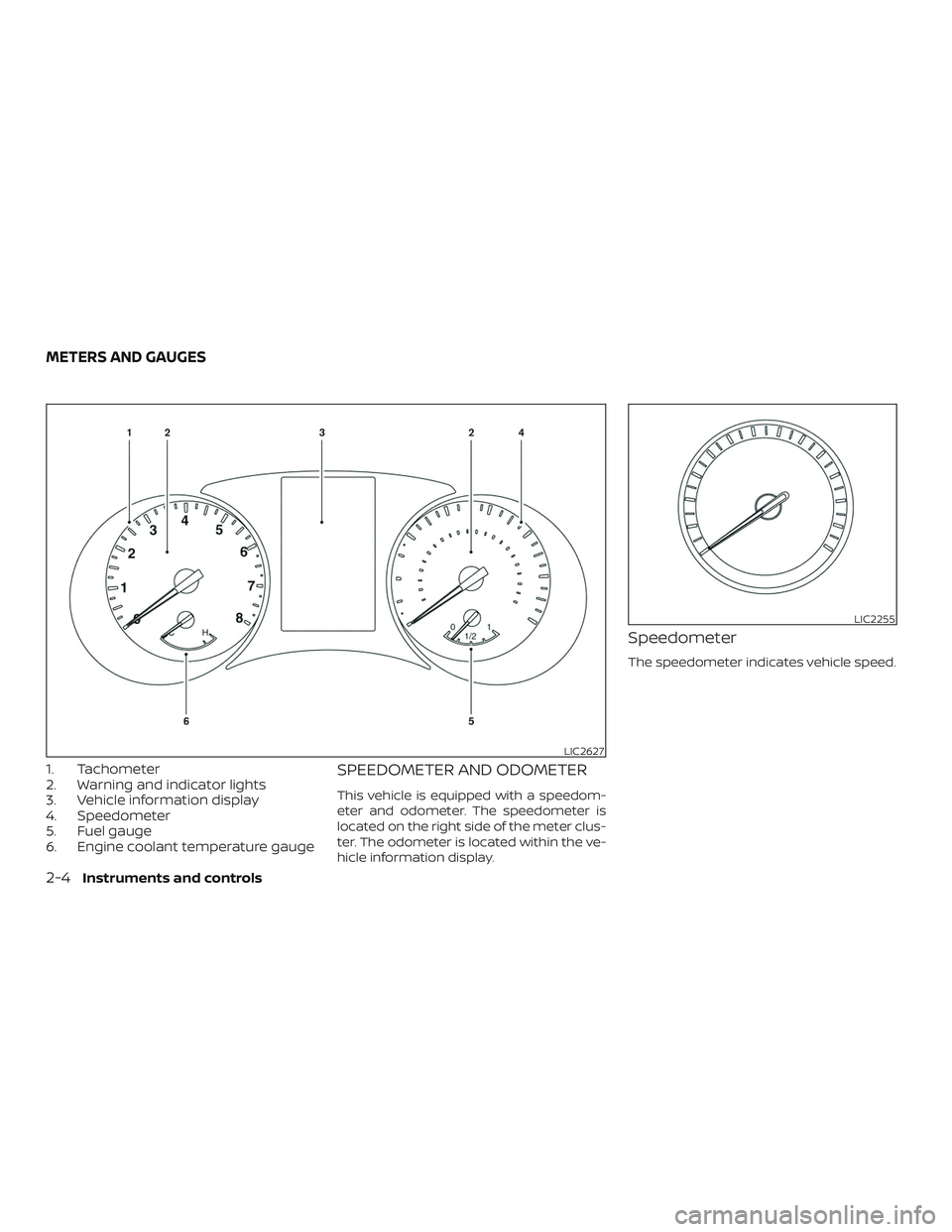
1. Tachometer
2. Warning and indicator lights
3. Vehicle information display
4. Speedometer
5. Fuel gauge
6. Engine coolant temperature gaugeSPEEDOMETER AND ODOMETER
This vehicle is equipped with a speedom-
eter and odometer. The speedometer is
located on the right side of the meter clus-
ter. The odometer is located within the ve-
hicle information display.
Speedometer
The speedometer indicates vehicle speed.
LIC2627
LIC2255
METERS AND GAUGES
2-4Instruments and controls
Page 95 of 564
FUEL GAUGE
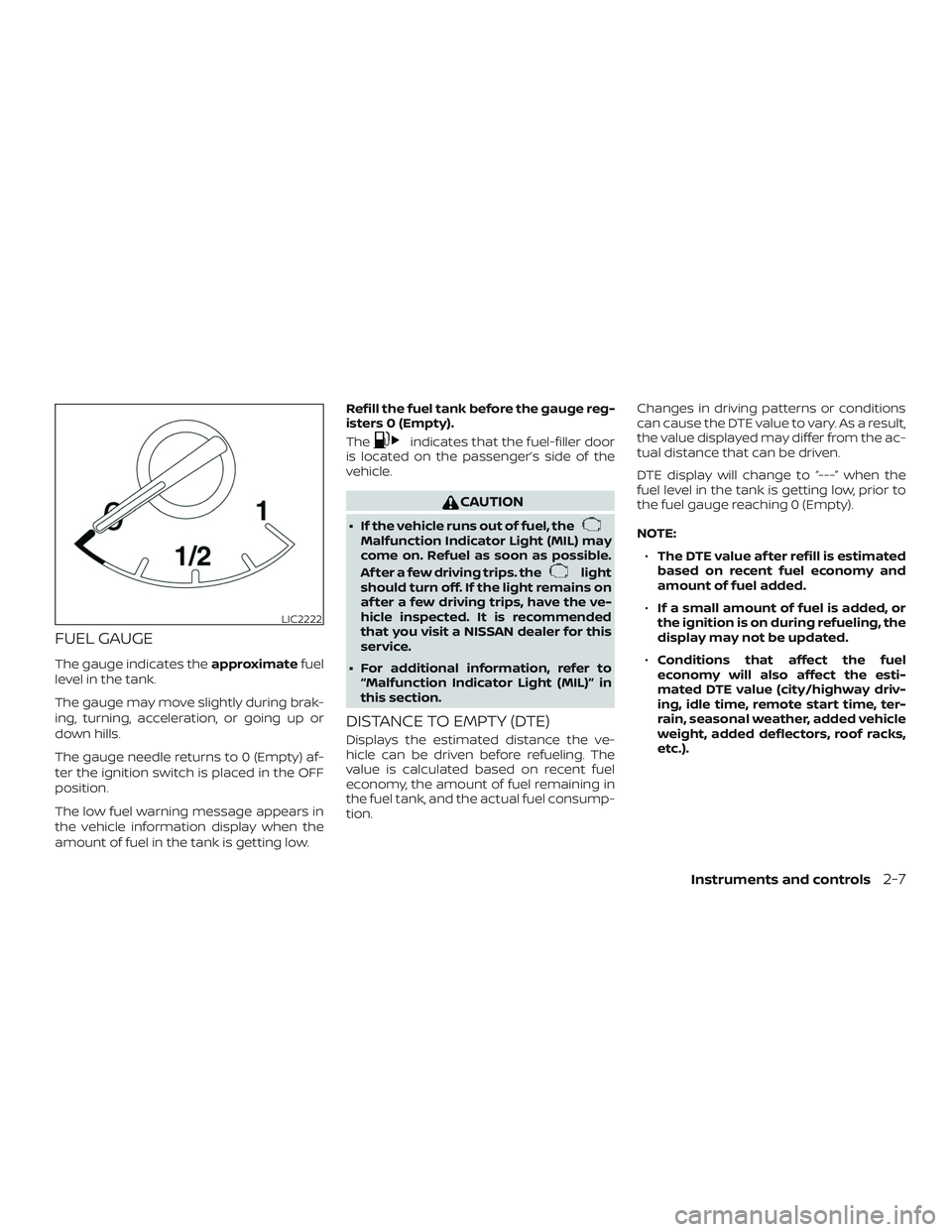
The gauge indicates theapproximatefuel
level in the tank.
The gauge may move slightly during brak-
ing, turning, acceleration, or going up or
down hills.
The gauge needle returns to 0 (Empty) af-
ter the ignition switch is placed in the OFF
position.
The low fuel warning message appears in
the vehicle information display when the
amount of fuel in the tank is getting low. Refill the fuel tank before the gauge reg-
isters 0 (Empty).
The
indicates that the fuel-filler door
is located on the passenger’s side of the
vehicle.
CAUTION
∙ If the vehicle runs out of fuel, theMalfunction Indicator Light (MIL) may
come on. Refuel as soon as possible.
Af ter a few driving trips. the
light
should turn off. If the light remains on
af ter a few driving trips, have the ve-
hicle inspected. It is recommended
that you visit a NISSAN dealer for this
service.
∙ For additional information, refer to “Malfunction Indicator Light (MIL)” in
this section.
DISTANCE TO EMPTY (DTE)
Displays the estimated distance the ve-
hicle can be driven before refueling. The
value is calculated based on recent fuel
economy, the amount of fuel remaining in
the fuel tank, and the actual fuel consump-
tion. Changes in driving patterns or conditions
can cause the DTE value to vary. As a result,
the value displayed may differ from the ac-
tual distance that can be driven.
DTE display will change to “---” when the
fuel level in the tank is getting low, prior to
the fuel gauge reaching 0 (Empty).
NOTE:
∙ The DTE value af ter refill is estimated
based on recent fuel economy and
amount of fuel added.
∙ If a small amount of fuel is added, or
the ignition is on during refueling, the
display may not be updated.
∙ Conditions that affect the fuel
economy will also affect the esti-
mated DTE value (city/highway driv-
ing, idle time, remote start time, ter-
rain, seasonal weather, added vehicle
weight, added deflectors, roof racks,
etc.).
LIC2222
Instruments and controls2-7