steering wheel NISSAN ROGUE 2019 Owner´s Manual
[x] Cancel search | Manufacturer: NISSAN, Model Year: 2019, Model line: ROGUE, Model: NISSAN ROGUE 2019Pages: 564, PDF Size: 6.97 MB
Page 419 of 564
The VDC OFF switch is used to turn off the
VDC system. The
indicator light and
the AEB system warning light or the AEB
with Pedestrian Detection system warning
light illuminates to indicate the VDC system
is off.
When the VDC OFF switch is used to turn off
the system, the VDC system still operates
to prevent one drive wheel from slipping by
transferring power to a non-slipping drive
wheel. The
indicator light flashes if
this occurs. All other VDC functions are off
and the
indicator light will not flash.
The VDC system is automatically reset to
on when the ignition switch is placed in the
OFF position then back to the ON position.
The computer has a built-in diagnostic fea-
ture that tests the system each time you
start the engine and move the vehicle for-
ward or in reverse at a slow speed. When
the self-test occurs, you may hear a clunk
noise and/or feel a pulsation in the brake
pedal. This is normal and is not an indica-
tion of a malfunction.
WARNING
∙ The VDC system is designed to help the driver maintain stability but does
not prevent accidents due to abrupt
steering operation at high speeds or
by careless or dangerous driving
techniques. Reduce vehicle speed and
be especially careful when driving and
cornering on slippery surfaces and al-
ways drive carefully.
∙ Do not modif y the vehicle’s suspen- sion. If suspension parts such as
shock absorbers, struts, springs, sta-
bilizer bars, bushings and wheels are
not NISSAN recommended for your
vehicle or are extremely deteriorated,
the VDC system may not operate
properly. This could adversely affect
vehicle handling performance, and
the
indicator light may flash or
both the
andindicator
lights may illuminate. ∙ If brake related parts such as brake
pads, rotors and calipers are not
NISSAN recommended or are ex-
tremely deteriorated, the VDC system
may not operate properly and both
the
and theindicator lights
may illuminate.
∙ If engine control related parts are not NISSAN recommended or are ex-
tremely deteriorated, both the
andindicator lights may
illuminate.
∙ When driving on extremely inclined surfaces such as higher banked cor-
ners, the VDC system may not operate
properly and the
indicator light
may flash or both the
andindicator lights may illuminate. Do not
drive on these types of roads.
∙ When driving on an unstable surface such as a turntable, ferry, elevator or
ramp, the
indicator light may
flash or both the
andindi-
cator lights may illuminate. This is not
a malfunction. Restart the engine af-
ter driving onto a stable surface.
Starting and driving5-157
Page 420 of 564
∙ If wheels or tires other than theNISSAN recommended ones are used,
the VDC system may not operate
properly and the
indicator light
may flash or both the
andindicator lights may illuminate.
∙ The VDC system is not a substitute for winter tires or tire chains on a snow
covered road.
BRAKE FORCE DISTRIBUTION
During braking while driving through turns,
the system optimizes the distribution of
force to each of the four wheels depending
on the radius of the turn.
WARNING
∙ The VDC system is designed to helpthe driver maintain stability but does
not prevent accidents due to abrupt
steering operation at high speeds or
by careless or dangerous driving
techniques. Reduce vehicle speed and
be especially careful when driving and
cornering on slippery surfaces and al-
ways drive carefully. ∙ Do not modif y the vehicle’s suspen-
sion. If suspension parts such as
shock absorbers, struts, springs, sta-
bilizer bars, bushings and wheels are
not NISSAN recommended for your
vehicle or are extremely deteriorated,
the VDC system may not operate
properly. This could adversely affect
vehicle handling performance, and
the
indicator light may flash or
both the
andindicator
lights may illuminate.
∙ If brake related parts such as brake pads, rotors and calipers are not
NISSAN recommended or are ex-
tremely deteriorated, the VDC system
may not operate properly and both
the
and theindicator lights
may illuminate.
∙ If engine control related parts are not NISSAN recommended or are ex-
tremely deteriorated, both the
andindicator lights may
illuminate. ∙ When driving on extremely inclined
surfaces such as higher banked cor-
ners, the VDC system may not operate
properly and the
indicator light
may flash or both the
andindicator lights may illuminate. Do not
drive on these types of roads.
∙ When driving on an unstable surface such as a turntable, ferry, elevator or
ramp, the
indicator light may
flash or both the
andindi-
cator lights may illuminate. This is not
a malfunction. Restart the engine af-
ter driving onto a stable surface.
∙ If wheels or tires other than the NISSAN recommended ones are used,
the VDC system may not operate
properly and the
indicator light
may flash or both the
andindicator lights may illuminate.
∙ The VDC system is not a substitute for winter tires or tire chains on a snow
covered road.
5-158Starting and driving
Page 421 of 564
The chassis control is an electric control
module that includes the following func-
tions:∙ Intelligent Trace Control
∙ Intelligent Engine Brake
∙ Active Ride Control
INTELLIGENT TRACE CONTROL
(I-TC)
This system senses driving based on the
driver’s steering and acceleration/braking
patterns, and controls brake pressure at
individual wheels to aid tracing at corners
and help smooth vehicle response.
The I-TC can be set to on (enabled) or off
(disabled) through the vehicle information
display “Settings” page. For additional infor-
mation, refer to “Vehicle information dis-
play” in the “Instruments and controls” sec-
tion of this manual.
When the Vehicle Dynamic Control (VDC)
OFF switch is used to turn off the VDC sys-
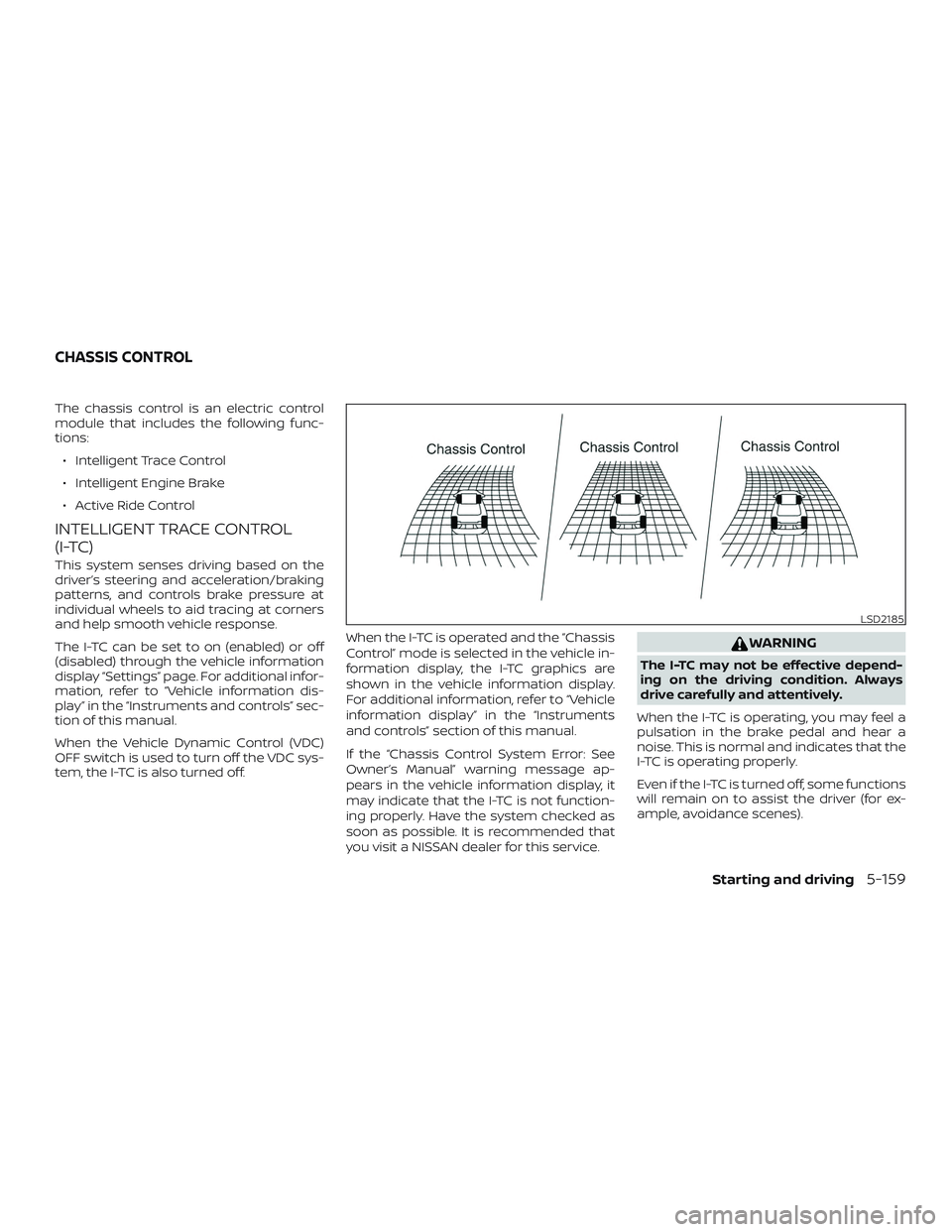
tem, the I-TC is also turned off. When the I-TC is operated and the “Chassis
Control” mode is selected in the vehicle in-
formation display, the I-TC graphics are
shown in the vehicle information display.
For additional information, refer to “Vehicle
information display” in the “Instruments
and controls” section of this manual.
If the “Chassis Control System Error: See
Owner’s Manual” warning message ap-
pears in the vehicle information display, it
may indicate that the I-TC is not function-
ing properly. Have the system checked as
soon as possible. It is recommended that
you visit a NISSAN dealer for this service.
WARNING
The I-TC may not be effective depend-
ing on the driving condition. Always
drive carefully and attentively.
When the I-TC is operating, you may feel a
pulsation in the brake pedal and hear a
noise. This is normal and indicates that the
I-TC is operating properly.
Even if the I-TC is turned off, some functions
will remain on to assist the driver (for ex-
ample, avoidance scenes).
LSD2185
CHASSIS CONTROL
Starting and driving5-159
Page 431 of 564
DRIVING ON SNOW OR ICE
WARNING
∙ Wet ice (32°F, 0°C and freezing rain),very cold snow or ice can be slick and
very hard to drive on. The vehicle will
have much less traction or “grip” un-
der these conditions. Try to avoid driv-
ing on wet ice until the road is salted
or sanded.
∙ Whatever the condition, drive with caution. Accelerate and slow down
with care. If accelerating or down-
shif ting too fast, the drive wheels will
lose even more traction.
∙ Allow more stopping distance under these conditions. Braking should be
started sooner than on dry pavement.
∙ Allow greater following distances on slippery roads.
∙ Watch for slippery spots (glare ice). These may appear on an otherwise
clear road in shaded areas. If a patch
of ice is seen ahead, brake before
reaching it. Try not to brake while on
the ice, and avoid any sudden steering
maneuvers. ∙ Do not use the cruise control (if so
equipped) on slippery roads.
∙ Snow can trap dangerous exhaust gases under your vehicle. Keep snow
clear of the exhaust pipe and from
around your vehicle.
PARKING BRAKE
CAUTION
When parking in an area where the out-
side temperature is below 32°F (0°C), the
parking brake, if applied, may freeze in
place and may be difficult to release.
For safe parking, it is recommended
that you place the shif t lever in the P
(Park) position and securely block the
wheels.
For models equipped with
electronic parking brake system
CAUTION
To keep the electronic parking brake re-
leased af ter the engine is turned off, re-
fer to “Parking brake” in this section.
Starting and driving5-169
Page 435 of 564
TIRE PRESSURE MONITORING
SYSTEM (TPMS)
This vehicle is equipped with the TPMS. It
monitors tire pressure of all tires except the
spare. When the low tire pressure warning
light is lit and the “Tire Pressure Low — Add
Air” warning appears in the vehicle infor-
mation display, one or more of your tires is
significantly under-inflated. If the vehicle is
being driven with low tire pressure, the
TPMS will activate and warn you of it by the
low tire pressure warning light. This system
will activate only when the vehicle is driven
at speeds above 16 mph (25 km/h). For ad-
ditional information, refer to “Warning
lights, indicator lights and audible remind-
ers” in the “Instruments and controls” sec-
tion, and “Tire Pressure Monitoring System
(TPMS)” in the “Starting and driving” section
of this manual.
WARNING
∙ Radio waves could adversely affectelectric medical equipment. Those
who use a pacemaker should contact
the electric medical equipment
manufacturer for the possible influ-
ences before use. ∙ If the low tire pressure warning light
illuminates while driving, avoid sud-
den steering maneuvers or abrupt
braking, reduce vehicle speed, pull off
the road to a safe location and stop
the vehicle as soon as possible. Driv-
ing with underinflated tires may per-
manently damage the tires and in-
crease the likelihood of tire failure.
Serious vehicle damage could occur
and may lead to an accident and could
result in serious personal injury.
Check the tire pressure for all four
tires. Adjust the tire pressure to the
recommended COLD tire pressure
shown on the Tire and Loading Infor-
mation label to turn the low tire pres-
sure warning light OFF. If the light still
illuminates while driving af ter adjust-
ing the tire pressure, a tire may be flat
or the TPMS may be malfunctioning. If
you have a flat tire, replace it with a
spare tire as soon as possible. If no tire
is flat and all tires are properly in-
flated, have the vehicle checked. It is
recommended that you visit a NISSAN
dealer for this service. ∙ When replacing a wheel without the
TPMS such as the spare tire, the TPMS
will not function and the low tire pres-
sure warning light will flash for ap-
proximately 1 minute. The light will re-
main on af ter 1 minute. Have your
tires replaced and/or TPMS system
reset as soon as possible. It is recom-
mended that you visit a NISSAN dealer
for these services.
∙ Replacing tires with those not origi- nally specified by NISSAN could affect
the proper operation of the TPMS.
∙ Do not inject any tire liquid or aerosol tire sealant into the tires, as this may
cause a malfunction of the tire pres-
sure sensors.
∙ If the light still comes on while driving af ter adjusting the tire pressure, a tire
may be flat or the TPMS may be mal-
functioning. If you have a flat tire, re-
place it with a spare tire as soon as
possible. If no tire is flat and all tires
are properly inflated, it is recom-
mended that you visit a NISSAN dealer
for this service.
FLAT TIRE
In case of emergency6-3
Page 446 of 564
6. Af ter the engine cools down, check thecoolant level in the engine coolant res-
ervoir tank with the engine running.
Add coolant to the engine coolant res-
ervoir tank if necessary. Have your ve-
hicle repaired. It is recommended that
you visit a NISSAN dealer for this ser-
vice. When towing your vehicle, all jurisdictional
and local regulations for towing must be
followed. Incorrect towing equipment
could damage your vehicle. Towing in-
structions are available from a NISSAN
dealer. Local service operators are gener-
ally familiar with the applicable laws and
procedures for towing. To assure proper
towing and to prevent accidental damage
to your vehicle, NISSAN recommends hav-
ing a service operator tow your vehicle. It is
advisable to have the service operator
carefully read the following precautions:
WARNING
∙ Never ride in a vehicle that is being
towed.
∙ Never get under your vehicle af ter it has been lif ted by a tow truck.
CAUTION
∙ When towing, make sure that thetransmission, axles, steering system
and powertrain are in working condi-
tion. If any of these conditions apply,
dollies or a flatbed tow truck must be
used.
∙ Always attach safety chains before towing. For additional information, refer to “Flat
towing for All-Wheel drive vehicle” or “Flat
towing for front wheel drive vehicle” in the
“Technical and consumer information” sec-
tion of this manual.
TOWING RECOMMENDED BY
NISSAN
NISSAN recommends towing your vehicle
based upon the type of drivetrain. For addi-
tional information, refer to the diagrams in
this section to ensure that your vehicle is
properly towed.
TOWING YOUR VEHICLE
6-14In case of emergency
Page 448 of 564
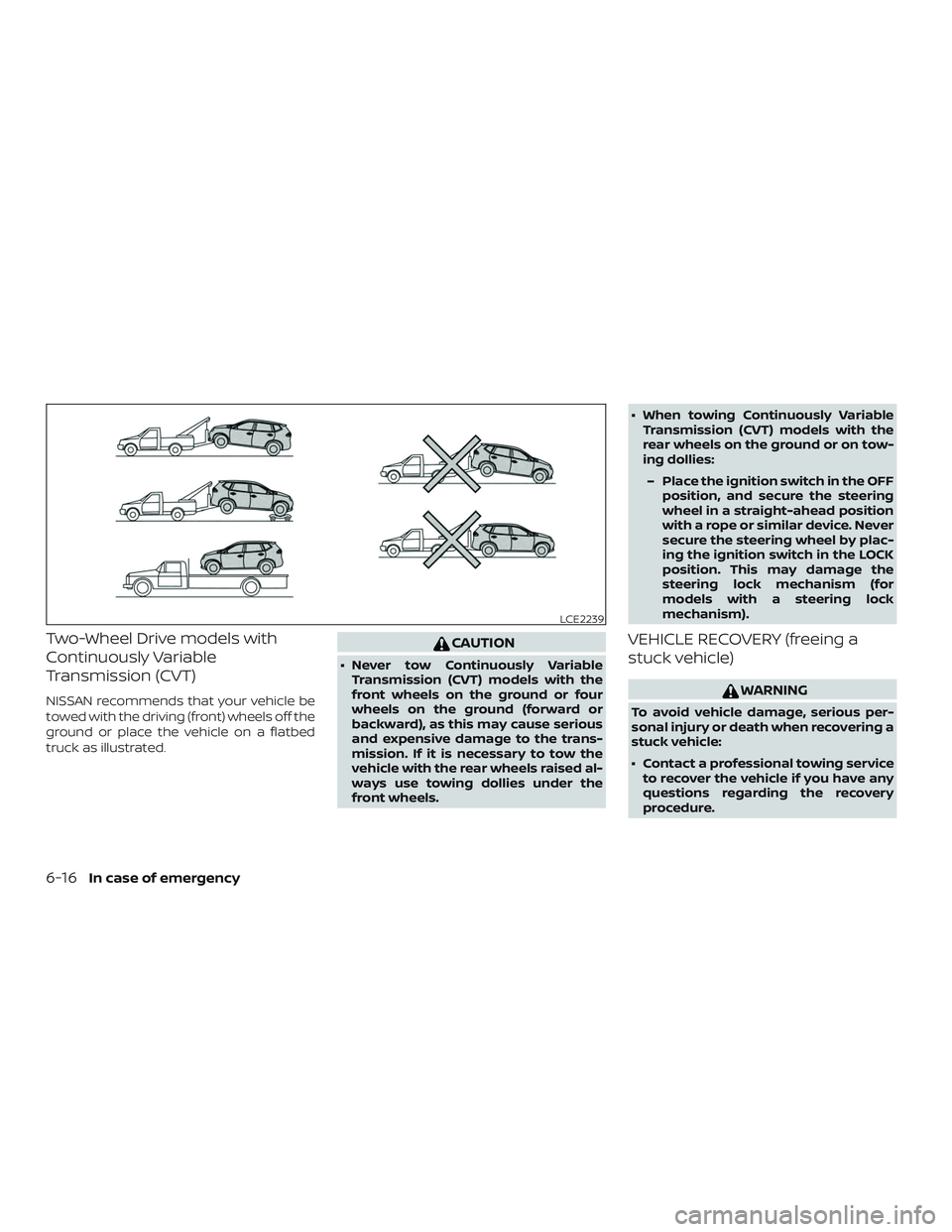
Two-Wheel Drive models with
Continuously Variable
Transmission (CVT)
NISSAN recommends that your vehicle be
towed with the driving (front) wheels off the
ground or place the vehicle on a flatbed
truck as illustrated.
CAUTION
∙ Never tow Continuously VariableTransmission (CVT) models with the
front wheels on the ground or four
wheels on the ground (forward or
backward), as this may cause serious
and expensive damage to the trans-
mission. If it is necessary to tow the
vehicle with the rear wheels raised al-
ways use towing dollies under the
front wheels. ∙ When towing Continuously Variable
Transmission (CVT) models with the
rear wheels on the ground or on tow-
ing dollies:
– Place the ignition switch in the OFF position, and secure the steering
wheel in a straight-ahead position
with a rope or similar device. Never
secure the steering wheel by plac-
ing the ignition switch in the LOCK
position. This may damage the
steering lock mechanism (for
models with a steering lock
mechanism).
VEHICLE RECOVERY (freeing a
stuck vehicle)
WARNING
To avoid vehicle damage, serious per-
sonal injury or death when recovering a
stuck vehicle:
∙ Contact a professional towing serviceto recover the vehicle if you have any
questions regarding the recovery
procedure.
LCE2239
6-16In case of emergency
Page 449 of 564
∙ Tow chains or cables must be at-tached only to main structural mem-
bers of the vehicle.
∙ Do not use the vehicle tie-downs to tow or free a stuck vehicle.
∙ Only use devices specifically designed for vehicle recovery and follow the
manufacturer’s instructions.
∙ Always pull the recovery device straight out from the front of the ve-
hicle. Never pull at an angle.
∙ Route recovery devices so they do not touch any part of the vehicle except
the attachment point.
If your vehicle is stuck in sand, snow, mud,
etc., use a tow strap or other device de-
signed specifically for vehicle recovery. Al-
ways follow the manufacturer’s instruc-
tions for the recovery device.Rocking a stuck vehicle
WARNING
∙ Stand clear of a stuck vehicle.
∙ Do not spin your tires at high speed. This could cause them to explode and
result in serious injury. Parts of your
vehicle could also overheat and be
damaged.
If your vehicle is stuck in sand, snow, mud,
etc., use the following procedure: 1. Turn off the Vehicle Dynamic Control (VDC) system.
2. Make sure the area in front and behind the vehicle is clear of obstructions.
3. Turn the steering wheel right and lef t to clear an area around the front tires.
4. Slowly rock the vehicle forward and backward.
∙ Shif t back and forth between R (Re- verse) and D (Drive). ∙ Apply the accelerator as little as pos-
sible to maintain the rocking motion.
∙ Release the accelerator pedal before shif ting between R (Reverse) and D
(Drive).
∙ Do not spin the tires above 35 mph (55 km/h).
5. If the vehicle cannot be freed af ter a few tries, contact a professional towing
service to remove the vehicle.
In case of emergency6-17
Page 506 of 564
Inside the vehicle
The maintenance items listed here should
be checked on a regular basis, such as
when performing scheduled maintenance,
cleaning the vehicle, etc.
Accelerator pedal:Check the pedal for
smooth operation and make sure the
pedal does not catch or require uneven
effort. Keep the floor mat away from the
pedal.
Brake pedal: Check the pedal for smooth
operation. If the brake pedal suddenly goes
down further than normal, the pedal feels
spongy or the vehicle seems to take longer
to stop, have your vehicle checked imme-
diately. It is recommended that you visit a
NISSAN dealer for this service. Keep the
floor mat away from the pedal.
Brakes: Check that the brakes do not pull
the vehicle to one side when applied.
Continuously Variable Transmission
(CVT) P (Park) position mechanism: On a
fairly steep hill check that the vehicle is held
securely with the shif t lever in the P (Park)
position without applying any brakes. Parking brake:
Check the parking brake
operation regularly. The vehicle should be
securely held on a fairly steep hill with only
the parking brake applied. If the parking
brake needs adjustment, it is recom-
mended that you visit a NISSAN dealer for
this service.
Seats: Check seat position controls such
as seat adjusters, seatback recliner, etc., to
ensure they operate smoothly and all
latches lock securely in every position.
Check that the head restraints/headrests
move up and down smoothly and the locks
(if so equipped) hold securely in all latched
positions.
Seat belts: Check that all parts of the seat
belt system (for example, buckles, anchors,
adjusters and retractors) operate properly
and smoothly, and are installed securely.
Check the belt webbing for cuts, fraying,
wear or damage.
Steering wheel: Check for changes in the
steering system, such as excessive free
play, hard steering or strange noises.
Warning lights and chimes: Make sure all
warning lights and chimes are operating
properly. Windshield defroster:
Check that the air
comes out of the defroster outlets properly
and in sufficient quantity when operating
the heater or air conditioner.
Windshield wiper and washer*: Check
that the wipers and washer operate prop-
erly and that the wipers do not streak.
Under the hood and vehicle
The maintenance items listed here should
be checked periodically (for example, each
time you check the engine oil or refuel).
Battery (except for maintenance free
batteries)*: Check the fluid level in each
cell. It should be between the UPPER LEVEL
and LOWER LEVEL lines. Vehicles operated
in high temperatures or under severe con-
ditions require frequent checks of the bat-
tery fluid level.
Battery (for maintenance free batter-
ies)*: This vehicle is equipped with a sealed
maintenance free battery. It is recom-
mended that you visit a NISSAN dealer for
service.
9-4Maintenance and schedules
Page 544 of 564
Trailer lights should comply with federal
and/or local regulations. For assistance in
hooking up trailer lights, contact a NISSAN
dealer or reputable trailer retailer. Vehicles
equipped with the optional trailer tow
package are equipped with a 7-pin trailer
harness connector. If your trailer is
equipped with a flat 4-pin connector, an
adapter will be needed to connect the
trailer lights to the vehicle. Adapters are
available at auto parts stores and hitch re-
tailers.
Pre-towing tips
∙ Be certain your vehicle maintains a levelposition when a loaded and/or un-
loaded trailer is hitched. Do not drive the
vehicle if it has an abnormal nose-up or
nose-down condition; check for im-
proper tongue load, overload, worn sus-
pension or other possible causes of ei-
ther condition.
∙ Always secure items in the trailer to pre- vent load shif t while driving.
∙ Keep the cargo load as low as possible in the trailer to keep the trailer center of
gravity low. ∙ Load the trailer so approximately 60%
of the trailer load is in the front half and
40% is in the back half. Also make sure
the load is balanced side to side.
∙ Check your hitch, trailer tire pressure, vehicle tire pressure, trailer light opera-
tion, and trailer wheel lug nuts every
time you attach a trailer to the vehicle.
∙ Be certain your rearview mirrors con- form to all federal, state or local regula-
tions. If not, install any mirrors required
for towing before driving the vehicle.
∙ Determine the overall height of the ve- hicle and trailer so the required clear-
ance is known.
Trailer towing tips
In order to gain skill and an understanding
of the vehicle’s behavior, you should prac-
tice turning, stopping and backing up in an
area which is free from traffic. Steering sta-
bility and braking performance will be
somewhat different than under normal
driving conditions.
∙ Always secure items in the trailer to pre- vent load shif t while driving. ∙ Lock the trailer hitch coupler with a pin
or lock to prevent the coupler from in-
advertently becoming unlatched.
∙ Avoid abrupt starts, acceleration or stops.
∙ Avoid sharp turns or lane changes.
∙ Always drive your vehicle at a moderate speed.
∙ When backing up, hold the bottom of the steering wheel with one hand. Move
your hand in the direction in which you
want the trailer to go. Make small cor-
rections and back up slowly. If possible,
have someone guide you when you are
backing up.
Always block the wheels on both vehicle
and trailer when parking. Parking on a
slope is not recommended; however, if you
must do so:
CAUTION
If you move the shif t lever to the P (Park)
position before blocking the wheels
and applying the parking brake, trans-
mission damage could occur.
10-24Technical and consumer information