steering NISSAN ROGUE 2021 Owner´s Manual
[x] Cancel search | Manufacturer: NISSAN, Model Year: 2021, Model line: ROGUE, Model: NISSAN ROGUE 2021Pages: 556, PDF Size: 2.7 MB
Page 396 of 556
5-142Starting and driving
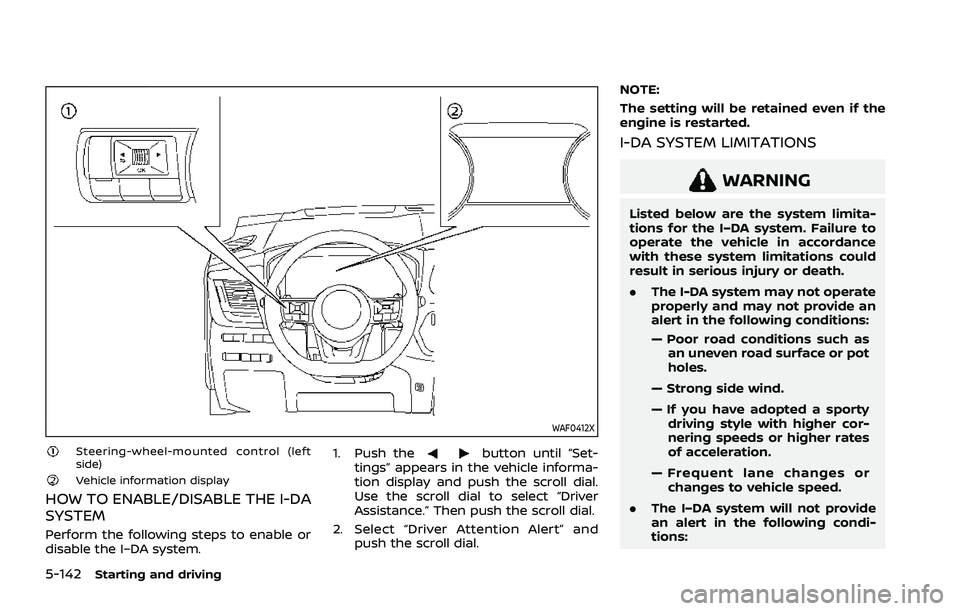
WAF0412X
Steering-wheel-mounted control (left
side)
Vehicle information display
HOW TO ENABLE/DISABLE THE I-DA
SYSTEM
Perform the following steps to enable or
disable the I–DA system.1. Push the
button until “Set-
tings” appears in the vehicle informa-
tion display and push the scroll dial.
Use the scroll dial to select “Driver
Assistance.” Then push the scroll dial.
2. Select “Driver Attention Alert” and push the scroll dial. NOTE:
The setting will be retained even if the
engine is restarted.
I-DA SYSTEM LIMITATIONS
WARNING
Listed below are the system limita-
tions for the I–DA system. Failure to
operate the vehicle in accordance
with these system limitations could
result in serious injury or death.
.
The I-DA system may not operate
properly and may not provide an
alert in the following conditions:
— Poor road conditions such as
an uneven road surface or pot
holes.
— Strong side wind.
— If you have adopted a sporty driving style with higher cor-
nering speeds or higher rates
of acceleration.
— Frequent lane changes or changes to vehicle speed.
. The I–DA system will not provide
an alert in the following condi-
tions:
Page 398 of 556
5-144Starting and driving
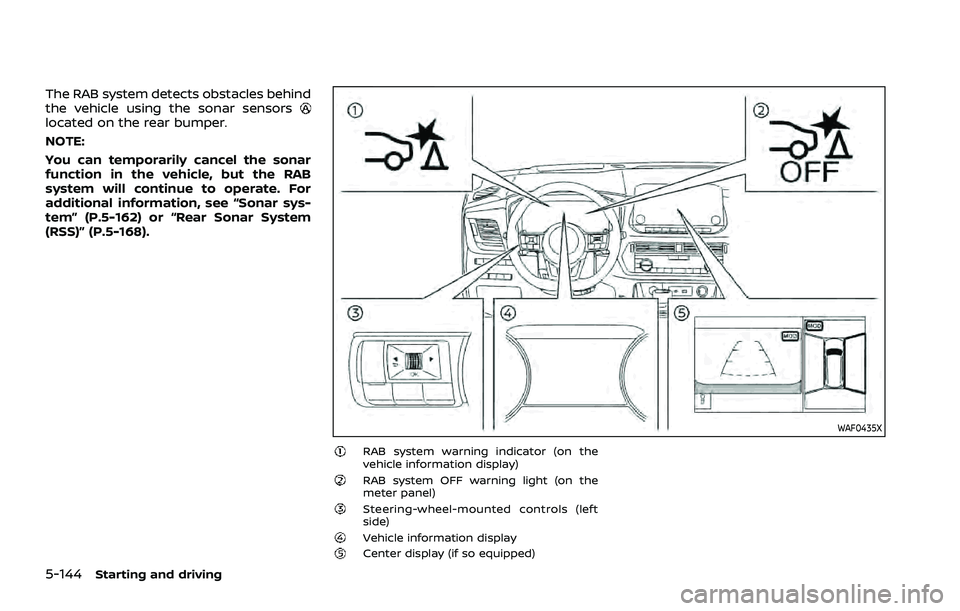
The RAB system detects obstacles behind
the vehicle using the sonar sensors
located on the rear bumper.
NOTE:
You can temporarily cancel the sonar
function in the vehicle, but the RAB
system will continue to operate. For
additional information, see “Sonar sys-
tem” (P.5-162) or “Rear Sonar System
(RSS)” (P.5-168).
WAF0435X
RAB system warning indicator (on the
vehicle information display)
RAB system OFF warning light (on the
meter panel)
Steering-wheel-mounted controls (left
side)
Vehicle information displayCenter display (if so equipped)
Page 399 of 556
RAB SYSTEM OPERATION
When the shift lever is in the R (Reverse)
position and the vehicle speed is less than
approximately 9 MPH (15 km/h), the RAB
system operates.
If a risk of a collision with an obstacle is
detected when your vehicle is backing up,
the RAB system warning indicator will
flash in the vehicle information display, a
red frame will appear in the center display
(models with the Intelligent Around View®
Monitor system), and the system will
chime three times. The system will then
automatically apply the brakes. After the
automatic brake application, the driver
must depress the brake pedal to maintain
brake pressure.
NOTE:
.The stop lights of the vehicle come
on when braking is performed by
the RAB system.
. When the brakes operate, a noise
may be heard. This is not a malfunc-
tion.
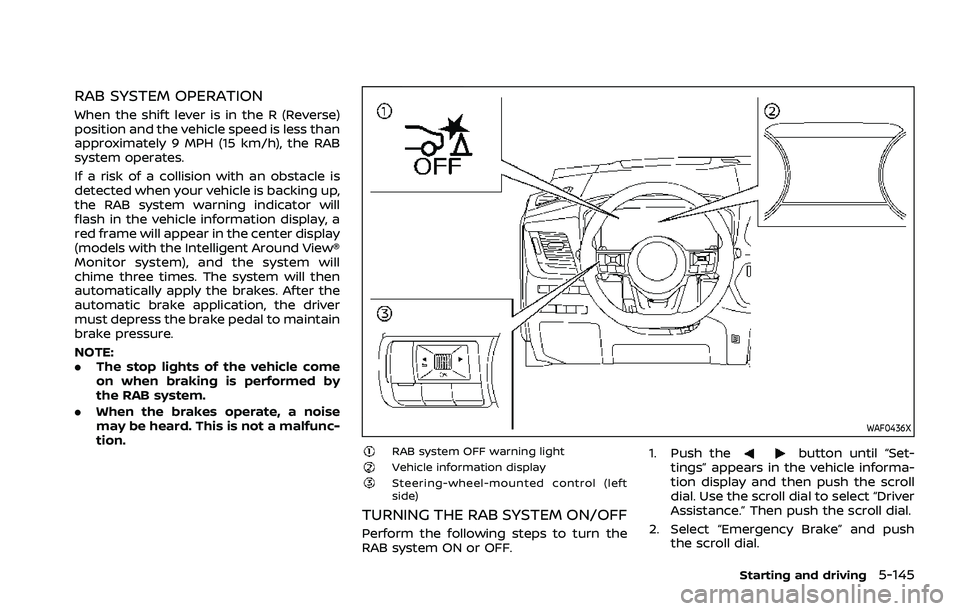
WAF0436X
RAB system OFF warning lightVehicle information displaySteering-wheel-mounted control (left
side)
TURNING THE RAB SYSTEM ON/OFF
Perform the following steps to turn the
RAB system ON or OFF. 1. Push the
button until “Set-
tings” appears in the vehicle informa-
tion display and then push the scroll
dial. Use the scroll dial to select “Driver
Assistance.” Then push the scroll dial.
2. Select “Emergency Brake” and push the scroll dial.
Starting and driving5-145
Page 401 of 556
narrow tunnel, a parking lot
gate) near the side of the
vehicle.
— There are bumps, protrusions, or manhole covers on the
road surface.
— The vehicle is driving through a draped flag or a curtain.
— The vehicle is driving on a steep hill.
— There is an accumulation of snow or ice behind the vehi-
cle.
— An ultrasonic wave source, such as another vehicle’s so-
nar, is near the vehicle.
. Once the automatic brake control
operates, it does not operate
again if the vehicle approaches
the same obstacle.
. The automatic brake control can
only operate for a short period of
time. Therefore, the driver must
depress the brake pedal.
. In the following situations, the
RAB system may not operate
properly or may not function
sufficiently: — The vehicle is driven in bad
weather (rain, fog, snow, etc.).
— The vehicle is driven on a steep hill.
— The vehicle’s posture is chan- ged (e.g., when driving over a
bump).
— The vehicle is driven on a slippery road.
— The vehicle is turned sharply by turning the steering wheel
fully.
— Snow chains are used.
— Wheels or tires other than NISSAN recommended are
used.
— The brakes are cold at low ambient temperatures or im-
mediately after driving has
started.
— The braking force becomes poor due to wet brakes after
driving through a puddle or
washing the vehicle.
. Turn the RAB system off in the
following conditions to prevent
the occurrence of an unexpected
accident resulting from sudden
system operation: — The vehicle is towed.
— The vehicle is carried on a
flatbed truck.
— The vehicle is on the chassis dynamometer.
— The vehicle drives on an un- even road surface.
— Suspension parts other than those designated as genuine
parts are used. (If the vehicle
height or the vehicle body
inclination is changed, the
system may not detect an
obstacle correctly.)
. Excessive noise (e.g., audio sys-
tem volume, an open vehicle win-
dow) will interfere with the chime
sound, and it may not be heard.
SYSTEM MALFUNCTION
If the RAB system malfunctions, it will be
turned off automatically, the RAB system
OFF warning light will illuminate, and the
“Malfunction See Owner’s Manual” warn-
ing message will appear in the vehicle
information display.
Starting and driving5-147
Page 408 of 556
5-154Starting and driving
4. Place the ignition switch in the OFFposition.
WARNING
.If the engine is not running or is
turned off while driving, the
power assist for the steering will
not work. Steering will be harder
to operate.
. When the electric power steering
warning light illuminates with the
engine running, the power assist
for the steering will cease opera-
tion. You will still have control of
the vehicle but the steering will
be harder to operate.
The electric power steering is designed to
provide power assist while driving to
operate the steering wheel with light
force.
When SPORT mode is selected, the steer-
ing wheel effort is moderately increased
for a sporty feel. (See “SPORT mode” (P.5-
33).)
When the steering wheel is operated
repeatedly or continuously while parking
or driving at a very low speed, the power
assist for the steering wheel will be
reduced. This is to prevent overheating
of the electric power steering and protect
it from getting damaged. While the power assist is reduced, steering wheel opera-
tion will become heavy. If the steering
wheel operation is still performed, the
electric power steering may stop and the
electric power steering warning light
will illuminate. In a safe location, stop the
engine and place the ignition switch in
the OFF position. When the temperature
of the electric power steering goes down,
the power assist level will return to
normal. Avoid repeating such steering
wheel operations that could cause the
electric power steering to overheat.
You may hear a noise when the steering
wheel is operated quickly. However, this is
not a malfunction.
If the electric power steering warning
light illuminates while the engine is run-
ning, it may indicate the electric power
steering is not functioning properly and
may need servicing. Have the electric
power steering checked. It is recom-
mended that you visit a NISSAN dealer
for this service. (See “Electric power steer-
ing warning light” (P.2-17).)
When the electric power steering warning
light illuminates with the engine running,
the power assist for the steering will
cease operation. You will still have control
of the vehicle. However, greater steering
effort is needed, especially in sharp turns
and at low speeds.
ELECTRIC POWER STEERING
Page 410 of 556
5-156Starting and driving
BRAKE ASSIST
When the force applied to the brake pedal
exceeds a certain level, the Brake Assist is
activated generating greater braking
force than a conventional brake booster
even with light pedal force.
WARNING
The Brake Assist is only an aid to
assist braking operation and is not a
collision warning or avoidance de-
vice. It is the driver’s responsibility to
stay alert, drive safely and be in
control of the vehicle at all times.
ANTI-LOCK BRAKING SYSTEM (ABS)
WARNING
.The Anti-lock Braking System
(ABS) is a sophisticated device,
but it cannot prevent accidents
resulting from careless or dan-
gerous driving techniques. It can
help maintain vehicle control dur-
ing braking on slippery surfaces.
Remember that stopping dis-
tances on slippery surfaces will
be longer than on normal sur- faces even with ABS. Stopping
distances may also be longer on
rough, gravel or snow covered
roads, or if you are using tire
chains. Always maintain a safe
distance from the vehicle in front
of you. Ultimately, the driver is
responsible for safety.
. Tire type and condition may also
affect braking effectiveness.
— When replacing tires, install
the specified size of tires on
all four wheels.
— When installing a spare tire, make sure that it is the proper
size and type as specified on
the Tire and Loading Informa-
tion label. See “Tire and Load-
ing Information label” (P.10-11)
of this manual.
— For detailed information, see “Wheels and tires” (P.8-25) of
this manual.
The Anti-lock Braking System (ABS) con-
trols the brakes so the wheels do not lock
during hard braking or when braking on
slippery surfaces. The system detects the
rotation speed at each wheel and varies
the brake fluid pressure to prevent each
wheel from locking and sliding. By pre- venting each wheel from locking, the
system helps the driver maintain steering
control and helps to minimize swerving
and spinning on slippery surfaces.
Using the system
Depress the brake pedal and hold it down.
Depress the brake pedal with firm steady
pressure, but do not pump the brakes.
The ABS will operate to prevent the
wheels from locking up. Steer the vehicle
to avoid obstacles.
WARNING
Do not pump the brake pedal. Doing
so may result in increased stopping
distances.
Self-test feature
The ABS includes electronic sensors, elec-
tric pumps, hydraulic solenoids and a
computer. The computer has a built-in
diagnostic feature that tests the system
each time you start the engine and move
the vehicle at a low speed in forward or
reverse. When the self-test occurs, you
may hear a “clunk” noise and/or feel a
pulsation in the brake pedal. This is
normal and does not indicate a malfunc-
tion. If the computer senses a malfunc-
BRAKE ASSIST
Page 411 of 556
tion, it switches the ABS off and illumi-
nates the ABS warning light on the
instrument panel. The brake system then
operates normally, but without anti-lock
assistance.
If the ABS warning light illuminates during
the self-test or while driving, have the
vehicle checked. It is recommended you
visit a NISSAN dealer for this service.
Normal operation
The ABS operates at speeds above 3 to 6
MPH (5 to 10 km/h). The speed varies
according to road conditions.
When the ABS senses that one or more
wheels are close to locking up, the
actuator rapidly applies and releases
hydraulic pressure. This action is similar
to pumping the brakes very quickly. You
may feel a pulsation in the brake pedal
and hear a noise from under the hood or
feel a vibration from the actuator when it
is operating. This is normal and indicates
that the ABS is operating properly. How-
ever, the pulsation may indicate that road
conditions are hazardous and extra care
is required while driving.The Vehicle Dynamic Control (VDC) sys-
tem uses various sensors to monitor
driver inputs and vehicle motion. Under
certain driving conditions, the VDC sys-
tem helps to perform the following func-
tions.
.
Controls brake pressure to reduce
wheel slip on one slipping drive wheel
so power is transferred to a non
slipping drive wheel on the same axle.
. Controls brake pressure and engine
output to reduce drive wheel slip
based on vehicle speed (traction con-
trol function).
. Controls brake pressure at individual
wheels and engine output to help the
driver maintain control of the vehicle
in the following conditions:
— understeer (vehicle tends to not
follow the steered path despite
increased steering input)
— oversteer (vehicle tends to spin due to certain road or driving condi-
tions).
The VDC system can help the driver to
maintain control of the vehicle, but it
cannot prevent loss of vehicle control in
all driving situations.
When the VDC system operates, the slip
indicator light
in the instrument panel
flashes so note the following: .
The road may be slippery or the
system may determine some action
is required to help keep the vehicle on
the steered path.
. You may feel a pulsation in the brake
pedal and hear a noise or vibration
from under the hood. This is normal
and indicates that the VDC system is
working properly.
. Adjust your speed and driving to the
road conditions.
If a malfunction occurs in the system, the
slip indicator light
illuminates in the
instrument panel. The VDC system auto-
matically turns off.
The vehicle information display is used to
turn off the VDC system. The VDC off
indicator
illuminates to indicate the
VDC system is off. When the VDC system
is turned off, the VDC system still oper-
ates to prevent one drive wheel from
slipping by transferring power to a non
slipping drive wheel. The slip indicator
light
flashes if this occurs. All other
VDC functions are off, and the slip in-
dicator light
will not flash. The VDC
system is automatically reset to on when
the ignition switch is placed in the off
position then back to the on position.
See “Slip indicator light” (P.2-20) and
“Vehicle Dynamic Control (VDC) off indi-
cator light” (P.2-20).
Starting and driving5-157
VEHICLE DYNAMIC CONTROL (VDC) SYSTEM
Page 412 of 556
5-158Starting and driving
The computer has a built-in diagnostic
feature that tests the system each time
you start the engine and move the vehicle
forward or in reverse at a slow speed.
When the self-test occurs, you may hear a
“clunk” noise and/or feel a pulsation in the
brake pedal. This is normal and is not an
indication of a malfunction.
WARNING
.The VDC system is designed to
help improve driving stability but
does not prevent accidents due
to abrupt steering operation at
high speeds or by careless or
dangerous driving techniques.
Reduce vehicle speed and be
especially careful when driving
and cornering on slippery sur-
faces and always drive carefully.
. Do not modify the vehicle’s sus-
pension. If suspension parts such
as shock absorbers, struts,
springs, stabilizer bars, bushings
and wheels are not NISSAN re-
commended for your vehicle or
are extremely deteriorated, the
VDC system may not operate
properly. This could adversely
affect vehicle handling perfor-
mance, and the slip indicator light
may illuminate.
. If brake related parts such as
brake pads, rotors and calipers
are not NISSAN recommended or
are extremely deteriorated, the
VDC system may not operate
properly and the slip indicator
light
may illuminate.
. If engine control related parts are
not NISSAN recommended or are
extremely deteriorated, the slip
indicator light
may illuminate.
. When driving on extremely in-
clined surfaces such as higher
banked corners, the VDC system
may not operate properly and the
slip indicator light
may illu-
minate. Do not drive on these
types of roads.
. When driving on an unstable sur-
face such as a turntable, ferry,
elevator or ramp, the slip indica-
tor light
may illuminate. This
is not a malfunction. Restart the
engine after driving onto a stable
surface.
. If wheels or tires other than the
NISSAN recommended ones are
used, the VDC system may not
operate properly and the slip
indicator light
may illuminate. .
The VDC system is not a substi-
tute for winter tires or tire chains
on a snow covered road.
HOW TO TURN OFF THE VDC SYS-
TEM
The vehicle should be driven with the
Vehicle Dynamic Control (VDC) system ON
for most driving conditions.
When the vehicle is stuck in mud or snow,
the VDC system reduces the engine out-
put to reduce wheel spin. The engine
speed will be reduced even if the accel-
erator is depressed to the floor. If max-
imum engine power is needed to free a
stuck vehicle, turn the VDC system off.
Page 413 of 556
WAF0521XExample
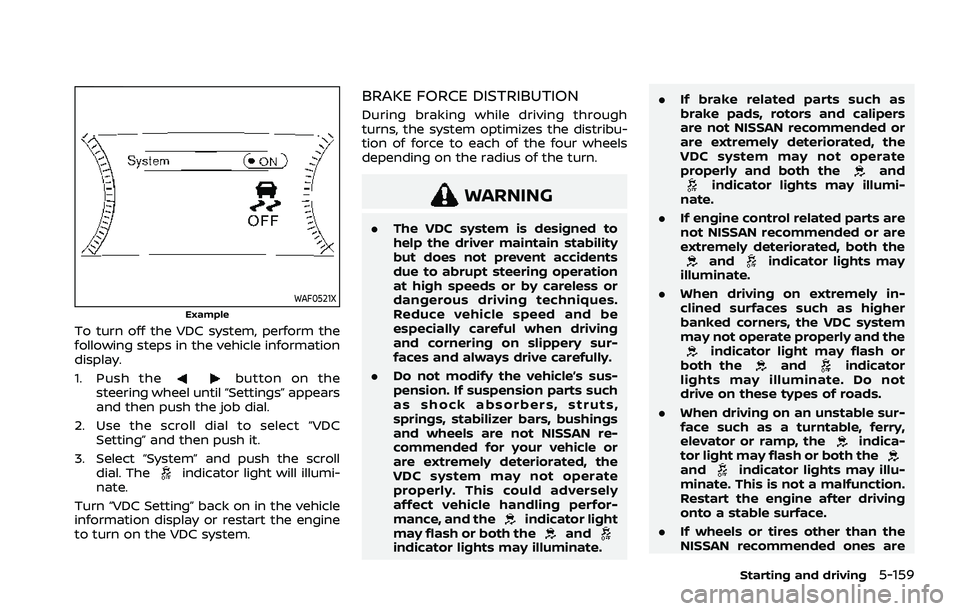
To turn off the VDC system, perform the
following steps in the vehicle information
display.
1. Push the
button on the
steering wheel until “Settings” appears
and then push the job dial.
2. Use the scroll dial to select “VDC Setting” and then push it.
3. Select “System” and push the scroll dial. The
indicator light will illumi-
nate.
Turn “VDC Setting” back on in the vehicle
information display or restart the engine
to turn on the VDC system.
BRAKE FORCE DISTRIBUTION
During braking while driving through
turns, the system optimizes the distribu-
tion of force to each of the four wheels
depending on the radius of the turn.
WARNING
. The VDC system is designed to
help the driver maintain stability
but does not prevent accidents
due to abrupt steering operation
at high speeds or by careless or
dangerous driving techniques.
Reduce vehicle speed and be
especially careful when driving
and cornering on slippery sur-
faces and always drive carefully.
. Do not modify the vehicle’s sus-
pension. If suspension parts such
as shock absorbers, struts,
springs, stabilizer bars, bushings
and wheels are not NISSAN re-
commended for your vehicle or
are extremely deteriorated, the
VDC system may not operate
properly. This could adversely
affect vehicle handling perfor-
mance, and the
indicator light
may flash or both theandindicator lights may illuminate. .
If brake related parts such as
brake pads, rotors and calipers
are not NISSAN recommended or
are extremely deteriorated, the
VDC system may not operate
properly and both the
andindicator lights may illumi-
nate.
. If engine control related parts are
not NISSAN recommended or are
extremely deteriorated, both the
andindicator lights may
illuminate.
. When driving on extremely in-
clined surfaces such as higher
banked corners, the VDC system
may not operate properly and the
indicator light may flash or
both theandindicator
lights may illuminate. Do not
drive on these types of roads.
. When driving on an unstable sur-
face such as a turntable, ferry,
elevator or ramp, the
indica-
tor light may flash or both the
andindicator lights may illu-
minate. This is not a malfunction.
Restart the engine after driving
onto a stable surface.
. If wheels or tires other than the
NISSAN recommended ones are
Starting and driving5-159
Page 414 of 556
5-160Starting and driving
used, the VDC system may not
operate properly and the
indicator light may flash or both
theandindicator lights
may illuminate.
. The VDC system is not a substi-
tute for winter tires or tire chains
on a snow covered road. The chassis control is an electric control
module that includes the following func-
tions:
.
Intelligent Trace Control
. Active Ride Control
INTELLIGENT TRACE CONTROL
This system senses driving based on the
driver’s steering and acceleration/braking
patterns, and controls brake pressure at
individual wheels to aid tracing at corners
and help smooth vehicle response.
When the VDC system is turned off, the
Intelligent Trace Control is also turned off.
Amount of brake control is changed
based on Drive Mode selector.
When Intelligent Trace Control is not
functioning properly, the master warning
light illuminates, and warning message
“Chassis Control System Error” will also
appear in the vehicle information display.
If the chassis control warning message
appears in the vehicle information dis-
play, it may indicate that the Intelligent
Trace Control is not functioning properly.
Have the system checked as soon as
possible. It is recommended that you visit
a NISSAN dealer for this service. (See
“Vehicle information display warnings
and indicators” (P.2-34).)
WARNING
The Intelligent Trace Control may not
be effective depending on the driv-
ing condition. Always drive carefully
and attentively.
When the Intelligent Trace Control is
operating, you may feel a pulsation in
the brake pedal, sense slight deceleration,
or hear a noise. This is normal and
indicates that Intelligent Trace Control is
operating properly.
ACTIVE RIDE CONTROL
This system senses upper body motion
and controls four wheel brake pressure.
This will enhance ride comfort in effort to
restrain uncomfortable upper body
movement when passing over undulated
road surfaces. When the VDC system is
turned off, the Active Ride Control is also
turned off.
If the chassis control warning message
appears in the vehicle information dis-
play, it may indicate that the Active Ride
Control is not functioning properly. Have
the system checked as soon as possible.
It is recommended that you visit a NISSAN
dealer for this service.
CHASSIS CONTROL