steering NISSAN ROGUE 2021 Owner´s Manual
[x] Cancel search | Manufacturer: NISSAN, Model Year: 2021, Model line: ROGUE, Model: NISSAN ROGUE 2021Pages: 556, PDF Size: 2.7 MB
Page 330 of 556
5-76Starting and driving
WARNING
Failure to follow the warnings and
instructions for proper use of the
RCTA system could result in serious
injury or death.
.The RCTA system is not a replace-
ment for proper driving proce-
dures and is not designed to
prevent contact with vehicles or
objects. When backing out of a
parking space, always use the
side and rear mirrors and turn
and look in the direction your
vehicle will move. Never rely so-
lely on the RCTA system.
The RCTA system will assist you when
backing out from a parking space. When
the vehicle is in reverse, the system is
designed to detect other vehicles ap-
proaching from the right or left of the
vehicle. If the system detects cross traffic,
it will alert you.
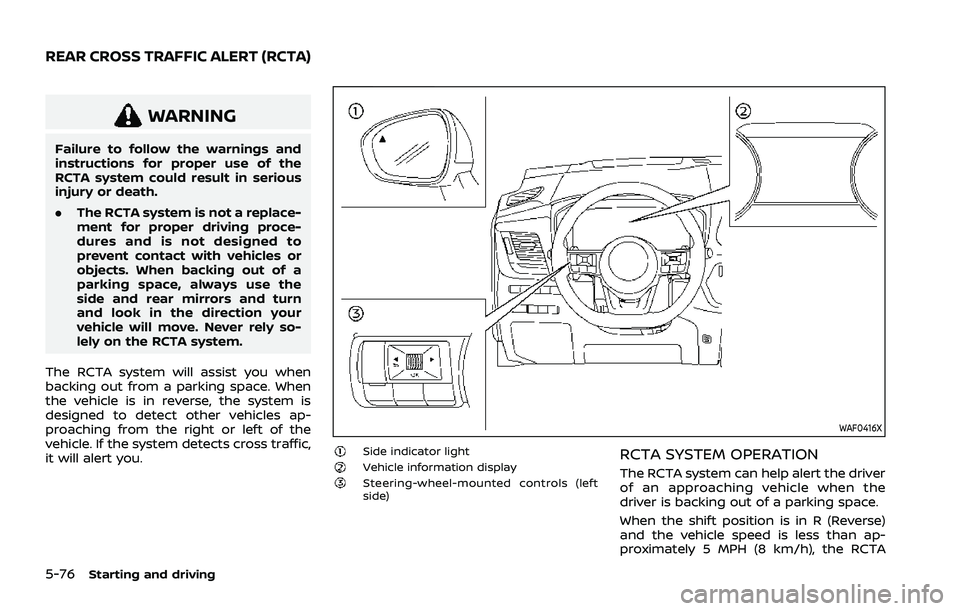
WAF0416X
Side indicator lightVehicle information displaySteering-wheel-mounted controls (left
side)
RCTA SYSTEM OPERATION
The RCTA system can help alert the driver
of an approaching vehicle when the
driver is backing out of a parking space.
When the shift position is in R (Reverse)
and the vehicle speed is less than ap-
proximately 5 MPH (8 km/h), the RCTA
REAR CROSS TRAFFIC ALERT (RCTA)
Page 332 of 556
5-78Starting and driving
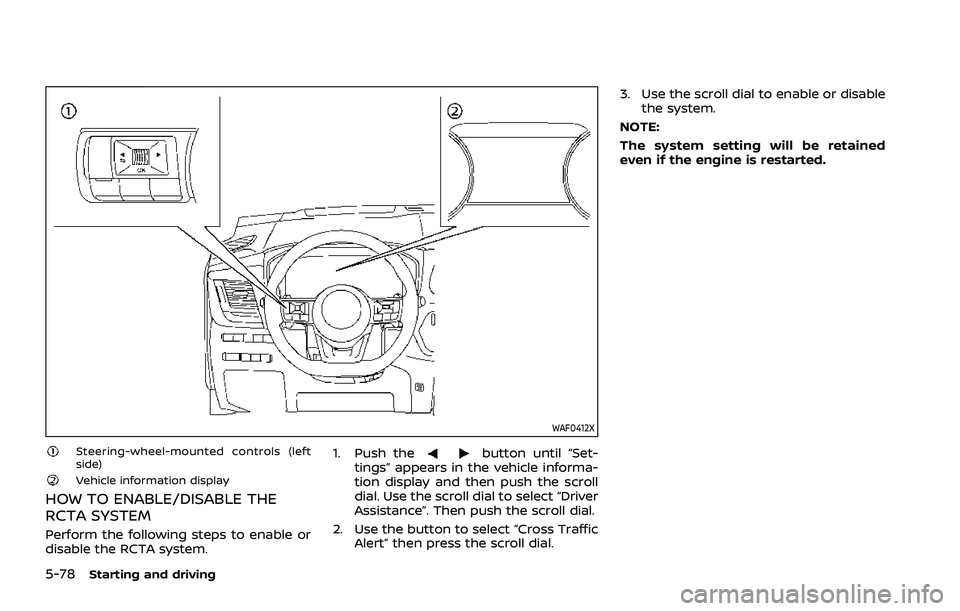
WAF0412X
Steering-wheel-mounted controls (left
side)
Vehicle information display
HOW TO ENABLE/DISABLE THE
RCTA SYSTEM
Perform the following steps to enable or
disable the RCTA system.1. Push the
button until “Set-
tings” appears in the vehicle informa-
tion display and then push the scroll
dial. Use the scroll dial to select “Driver
Assistance”. Then push the scroll dial.
2. Use the button to select “Cross Traffic Alert” then press the scroll dial. 3. Use the scroll dial to enable or disable
the system.
NOTE:
The system setting will be retained
even if the engine is restarted.
Page 338 of 556
5-84Starting and driving
Cancelling cruising speed
Use any one of the following methods to
cancel the vehicle set speed. (“Standby
Push RES+ to resume” message appears
in the display.)
.Push the CANCEL switch.
. Tap the foot brake pedal.
. Push the Cruise ON/OFF switch. The
cruise indicator will turn off. This section contains the information
about the following system features:
.
ProPILOT Assist (general system op-
eration)
. ProPILOT Assist with Navi-link (addi-
tional functionality, if so equipped)
WARNING
Failure to follow the warnings and
instructions for proper use of the
ProPILOT Assist system could result
in serious injury or death.
.ProPILOT Assist is not a self-driv-
ing system. Within the limits of its
capabilities, as described in this
manual, it helps the driver with
certain driving activities.
. The ProPILOT Assist system is not
a replacement for proper driving
procedures and is not designed
to correct careless, inattentive or
absent-minded driving. ProPILOT
Assist will not always steer the
vehicle to keep it in the lane. The
ProPILOT Assist system is not
designed to prevent loss of con-
trol. It is the driver’s responsibility
to stay alert, drive safely, keep
the vehicle in the traveling lane,
and be in control of the vehicle at all times.
. There are limitations to the Pro-
PILOT Assist system capability.
The ProPILOT Assist system does
not function in all driving, traffic,
weather, and road conditions. It is
the driver’s responsibility to stay
alert, drive safely, keep the vehi-
cle in the traveling lane, and be in
control of the vehicle at all times.
. The ProPILOT Assist system is
only an aid to assist the driver
and is not a collision warning or
avoidance device.
. The ProPILOT Assist system is for
highway use only and is not
intended for city driving. Failure
to apply the brakes or steer the
vehicle when necessary may re-
sult in a serious accident.
. Always observe posted speed
limits and do not set the speed
over them.
. Never take your hands off the
steering wheel when driving. Al-
ways keep your hands on the
steering wheel and drive your
vehicle safely.
. Never unfasten your safety belt
when using ProPILOT Assist.
Doing so automatically cancels
PROPILOT ASSIST (if so equipped)
Page 339 of 556
the ProPILOT Assist system.
. The ProPILOT Assist system does
not react when approaching sta-
tionary and slow moving vehicles.
. Always drive carefully and atten-
tively when using the ProPILOT
Assist system. Read and under-
stand the Owner’s Manual thor-
oughly before using the ProPILOT
Assist system. To avoid serious
injury or death, do not rely on the
system to prevent accidents or to
control the vehicle’s speed in
emergency situations. Do not
use the ProPILOT Assist system
except in appropriate road and
traffic conditions.
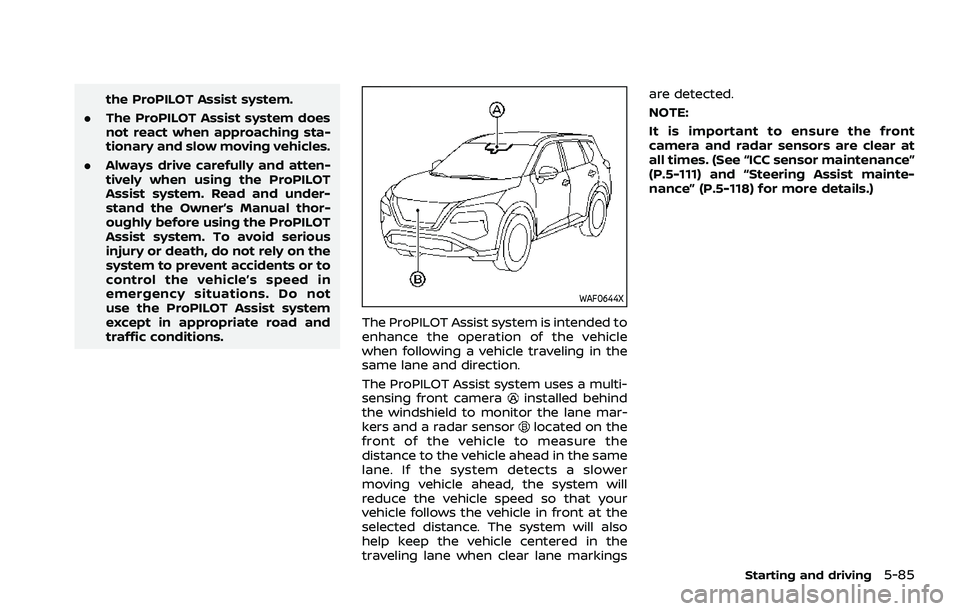
WAF0644X
The ProPILOT Assist system is intended to
enhance the operation of the vehicle
when following a vehicle traveling in the
same lane and direction.
The ProPILOT Assist system uses a multi-
sensing front camera
installed behind
the windshield to monitor the lane mar-
kers and a radar sensor
located on the
front of the vehicle to measure the
distance to the vehicle ahead in the same
lane. If the system detects a slower
moving vehicle ahead, the system will
reduce the vehicle speed so that your
vehicle follows the vehicle in front at the
selected distance. The system will also
help keep the vehicle centered in the
traveling lane when clear lane markings are detected.
NOTE:
It is important to ensure the front
camera and radar sensors are clear at
all times. (See “ICC sensor maintenance”
(P.5-111) and “Steering Assist mainte-
nance” (P.5-118) for more details.)
Starting and driving5-85
Page 340 of 556
5-86Starting and driving
WAF0557X
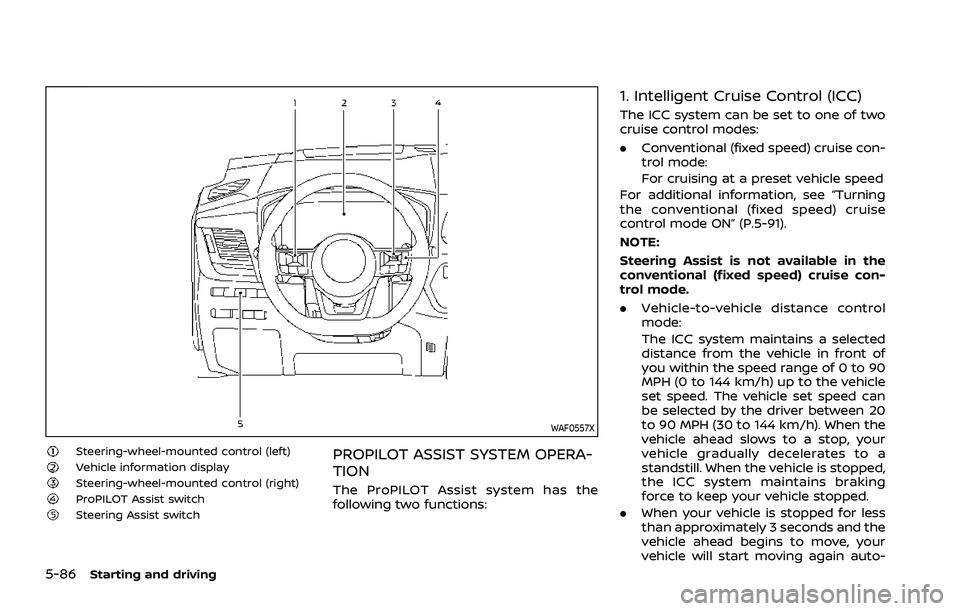
Steering-wheel-mounted control (left)Vehicle information displaySteering-wheel-mounted control (right)ProPILOT Assist switchSteering Assist switch
PROPILOT ASSIST SYSTEM OPERA-
TION
The ProPILOT Assist system has the
following two functions:
1. Intelligent Cruise Control (ICC)
The ICC system can be set to one of two
cruise control modes:
.Conventional (fixed speed) cruise con-
trol mode:
For cruising at a preset vehicle speed
For additional information, see “Turning
the conventional (fixed speed) cruise
control mode ON” (P.5-91).
NOTE:
Steering Assist is not available in the
conventional (fixed speed) cruise con-
trol mode.
. Vehicle-to-vehicle distance control
mode:
The ICC system maintains a selected
distance from the vehicle in front of
you within the speed range of 0 to 90
MPH (0 to 144 km/h) up to the vehicle
set speed. The vehicle set speed can
be selected by the driver between 20
to 90 MPH (30 to 144 km/h). When the
vehicle ahead slows to a stop, your
vehicle gradually decelerates to a
standstill. When the vehicle is stopped,
the ICC system maintains braking
force to keep your vehicle stopped.
. When your vehicle is stopped for less
than approximately 3 seconds and the
vehicle ahead begins to move, your
vehicle will start moving again auto-
Page 341 of 556
matically.
. When your vehicle is at a standstill for
more than approximately 3 seconds
and the vehicle ahead begins to
accelerate, push up the RES+ switch
or lightly depress the accelerator ped-
al. The ICC system starts to follow the
vehicle ahead.
. Always check surroundings before
restarting the vehicle.
. For vehicles equipped with ProPILOT
Assist with Navi-link and only when on
a limited access freeway (as identified
in the navigation map data):
— The time the vehicle can remain
stopped and automatically restart
is extended from 3 seconds to 30
seconds.
— If a vehicle ahead cuts in or out of the lane ahead, the vehicle may not
automatically start when the traffic
ahead begins to move. You need to
push up the RES+ switch or lightly
depress the accelerator pedal to
follow the vehicle directly ahead
when it is safe to do so.
. When no vehicle is detected ahead
within the driver selected distance, the
vehicle travels at the speed set by the
driver. The speed must be above 20
MPH (30 km/h) to use this function. NOTE:
Even if the Automatic Emergency Brak-
ing (AEB) setting is turned off by the
driver using the “Settings” menu in the
vehicle information display, AEB will be
automatically turned on when ICC is
used.
2. Steering Assist
The Steering Assist function helps the
driver to keep the vehicle centered within
the traveling lane.
When there is no vehicle ahead, Steering
Assist is not available at speeds under 37
MPH (60 km/h).
Starting and driving5-87
Page 342 of 556
5-88Starting and driving
WAF0422X
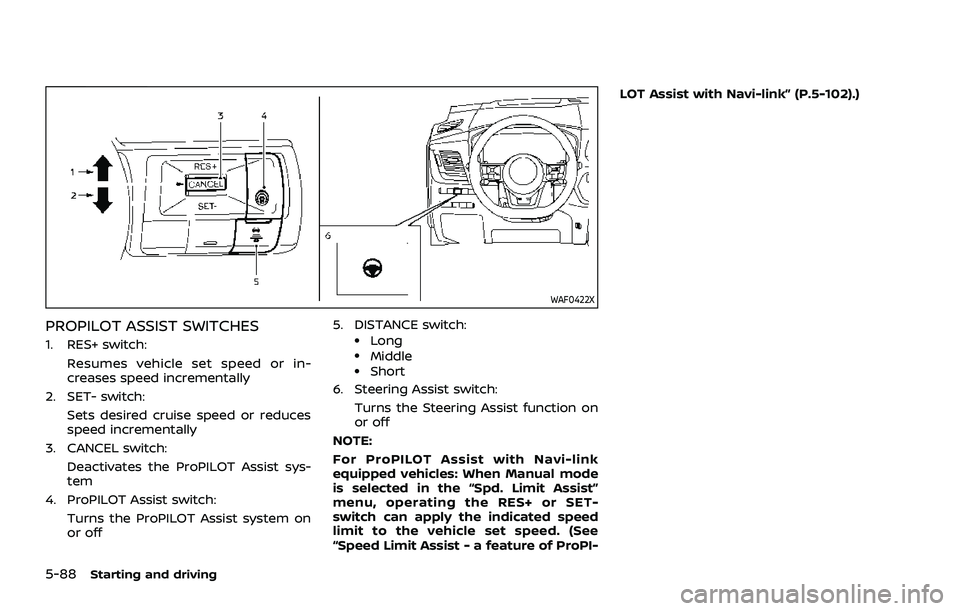
PROPILOT ASSIST SWITCHES
1. RES+ switch:Resumes vehicle set speed or in-
creases speed incrementally
2. SET- switch:
Sets desired cruise speed or reduces
speed incrementally
3. CANCEL switch:
Deactivates the ProPILOT Assist sys-
tem
4. ProPILOT Assist switch:
Turns the ProPILOT Assist system on
or off 5. DISTANCE switch:.Long.Middle.Short
6. Steering Assist switch:
Turns the Steering Assist function on
or off
NOTE:
For ProPILOT Assist with Navi-link
equipped vehicles: When Manual mode
is selected in the “Spd. Limit Assist”
menu, operating the RES+ or SET-
switch can apply the indicated speed
limit to the vehicle set speed. (See
“Speed Limit Assist - a feature of ProPI- LOT Assist with Navi-link” (P.5-102).)
Page 343 of 556
WAF0577XModels with full-screen display
WAF0578XModels with analog meter and color display
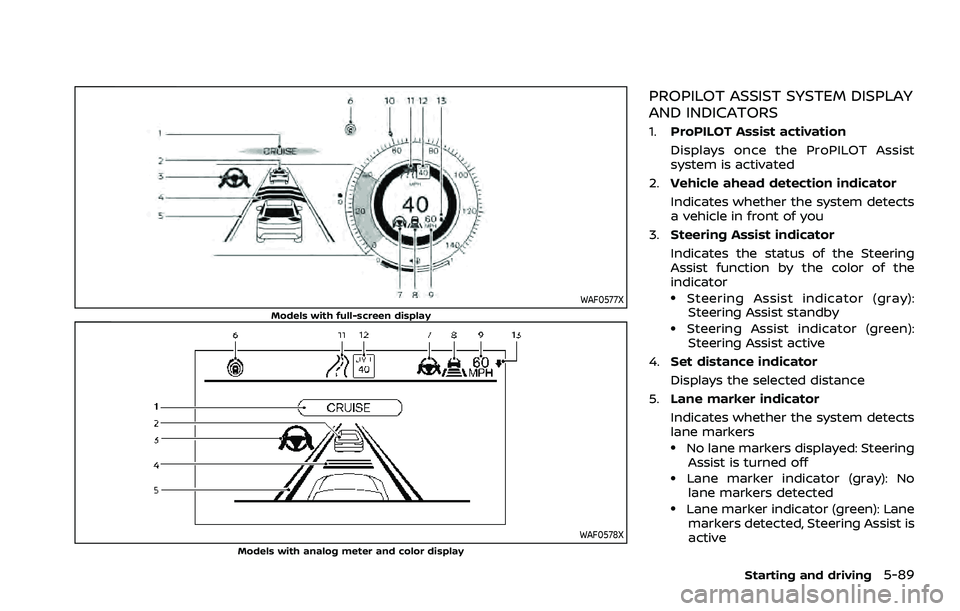
PROPILOT ASSIST SYSTEM DISPLAY
AND INDICATORS
1.ProPILOT Assist activation
Displays once the ProPILOT Assist
system is activated
2. Vehicle ahead detection indicator
Indicates whether the system detects
a vehicle in front of you
3. Steering Assist indicator
Indicates the status of the Steering
Assist function by the color of the
indicator
.Steering Assist indicator (gray):
Steering Assist standby
.Steering Assist indicator (green): Steering Assist active
4. Set distance indicator
Displays the selected distance
5. Lane marker indicator
Indicates whether the system detects
lane markers
.No lane markers displayed: Steering
Assist is turned off
.Lane marker indicator (gray): No
lane markers detected
.Lane marker indicator (green): Lane markers detected, Steering Assist is
active
Starting and driving5-89
Page 344 of 556
5-90Starting and driving
.Lane marker indicator (orange):Lane departure is detected
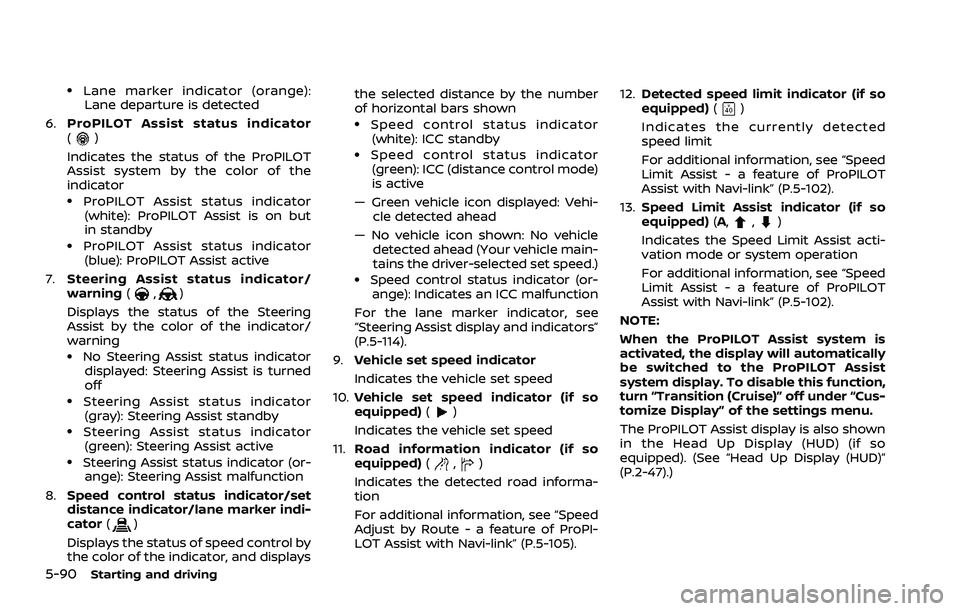
6. ProPILOT Assist status indicator
(
)
Indicates the status of the ProPILOT
Assist system by the color of the
indicator
.ProPILOT Assist status indicator (white): ProPILOT Assist is on but
in standby
.ProPILOT Assist status indicator(blue): ProPILOT Assist active
7. Steering Assist status indicator/
warning (
,)
Displays the status of the Steering
Assist by the color of the indicator/
warning
.No Steering Assist status indicator displayed: Steering Assist is turned
off
.Steering Assist status indicator(gray): Steering Assist standby
.Steering Assist status indicator
(green): Steering Assist active
.Steering Assist status indicator (or- ange): Steering Assist malfunction
8. Speed control status indicator/set
distance indicator/lane marker indi-
cator (
)
Displays the status of speed control by
the color of the indicator, and displays the selected distance by the number
of horizontal bars shown
.Speed control status indicator
(white): ICC standby
.Speed control status indicator(green): ICC (distance control mode)
is active
— Green vehicle icon displayed: Vehi- cle detected ahead
— No vehicle icon shown: No vehicle detected ahead (Your vehicle main-
tains the driver-selected set speed.)
.Speed control status indicator (or-ange): Indicates an ICC malfunction
For the lane marker indicator, see
“Steering Assist display and indicators”
(P.5-114).
9. Vehicle set speed indicator
Indicates the vehicle set speed
10. Vehicle set speed indicator (if so
equipped) (
)
Indicates the vehicle set speed
11. Road information indicator (if so
equipped) (
,)
Indicates the detected road informa-
tion
For additional information, see “Speed
Adjust by Route - a feature of ProPI-
LOT Assist with Navi-link” (P.5-105). 12.
Detected speed limit indicator (if so
equipped) (
)
Indicates the currently detected
speed limit
For additional information, see “Speed
Limit Assist - a feature of ProPILOT
Assist with Navi-link” (P.5-102).
13. Speed Limit Assist indicator (if so
equipped) (A,
,)
Indicates the Speed Limit Assist acti-
vation mode or system operation
For additional information, see “Speed
Limit Assist - a feature of ProPILOT
Assist with Navi-link” (P.5-102).
NOTE:
When the ProPILOT Assist system is
activated, the display will automatically
be switched to the ProPILOT Assist
system display. To disable this function,
turn “Transition (Cruise)” off under “Cus-
tomize Display” of the settings menu.
The ProPILOT Assist display is also shown
in the Head Up Display (HUD) (if so
equipped). (See “Head Up Display (HUD)”
(P.2-47).)
Page 347 of 556
down, the vehicle set speed is 20 MPH
(30 km/h).
NOTE:
When the I-LI and I-BSI systems are
enabled in the settings menu of the
vehicle information display, turning the
ProPILOT Assist system on will turn on
the I-LI and I-BSI systems at the same
time. If the I-LI system is disabled in the
settings menu, the I-LI system will
automatically be turned on when the
Steering Assist system is active. For
additional information, see “Intelligent
Lane Intervention (I-LI)” (P.5-51), “Intelli-
gent Lane Intervention (I-LI)” (P.5-115)
and “Intelligent Blind Spot Intervention
(I-BSI)” (P.5-65).
WAF0634X
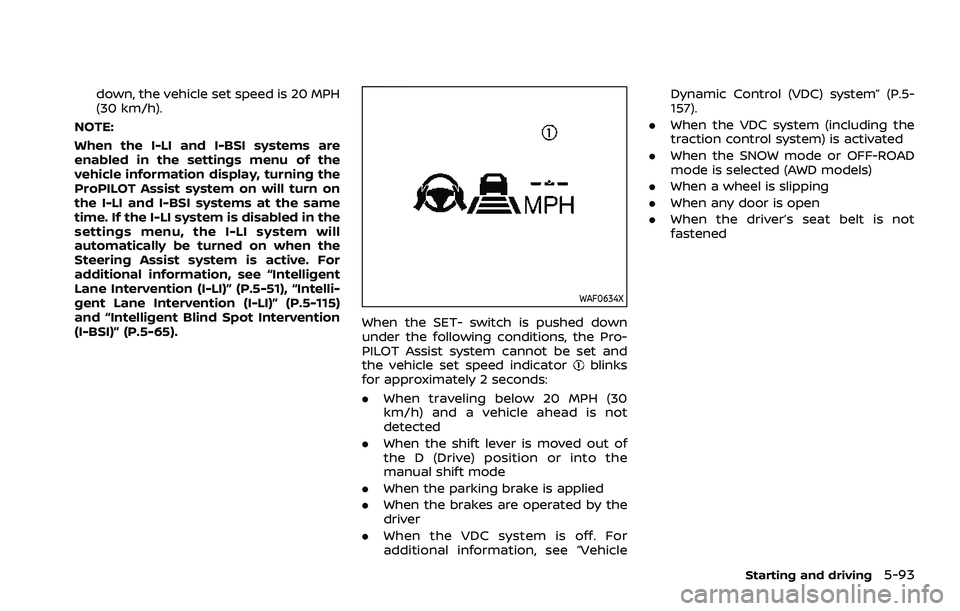
When the SET- switch is pushed down
under the following conditions, the Pro-
PILOT Assist system cannot be set and
the vehicle set speed indicator
blinks
for approximately 2 seconds:
. When traveling below 20 MPH (30
km/h) and a vehicle ahead is not
detected
. When the shift lever is moved out of
the D (Drive) position or into the
manual shift mode
. When the parking brake is applied
. When the brakes are operated by the
driver
. When the VDC system is off. For
additional information, see “Vehicle Dynamic Control (VDC) system” (P.5-
157).
. When the VDC system (including the
traction control system) is activated
. When the SNOW mode or OFF-ROAD
mode is selected (AWD models)
. When a wheel is slipping
. When any door is open
. When the driver’s seat belt is not
fastened
Starting and driving5-93