display NISSAN ROGUE 2021 Owner´s Manual
[x] Cancel search | Manufacturer: NISSAN, Model Year: 2021, Model line: ROGUE, Model: NISSAN ROGUE 2021Pages: 556, PDF Size: 2.7 MB
Page 365 of 556
structed, the ICC system will automati-
cally be canceled.
The chime will sound and the “Forward
Driving Aids temporarily disabled Front
Sensor blocked” warning message will
appear in the vehicle information display.
Action to take:
If the warning message appears, stop the
vehicle in a safe place, push the park
button to engage the P (Park) position,
and turn the engine off. When the radar
signal is temporarily interrupted, clean
the sensor area and restart the engine. If
the warning message continues to ap-
pear, have the system checked. It is
recommended that you visit a NISSAN
dealer for this service.
Condition D:
When driving on roads with limited road
structures or buildings (for example, long
bridges, deserts, snow fields, driving next
to long walls), the system may display the
“Forward Driving Aids temporarily dis-
abled Front Sensor blocked” message.
Action to take:
When the above driving conditions no
longer exist, turn the system back on.ICC system malfunction
If the ICC system malfunctions, it will be
turned off automatically, a chime will
sound, and the speed control status
warning (orange) will illuminate.
Action to take:
If the warning illuminates, stop the vehicle
in a safe place. Turn the engine off, restart
the engine and set the ICC system again.
If it is not possible to set the ICC system or
the warning stays on, it may be a
malfunction. Although the normal driving
can be continued, the ICC system should
be inspected. It is recommended that you
visit a NISSAN dealer for this service.
NOTE:
If the ICC system is temporarily unavail-
able, the conventional cruise control
mode may still be used. For additional
information, see “Conventional (fixed
speed) cruise control mode” (P.5-118).
ICC sensor maintenance
The radar sensor is located on the front of
the vehicle.
To keep the ICC system operating prop-
erly, be sure to observe the following:
.Always keep the sensor area clean.
. Do not strike or damage the areas
around the sensor.
. Do not attach a sticker (including
transparent material) or install an
accessory near the sensor. This could
cause failure or malfunction.
. Do not attach metallic objects near
the sensor area (brush guard, etc.).
This could cause failure or malfunc-
tion.
. Do not alter, remove, or paint the front
bumper.
Before customizing or restoring the front
bumper, it is recommended that you visit
a NISSAN dealer.
The camera sensor is located above the
inside mirror.
To keep the proper operation of the
systems and prevent a system malfunc-
tion, be sure to observe the following:
. Always keep the windshield clean.
. Do not attach a sticker (including
transparent material) or install an
accessory near the camera unit.
Starting and driving5-111
Page 368 of 556
5-114Starting and driving
see “How to enable/disable the Steering
Assist” (P.5-96).
WAF0584XExample
Steering Assist display and indica-
tors
1.Steering Assist status indicator/
warning
Displays the status of the Steering
Assist by the color of the indicator/
warning
.Steering Assist status indicator
(gray): Steering Assist standby
.Steering Assist status indicator
(green): Steering Assist active
.Steering Assist status indicator (or- ange): Steering Assist malfunction 2.
Steering Assist indicator
Indicates the status of the Steering
Assist by the color of the indicator
.Steering Assist indicator (gray):
Steering Assist standby
.Steering Assist indicator (green): Steering Assist active
3. Lane marker indicator
Indicates whether the system detects
the lane marker
.Lane marker indicator (gray): Lane
markers not detected
.Lane marker indicator (green): Lanemarkers detected
.Lane marker indicator (orange):Lane departure is detected
4. Lane marker indicator/speed con-
trol status indicator/set distance
indicator
Displays the status of the Steering
Assist by the color of the lane marker
indicator.
.Lane marker indicator (gray): Steer-
ing Assist standby
.Lane marker indicator (green):Steering Assist active
For the speed control status indicator
and set distance indicator, see “ProPILOT
Assist system display and indicators” (P.5-
89).
Page 369 of 556
When the Steering Assist is in operation,
the Steering Assist status indicator, the
Steering Assist indicator, and the lane
marker indicatorandon the vehicle
information display turn green. A chime
sounds when the Steering Assist initially
activates.
When the Steering Assist deactivates, the
Steering Assist status indicator
, the
Steering Assist indicator, and the lane
marker indicatorandon the vehicle
information display turn gray and a chime
sounds twice.
Intelligent Lane Intervention (I-LI)
With the Steering Assist active, when a
curve or strong cross wind exceeds the
capabilities of the system and your vehi-
cle approaches either the left or the right
side of the traveling lane, the I-LI system
will flash the I-LI indicator on the vehicle
information display and provide steering
wheel vibration to alert the driver. The
warning chime will also sound (4 rapid
beeps). Then, the I-LI system automati-
cally applies the brakes for a short period
of time to help assist the driver to return
the vehicle to the center of the traveling
lane. This action is in addition to any
Steering Assist actions and the warnings
cannot be turned off. For more informa-
tion, see “Intelligent Lane Intervention (I-
LI)” (P.5-51).WAF0639X
Hands on detection
When the Steering Assist is activated, it
monitors the driver’s steering wheel op-
eration.
If the steering wheel is not operated or
the driver takes his/her hands off the
steering wheel for a period of time, the
warning
appears in the vehicle infor-
mation display and the hands OFF warn-
ing light
illuminates.
If the driver does not operate the steering
wheel after the warning has been dis-
played and the warning light illuminated,
an audible alert sounds and both the
warning and the warning light flash. If the
driver still does not operate the steering wheel, the system applies a momentary
brake application to request the driver to
take control of the vehicle again.
If the driver still does not respond, the
system turns on the hazard flasher and
slows the vehicle to a complete stop.
The driver can cancel the deceleration at
any time by steering, braking, accelerat-
ing, or operating the ProPILOT Assist
switch.
WARNING
Steering Assist is not a system for a
hands-free driving. Always keep your
hands on the steering wheel and
drive your vehicle safely. Failure to
do so could cause a collision result-
ing in serious personal injury or
death.
NOTE:
If the driver lightly touches (instead of
firmly grips) the steering wheel, the
steering torque sensor may not detect
the driver’s hand(s) on the steering
wheel and a sequence of warnings
may occur. When the driver holds and
operates the steering wheel again, the
warnings turn off.
Starting and driving5-115
Page 371 of 556
tions (for example, tire wear,
abnormal tire pressure, instal-
lation of a spare tire, tire
chains, non-standard wheels)
— When the vehicle is equipped with non-original brake or
suspension parts
— When an object such as a sticker or cargo obstructs the
camera
— When excessively heavy bag- gage is loaded in the rear seat
or luggage area of your vehi-
cle
— When the vehicle load capa- city is exceeded
— When towing a trailer or other vehicle
. Excessive noise will interfere with
the warning chime sound, and
the beep may not be heard.
. For the ProPILOT Assist system to
operate properly, the windshield
in front of the camera must be
clean. Replace worn wiper blades.
The correct size wiper blades
must be used to help make sure
the windshield is kept clean. Only
use Genuine NISSAN wiper blades,
or equivalent wiper blades, that are specifically designed for use
on your vehicle model and model
year. It is recommended that you
visit your NISSAN dealer for the
correct parts for your vehicle.
Steering Assist temporary standby
Automatic standby due to driving op-
eration:
When the driver activates the turn signal,
the Steering Assist is temporarily placed
in a standby mode. (The Steering Assist
restarts automatically when the operat-
ing conditions are met again.)
Automatic standby:
In the following cases, “Not Available
Front Camera Obstructed” warning mes-
sage appears in the vehicle information
display, along with the chime, and the
Steering Assist is placed in a temporary
standby mode. (The Steering Assist re-
starts automatically when the operating
conditions are met again.)
.
When lane markers on both sides are
no longer detected
. When a vehicle ahead is no longer
detected under approximately 37 MPH
(60 km/h) NOTE:
For ProPILOT Assist with Navi-link
equipped vehicles on a limited access
freeway as identified in the navigation
map data, the Steering Assist system
may continue to operate with visible
lane markers on the both sides, even
when the vehicle speed is below ap-
proximately 37 MPH (60 km/h) and a
vehicle is not detected ahead.
Steering Assist cancel
Under the following conditions, the Steer-
ing Assist cancels, and the Steering Assist
status indicator and the Steering Assist
indicator turn off:
.
When unusual lane markers appear in
the traveling lane or when the lane
marker cannot be correctly detected
for some time due to certain condi-
tions (for example, a snow rut, the
reflection of light on a rainy day, the
presence of several unclear lane mar-
kers)
. When the windshield wiper operates
in the high speed operation (the
Steering Assist is disabled when the
wiper operates for more than approxi-
mately 10 seconds)
Starting and driving5-117
Page 372 of 556
5-118Starting and driving
Action to take:
Turn the ICC system off using the CANCEL
switch. When the conditions listed above
are no longer present, turn the ICC
system on again.
Steering Assist malfunction
When the system malfunctions, it turns
off automatically. The Steering Assist
status warning (orange) illuminates. A
chime may sound depending on the
situation.
Action to take:
Stop the vehicle in a safe location, push
the park button to shift to the P (Park)
position, turn the engine off, restart the
engine, resume driving, and set the ICC
system again. If the warning (orange)
continues to illuminate, the Steering As-
sist is malfunctioning. Although the vehi-
cle is still drivable under normal
conditions, have the system checked. It
is recommended that you visit a NISSAN
dealer for this service.
Steering Assist maintenance
The camera is located above the inside
mirror.
To keep the proper operation of the
system and prevent a system malfunc-
tion, be sure to observe the following:.
Always keep the windshield clean.
. Do not attach a sticker (including
transparent material) or install an
accessory near the camera unit.
. Do not place reflective materials, such
as white paper or a mirror, on the
instrument panel. The reflection of
sunlight may adversely affect the
camera unit’s capability of detecting
the lane markers.
. Do not strike or damage the areas
around the camera unit. Do not touch
the camera lens or remove the screw
located on the camera unit.
If the camera unit is damaged due to an
accident, it is recommended that you visit
a NISSAN dealer.
For additional information, see “Common
troubleshooting guide” (P.5-39).
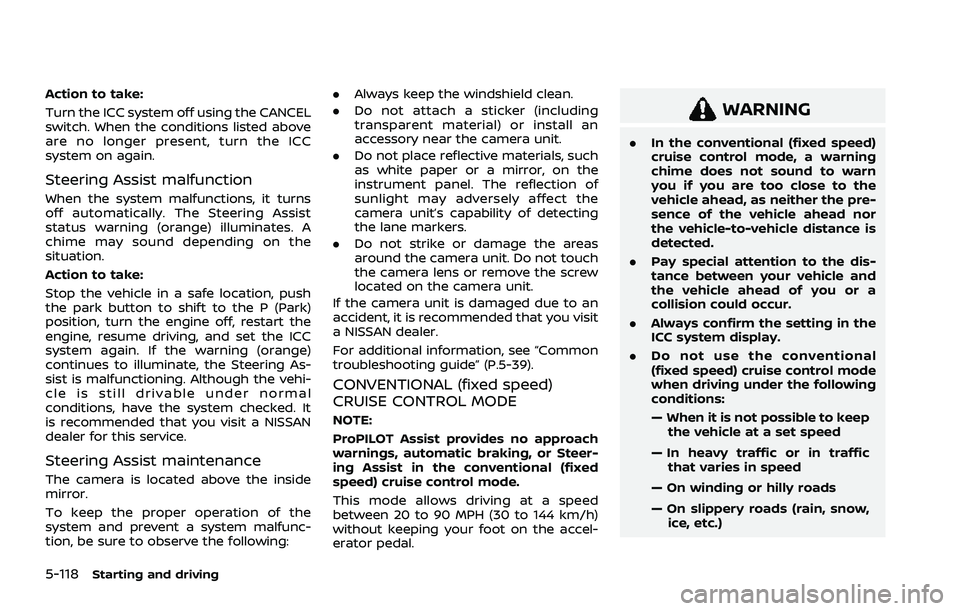
CONVENTIONAL (fixed speed)
CRUISE CONTROL MODE
NOTE:
ProPILOT Assist provides no approach
warnings, automatic braking, or Steer-
ing Assist in the conventional (fixed
speed) cruise control mode.
This mode allows driving at a speed
between 20 to 90 MPH (30 to 144 km/h)
without keeping your foot on the accel-
erator pedal.
WARNING
. In the conventional (fixed speed)
cruise control mode, a warning
chime does not sound to warn
you if you are too close to the
vehicle ahead, as neither the pre-
sence of the vehicle ahead nor
the vehicle-to-vehicle distance is
detected.
. Pay special attention to the dis-
tance between your vehicle and
the vehicle ahead of you or a
collision could occur.
. Always confirm the setting in the
ICC system display.
. Do not use the conventional
(fixed speed) cruise control mode
when driving under the following
conditions:
— When it is not possible to keep
the vehicle at a set speed
— In heavy traffic or in traffic that varies in speed
— On winding or hilly roads
— On slippery roads (rain, snow, ice, etc.)
Page 373 of 556
— In very windy areas
. Doing so could cause a loss of
vehicle control and result in an
accident.
WAF0426X
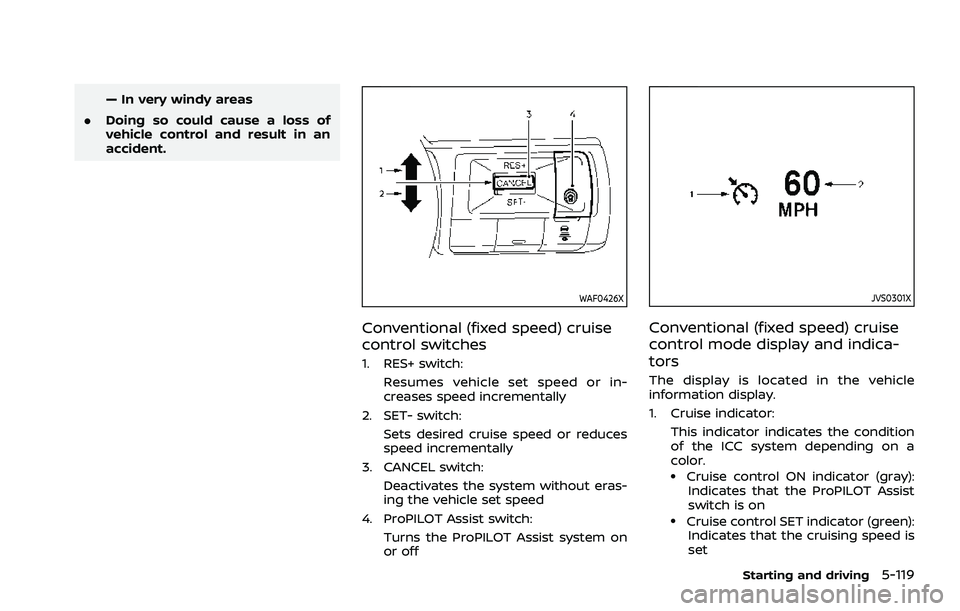
Conventional (fixed speed) cruise
control switches
1. RES+ switch:
Resumes vehicle set speed or in-
creases speed incrementally
2. SET- switch: Sets desired cruise speed or reduces
speed incrementally
3. CANCEL switch: Deactivates the system without eras-
ing the vehicle set speed
4. ProPILOT Assist switch: Turns the ProPILOT Assist system on
or off
JVS0301X
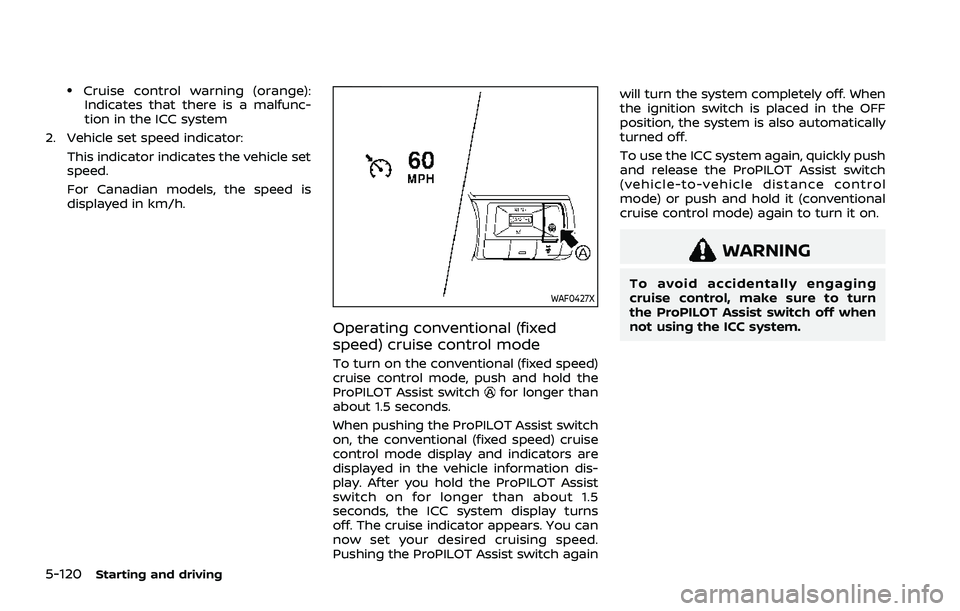
Conventional (fixed speed) cruise
control mode display and indica-
tors
The display is located in the vehicle
information display.
1. Cruise indicator:This indicator indicates the condition
of the ICC system depending on a
color.
.Cruise control ON indicator (gray):Indicates that the ProPILOT Assist
switch is on
.Cruise control SET indicator (green):Indicates that the cruising speed is
set
Starting and driving5-119
Page 374 of 556
5-120Starting and driving
.Cruise control warning (orange):Indicates that there is a malfunc-
tion in the ICC system
2. Vehicle set speed indicator: This indicator indicates the vehicle set
speed.
For Canadian models, the speed is
displayed in km/h.
WAF0427X
Operating conventional (fixed
speed) cruise control mode
To turn on the conventional (fixed speed)
cruise control mode, push and hold the
ProPILOT Assist switch
for longer than
about 1.5 seconds.
When pushing the ProPILOT Assist switch
on, the conventional (fixed speed) cruise
control mode display and indicators are
displayed in the vehicle information dis-
play. After you hold the ProPILOT Assist
switch on for longer than about 1.5
seconds, the ICC system display turns
off. The cruise indicator appears. You can
now set your desired cruising speed.
Pushing the ProPILOT Assist switch again will turn the system completely off. When
the ignition switch is placed in the OFF
position, the system is also automatically
turned off.
To use the ICC system again, quickly push
and release the ProPILOT Assist switch
(vehicle-to-vehicle distance control
mode) or push and hold it (conventional
cruise control mode) again to turn it on.
WARNING
To avoid accidentally engaging
cruise control, make sure to turn
the ProPILOT Assist switch off when
not using the ICC system.
Page 377 of 556
WAF0429X
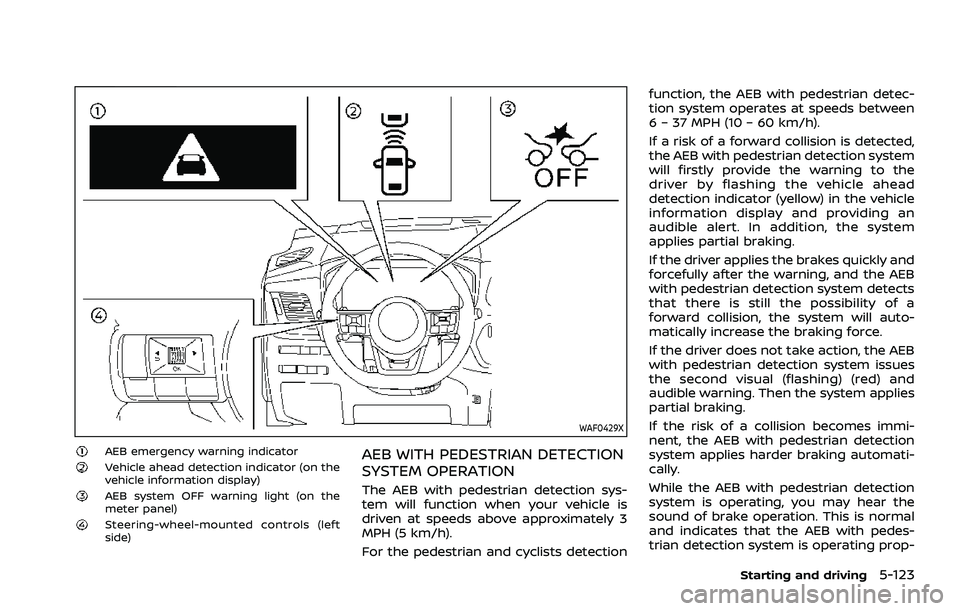
AEB emergency warning indicatorVehicle ahead detection indicator (on the
vehicle information display)
AEB system OFF warning light (on the
meter panel)
Steering-wheel-mounted controls (left
side)
AEB WITH PEDESTRIAN DETECTION
SYSTEM OPERATION
The AEB with pedestrian detection sys-
tem will function when your vehicle is
driven at speeds above approximately 3
MPH (5 km/h).
For the pedestrian and cyclists detectionfunction, the AEB with pedestrian detec-
tion system operates at speeds between
6 – 37 MPH (10 – 60 km/h).
If a risk of a forward collision is detected,
the AEB with pedestrian detection system
will firstly provide the warning to the
driver by flashing the vehicle ahead
detection indicator (yellow) in the vehicle
information display and providing an
audible alert. In addition, the system
applies partial braking.
If the driver applies the brakes quickly and
forcefully after the warning, and the AEB
with pedestrian detection system detects
that there is still the possibility of a
forward collision, the system will auto-
matically increase the braking force.
If the driver does not take action, the AEB
with pedestrian detection system issues
the second visual (flashing) (red) and
audible warning. Then the system applies
partial braking.
If the risk of a collision becomes immi-
nent, the AEB with pedestrian detection
system applies harder braking automati-
cally.
While the AEB with pedestrian detection
system is operating, you may hear the
sound of brake operation. This is normal
and indicates that the AEB with pedes-
trian detection system is operating prop-
Starting and driving5-123
Page 379 of 556
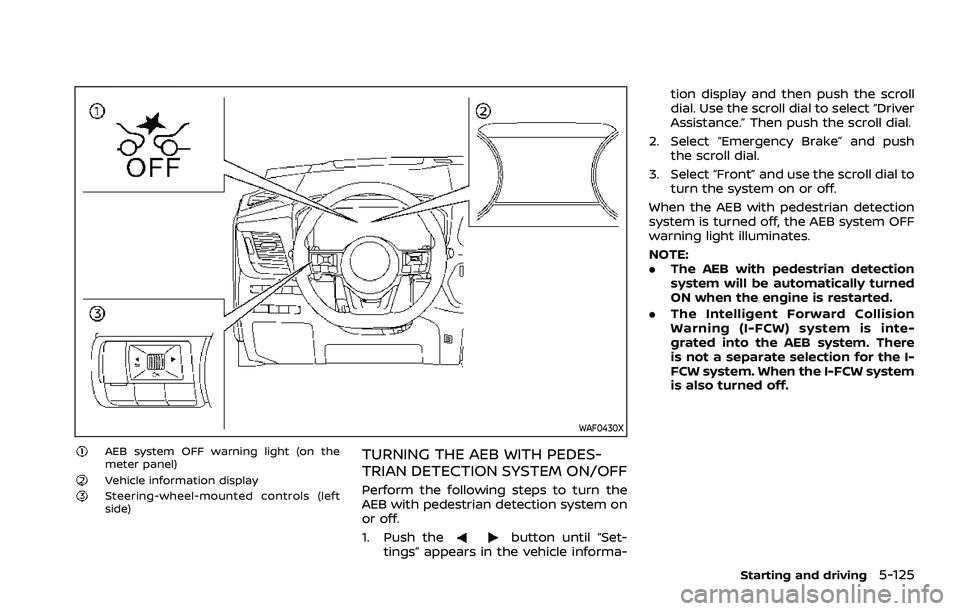
WAF0430X
AEB system OFF warning light (on the
meter panel)
Vehicle information displaySteering-wheel-mounted controls (left
side)
TURNING THE AEB WITH PEDES-
TRIAN DETECTION SYSTEM ON/OFF
Perform the following steps to turn the
AEB with pedestrian detection system on
or off.
1. Push the
button until “Set-
tings” appears in the vehicle informa- tion display and then push the scroll
dial. Use the scroll dial to select “Driver
Assistance.” Then push the scroll dial.
2. Select “Emergency Brake” and push the scroll dial.
3. Select “Front” and use the scroll dial to turn the system on or off.
When the AEB with pedestrian detection
system is turned off, the AEB system OFF
warning light illuminates.
NOTE:
. The AEB with pedestrian detection
system will be automatically turned
ON when the engine is restarted.
. The Intelligent Forward Collision
Warning (I-FCW) system is inte-
grated into the AEB system. There
is not a separate selection for the I-
FCW system. When the I-FCW system
is also turned off.
Starting and driving5-125
Page 383 of 556
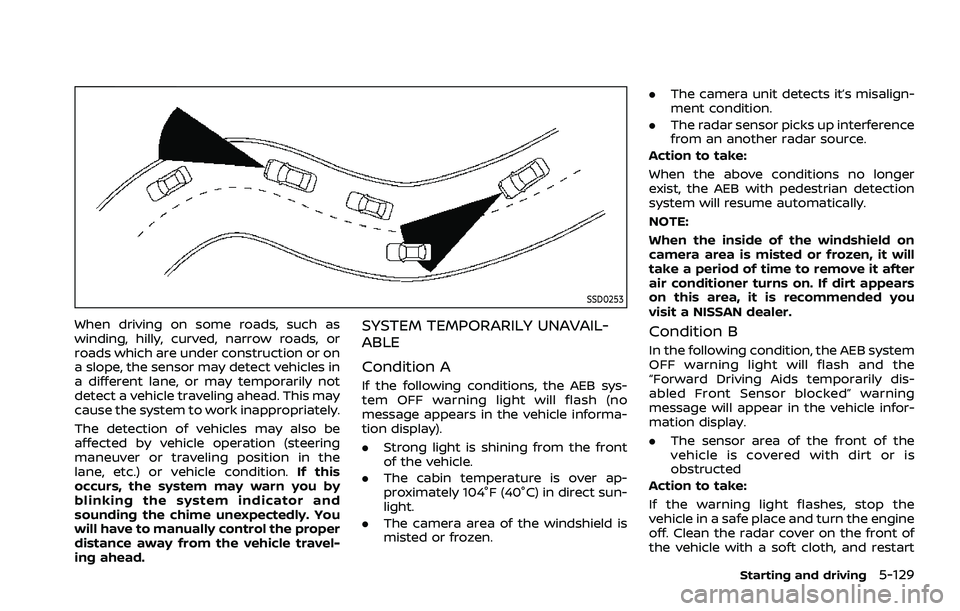
SSD0253
When driving on some roads, such as
winding, hilly, curved, narrow roads, or
roads which are under construction or on
a slope, the sensor may detect vehicles in
a different lane, or may temporarily not
detect a vehicle traveling ahead. This may
cause the system to work inappropriately.
The detection of vehicles may also be
affected by vehicle operation (steering
maneuver or traveling position in the
lane, etc.) or vehicle condition.If this
occurs, the system may warn you by
blinking the system indicator and
sounding the chime unexpectedly. You
will have to manually control the proper
distance away from the vehicle travel-
ing ahead.SYSTEM TEMPORARILY UNAVAIL-
ABLE
Condition A
If the following conditions, the AEB sys-
tem OFF warning light will flash (no
message appears in the vehicle informa-
tion display).
. Strong light is shining from the front
of the vehicle.
. The cabin temperature is over ap-
proximately 104°F (40°C) in direct sun-
light.
. The camera area of the windshield is
misted or frozen. .
The camera unit detects it’s misalign-
ment condition.
. The radar sensor picks up interference
from an another radar source.
Action to take:
When the above conditions no longer
exist, the AEB with pedestrian detection
system will resume automatically.
NOTE:
When the inside of the windshield on
camera area is misted or frozen, it will
take a period of time to remove it after
air conditioner turns on. If dirt appears
on this area, it is recommended you
visit a NISSAN dealer.
Condition B
In the following condition, the AEB system
OFF warning light will flash and the
“Forward Driving Aids temporarily dis-
abled Front Sensor blocked” warning
message will appear in the vehicle infor-
mation display.
. The sensor area of the front of the
vehicle is covered with dirt or is
obstructed
Action to take:
If the warning light flashes, stop the
vehicle in a safe place and turn the engine
off. Clean the radar cover on the front of
the vehicle with a soft cloth, and restart
Starting and driving5-129