light NISSAN ROGUE 2021 Owner´s Manual
[x] Cancel search | Manufacturer: NISSAN, Model Year: 2021, Model line: ROGUE, Model: NISSAN ROGUE 2021Pages: 556, PDF Size: 2.7 MB
Page 329 of 556
WAF0633X
SYSTEM MAINTENANCE
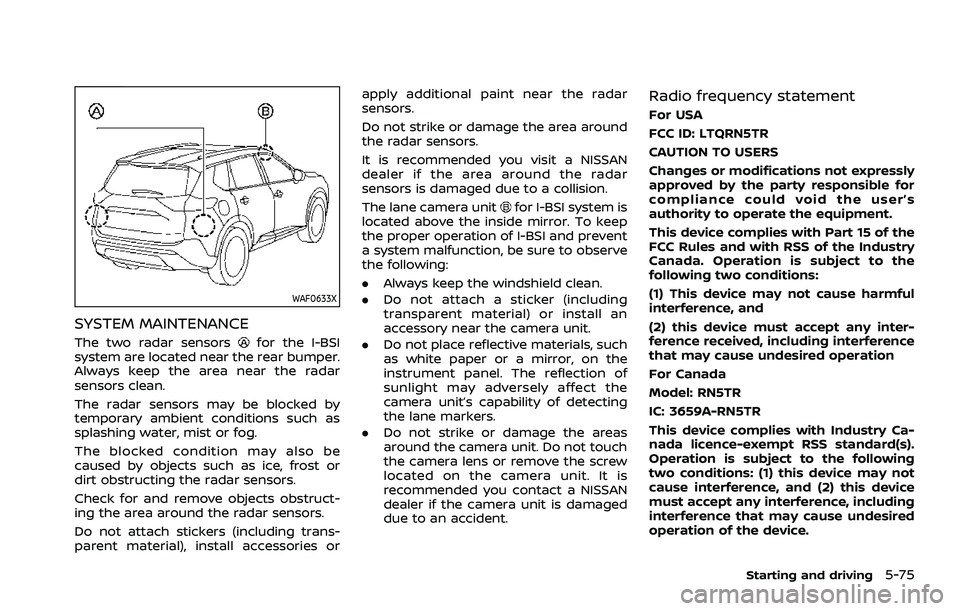
The two radar sensorsfor the I-BSI
system are located near the rear bumper.
Always keep the area near the radar
sensors clean.
The radar sensors may be blocked by
temporary ambient conditions such as
splashing water, mist or fog.
The blocked condition may also be
caused by objects such as ice, frost or
dirt obstructing the radar sensors.
Check for and remove objects obstruct-
ing the area around the radar sensors.
Do not attach stickers (including trans-
parent material), install accessories or apply additional paint near the radar
sensors.
Do not strike or damage the area around
the radar sensors.
It is recommended you visit a NISSAN
dealer if the area around the radar
sensors is damaged due to a collision.
The lane camera unit
for I-BSI system is
located above the inside mirror. To keep
the proper operation of I-BSI and prevent
a system malfunction, be sure to observe
the following:
. Always keep the windshield clean.
. Do not attach a sticker (including
transparent material) or install an
accessory near the camera unit.
. Do not place reflective materials, such
as white paper or a mirror, on the
instrument panel. The reflection of
sunlight may adversely affect the
camera unit’s capability of detecting
the lane markers.
. Do not strike or damage the areas
around the camera unit. Do not touch
the camera lens or remove the screw
located on the camera unit. It is
recommended you contact a NISSAN
dealer if the camera unit is damaged
due to an accident.
Radio frequency statement
For USA
FCC ID: LTQRN5TR
CAUTION TO USERS
Changes or modifications not expressly
approved by the party responsible for
compliance could void the user’s
authority to operate the equipment.
This device complies with Part 15 of the
FCC Rules and with RSS of the Industry
Canada. Operation is subject to the
following two conditions:
(1) This device may not cause harmful
interference, and
(2) this device must accept any inter-
ference received, including interference
that may cause undesired operation
For Canada
Model: RN5TR
IC: 3659A-RN5TR
This device complies with Industry Ca-
nada licence-exempt RSS standard(s).
Operation is subject to the following
two conditions: (1) this device may not
cause interference, and (2) this device
must accept any interference, including
interference that may cause undesired
operation of the device.
Starting and driving5-75
Page 330 of 556
5-76Starting and driving
WARNING
Failure to follow the warnings and
instructions for proper use of the
RCTA system could result in serious
injury or death.
.The RCTA system is not a replace-
ment for proper driving proce-
dures and is not designed to
prevent contact with vehicles or
objects. When backing out of a
parking space, always use the
side and rear mirrors and turn
and look in the direction your
vehicle will move. Never rely so-
lely on the RCTA system.
The RCTA system will assist you when
backing out from a parking space. When
the vehicle is in reverse, the system is
designed to detect other vehicles ap-
proaching from the right or left of the
vehicle. If the system detects cross traffic,
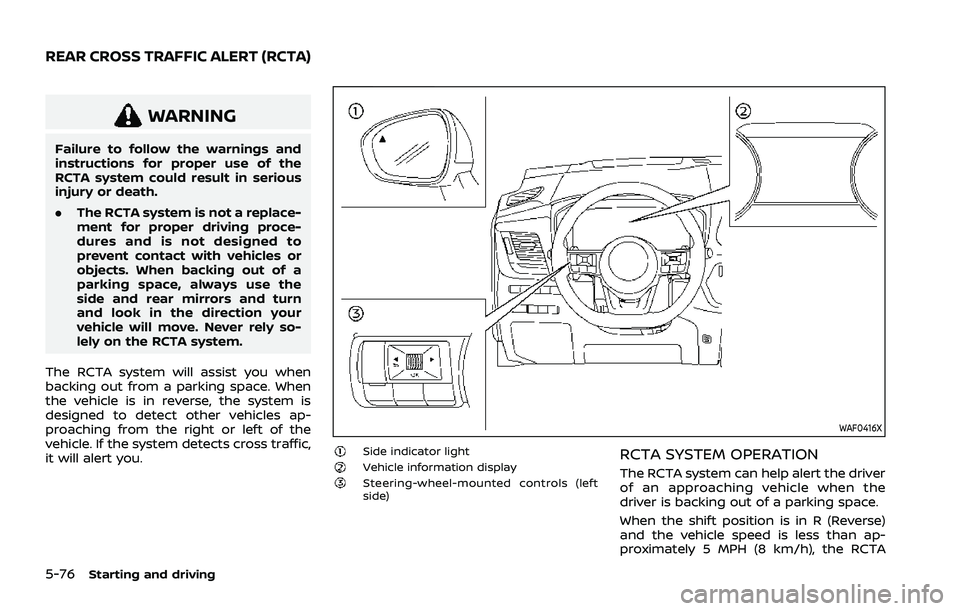
it will alert you.
WAF0416X
Side indicator lightVehicle information displaySteering-wheel-mounted controls (left
side)
RCTA SYSTEM OPERATION
The RCTA system can help alert the driver
of an approaching vehicle when the
driver is backing out of a parking space.
When the shift position is in R (Reverse)
and the vehicle speed is less than ap-
proximately 5 MPH (8 km/h), the RCTA
REAR CROSS TRAFFIC ALERT (RCTA)
Page 331 of 556
system is operational.
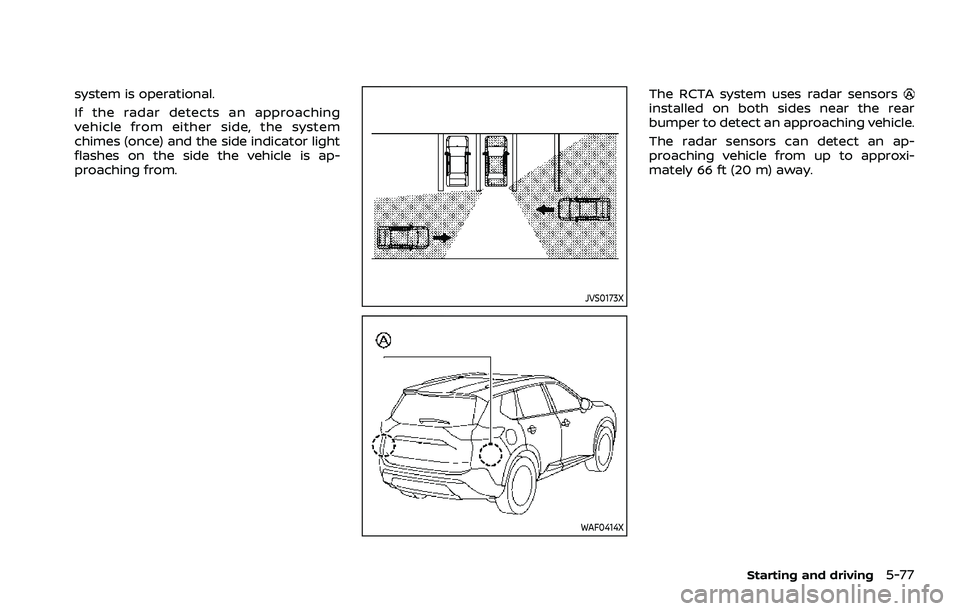
If the radar detects an approaching
vehicle from either side, the system
chimes (once) and the side indicator light
flashes on the side the vehicle is ap-
proaching from.
JVS0173X
WAF0414X
The RCTA system uses radar sensorsinstalled on both sides near the rear
bumper to detect an approaching vehicle.
The radar sensors can detect an ap-
proaching vehicle from up to approxi-
mately 66 ft (20 m) away.
Starting and driving5-77
Page 337 of 556
.The cruise indicator may blink when
the Cruise ON/OFF switch is turned
ON while pushing up the RES+, push-
ing down the SET-, or pushing the
CANCEL switch. To properly set the
cruise control system, perform the
following procedures.
CRUISE CONTROL OPERATIONS
The cruise control allows driving at
speeds above 25 MPH (40 km/h) without
keeping your foot on the accelerator
pedal.
The cruise control will automatically be
canceled if the vehicle slows down more
than approximately 8 MPH (13 km/h)
below the vehicle set speed. (“Unavailable:
Under specified speed” message appears
in the display.)
Moving the shift lever to the N (Neutral)
position will cancel the cruise control.
Turning on cruise control
Push the Cruise ON/OFF switch. The
cruise indicator and “Standby Push SET-
to active” message in the vehicle informa-
tion display will appear.
Setting cruising speed
1. Accelerate to the desired speed.
2. Push the SET- switch down or RES+
switch up and release it.
3. Take your foot off the accelerator pedal.
The vehicle will maintain the set speed. (“+
/- Change Set speed” message appears in
the display.)
NOTE:
If pushed the RES+ switch and released
it when there is no vehicle set speed,
the set speed is set to the current
vehicle speed.
Passing another vehicle:
Depress the accelerator pedal to accel-
erate. After releasing the accelerator
pedal, the vehicle will return to the pre-
viously set speed.
The vehicle may not maintain the set
speed when going up or down steep hills.
In such cases, drive without the cruise
control.
Resetting to slower speed:
Use any one of the following methods to
reset to a slower speed.
. Lightly tap the foot brake pedal. When
the vehicle reaches the desired speed,
push down and release the SET- switch.
. Push down and hold the SET- switch.
When the vehicle reaches the desired
speed, release the SET- switch.
. Quickly push down and release the
SET- switch. This will reduce the
vehicle speed by about 1 MPH (1.6
km/h).
Resetting to faster speed:
Use any one of the following methods to
reset to a faster speed.
. Depress the accelerator pedal. When
the vehicle reaches the desired speed,
push down and release the SET-
switch.
. Push up and hold the RES+ switch.
When the vehicle reaches the desired
speed, release the RES+ switch.
. Quickly push up and release the RES+
switch. This will increase the vehicle
speed by about 1 MPH (1.6 km/h).
Resuming at preset speed:
Push up and release the RES+ switch.
The vehicle will resume the last set
cruising speed when the vehicle speed is
over 25 MPH (40 km/h). (“Resumed” mes-
sage appears in the display.)
Starting and driving5-83
Page 341 of 556
matically.
. When your vehicle is at a standstill for
more than approximately 3 seconds
and the vehicle ahead begins to
accelerate, push up the RES+ switch
or lightly depress the accelerator ped-
al. The ICC system starts to follow the
vehicle ahead.
. Always check surroundings before
restarting the vehicle.
. For vehicles equipped with ProPILOT
Assist with Navi-link and only when on
a limited access freeway (as identified
in the navigation map data):
— The time the vehicle can remain
stopped and automatically restart
is extended from 3 seconds to 30
seconds.
— If a vehicle ahead cuts in or out of the lane ahead, the vehicle may not
automatically start when the traffic
ahead begins to move. You need to
push up the RES+ switch or lightly
depress the accelerator pedal to
follow the vehicle directly ahead
when it is safe to do so.
. When no vehicle is detected ahead
within the driver selected distance, the
vehicle travels at the speed set by the
driver. The speed must be above 20
MPH (30 km/h) to use this function. NOTE:
Even if the Automatic Emergency Brak-
ing (AEB) setting is turned off by the
driver using the “Settings” menu in the
vehicle information display, AEB will be
automatically turned on when ICC is
used.
2. Steering Assist
The Steering Assist function helps the
driver to keep the vehicle centered within
the traveling lane.
When there is no vehicle ahead, Steering
Assist is not available at speeds under 37
MPH (60 km/h).
Starting and driving5-87
Page 354 of 556
5-100Starting and driving
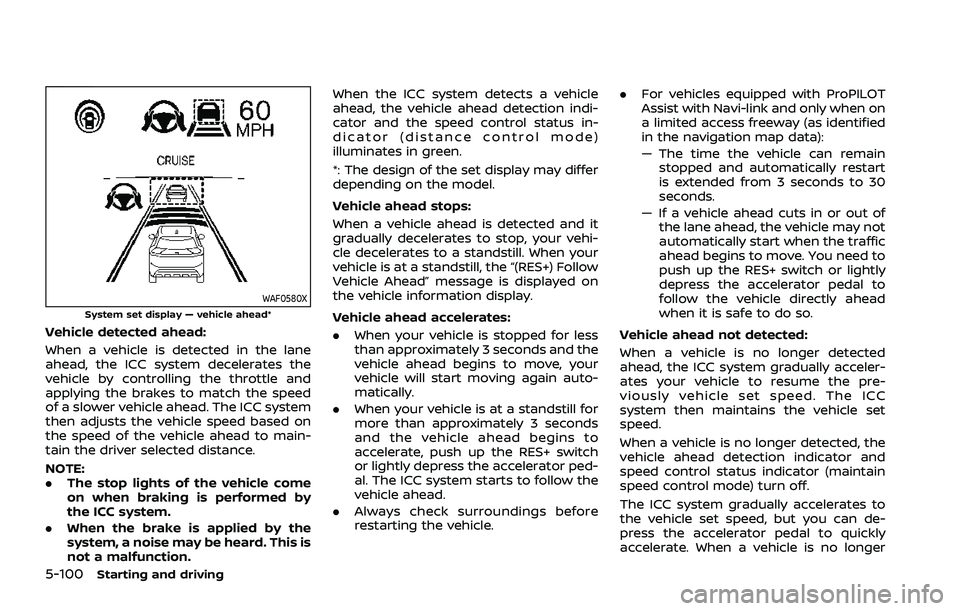
WAF0580XSystem set display — vehicle ahead*
Vehicle detected ahead:
When a vehicle is detected in the lane
ahead, the ICC system decelerates the
vehicle by controlling the throttle and
applying the brakes to match the speed
of a slower vehicle ahead. The ICC system
then adjusts the vehicle speed based on
the speed of the vehicle ahead to main-
tain the driver selected distance.
NOTE:
.The stop lights of the vehicle come
on when braking is performed by
the ICC system.
. When the brake is applied by the
system, a noise may be heard. This is
not a malfunction. When the ICC system detects a vehicle
ahead, the vehicle ahead detection indi-
cator and the speed control status in-
dicator (distance control mode)
illuminates in green.
*: The design of the set display may differ
depending on the model.
Vehicle ahead stops:
When a vehicle ahead is detected and it
gradually decelerates to stop, your vehi-
cle decelerates to a standstill. When your
vehicle is at a standstill, the “(RES+) Follow
Vehicle Ahead” message is displayed on
the vehicle information display.
Vehicle ahead accelerates:. When your vehicle is stopped for less
than approximately 3 seconds and the
vehicle ahead begins to move, your
vehicle will start moving again auto-
matically.
. When your vehicle is at a standstill for
more than approximately 3 seconds
and the vehicle ahead begins to
accelerate, push up the RES+ switch
or lightly depress the accelerator ped-
al. The ICC system starts to follow the
vehicle ahead.
. Always check surroundings before
restarting the vehicle. .
For vehicles equipped with ProPILOT
Assist with Navi-link and only when on
a limited access freeway (as identified
in the navigation map data):
— The time the vehicle can remain
stopped and automatically restart
is extended from 3 seconds to 30
seconds.
— If a vehicle ahead cuts in or out of the lane ahead, the vehicle may not
automatically start when the traffic
ahead begins to move. You need to
push up the RES+ switch or lightly
depress the accelerator pedal to
follow the vehicle directly ahead
when it is safe to do so.
Vehicle ahead not detected:
When a vehicle is no longer detected
ahead, the ICC system gradually acceler-
ates your vehicle to resume the pre-
viously vehicle set speed. The ICC
system then maintains the vehicle set
speed.
When a vehicle is no longer detected, the
vehicle ahead detection indicator and
speed control status indicator (maintain
speed control mode) turn off.
The ICC system gradually accelerates to
the vehicle set speed, but you can de-
press the accelerator pedal to quickly
accelerate. When a vehicle is no longer
Page 361 of 556
map data):
— The time the vehicle can re-main stopped and automati-
cally restart is extended from
3 seconds to 30 seconds.
— If a vehicle ahead cuts in or out of the lane ahead, the
vehicle may not automatically
start when the traffic ahead
begins to move. You need to
push up the RES+ switch or
lightly depress the accelerator
pedal to follow the vehicle
directly ahead when it is safe
to do so.
. Always check surroundings be-
fore restarting the vehicle.
. Always pay attention to the op-
eration of the vehicle and be
ready to manually control the
proper following distance. The
ICC system may not be able to
maintain the selected distance
between vehicles (following dis-
tance) or selected vehicle speed
under some circumstances.
. The ICC system does not detect
the following objects:
— Stationary or slow moving ve-
hicles (when your vehicle is approaching them)
— Pedestrians or objects in the roadway
— Oncoming vehicles in the same lane
— Motorcycles traveling offset in the travel lane
. The ICC system may not detect a
vehicle ahead in certain road,
weather or driving conditions. To
avoid accidents, never use the ICC
system under the following con-
ditions:
— On roads with heavy, high-
speed traffic or sharp curves
— On slippery road surfaces such as on ice or snow, etc.
— On a bumpy road surface, such as an uneven dirt road
— On steep downhill roads (the vehicle may go beyond the
vehicle set speed and fre-
quent braking may result in
overheating the brakes)
— On repeated uphill and down- hill roads
— During bad weather (rain, fog, snow, etc.) — When the sensor detection is
reduced (conditions such as
rain, snow, fog, dust storms,
sandstorms, and road spray
from other vehicles)
— When dirt, ice, snow or other material adhere to the radar
sensor area
— When traffic conditions make it difficult to keep a proper
distance between vehicles be-
cause of frequent accelera-
tion or deceleration
— When a complicated-shaped vehicle such as a car carrier
trailer or flatbed truck/trailer
is near the vehicle ahead
— When there is interference by other radar sources
— When excessively heavy bag- gage is loaded in the rear seat
or cargo area of your vehicle
— When towing a trailer or other vehicle
. In some road or traffic conditions,
a vehicle or object can unexpect-
edly come into the sensor detec-
tion zone and cause automatic
braking. Always stay alert and
Starting and driving5-107
Page 362 of 556
5-108Starting and driving
avoid using the ICC system where
not recommended in this warn-
ing section.
. The ICC system also uses a multi-
sensing front camera. The follow-
ing are some conditions in which
the camera may not properly
detect a vehicle and detection of
a vehicle ahead may be delayed:
— Poor visibility (conditions such
as rain, snow, fog, dust
storms, sandstorms, and road
spray from other vehicles)
— The camera area of the wind- shield is fogged up or covered
with dirt, water drops, ice,
snow, etc.
— Strong light (for example, sun- light or high beams from on-
coming vehicles) enters the
front camera
— A sudden change in bright- ness occurs (for example,
when the vehicle enters or
exits a tunnel or shaded area
or lightning flashes)
The ICC system is designed to automati-
cally check the radar sensor’s operation
within the limitations of the system The detection zone of the radar sensor is
limited. A vehicle ahead must be in the
detection zone for the ICC system to
maintain the selected distance from the
vehicle ahead. A vehicle ahead may move
outside of the detection zone due to its
position within the same lane of travel.
Motorcycles may not be detected in the
same lane ahead if they are traveling
offset from the center line of the lane. A
vehicle that is entering the lane ahead
may not be detected until the vehicle has
completely moved into the lane.
If this occurs, the ICC system may warn
you by blinking the system indicator and
sounding the chime. The driver may have
to manually control the proper distance
away from the vehicle traveling ahead.
Page 366 of 556
5-112Starting and driving
.Do not place reflective materials, such
as white paper or a mirror, on the
instrument panel. The reflection of
sunlight may adversely affect the
camera unit’s capability of detecting
the lane markers.
. Do not strike or damage the areas
around the camera unit. Do not touch
the camera lens or remove the screw
located on the camera unit.
If the camera unit is damaged due to an
accident, it is recommended that you visit
a NISSAN dealer.
For additional information, see “Common
troubleshooting guide” (P.5-39).
Radio frequency statement:
For USA
Type approval number:
FCC ID: NF3–FR5CPEC
User Manual statement according to
§15.19:
This device complies with Part 15 of the
FCC Rules.
Operation is subject to the following two
conditions:
1. this device may not cause harmful interference, and
2. this device must accept any interfer- ence received, including interference that may cause undesired operation.
User Manual statement according to
§15.21:
Changes or modifications made to this
equipment not expressly approved by
Robert BOSCH GmbH may void the FCC
authorization to operate this equipment.
User Manual statement according to
§15.105:
This equipment has been tested and
found to comply with the limits for a
Class A digital device, pursuant to Part 15
of the FCC Rules. These limits are de-
signed to provide reasonable protection
against harmful interference when the
equipment is operated in a commercial
environment. This equipment generates,
uses, and can radiate radio frequency
energy and, if not installed and used in
accordance with the instruction manual,
may cause harmful interference to radio
communications. Operation of this equip-
ment in a residential area is likely to cause
harmful interference in which case the
user will be required to correct the inter-
ference at his own expense.
RF Exposure Information according
2.1091/2.1093/OET bulletin 65:
Radiofrequency radiation exposure infor-
mation:
This equipment complies with FCC radia- tion exposure limits set forth for an
uncontrolled environment. This equip-
ment should be installed and operated
with minimum distance of 20 cm be-
tween the radiator and your body.
The transmitter must not be co-located
or operating in conjunction with any
other antenna or transmitter.
For Canada
Type approval number:
IC: 3387A-FR5CPEC
Legal warning for RF equipment:
This device complies with Industry Cana-
da licence-exempt RSS standard(s). Op-
eration is subject to the following two
conditions: (1) this device may not cause
interference, and (2) this device must
accept any interference, including inter-
ference that may cause undesired opera-
tion of the device.
Page 369 of 556
When the Steering Assist is in operation,
the Steering Assist status indicator, the
Steering Assist indicator, and the lane
marker indicatorandon the vehicle
information display turn green. A chime
sounds when the Steering Assist initially
activates.
When the Steering Assist deactivates, the
Steering Assist status indicator
, the
Steering Assist indicator, and the lane
marker indicatorandon the vehicle
information display turn gray and a chime
sounds twice.
Intelligent Lane Intervention (I-LI)
With the Steering Assist active, when a
curve or strong cross wind exceeds the
capabilities of the system and your vehi-
cle approaches either the left or the right
side of the traveling lane, the I-LI system
will flash the I-LI indicator on the vehicle
information display and provide steering
wheel vibration to alert the driver. The
warning chime will also sound (4 rapid
beeps). Then, the I-LI system automati-
cally applies the brakes for a short period
of time to help assist the driver to return
the vehicle to the center of the traveling
lane. This action is in addition to any
Steering Assist actions and the warnings
cannot be turned off. For more informa-
tion, see “Intelligent Lane Intervention (I-
LI)” (P.5-51).WAF0639X
Hands on detection
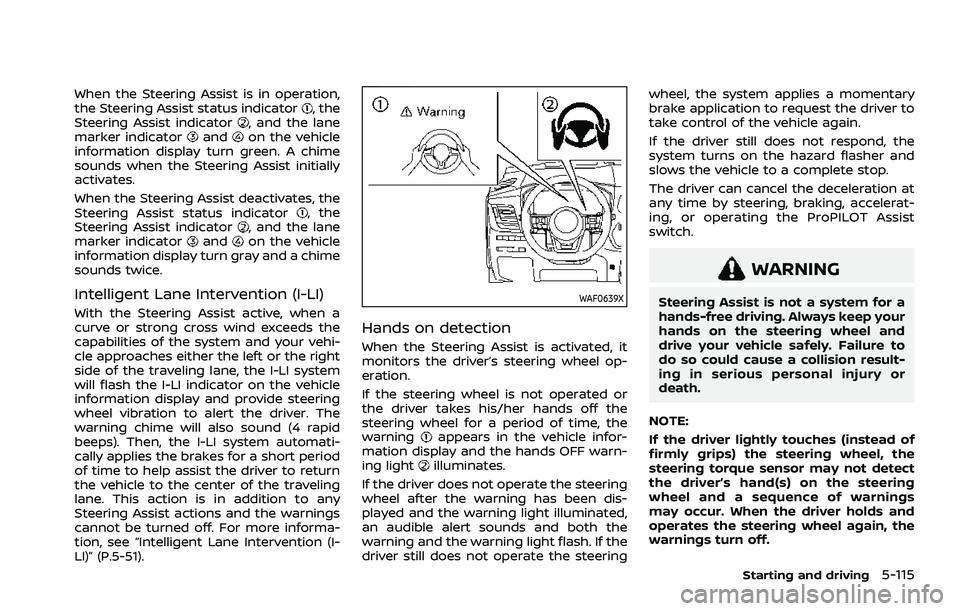
When the Steering Assist is activated, it
monitors the driver’s steering wheel op-
eration.
If the steering wheel is not operated or
the driver takes his/her hands off the
steering wheel for a period of time, the
warning
appears in the vehicle infor-
mation display and the hands OFF warn-
ing light
illuminates.
If the driver does not operate the steering
wheel after the warning has been dis-
played and the warning light illuminated,
an audible alert sounds and both the
warning and the warning light flash. If the
driver still does not operate the steering wheel, the system applies a momentary
brake application to request the driver to
take control of the vehicle again.
If the driver still does not respond, the
system turns on the hazard flasher and
slows the vehicle to a complete stop.
The driver can cancel the deceleration at
any time by steering, braking, accelerat-
ing, or operating the ProPILOT Assist
switch.
WARNING
Steering Assist is not a system for a
hands-free driving. Always keep your
hands on the steering wheel and
drive your vehicle safely. Failure to
do so could cause a collision result-
ing in serious personal injury or
death.
NOTE:
If the driver lightly touches (instead of
firmly grips) the steering wheel, the
steering torque sensor may not detect
the driver’s hand(s) on the steering
wheel and a sequence of warnings
may occur. When the driver holds and
operates the steering wheel again, the
warnings turn off.
Starting and driving5-115