light NISSAN ROGUE 2021 Owner´s Manual
[x] Cancel search | Manufacturer: NISSAN, Model Year: 2021, Model line: ROGUE, Model: NISSAN ROGUE 2021Pages: 556, PDF Size: 2.7 MB
Page 278 of 556
5-24Starting and driving
1M(1st):
Use this position when climbing steep
hills slowly or driving slowly through deep
snow, or for maximum engine braking on
steep downhill grades.
. Remember not to drive at high speeds
for extended periods of time in lower
than 8th gear. This reduces fuel econ-
omy.
. Pulling the same paddle shifter twice
will shift the ranges in succession.
However, if this motion is rapidly done,
the second shifting may not be com-
pleted properly.
. In the manual shift mode, the trans-
mission may not shift to the se-
lected gear. This helps maintain
driving performance and reduces
the chance of vehicle damage or
loss of control.
. When this situation occurs, the Con-
tinuously Variable Transmission
(CVT) position indicator will blink
and the chime will sound.
. In the manual shift mode, the trans-
mission may shift up automatically
to a higher range than selected if the
engine speed is too high. When the
vehicle speed decreases, the trans-
mission automatically shifts down
and shifts to 1st gear before the
vehicle comes to a stop. .
CVT operation is limited to automatic
drive mode when CVT fluid tempera-
ture is extremely low even if manual
shift mode is selected. This is not a
malfunction. When CVT fluid warms
up, manual shift mode can be se-
lected.
. When the CVT fluid temperature is
high, the shift range may upshift in
lower rpm than usual. This is not a
malfunction.
Accelerator downshift - in D (Drive)
position -
For passing or climbing hills, depress the
accelerator pedal to the floor. This shifts
the transmission down into a lower gear,
depending on the vehicle speed.
High fluid temperature protection
mode
This transmission has a high fluid tem-
perature protection mode. If the fluid
temperature becomes too high, (for ex-
ample, when climbing steep grades in
high temperatures with heavy loads, such
as when towing a trailer), engine power
and, under some conditions, vehicle
speed will be decreased automatically to
reduce the chance of transmission da-
mage. Vehicle speed can be controlled
with the accelerator pedal, but the engine and vehicle speed may be limited.
Fail-safe
When the fail-safe operation occurs, the
Continuously Variable Transmission will
not be shifted into the selected driving
position.
If the vehicle is driven under extreme
conditions, such as excessive wheel
spinning and subsequent hard braking,
the fail-safe system may be activated.
The Malfunction Indicator Light (MIL)
may come on to indicate the fail-safe
mode is activated. For additional infor-
mation, refer to “Malfunction Indicator
Light (MIL)” (P.2-19). This will occur even
if all electrical circuits are functioning
properly. In this case, place the ignition
switch in the OFF position and wait for
10 seconds. Then place the ignition
switch back in the ON position. The
vehicle should return to its normal
operating condition. (The MIL may be
illuminated even when the vehicle has
returned to its normal operating condi-
tion.) If it does not return to its normal
operating condition, have the transmis-
sion checked and repaired, if necessary,
by a NISSAN dealer.
Page 279 of 556
WARNING
When the high fluid temperature
protection mode or fail-safe opera-
tion occurs, vehicle speed may be
gradually reduced. The reduced
speed may be lower than other
traffic, which could increase the
chance of a collision. Be especially
careful when driving. If necessary,
pull to the side of the road at a safe
place and allow the transmission to
return to normal operation, or have it
repaired if necessary.
WARNING
.Never drive the vehicle with the
parking brake applied. The brake
will overheat and fail to operate
and will lead to an accident.
. Never release the parking brake
from outside the vehicle. If the
vehicle moves, it will be impossi-
ble to push the foot brake pedal
and will lead to an accident.
. Never use the shift lever in place
of the parking brake. When park-
ing, be sure the parking brake is
fully applied.
. To help avoid risk of injury or
death through unintended opera-
tion of the vehicle and/or its
systems, do not leave children,
people who require the assis-
tance of others or pets unat-
tended in your vehicle.
Additionally, the temperature in-
side a closed vehicle on a warm
day can quickly become high
enough to cause a significant risk
of injury or death to people and
pets.
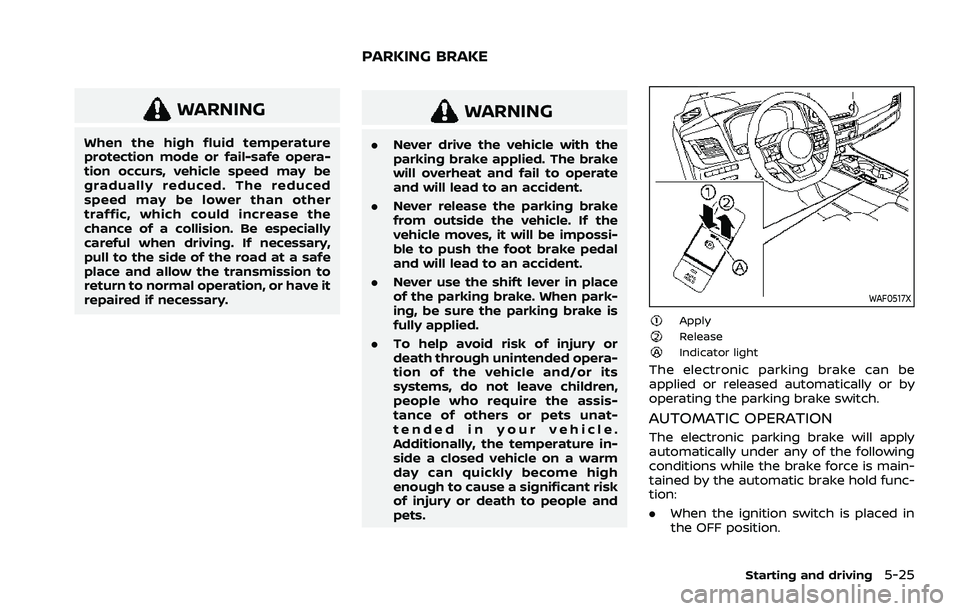
WAF0517X
ApplyReleaseIndicator light
The electronic parking brake can be
applied or released automatically or by
operating the parking brake switch.
AUTOMATIC OPERATION
The electronic parking brake will apply
automatically under any of the following
conditions while the brake force is main-
tained by the automatic brake hold func-
tion:
.When the ignition switch is placed in
the OFF position.
Starting and driving5-25
PARKING BRAKE
Page 280 of 556
5-26Starting and driving
.When the shift position is placed in the
P (Park) position.
. When the driver’s door is opened.
. When the driver’s seat belt is unfas-
tened.
The electronic parking brake is automati-
cally released as soon as the vehicle
starts while the accelerator pedal is
depressed under the following condi-
tions.
. While the engine is running.
. When the shift position is in the D
(Drive) or R (Reverse) position.
. When the driver’s door is closed.
The electronic parking brake is automati-
cally released within 5 seconds after the
shift position is placed in the D (Drive) or R
(Reverse) position even if the driver’s door
is opened. Be sure to close the door
before starting the vehicle.
WARNING
. When the automatic brake hold
function is activated, the electro-
nic parking brake will not be
automatically applied when the
engine is stopped without using
the ignition switch (for example,
by engine stalling). Without the vehicle stationary,
the electronic parking brake will
not be automatically applied
even if the engine is turned off
with the ignition switch.
. Before leaving the vehicle, place
the shift position in the P (Park)
position and check that the elec-
tronic parking brake warning
light is illuminated to confirm
that the electronic parking brake
is applied. The electronic parking
brake warning light will remain
on for a period of time after the
driver’s door is locked.
CAUTION
When parking in an area where the
outside temperature is below 32°F
(0°C), the electronic parking brake, if
applied, may freeze in place and may
be difficult to release.
For safe parking, it is recommended
that you place the shift position in
the P (Park) position and securely
block the wheels. NOTE:
.
To keep the electronic parking brake
released after the engine is turned
off, place the ignition switch in the
OFF position, depress the brake
pedal and push down the parking
brake switch before opening the
driver’s door.
. If a malfunction occurs in the elec-
tronic parking brake system (for
example, due to battery discharge),
it is recommended to contact a
NISSAN dealer.
. Under the following conditions, the
electronic parking brake will auto-
matically be applied and the brake
force of the automatic brake hold
will be released.
—The braking force is applied by
the automatic brake hold function
for 3 minutes or longer.
— The vehicle is placed in the P
(Park) position.
— The driver’s seat belt is unfas-
tened.
— The driver’s door is opened.
— The ignition switch is placed in
the OFF position.
— The electronic parking brake is
applied manually.
Page 281 of 556
—If a malfunction occurs in the
automatic brake hold function.
. Make sure that the electronic park-
ing brake system warning light (yel-
low) is OFF before starting the
vehicle.
MANUAL OPERATION
To apply: When the vehicle is stopped,
pull the parking brake switchup. (The
electronic parking brake will apply even if
the ignition switch is placed in the OFF
position.) The indicator light
on the
switch and the electronic parking brake
warning light PARK or
(red) will
illuminate.
To release: With the ignition switch in the
ON position, depress the brake pedal and
push the parking brake switch down
.
The indicator lightand the electronic
parking brake warning light (red) will turn
off.
Before driving, check that the electronic
parking brake warning light (red) turns
off. For additional information, see “Warn-
ing lights, indicator lights and audible
reminders” (P.2-13).
NOTE:
. While the electronic parking brake is
applied or released, an operating
sound is heard from the lower side
of the rear seat. This is normal and does not indicate a malfunction.
. When the electronic parking brake is
frequently applied and released in a
short period of time, the electronic
parking brake system warning light
(yellow) may blink and the electronic
parking brake may not operate in
order to prevent the electronic park-
ing brake system from overheating.
If this occurs, operate the parking
brake switch again after waiting
approximately 1 minute.
. If the electronic parking brake must
be applied while driving in an emer-
gency, pull up and hold the parking
brake switch. When you release the
parking brake switch, the electronic
parking brake will be released.
. While pulling up the parking brake
switch during driving, the electronic
parking brake is applied and a chime
sounds. The electronic parking
brake warning light (red) and the
indicator light on the parking brake
switch illuminate. This does not in-
dicate a malfunction. The electronic
parking brake warning light (red)
and the indicator light on the park-
ing brake switch will turn off when
the electronic parking brake is re-
leased. .
When pulling the parking brake
switch up with the ignition switch
in the OFF position, the indicator
light on the parking brake switch
will continue to illuminate for a short
period of time.
When towing a trailer
Depending on the weight of the vehicle
and trailer and the steepness of the slope,
there may be a tendency for the vehicle
to move backwards when starting from a
standstill. When this occurs, you can use
the parking brake switch in the same way
as a conventional lever type parking
brake.
Before starting on sloping roads when
towing a trailer, be sure to read the
following to prevent the vehicle from
moving backward unintentionally.
.Release the parking brake switch as
soon as the engine is delivering en-
ough torque to the wheels.
Starting and driving5-27
Page 282 of 556
5-28Starting and driving
The automatic brake hold function main-
tains the braking force without the driver
having to depress the brake pedal when
the vehicle is stopped at a traffic light or
intersection. As soon as the driver de-
presses the accelerator pedal again, the
automatic brake hold function is deacti-
vated and the braking force is released.
The operating status of the automatic
brake hold can be displayed on the
vehicle information display.
WARNING
.The automatic brake hold func-
tion is not designed to hold the
vehicle on a steep hill or slippery
road. Never use the automatic
brake hold when the vehicle is
stopped on a steep hill or slippery
road. Failure to do so may cause
the vehicle to move.
. The automatic brake hold warn-
ing may appear in the vehicle
information display to request
that the driver retake control by
depressing the brake pedal.
. When the automatic brake hold
function is activated but fails to
maintain the vehicle at a stand-
still, depress the brake pedal to
stop the vehicle. If the vehicle unexpectedly moves due to out-
side conditions, the chime may
sound and automatic brake hold
warning may illuminate in the
vehicle information display.
. Be sure to deactivate the auto-
matic brake hold function when
using a car wash or towing your
vehicle.
. Make sure to push the park but-
ton to shift to the P (Park) posi-
tion and apply the electronic
parking brake when parking your
vehicle, riding on or off the vehi-
cle, or loading luggage. Failure to
do so could cause the vehicle to
move or roll away unexpectedly
and result in serious personal
injury or property damage.
. If any of the following conditions
occur, the automatic brake hold
function may not function. Have
the system checked promptly. It
is recommended that you visit a
NISSAN dealer for this service.
Failure to operate the vehicle in
accordance with these conditions
could cause the vehicle to move
or roll away unexpectedly and
result in serious personal injury
or property damage. — A warning message appears
in the vehicle information dis-
play.
— The indicator light on the automatic brake hold switch
does not illuminate when the
switch is pushed.
. The automatic brake hold func-
tion will not be activated if the
slip indicator light, electronic
parking brake system warning
light or master warning light illu-
minates and the Chassis Control
System Error warning message
appears in the vehicle informa-
tion display.
. To maintain the braking force to
keep the vehicle to a standstill, a
noise may be heard. This is not a
malfunction.
AUTOMATIC BRAKE HOLD
Page 283 of 556
WAF0516X
HOW TO ACTIVATE/DEACTIVATE
THE AUTOMATIC BRAKE HOLD
FUNCTION
How to activate the automatic
brake hold function
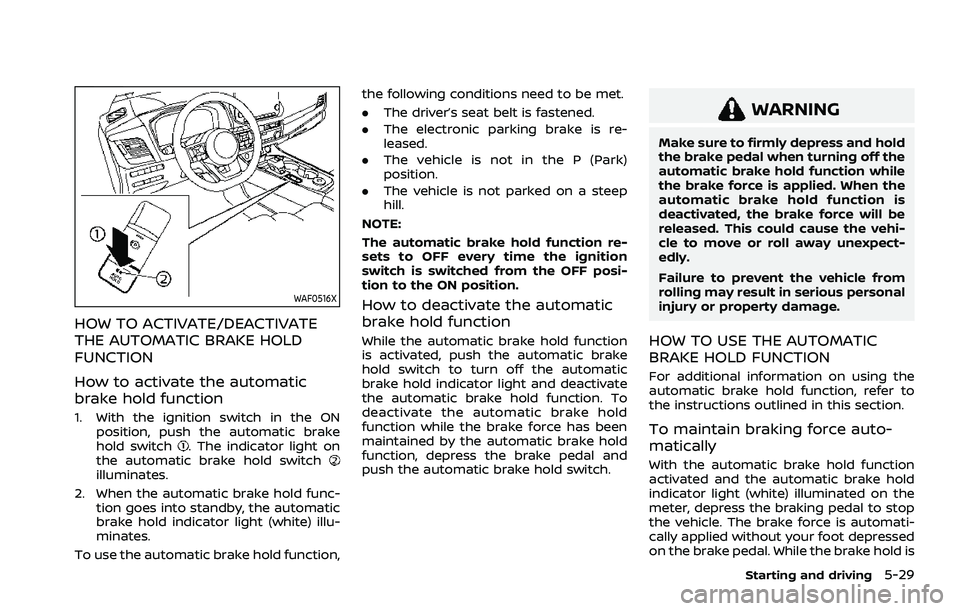
1. With the ignition switch in the ONposition, push the automatic brake
hold switch
. The indicator light on
the automatic brake hold switch
illuminates.
2. When the automatic brake hold func- tion goes into standby, the automatic
brake hold indicator light (white) illu-
minates.
To use the automatic brake hold function, the following conditions need to be met.
.
The driver’s seat belt is fastened.
. The electronic parking brake is re-
leased.
. The vehicle is not in the P (Park)
position.
. The vehicle is not parked on a steep
hill.
NOTE:
The automatic brake hold function re-
sets to OFF every time the ignition
switch is switched from the OFF posi-
tion to the ON position.
How to deactivate the automatic
brake hold function
While the automatic brake hold function
is activated, push the automatic brake
hold switch to turn off the automatic
brake hold indicator light and deactivate
the automatic brake hold function. To
deactivate the automatic brake hold
function while the brake force has been
maintained by the automatic brake hold
function, depress the brake pedal and
push the automatic brake hold switch.
WARNING
Make sure to firmly depress and hold
the brake pedal when turning off the
automatic brake hold function while
the brake force is applied. When the
automatic brake hold function is
deactivated, the brake force will be
released. This could cause the vehi-
cle to move or roll away unexpect-
edly.
Failure to prevent the vehicle from
rolling may result in serious personal
injury or property damage.
HOW TO USE THE AUTOMATIC
BRAKE HOLD FUNCTION
For additional information on using the
automatic brake hold function, refer to
the instructions outlined in this section.
To maintain braking force auto-
matically
With the automatic brake hold function
activated and the automatic brake hold
indicator light (white) illuminated on the
meter, depress the braking pedal to stop
the vehicle. The brake force is automati-
cally applied without your foot depressed
on the brake pedal. While the brake hold is
Starting and driving5-29
Page 284 of 556
5-30Starting and driving
maintained, the automatic brake hold
indicator light (green) illuminates on the
meter.
To start the vehicle from a stand-
still
With the vehicle not in the P (Park) or the
shift lever not in the N (Neutral) position,
depress the accelerator pedal while the
brake force is maintained. The brake force
will automatically be released to restart
the vehicle. The automatic brake hold
indicator light (white) on the meter illu-
minates and the automatic brake hold
returns to standby.
Parking
When the park button is pushed to
engage the P (Park) position with the
brake force maintained by the automatic
brake hold function, the electronic park-
ing brake will automatically be applied
and the brake force of the automatic
brake hold will be released. The auto-
matic brake hold indicator light turns off.
When the electronic parking brake is
applied with the brake force maintained
by the automatic brake hold function, the
brake force of the automatic brake hold
will be released. The automatic brake
hold indicator light turns off.NOTE:
.
Under the following conditions, the
electronic parking brake will auto-
matically be applied and the brake
force of the automatic brake hold
will be released:
—The braking force is applied by
the automatic brake hold function
for 3 minutes or longer.
— The driver’s seat belt is unfas-
tened.
— The ignition switch is placed in
the OFF position.
— If a malfunction occurs in the
automatic brake hold function.
— The vehicle is placed in the P
(Park) position.
— The driver’s door is opened.
— The electronic parking brake is
applied manually.
. When the vehicle stops, but the
brake force is not automatically
applied, depress the brake pedal
firmly until the automatic brake hold
indicator light (green) illuminates.
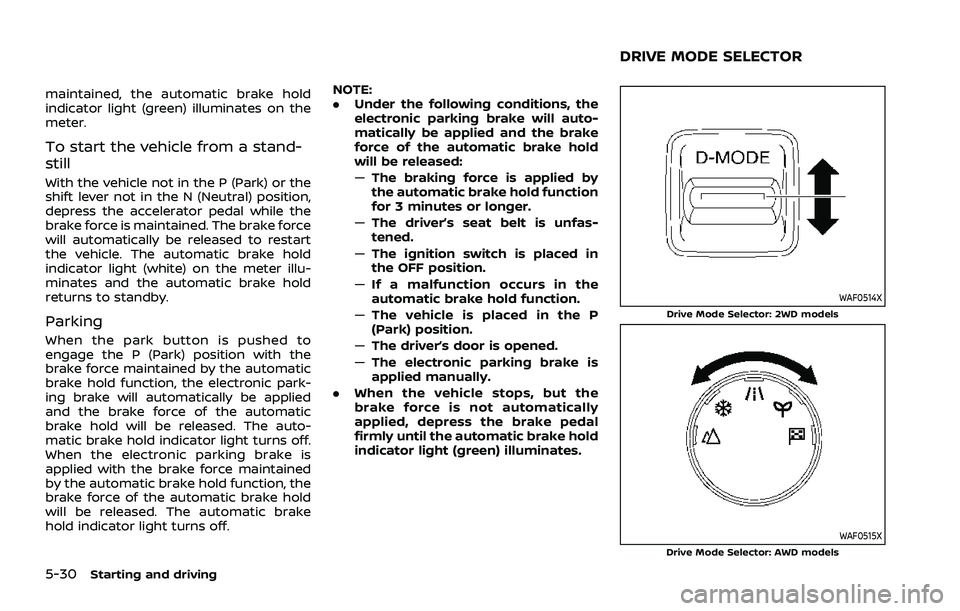
WAF0514XDrive Mode Selector: 2WD models
WAF0515XDrive Mode Selector: AWD models
DRIVE MODE SELECTOR
Page 287 of 556
Tire Pres ECO advice
The “Tire Pres ECO advice” is a function to
show an ECO advice message in the
vehicle information display when low tire
pressure is detected. To activate or deac-
tivate this function, see “ECO Mode
Setting” (P.2-26).
When the setting is ON, the ECO Drive
Report display shows "See Tire Pres-
sures". You can switch the display to the
Tire Pressures display by pushing the
button on the steering wheel.
WAF0126X
ECO Pedal Guide function
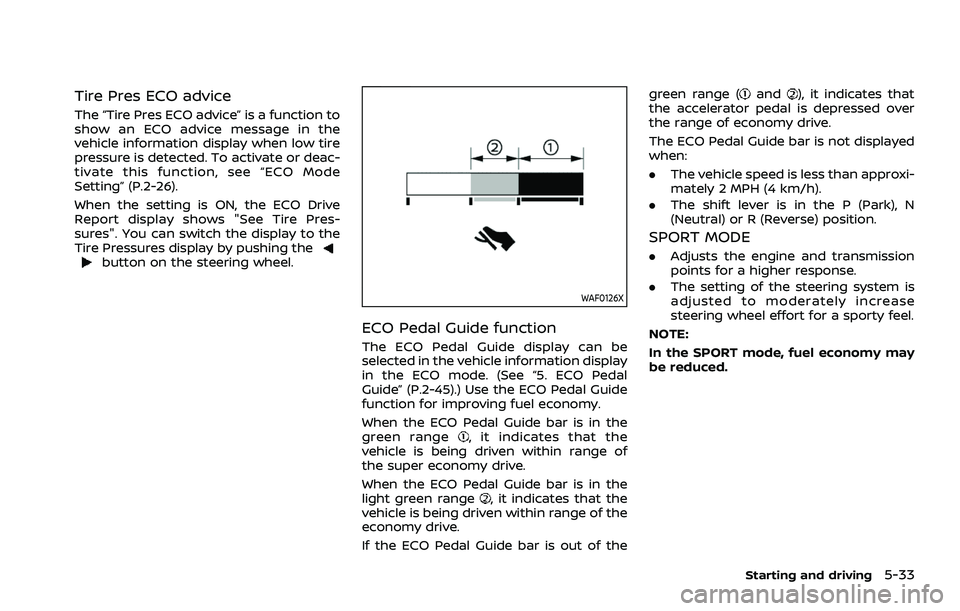
The ECO Pedal Guide display can be
selected in the vehicle information display
in the ECO mode. (See “5. ECO Pedal
Guide” (P.2-45).) Use the ECO Pedal Guide
function for improving fuel economy.
When the ECO Pedal Guide bar is in the
green range
, it indicates that the
vehicle is being driven within range of
the super economy drive.
When the ECO Pedal Guide bar is in the
light green range
, it indicates that the
vehicle is being driven within range of the
economy drive.
If the ECO Pedal Guide bar is out of the green range (
and), it indicates that
the accelerator pedal is depressed over
the range of economy drive.
The ECO Pedal Guide bar is not displayed
when:
. The vehicle speed is less than approxi-
mately 2 MPH (4 km/h).
. The shift lever is in the P (Park), N
(Neutral) or R (Reverse) position.
SPORT MODE
.Adjusts the engine and transmission
points for a higher response.
. The setting of the steering system is
adjusted to moderately increase
steering wheel effort for a sporty feel.
NOTE:
In the SPORT mode, fuel economy may
be reduced.
Starting and driving5-33
Page 290 of 556
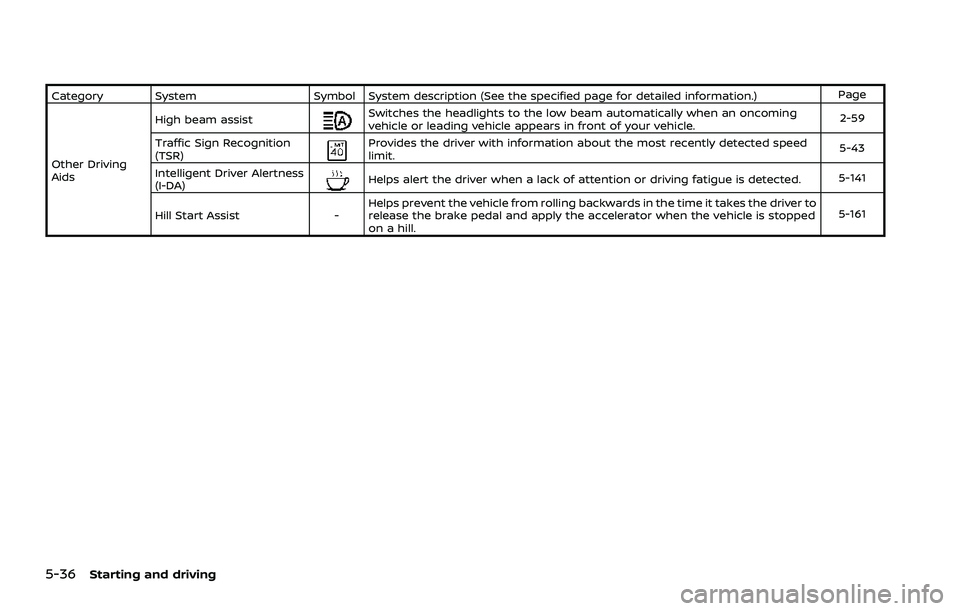
5-36Starting and driving
Category SystemSymbol System description (See the specified page for detailed information.) Page
Other Driving
Aids High beam assist
Switches the headlights to the low beam automatically when an oncoming
vehicle or leading vehicle appears in front of your vehicle.
2-59
Traffic Sign Recognition
(TSR)
Provides the driver with information about the most recently detected speed
limit. 5-43
Intelligent Driver Alertness
(I-DA)
Helps alert the driver when a lack of attention or driving fatigue is detected. 5-141
Hill Start Assist -Helps prevent the vehicle from rolling backwards in the time it takes the driver to
release the brake pedal and apply the accelerator when the vehicle is stopped
on a hill. 5-161
Page 293 of 556
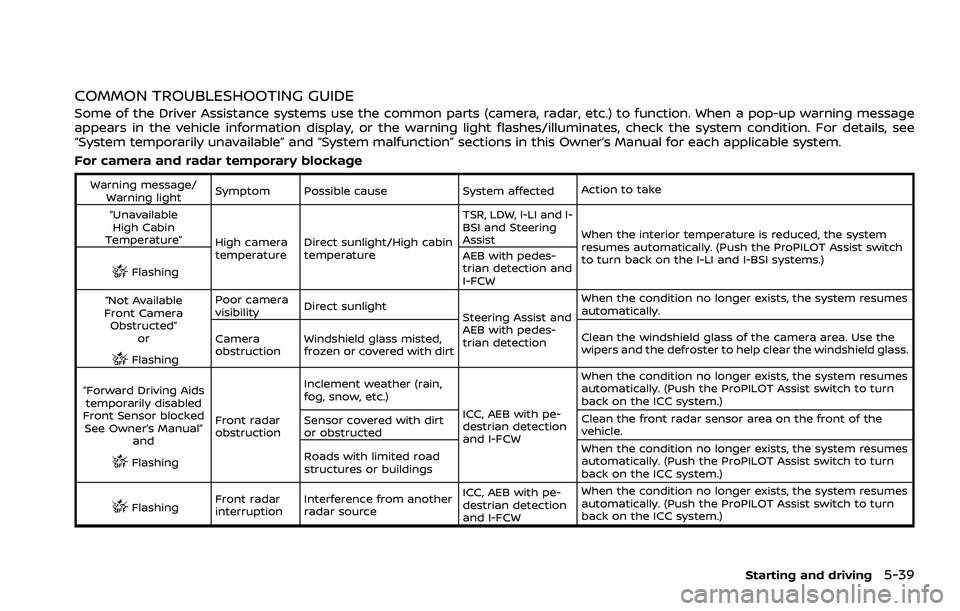
COMMON TROUBLESHOOTING GUIDE
Some of the Driver Assistance systems use the common parts (camera, radar, etc.) to function. When a pop-up warning message
appears in the vehicle information display, or the warning light flashes/illuminates, check the system condition. For details, see
“System temporarily unavailable” and “System malfunction” sections in this Owner’s Manual for each applicable system.
For camera and radar temporary blockage
Warning message/Warning light Symptom Possible cause System affected
Action to take
“Unavailable High Cabin
Temperature” High camera
temperatureDirect sunlight/High cabin
temperature TSR, LDW, I-LI and I-
BSI and Steering
Assist
When the interior temperature is reduced, the system
resumes automatically. (Push the ProPILOT Assist switch
to turn back on the I-LI and I-BSI systems.)
Flashing AEB with pedes-
trian detection and
I-FCW
“Not Available
Front Camera Obstructed”
or
Flashing Poor camera
visibility
Direct sunlight
Steering Assist and
AEB with pedes-
trian detectionWhen the condition no longer exists, the system resumes
automatically.
Camera
obstruction Windshield glass misted,
frozen or covered with dirt Clean the windshield glass of the camera area. Use the
wipers and the defroster to help clear the windshield glass.
“Forward Driving Aids temporarily disabled
Front Sensor blocked See Owner’s Manual” and
Flashing Front radar
obstruction Inclement weather (rain,
fog, snow, etc.)
ICC, AEB with pe-
destrian detection
and I-FCWWhen the condition no longer exists, the system resumes
automatically. (Push the ProPILOT Assist switch to turn
back on the ICC system.)
Sensor covered with dirt
or obstructed Clean the front radar sensor area on the front of the
vehicle.
Roads with limited road
structures or buildings When the condition no longer exists, the system resumes
automatically. (Push the ProPILOT Assist switch to turn
back on the ICC system.)
Flashing
Front radar
interruption Interference from another
radar source ICC, AEB with pe-
destrian detection
and I-FCWWhen the condition no longer exists, the system resumes
automatically. (Push the ProPILOT Assist switch to turn
back on the ICC system.)
Starting and driving5-39