ABS NISSAN ROGUE 2021 Owner´s Manual
[x] Cancel search | Manufacturer: NISSAN, Model Year: 2021, Model line: ROGUE, Model: NISSAN ROGUE 2021Pages: 556, PDF Size: 2.7 MB
Page 410 of 556
5-156Starting and driving
BRAKE ASSIST
When the force applied to the brake pedal
exceeds a certain level, the Brake Assist is
activated generating greater braking
force than a conventional brake booster
even with light pedal force.
WARNING
The Brake Assist is only an aid to
assist braking operation and is not a
collision warning or avoidance de-
vice. It is the driver’s responsibility to
stay alert, drive safely and be in
control of the vehicle at all times.
ANTI-LOCK BRAKING SYSTEM (ABS)
WARNING
.The Anti-lock Braking System
(ABS) is a sophisticated device,
but it cannot prevent accidents
resulting from careless or dan-
gerous driving techniques. It can
help maintain vehicle control dur-
ing braking on slippery surfaces.
Remember that stopping dis-
tances on slippery surfaces will
be longer than on normal sur- faces even with ABS. Stopping
distances may also be longer on
rough, gravel or snow covered
roads, or if you are using tire
chains. Always maintain a safe
distance from the vehicle in front
of you. Ultimately, the driver is
responsible for safety.
. Tire type and condition may also
affect braking effectiveness.
— When replacing tires, install
the specified size of tires on
all four wheels.
— When installing a spare tire, make sure that it is the proper
size and type as specified on
the Tire and Loading Informa-
tion label. See “Tire and Load-
ing Information label” (P.10-11)
of this manual.
— For detailed information, see “Wheels and tires” (P.8-25) of
this manual.
The Anti-lock Braking System (ABS) con-
trols the brakes so the wheels do not lock
during hard braking or when braking on
slippery surfaces. The system detects the
rotation speed at each wheel and varies
the brake fluid pressure to prevent each
wheel from locking and sliding. By pre- venting each wheel from locking, the
system helps the driver maintain steering
control and helps to minimize swerving
and spinning on slippery surfaces.
Using the system
Depress the brake pedal and hold it down.
Depress the brake pedal with firm steady
pressure, but do not pump the brakes.
The ABS will operate to prevent the
wheels from locking up. Steer the vehicle
to avoid obstacles.
WARNING
Do not pump the brake pedal. Doing
so may result in increased stopping
distances.
Self-test feature
The ABS includes electronic sensors, elec-
tric pumps, hydraulic solenoids and a
computer. The computer has a built-in
diagnostic feature that tests the system
each time you start the engine and move
the vehicle at a low speed in forward or
reverse. When the self-test occurs, you
may hear a “clunk” noise and/or feel a
pulsation in the brake pedal. This is
normal and does not indicate a malfunc-
tion. If the computer senses a malfunc-
BRAKE ASSIST
Page 411 of 556
tion, it switches the ABS off and illumi-
nates the ABS warning light on the
instrument panel. The brake system then
operates normally, but without anti-lock
assistance.
If the ABS warning light illuminates during
the self-test or while driving, have the
vehicle checked. It is recommended you
visit a NISSAN dealer for this service.
Normal operation
The ABS operates at speeds above 3 to 6
MPH (5 to 10 km/h). The speed varies
according to road conditions.
When the ABS senses that one or more
wheels are close to locking up, the
actuator rapidly applies and releases
hydraulic pressure. This action is similar
to pumping the brakes very quickly. You
may feel a pulsation in the brake pedal
and hear a noise from under the hood or
feel a vibration from the actuator when it
is operating. This is normal and indicates
that the ABS is operating properly. How-
ever, the pulsation may indicate that road
conditions are hazardous and extra care
is required while driving.The Vehicle Dynamic Control (VDC) sys-
tem uses various sensors to monitor
driver inputs and vehicle motion. Under
certain driving conditions, the VDC sys-
tem helps to perform the following func-
tions.
.
Controls brake pressure to reduce
wheel slip on one slipping drive wheel
so power is transferred to a non
slipping drive wheel on the same axle.
. Controls brake pressure and engine
output to reduce drive wheel slip
based on vehicle speed (traction con-
trol function).
. Controls brake pressure at individual
wheels and engine output to help the
driver maintain control of the vehicle
in the following conditions:
— understeer (vehicle tends to not
follow the steered path despite
increased steering input)
— oversteer (vehicle tends to spin due to certain road or driving condi-
tions).
The VDC system can help the driver to
maintain control of the vehicle, but it
cannot prevent loss of vehicle control in
all driving situations.
When the VDC system operates, the slip
indicator light
in the instrument panel
flashes so note the following: .
The road may be slippery or the
system may determine some action
is required to help keep the vehicle on
the steered path.
. You may feel a pulsation in the brake
pedal and hear a noise or vibration
from under the hood. This is normal
and indicates that the VDC system is
working properly.
. Adjust your speed and driving to the
road conditions.
If a malfunction occurs in the system, the
slip indicator light
illuminates in the
instrument panel. The VDC system auto-
matically turns off.
The vehicle information display is used to
turn off the VDC system. The VDC off
indicator
illuminates to indicate the
VDC system is off. When the VDC system
is turned off, the VDC system still oper-
ates to prevent one drive wheel from
slipping by transferring power to a non
slipping drive wheel. The slip indicator
light
flashes if this occurs. All other
VDC functions are off, and the slip in-
dicator light
will not flash. The VDC
system is automatically reset to on when
the ignition switch is placed in the off
position then back to the on position.
See “Slip indicator light” (P.2-20) and
“Vehicle Dynamic Control (VDC) off indi-
cator light” (P.2-20).
Starting and driving5-157
VEHICLE DYNAMIC CONTROL (VDC) SYSTEM
Page 412 of 556
5-158Starting and driving
The computer has a built-in diagnostic
feature that tests the system each time
you start the engine and move the vehicle
forward or in reverse at a slow speed.
When the self-test occurs, you may hear a
“clunk” noise and/or feel a pulsation in the
brake pedal. This is normal and is not an
indication of a malfunction.
WARNING
.The VDC system is designed to
help improve driving stability but
does not prevent accidents due
to abrupt steering operation at
high speeds or by careless or
dangerous driving techniques.
Reduce vehicle speed and be
especially careful when driving
and cornering on slippery sur-
faces and always drive carefully.
. Do not modify the vehicle’s sus-
pension. If suspension parts such
as shock absorbers, struts,
springs, stabilizer bars, bushings
and wheels are not NISSAN re-
commended for your vehicle or
are extremely deteriorated, the
VDC system may not operate
properly. This could adversely
affect vehicle handling perfor-
mance, and the slip indicator light
may illuminate.
. If brake related parts such as
brake pads, rotors and calipers
are not NISSAN recommended or
are extremely deteriorated, the
VDC system may not operate
properly and the slip indicator
light
may illuminate.
. If engine control related parts are
not NISSAN recommended or are
extremely deteriorated, the slip
indicator light
may illuminate.
. When driving on extremely in-
clined surfaces such as higher
banked corners, the VDC system
may not operate properly and the
slip indicator light
may illu-
minate. Do not drive on these
types of roads.
. When driving on an unstable sur-
face such as a turntable, ferry,
elevator or ramp, the slip indica-
tor light
may illuminate. This
is not a malfunction. Restart the
engine after driving onto a stable
surface.
. If wheels or tires other than the
NISSAN recommended ones are
used, the VDC system may not
operate properly and the slip
indicator light
may illuminate. .
The VDC system is not a substi-
tute for winter tires or tire chains
on a snow covered road.
HOW TO TURN OFF THE VDC SYS-
TEM
The vehicle should be driven with the
Vehicle Dynamic Control (VDC) system ON
for most driving conditions.
When the vehicle is stuck in mud or snow,
the VDC system reduces the engine out-
put to reduce wheel spin. The engine
speed will be reduced even if the accel-
erator is depressed to the floor. If max-
imum engine power is needed to free a
stuck vehicle, turn the VDC system off.
Page 413 of 556
WAF0521XExample
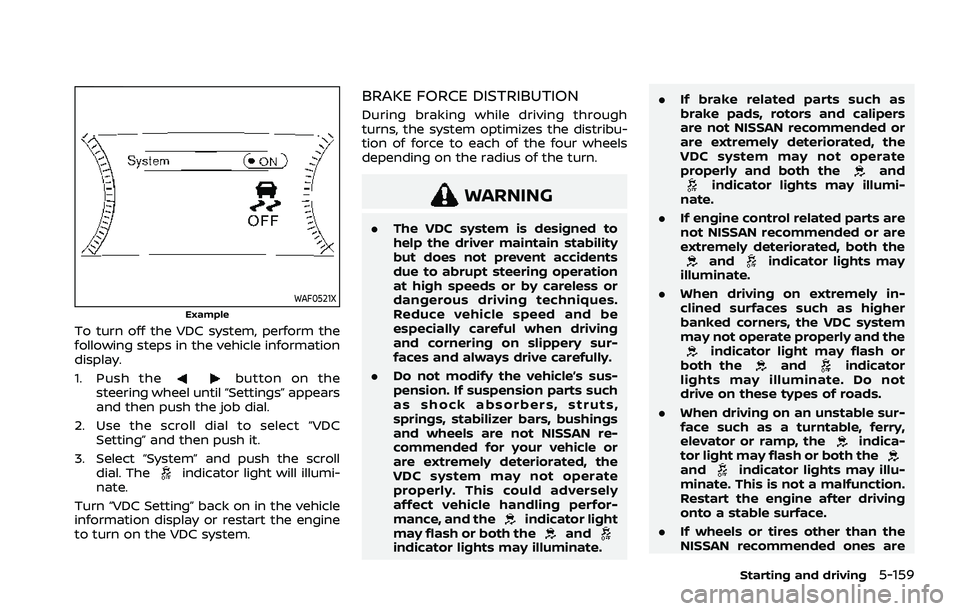
To turn off the VDC system, perform the
following steps in the vehicle information
display.
1. Push the
button on the
steering wheel until “Settings” appears
and then push the job dial.
2. Use the scroll dial to select “VDC Setting” and then push it.
3. Select “System” and push the scroll dial. The
indicator light will illumi-
nate.
Turn “VDC Setting” back on in the vehicle
information display or restart the engine
to turn on the VDC system.
BRAKE FORCE DISTRIBUTION
During braking while driving through
turns, the system optimizes the distribu-
tion of force to each of the four wheels
depending on the radius of the turn.
WARNING
. The VDC system is designed to
help the driver maintain stability
but does not prevent accidents
due to abrupt steering operation
at high speeds or by careless or
dangerous driving techniques.
Reduce vehicle speed and be
especially careful when driving
and cornering on slippery sur-
faces and always drive carefully.
. Do not modify the vehicle’s sus-
pension. If suspension parts such
as shock absorbers, struts,
springs, stabilizer bars, bushings
and wheels are not NISSAN re-
commended for your vehicle or
are extremely deteriorated, the
VDC system may not operate
properly. This could adversely
affect vehicle handling perfor-
mance, and the
indicator light
may flash or both theandindicator lights may illuminate. .
If brake related parts such as
brake pads, rotors and calipers
are not NISSAN recommended or
are extremely deteriorated, the
VDC system may not operate
properly and both the
andindicator lights may illumi-
nate.
. If engine control related parts are
not NISSAN recommended or are
extremely deteriorated, both the
andindicator lights may
illuminate.
. When driving on extremely in-
clined surfaces such as higher
banked corners, the VDC system
may not operate properly and the
indicator light may flash or
both theandindicator
lights may illuminate. Do not
drive on these types of roads.
. When driving on an unstable sur-
face such as a turntable, ferry,
elevator or ramp, the
indica-
tor light may flash or both the
andindicator lights may illu-
minate. This is not a malfunction.
Restart the engine after driving
onto a stable surface.
. If wheels or tires other than the
NISSAN recommended ones are
Starting and driving5-159
Page 433 of 556
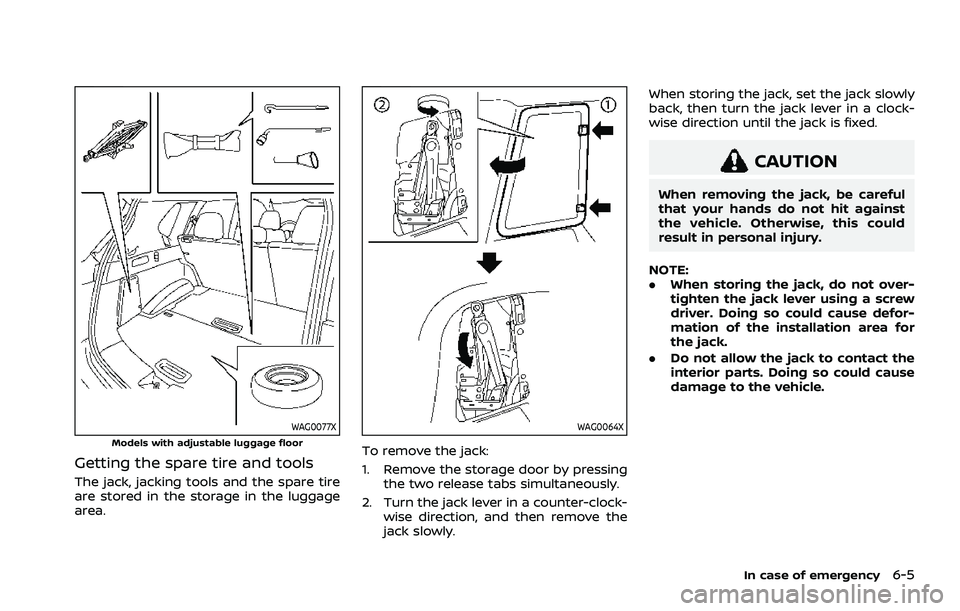
WAG0077XModels with adjustable luggage floor
Getting the spare tire and tools
The jack, jacking tools and the spare tire
are stored in the storage in the luggage
area.
WAG0064X
To remove the jack:
1. Remove the storage door by pressingthe two release tabs simultaneously.
2. Turn the jack lever in a counter-clock- wise direction, and then remove the
jack slowly. When storing the jack, set the jack slowly
back, then turn the jack lever in a clock-
wise direction until the jack is fixed.
CAUTION
When removing the jack, be careful
that your hands do not hit against
the vehicle. Otherwise, this could
result in personal injury.
NOTE:
. When storing the jack, do not over-
tighten the jack lever using a screw
driver. Doing so could cause defor-
mation of the installation area for
the jack.
. Do not allow the jack to contact the
interior parts. Doing so could cause
damage to the vehicle.
In case of emergency6-5
Page 536 of 556
10-24Technical and consumer information
vehicle.
. Determine the overall height of the
vehicle and trailer so the required
clearance is known.
Trailer towing tips
In order to gain skill and an understand-
ing of the vehicle’s behavior, you should
practice turning, stopping and backing up
in an area which is free from traffic.
Steering stability, and braking perfor-
mance will be somewhat different than
under normal driving conditions.
.Always secure items in the trailer to
prevent load shift while driving.
. Lock the trailer hitch coupler with a
pin or lock to prevent the coupler from
inadvertently becoming unlatched.
. Avoid abrupt starts, acceleration or
stops.
. Avoid sharp turns or lane changes.
. Always drive your vehicle at a moder-
ate speed. Some states or provinces
have specific speed limits for vehicles
that are towing trailers. Obey the local
speed limits.
. When backing up, hold the bottom of
the steering wheel with one hand.
Move your hand in the direction in
which you want the trailer to go. Make
small corrections and back up slowly.
If possible, have someone guide you when you are backing up.
Always block the wheels on both vehicle
and trailer when parking. Parking on a
slope is not recommended; however, if
you must do so:CAUTION
If you push the park button to
engage the P (Park) position before
blocking the wheels and applying
the parking brake, transmission da-
mage could occur.
1. Apply and hold the brake pedal.
2. Have someone place blocks on the downhill side of the vehicle and trailer
wheels.
3. After the wheel blocks are in place, slowly release the brake pedal until
the blocks absorb the vehicle load.
4. Apply the parking brake.
5. Push the park button to engage the P (Park) position.
6. Turn off the engine.
To drive away:
1. Apply and hold the brake pedal.
2. Start the engine. 3. Shift the transmission into gear.
4. Release the parking brake.
5. Drive slowly until the vehicle and
trailer are clear from the blocks.
6. Apply and hold the brake pedal.
7. Have someone retrieve and store the blocks.
. While going downhill, the weight of the
trailer pushing on the tow vehicle may
decrease overall stability. Therefore, to
maintain adequate control, reduce
your speed and shift to a lower gear.
Avoid long or repeated use of the
brakes when descending a hill, as this
reduces their effectiveness and could
cause overheating. Shifting to a lower
gear instead provides “engine braking”
and reduces the need to brake as
frequently.
. If the engine coolant temperature
rises to a high temperature, see “If
your vehicle overheats” (P.6-13).
. Trailer towing requires more fuel than
normal circumstances.
. Avoid towing a trailer for your vehicle’s
first 500 miles (800 km).
. For the first 500 miles (800 km) that
you do tow, do not drive over 50 MPH
(80 km/h).
Page 547 of 556
11 Index
A
ABS (Anti-lock Braking System) .................... 5-156
Active Ride Control ................................................. 5-160
Adjustable luggage floor ....................................... 2-72
Advanced Air Bag System .................................... 1-52
Air bag systemAdvanced Air Bag System ............................. 1-52
Driver and front passengersupplemental knee air bag system...... 1-61
Front and rear seat-mounted
side-impact supplemental air
bag system................................................................ 1-63
Front central seat-mounted
side-impact supplemental air
bag system................................................................ 1-63
Front passenger air bag and
status light................................................................. 1-54
Roof-mounted curtain side-impact
supplemental air bag system..................... 1-63
Air bag warning labels ............................................ 1-66
Air bag warning light................................. 1-66, 2-16
Air cleaner housing filter ....................................... 8-15
Air conditioner Air conditioner operation............................... 4-27
Air conditioner service...................................... 4-38
Air conditioner specification label....... 10-11
Air conditioning system refrigerant
and lubricant recommendations............. 4-38
Air conditioning system refrigerant
and oil recommendations ............................. 10-7
Alarm, How to stop alarm (see vehicle
security system)............................................................ 2-51
Alcohol, drugs and driving ................................... 5-11
Alert Rear Door Alert....................................................... 2-65 All-Wheel Drive (AWD) (See
Intelligent 4x4)............................................................ 5-151
Antenna........................................................................\
....... 4-39
Anti-lock Braking System (ABS) .................... 5-156
Anti-lock Braking System (ABS)
warning light ................................................................... 2-17
Appearance care
Exterior appearance care ................................. 7-2
Interior appearance care................................... 7-4
Armrest ........................................................................\
............ 1-9
Audible reminders....................................................... 2-22
AUTO mode...................................................................... 5-32
Automatic Door locks...................................................................... 3-7
Automatic air conditioner
and heater ......................................................... 4-32, 4-35
Automatic brake hold .............................................. 5-28
Automatic Emergency Braking (AEB)
system OFF warning light .................................... 2-17
Automatic Emergency Braking (AEB)
with pedestrian detection system.............. 5-122
Automatic moonroof and sunshade ........... 2-83
Average fuel consumption................................... 2-44
Average speed ............................................................... 2-44
Avoiding collision and rollover.......................... 5-10
AWD (See Intelligent 4x4)................................... 5-151
B
Battery........................................................................\
.......... 8-11 Battery replacement, Intelligent Key ..... 8-20
Battery saver system......................................... 2-61
Variable voltage control system .............. 8-13
Before starting the engine................................... 5-17
Blind Spot Warning (BSW) ..................................... 5-57
Booster seats.................................................................. 1-42 Brake
Anti-lock Braking System (ABS) ............ 5-156
Brake fluid ..................................................................... 8-9
Brake system ....................................................... 5-155
Electronic parking brake system
warning light ............................................................ 2-18
Parking brake .......................................................... 5-25
Warning light............................................................ 2-14
Break-in schedule .................................................... 5-149
Brightness control Instrument panel .................................................. 2-11
Bulb check/instrument panel............................ 2-14
Bulb replacement ........................................................ 8-22
C
Capacities and
recommended fluids/lubricants...................... 10-3
Car phone or CB radio ............................................ 4-39
Card holder....................................................................... 2-77
Cargo cover ..................................................................... 2-77
Cargo light ........................................................................\
2-87
Catalytic converter, Three way catalyst ....... 5-6
Charger USB (Universal Serial Bus)
charging connector............................................ 2-67
Wireless charger .................................................... 2-68
Chassis control........................................................... 5-160
Child restraints .............................................................. 1-23 Booster seats........................................................... 1-42
LATCH system ......................................................... 1-25
Precautions on child restraints................. 1-23
Child safety....................................................................... 1-20
Child safety rear door lock ...................................... 3-7
Page 553 of 556
Trip odometer ................................................................ 2-44
Troubleshooting guideDriver Assistance systems............................. 5-39
Turn signal switch ...................................................... 2-62
U
Underbody cleaning ...................................................... 7-3
Uniform tire quality grading ............................ 10-27
USB (Universal Serial Bus)
charging connector................................................... 2-67
V
Vanity mirror ................................................................... 3-36
Vanity mirror lights .................................................... 2-87
Variable voltage control system ..................... 8-13
Vehicle Dimensions and weights................................ 10-9
Identification number (VIN)........................... 10-9
Loading information ...................................... 10-13
Recovery (freeing a stuck vehicle) .......... 6-17
Security system...................................................... 2-50
Vehicle Dynamic Control
(VDC) system ........................................................ 5-157
Vehicle information display................................. 2-22 Settings........................................................................\
. 2-24
Vehicle information display warnings
and indicators ......................................................... 2-34
Ventilators ........................................................................\
. 4-26
W
Warning Blind Spot Warning (BSW) .............................. 5-57
Driver Assistance systems
troubleshooting guide...................................... 5-39 Hazard warning flasher switch .................... 6-2
Intelligent Forward Collision
Warning (I-FCW).................................................. 5-132
Lane Departure Warning (LDW) ................. 5-46
Lights..................................................................\
............ 2-14
Low tire pressure warning............................ 2-35
Rear Door Alert....................................................... 2-65
Tire pressure monitoring
system (TPMS)................................................. 5-6, 6-3
Vehicle information display.......................... 2-22
Warning lights, indicator lights and
audible reminders ................................................ 2-13
Warning labels, Air bag warning labels...... 1-66
Warning light Air bag warning light.......................... 1-66, 2-16
Anti-lock Braking System (ABS)
warning light ............................................................ 2-17
Brake warning light ............................................ 2-14
Electric power steering
warning light ............................................................ 2-17
Electric shift control system
warning light ............................................................ 2-15
Electronic parking brake system
warning light ............................................................ 2-18
Low tire pressure warning light ............... 2-18
Seat belt warning light
and chime.................................................... 1-15, 2-16
Warranty, Emission control
system warranty ....................................................... 10-28
Washer switch Rear window wiper and
washer operation ................................................. 2-53
Wiper and washer switch .............................. 2-52
Washing........................................................................\
........... 7-2
Waxing ........................................................................\
.............. 7-3
Weights (See dimensions and weights)..... 10-9
Wheel/tire size ............................................................... 10-8 Wheels and tires ........................................................... 8-25
Care of wheels........................................................... 7-3
Cleaning aluminum alloy wheels ................ 7-3
Window washer fluid .................................................... 8-9
Window(s) Cleaning ........................................................................\
.. 7-3
Power windows ..................................................... 2-79
Wiper Rear window wiper blade.............................. 8-17
Wiper and washer switch .............................. 2-52
Wiper blades ............................................................. 8-16
Wiper and washer switch ..................................... 2-52
Wireless charger ........................................................... 2-68
11-7