buttons NISSAN ROGUE 2021 Owner´s Manual
[x] Cancel search | Manufacturer: NISSAN, Model Year: 2021, Model line: ROGUE, Model: NISSAN ROGUE 2021Pages: 556, PDF Size: 2.7 MB
Page 250 of 556
4-36Monitor, heater, air conditioner, audio and phone systems
.The temperature of the passengercompartment will be maintained
automatically. Air flow distribution
and fan speed are also controlled
automatically.
NOTE:
. Do not set the temperature lower
than the outside air temperature or
the system may not work properly.
. Not recommended if windows fog
up.
Dehumidified defrosting or defogging:
1. Push the
button. (The indicator
light on the button will come on.)
2. Turn the temperature control dial on the corresponding side to set the
desired temperature.
.To quickly remove ice from theoutside of the windows, use the
button to set the fan speed to
maximum.
.As soon as possible after the wind- shield is clean, push the AUTO
button to return to the automatic
mode.
.When thebutton is pushed, the
air conditioner will automatically be
turned on at outside temperatures
more than slightly above freezing.
The air recirculation mode auto-
matically turns off, allowing outside air to be drawn into the passenger
compartment to further improve
the defogging performance.
Manual operation
Fan speed control:
Push the
buttons to manually control
the fan speed.
Air intake control:
. Push the
button to recirculate
interior air inside the vehicle. The
indicator light on the button will come
on.
. Push the
button to draw outside
air into the passenger compartment.
The indicator light on the button will
come on.
. To control the air intake automatically,
push and hold either the
button
or thebutton. The indicator light
will blink, and then the air intake will
switch to automatic control. When the
automatic control is set, the system
automatically alternates between the
outside air circulation and the air
recirculation modes. (The indicator
light of the active mode will turn on.) Air flow control:
Pushing the
button manually con-
trols air flow and selects the air outlet:
— Air flows mainly from center and side
ventilators.
— Air flows mainly from center and sideventilators and foot outlets.
— Air flows mainly from the foot outletand partly from the defroster.
— Air flows mainly from the defrosterand foot outlets.
Synchronize temperature settings:
Push the SYNC button to turn on the
SYNC mode. (The indicator light on the
button will turn on.)
When the SYNC mode is active, the
driver’s side temperature control dial will
control the driver’s side, front passenger’s
side and rear temperatures.
When the passenger’s side temperature
control dial or the rear temperature
control buttons are operated, it will can-
cel the SYNC mode of the individual zone.
(The indicator light on the SYNC button
will remain on.)
Operating both the passenger’s side
temperature control dial and the rear
temperature control buttons will turn off
the SYNC mode. (The indicator light on
the SYNC button will turn off.) (See “Rear
Page 251 of 556
temperature control” (P.4-37).)
To turn the system off
Push the ON·OFF button.
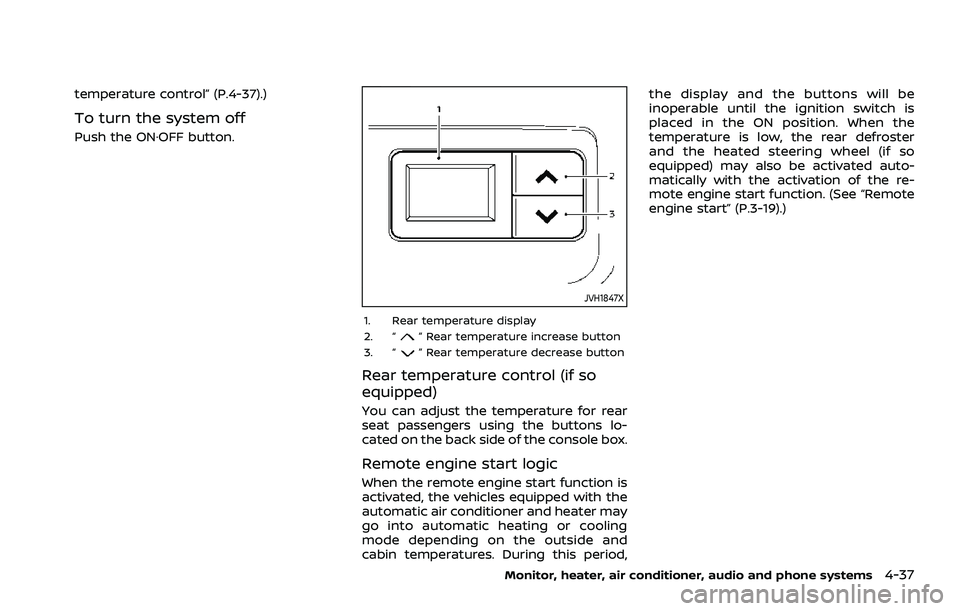
JVH1847X
1. Rear temperature display
2. “” Rear temperature increase button
3. “” Rear temperature decrease button
Rear temperature control (if so
equipped)
You can adjust the temperature for rear
seat passengers using the buttons lo-
cated on the back side of the console box.
Remote engine start logic
When the remote engine start function is
activated, the vehicles equipped with the
automatic air conditioner and heater may
go into automatic heating or cooling
mode depending on the outside and
cabin temperatures. During this period, the display and the buttons will be
inoperable until the ignition switch is
placed in the ON position. When the
temperature is low, the rear defroster
and the heated steering wheel (if so
equipped) may also be activated auto-
matically with the activation of the re-
mote engine start function. (See “Remote
engine start” (P.3-19).)
Monitor, heater, air conditioner, audio and phone systems4-37
Page 475 of 556
Use a cloth to protect the casing.
3. Replace the battery with a new one. Recommended battery:
CR2032 or equivalent
.Do not touch the internal circuitand electric terminals as doing so
could cause a malfunction.
.Hold the battery by the edges.
Holding the battery across the
contact points will seriously deplete
the storage capacity.
.Make sure that the +side faces the
bottom of the case.
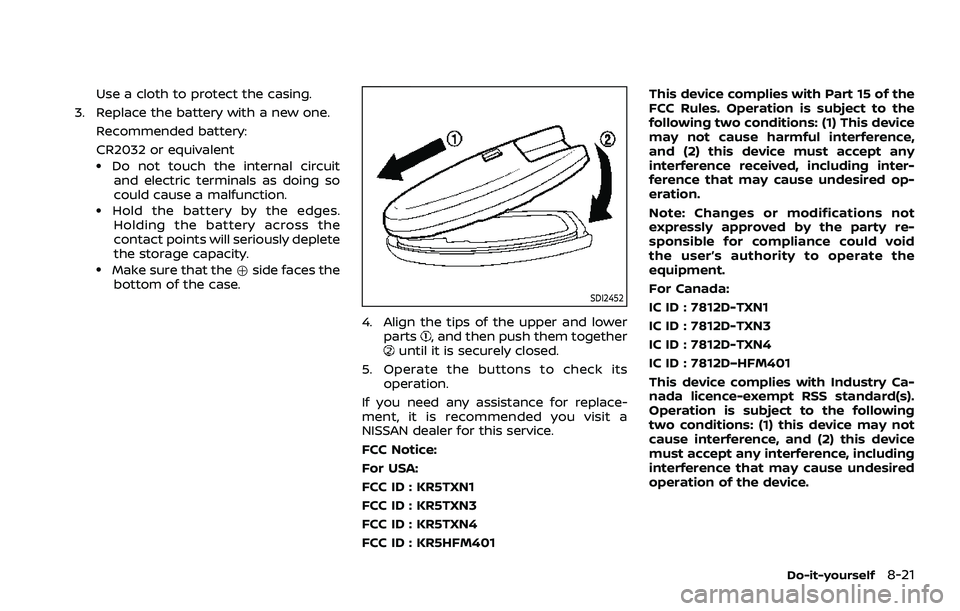
SDI2452
4. Align the tips of the upper and lower
parts, and then push them togetheruntil it is securely closed.
5. Operate the buttons to check its operation.
If you need any assistance for replace-
ment, it is recommended you visit a
NISSAN dealer for this service.
FCC Notice:
For USA:
FCC ID : KR5TXN1
FCC ID : KR5TXN3
FCC ID : KR5TXN4
FCC ID : KR5HFM401 This device complies with Part 15 of the
FCC Rules. Operation is subject to the
following two conditions: (1) This device
may not cause harmful interference,
and (2) this device must accept any
interference received, including inter-
ference that may cause undesired op-
eration.
Note: Changes or modifications not
expressly approved by the party re-
sponsible for compliance could void
the user’s authority to operate the
equipment.
For Canada:
IC ID : 7812D-TXN1
IC ID : 7812D-TXN3
IC ID : 7812D-TXN4
IC ID : 7812D–HFM401
This device complies with Industry Ca-
nada licence-exempt RSS standard(s).
Operation is subject to the following
two conditions: (1) this device may not
cause interference, and (2) this device
must accept any interference, including
interference that may cause undesired
operation of the device.
Do-it-yourself8-21