door lock NISSAN ROGUE 2021 Owner´s Manual
[x] Cancel search | Manufacturer: NISSAN, Model Year: 2021, Model line: ROGUE, Model: NISSAN ROGUE 2021Pages: 556, PDF Size: 2.7 MB
Page 139 of 556
theft of interior or exterior vehicle com-
ponents in all situations. Always secure
your vehicle even if parking for a brief
period. Never leave your keys in the
vehicle, and always lock it when unat-
tended. Be aware of your surroundings,
and park in secure, well-lit areas when-
ever possible.
Many devices offering additional protec-
tion, such as component locks, identifica-
tion markers, and tracking systems, are
available at auto supply stores and speci-
alty shops. Your NISSAN dealer may also
offer such equipment. Check with your
insurance company to see if you may be
eligible for discounts for various theft
protection features.
How to arm the vehicle security
system
1. Close all windows.The system can be
armed even if the windows are open.
2. Remove the keys from the vehicle.
3. Close all doors, hood and liftgate. Lock all doors. The doors can be locked
with Intelligent Key, door handle re-
quest switch (if so equipped).
Even when the driver and/or passen-
gers are in the vehicle, the system will
activate with all the doors, hood and
liftgate locked with the ignition switch
placed in the OFF position. When pla- cing the ignition switch in the ON
position, the system will be released.
Vehicle security system activation
The vehicle security system will give the
following alarm:
.
The headlights or the hazard indicator
lights blink and the horn sounds
intermittently.
. The alarm automatically turns off
after approximately 30 seconds. How-
ever, the alarm reactivates if the
vehicle is tampered with again.
The alarm is activated by:
. opening any doors, the hood or lift-
gate without using Intelligent Key
(even if the door is unlocked by
releasing the door inside lock knob).
How to stop an activated alarm
The alarm stops by pushing the UNLOCKbutton on the Intelligent Key, pushing
the request switch (if so equipped) in
range of the door handle or placing the
ignition switch in the ON position.
NISSAN VEHICLE IMMOBILIZER SYS-
TEM
The NISSAN Vehicle Immobilizer System
will not allow the engine to start without
the use of the registered key.
If the engine does not start using the
registered Intelligent Key, it may be due to
interference caused by:
. Another Intelligent Key.
. Automated toll road device.
. Automated payment device.
. Other devices that transmit similar
signals.
Start the engine using the following
procedure:
1. Remove any items that may be caus- ing the interference away from the
Intelligent Key.
2. Start the engine again.
If this procedure allows the engine to
start, NISSAN recommends placing the
registered Intelligent Key separate from
other devices to avoid interference.
Statement related to section 15 of FCC
rules for NISSAN Vehicle Immobilizer
System (CONT ASSY-SMART KEYLESS)
FCC Notice:
For USA:
FCC ID : KR5HFM401
Instruments and controls2-51
Page 153 of 556
WAF0222X
The Steering Assist switch is used to
temporarily turn on and off the Steering
Assist system.
You can also use the “Driver Assistance”
menu in the vehicle information display to
turn on and off the Steering Assist
system. (See “How to enable/disable the
Steering Assist” (P.5-96).)
The Steering Assist system controls the
steering system to help keep your vehicle
near the center of the lane when driving.
(See “ProPILOT Assist” (P.5-84).)
The Rear Door Alert system functions
under certain conditions to indicate there
may be an object or passenger in the rear
seat(s). Check the seat(s) before exiting
the vehicle.
The Rear Door Alert system is initially
disabled. The driver can enable the sys-
tem using the vehicle information display.
(See “Vehicle Settings” (P.2-27).)
When the system is enabled:
.The system is activated when a rear
door is opened and closed. When the
vehicle is started and the system is
activated, a visual message appears in
the vehicle information display. (See
“31. Rear Door Alert is activated indi-
cator” (P.2-37).)
. If a rear door is opened and closed but
the vehicle is not driven, the system
will not be activated. A rear door must
be opened and closed and the car
driven for the system to activate.
. The time interval to activate the
system between when the rear door
is opened and closed and the vehicle
is started is about 10 minutes. A longer
interval does not indicate a malfunc-
tion.
When the Rear Door Alert system is
activated: .
When the driver puts the vehicle in the
P (Park) position, a notification mes-
sage appears in the vehicle informa-
tion display with the options to
“Dismiss Message” or “Disable Alert” if
desired.
— Select “Disable Alert” to temporarily
disable for that stop.
— No selection or ‘Dismiss Message” will keep the alert enabled for that
stop.
. If the alert is enabled when a driver
exits the vehicle, a message will ap-
pear in the vehicle information display
that states “Check Rear Seat for All
Articles.”
If “Horn & Alert” setting is selected:
— An audible horn sound will occur
after a short time unless a rear
door is opened and closed within a
short time to deactivate the alert.
— If the doors are locked before the alert is deactivated by opening a
rear door, the horn will sound.
— If the liftgate is opened before a rear door is opened, the horn will be
delayed until after the liftgate is
closed.
NOTE:
If “Alert Only” setting is selected, the
message alert will still be shown in the
Instruments and controls2-65
STEERING ASSIST SWITCH (models
with ProPILOT Assist) REAR DOOR ALERT
Page 167 of 556
GAWR are located on the F.M.V.S.S. or C.V.
M.S.S. certification label (located on the
driver’s door pillar). For additional infor-
mation regarding GVWR and GAWR, refer
to “Vehicle loading information” (P.10-13).
WARNING
.Always install the cross bars onto
the roof side rails before loading
cargo of any kind. Loading cargo
directly onto the roof side rails or
the vehicle’s roof may cause ve-
hicle damage.
. Drive extra carefully when the
vehicle is loaded at or near the
cargo carrying capacity, espe-
cially if the significant portion of
that load is carried on the cross
bars.
. Heavy loading of the cross bars
has the potential to affect the
vehicle stability and handling
during sudden or unusual hand-
ling maneuvers.
. Roof rack cross bars should be
evenly distributed.
. Do not exceed maximum roof
rack cross bars load. .
Properly secure all cargo with
ropes or straps to help prevent it
from sliding or shifting. In a sud-
den stop or collision, unsecured
cargo could cause personal in-
jury.CAUTION
Use care when placing or removing
items from the roof rack. If you
cannot comfortably lift the items
onto the roof rack from the ground,
use a ladder or a stool.
POWER WINDOWS
WARNING
.Make sure that all passengers
have their hands, etc. inside the
vehicle while it is in motion and
before closing the windows. Use
the window lock switch to pre-
vent unexpected use of the
power windows.
. To help avoid risk of injury or
death through unintended opera-
tion of the vehicle and or its
systems, including entrapment
in windows or inadvertent door
lock activation, do not leave chil-
dren, people who require the
assistance of others or pets un-
attended in your vehicle. Addi-
tionally, the temperature inside a
closed vehicle on a warm day can
quickly become high enough to
cause a significant risk of injury
or death to people and pets.
The power windows operate when the
ignition switch is in the ON position, or for
a period of time after the ignition switch is
placed in the OFF position. If the driver’s
or front passenger’s door is opened dur-
Instruments and controls2-79
WINDOWS
Page 169 of 556
WAC0535X
Passenger side power window
switch
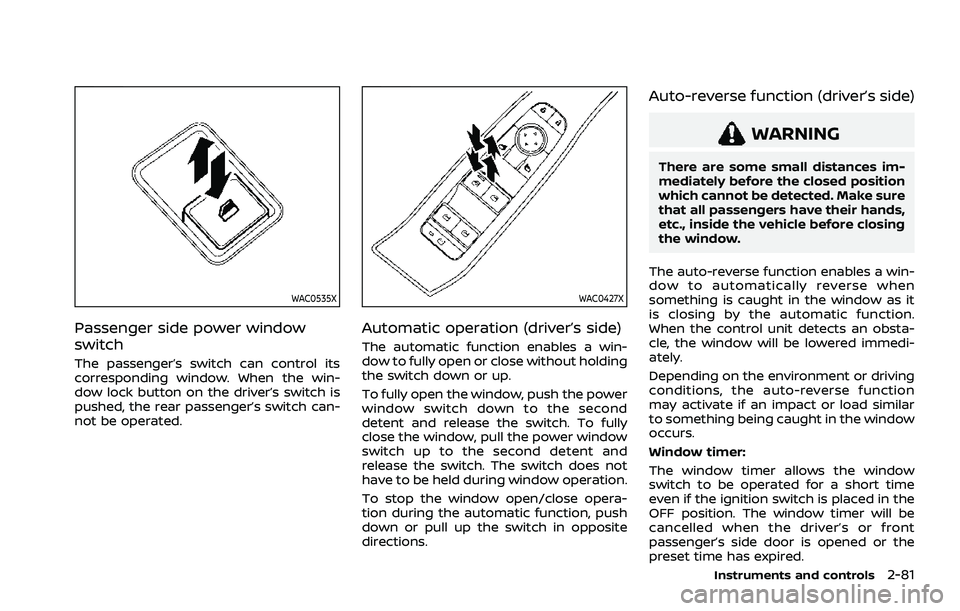
The passenger’s switch can control its
corresponding window. When the win-
dow lock button on the driver’s switch is
pushed, the rear passenger’s switch can-
not be operated.
WAC0427X
Automatic operation (driver’s side)
The automatic function enables a win-
dow to fully open or close without holding
the switch down or up.
To fully open the window, push the power
window switch down to the second
detent and release the switch. To fully
close the window, pull the power window
switch up to the second detent and
release the switch. The switch does not
have to be held during window operation.
To stop the window open/close opera-
tion during the automatic function, push
down or pull up the switch in opposite
directions.
Auto-reverse function (driver’s side)
WARNING
There are some small distances im-
mediately before the closed position
which cannot be detected. Make sure
that all passengers have their hands,
etc., inside the vehicle before closing
the window.
The auto-reverse function enables a win-
dow to automatically reverse when
something is caught in the window as it
is closing by the automatic function.
When the control unit detects an obsta-
cle, the window will be lowered immedi-
ately.
Depending on the environment or driving
conditions, the auto-reverse function
may activate if an impact or load similar
to something being caught in the window
occurs.
Window timer:
The window timer allows the window
switch to be operated for a short time
even if the ignition switch is placed in the
OFF position. The window timer will be
cancelled when the driver’s or front
passenger’s side door is opened or the
preset time has expired.
Instruments and controls2-81
Page 173 of 556
.Do not push the sunshade arm
with your hands, etc., as this may
deform it. Improper operation or
damage to the sunshade may
result.
. Do not put any object into the
sunshade inlet port as this may
result in improper operation or
damage the sunshade.
. Do not hang any object on the
arm rail as this may result in
improper operation or damage
the sunshade.
. Do not forcefully pull the sun-
shade. Doing so may elongate
the sunshade. Improper opera-
tion or damage to the sunshade
may result.
If the moonroof does not operate prop-
erly after performing the procedure
above, have your vehicle checked by a
NISSAN dealer.CAUTION
. Do not leave the light switch on
when the engine is not running
for extended periods of time to
prevent the battery from being
discharged.
. Turn off the lights when you leave
the vehicle.
WAC0066X
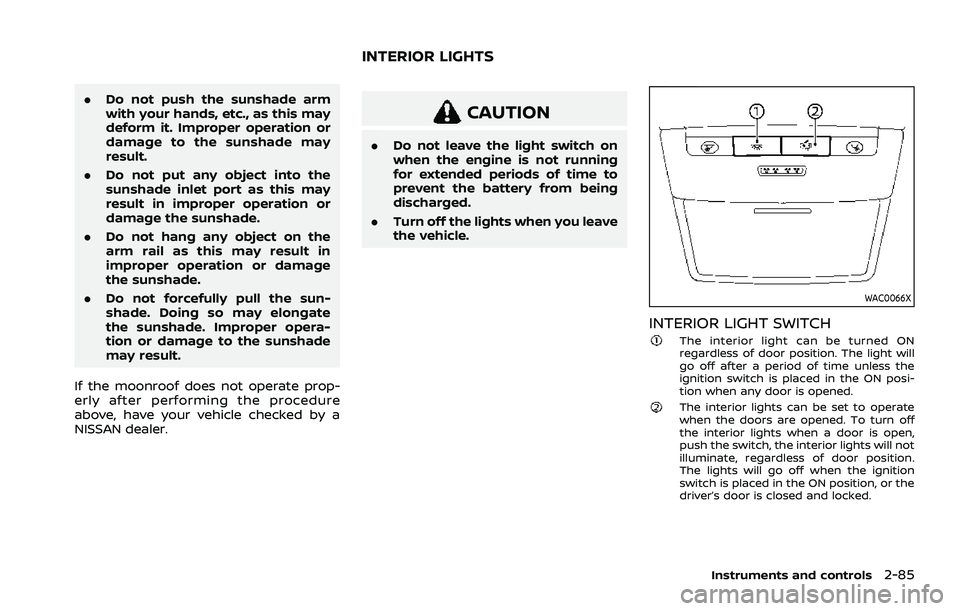
INTERIOR LIGHT SWITCHThe interior light can be turned ON
regardless of door position. The light will
go off after a period of time unless the
ignition switch is placed in the ON posi-
tion when any door is opened.
The interior lights can be set to operate
when the doors are opened. To turn off
the interior lights when a door is open,
push the switch, the interior lights will not
illuminate, regardless of door position.
The lights will go off when the ignition
switch is placed in the ON position, or the
driver’s door is closed and locked.
Instruments and controls2-85
INTERIOR LIGHTS
Page 177 of 556

3 Pre-driving checks and adjustments
Keys ........................................................................\
................................. 3-3Intelligent Key ........................................................................\
... 3-3
Doors ........................................................................\
.............................. 3-5
Locking with key .................................................................... 3-5
Locking with inside lock knob ..................................... 3-6
Locking with power door lock switch ................... 3-6
Automatic door locks ......................................................... 3-7
Child safety rear door lock ............................................. 3-7
Intelligent Key system .............................................................. 3-7 Intelligent Key operating range (models with
request switch) ........................................................................\
3-9
Door locks/unlocks precaution (models with
request switch) ..................................................................... 3-10
Intelligent Key operation (models with
request switch) ..................................................................... 3-11
Battery saver system ....................................................... 3-12
Warning lights and audible reminders .............. 3-12
Troubleshooting guide ................................................... 3-13
How to use remote keyless entry function ...... 3-15
Remote engine start (if so equipped) ....................... 3-19
Remote engine start operating range ............... 3-20
Remote starting the engine ....................................... 3-20
Extending engine run time ......................................... 3-20
Canceling a remote engine start ........................... 3-21
Conditions the remote engine start will
not work ........................................................................\
............. 3-21 Hood ........................................................................\
............................ 3-22
Liftgate ........................................................................\
...................... 3-23
Operating manual liftgate (if
so equipped) ........................................................................\
. 3-23
Operating power liftgate (if so equipped) ...... 3-24
Motion-activated liftgate (if
so equipped) ........................................................................\
. 3-26
Garage mode system (if so equipped) ............ 3-27
Auto closure (if so equipped) .................................. 3-28
liftgate release lever ....................................................... 3-28
Fuel-filler door ........................................................................\
..... 3-29 Opening the fuel-filler door ...................................... 3-29
How to refuel ....................................................................... 3-29
When refueling from a portable
fuel container ...................................................................... 3-30
Tilt/telescopic steering ........................................................ 3-31
Tilt and telescopic operation .................................. 3-31
Sun visors ........................................................................\
................ 3-32
Rear sunshade (if so equipped) .................................... 3-32
Mirrors ........................................................................\
...................... 3-33
Inside mirror ........................................................................\
. 3-33
Outside mirrors .................................................................. 3-34
Vanity mirror ........................................................................\
3-36
Memory seat (if so equipped) ......................................... 3-36 Memory storage function .......................................... 3-36
Page 180 of 556
3-4Pre-driving checks and adjustments
Key. If the Intelligent Key gets
wet, immediately wipe until it
is completely dry.
— Do not bend, drop or strike it against another object.
— If the outside temperature is below 14°F (-10°C) degrees, the
battery of the Intelligent Key
may not function properly.
— Do not place the Intelligent Key for an extended period in
a place where temperatures
exceed 140°F (60°C).
— Do not change or modify the Intelligent Key.
— Do not use a magnet key holder.
— Do not place the Intelligent Key near an electric appliance
such as a television set, per-
sonal computer or cellular
phone.
— Do not allow the Intelligent Key to come into contact with
water or salt water, and do
not wash it in a washing
machine. This could affect
the system function. If an Intelligent Key is lost or stolen,
NISSAN recommends erasing the ID code
of that Intelligent Key. This will prevent
the Intelligent Key from unauthorized use
to unlock the vehicle. For information
regarding the erasing procedure, it is
recommended you visit a NISSAN dealer.
SPA2033
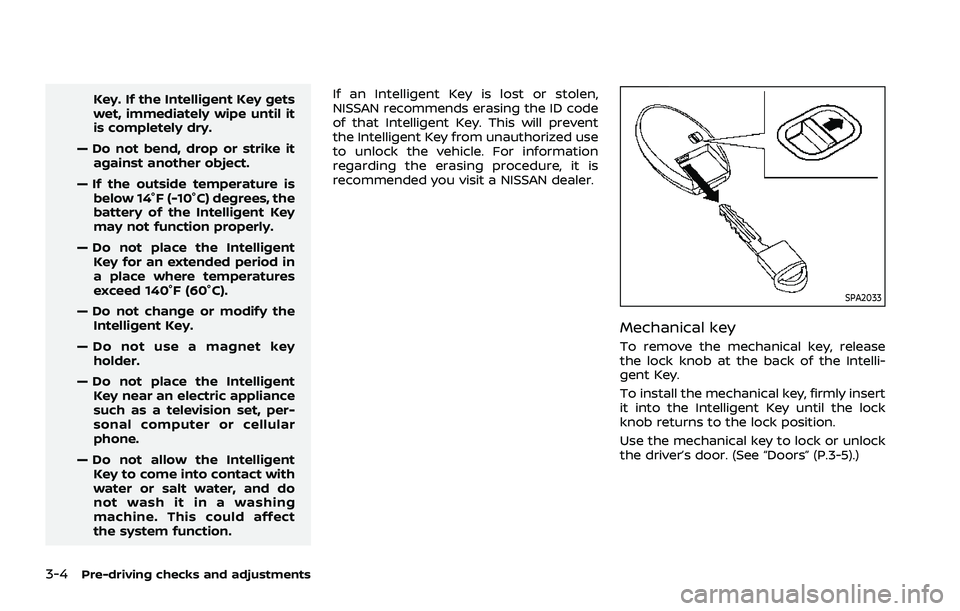
Mechanical key
To remove the mechanical key, release
the lock knob at the back of the Intelli-
gent Key.
To install the mechanical key, firmly insert
it into the Intelligent Key until the lock
knob returns to the lock position.
Use the mechanical key to lock or unlock
the driver’s door. (See “Doors” (P.3-5).)
Page 181 of 556
CAUTION
Always carry the mechanical key
installed in the Intelligent Key.
WARNING
.Always have the doors locked
while driving. Along with the use
of seat belts, this provides great-
er safety in the event of an
accident by helping to prevent
persons from being thrown from
the vehicle. This also helps keep
children and others from unin-
tentionally opening the doors,
and will help keep out intruders.
. Before opening any door, always
look for and avoid oncoming
traffic.
. To help avoid risk of injury or
death through unintended opera-
tion of the vehicle and or its
systems, including entrapment
in windows or inadvertent door
lock activation, do not leave chil-
dren, people who require the
assistance of others or pets un-
attended in your vehicle. Addi-
tionally, the temperature inside a
closed vehicle on a warm day can
quickly become high enough to
cause a significant risk of injury
or death to people and pets.
WAD0251X
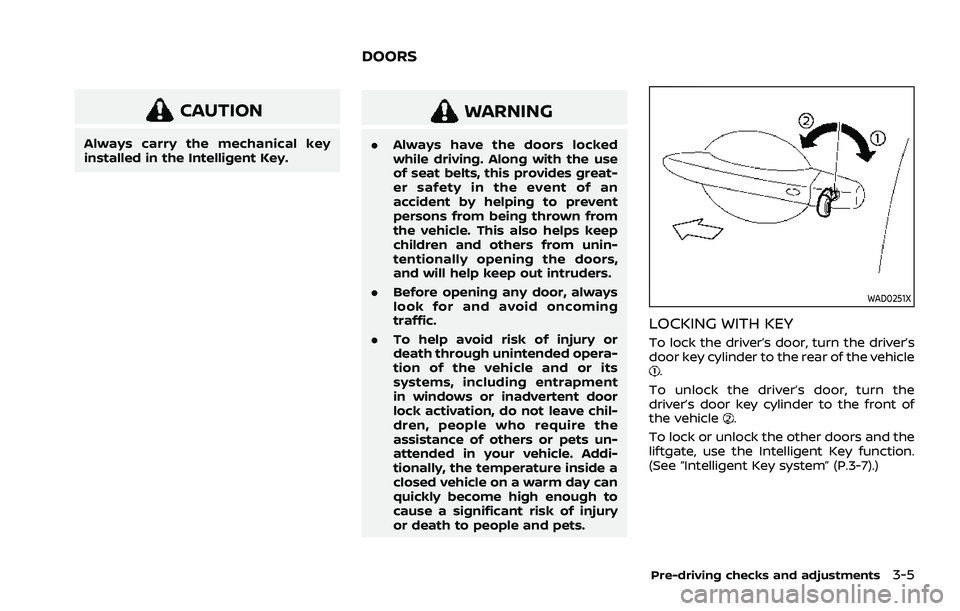
LOCKING WITH KEY
To lock the driver’s door, turn the driver’s
door key cylinder to the rear of the vehicle
.
To unlock the driver’s door, turn the
driver’s door key cylinder to the front of
the vehicle
.
To lock or unlock the other doors and the
liftgate, use the Intelligent Key function.
(See “Intelligent Key system” (P.3-7).)
Pre-driving checks and adjustments3-5
DOORS
Page 182 of 556
3-6Pre-driving checks and adjustments
SPA2726Example
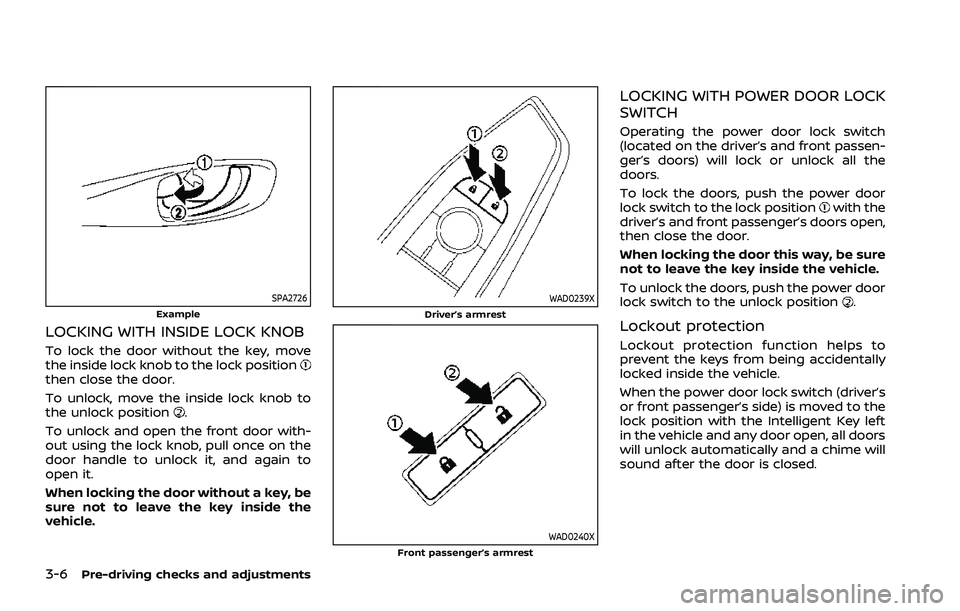
LOCKING WITH INSIDE LOCK KNOB
To lock the door without the key, move
the inside lock knob to the lock position
then close the door.
To unlock, move the inside lock knob to
the unlock position
.
To unlock and open the front door with-
out using the lock knob, pull once on the
door handle to unlock it, and again to
open it.
When locking the door without a key, be
sure not to leave the key inside the
vehicle.
WAD0239XDriver’s armrest
WAD0240XFront passenger’s armrest
LOCKING WITH POWER DOOR LOCK
SWITCH
Operating the power door lock switch
(located on the driver’s and front passen-
ger’s doors) will lock or unlock all the
doors.
To lock the doors, push the power door
lock switch to the lock position
with the
driver’s and front passenger’s doors open,
then close the door.
When locking the door this way, be sure
not to leave the key inside the vehicle.
To unlock the doors, push the power door
lock switch to the unlock position
.
Lockout protection
Lockout protection function helps to
prevent the keys from being accidentally
locked inside the vehicle.
When the power door lock switch (driver’s
or front passenger’s side) is moved to the
lock position with the Intelligent Key left
in the vehicle and any door open, all doors
will unlock automatically and a chime will
sound after the door is closed.
Page 183 of 556
AUTOMATIC DOOR LOCKS
.All doors lock automatically when the
vehicle speed reaches 15 MPH (24
km/h).
. All doors unlock automatically when
the ignition switch is placed in the OFF
position or when the shift position is
placed in the P (Park) position, if
selected.
NOTE:
The Automatic door unlock feature can
be changed using the "Vehicle Settings"
menu on the vehicle information dis-
play. (See “Vehicle Settings” (P.2-27).)
WAD0021X
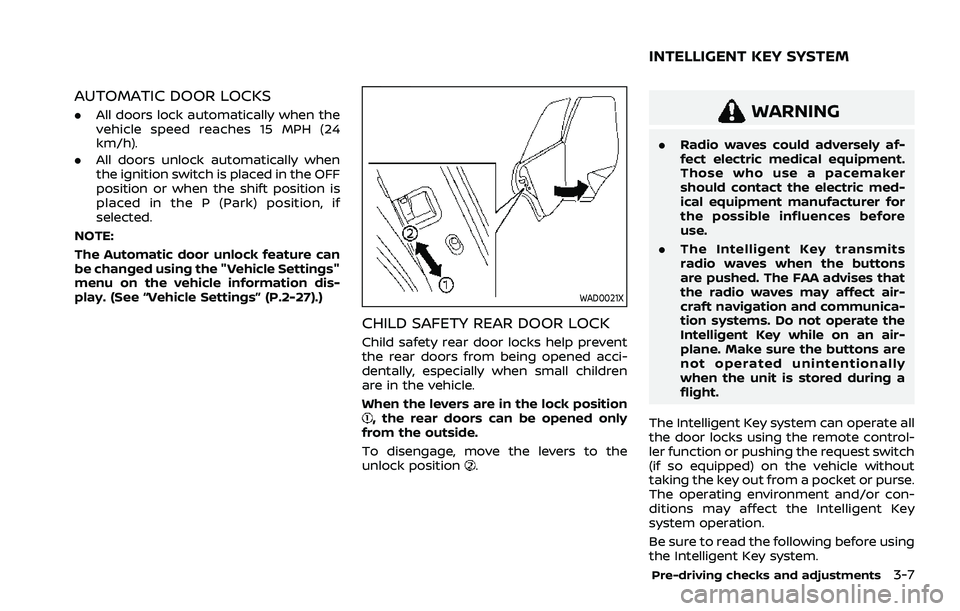
CHILD SAFETY REAR DOOR LOCK
Child safety rear door locks help prevent
the rear doors from being opened acci-
dentally, especially when small children
are in the vehicle.
When the levers are in the lock position
, the rear doors can be opened only
from the outside.
To disengage, move the levers to the
unlock position
.
WARNING
. Radio waves could adversely af-
fect electric medical equipment.
Those who use a pacemaker
should contact the electric med-
ical equipment manufacturer for
the possible influences before
use.
. The Intelligent Key transmits
radio waves when the buttons
are pushed. The FAA advises that
the radio waves may affect air-
craft navigation and communica-
tion systems. Do not operate the
Intelligent Key while on an air-
plane. Make sure the buttons are
not operated unintentionally
when the unit is stored during a
flight.
The Intelligent Key system can operate all
the door locks using the remote control-
ler function or pushing the request switch
(if so equipped) on the vehicle without
taking the key out from a pocket or purse.
The operating environment and/or con-
ditions may affect the Intelligent Key
system operation.
Be sure to read the following before using
the Intelligent Key system.
Pre-driving checks and adjustments3-7
INTELLIGENT KEY SYSTEM