door lock NISSAN ROGUE 2021 Owner´s Manual
[x] Cancel search | Manufacturer: NISSAN, Model Year: 2021, Model line: ROGUE, Model: NISSAN ROGUE 2021Pages: 556, PDF Size: 2.7 MB
Page 199 of 556
WARNING
.Always be sure the liftgate has
been closed securely to prevent it
from opening while driving.
. Do not drive with the liftgate
open. This could allow dangerous
exhaust gases to be drawn into
the vehicle. For additional infor-
mation, refer to “Exhaust gas
(carbon monoxide)” (P.5-5).
. To help avoid risk of injury or
death through unintended opera-
tion of the vehicle and or its
systems, including entrapment
in windows or inadvertent door
lock activation, do not leave chil-
dren, people who require the
assistance of others or pets un-
attended in your vehicle. Addi-
tionally, the temperature inside a
closed vehicle on a warm day can
quickly become high enough to
cause a significant risk of injury
or death to people and pets.
. Always be sure that hands and
feet are clear of the door frame to
avoid injury while closing the
liftgate.
CAUTION
Do not use accessory carriers that
attach to the liftgate. Doing so will
cause damage to the vehicle.
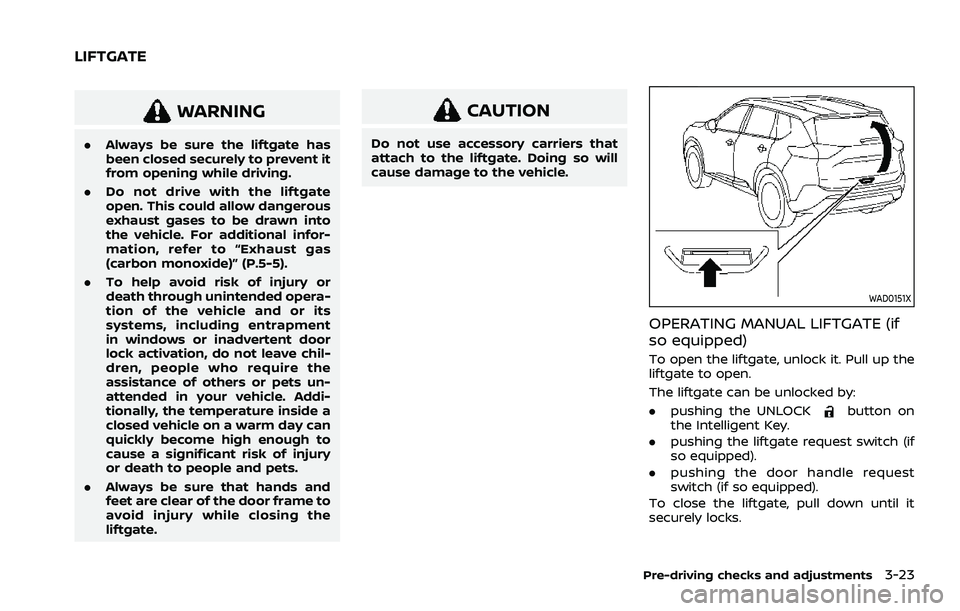
WAD0151X
OPERATING MANUAL LIFTGATE (if
so equipped)
To open the liftgate, unlock it. Pull up the
liftgate to open.
The liftgate can be unlocked by:
.pushing the UNLOCK
button on
the Intelligent Key.
. pushing the liftgate request switch (if
so equipped).
. pushing the door handle request
switch (if so equipped).
To close the liftgate, pull down until it
securely locks.
Pre-driving checks and adjustments3-23
LIFTGATE
Page 201 of 556
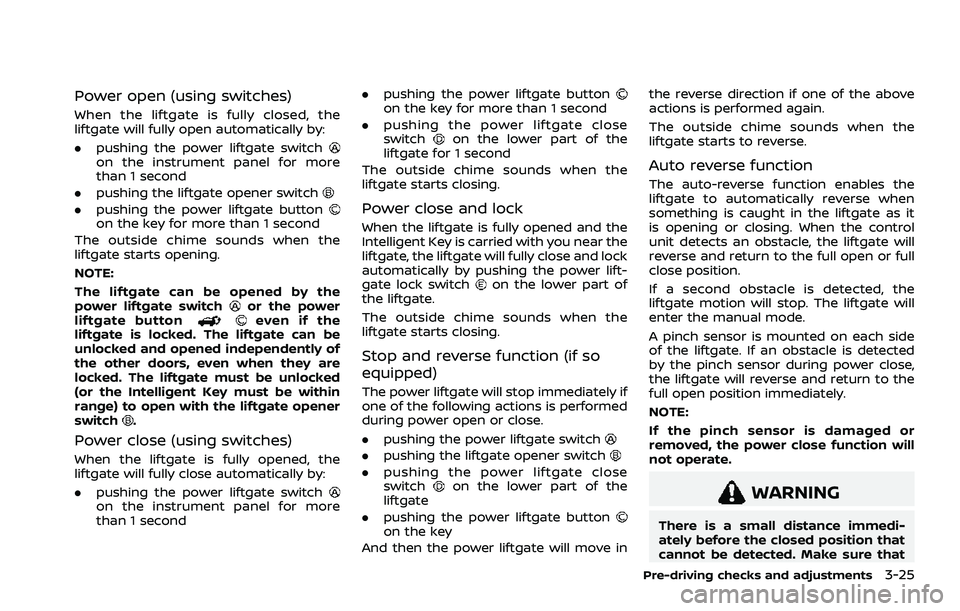
Power open (using switches)
When the liftgate is fully closed, the
liftgate will fully open automatically by:
.pushing the power liftgate switch
on the instrument panel for more
than 1 second
. pushing the liftgate opener switch
.pushing the power liftgate buttonon the key for more than 1 second
The outside chime sounds when the
liftgate starts opening.
NOTE:
The liftgate can be opened by the
power liftgate switch
or the power
liftgate buttoneven if the
liftgate is locked. The liftgate can be
unlocked and opened independently of
the other doors, even when they are
locked. The liftgate must be unlocked
(or the Intelligent Key must be within
range) to open with the liftgate opener
switch
.
Power close (using switches)
When the liftgate is fully opened, the
liftgate will fully close automatically by:
. pushing the power liftgate switch
on the instrument panel for more
than 1 second .
pushing the power liftgate button
on the key for more than 1 second
. pushing the power liftgate close
switch
on the lower part of the
liftgate for 1 second
The outside chime sounds when the
liftgate starts closing.
Power close and lock
When the liftgate is fully opened and the
Intelligent Key is carried with you near the
liftgate, the liftgate will fully close and lock
automatically by pushing the power lift-
gate lock switch
on the lower part of
the liftgate.
The outside chime sounds when the
liftgate starts closing.
Stop and reverse function (if so
equipped)
The power liftgate will stop immediately if
one of the following actions is performed
during power open or close.
. pushing the power liftgate switch
.pushing the liftgate opener switch
.pushing the power liftgate close
switchon the lower part of the
liftgate
. pushing the power liftgate button
on the key
And then the power liftgate will move in the reverse direction if one of the above
actions is performed again.
The outside chime sounds when the
liftgate starts to reverse.
Auto reverse function
The auto-reverse function enables the
liftgate to automatically reverse when
something is caught in the liftgate as it
is opening or closing. When the control
unit detects an obstacle, the liftgate will
reverse and return to the full open or full
close position.
If a second obstacle is detected, the
liftgate motion will stop. The liftgate will
enter the manual mode.
A pinch sensor is mounted on each side
of the liftgate. If an obstacle is detected
by the pinch sensor during power close,
the liftgate will reverse and return to the
full open position immediately.
NOTE:
If the pinch sensor is damaged or
removed, the power close function will
not operate.
WARNING
There is a small distance immedi-
ately before the closed position that
cannot be detected. Make sure that
Pre-driving checks and adjustments3-25
Page 204 of 556
3-28Pre-driving checks and adjustments
CAUTION
Do not set the height of the liftgate
below approximately 1/3 of the way
to the floor using garage mode. Even
if you set the height below approxi-
mately 1/3 of the way to the floor,
the height will automatically be set
to approximately 1/3 of the way to
the floor.
AUTO CLOSURE (if so equipped)
When the liftgate reaches the secondary
position, the closure motor engages and
pulls the liftgate to its primary latch
position.
Do not apply excessive force when the
auto closure is operating. Excessive
force applied may cause the mechan-
ism to malfunction.
CAUTION
.The liftgate will automatically
close from the secondary posi-
tion. To avoid pinching, keep
hands and fingers away from
liftgate opening. .
Do not let children operate the
liftgate.
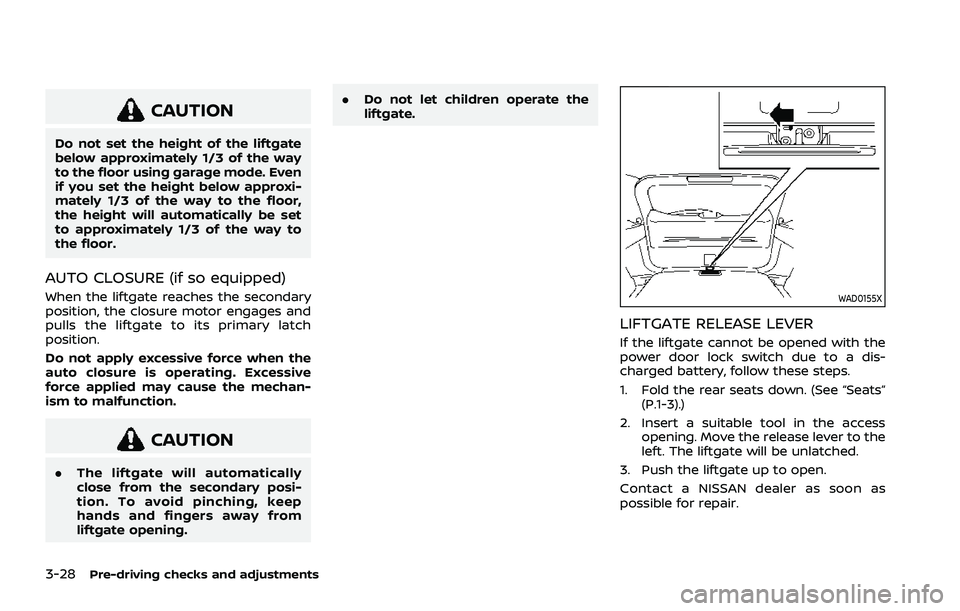
WAD0155X
LIFTGATE RELEASE LEVER
If the liftgate cannot be opened with the
power door lock switch due to a dis-
charged battery, follow these steps.
1. Fold the rear seats down. (See “Seats”
(P.1-3).)
2. Insert a suitable tool in the access opening. Move the release lever to the
left. The liftgate will be unlatched.
3. Push the liftgate up to open.
Contact a NISSAN dealer as soon as
possible for repair.
Page 258 of 556
Cold weather driving .......................................................... 5-172Freeing a frozen door lock ...................................... 5-172
Anti-freeze ........................................................................\
.... 5-172
Battery ........................................................................\
............. 5-172 Draining of coolant water ..................................... 5-172
Tire equipment ............................................................... 5-173
Special winter equipment ..................................... 5-173
Driving on snow or ice ............................................. 5-173
Page 270 of 556
5-16Starting and driving
3. Push the ignition switch again to theOFF position.
The shift position can be shifted from
the P (Park) position if the ignition
switch is in the ON position and the
brake pedal is depressed.
PUSH-BUTTON IGNITION SWITCH
POSITIONS
ON (Normal operating position)
The ignition system and the electrical
accessory power activate at this position
without the engine turned on.
The ON position has a battery saver
feature that will place the ignition switch
in the OFF position, if the vehicle is not
running, after some time under the fol-
lowing conditions:
. all doors are closed.
. vehicle is in P (Park) position.
OFF position
The engine is turned off in this position.
Auto ACC position
With the vehicle in the P (Park) position,
the Intelligent Key with you and the
ignition placed from ON to OFF, the radio
can still be used for a period of time, or
until the driver’s door is opened. After a
period of time, functions such as radio,
navigation (if so equipped), and Blue-
tooth® Hands-Free Phone System may
be restarted by turning on the audio
system (see the separate NissanConnect®
Owner’s Manual), or by pushing the UN-
LOCK button on the Intelligent Key for up
to a total of 30 minutes.
EMERGENCY ENGINE SHUT OFF
To shut off the engine in an emergency
situation while driving or when the In-
telligent Key battery is discharged, per-
form the following procedure:
.Rapidly push the push-button ignition
switch 3 consecutive times in less
than 1.5 seconds, or
. Push and hold the push-button igni-
tion switch for more than 2 seconds.
After engine shut-off, open the door to
return to the normal condition.
JVS0404X
INTELLIGENT KEY BATTERY DIS-
CHARGE
If the battery of the Intelligent Key is
discharged, or environmental conditions
interfere with the Intelligent Key opera-
tion, start the engine according to the
following procedure:
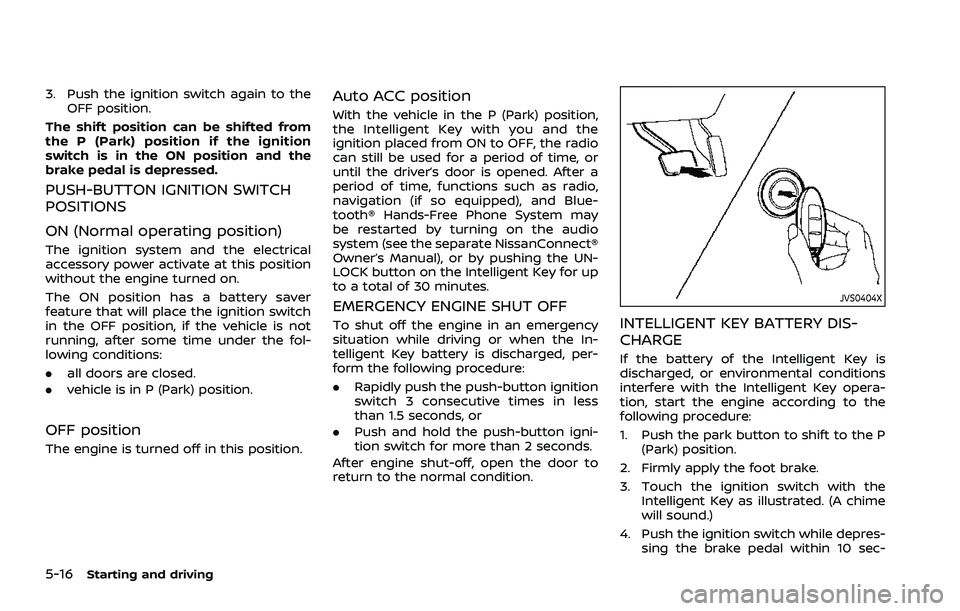
1. Push the park button to shift to the P (Park) position.
2. Firmly apply the foot brake.
3. Touch the ignition switch with the Intelligent Key as illustrated. (A chime
will sound.)
4. Push the ignition switch while depres- sing the brake pedal within 10 sec-
Page 271 of 556
onds after the chime sounds. The
engine will start.
After step 3 is performed, when the
ignition switch is pushed without depres-
sing the brake pedal, the ignition switch
position will change to ON.
NOTE:
. When the ignition switch is pushed
to the ON position or the engine is
started by the above procedures, the
“Key Battery Low” warning appears
(on the vehicle information display)
even if the Intelligent Key is inside
the vehicle. This is not a malfunction.
To turn off the warning, touch the
ignition switch with the Intelligent
Key again.
. If the “Key Battery Low” warning
appears, replace the battery as soon
as possible. (See “Intelligent Key
battery replacement” (P.8-20).) .
Make sure the area around the vehicle
is clear.
. Check fluid levels such as engine oil,
coolant, brake fluid, and window
washer fluid as frequently as possible,
or at least whenever you refuel.
. Check that all windows and lights are
clean.
. Visually inspect tires for their appear-
ance and condition. Also check tires
for proper inflation.
. Lock all doors.
. Position seat and adjust head re-
straints/headrests.
. Adjust inside and outside mirrors.
. Fasten seat belts and ask all passen-
gers to do likewise.
. Check the operation of warning lights
when the ignition switch is placed in
the ON position. (See “Warning lights,
indicator lights and audible remin-
ders” (P.2-13).) 1. Apply the parking brake.
2. Confirm that the vehicle is in the P
(Park) position.
The Intelligent Key must be carried
when operating the ignition switch.
3. Push the ignition switch to the ON position. Depress the brake pedal and
push the ignition switch to start the
engine.
To start the engine immediately, push
and release the ignition switch while
depressing the brake pedal with the
ignition switch in any position.
.If the engine is very hard to start inextremely cold weather or when
restarting, depress the accelerator
pedal a little (approximately 1/3 to
the floor) and while holding, crank
the engine. Release the accelerator
pedal when the engine starts.
.If the engine is very hard to startbecause it is flooded, depress the
accelerator pedal all the way to the
floor and hold it. Push the ignition
switch to the ON position to start
cranking the engine. After 5 or 6
seconds, stop cranking by pushing
the ignition switch to OFF. After
cranking the engine, release the
accelerator pedal. Crank the engine
with your foot off the accelerator
pedal by depressing the brake
Starting and driving5-17
BEFORE STARTING THE ENGINE STARTING THE ENGINE
Page 275 of 556
in an accident.
. The following operations are not
allowed because excessive force
would be applied to the transmis-
sion and this may result in da-
mage to the vehicle:
— Moving the shift lever to the R
(Reverse) position when driv-
ing forward
— Moving the shift lever to the D (Drive) position when rever-
sing
If these operations are at-
tempted, a chime sounds and
the vehicle shifts to the N (Neu-
tral) position.
P (Park):
CAUTION
. To prevent transmission damage,
use the P (Park) position only
when the vehicle is completely
stopped.
. Do not slide the shift lever while
pushing the park button. This
may damage the shift control
system. Use this position when the vehicle is
parked or starting the engine. Always
make sure that the vehicle is completely
stopped before pushing the park button
to engage the P (Park) position. For
maximum safety, the brake pedal must
be depressed before engaging the P
(Park) position. Use this position together
with the electronic parking brake. When
parking on a hill, first depress the brake
pedal, apply the electronic parking brake
and then engage the P (Park) position.
The parking lock should not be used as a
brake when parking. In order to secure
the vehicle, always apply the electronic
parking brake in addition to the parking
lock.
In the event of a malfunction of the
vehicle’s electronics, the transmission
may lock in the P (Park) position. Have
the vehicle’s electronics checked immedi-
ately. It is recommended that you visit a
NISSAN dealer for this service.
The P (Park) position is automatically
engaged if:
.
You switch off the ignition switch
. You unfasten the driver’s seat belt and
open the driver side door when the
vehicle is stationary or driving at very
low speed and the transmission is in
the D (Drive) position, the R (Reverse)
position or the N position unless the Neutral hold mode is engaged.
CAUTION
To avoid CVT malfunction, it is re-
commended that you manually
place the shift position in the P (Park)
position under the above conditions.
R (Reverse):
CAUTION
To prevent transmission damage,
use the R (Reverse) position only
when the vehicle is completely
stopped.
Use the R (Reverse) position to back up.
Make sure the vehicle is completely
stopped before selecting the R (Reverse)
position. The brake pedal must be de-
pressed and the shift lever button
pushed to move the shift lever from
the home position to R (Reverse). If the
vehicle is placed in the R (Reverse)
position while the vehicle is moving
forward, the chime will sound and the
vehicle will switch into the N (Neutral)
position.
Starting and driving5-21
Page 280 of 556
5-26Starting and driving
.When the shift position is placed in the
P (Park) position.
. When the driver’s door is opened.
. When the driver’s seat belt is unfas-
tened.
The electronic parking brake is automati-
cally released as soon as the vehicle
starts while the accelerator pedal is
depressed under the following condi-
tions.
. While the engine is running.
. When the shift position is in the D
(Drive) or R (Reverse) position.
. When the driver’s door is closed.
The electronic parking brake is automati-
cally released within 5 seconds after the
shift position is placed in the D (Drive) or R
(Reverse) position even if the driver’s door
is opened. Be sure to close the door
before starting the vehicle.
WARNING
. When the automatic brake hold
function is activated, the electro-
nic parking brake will not be
automatically applied when the
engine is stopped without using
the ignition switch (for example,
by engine stalling). Without the vehicle stationary,
the electronic parking brake will
not be automatically applied
even if the engine is turned off
with the ignition switch.
. Before leaving the vehicle, place
the shift position in the P (Park)
position and check that the elec-
tronic parking brake warning
light is illuminated to confirm
that the electronic parking brake
is applied. The electronic parking
brake warning light will remain
on for a period of time after the
driver’s door is locked.
CAUTION
When parking in an area where the
outside temperature is below 32°F
(0°C), the electronic parking brake, if
applied, may freeze in place and may
be difficult to release.
For safe parking, it is recommended
that you place the shift position in
the P (Park) position and securely
block the wheels. NOTE:
.
To keep the electronic parking brake
released after the engine is turned
off, place the ignition switch in the
OFF position, depress the brake
pedal and push down the parking
brake switch before opening the
driver’s door.
. If a malfunction occurs in the elec-
tronic parking brake system (for
example, due to battery discharge),
it is recommended to contact a
NISSAN dealer.
. Under the following conditions, the
electronic parking brake will auto-
matically be applied and the brake
force of the automatic brake hold
will be released.
—The braking force is applied by
the automatic brake hold function
for 3 minutes or longer.
— The vehicle is placed in the P
(Park) position.
— The driver’s seat belt is unfas-
tened.
— The driver’s door is opened.
— The ignition switch is placed in
the OFF position.
— The electronic parking brake is
applied manually.
Page 364 of 556
5-110Starting and driving
ICC system temporarily unavailable
The following are conditions in which the
ICC system may be temporarily unavail-
able. In these instances, the ICC system
may not cancel and may not be able to
maintain the selected following distance
from the vehicle ahead.
Condition A:
Under the following conditions, the ICC
system is automatically canceled. A chime
will sound and the system will not be able
to be set:
.Any door is open.
. The driver’s seat belt is unfastened.
. The vehicle ahead is not detected and
your vehicle is traveling below the
speed of 15 MPH (25 km/h). For
ProPILOT Assist with Navi-link
equipped vehicles on a limited access
freeway as identified in the navigation
map data, the ICC system cancels and
a warning chime sounds if your vehi-
cle is at a standstill for more than
approximately 3 seconds and a vehi-
cle is not detected ahead.
. Your vehicle has been stopped by the
ICC system for approximately 3 min-
utes or longer.
. The shift lever is moved out of the D
(Drive) position or into the manual
shift mode. .
The electronic parking brake is ap-
plied.
. The VDC system is turned off.
. The AEB applies harder braking
. VDC (including the traction control
system) operates.
. The SNOW mode or OFF-ROAD mode
is selected (AWD models).
. A wheel slips.
. When the front radar is impaired due
to dirt or an other obstruction block-
ing the radar sensor.
. When the radar signal is temporarily
interrupted.
Action to take:
When the conditions listed above are no
longer present, turn the system off using
the ProPILOT Assist switch. Turn the
ProPILOT Assist system back on to use
the system.
NOTE:
When the ICC system is canceled under
any of the following conditions at a
standstill, the electronic parking brake
is automatically activated:
. Any door is open.
. The driver’s seat belt is unfastened.
. Your vehicle has been stopped by
the ICC system for approximately 3
minutes or longer. .
The shift lever is moved out of the D
(Drive) position or into the manual
shift mode.
. The VDC system is turned off.
. When the front radar is impaired due
to dirt or an other obstruction block-
ing the radar sensor.
. When the radar signal is temporarily
interrupted.
Condition B:
When there is inclement weather (rain,
fog, snow, etc.) blocking the front radar
sensor, the ICC system will automatically
be canceled, the chime will sound and the
“Forward Driving Aids temporarily dis-
abled Front Sensor blocked” warning
message will appear in the vehicle infor-
mation display.
Action to take:
When the above condition is no longer
present, the warning message will no
longer be available in the vehicle informa-
tion display and the system will operate
normally. If the warning message con-
tinues to appear, have the system
checked. It is recommended that you visit
a NISSAN dealer for this service.
Condition C:
When the radar sensor on the front of the
vehicle is covered with dirt or is ob-
Page 426 of 556
5-172Starting and driving
WAF0647X
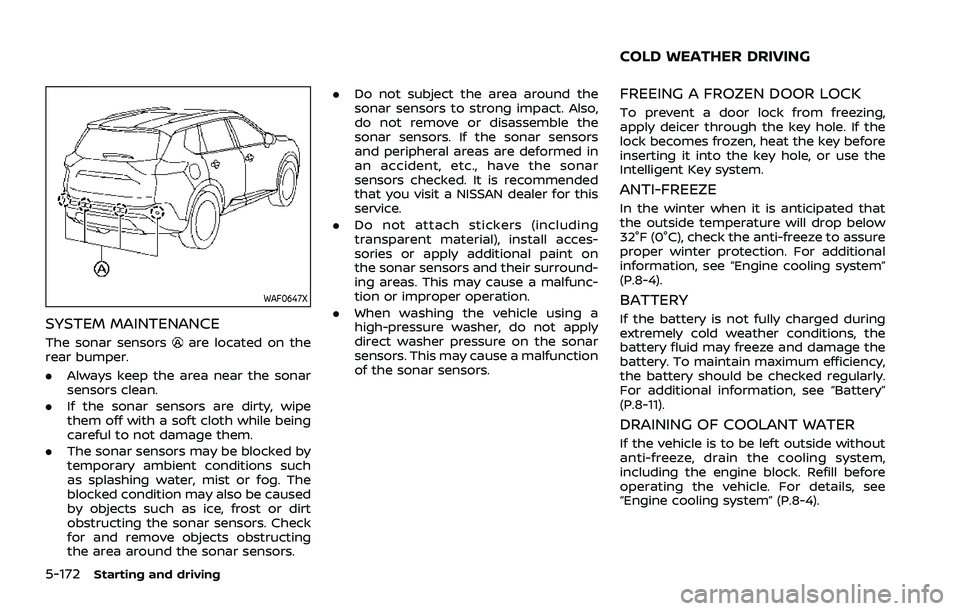
SYSTEM MAINTENANCE
The sonar sensorsare located on the
rear bumper.
. Always keep the area near the sonar
sensors clean.
. If the sonar sensors are dirty, wipe
them off with a soft cloth while being
careful to not damage them.
. The sonar sensors may be blocked by
temporary ambient conditions such
as splashing water, mist or fog. The
blocked condition may also be caused
by objects such as ice, frost or dirt
obstructing the sonar sensors. Check
for and remove objects obstructing
the area around the sonar sensors. .
Do not subject the area around the
sonar sensors to strong impact. Also,
do not remove or disassemble the
sonar sensors. If the sonar sensors
and peripheral areas are deformed in
an accident, etc., have the sonar
sensors checked. It is recommended
that you visit a NISSAN dealer for this
service.
. Do not attach stickers (including
transparent material), install acces-
sories or apply additional paint on
the sonar sensors and their surround-
ing areas. This may cause a malfunc-
tion or improper operation.
. When washing the vehicle using a
high-pressure washer, do not apply
direct washer pressure on the sonar
sensors. This may cause a malfunction
of the sonar sensors.
FREEING A FROZEN DOOR LOCK
To prevent a door lock from freezing,
apply deicer through the key hole. If the
lock becomes frozen, heat the key before
inserting it into the key hole, or use the
Intelligent Key system.
ANTI-FREEZE
In the winter when it is anticipated that
the outside temperature will drop below
32°F (0°C), check the anti-freeze to assure
proper winter protection. For additional
information, see “Engine cooling system”
(P.8-4).
BATTERY
If the battery is not fully charged during
extremely cold weather conditions, the
battery fluid may freeze and damage the
battery. To maintain maximum efficiency,
the battery should be checked regularly.
For additional information, see “Battery”
(P.8-11).
DRAINING OF COOLANT WATER
If the vehicle is to be left outside without
anti-freeze, drain the cooling system,
including the engine block. Refill before
operating the vehicle. For details, see
“Engine cooling system” (P.8-4).
COLD WEATHER DRIVING