horn NISSAN ROGUE 2021 Owner´s Manual
[x] Cancel search | Manufacturer: NISSAN, Model Year: 2021, Model line: ROGUE, Model: NISSAN ROGUE 2021Pages: 556, PDF Size: 2.7 MB
Page 187 of 556
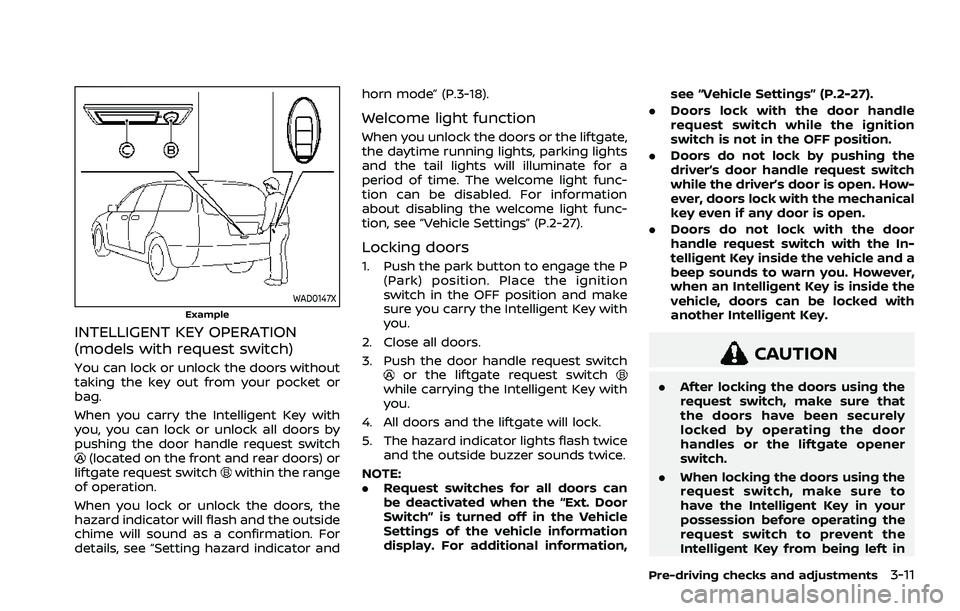
WAD0147XExample
INTELLIGENT KEY OPERATION
(models with request switch)
You can lock or unlock the doors without
taking the key out from your pocket or
bag.
When you carry the Intelligent Key with
you, you can lock or unlock all doors by
pushing the door handle request switch
(located on the front and rear doors) or
liftgate request switchwithin the range
of operation.
When you lock or unlock the doors, the
hazard indicator will flash and the outside
chime will sound as a confirmation. For
details, see “Setting hazard indicator and horn mode” (P.3-18).
Welcome light function
When you unlock the doors or the liftgate,
the daytime running lights, parking lights
and the tail lights will illuminate for a
period of time. The welcome light func-
tion can be disabled. For information
about disabling the welcome light func-
tion, see “Vehicle Settings” (P.2-27).
Locking doors
1. Push the park button to engage the P
(Park) position. Place the ignition
switch in the OFF position and make
sure you carry the Intelligent Key with
you.
2. Close all doors.
3. Push the door handle request switch
or the liftgate request switchwhile carrying the Intelligent Key with
you.
4. All doors and the liftgate will lock.
5. The hazard indicator lights flash twice and the outside buzzer sounds twice.
NOTE:
. Request switches for all doors can
be deactivated when the “Ext. Door
Switch” is turned off in the Vehicle
Settings of the vehicle information
display. For additional information, see “Vehicle Settings” (P.2-27).
. Doors lock with the door handle
request switch while the ignition
switch is not in the OFF position.
. Doors do not lock by pushing the
driver’s door handle request switch
while the driver’s door is open. How-
ever, doors lock with the mechanical
key even if any door is open.
. Doors do not lock with the door
handle request switch with the In-
telligent Key inside the vehicle and a
beep sounds to warn you. However,
when an Intelligent Key is inside the
vehicle, doors can be locked with
another Intelligent Key.
CAUTION
.After locking the doors using the
request switch, make sure that
the doors have been securely
locked by operating the door
handles or the liftgate opener
switch.
. When locking the doors using the
request switch, make sure to
have the Intelligent Key in your
possession before operating the
request switch to prevent the
Intelligent Key from being left in
Pre-driving checks and adjustments3-11
Page 189 of 556
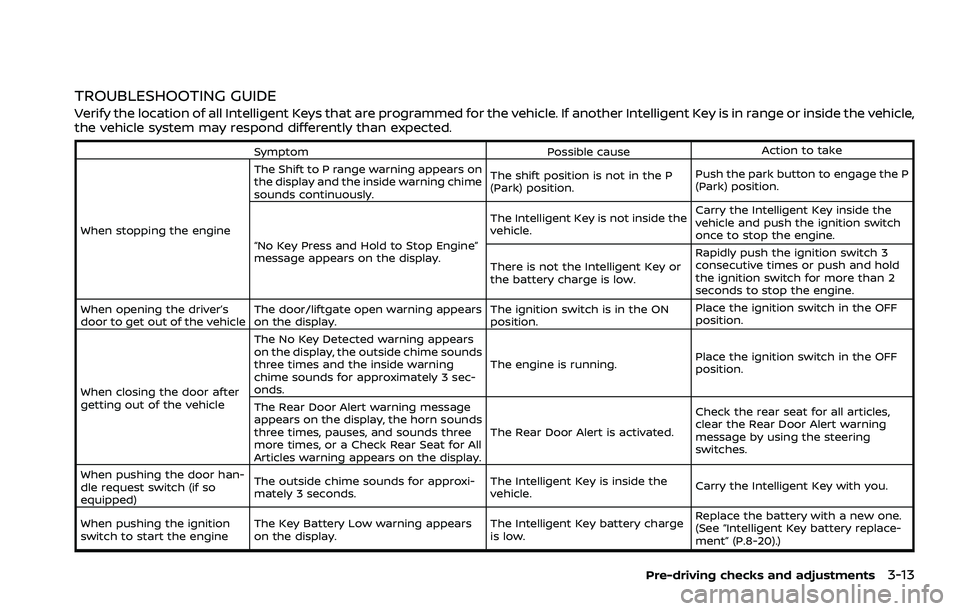
TROUBLESHOOTING GUIDE
Verify the location of all Intelligent Keys that are programmed for the vehicle. If another Intelligent Key is in range or inside the vehicle,
the vehicle system may respond differently than expected.
SymptomPossible causeAction to take
When stopping the engine The Shift to P range warning appears on
the display and the inside warning chime
sounds continuously.
The shift position is not in the P
(Park) position.
Push the park button to engage the P
(Park) position.
“No Key Press and Hold to Stop Engine”
message appears on the display. The Intelligent Key is not inside the
vehicle.
Carry the Intelligent Key inside the
vehicle and push the ignition switch
once to stop the engine.
There is not the Intelligent Key or
the battery charge is low. Rapidly push the ignition switch 3
consecutive times or push and hold
the ignition switch for more than 2
seconds to stop the engine.
When opening the driver’s
door to get out of the vehicle The door/liftgate open warning appears
on the display. The ignition switch is in the ON
position.Place the ignition switch in the OFF
position.
When closing the door after
getting out of the vehicle The No Key Detected warning appears
on the display, the outside chime sounds
three times and the inside warning
chime sounds for approximately 3 sec-
onds.
The engine is running.
Place the ignition switch in the OFF
position.
The Rear Door Alert warning message
appears on the display, the horn sounds
three times, pauses, and sounds three
more times, or a Check Rear Seat for All
Articles warning appears on the display. The Rear Door Alert is activated.
Check the rear seat for all articles,
clear the Rear Door Alert warning
message by using the steering
switches.
When pushing the door han-
dle request switch (if so
equipped) The outside chime sounds for approxi-
mately 3 seconds.
The Intelligent Key is inside the
vehicle.
Carry the Intelligent Key with you.
When pushing the ignition
switch to start the engine The Key Battery Low warning appears
on the display. The Intelligent Key battery charge
is low.Replace the battery with a new one.
(See “Intelligent Key battery replace-
ment” (P.8-20).)
Pre-driving checks and adjustments3-13
Page 192 of 556
3-16Pre-driving checks and adjustments
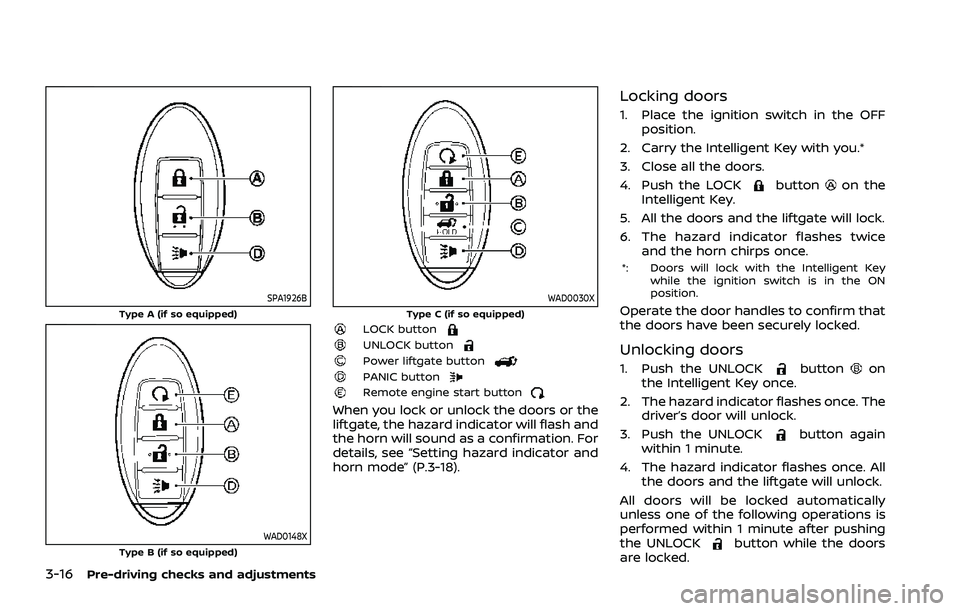
SPA1926BType A (if so equipped)
WAD0148XType B (if so equipped)
WAD0030XType C (if so equipped)LOCK buttonUNLOCK buttonPower liftgate buttonPANIC buttonRemote engine start button
When you lock or unlock the doors or the
liftgate, the hazard indicator will flash and
the horn will sound as a confirmation. For
details, see “Setting hazard indicator and
horn mode” (P.3-18).
Locking doors
1. Place the ignition switch in the OFFposition.
2. Carry the Intelligent Key with you.*
3. Close all the doors.
4. Push the LOCK
buttonon the
Intelligent Key.
5. All the doors and the liftgate will lock.
6. The hazard indicator flashes twice and the horn chirps once.
*: Doors will lock with the Intelligent Key
while the ignition switch is in the ON
position.
Operate the door handles to confirm that
the doors have been securely locked.
Unlocking doors
1. Push the UNLOCKbuttonon
the Intelligent Key once.
2. The hazard indicator flashes once. The driver’s door will unlock.
3. Push the UNLOCK
button again
within 1 minute.
4. The hazard indicator flashes once. All the doors and the liftgate will unlock.
All doors will be locked automatically
unless one of the following operations is
performed within 1 minute after pushing
the UNLOCK
button while the doors
are locked.
Page 194 of 556
3-18Pre-driving checks and adjustments
Setting hazard indicator and horn
mode
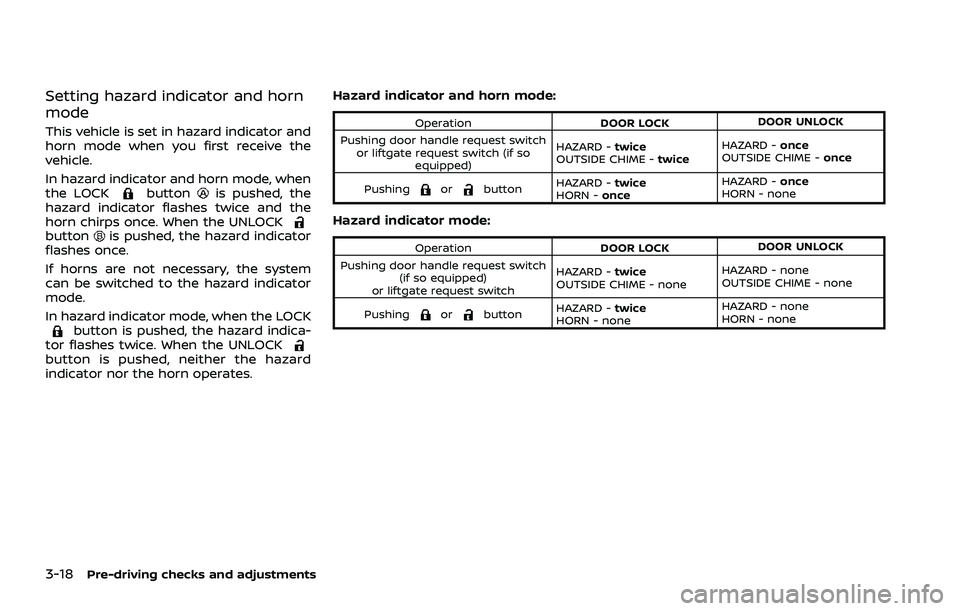
This vehicle is set in hazard indicator and
horn mode when you first receive the
vehicle.
In hazard indicator and horn mode, when
the LOCK
buttonis pushed, the
hazard indicator flashes twice and the
horn chirps once. When the UNLOCK
buttonis pushed, the hazard indicator
flashes once.
If horns are not necessary, the system
can be switched to the hazard indicator
mode.
In hazard indicator mode, when the LOCK
button is pushed, the hazard indica-
tor flashes twice. When the UNLOCK
button is pushed, neither the hazard
indicator nor the horn operates. Hazard indicator and horn mode:
Operation
DOOR LOCKDOOR UNLOCK
Pushing door handle request switch or liftgate request switch (if so equipped) HAZARD -
twice
OUTSIDE CHIME - twiceHAZARD -
once
OUTSIDE CHIME - once
Pushing
orbutton HAZARD -
twice
HORN - once HAZARD -
once
HORN - none
Hazard indicator mode:
Operation DOOR LOCKDOOR UNLOCK
Pushing door handle request switch (if so equipped)
or liftgate request switch HAZARD -
twice
OUTSIDE CHIME - none HAZARD - none
OUTSIDE CHIME - none
Pushing
orbutton HAZARD -
twice
HORN - none HAZARD - none
HORN - none
Page 195 of 556
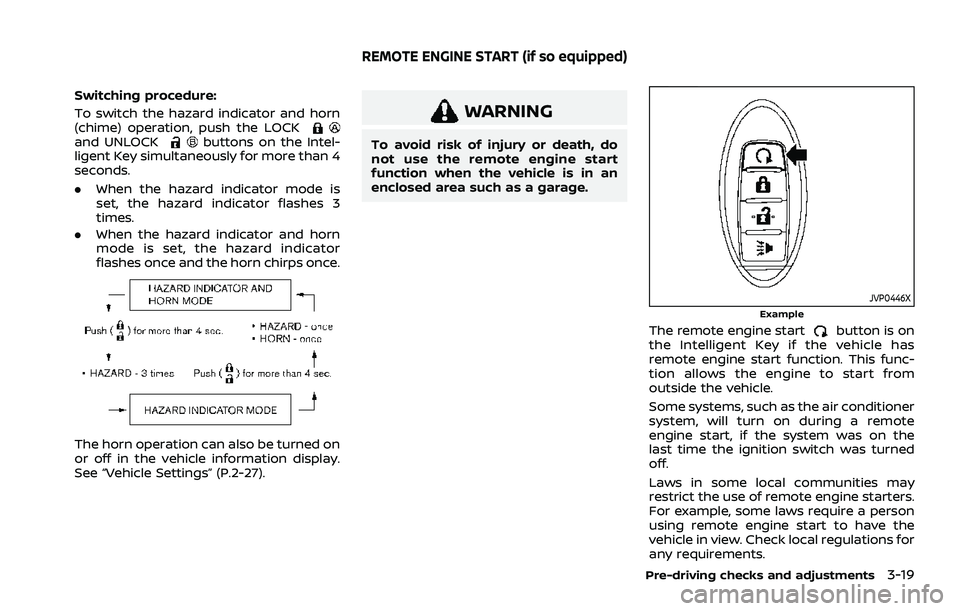
Switching procedure:
To switch the hazard indicator and horn
(chime) operation, push the LOCK
and UNLOCKbuttons on the Intel-
ligent Key simultaneously for more than 4
seconds.
. When the hazard indicator mode is
set, the hazard indicator flashes 3
times.
. When the hazard indicator and horn
mode is set, the hazard indicator
flashes once and the horn chirps once.
The horn operation can also be turned on
or off in the vehicle information display.
See “Vehicle Settings” (P.2-27).
WARNING
To avoid risk of injury or death, do
not use the remote engine start
function when the vehicle is in an
enclosed area such as a garage.
JVP0446XExample
The remote engine startbutton is on
the Intelligent Key if the vehicle has
remote engine start function. This func-
tion allows the engine to start from
outside the vehicle.
Some systems, such as the air conditioner
system, will turn on during a remote
engine start, if the system was on the
last time the ignition switch was turned
off.
Laws in some local communities may
restrict the use of remote engine starters.
For example, some laws require a person
using remote engine start to have the
vehicle in view. Check local regulations for
any requirements.
Pre-driving checks and adjustments3-19
REMOTE ENGINE START (if so equipped)
Page 263 of 556
Model: TIS-10DL
IC: 7812D-TIS10DL
Body Control Module (BCM)
Model: 40406556
IC: 7812D-5235RXDP
Continental
This device complies with Industry Ca-
nada licence-exempt RSS standard(s).
Operation is subject to the following
two conditions: (1) this device may not
cause interference, and (2) this device
must accept any interference, including
interference that may cause undesired
operation of the device.
TPMS with Easy Fill Tire Alert
WARNING
After rotating the tires, do not use
the Easy-Fill Tire Alert to adjust the
tire pressure. Instead use a gauge to
adjust the tires to the correct pres-
sure in accordance with Tire and
Loading Information label.
When adding air to an under-inflated tire,
the TPMS with Easy Fill Tire Alert provides
visual and audible signals outside the vehicle to help you inflate the tires to
the recommended COLD tire pressure.
Vehicle set-up:
1. Park the vehicle in a safe and level place.
2. Apply the parking brake and push the park button to shift to the P (Park)
position.
3. Place the ignition switch in the ON position. Do not start the engine.
Operation:
1. Add air to the tire.
2. After a few seconds, the hazard in- dicators will start flashing.
3. When the designated pressure is reached, the horn beeps once and
the hazard indicators stop flashing.
4. Perform the above steps for each tire.
. If the tire is over-inflated more than
approximately 4 psi (30 kPa), the horn
beeps and the hazard indicators flash
3 times. To correct the pressure, push
the core of the valve stem on the tire
briefly to release pressure. When the
pressure reaches the designated
pressure, the horn beeps once.
. If the hazard indicator does not flash
within approximately 15 seconds after
starting to inflate the tire, it indicates that the TPMS with Easy Fill Tire Alert
is not operating.
. The TPMS will not activate the Easy Fill
Tire Alert under the following condi-
tions:
— If there is interference from an
external device or transmitter
— The air pressure from the inflation device such as those using a power
socket is not sufficient to inflate the
tire
— If an electrical equipment is being used in or near the vehicle
— There is a malfunction in the TPMS system
— There is a malfunction in the horn or hazard indicators
. If the TPMS with Easy Fill Tire Alert
does not operate due to TPMS inter-
ference, move the vehicle about 3 ft
(1m) backward or forward and try
again.
If the TPMS with Easy Fill Tire Alert is not
working, use a tire pressure gauge.
Starting and driving5-9
Page 549 of 556

F
F.M.V.S.S./C.M.V.S.S. certification label ...... 10-10
FilterAir cleaner housing filter ................................ 8-15
Changing engine oil and filter ...................... 8-6
Flashers (See hazard warning
flasher switch).................................................................... 6-2
Flat tire........................................................................\
............. 6-3
Flat towing..................................................................... 10-26
Floor mat cleaning ......................................................... 7-5
Fluid Brake fluid ..................................................................... 8-9
Capacities and
recommended fluids/lubricants............... 10-3
Continuously Variable Transmission
(CVT) fluid....................................................................... 8-8
Engine coolant........................................................... 8-4
Engine oil.....................................................................\
... 8-5
Window washer fluid ............................................ 8-9
Fog light switch ............................................................ 2-62
Forward Driving Aids ................................................ 5-34
Front manual seat adjustment ............................ 1-4
Front passenger air bag and status
light........................................................................\
................. 1-54
Front seat, Front seat adjustment .................... 1-4
Fuel Capacities and
recommended fluids/lubricants............... 10-3
Fuel economy...................................................... 5-150
Fuel information.................................................... 10-4
Fuel octane rating ............................................... 10-4
Fuel-filler door......................................................... 3-29
Gauge........................................................................\
..... 2-10
Fuel Efficient Driving Tips................................... 5-149
Fuses........................................................................\
.............. 8-18 Fusible links...................................................................... 8-18G
Garage mode system............................................... 3-27
Gauge........................................................................\
................ 2-5
Engine coolant temperature gauge......... 2-9
Fuel gauge ................................................................. 2-10
Odometer....................................................................... 2-8
Speedometer .............................................................. 2-8
Tachometer.................................................................. 2-9
General maintenance................................................... 9-2
Glove box ........................................................................\
... 2-75
H
Hazard warning flasher switch ............................ 6-2
Head restraints/headrests....................................... 1-9
Head Up Display (HUD) ............................................ 2-47
Headlights Bulb replacement ................................................. 8-23
Headlight switch ................................................... 2-55
Heated seats ................................................................... 2-63
Heated steering wheel ............................................ 2-63
Heater Heater and air conditioner
operation..................................................................... 4-27
High beam assist ......................................................... 2-59
Hill start assist system ......................................... 5-161
Hood release ................................................................... 3-22
Hook Coat hook................................................................... 2-77
Luggage hook ......................................................... 2-78
Horn........................................................................\
................ 2-63
I
Ignition switch ............................................................... 5-14
Ignition switch positions ....................................... 5-15
Immobilizer system.................................................... 2-51
Indicator Lights..................................................................\
............ 2-17
Vehicle information display.......................... 2-22
indicator light Electronic parking brake warning
light........................................................................\
.......... 2-15
Inside mirror .................................................................... 3-33
Inspection/maintenance (I/M) test ............ 10-29
Instrument brightness control ......................... 2-11
Instrument panel ............................................................. 2-4
Intelligent 4x4 ............................................................. 5-151
Intelligent Around View® Monitor....................... 4-9
Intelligent Auto Headlight system ................. 2-56
Intelligent Blind Spot
Intervention (I-BSI) ...................................................... 5-65
Intelligent Cruise Control (ICC) ......................... 5-97
Intelligent Driver Alertness (I-DA) ................. 5-141
Intelligent Forward Collision Warning
(I-FCW)........................................................................\
........ 5-132
Intelligent Key button operation light ........ 3-17
Intelligent Key system ................................................. 3-7 Key operating range ............................................. 3-9
Key operation .......................................................... 3-11
Remote keyless operation ............................ 3-15
Intelligent Lane Intervention (I-LI) .................. 5-51
Intelligent Trace Control..................................... 5-160
Interior light replacement..................................... 8-23
Interior light switch.................................................... 2-85
Interior lights................................................................... 2-85
ISOFIX child restraint ................................................ 1-25
11-3