key battery NISSAN ROGUE 2021 Owner´s Manual
[x] Cancel search | Manufacturer: NISSAN, Model Year: 2021, Model line: ROGUE, Model: NISSAN ROGUE 2021Pages: 556, PDF Size: 2.7 MB
Page 193 of 556
.Opening any door (including the lift-
gate).
. Pushing the ignition switch.
During this 1-minute time period, if the
UNLOCK
button is pushed, all doors
will be locked automatically after another
1 minute.
NOTE:
The unlocking operation can be chan-
ged in selective unlock in the Vehicle
Settings of the vehicle information dis-
play. For additional information, see
“Vehicle Settings” (P.2-27).
Opening/closing liftgate (if so
equipped)
1. Push the power liftgate buttonfor more than 1 second.
2. The liftgate will automatically open.
The outside chime sounds 3 times for
approximately 3 seconds.
To close the liftgate, push the power
liftgate button
for more than 1
second.
The liftgate will automatically close.
If the button
is pushed while the
liftgate is being opened or closed, the
liftgate will immediately stop. Pushing the
button
again will reverse the direc-
tion of the liftgate. However, when the
liftgate is near the fully open position, it moves in the closing direction and when
the liftgate is near the fully close position,
it moves in the opening direction.
Using panic alarm
If you are near your vehicle and feel
threatened, you may activate the alarm
to call attention as follows:
1. Push the PANIC
buttonon the
Intelligent Key for more than 0.5
seconds.
2. The theft warning alarm and head- lights will stay on for 25 seconds.
3. The panic alarm stops when:
.It has run for 25 seconds, or.Any of the buttons on the Intelligent Key is pushed.
Remote engine start (if so
equipped)
The remote engine startbuttonis
on the Intelligent Key if the vehicle has
remote engine start function. This func-
tion allows the engine to start from
outside the vehicle. See “Remote engine
start” (P.3-19).
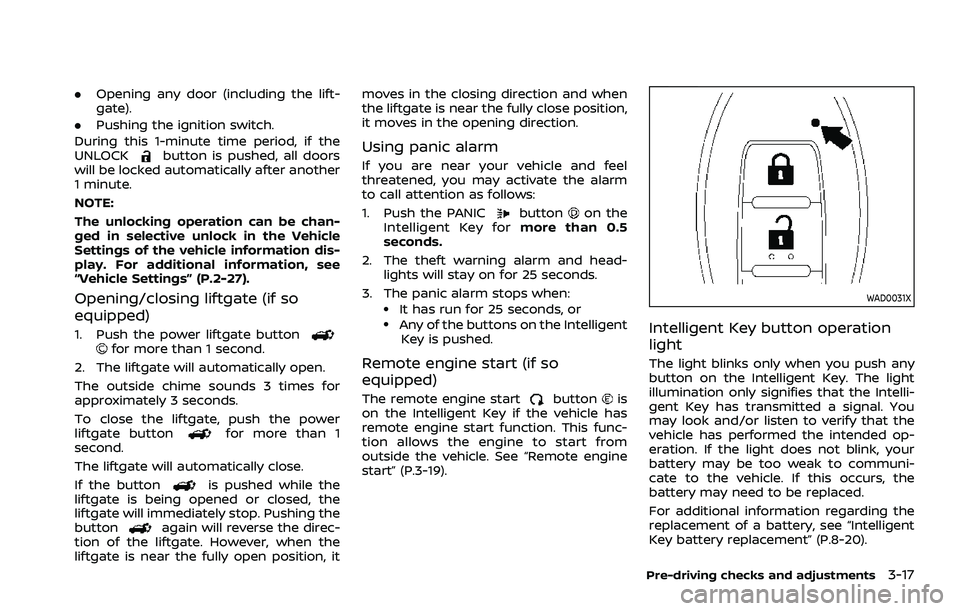
WAD0031X
Intelligent Key button operation
light
The light blinks only when you push any
button on the Intelligent Key. The light
illumination only signifies that the Intelli-
gent Key has transmitted a signal. You
may look and/or listen to verify that the
vehicle has performed the intended op-
eration. If the light does not blink, your
battery may be too weak to communi-
cate to the vehicle. If this occurs, the
battery may need to be replaced.
For additional information regarding the
replacement of a battery, see “Intelligent
Key battery replacement” (P.8-20).
Pre-driving checks and adjustments3-17
Page 196 of 556
3-20Pre-driving checks and adjustments
Other conditions may affect the remote
engine start function. See “Conditions the
remote engine start will not work” (P.3-21).
Other conditions can affect the perfor-
mance of the Intelligent Key transmitter.
See “Intelligent Key system” (P.3-7) for
additional information.
REMOTE ENGINE START OPERATING
RANGE
The remote engine start function can
only be used when the Intelligent Key is
within the specified operating range from
the vehicle.
When the Intelligent Key battery is dis-
charged or other strong radio wave
sources are present near the operating
location, the Intelligent Key operating
range becomes narrower, and the Intelli-
gent Key may not function properly.
The remote engine start operating range
is approximately 197 ft (60 m) from the
vehicle.
REMOTE STARTING THE ENGINE
To use the remote start function to start
the engine, perform the following:
1. If the doors are unlocked, push theLOCK
button to lock all doors.
2. Aim the Intelligent Key at the vehicle. 3. Push the LOCK
button again.
4. Within 5 seconds push and hold the remote engine start
button until
the turn signal lights flash and the tail
lights illuminate. If the vehicle is not
within view, push and hold the remote
engine start
button for at least 2
seconds.
The following events will occur when the
engine starts:
. The front parking lights will turn on
and remain on as long as the engine is
running.
. The doors will be locked and the air
conditioner system may turn on.
. The engine will continue to run for
about 10 minutes. Repeat the steps to
extend the time for an additional 10
minutes. See “Extending engine run
time” (P.3-20).
Depress and hold the brake pedal, then
place the ignition switch in the ON posi-
tion before driving. For further instruc-
tions, see “Driving the vehicle” (P.5-19).
EXTENDING ENGINE RUN TIME
The remote engine start function can be
extended one time by performing the
steps listed in “Remote starting the en-
gine” (P.3-20). Run time will be calculated
as follows:
. The first 10 minute run time will start
when the remote engine start func-
tion is performed.
. The second 10 minutes will start im-
mediately when the remote engine
start function is performed. For exam-
ple, if the engine has been running for
5 minutes, and 10 minutes are added,
the engine will run for a total of 15
minutes.
. Extending engine run time will count
towards the two remote engine start
limit.
A maximum of two remote engine starts,
or a single start with an extension can be
used.
The vehicle needs to be driven at speeds
of 4 MPH (7 km/h) before the remote
engine start procedure can be used
again.
Page 200 of 556
3-24Pre-driving checks and adjustments
OPERATING POWER LIFTGATE (if so
equipped)
To operate the power liftgate, the vehicle
must be in the P (Park) position.
The power liftgate will not operate if the
battery voltage is low.
The power liftgate operation can be
activated or deactivated in the vehicle
information display. (See “Vehicle Set-
tings” (P.2-27).)
NOTE:
.For models with motion-activated
liftgate: When washing, waxing or
maintaining your vehicle, placing or
replacing the body cover, or splash-
ing water to the area around the kick
motion sensor, turn off the power
liftgate.
. If the power open or close operation
is performed consecutively, the
safety mode activates and the op-
eration cannot be performed for a
certain period of time. In this case,
wait for a while and then perform
the operation.
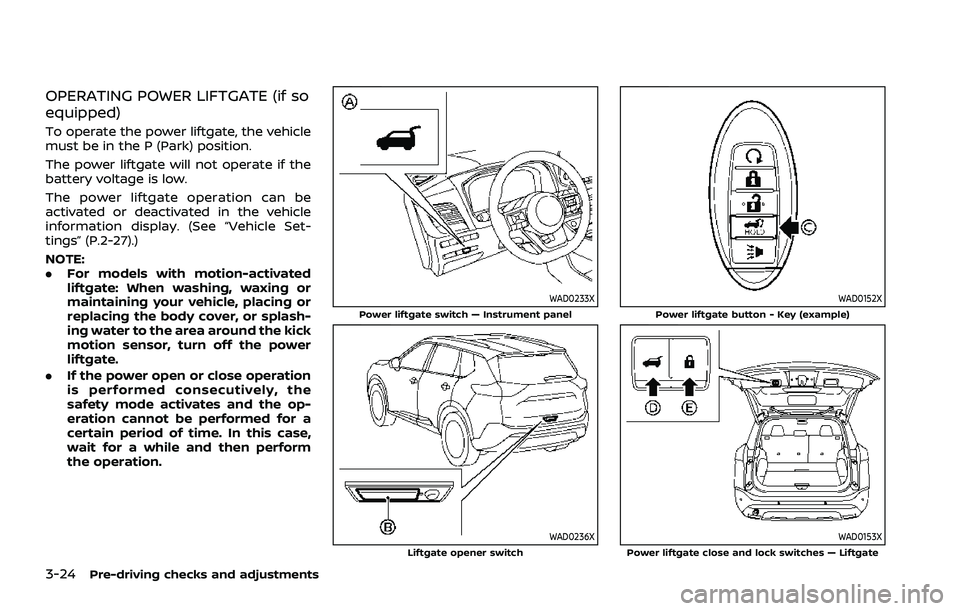
WAD0233XPower liftgate switch — Instrument panel
WAD0236XLiftgate opener switch
WAD0152XPower liftgate button - Key (example)
WAD0153XPower liftgate close and lock switches — Liftgate
Page 202 of 556
3-26Pre-driving checks and adjustments
all passengers keep their hands, etc.,
clear from the liftgate opening be-
fore closing the liftgate.
Manual mode
If power operation is not available, the
liftgate can be operated manually. Power
operation may not be available if multiple
obstacles have been detected in a single
power cycle or if the battery voltage is
low. When the power liftgate is turned off,
the liftgate can be opened manually by
pushing the liftgate opener switch. If the
power liftgate opener switch is pushed
during power open or close, the power
operation will be canceled and the liftgate
can be operated manually. This will allow
normal power operation functions to
resume.
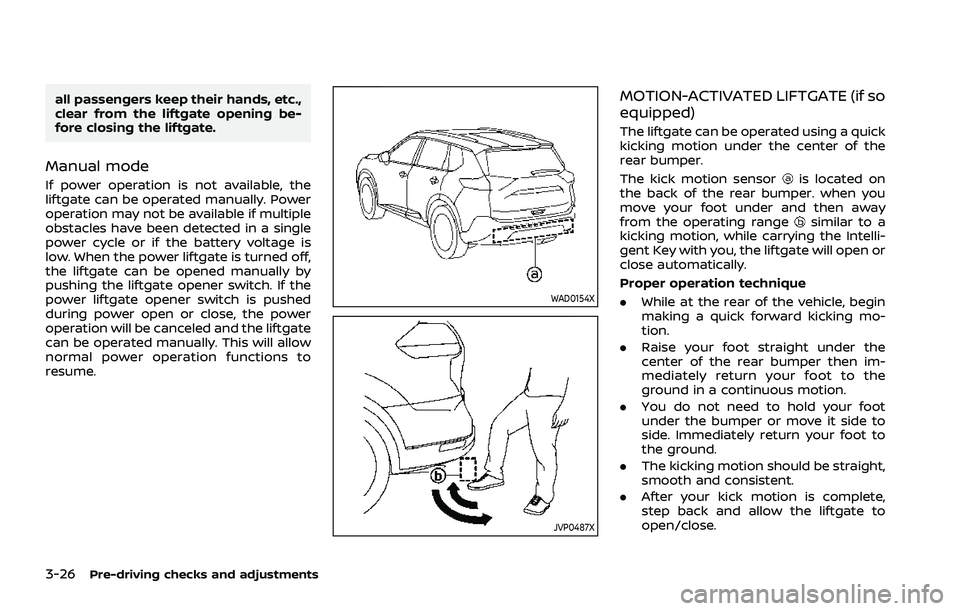
WAD0154X
JVP0487X
MOTION-ACTIVATED LIFTGATE (if so
equipped)
The liftgate can be operated using a quick
kicking motion under the center of the
rear bumper.
The kick motion sensor
is located on
the back of the rear bumper. when you
move your foot under and then away
from the operating range
similar to a
kicking motion, while carrying the Intelli-
gent Key with you, the liftgate will open or
close automatically.
Proper operation technique
. While at the rear of the vehicle, begin
making a quick forward kicking mo-
tion.
. Raise your foot straight under the
center of the rear bumper then im-
mediately return your foot to the
ground in a continuous motion.
. You do not need to hold your foot
under the bumper or move it side to
side. Immediately return your foot to
the ground.
. The kicking motion should be straight,
smooth and consistent.
. After your kick motion is complete,
step back and allow the liftgate to
open/close.
Page 255 of 556
5 Starting and driving
Precautions when starting and driving ...................... 5-5Exhaust gas (carbon monoxide) ................................ 5-5
Three-way catalyst ............................................................... 5-6
Tire Pressure Monitoring System (TPMS) ........... 5-6
Avoiding collision and rollover ................................. 5-10
On-pavement and off-road
driving precautions ........................................................... 5-10
Off-road recovery ............................................................... 5-10
Rapid air pressure loss ................................................... 5-11
Drinking alcohol/drugs and driving ..................... 5-11
Driving safety precautions .......................................... 5-12
Push-button ignition switch ............................................. 5-14 Operating range for engine start function ...... 5-14
Push-button ignition switch operation ............. 5-15
Push-button ignition switch positions .............. 5-16
Emergency engine shut off ........................................ 5-16
Intelligent Key battery discharge ........................... 5-16
Before starting the engine ................................................. 5-17
Starting the engine .................................................................. 5-17 Remote engine start (if so equipped) ................. 5-18
Driving the vehicle .................................................................... 5-19 Continuously Variable
Transmission (CVT) ............................................................ 5-19
Parking brake ........................................................................\
....... 5-25 Automatic operation ........................................................ 5-25 Manual operation ............................................................. 5-27
Automatic brake hold ........................................................... 5-28 How to activate/deactivate the automatic
brake hold function ........................................................ 5-29
How to use the automatic brake
hold function ........................................................................\
5-29
Drive Mode Selector ............................................................... 5-30 OFF-ROAD mode (AWD models) ........................... 5-31
SNOW mode (AWD models) ...................................... 5-32
STANDARD mode (2WD models)/AUTO
mode (AWD models) ....................................................... 5-32
ECO mode ........................................................................\
...... 5-32
SPORT mode ........................................................................\
5-33
Driver Assistance systems ................................................. 5-34 How to enable/disable the systems ................. 5-37
Common troubleshooting guide ......................... 5-39
Traffic Sign Recognition (TSR) (if
so equipped) ........................................................................\
......... 5-43 System operation ............................................................. 5-43
How to enable/disable the TSR system ........ 5-45
System temporarily unavailable ........................... 5-45
System malfunction ....................................................... 5-45
System maintenance .................................................... 5-46
Lane Departure Warning (LDW) ..................................... 5-46 LDW system operation ................................................. 5-47
How to enable/disable the LDW system ....... 5-48
Page 268 of 556
5-14Starting and driving
(AWD models).WARNING
Do not operate the push-button
ignition switch while driving the ve-
hicle except in an emergency. (The
engine will stop when the ignition
switch is pushed 3 consecutive times
or the ignition switch is pushed and
held for more than 2 seconds.) If the
engine stops while the vehicle is
being driven, this could lead to a
crash and serious injury.
Before operating the push-button igni-
tion switch, be sure to push the park
button to shift to the P (Park) position.
SSD0436
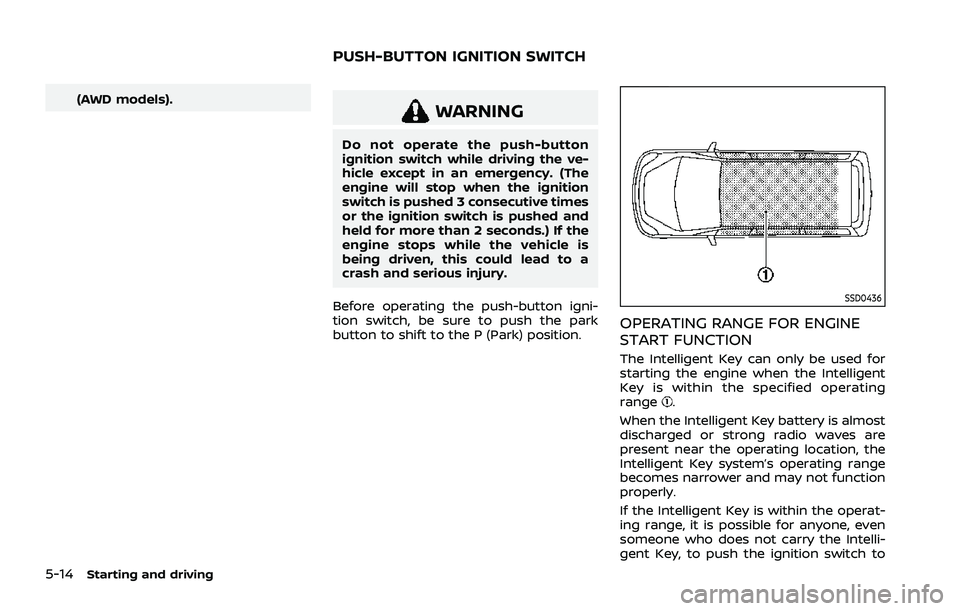
OPERATING RANGE FOR ENGINE
START FUNCTION
The Intelligent Key can only be used for
starting the engine when the Intelligent
Key is within the specified operating
range
.
When the Intelligent Key battery is almost
discharged or strong radio waves are
present near the operating location, the
Intelligent Key system’s operating range
becomes narrower and may not function
properly.
If the Intelligent Key is within the operat-
ing range, it is possible for anyone, even
someone who does not carry the Intelli-
gent Key, to push the ignition switch to
PUSH-BUTTON IGNITION SWITCH
Page 269 of 556
start the engine.
.The cargo room area is not included in
the operating range but the Intelligent
Key may function.
. If the Intelligent Key is placed on the
instrument panel, inside the glove box
or door pocket, the Intelligent Key may
not function.
. If the Intelligent Key is placed near the
door or window outside the vehicle,
the Intelligent Key may function.
If the battery of the Intelligent Key is
discharged, see “Intelligent Key battery
discharge” (P.5-16).
PUSH-BUTTON IGNITION SWITCH
OPERATION
CAUTION
. Do not leave the vehicle for ex-
tended periods of time when the
ignition switch is in the ON posi-
tion and the engine is not run-
ning. This can discharge the
battery.
. Use electrical accessories with
the engine running to avoid dis-
charging the vehicle battery. If
you must use accessories while
the engine is not running, do not use them for extended periods of
time and do not use multiple
electrical accessories at the same
time.
JVS1053X
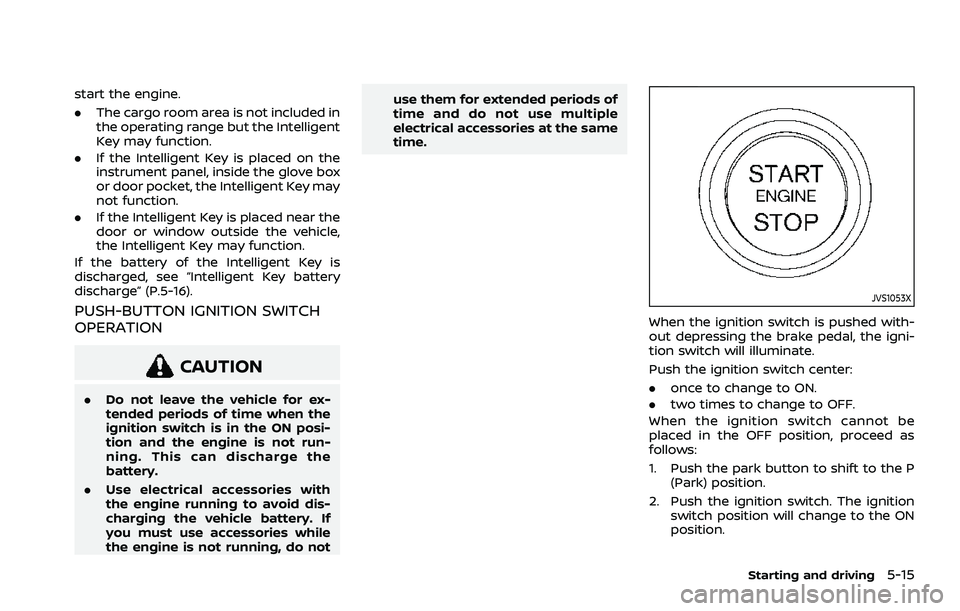
When the ignition switch is pushed with-
out depressing the brake pedal, the igni-
tion switch will illuminate.
Push the ignition switch center:
.
once to change to ON.
. two times to change to OFF.
When the ignition switch cannot be
placed in the OFF position, proceed as
follows:
1. Push the park button to shift to the P (Park) position.
2. Push the ignition switch. The ignition switch position will change to the ON
position.
Starting and driving5-15
Page 270 of 556
5-16Starting and driving
3. Push the ignition switch again to theOFF position.
The shift position can be shifted from
the P (Park) position if the ignition
switch is in the ON position and the
brake pedal is depressed.
PUSH-BUTTON IGNITION SWITCH
POSITIONS
ON (Normal operating position)
The ignition system and the electrical
accessory power activate at this position
without the engine turned on.
The ON position has a battery saver
feature that will place the ignition switch
in the OFF position, if the vehicle is not
running, after some time under the fol-
lowing conditions:
. all doors are closed.
. vehicle is in P (Park) position.
OFF position
The engine is turned off in this position.
Auto ACC position
With the vehicle in the P (Park) position,
the Intelligent Key with you and the
ignition placed from ON to OFF, the radio
can still be used for a period of time, or
until the driver’s door is opened. After a
period of time, functions such as radio,
navigation (if so equipped), and Blue-
tooth® Hands-Free Phone System may
be restarted by turning on the audio
system (see the separate NissanConnect®
Owner’s Manual), or by pushing the UN-
LOCK button on the Intelligent Key for up
to a total of 30 minutes.
EMERGENCY ENGINE SHUT OFF
To shut off the engine in an emergency
situation while driving or when the In-
telligent Key battery is discharged, per-
form the following procedure:
.Rapidly push the push-button ignition
switch 3 consecutive times in less
than 1.5 seconds, or
. Push and hold the push-button igni-
tion switch for more than 2 seconds.
After engine shut-off, open the door to
return to the normal condition.
JVS0404X
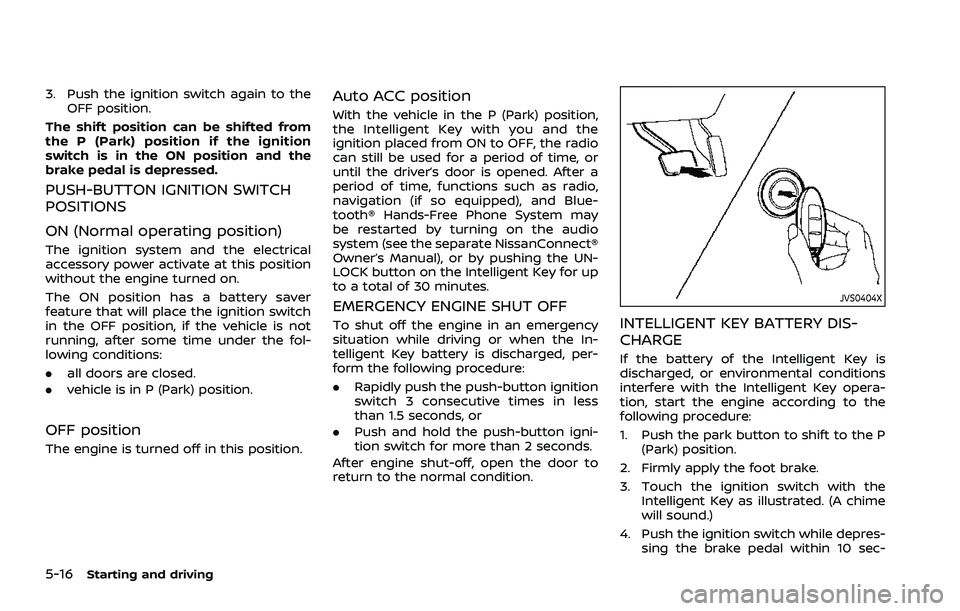
INTELLIGENT KEY BATTERY DIS-
CHARGE
If the battery of the Intelligent Key is
discharged, or environmental conditions
interfere with the Intelligent Key opera-
tion, start the engine according to the
following procedure:
1. Push the park button to shift to the P (Park) position.
2. Firmly apply the foot brake.
3. Touch the ignition switch with the Intelligent Key as illustrated. (A chime
will sound.)
4. Push the ignition switch while depres- sing the brake pedal within 10 sec-
Page 271 of 556
onds after the chime sounds. The
engine will start.
After step 3 is performed, when the
ignition switch is pushed without depres-
sing the brake pedal, the ignition switch
position will change to ON.
NOTE:
. When the ignition switch is pushed
to the ON position or the engine is
started by the above procedures, the
“Key Battery Low” warning appears
(on the vehicle information display)
even if the Intelligent Key is inside
the vehicle. This is not a malfunction.
To turn off the warning, touch the
ignition switch with the Intelligent
Key again.
. If the “Key Battery Low” warning
appears, replace the battery as soon
as possible. (See “Intelligent Key
battery replacement” (P.8-20).) .
Make sure the area around the vehicle
is clear.
. Check fluid levels such as engine oil,
coolant, brake fluid, and window
washer fluid as frequently as possible,
or at least whenever you refuel.
. Check that all windows and lights are
clean.
. Visually inspect tires for their appear-
ance and condition. Also check tires
for proper inflation.
. Lock all doors.
. Position seat and adjust head re-
straints/headrests.
. Adjust inside and outside mirrors.
. Fasten seat belts and ask all passen-
gers to do likewise.
. Check the operation of warning lights
when the ignition switch is placed in
the ON position. (See “Warning lights,
indicator lights and audible remin-
ders” (P.2-13).) 1. Apply the parking brake.
2. Confirm that the vehicle is in the P
(Park) position.
The Intelligent Key must be carried
when operating the ignition switch.
3. Push the ignition switch to the ON position. Depress the brake pedal and
push the ignition switch to start the
engine.
To start the engine immediately, push
and release the ignition switch while
depressing the brake pedal with the
ignition switch in any position.
.If the engine is very hard to start inextremely cold weather or when
restarting, depress the accelerator
pedal a little (approximately 1/3 to
the floor) and while holding, crank
the engine. Release the accelerator
pedal when the engine starts.
.If the engine is very hard to startbecause it is flooded, depress the
accelerator pedal all the way to the
floor and hold it. Push the ignition
switch to the ON position to start
cranking the engine. After 5 or 6
seconds, stop cranking by pushing
the ignition switch to OFF. After
cranking the engine, release the
accelerator pedal. Crank the engine
with your foot off the accelerator
pedal by depressing the brake
Starting and driving5-17
BEFORE STARTING THE ENGINE STARTING THE ENGINE
Page 272 of 556
5-18Starting and driving
pedal and pushing the push-button
ignition switch to start the engine.
If the engine starts, but fails to run,
repeat the above procedure.
CAUTION
Do not operate the starter for more
than 15 seconds at a time. If the
engine does not start, push the
ignition switch to OFF and wait 10
seconds before cranking again,
otherwise the starter could be da-
maged.
4. Warm-up
Allow the engine to idle for at least 30
seconds after starting. Do not race the
engine while warming it up. Drive at
moderate speed for a short distance
first, especially in cold weather. In cold
weather, keep the engine running for
a minimum of 2 - 3 minutes before
shutting it off. Starting and stopping
the engine over a short period of time
may make the vehicle more difficult to
start.
When the engine is racing with no load
and cold, the engine speed is limited
to about 4,500 rpm. 5. To stop the engine, push the park
button to shift to the P (Park) position,
and push the ignition switch to the
OFF position.
NOTE:
Care should be taken to avoid situations
that can lead to potential battery dis-
charge and potential no-start condi-
tions such as:
1. Installation or extended use of elec-
tronic accessories that consume
battery power when the engine is
not running (Phone chargers, GPS,
DVD players, etc.)
2. Vehicle is not driven regularly and/
or only driven short distances.
In these cases, the battery may need to
be charged to maintain battery health.
REMOTE ENGINE START (if so
equipped)
Vehicles started with the remote engine
start function require the ignition switch
to be placed in the ON position before the
shift position can be shifted from the P
(Park) position. To place the ignition
switch in the ON position, perform the
following steps:
1. Make sure that the Intelligent Key is carried with you. 2. Depress the brake pedal.
3. Push the ignition switch once to the
ON position.
For additional information about the
remote engine start function, see “Re-
mote engine start” (P.3-19).