fuel NISSAN ROGUE 2021 Owner´s Manual
[x] Cancel search | Manufacturer: NISSAN, Model Year: 2021, Model line: ROGUE, Model: NISSAN ROGUE 2021Pages: 556, PDF Size: 2.7 MB
Page 12 of 556
0-4Illustrated table of contents
WAA0170X
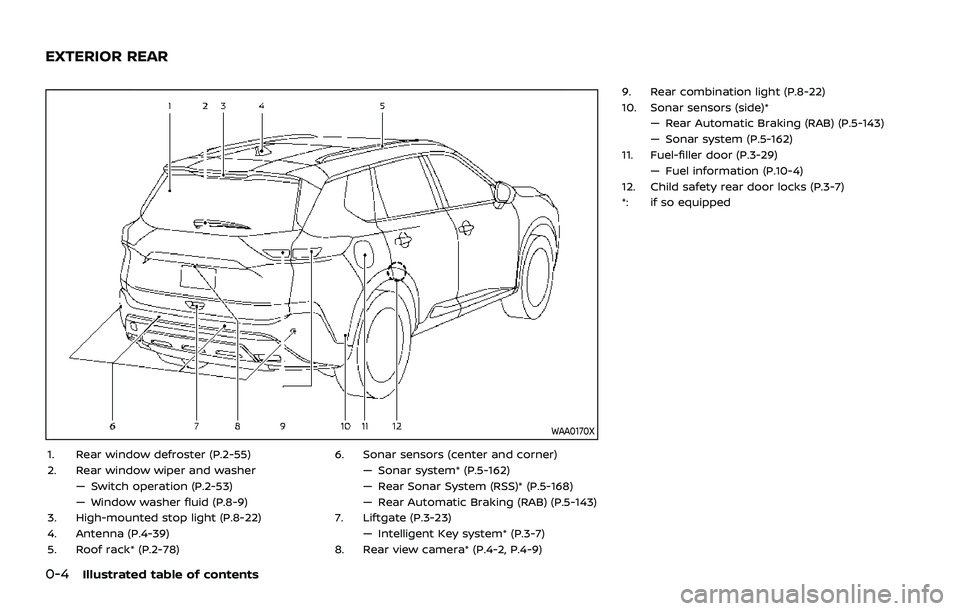
1. Rear window defroster (P.2-55)
2. Rear window wiper and washer— Switch operation (P.2-53)
— Window washer fluid (P.8-9)
3. High-mounted stop light (P.8-22)
4. Antenna (P.4-39)
5. Roof rack* (P.2-78) 6. Sonar sensors (center and corner)
— Sonar system* (P.5-162)
— Rear Sonar System (RSS)* (P.5-168)
— Rear Automatic Braking (RAB) (P.5-143)
7. Liftgate (P.3-23) — Intelligent Key system* (P.3-7)
8. Rear view camera* (P.4-2, P.4-9) 9. Rear combination light (P.8-22)
10. Sonar sensors (side)*
— Rear Automatic Braking (RAB) (P.5-143)
— Sonar system (P.5-162)
11. Fuel-filler door (P.3-29) — Fuel information (P.10-4)
12. Child safety rear door locks (P.3-7)
*: if so equipped
EXTERIOR REAR
Page 16 of 556
0-8Illustrated table of contents
WAA0046X
MODELS WITH ANALOG METER AND
COLOR DISPLAY
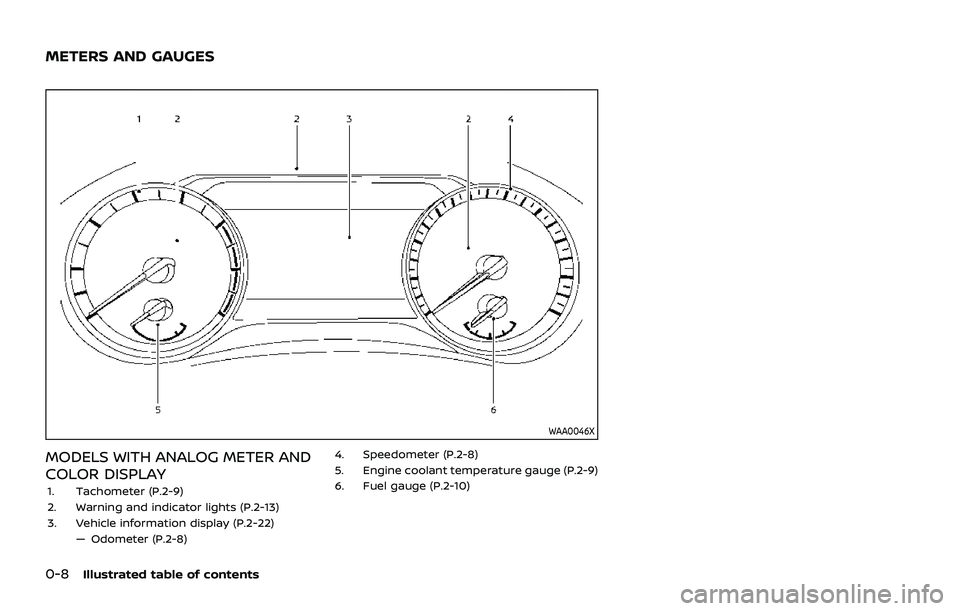
1. Tachometer (P.2-9)
2. Warning and indicator lights (P.2-13)
3. Vehicle information display (P.2-22)— Odometer (P.2-8) 4. Speedometer (P.2-8)
5. Engine coolant temperature gauge (P.2-9)
6. Fuel gauge (P.2-10)
METERS AND GAUGES
Page 17 of 556
WAA0167X
MODELS WITH FULL-SCREEN DIS-
PLAY
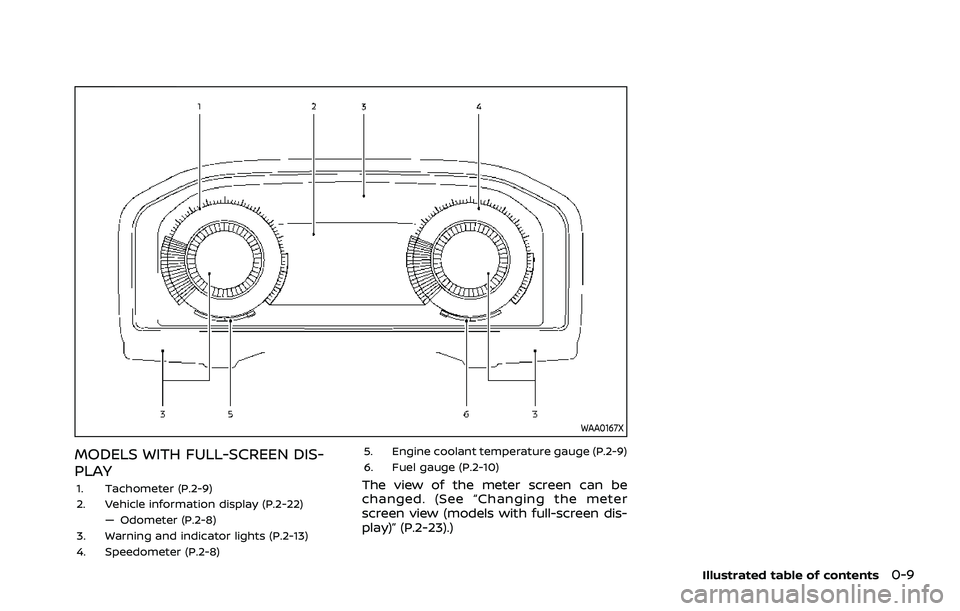
1. Tachometer (P.2-9)
2. Vehicle information display (P.2-22)— Odometer (P.2-8)
3. Warning and indicator lights (P.2-13)
4. Speedometer (P.2-8) 5. Engine coolant temperature gauge (P.2-9)
6. Fuel gauge (P.2-10)The view of the meter screen can be
changed. (See “Changing the meter
screen view (models with full-screen dis-
play)” (P.2-23).)
Illustrated table of contents0-9
Page 89 of 556

2 Instruments and controls
Cockpit ........................................................................\
.......................... 2-3
Instrument panel ........................................................................\
.. 2-4
Meters and gauges ..................................................................... 2-5Models with analog meter and
color display ........................................................................\
....... 2-5
Models with full-screen display .................................. 2-6
Speedometer and odometer ........................................ 2-8
Tachometer ........................................................................\
........ 2-9
Engine coolant temperature gauge ....................... 2-9
Fuel gauge ........................................................................\
........ 2-10
Instrument brightness control ................................. 2-11
Continuously Variable Transmission (CVT)
position indicator ................................................................ 2-11
ECO Drive Report ................................................................ 2-11
Warning lights, indicator lights and
audible reminders ..................................................................... 2-13
Checking lights ..................................................................... 2-14
Warning/indicator lights (red) ................................... 2-14
Warning/indicator lights (yellow) ........................... 2-17
Warning/indicator lights (other) ............................. 2-21
Audible reminders .............................................................. 2-22
Vehicle information display ............................................... 2-22 Changing the meter screen view
(models with full-screen display) ............................ 2-23
How to use the vehicle
information display ........................................................... 2-23 Startup display ................................................................... 2-23
Settings ........................................................................\
............ 2-24
Vehicle information display warnings
and indicators ..................................................................... 2-34
Trip computer ..................................................................... 2-44
Clock and outside air temperature ................... 2-46
Head Up Display (HUD) (if so equipped) .................. 2-47 How to use the HUD ...................................................... 2-49
Driver Assistance/Navigation/Traffic
Sign/Audio/TEL/SMS linking ................................... 2-50
Security systems ....................................................................... 2-50 Vehicle Security System (if so equipped) ...... 2-50
NISSAN Vehicle Immobilizer System ................. 2-51
Wiper and washer switch ................................................... 2-52 Windshield wiper and washer operation ...... 2-53
Rear window wiper and
washer operation ............................................................. 2-53
Rear window and outside mirror
(if so equipped) defroster switch ................................. 2-55
Headlight and turn signal switch ................................ 2-55
Headlight switch ............................................................... 2-55
Turn signal switch ........................................................... 2-62
Fog light switch (if so equipped) ......................... 2-62
Horn ........................................................................\
............................. 2-63
Heated steering wheel (if so equipped) .................. 2-63
Page 93 of 556
WAA0046X
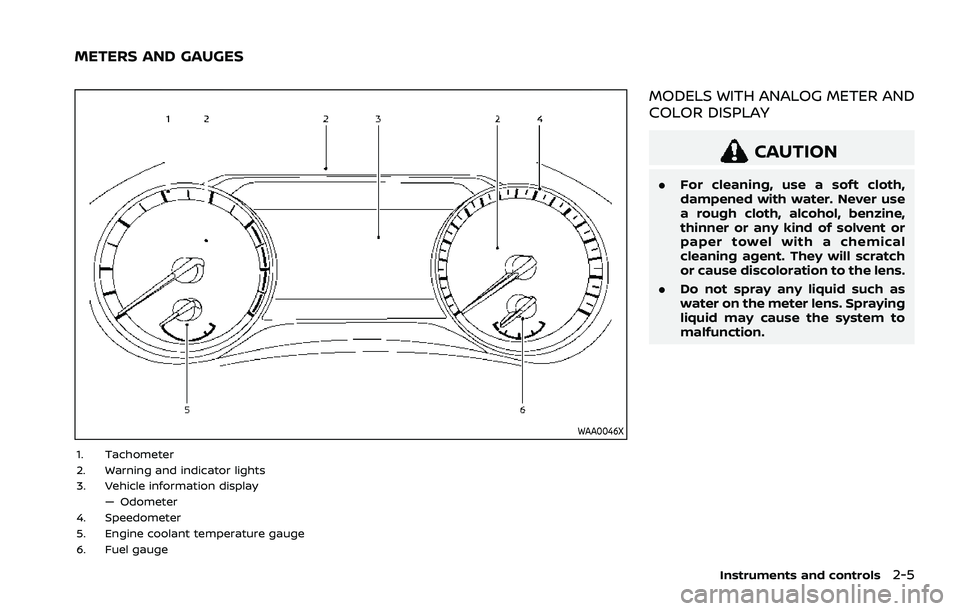
1. Tachometer
2. Warning and indicator lights
3. Vehicle information display— Odometer
4. Speedometer
5. Engine coolant temperature gauge
6. Fuel gauge
MODELS WITH ANALOG METER AND
COLOR DISPLAY
CAUTION
. For cleaning, use a soft cloth,
dampened with water. Never use
a rough cloth, alcohol, benzine,
thinner or any kind of solvent or
paper towel with a chemical
cleaning agent. They will scratch
or cause discoloration to the lens.
. Do not spray any liquid such as
water on the meter lens. Spraying
liquid may cause the system to
malfunction.
Instruments and controls2-5
METERS AND GAUGES
Page 94 of 556
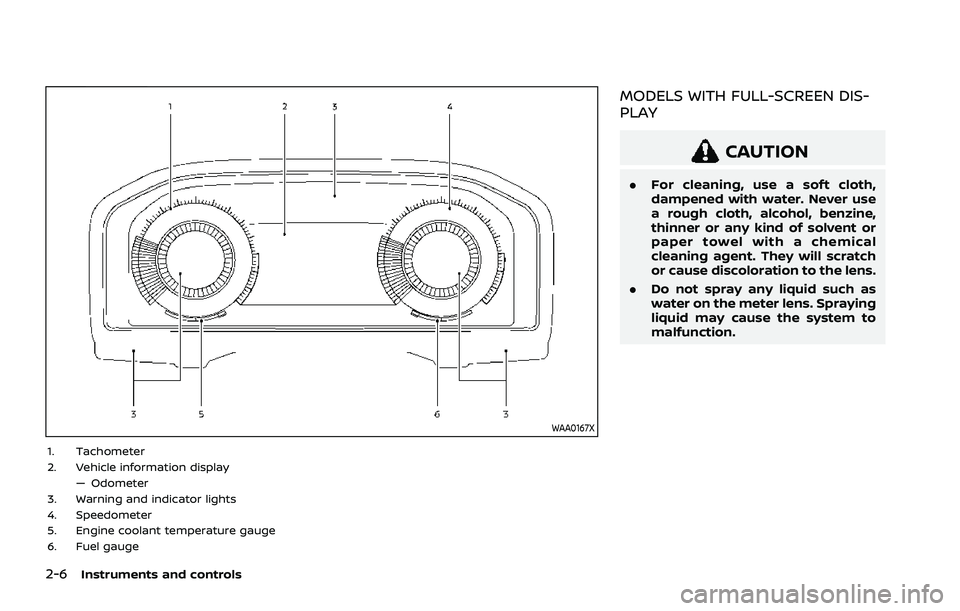
2-6Instruments and controls
WAA0167X
1. Tachometer
2. Vehicle information display— Odometer
3. Warning and indicator lights
4. Speedometer
5. Engine coolant temperature gauge
6. Fuel gauge
MODELS WITH FULL-SCREEN DIS-
PLAY
CAUTION
. For cleaning, use a soft cloth,
dampened with water. Never use
a rough cloth, alcohol, benzine,
thinner or any kind of solvent or
paper towel with a chemical
cleaning agent. They will scratch
or cause discoloration to the lens.
. Do not spray any liquid such as
water on the meter lens. Spraying
liquid may cause the system to
malfunction.
Page 95 of 556
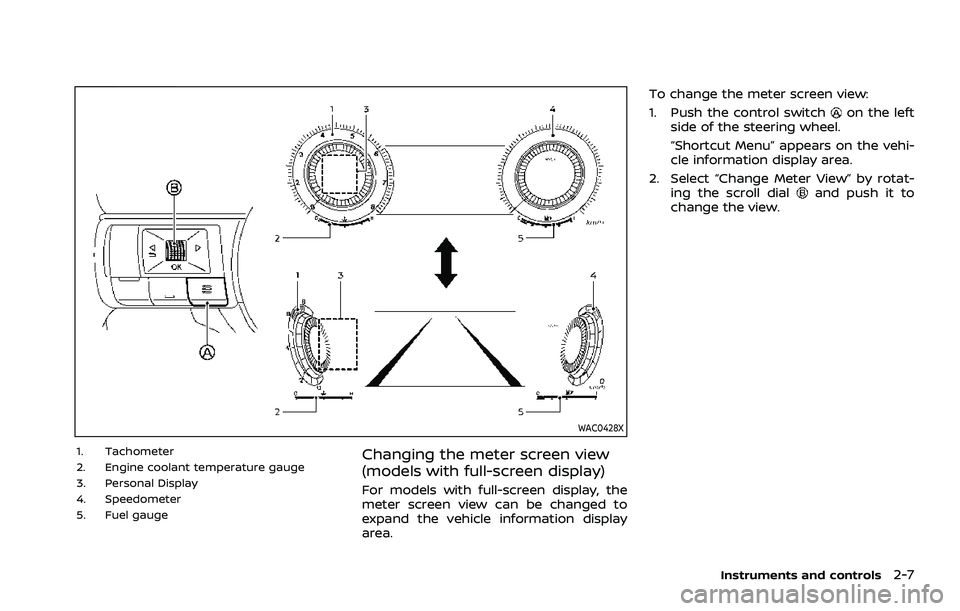
WAC0428X
1. Tachometer
2. Engine coolant temperature gauge
3. Personal Display
4. Speedometer
5. Fuel gaugeChanging the meter screen view
(models with full-screen display)
For models with full-screen display, the
meter screen view can be changed to
expand the vehicle information display
area.To change the meter screen view:
1. Push the control switch
on the left
side of the steering wheel.
“Shortcut Menu” appears on the vehi-
cle information display area.
2. Select “Change Meter View” by rotat- ing the scroll dial
and push it to
change the view.
Instruments and controls2-7
Page 96 of 556
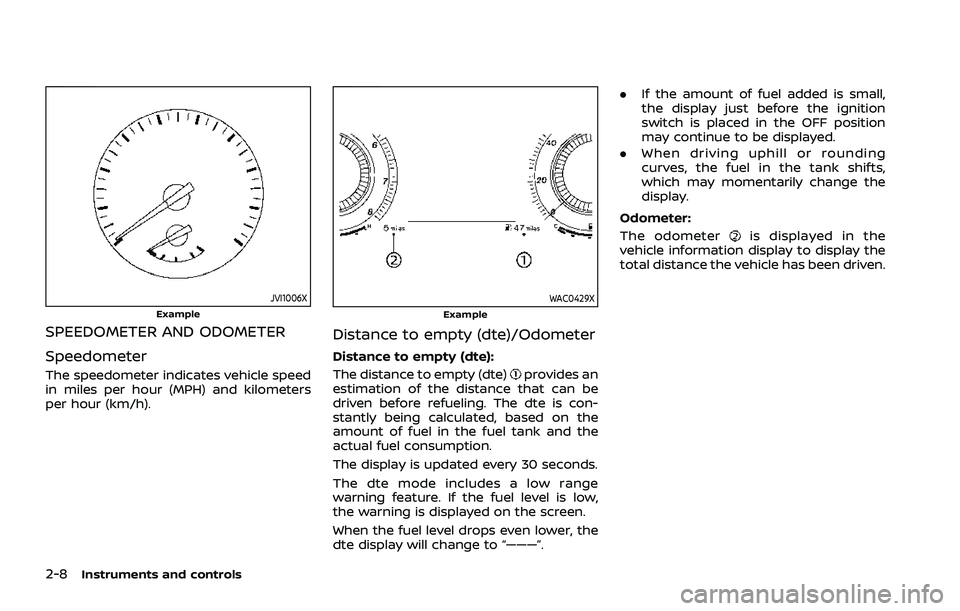
2-8Instruments and controls
JVI1006XExample
SPEEDOMETER AND ODOMETER
Speedometer
The speedometer indicates vehicle speed
in miles per hour (MPH) and kilometers
per hour (km/h).
WAC0429XExample
Distance to empty (dte)/Odometer
Distance to empty (dte):
The distance to empty (dte)
provides an
estimation of the distance that can be
driven before refueling. The dte is con-
stantly being calculated, based on the
amount of fuel in the fuel tank and the
actual fuel consumption.
The display is updated every 30 seconds.
The dte mode includes a low range
warning feature. If the fuel level is low,
the warning is displayed on the screen.
When the fuel level drops even lower, the
dte display will change to “———”. .
If the amount of fuel added is small,
the display just before the ignition
switch is placed in the OFF position
may continue to be displayed.
. When driving uphill or rounding
curves, the fuel in the tank shifts,
which may momentarily change the
display.
Odometer:
The odometer
is displayed in the
vehicle information display to display the
total distance the vehicle has been driven.
Page 98 of 556
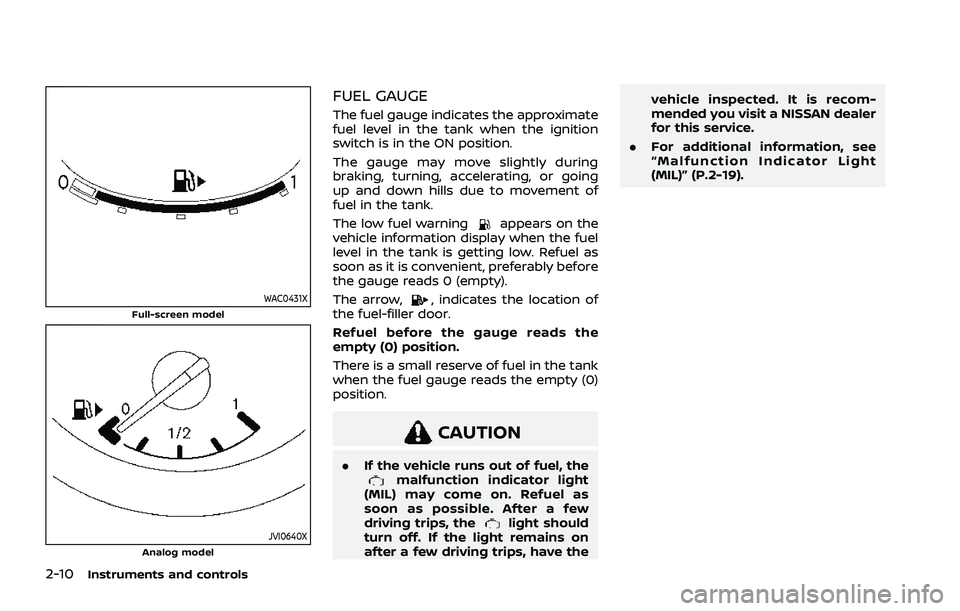
2-10Instruments and controls
WAC0431XFull-screen model
JVI0640XAnalog model
FUEL GAUGE
The fuel gauge indicates the approximate
fuel level in the tank when the ignition
switch is in the ON position.
The gauge may move slightly during
braking, turning, accelerating, or going
up and down hills due to movement of
fuel in the tank.
The low fuel warning
appears on the
vehicle information display when the fuel
level in the tank is getting low. Refuel as
soon as it is convenient, preferably before
the gauge reads 0 (empty).
The arrow,
, indicates the location of
the fuel-filler door.
Refuel before the gauge reads the
empty (0) position.
There is a small reserve of fuel in the tank
when the fuel gauge reads the empty (0)
position.
CAUTION
. If the vehicle runs out of fuel, themalfunction indicator light
(MIL) may come on. Refuel as
soon as possible. After a few
driving trips, the
light should
turn off. If the light remains on
after a few driving trips, have the vehicle inspected. It is recom-
mended you visit a NISSAN dealer
for this service.
. For additional information, see
“Malfunction Indicator Light
(MIL)” (P.2-19).
Page 99 of 556
WAC0566X
WAC0489X
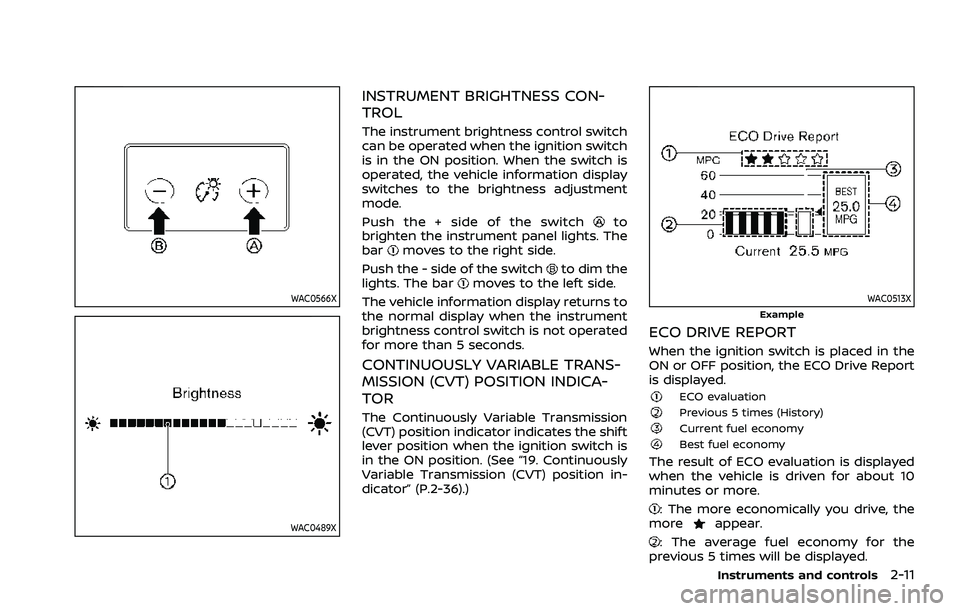
INSTRUMENT BRIGHTNESS CON-
TROL
The instrument brightness control switch
can be operated when the ignition switch
is in the ON position. When the switch is
operated, the vehicle information display
switches to the brightness adjustment
mode.
Push the + side of the switch
to
brighten the instrument panel lights. The
bar
moves to the right side.
Push the - side of the switch
to dim the
lights. The barmoves to the left side.
The vehicle information display returns to
the normal display when the instrument
brightness control switch is not operated
for more than 5 seconds.
CONTINUOUSLY VARIABLE TRANS-
MISSION (CVT) POSITION INDICA-
TOR
The Continuously Variable Transmission
(CVT) position indicator indicates the shift
lever position when the ignition switch is
in the ON position. (See “19. Continuously
Variable Transmission (CVT) position in-
dicator” (P.2-36).)
WAC0513XExample
ECO DRIVE REPORT
When the ignition switch is placed in the
ON or OFF position, the ECO Drive Report
is displayed.
ECO evaluationPrevious 5 times (History)Current fuel economyBest fuel economy
The result of ECO evaluation is displayed
when the vehicle is driven for about 10
minutes or more.
: The more economically you drive, the
moreappear.
: The average fuel economy for the
previous 5 times will be displayed.
Instruments and controls2-11