brakes NISSAN ROGUE 2021 Owner´s Manual
[x] Cancel search | Manufacturer: NISSAN, Model Year: 2021, Model line: ROGUE, Model: NISSAN ROGUE 2021Pages: 556, PDF Size: 2.7 MB
Page 415 of 556
WARNING
The Active Ride Control may not be
effective depending on the driving
condition. Always drive carefully and
attentively.
When the Active Ride Control is operating,
you may feel a pulsation in the brake
pedal, sense slight deceleration, or hear a
noise. This is normal and indicates that
Active Ride Control is operating properly.
WARNING
. Never rely solely on the hill start
assist system to prevent the ve-
hicle from moving backward on a
hill. Always drive carefully and
attentively. Depress the brake
pedal when the vehicle is stopped
on a steep hill. Be especially care-
ful when stopped on a hill on
frozen or muddy roads. Failure
to prevent the vehicle from rolling
backwards may result in a loss of
control of the vehicle and possi-
ble serious injury or death.
. The hill start assist system is not
designed to hold the vehicle at a
standstill on a hill. Depress the
brake pedal when the vehicle is
stopped on a steep hill. Failure to
do so may cause the vehicle to
roll backwards and may result in
a collision or serious personal
injury.
. The hill start assist system may
not prevent the vehicle from roll-
ing backwards on a hill under all
load or road conditions. Always
be prepared to depress the brake
pedal to prevent the vehicle from
rolling backwards. Failure to do so may result in a collision or
serious personal injury.
The hill start assist system automatically
keeps the brakes applied to help prevent
the vehicle from rolling backwards in the
time it takes the driver to release the
brake pedal and apply the accelerator
when the vehicle is stopped on a hill.
The hill start assist system will operate
automatically under the following condi-
tions:
. The transmission is shifted to a for-
ward or reverse gear.
. The vehicle is stopped completely on a
hill by applying the brake.
The maximum holding time is 2 seconds.
After 2 seconds the vehicle will begin to
roll back and the hill start assist system
will stop operating completely.
The hill start assist system will not
operate when the transmission is shifted
to the N (Neutral) or P (Park) position or
on a flat and level road.
When the slip indicator light illuminates in
the meter, the hill start assist system will
not operate. (See “Slip indicator light” (P.2-
20).)
Starting and driving5-161
HILL START ASSIST SYSTEM
Page 416 of 556
5-162Starting and driving
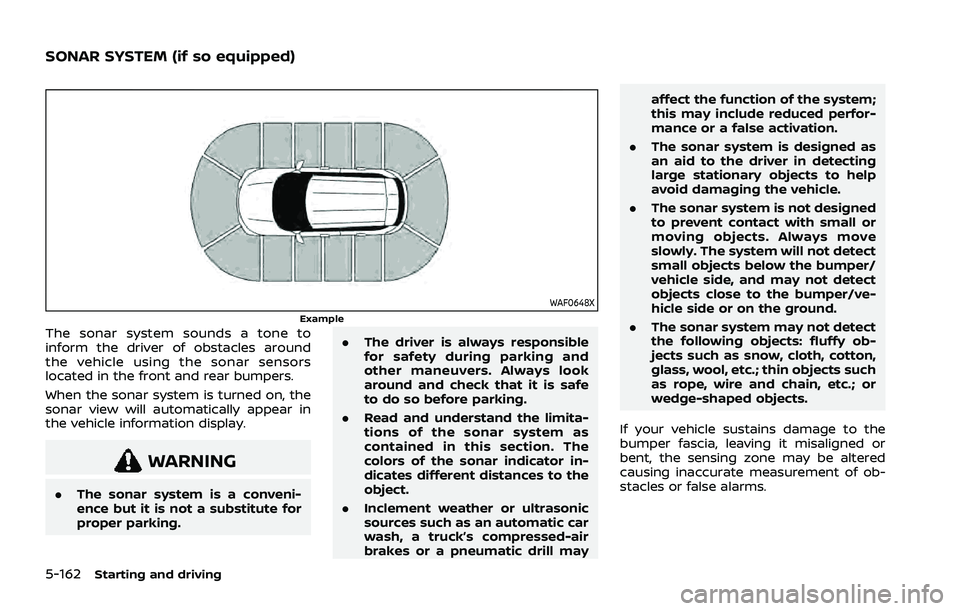
WAF0648XExampleThe sonar system sounds a tone to
inform the driver of obstacles around
the vehicle using the sonar sensors
located in the front and rear bumpers.
When the sonar system is turned on, the
sonar view will automatically appear in
the vehicle information display.
WARNING
.The sonar system is a conveni-
ence but it is not a substitute for
proper parking. .
The driver is always responsible
for safety during parking and
other maneuvers. Always look
around and check that it is safe
to do so before parking.
. Read and understand the limita-
tions of the sonar system as
contained in this section. The
colors of the sonar indicator in-
dicates different distances to the
object.
. Inclement weather or ultrasonic
sources such as an automatic car
wash, a truck’s compressed-air
brakes or a pneumatic drill may affect the function of the system;
this may include reduced perfor-
mance or a false activation.
. The sonar system is designed as
an aid to the driver in detecting
large stationary objects to help
avoid damaging the vehicle.
. The sonar system is not designed
to prevent contact with small or
moving objects. Always move
slowly. The system will not detect
small objects below the bumper/
vehicle side, and may not detect
objects close to the bumper/ve-
hicle side or on the ground.
. The sonar system may not detect
the following objects: fluffy ob-
jects such as snow, cloth, cotton,
glass, wool, etc.; thin objects such
as rope, wire and chain, etc.; or
wedge-shaped objects.
If your vehicle sustains damage to the
bumper fascia, leaving it misaligned or
bent, the sensing zone may be altered
causing inaccurate measurement of ob-
stacles or false alarms.
SONAR SYSTEM (if so equipped)
Page 420 of 556
5-166Starting and driving
SONAR SYSTEM LIMITATIONS
WARNING
Listed below are the system limita-
tions for the sonar system. Failure to
operate the vehicle in accordance
with these system limitations could
result in serious injury or death.
.Read and understand the limita-
tions of the sonar system as
contained in this section. Incle-
ment weather may affect the
function of the sonar system; this
may include reduced perfor-
mance or a false activation.
. The sonar system is deactivated
at speeds above 6 MPH (10 km/h).
It is reactivated at lower speeds.
. Inclement weather or ultrasonic
sources such as an automatic car
wash, a truck’s compressed-air
brakes or a pneumatic drill may
affect the function of the sonar
system; this may include reduced
performance or a false activation.
. The sonar system is not designed
to prevent contact with small or
moving objects. Always move
slowly. The system will not detect
small objects below the bumper or on the ground.
. The sonar system may not detect
the following objects: fluffy ob-
jects such as snow, cloth, cotton,
glass-wool, etc.; thin objects such
as rope, wire and chain, etc.; or
wedge-shaped objects; complex-
shaped objects or multiple ob-
jects in close.
. The sonar system may not detect
objects at speed above 3 MPH (5
km/h) and may not detect certain
angular or moving objects.
. The sonar system may not detect
the following objects:
— Pedestrians who approach
the vehicle from the side
— Objects placed next to the vehicle
. The sonar system may not oper-
ate in the following conditions:
— When rain, snow, ice, dirt, etc.
adheres to the sonar sensor.
— When a loud sound is heard in the area around the vehicle.
— When the surface of the ob- stacle is diagonal to the front
or rear of the vehicle. — When a sonar sensor or the
area around the sensor is
extremely hot or cold.
. The sonar system may uninten-
tionally operate in the following
conditions:
— When there is overgrown
grass in the area around the
vehicle.
— When there is a structure (for example, a wall, a toll gate
equipment, a narrow tunnel or
a parking lot gate) near the
side of the vehicle.
— When there are bumps, pro- trusions or manhole covers on
the road surface.
— When the vehicle drives through a draped flag or a
curtain.
— When there is an accumula- tion of snow or ice behind the
vehicle.
— When driving on a steep hill.
Page 422 of 556
5-168Starting and driving
WAF0072X
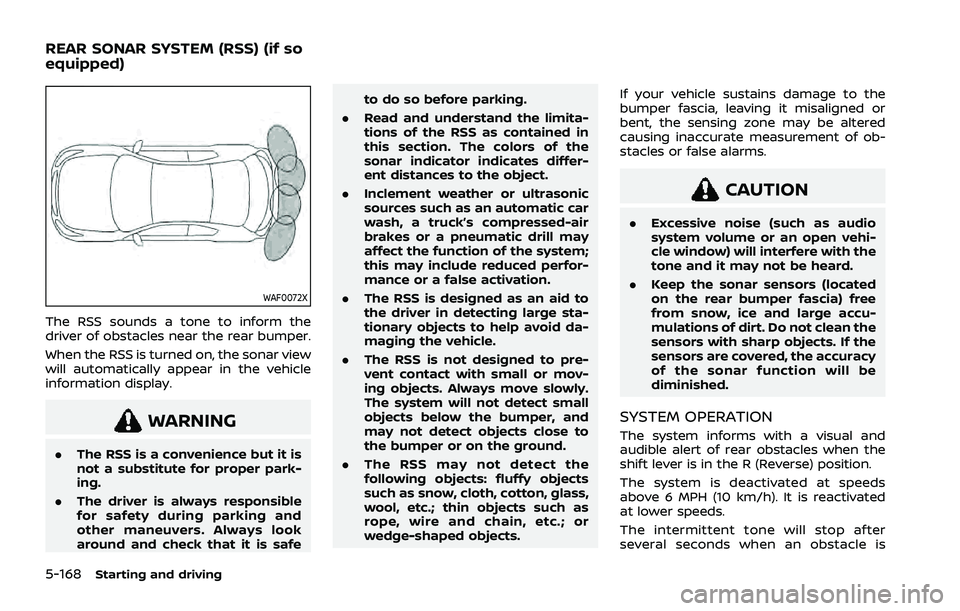
The RSS sounds a tone to inform the
driver of obstacles near the rear bumper.
When the RSS is turned on, the sonar view
will automatically appear in the vehicle
information display.
WARNING
.The RSS is a convenience but it is
not a substitute for proper park-
ing.
. The driver is always responsible
for safety during parking and
other maneuvers. Always look
around and check that it is safe to do so before parking.
. Read and understand the limita-
tions of the RSS as contained in
this section. The colors of the
sonar indicator indicates differ-
ent distances to the object.
. Inclement weather or ultrasonic
sources such as an automatic car
wash, a truck’s compressed-air
brakes or a pneumatic drill may
affect the function of the system;
this may include reduced perfor-
mance or a false activation.
. The RSS is designed as an aid to
the driver in detecting large sta-
tionary objects to help avoid da-
maging the vehicle.
. The RSS is not designed to pre-
vent contact with small or mov-
ing objects. Always move slowly.
The system will not detect small
objects below the bumper, and
may not detect objects close to
the bumper or on the ground.
. The RSS may not detect the
following objects: fluffy objects
such as snow, cloth, cotton, glass,
wool, etc.; thin objects such as
rope, wire and chain, etc.; or
wedge-shaped objects. If your vehicle sustains damage to the
bumper fascia, leaving it misaligned or
bent, the sensing zone may be altered
causing inaccurate measurement of ob-
stacles or false alarms.
CAUTION
.
Excessive noise (such as audio
system volume or an open vehi-
cle window) will interfere with the
tone and it may not be heard.
. Keep the sonar sensors (located
on the rear bumper fascia) free
from snow, ice and large accu-
mulations of dirt. Do not clean the
sensors with sharp objects. If the
sensors are covered, the accuracy
of the sonar function will be
diminished.
SYSTEM OPERATION
The system informs with a visual and
audible alert of rear obstacles when the
shift lever is in the R (Reverse) position.
The system is deactivated at speeds
above 6 MPH (10 km/h). It is reactivated
at lower speeds.
The intermittent tone will stop after
several seconds when an obstacle is
REAR SONAR SYSTEM (RSS) (if so
equipped)
Page 425 of 556
system limitations could result in
serious injury or death.
.Read and understand the limita-
tions of the RSS as contained in
this section. Inclement weather
may affect the function of the
RSS; this may include reduced
performance or a false activation.
. The system is deactivated at
speeds above 6 MPH (10 km/h).
It is reactivated at lower speeds.
. Inclement weather or ultrasonic
sources such as an automatic car
wash, a truck’s compressed-air
brakes or a pneumatic drill may
affect the function of the RSS;
this may include reduced perfor-
mance or a false activation.
. The RSS is not designed to pre-
vent contact with small or mov-
ing objects. Always move slowly.
The system will not detect small
objects below the bumper or on
the ground.
. The RSS may not detect the
following objects: fluffy objects
such as snow, cloth, cotton,
glass-wool, etc.; thin objects such
as rope, wire and chain, etc.; or
wedge-shaped objects; complex-
shaped objects or multiple ob- jects in close.
. The RSS may not detect objects
at speed above 3 MPH (5 km/h)
and may not detect certain angu-
lar or moving objects.
. The RSS may not operate in the
following conditions:
— When rain, snow, ice, dirt, etc.
adheres to the sonar sensor.
— When a loud sound is heard in the area around the vehicle.
— When the surface of the ob- stacle is diagonal to the rear
of the vehicle.
— When a sonar sensor or the area around the sensor is
extremely hot or cold.
. The RSS may unintentionally op-
erate in the following conditions:
— When there is overgrown
grass in the area around the
vehicle.
— When there are bumps, pro- trusions or manhole covers on
the road surface.
— When the vehicle drives through a draped flag or a
curtain. — When there is an accumula-
tion of snow or ice behind the
vehicle.
— When driving on a steep hill.
SYSTEM TEMPORARILY UNAVAIL-
ABLE
When sonar blockage is detected, the
system will be deactivated automatically.
The system is not available until the
conditions no longer exist.
The sonar sensors may be blocked by
temporary ambient conditions such as
splashing water, mist or fog. The blocked
condition may also be caused by objects
such as ice, frost or dirt obstructing the
sonar sensors.
Action to take:
When the above conditions no longer
exist, the system will resume automati-
cally.
Starting and driving5-171
Page 455 of 556
8 Do-it-yourself
Maintenance precautions ...................................................... 8-2
Engine compartment check locations ........................ 8-3PR25DD engine model ...................................................... 8-3
Engine cooling system ............................................................. 8-4 Checking engine coolant level .................................... 8-5
Changing engine coolant ................................................ 8-5
Engine oil ........................................................................\
..................... 8-5 Checking engine oil level ................................................. 8-5
Changing engine oil and filter ..................................... 8-6
Continuously Variable Transmission
(CVT) fluid ........................................................................\
.................... 8-8
Brake fluid ........................................................................\
.................. 8-9
Window washer fluid ................................................................. 8-9
Battery ........................................................................\
........................ 8-11 Jump starting ........................................................................\
. 8-12
Variable voltage control system ................................... 8-13
Drive belt ........................................................................\
.................. 8-13
Spark plugs ........................................................................\
............. 8-14 Replacing spark plugs ..................................................... 8-14
Air cleaner ........................................................................\
............... 8-15 Windshield wiper blades ..................................................... 8-16
Cleaning ........................................................................\
........... 8-16
Replacing ........................................................................\
........ 8-16
Rear window wiper blade .................................................. 8-17
Brakes ........................................................................\
........................ 8-17 Self-adjusting brakes ..................................................... 8-17
Brake pad wear warning ............................................ 8-17
Fuses ........................................................................\
........................... 8-18 Engine compartment .................................................... 8-18
Passenger compartment ........................................... 8-19
Intelligent Key battery replacement .......................... 8-20
Lights ........................................................................\
.......................... 8-22 Headlights ........................................................................\
...... 8-23
Exterior and interior lights ........................................ 8-23
Wheels and tires ........................................................................\
8-25 Tire pressure ........................................................................\
8-25
Tire labeling ........................................................................\
.. 8-29
Types of tires ....................................................................... 8-31
Tire chains ........................................................................\
...... 8-32
Changing wheels and tires ...................................... 8-33
Page 471 of 556
It is recommended you contact a NISSAN
dealer if checking or replacement is
required.If the brakes do not operate properly, it is
recommended you have the brakes
checked by a NISSAN dealer.
SELF-ADJUSTING BRAKES
Your vehicle is equipped with self-adjust-
ing brakes.
The disc-type brakes self-adjust every
time the brake pedal is applied.
WARNING
Have your brake system checked if
the brake pedal height does not
return to normal. It is recommended
you visit a NISSAN dealer for this
service.
BRAKE PAD WEAR WARNING
The disc brake pads have audible wear
warnings. When a brake pad requires
replacement, it will make a high pitched
scraping sound when the vehicle is in
motion. This scraping sound will first
occur only when the brake pedal is
depressed. After more wear of the brake
pad, the sound will always be heard even
if the brake pedal is not depressed. Have
the brakes checked as soon as possible if
the wear warning sound is heard.
Under some driving or climate conditions,occasional brake squeak, squeal or other
noise may be heard. Occasional brake
noise during light to moderate stops is
normal and does not affect the function
or performance of the brake system.
Proper brake inspection intervals
should be followed.
For additional infor-
mation, see the maintenance schedule
shown in the “9. Maintenance and sche-
dules” section.
Do-it-yourself8-17
REAR WINDOW WIPER BLADE BRAKES
Page 486 of 556
8-32Do-it-yourself
.For additional information re-
garding tires, refer to “Important
Tire Safety Information” (US) or
“Tire Safety Information” (Cana-
da) in the Warranty Information
Booklet.
. Always use tires of the same type,
size, brand, construction and
tread pattern on all four wheels.
Failure to do so may result in a
circumference difference be-
tween tires on the front and rear
axles which can cause the Vehicle
Dynamic Control (VDC) system to
malfunction resulting in personal
injury or death, excessive tire
wear and may damage the trans-
mission, transfer case and differ-
ential gears.
All season tires
NISSAN specifies all season tires on some
models to provide good performance all
year, including snowy and icy road con-
ditions. All Season tires are identified by
ALL SEASON and/or M&S (Mud and Snow)
on the tire sidewall. Snow tires have
better snow traction than All Season tires
and may be more appropriate in some
areas.
Summer tires
NISSAN specifies summer tires on some
models to provide superior performance
on dry roads. Summer tire performance is
substantially reduced in snow and ice.
Summer tires do not have the tire trac-
tion rating M&S on the tire sidewall.
If you plan to operate your vehicle in
snowy or icy conditions, NISSAN recom-
mends the use of SNOW tires or ALL
SEASON tires on all four wheels.
Snow tires
If snow tires are needed, it is necessary to
select tires equivalent in size and load
rating to the original equipment tires. If
you do not, it can adversely affect the
safety and handling of your vehicle.
Generally, snow tires will have lower
speed ratings than factory equipped tires
and may not match the potential max-
imum vehicle speed. Never exceed the
maximum speed rating of the tire.
If you install snow tires, they must be the
same size, brand, construction and tread
pattern on all four wheels.
For additional traction on icy roads,
studded tires may be used. However,
some U.S. states and Canadian provinces
prohibit their use. Check local, state and
provincial laws before installing studded tires. Skid and traction capabilities of
studded snow tires, on wet or dry sur-
faces, may be poorer than that of non-
studded snow tires.
TIRE CHAINS
WARNING
If tire chains are used with this
vehicle, they must allow sufficient
clearance between the tire and the
closest vehicle suspension or body
component. Failure to use the cor-
rect chains, or not properly installing
chains, can damage the brakes, sus-
pension or other vehicle parts and
cause a crash in which a person
could be seriously injured or killed.
NISSAN recommends using the fol-
lowing chains, or equivalent.
.
PEERLESS SUPER Z6 SZ-429
Use of tire chains may be prohibited
according to location. Check the local
laws before installing tire chains. When
installing tire chains, make sure they are
the proper size for the tires on your
vehicle and are installed according to
the chain manufacturer’s suggestions.
Use only SAE Class S chains. Class “S”
chains are used on vehicles with re-
Page 495 of 556
other corrosive materials, check lubrica-
tion frequently.
Lights*:Clean the headlights on a regular
basis. Make sure that the headlights, stop
lights, tail lights, turn signal lights, and
other lights are all operating properly and
installed securely. Also check headlight
aim.
Road wheel nuts (lug nuts)*: When
checking the tires, make sure no wheel
nuts are missing, and check for any loose
wheel nuts. Tighten if necessary.
Tire rotation*: Rotate tires at the speci-
fied interval shown in the maintenance
schedule.
Tires*: Check the pressure with a gauge
often and always prior to long distance
trips. If necessary, adjust the pressure in
all tires, including the spare (if so
equipped), to the pressure specified.
Check carefully for damage, cuts or
excessive wear.
Tire Pressure Monitoring System (TPMS)
transmitter components: Replace the
TPMS transmitter snap-in type, valve core
and cap when the tires are replaced due
to wear or age.
Wheel alignment and balance: If the
vehicle should pull to either side while
driving on a straight and level road, or if
you detect uneven or abnormal tire wear, there may be a need for wheel alignment.
If the steering wheel or seat vibrates at
normal highway speeds, wheel balancing
may be needed.
For additional information regarding tires,
refer to “Important Tire Safety Informa-
tion” (US) or “Tire Safety Information”
(Canada) in the NISSAN Warranty Infor-
mation Booklet.
Windshield:
Clean the windshield on a
regular basis. Check the windshield at
least every six months for cracks or other
damage. Have a damaged windshield
repaired by a qualified repair facility.
It is recommended that you have a
damaged windshield repaired by a
NISSAN dealer, or a NISSAN Certified
Collision Center. To locate a collision
center in your area, refer to http://colli-
sion.nissanusa.com.
Windshield wiper blades*: Check for
cracks or wear if they do not wipe
properly.
Inside the vehicle
The maintenance items listed here should
be checked on a regular basis, such as
when performing scheduled mainte-
nance, cleaning the vehicle, etc.
Accelerator pedal: Check the pedal for
smooth operation and make sure the pedal does not catch or require uneven
effort. Keep the floor mat away from the
pedal.
Brake pedal:
Check the pedal for smooth
operation. If the brake pedal suddenly
goes down further than normal, the pedal
feels spongy or the vehicle seems to take
longer to stop, have your vehicle checked
immediately. It is recommended you visit
a NISSAN dealer for this service. Keep the
floor mat away from the pedal.
Brakes: Check that the brakes do not pull
the vehicle to one side when applied.
Continuously Variable Transmission
(CVT) P (Park) mechanism: On a fairly
steep hill, check that the vehicle is held
securely with the shift lever in the P (Park)
position without applying any brakes.
Parking brake: Check the parking brake
operation regularly. The vehicle should be
securely held on a fairly steep hill with
only the parking brake applied. If the
parking brake needs adjusted, it is re-
commended you visit a NISSAN dealer for
this service.
Seat belts: Check that all parts of the seat
belt system (for example, buckles, an-
chors, adjusters and retractors) operate
properly and smoothly, and are installed
securely. Check the belt webbing for cuts,
fraying, wear or damage.
Maintenance and schedules9-3
Page 534 of 556
10-22Technical and consumer information
.The diameter of the threaded shank of
the hitch ball must be matched to the
ball mount hole diameter. The hitch
ball shank should be no more than
1/16″ smaller than the hole in the ball
mount.
. The threaded shank of the hitch ball
must be long enough to be properly
secured to the ball mount. There
should be at least 2 threads showing
beyond the lock washer and nut.
Ball mount
The hitch ball is attached to the ball
mount and the ball mount is inserted into
the hitch receiver. Choose a proper class
ball mount based on the trailer weight.
Additionally, the ball mount should be
chosen to keep the trailer tongue level
with the ground.
Weight carrying hitches
A weight carrying or “dead weight” ball
mount is one that is designed to carry the
whole amount of tongue weight and
gross weight directly on the ball mount
and on the receiver.
Weight distribution hitch
This type of hitch is also called a “load-
leveling” or “equalizing” hitch. A set of bars
attach to the ball mount and to the trailer
to distribute the tongue weight (hitch
weight) of your trailer. Many vehicles
cannot carry the full tongue weight of a
given trailer, and need some of the
tongue weight transferred through the
frame and pushing down on the front
wheels. This gives stability to the tow
vehicle.
A weight-distributing hitch system (Class
IV) is recommended if you plan to tow
trailers with a maximum weight over
5,000 lbs (2,267 kg). Check with the trailer
and towing equipment manufacturers to
determine if they recommend the use of a
weight-distributing hitch system.
NOTE:
A weight-distributing hitch system may
affect the operation of trailer surge
brakes. If you are considering use of a
weight-distributing hitch system with a
surge brake-equipped trailer, check
with the surge brake, hitch or trailer
manufacturer to determine if and how
this can be done.
Follow the instructions provided by the
manufacturer for installing and using the
weight-distributing hitch system. General set-up instructions are as follows:
1. Park unloaded vehicle on a level sur-
face. With the ignition switch in the ON
position and the doors closed, allow
the vehicle to stand for several min-
utes so that it can level.
2. Measure the height of a reference point on the front and rear bumpers
at the center of the vehicle.
3. Attach the trailer to the vehicle and adjust the hitch equalizers so that the
front bumper height is within 0 - .5
inches (0 - 13 mm) of the reference
height measured in step 2. The rear
bumper should be no higher than the
reference height measured in step 2.
WARNING
Properly adjust the weight distribut-
ing hitch so the rear of the bumper is
no higher than the measured refer-
ence height when the trailer is at-
tached. If the rear bumper is higher
than the measured reference height
when loaded, the vehicle may handle
unpredictably which could cause a
loss of vehicle control and cause
serious personal injury or property
damage.