brakes NISSAN ROGUE 2021 Owner´s Manual
[x] Cancel search | Manufacturer: NISSAN, Model Year: 2021, Model line: ROGUE, Model: NISSAN ROGUE 2021Pages: 556, PDF Size: 2.7 MB
Page 354 of 556
5-100Starting and driving
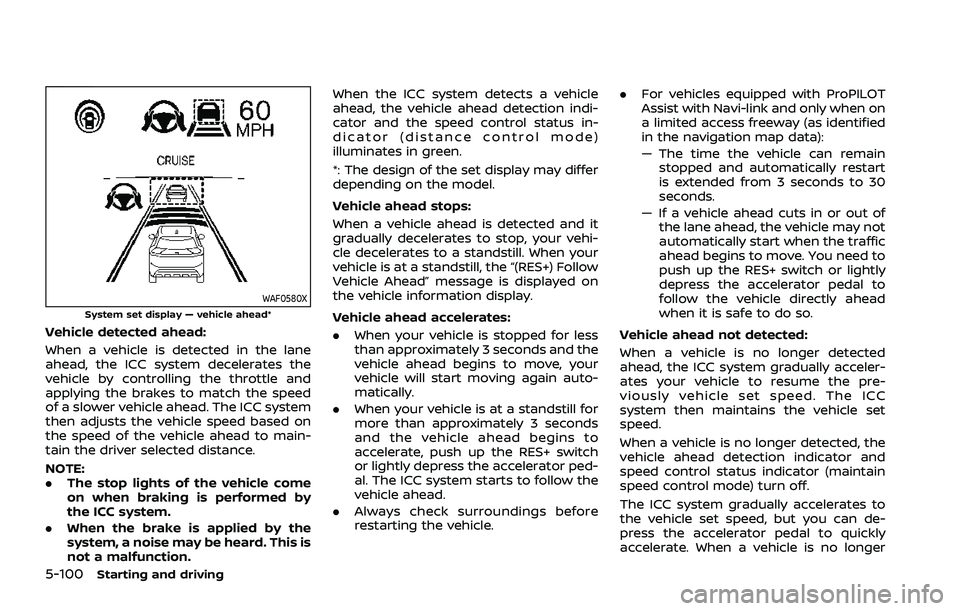
WAF0580XSystem set display — vehicle ahead*
Vehicle detected ahead:
When a vehicle is detected in the lane
ahead, the ICC system decelerates the
vehicle by controlling the throttle and
applying the brakes to match the speed
of a slower vehicle ahead. The ICC system
then adjusts the vehicle speed based on
the speed of the vehicle ahead to main-
tain the driver selected distance.
NOTE:
.The stop lights of the vehicle come
on when braking is performed by
the ICC system.
. When the brake is applied by the
system, a noise may be heard. This is
not a malfunction. When the ICC system detects a vehicle
ahead, the vehicle ahead detection indi-
cator and the speed control status in-
dicator (distance control mode)
illuminates in green.
*: The design of the set display may differ
depending on the model.
Vehicle ahead stops:
When a vehicle ahead is detected and it
gradually decelerates to stop, your vehi-
cle decelerates to a standstill. When your
vehicle is at a standstill, the “(RES+) Follow
Vehicle Ahead” message is displayed on
the vehicle information display.
Vehicle ahead accelerates:. When your vehicle is stopped for less
than approximately 3 seconds and the
vehicle ahead begins to move, your
vehicle will start moving again auto-
matically.
. When your vehicle is at a standstill for
more than approximately 3 seconds
and the vehicle ahead begins to
accelerate, push up the RES+ switch
or lightly depress the accelerator ped-
al. The ICC system starts to follow the
vehicle ahead.
. Always check surroundings before
restarting the vehicle. .
For vehicles equipped with ProPILOT
Assist with Navi-link and only when on
a limited access freeway (as identified
in the navigation map data):
— The time the vehicle can remain
stopped and automatically restart
is extended from 3 seconds to 30
seconds.
— If a vehicle ahead cuts in or out of the lane ahead, the vehicle may not
automatically start when the traffic
ahead begins to move. You need to
push up the RES+ switch or lightly
depress the accelerator pedal to
follow the vehicle directly ahead
when it is safe to do so.
Vehicle ahead not detected:
When a vehicle is no longer detected
ahead, the ICC system gradually acceler-
ates your vehicle to resume the pre-
viously vehicle set speed. The ICC
system then maintains the vehicle set
speed.
When a vehicle is no longer detected, the
vehicle ahead detection indicator and
speed control status indicator (maintain
speed control mode) turn off.
The ICC system gradually accelerates to
the vehicle set speed, but you can de-
press the accelerator pedal to quickly
accelerate. When a vehicle is no longer
Page 361 of 556
map data):
— The time the vehicle can re-main stopped and automati-
cally restart is extended from
3 seconds to 30 seconds.
— If a vehicle ahead cuts in or out of the lane ahead, the
vehicle may not automatically
start when the traffic ahead
begins to move. You need to
push up the RES+ switch or
lightly depress the accelerator
pedal to follow the vehicle
directly ahead when it is safe
to do so.
. Always check surroundings be-
fore restarting the vehicle.
. Always pay attention to the op-
eration of the vehicle and be
ready to manually control the
proper following distance. The
ICC system may not be able to
maintain the selected distance
between vehicles (following dis-
tance) or selected vehicle speed
under some circumstances.
. The ICC system does not detect
the following objects:
— Stationary or slow moving ve-
hicles (when your vehicle is approaching them)
— Pedestrians or objects in the roadway
— Oncoming vehicles in the same lane
— Motorcycles traveling offset in the travel lane
. The ICC system may not detect a
vehicle ahead in certain road,
weather or driving conditions. To
avoid accidents, never use the ICC
system under the following con-
ditions:
— On roads with heavy, high-
speed traffic or sharp curves
— On slippery road surfaces such as on ice or snow, etc.
— On a bumpy road surface, such as an uneven dirt road
— On steep downhill roads (the vehicle may go beyond the
vehicle set speed and fre-
quent braking may result in
overheating the brakes)
— On repeated uphill and down- hill roads
— During bad weather (rain, fog, snow, etc.) — When the sensor detection is
reduced (conditions such as
rain, snow, fog, dust storms,
sandstorms, and road spray
from other vehicles)
— When dirt, ice, snow or other material adhere to the radar
sensor area
— When traffic conditions make it difficult to keep a proper
distance between vehicles be-
cause of frequent accelera-
tion or deceleration
— When a complicated-shaped vehicle such as a car carrier
trailer or flatbed truck/trailer
is near the vehicle ahead
— When there is interference by other radar sources
— When excessively heavy bag- gage is loaded in the rear seat
or cargo area of your vehicle
— When towing a trailer or other vehicle
. In some road or traffic conditions,
a vehicle or object can unexpect-
edly come into the sensor detec-
tion zone and cause automatic
braking. Always stay alert and
Starting and driving5-107
Page 369 of 556
When the Steering Assist is in operation,
the Steering Assist status indicator, the
Steering Assist indicator, and the lane
marker indicatorandon the vehicle
information display turn green. A chime
sounds when the Steering Assist initially
activates.
When the Steering Assist deactivates, the
Steering Assist status indicator
, the
Steering Assist indicator, and the lane
marker indicatorandon the vehicle
information display turn gray and a chime
sounds twice.
Intelligent Lane Intervention (I-LI)
With the Steering Assist active, when a
curve or strong cross wind exceeds the
capabilities of the system and your vehi-
cle approaches either the left or the right
side of the traveling lane, the I-LI system
will flash the I-LI indicator on the vehicle
information display and provide steering
wheel vibration to alert the driver. The
warning chime will also sound (4 rapid
beeps). Then, the I-LI system automati-
cally applies the brakes for a short period
of time to help assist the driver to return
the vehicle to the center of the traveling
lane. This action is in addition to any
Steering Assist actions and the warnings
cannot be turned off. For more informa-
tion, see “Intelligent Lane Intervention (I-
LI)” (P.5-51).WAF0639X
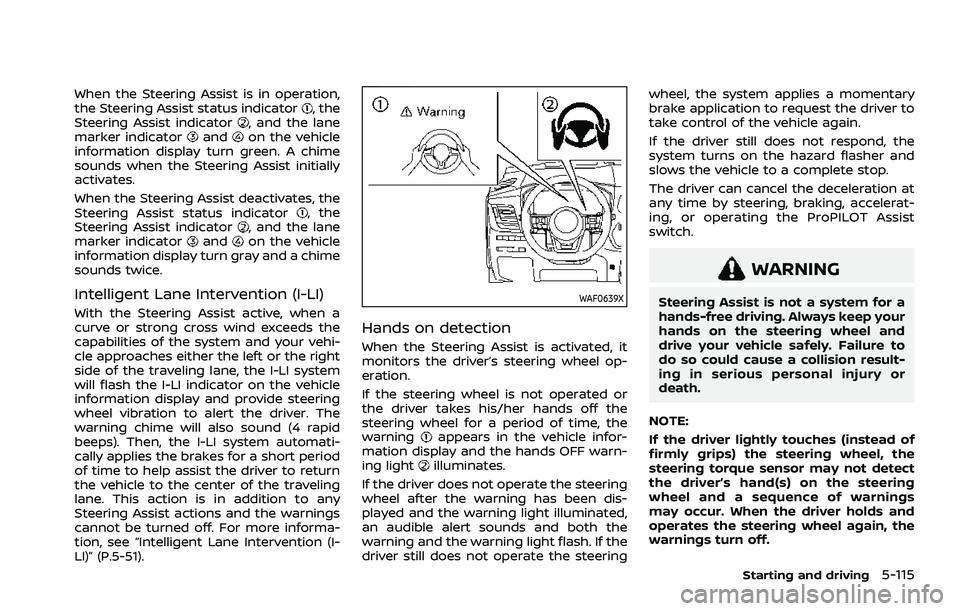
Hands on detection
When the Steering Assist is activated, it
monitors the driver’s steering wheel op-
eration.
If the steering wheel is not operated or
the driver takes his/her hands off the
steering wheel for a period of time, the
warning
appears in the vehicle infor-
mation display and the hands OFF warn-
ing light
illuminates.
If the driver does not operate the steering
wheel after the warning has been dis-
played and the warning light illuminated,
an audible alert sounds and both the
warning and the warning light flash. If the
driver still does not operate the steering wheel, the system applies a momentary
brake application to request the driver to
take control of the vehicle again.
If the driver still does not respond, the
system turns on the hazard flasher and
slows the vehicle to a complete stop.
The driver can cancel the deceleration at
any time by steering, braking, accelerat-
ing, or operating the ProPILOT Assist
switch.
WARNING
Steering Assist is not a system for a
hands-free driving. Always keep your
hands on the steering wheel and
drive your vehicle safely. Failure to
do so could cause a collision result-
ing in serious personal injury or
death.
NOTE:
If the driver lightly touches (instead of
firmly grips) the steering wheel, the
steering torque sensor may not detect
the driver’s hand(s) on the steering
wheel and a sequence of warnings
may occur. When the driver holds and
operates the steering wheel again, the
warnings turn off.
Starting and driving5-115
Page 377 of 556
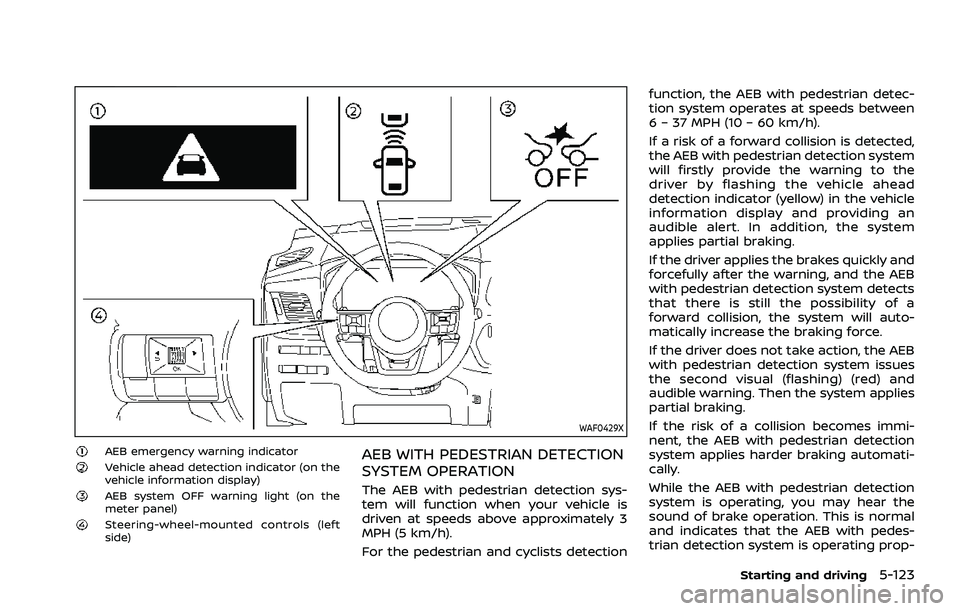
WAF0429X
AEB emergency warning indicatorVehicle ahead detection indicator (on the
vehicle information display)
AEB system OFF warning light (on the
meter panel)
Steering-wheel-mounted controls (left
side)
AEB WITH PEDESTRIAN DETECTION
SYSTEM OPERATION
The AEB with pedestrian detection sys-
tem will function when your vehicle is
driven at speeds above approximately 3
MPH (5 km/h).
For the pedestrian and cyclists detectionfunction, the AEB with pedestrian detec-
tion system operates at speeds between
6 – 37 MPH (10 – 60 km/h).
If a risk of a forward collision is detected,
the AEB with pedestrian detection system
will firstly provide the warning to the
driver by flashing the vehicle ahead
detection indicator (yellow) in the vehicle
information display and providing an
audible alert. In addition, the system
applies partial braking.
If the driver applies the brakes quickly and
forcefully after the warning, and the AEB
with pedestrian detection system detects
that there is still the possibility of a
forward collision, the system will auto-
matically increase the braking force.
If the driver does not take action, the AEB
with pedestrian detection system issues
the second visual (flashing) (red) and
audible warning. Then the system applies
partial braking.
If the risk of a collision becomes immi-
nent, the AEB with pedestrian detection
system applies harder braking automati-
cally.
While the AEB with pedestrian detection
system is operating, you may hear the
sound of brake operation. This is normal
and indicates that the AEB with pedes-
trian detection system is operating prop-
Starting and driving5-123
Page 378 of 556
5-124Starting and driving
erly.
NOTE:
The vehicle’s stop lights come on when
braking is performed by the AEB with
pedestrian detection system.
Depending on vehicle speed and distance
to the vehicle, pedestrian or cyclists
ahead, as well as driving and roadway
conditions, the system may help the
driver avoid a forward collision or may
help mitigate the consequences of a
collision should one be unavoidable.
If the driver is handling the steering
wheel, accelerating or braking, the AEB
with pedestrian detection system will
function later or will not function.
The automatic braking will cease under
the following conditions:
.When the steering wheel is turned as
far as necessary to avoid a collision.
. When the accelerator pedal is de-
pressed.
. When there is no longer a vehicle,
pedestrian detected ahead.
If the AEB with pedestrian detection
system has stopped the vehicle, the
vehicle will remain at a standstill for
approximately 2 seconds before the
brakes are released.
When the brake pedal is depressed while the brake is applied by the system, you
may feel the pedal effort is changed and
may hear a sound and vibration noise.
This is normal and does not indicate a
malfunction. In addition, the braking force
can be increased by adding the pedal
effort.
Page 399 of 556
RAB SYSTEM OPERATION
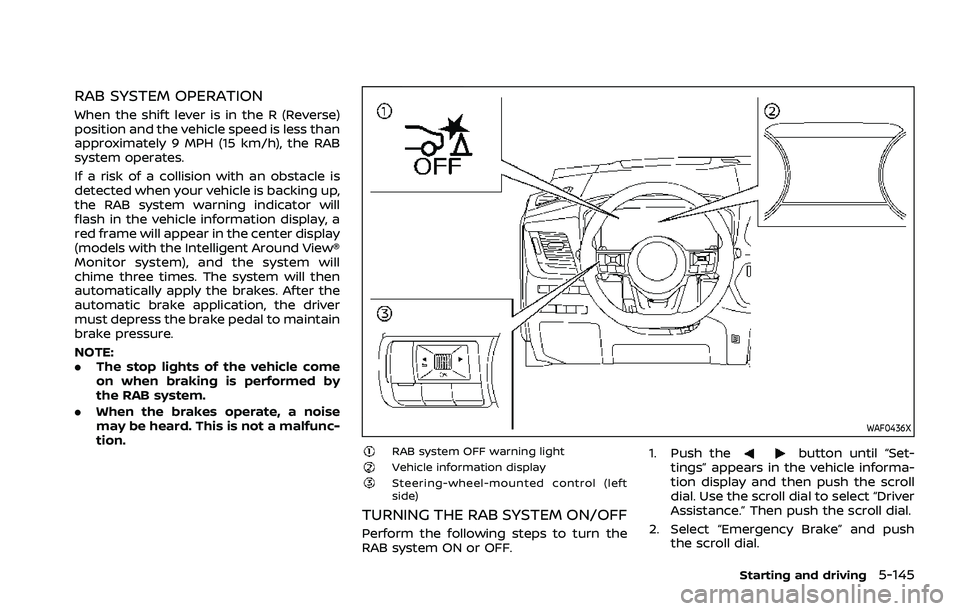
When the shift lever is in the R (Reverse)
position and the vehicle speed is less than
approximately 9 MPH (15 km/h), the RAB
system operates.
If a risk of a collision with an obstacle is
detected when your vehicle is backing up,
the RAB system warning indicator will
flash in the vehicle information display, a
red frame will appear in the center display
(models with the Intelligent Around View®
Monitor system), and the system will
chime three times. The system will then
automatically apply the brakes. After the
automatic brake application, the driver
must depress the brake pedal to maintain
brake pressure.
NOTE:
.The stop lights of the vehicle come
on when braking is performed by
the RAB system.
. When the brakes operate, a noise
may be heard. This is not a malfunc-
tion.
WAF0436X
RAB system OFF warning lightVehicle information displaySteering-wheel-mounted control (left
side)
TURNING THE RAB SYSTEM ON/OFF
Perform the following steps to turn the
RAB system ON or OFF. 1. Push the
button until “Set-
tings” appears in the vehicle informa-
tion display and then push the scroll
dial. Use the scroll dial to select “Driver
Assistance.” Then push the scroll dial.
2. Select “Emergency Brake” and push the scroll dial.
Starting and driving5-145
Page 401 of 556
narrow tunnel, a parking lot
gate) near the side of the
vehicle.
— There are bumps, protrusions, or manhole covers on the
road surface.
— The vehicle is driving through a draped flag or a curtain.
— The vehicle is driving on a steep hill.
— There is an accumulation of snow or ice behind the vehi-
cle.
— An ultrasonic wave source, such as another vehicle’s so-
nar, is near the vehicle.
. Once the automatic brake control
operates, it does not operate
again if the vehicle approaches
the same obstacle.
. The automatic brake control can
only operate for a short period of
time. Therefore, the driver must
depress the brake pedal.
. In the following situations, the
RAB system may not operate
properly or may not function
sufficiently: — The vehicle is driven in bad
weather (rain, fog, snow, etc.).
— The vehicle is driven on a steep hill.
— The vehicle’s posture is chan- ged (e.g., when driving over a
bump).
— The vehicle is driven on a slippery road.
— The vehicle is turned sharply by turning the steering wheel
fully.
— Snow chains are used.
— Wheels or tires other than NISSAN recommended are
used.
— The brakes are cold at low ambient temperatures or im-
mediately after driving has
started.
— The braking force becomes poor due to wet brakes after
driving through a puddle or
washing the vehicle.
. Turn the RAB system off in the
following conditions to prevent
the occurrence of an unexpected
accident resulting from sudden
system operation: — The vehicle is towed.
— The vehicle is carried on a
flatbed truck.
— The vehicle is on the chassis dynamometer.
— The vehicle drives on an un- even road surface.
— Suspension parts other than those designated as genuine
parts are used. (If the vehicle
height or the vehicle body
inclination is changed, the
system may not detect an
obstacle correctly.)
. Excessive noise (e.g., audio sys-
tem volume, an open vehicle win-
dow) will interfere with the chime
sound, and it may not be heard.
SYSTEM MALFUNCTION
If the RAB system malfunctions, it will be
turned off automatically, the RAB system
OFF warning light will illuminate, and the
“Malfunction See Owner’s Manual” warn-
ing message will appear in the vehicle
information display.
Starting and driving5-147
Page 409 of 556
BRAKING PRECAUTIONS
The brake system has two separate
hydraulic circuits. If one circuit malfunc-
tions, you will still have braking at two
wheels.
Vacuum assisted brakes
The brake booster aids braking by using
engine vacuum. If the engine stops, you
can stop the vehicle by depressing the
brake pedal. However, greater foot pres-
sure on the brake pedal will be required to
stop the vehicle and the stopping dis-
tance will be longer.
Using the brakes
Avoid resting your foot on the brake
pedal while driving. This will cause over-
heating of the brakes, wearing out the
brake pads faster and reduce gas mile-
age.
To help reduce brake wear and to prevent
the brakes from overheating, reduce
speed and downshift to a lower gear
before going down a slope or long grade.
Overheated brakes may reduce braking
performance and could result in loss of
vehicle control.
WARNING
.While driving on a slippery sur-
face, be careful when braking,
accelerating or downshifting.
Abrupt braking or accelerating
could cause the wheels to skid
and result in an accident.
. If the engine is not running or is
turned off while driving, the
power assist for the brakes will
not work. Braking will be harder.
Wet brakes
When the vehicle is washed or driven
through water, the brakes may get wet.
As a result, your braking distance will be
longer and the vehicle may pull to one
side during braking.
To dry brakes, drive the vehicle at a safe
speed while lightly tapping the brake
pedal to heat-up the brakes. Do this until
the brakes return to normal. Avoid driving
the vehicle at high speeds until the brakes
function correctly.
Parking brake break-in
Break in the parking brake pads when-
ever the stopping effect of the parking
brake is weakened or whenever the
parking brake pads and/or calipers/ro-
tors are replaced, in order to assure the
best braking performance.
This procedure is described in the vehicle
service manual. It is recommended you
visit a NISSAN dealer for this service.
Starting and driving5-155
BRAKE SYSTEM
Page 410 of 556
5-156Starting and driving
BRAKE ASSIST
When the force applied to the brake pedal
exceeds a certain level, the Brake Assist is
activated generating greater braking
force than a conventional brake booster
even with light pedal force.
WARNING
The Brake Assist is only an aid to
assist braking operation and is not a
collision warning or avoidance de-
vice. It is the driver’s responsibility to
stay alert, drive safely and be in
control of the vehicle at all times.
ANTI-LOCK BRAKING SYSTEM (ABS)
WARNING
.The Anti-lock Braking System
(ABS) is a sophisticated device,
but it cannot prevent accidents
resulting from careless or dan-
gerous driving techniques. It can
help maintain vehicle control dur-
ing braking on slippery surfaces.
Remember that stopping dis-
tances on slippery surfaces will
be longer than on normal sur- faces even with ABS. Stopping
distances may also be longer on
rough, gravel or snow covered
roads, or if you are using tire
chains. Always maintain a safe
distance from the vehicle in front
of you. Ultimately, the driver is
responsible for safety.
. Tire type and condition may also
affect braking effectiveness.
— When replacing tires, install
the specified size of tires on
all four wheels.
— When installing a spare tire, make sure that it is the proper
size and type as specified on
the Tire and Loading Informa-
tion label. See “Tire and Load-
ing Information label” (P.10-11)
of this manual.
— For detailed information, see “Wheels and tires” (P.8-25) of
this manual.
The Anti-lock Braking System (ABS) con-
trols the brakes so the wheels do not lock
during hard braking or when braking on
slippery surfaces. The system detects the
rotation speed at each wheel and varies
the brake fluid pressure to prevent each
wheel from locking and sliding. By pre- venting each wheel from locking, the
system helps the driver maintain steering
control and helps to minimize swerving
and spinning on slippery surfaces.
Using the system
Depress the brake pedal and hold it down.
Depress the brake pedal with firm steady
pressure, but do not pump the brakes.
The ABS will operate to prevent the
wheels from locking up. Steer the vehicle
to avoid obstacles.
WARNING
Do not pump the brake pedal. Doing
so may result in increased stopping
distances.
Self-test feature
The ABS includes electronic sensors, elec-
tric pumps, hydraulic solenoids and a
computer. The computer has a built-in
diagnostic feature that tests the system
each time you start the engine and move
the vehicle at a low speed in forward or
reverse. When the self-test occurs, you
may hear a “clunk” noise and/or feel a
pulsation in the brake pedal. This is
normal and does not indicate a malfunc-
tion. If the computer senses a malfunc-
BRAKE ASSIST
Page 411 of 556
tion, it switches the ABS off and illumi-
nates the ABS warning light on the
instrument panel. The brake system then
operates normally, but without anti-lock
assistance.
If the ABS warning light illuminates during
the self-test or while driving, have the
vehicle checked. It is recommended you
visit a NISSAN dealer for this service.
Normal operation
The ABS operates at speeds above 3 to 6
MPH (5 to 10 km/h). The speed varies
according to road conditions.
When the ABS senses that one or more
wheels are close to locking up, the
actuator rapidly applies and releases
hydraulic pressure. This action is similar
to pumping the brakes very quickly. You
may feel a pulsation in the brake pedal
and hear a noise from under the hood or
feel a vibration from the actuator when it
is operating. This is normal and indicates
that the ABS is operating properly. How-
ever, the pulsation may indicate that road
conditions are hazardous and extra care
is required while driving.The Vehicle Dynamic Control (VDC) sys-
tem uses various sensors to monitor
driver inputs and vehicle motion. Under
certain driving conditions, the VDC sys-
tem helps to perform the following func-
tions.
.
Controls brake pressure to reduce
wheel slip on one slipping drive wheel
so power is transferred to a non
slipping drive wheel on the same axle.
. Controls brake pressure and engine
output to reduce drive wheel slip
based on vehicle speed (traction con-
trol function).
. Controls brake pressure at individual
wheels and engine output to help the
driver maintain control of the vehicle
in the following conditions:
— understeer (vehicle tends to not
follow the steered path despite
increased steering input)
— oversteer (vehicle tends to spin due to certain road or driving condi-
tions).
The VDC system can help the driver to
maintain control of the vehicle, but it
cannot prevent loss of vehicle control in
all driving situations.
When the VDC system operates, the slip
indicator light
in the instrument panel
flashes so note the following: .
The road may be slippery or the
system may determine some action
is required to help keep the vehicle on
the steered path.
. You may feel a pulsation in the brake
pedal and hear a noise or vibration
from under the hood. This is normal
and indicates that the VDC system is
working properly.
. Adjust your speed and driving to the
road conditions.
If a malfunction occurs in the system, the
slip indicator light
illuminates in the
instrument panel. The VDC system auto-
matically turns off.
The vehicle information display is used to
turn off the VDC system. The VDC off
indicator
illuminates to indicate the
VDC system is off. When the VDC system
is turned off, the VDC system still oper-
ates to prevent one drive wheel from
slipping by transferring power to a non
slipping drive wheel. The slip indicator
light
flashes if this occurs. All other
VDC functions are off, and the slip in-
dicator light
will not flash. The VDC
system is automatically reset to on when
the ignition switch is placed in the off
position then back to the on position.
See “Slip indicator light” (P.2-20) and
“Vehicle Dynamic Control (VDC) off indi-
cator light” (P.2-20).
Starting and driving5-157
VEHICLE DYNAMIC CONTROL (VDC) SYSTEM