fog light NISSAN ROGUE 2021 Owner´s Manual
[x] Cancel search | Manufacturer: NISSAN, Model Year: 2021, Model line: ROGUE, Model: NISSAN ROGUE 2021Pages: 556, PDF Size: 2.7 MB
Page 329 of 556
WAF0633X
SYSTEM MAINTENANCE
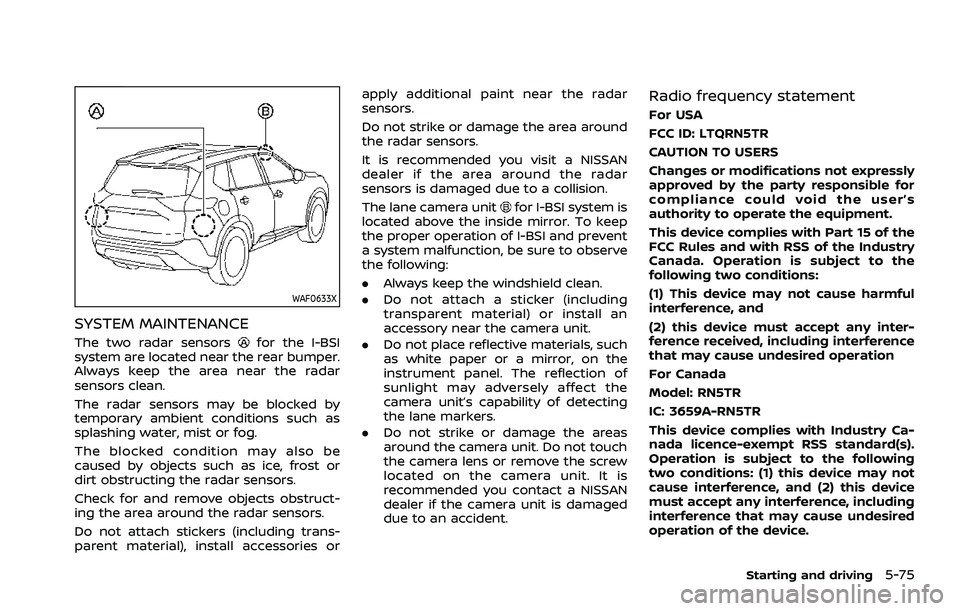
The two radar sensorsfor the I-BSI
system are located near the rear bumper.
Always keep the area near the radar
sensors clean.
The radar sensors may be blocked by
temporary ambient conditions such as
splashing water, mist or fog.
The blocked condition may also be
caused by objects such as ice, frost or
dirt obstructing the radar sensors.
Check for and remove objects obstruct-
ing the area around the radar sensors.
Do not attach stickers (including trans-
parent material), install accessories or apply additional paint near the radar
sensors.
Do not strike or damage the area around
the radar sensors.
It is recommended you visit a NISSAN
dealer if the area around the radar
sensors is damaged due to a collision.
The lane camera unit
for I-BSI system is
located above the inside mirror. To keep
the proper operation of I-BSI and prevent
a system malfunction, be sure to observe
the following:
. Always keep the windshield clean.
. Do not attach a sticker (including
transparent material) or install an
accessory near the camera unit.
. Do not place reflective materials, such
as white paper or a mirror, on the
instrument panel. The reflection of
sunlight may adversely affect the
camera unit’s capability of detecting
the lane markers.
. Do not strike or damage the areas
around the camera unit. Do not touch
the camera lens or remove the screw
located on the camera unit. It is
recommended you contact a NISSAN
dealer if the camera unit is damaged
due to an accident.
Radio frequency statement
For USA
FCC ID: LTQRN5TR
CAUTION TO USERS
Changes or modifications not expressly
approved by the party responsible for
compliance could void the user’s
authority to operate the equipment.
This device complies with Part 15 of the
FCC Rules and with RSS of the Industry
Canada. Operation is subject to the
following two conditions:
(1) This device may not cause harmful
interference, and
(2) this device must accept any inter-
ference received, including interference
that may cause undesired operation
For Canada
Model: RN5TR
IC: 3659A-RN5TR
This device complies with Industry Ca-
nada licence-exempt RSS standard(s).
Operation is subject to the following
two conditions: (1) this device may not
cause interference, and (2) this device
must accept any interference, including
interference that may cause undesired
operation of the device.
Starting and driving5-75
Page 361 of 556
map data):
— The time the vehicle can re-main stopped and automati-
cally restart is extended from
3 seconds to 30 seconds.
— If a vehicle ahead cuts in or out of the lane ahead, the
vehicle may not automatically
start when the traffic ahead
begins to move. You need to
push up the RES+ switch or
lightly depress the accelerator
pedal to follow the vehicle
directly ahead when it is safe
to do so.
. Always check surroundings be-
fore restarting the vehicle.
. Always pay attention to the op-
eration of the vehicle and be
ready to manually control the
proper following distance. The
ICC system may not be able to
maintain the selected distance
between vehicles (following dis-
tance) or selected vehicle speed
under some circumstances.
. The ICC system does not detect
the following objects:
— Stationary or slow moving ve-
hicles (when your vehicle is approaching them)
— Pedestrians or objects in the roadway
— Oncoming vehicles in the same lane
— Motorcycles traveling offset in the travel lane
. The ICC system may not detect a
vehicle ahead in certain road,
weather or driving conditions. To
avoid accidents, never use the ICC
system under the following con-
ditions:
— On roads with heavy, high-
speed traffic or sharp curves
— On slippery road surfaces such as on ice or snow, etc.
— On a bumpy road surface, such as an uneven dirt road
— On steep downhill roads (the vehicle may go beyond the
vehicle set speed and fre-
quent braking may result in
overheating the brakes)
— On repeated uphill and down- hill roads
— During bad weather (rain, fog, snow, etc.) — When the sensor detection is
reduced (conditions such as
rain, snow, fog, dust storms,
sandstorms, and road spray
from other vehicles)
— When dirt, ice, snow or other material adhere to the radar
sensor area
— When traffic conditions make it difficult to keep a proper
distance between vehicles be-
cause of frequent accelera-
tion or deceleration
— When a complicated-shaped vehicle such as a car carrier
trailer or flatbed truck/trailer
is near the vehicle ahead
— When there is interference by other radar sources
— When excessively heavy bag- gage is loaded in the rear seat
or cargo area of your vehicle
— When towing a trailer or other vehicle
. In some road or traffic conditions,
a vehicle or object can unexpect-
edly come into the sensor detec-
tion zone and cause automatic
braking. Always stay alert and
Starting and driving5-107
Page 362 of 556
5-108Starting and driving
avoid using the ICC system where
not recommended in this warn-
ing section.
. The ICC system also uses a multi-
sensing front camera. The follow-
ing are some conditions in which
the camera may not properly
detect a vehicle and detection of
a vehicle ahead may be delayed:
— Poor visibility (conditions such
as rain, snow, fog, dust
storms, sandstorms, and road
spray from other vehicles)
— The camera area of the wind- shield is fogged up or covered
with dirt, water drops, ice,
snow, etc.
— Strong light (for example, sun- light or high beams from on-
coming vehicles) enters the
front camera
— A sudden change in bright- ness occurs (for example,
when the vehicle enters or
exits a tunnel or shaded area
or lightning flashes)
The ICC system is designed to automati-
cally check the radar sensor’s operation
within the limitations of the system The detection zone of the radar sensor is
limited. A vehicle ahead must be in the
detection zone for the ICC system to
maintain the selected distance from the
vehicle ahead. A vehicle ahead may move
outside of the detection zone due to its
position within the same lane of travel.
Motorcycles may not be detected in the
same lane ahead if they are traveling
offset from the center line of the lane. A
vehicle that is entering the lane ahead
may not be detected until the vehicle has
completely moved into the lane.
If this occurs, the ICC system may warn
you by blinking the system indicator and
sounding the chime. The driver may have
to manually control the proper distance
away from the vehicle traveling ahead.
Page 370 of 556
5-116Starting and driving
Steering Assist limitations
WARNING
.In the following situations, the
camera may not detect lane mar-
kers correctly or may detect lane
markers incorrectly and the
Steering Assist may not operate
properly:
— When driving on roads where
there are multiple parallel
lane markers, lane markers
that are faded or not painted
clearly, non-standard lane
markers, or lane markers cov-
ered with water, dirt, snow,
etc.
— When driving on roads with discontinued lane markers
— When driving on roads with a widening or narrowing lane
width
— When driving on roads where there are multiple lanes or
unclear lane markers due to
road construction
— When driving on roads where there are sharply contrasting
objects, such as shadows, snow, water, wheel ruts,
seams, or lines remaining
after road repairs (the Steer-
ing Assist could detect these
items as lane markers)
— When driving on roads where the traveling lane merges or
separates
. Do not use the Steering Assist
under the following conditions
because the system may not
properly detect lane markers.
Doing so could cause a loss of
vehicle control and result in an
accident.
— During bad weather (rain, fog,
snow, dust, etc.)
— When rain, snow, sand, etc., is thrown up by the wheels of
other vehicles
— When dirt, oil, ice, snow, water, or another object adheres to
the camera unit
— When the lens of the camera unit is foggy
— When strong light (for exam- ple, sunlight or high beams
from oncoming vehicles)
shines on the camera — When the headlights are not
bright due to dirt on the lens
or the headlights are off in
tunnels or darkness
— When a sudden change in brightness occurs (for exam-
ple, when the vehicle enters or
exits a tunnel or is under a
bridge)
— When driving on roads where the traveling lane merges or
separates or where there are
temporary lane markers be-
cause of road construction
— When there is a lane closure due to road repairs
— When driving on a bumpy road surface, such as an uneven
dirt road
— When driving on sharp curves or winding roads
— When driving on repeated up- hill and downhill roads
. Do not use the Steering Assist
under the following conditions
because the system will not op-
erate properly:
— When driving with a tire that is
not within normal tire condi-
Page 380 of 556
5-126Starting and driving
AEB WITH PEDESTRIAN DETECTION
SYSTEM LIMITATIONS
WARNING
Listed below are the system limita-
tions for the AEB with pedestrian
detection system. Failure to operate
the vehicle in accordance with these
system limitations could result in
serious injury or death.
.The AEB with pedestrian detec-
tion system cannot detect all
vehicles, pedestrians or cyclists
under all conditions.
. The AEB with pedestrian detec-
tion system does not detect the
following:
— Pedestrians that are small (for
example, children), in a sitting
position, operating toys/ska-
teboards, on scooters or in
wheelchairs, or not in an up-
right standing or walking po-
sition.
— Animals of any size.
— Obstacles (for example, cargo or debris) on the roadway or
roadside. — Oncoming or crossing vehi-
cles.
— Vehicles where the tires are difficult to see or the shape of
the rear of the vehicle is un-
clear or obstructed.
— Parked vehicles.
. The AEB with pedestrian detec-
tion system has some perfor-
mance limitations.
— If a stationary vehicle is in the
vehicle’s path, the system will
not function when the vehicle
approaches the stationary ve-
hicle at speeds over approxi-
mately 50 MPH (80 km/h).
— Pedestrian and cyclist detec- tion will not function when the
vehicle is driven at speeds
over approximately 37 MPH
(60 km/h) or below approxi-
mately 6 MPH (10 km/h).
. For pedestrians, the AEB with
pedestrian detection system will
not issue the first warning.
. The AEB with pedestrian detec-
tion system may not function
properly or detect a vehicle, pe-
destrian or cyclist ahead in the
following conditions: — In poor visibility conditions
(such as rain, snow, fog, dust
storms, sand storms, smoke,
and road spray from other
vehicles).
— If dirt, ice, snow, fog or other material is covering the radar
sensor area or camera area of
the windshield.
— If strong light (for example, sunlight or high beams) en-
ters the front camera or a
sudden change in brightness
occurs (for example, entering
a tunnel or driving in light-
ning).
— In dark or dimly lit conditions, such as at night or in tunnels,
including cases where your
vehicle’s headlights are off or
dim, or the tail lights of the
vehicle ahead are off.
— When the direction of the camera is misaligned.
— When driving on a steep downhill slope, on roads with
sharp curves, and/or bumpy
or dirt roads.
Page 401 of 556
narrow tunnel, a parking lot
gate) near the side of the
vehicle.
— There are bumps, protrusions, or manhole covers on the
road surface.
— The vehicle is driving through a draped flag or a curtain.
— The vehicle is driving on a steep hill.
— There is an accumulation of snow or ice behind the vehi-
cle.
— An ultrasonic wave source, such as another vehicle’s so-
nar, is near the vehicle.
. Once the automatic brake control
operates, it does not operate
again if the vehicle approaches
the same obstacle.
. The automatic brake control can
only operate for a short period of
time. Therefore, the driver must
depress the brake pedal.
. In the following situations, the
RAB system may not operate
properly or may not function
sufficiently: — The vehicle is driven in bad
weather (rain, fog, snow, etc.).
— The vehicle is driven on a steep hill.
— The vehicle’s posture is chan- ged (e.g., when driving over a
bump).
— The vehicle is driven on a slippery road.
— The vehicle is turned sharply by turning the steering wheel
fully.
— Snow chains are used.
— Wheels or tires other than NISSAN recommended are
used.
— The brakes are cold at low ambient temperatures or im-
mediately after driving has
started.
— The braking force becomes poor due to wet brakes after
driving through a puddle or
washing the vehicle.
. Turn the RAB system off in the
following conditions to prevent
the occurrence of an unexpected
accident resulting from sudden
system operation: — The vehicle is towed.
— The vehicle is carried on a
flatbed truck.
— The vehicle is on the chassis dynamometer.
— The vehicle drives on an un- even road surface.
— Suspension parts other than those designated as genuine
parts are used. (If the vehicle
height or the vehicle body
inclination is changed, the
system may not detect an
obstacle correctly.)
. Excessive noise (e.g., audio sys-
tem volume, an open vehicle win-
dow) will interfere with the chime
sound, and it may not be heard.
SYSTEM MALFUNCTION
If the RAB system malfunctions, it will be
turned off automatically, the RAB system
OFF warning light will illuminate, and the
“Malfunction See Owner’s Manual” warn-
ing message will appear in the vehicle
information display.
Starting and driving5-147
Page 402 of 556
5-148Starting and driving
Action to take
If the warning light illuminates, park the
vehicle in a safe location, turn the engine
off, and restart the engine. If the warning
light continues to illuminate, have the
RAB system checked. It is recommended
that you visit a NISSAN dealer for this
service.
NOTE:
If the RAB system cannot be operated
temporarily, the RAB system OFF warn-
ing light blinks.
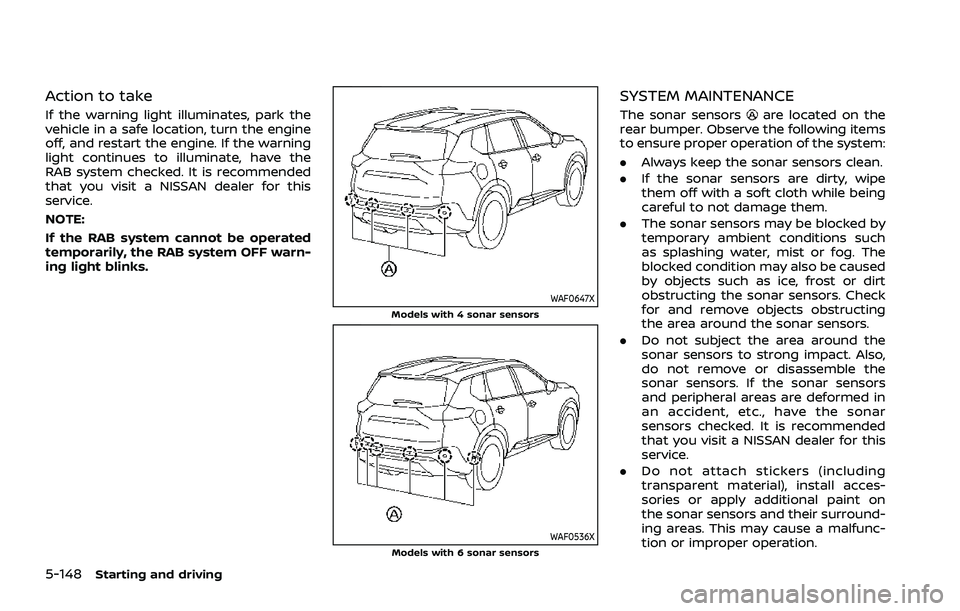
WAF0647XModels with 4 sonar sensors
WAF0536XModels with 6 sonar sensors
SYSTEM MAINTENANCE
The sonar sensorsare located on the
rear bumper. Observe the following items
to ensure proper operation of the system:
. Always keep the sonar sensors clean.
. If the sonar sensors are dirty, wipe
them off with a soft cloth while being
careful to not damage them.
. The sonar sensors may be blocked by
temporary ambient conditions such
as splashing water, mist or fog. The
blocked condition may also be caused
by objects such as ice, frost or dirt
obstructing the sonar sensors. Check
for and remove objects obstructing
the area around the sonar sensors.
. Do not subject the area around the
sonar sensors to strong impact. Also,
do not remove or disassemble the
sonar sensors. If the sonar sensors
and peripheral areas are deformed in
an accident, etc., have the sonar
sensors checked. It is recommended
that you visit a NISSAN dealer for this
service.
. Do not attach stickers (including
transparent material), install acces-
sories or apply additional paint on
the sonar sensors and their surround-
ing areas. This may cause a malfunc-
tion or improper operation.
Page 476 of 556
8-22Do-it-yourself
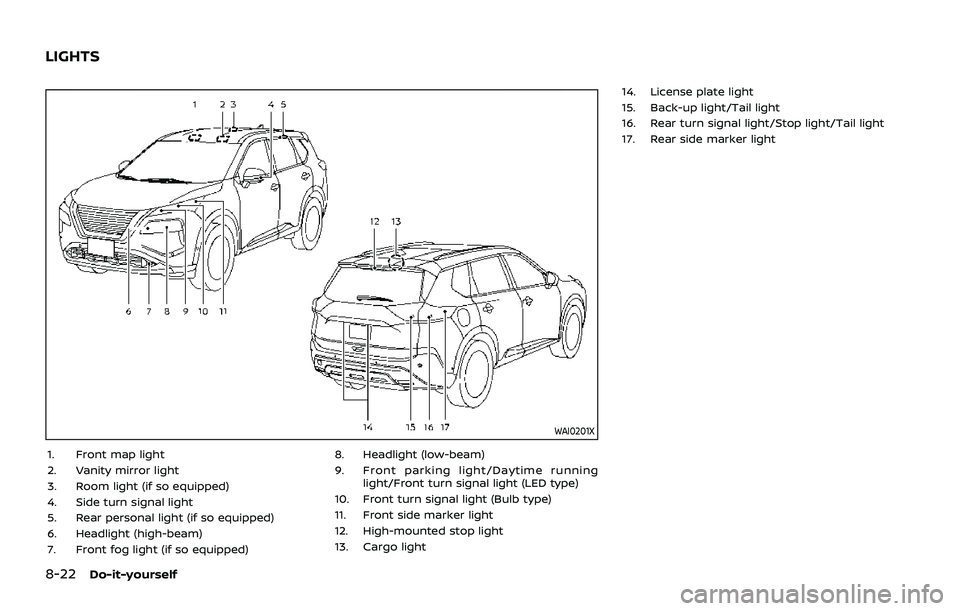
WAI0201X
1. Front map light
2. Vanity mirror light
3. Room light (if so equipped)
4. Side turn signal light
5. Rear personal light (if so equipped)
6. Headlight (high-beam)
7. Front fog light (if so equipped)8. Headlight (low-beam)
9. Front parking light/Daytime running
light/Front turn signal light (LED type)
10. Front turn signal light (Bulb type)
11. Front side marker light
12. High-mounted stop light
13. Cargo light 14. License plate light
15. Back-up light/Tail light
16. Rear turn signal light/Stop light/Tail light
17. Rear side marker light
LIGHTS
Page 477 of 556
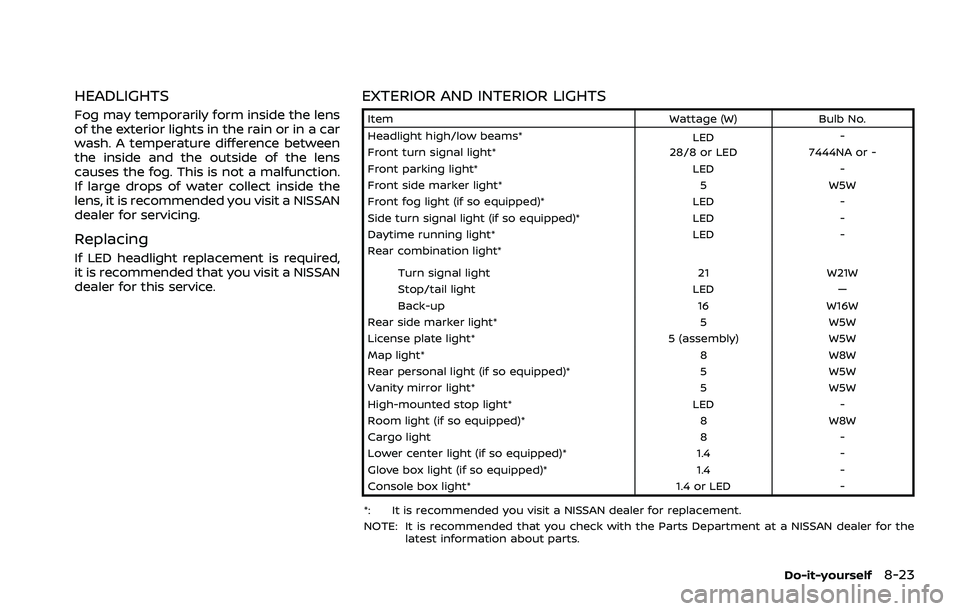
HEADLIGHTS
Fog may temporarily form inside the lens
of the exterior lights in the rain or in a car
wash. A temperature difference between
the inside and the outside of the lens
causes the fog. This is not a malfunction.
If large drops of water collect inside the
lens, it is recommended you visit a NISSAN
dealer for servicing.
Replacing
If LED headlight replacement is required,
it is recommended that you visit a NISSAN
dealer for this service.
EXTERIOR AND INTERIOR LIGHTS
ItemWattage (W)Bulb No.
Headlight high/low beams* LED-
Front turn signal light* 28/8 or LED7444NA or -
Front parking light* LED-
Front side marker light* 5W5W
Front fog light (if so equipped)* LED-
Side turn signal light (if so equipped)* LED-
Daytime running light* LED-
Rear combination light*
Turn signal light 21W21W
Stop/tail light LED—
Back-up 16W16W
Rear side marker light* 5W5W
License plate light* 5 (assembly)W5W
Map light* 8W8W
Rear personal light (if so equipped)* 5W5W
Vanity mirror light* 5W5W
High-mounted stop light* LED-
Room light (if so equipped)* 8W8W
Cargo light 8-
Lower center light (if so equipped)* 1.4-
Glove box light (if so equipped)* 1.4-
Console box light* 1.4 or LED-
*: It is recommended you visit a NISSAN dealer for replacement.
NOTE: It is recommended that you check with the Parts Department at a NISSAN dealer for the latest information about parts.
Do-it-yourself8-23
Page 549 of 556

F
F.M.V.S.S./C.M.V.S.S. certification label ...... 10-10
FilterAir cleaner housing filter ................................ 8-15
Changing engine oil and filter ...................... 8-6
Flashers (See hazard warning
flasher switch).................................................................... 6-2
Flat tire........................................................................\
............. 6-3
Flat towing..................................................................... 10-26
Floor mat cleaning ......................................................... 7-5
Fluid Brake fluid ..................................................................... 8-9
Capacities and
recommended fluids/lubricants............... 10-3
Continuously Variable Transmission
(CVT) fluid....................................................................... 8-8
Engine coolant........................................................... 8-4
Engine oil.....................................................................\
... 8-5
Window washer fluid ............................................ 8-9
Fog light switch ............................................................ 2-62
Forward Driving Aids ................................................ 5-34
Front manual seat adjustment ............................ 1-4
Front passenger air bag and status
light........................................................................\
................. 1-54
Front seat, Front seat adjustment .................... 1-4
Fuel Capacities and
recommended fluids/lubricants............... 10-3
Fuel economy...................................................... 5-150
Fuel information.................................................... 10-4
Fuel octane rating ............................................... 10-4
Fuel-filler door......................................................... 3-29
Gauge........................................................................\
..... 2-10
Fuel Efficient Driving Tips................................... 5-149
Fuses........................................................................\
.............. 8-18 Fusible links...................................................................... 8-18G
Garage mode system............................................... 3-27
Gauge........................................................................\
................ 2-5
Engine coolant temperature gauge......... 2-9
Fuel gauge ................................................................. 2-10
Odometer....................................................................... 2-8
Speedometer .............................................................. 2-8
Tachometer.................................................................. 2-9
General maintenance................................................... 9-2
Glove box ........................................................................\
... 2-75
H
Hazard warning flasher switch ............................ 6-2
Head restraints/headrests....................................... 1-9
Head Up Display (HUD) ............................................ 2-47
Headlights Bulb replacement ................................................. 8-23
Headlight switch ................................................... 2-55
Heated seats ................................................................... 2-63
Heated steering wheel ............................................ 2-63
Heater Heater and air conditioner
operation..................................................................... 4-27
High beam assist ......................................................... 2-59
Hill start assist system ......................................... 5-161
Hood release ................................................................... 3-22
Hook Coat hook................................................................... 2-77
Luggage hook ......................................................... 2-78
Horn........................................................................\
................ 2-63
I
Ignition switch ............................................................... 5-14
Ignition switch positions ....................................... 5-15
Immobilizer system.................................................... 2-51
Indicator Lights..................................................................\
............ 2-17
Vehicle information display.......................... 2-22
indicator light Electronic parking brake warning
light........................................................................\
.......... 2-15
Inside mirror .................................................................... 3-33
Inspection/maintenance (I/M) test ............ 10-29
Instrument brightness control ......................... 2-11
Instrument panel ............................................................. 2-4
Intelligent 4x4 ............................................................. 5-151
Intelligent Around View® Monitor....................... 4-9
Intelligent Auto Headlight system ................. 2-56
Intelligent Blind Spot
Intervention (I-BSI) ...................................................... 5-65
Intelligent Cruise Control (ICC) ......................... 5-97
Intelligent Driver Alertness (I-DA) ................. 5-141
Intelligent Forward Collision Warning
(I-FCW)........................................................................\
........ 5-132
Intelligent Key button operation light ........ 3-17
Intelligent Key system ................................................. 3-7 Key operating range ............................................. 3-9
Key operation .......................................................... 3-11
Remote keyless operation ............................ 3-15
Intelligent Lane Intervention (I-LI) .................. 5-51
Intelligent Trace Control..................................... 5-160
Interior light replacement..................................... 8-23
Interior light switch.................................................... 2-85
Interior lights................................................................... 2-85
ISOFIX child restraint ................................................ 1-25
11-3