turn signal NISSAN ROGUE 2021 Owner´s Manual
[x] Cancel search | Manufacturer: NISSAN, Model Year: 2021, Model line: ROGUE, Model: NISSAN ROGUE 2021Pages: 556, PDF Size: 2.7 MB
Page 315 of 556
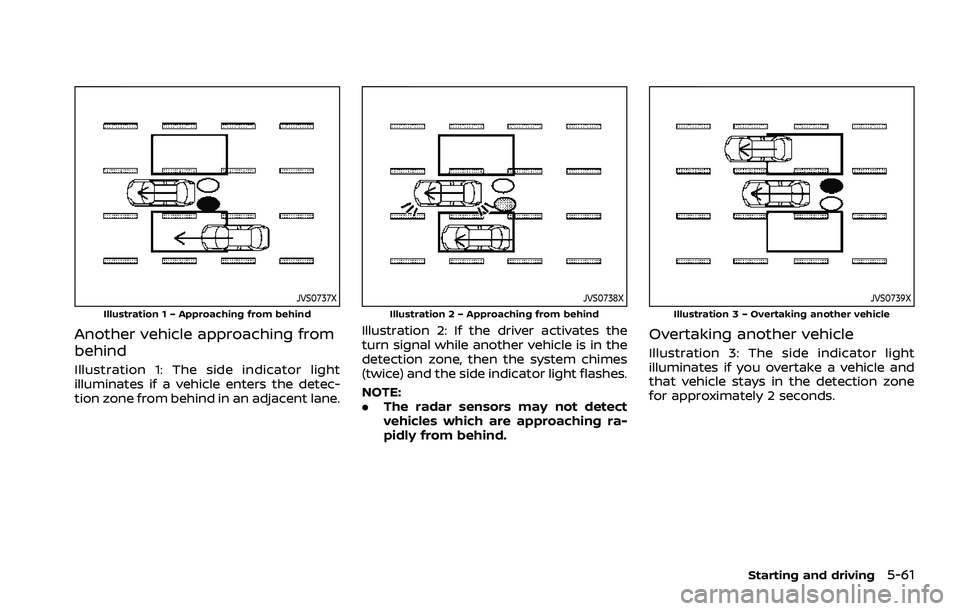
JVS0737XIllustration 1 – Approaching from behind
Another vehicle approaching from
behind
Illustration 1: The side indicator light
illuminates if a vehicle enters the detec-
tion zone from behind in an adjacent lane.
JVS0738XIllustration 2 – Approaching from behind
Illustration 2: If the driver activates the
turn signal while another vehicle is in the
detection zone, then the system chimes
(twice) and the side indicator light flashes.
NOTE:
.The radar sensors may not detect
vehicles which are approaching ra-
pidly from behind.
JVS0739XIllustration 3 – Overtaking another vehicle
Overtaking another vehicle
Illustration 3: The side indicator light
illuminates if you overtake a vehicle and
that vehicle stays in the detection zone
for approximately 2 seconds.
Starting and driving5-61
Page 316 of 556
5-62Starting and driving
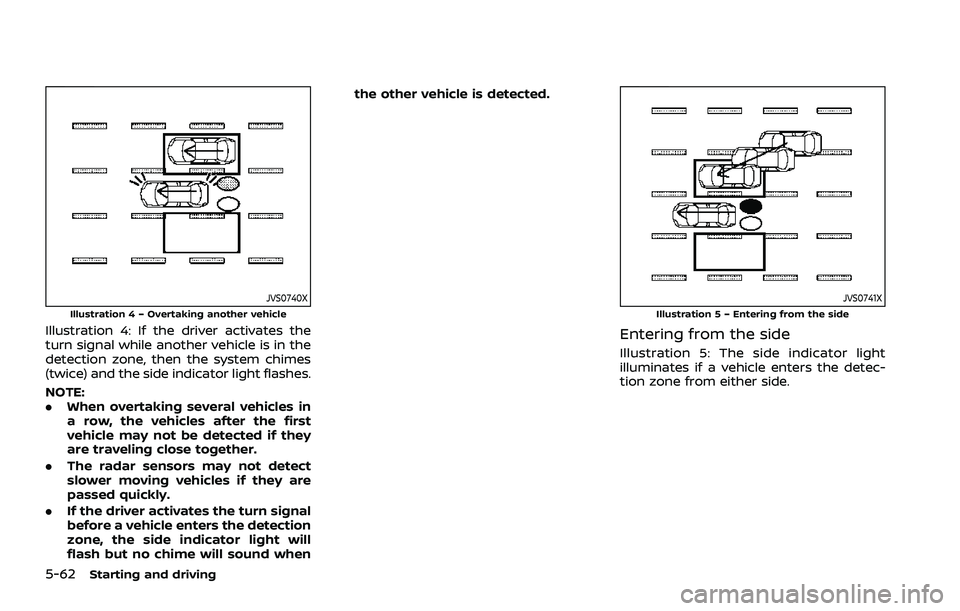
JVS0740XIllustration 4 – Overtaking another vehicle
Illustration 4: If the driver activates the
turn signal while another vehicle is in the
detection zone, then the system chimes
(twice) and the side indicator light flashes.
NOTE:
.When overtaking several vehicles in
a row, the vehicles after the first
vehicle may not be detected if they
are traveling close together.
. The radar sensors may not detect
slower moving vehicles if they are
passed quickly.
. If the driver activates the turn signal
before a vehicle enters the detection
zone, the side indicator light will
flash but no chime will sound when the other vehicle is detected.
JVS0741XIllustration 5 – Entering from the side
Entering from the side
Illustration 5: The side indicator light
illuminates if a vehicle enters the detec-
tion zone from either side.
Page 317 of 556
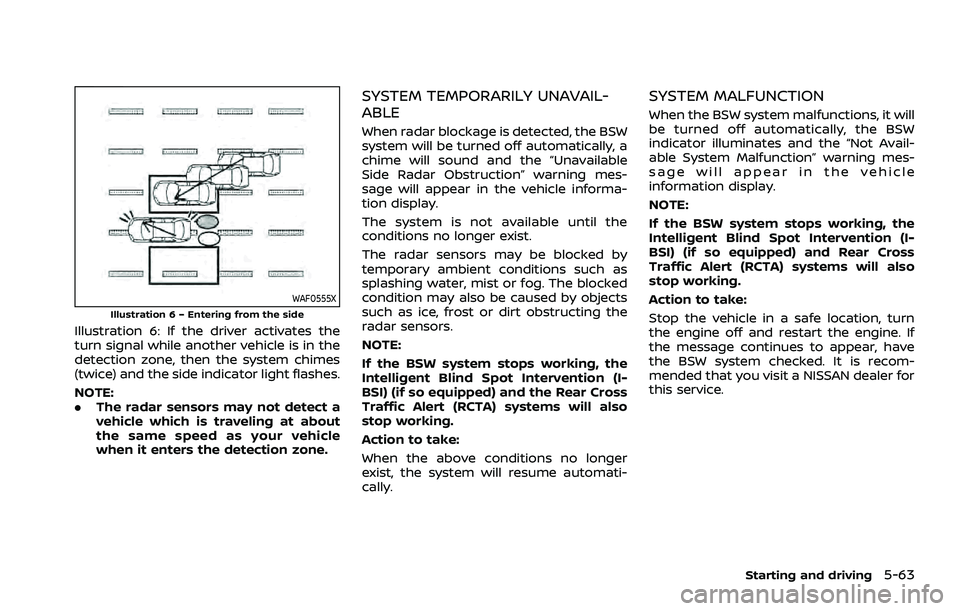
WAF0555XIllustration 6 – Entering from the side
Illustration 6: If the driver activates the
turn signal while another vehicle is in the
detection zone, then the system chimes
(twice) and the side indicator light flashes.
NOTE:
.The radar sensors may not detect a
vehicle which is traveling at about
the same speed as your vehicle
when it enters the detection zone.
SYSTEM TEMPORARILY UNAVAIL-
ABLE
When radar blockage is detected, the BSW
system will be turned off automatically, a
chime will sound and the “Unavailable
Side Radar Obstruction” warning mes-
sage will appear in the vehicle informa-
tion display.
The system is not available until the
conditions no longer exist.
The radar sensors may be blocked by
temporary ambient conditions such as
splashing water, mist or fog. The blocked
condition may also be caused by objects
such as ice, frost or dirt obstructing the
radar sensors.
NOTE:
If the BSW system stops working, the
Intelligent Blind Spot Intervention (I-
BSI) (if so equipped) and the Rear Cross
Traffic Alert (RCTA) systems will also
stop working.
Action to take:
When the above conditions no longer
exist, the system will resume automati-
cally.
SYSTEM MALFUNCTION
When the BSW system malfunctions, it will
be turned off automatically, the BSW
indicator illuminates and the “Not Avail-
able System Malfunction” warning mes-
sage will appear in the vehicle
information display.
NOTE:
If the BSW system stops working, the
Intelligent Blind Spot Intervention (I-
BSI) (if so equipped) and Rear Cross
Traffic Alert (RCTA) systems will also
stop working.
Action to take:
Stop the vehicle in a safe location, turn
the engine off and restart the engine. If
the message continues to appear, have
the BSW system checked. It is recom-
mended that you visit a NISSAN dealer for
this service.
Starting and driving5-63
Page 320 of 556
5-66Starting and driving
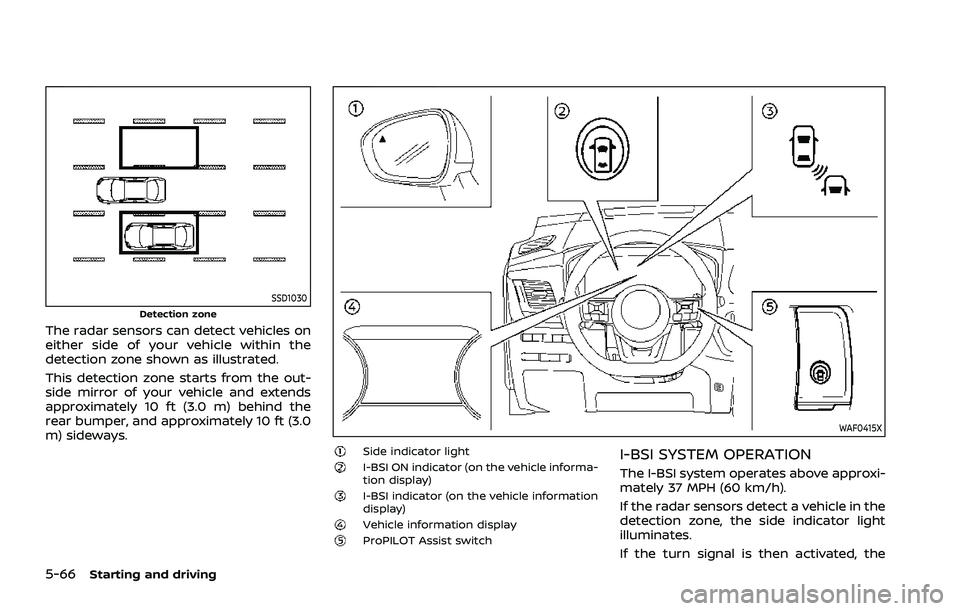
SSD1030Detection zone
The radar sensors can detect vehicles on
either side of your vehicle within the
detection zone shown as illustrated.
This detection zone starts from the out-
side mirror of your vehicle and extends
approximately 10 ft (3.0 m) behind the
rear bumper, and approximately 10 ft (3.0
m) sideways.
WAF0415X
Side indicator lightI-BSI ON indicator (on the vehicle informa-
tion display)
I-BSI indicator (on the vehicle information
display)
Vehicle information displayProPILOT Assist switch
I-BSI SYSTEM OPERATION
The I-BSI system operates above approxi-
mately 37 MPH (60 km/h).
If the radar sensors detect a vehicle in the
detection zone, the side indicator light
illuminates.
If the turn signal is then activated, the
Page 321 of 556
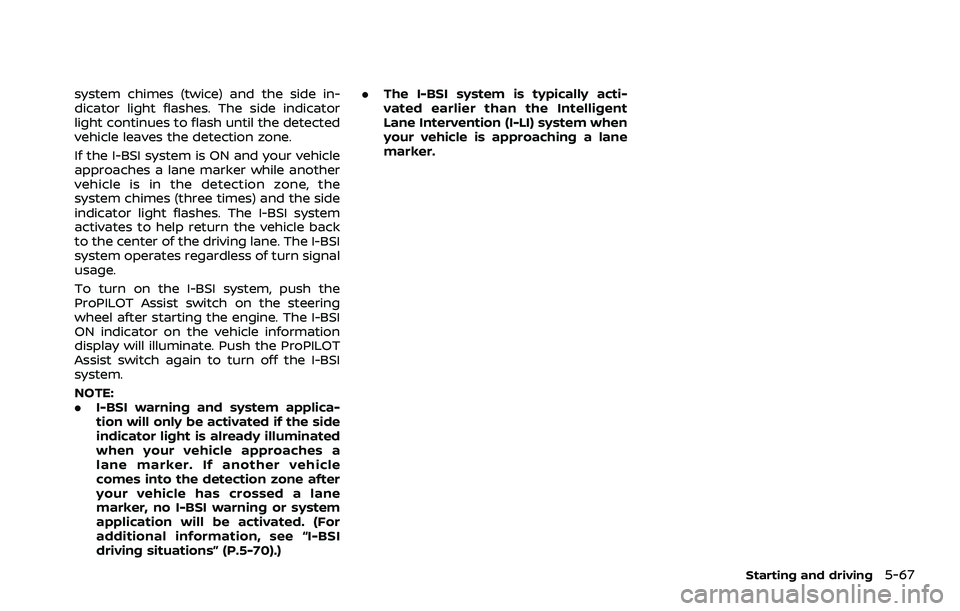
system chimes (twice) and the side in-
dicator light flashes. The side indicator
light continues to flash until the detected
vehicle leaves the detection zone.
If the I-BSI system is ON and your vehicle
approaches a lane marker while another
vehicle is in the detection zone, the
system chimes (three times) and the side
indicator light flashes. The I-BSI system
activates to help return the vehicle back
to the center of the driving lane. The I-BSI
system operates regardless of turn signal
usage.
To turn on the I-BSI system, push the
ProPILOT Assist switch on the steering
wheel after starting the engine. The I-BSI
ON indicator on the vehicle information
display will illuminate. Push the ProPILOT
Assist switch again to turn off the I-BSI
system.
NOTE:
.I-BSI warning and system applica-
tion will only be activated if the side
indicator light is already illuminated
when your vehicle approaches a
lane marker. If another vehicle
comes into the detection zone after
your vehicle has crossed a lane
marker, no I-BSI warning or system
application will be activated. (For
additional information, see “I-BSI
driving situations” (P.5-70).) .
The I-BSI system is typically acti-
vated earlier than the Intelligent
Lane Intervention (I-LI) system when
your vehicle is approaching a lane
marker.
Starting and driving5-67
Page 325 of 556
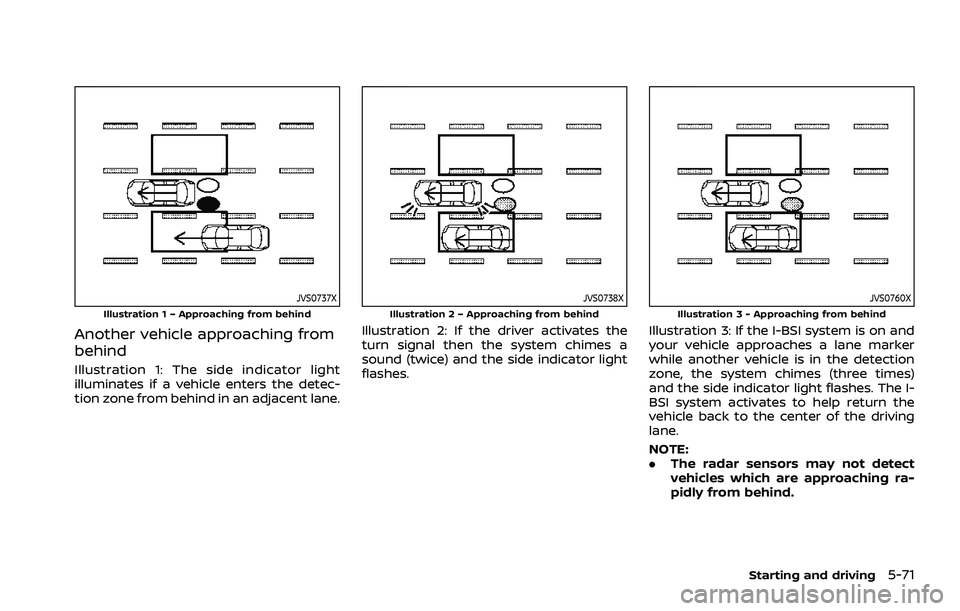
JVS0737XIllustration 1 – Approaching from behind
Another vehicle approaching from
behind
Illustration 1: The side indicator light
illuminates if a vehicle enters the detec-
tion zone from behind in an adjacent lane.
JVS0738XIllustration 2 – Approaching from behind
Illustration 2: If the driver activates the
turn signal then the system chimes a
sound (twice) and the side indicator light
flashes.
JVS0760XIllustration 3 - Approaching from behind
Illustration 3: If the I-BSI system is on and
your vehicle approaches a lane marker
while another vehicle is in the detection
zone, the system chimes (three times)
and the side indicator light flashes. The I-
BSI system activates to help return the
vehicle back to the center of the driving
lane.
NOTE:
.The radar sensors may not detect
vehicles which are approaching ra-
pidly from behind.
Starting and driving5-71
Page 326 of 556
5-72Starting and driving
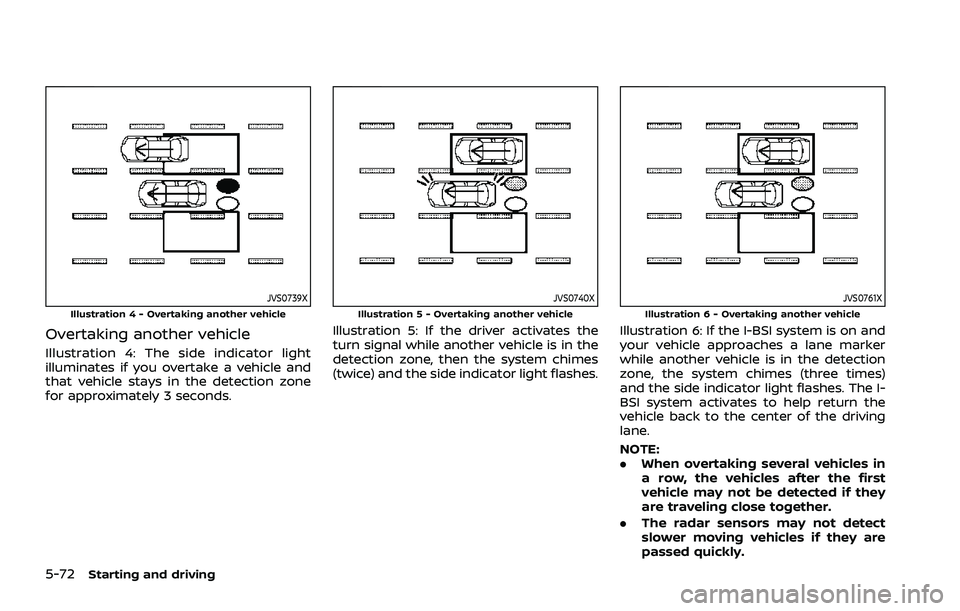
JVS0739XIllustration 4 - Overtaking another vehicle
Overtaking another vehicle
Illustration 4: The side indicator light
illuminates if you overtake a vehicle and
that vehicle stays in the detection zone
for approximately 3 seconds.
JVS0740XIllustration 5 - Overtaking another vehicle
Illustration 5: If the driver activates the
turn signal while another vehicle is in the
detection zone, then the system chimes
(twice) and the side indicator light flashes.
JVS0761XIllustration 6 - Overtaking another vehicle
Illustration 6: If the I-BSI system is on and
your vehicle approaches a lane marker
while another vehicle is in the detection
zone, the system chimes (three times)
and the side indicator light flashes. The I-
BSI system activates to help return the
vehicle back to the center of the driving
lane.
NOTE:
.When overtaking several vehicles in
a row, the vehicles after the first
vehicle may not be detected if they
are traveling close together.
. The radar sensors may not detect
slower moving vehicles if they are
passed quickly.
Page 327 of 556
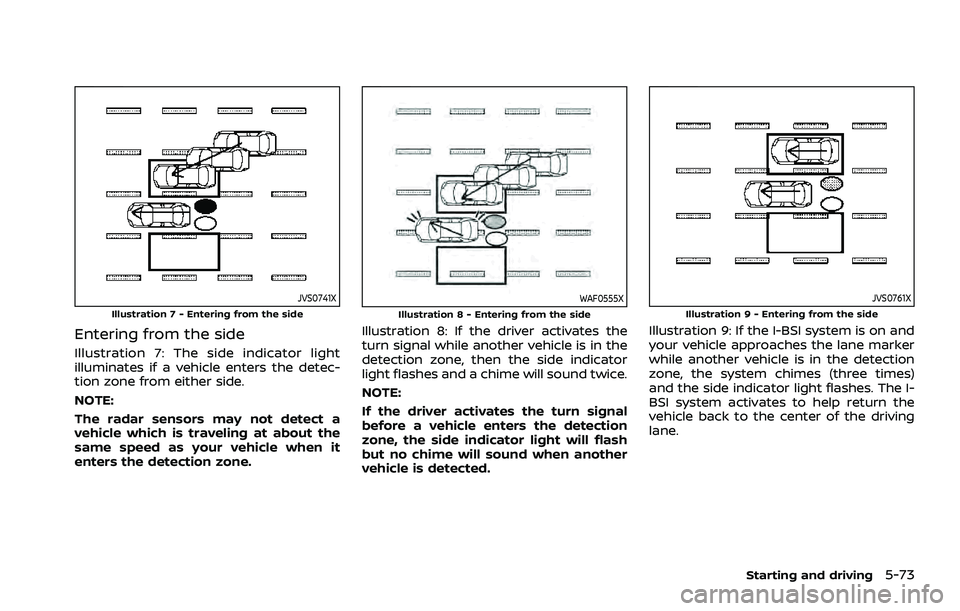
JVS0741XIllustration 7 - Entering from the side
Entering from the side
Illustration 7: The side indicator light
illuminates if a vehicle enters the detec-
tion zone from either side.
NOTE:
The radar sensors may not detect a
vehicle which is traveling at about the
same speed as your vehicle when it
enters the detection zone.
WAF0555XIllustration 8 - Entering from the side
Illustration 8: If the driver activates the
turn signal while another vehicle is in the
detection zone, then the side indicator
light flashes and a chime will sound twice.
NOTE:
If the driver activates the turn signal
before a vehicle enters the detection
zone, the side indicator light will flash
but no chime will sound when another
vehicle is detected.
JVS0761XIllustration 9 - Entering from the side
Illustration 9: If the I-BSI system is on and
your vehicle approaches the lane marker
while another vehicle is in the detection
zone, the system chimes (three times)
and the side indicator light flashes. The I-
BSI system activates to help return the
vehicle back to the center of the driving
lane.
Starting and driving5-73
Page 356 of 556
5-102Starting and driving
The warning chime will not sound when:
.Your vehicle approaches other vehi-
cles that are parked or moving slowly.
. The accelerator pedal is depressed,
overriding the system.
NOTE:
The approach warning chime may
sound and the system display may
flash when the radar sensor detects
objects on the side of the vehicle or on
the side of the road. This may cause the
ICC system to decelerate or accelerate
the vehicle. The radar sensor may de-
tect these objects when the vehicle is
driven on winding, narrow, or hilly roads
or when the vehicle is entering or
exiting a curve. In these cases, you will
have to manually control the proper
distance ahead of your vehicle.
Also, the sensor sensitivity can be af-
fected by vehicle operation (steering
maneuver or driving position in the
lane) or traffic or vehicle conditions
(for example, if a vehicle is being driven
with some damage).Acceleration when passing
When the ICC system is engaged above
44 MPH (70 km/h) and following a slower
vehicle (below the vehicle set speed), and
the turn signal is activated to the left, the
ICC system will automatically start to
accelerate the vehicle to help initiate
passing on the left and will begin to
reduce the distance to vehicle directly
ahead. Only the left side turn signal
operates this feature. As the driver steers
the vehicle and moves into the passing
lane, if no vehicle is detected ahead the
ICC system will continue to accelerate to
the vehicle set speed. If another vehicle is
detected ahead, then the vehicle will
accelerate up to the following speed of
that vehicle. If the vehicle is not steered
into the left lane to pass, the acceleration
will stop after a short time and regain the
set following distance. Acceleration can
be stopped at any point by depressing
the brake pedal or the CANCEL switch on
the steering wheel.
WARNING
In order to reduce the risk of a
collision that may result in serious
injury or death, please be aware of
the following: .
This function is only activated
with the left turn signal and will
briefly accelerate the vehicle even
if a lane change is not initiated.
This can include non-passing si-
tuations such as left side exits.
. Ensure that when passing an-
other vehicle, the adjacent lane
is clear before initiating the pass.
Sudden changes in traffic may
occur while passing. Always
manually steer or brake as
needed. Never solely rely on the
system.
Speed Limit Assist - a feature of
ProPILOT Assist with Navi-link (if so
equipped)
WARNING
Listed below are the system limita-
tions for the Speed Limit Assist. Fail-
ure to operate the vehicle in
accordance with these system lim-
itations could result in serious injury
or death:
.It is the driver’s responsibility to
select the proper speed, follow all
traffic regulations and observe
Page 364 of 556
5-110Starting and driving
ICC system temporarily unavailable
The following are conditions in which the
ICC system may be temporarily unavail-
able. In these instances, the ICC system
may not cancel and may not be able to
maintain the selected following distance
from the vehicle ahead.
Condition A:
Under the following conditions, the ICC
system is automatically canceled. A chime
will sound and the system will not be able
to be set:
.Any door is open.
. The driver’s seat belt is unfastened.
. The vehicle ahead is not detected and
your vehicle is traveling below the
speed of 15 MPH (25 km/h). For
ProPILOT Assist with Navi-link
equipped vehicles on a limited access
freeway as identified in the navigation
map data, the ICC system cancels and
a warning chime sounds if your vehi-
cle is at a standstill for more than
approximately 3 seconds and a vehi-
cle is not detected ahead.
. Your vehicle has been stopped by the
ICC system for approximately 3 min-
utes or longer.
. The shift lever is moved out of the D
(Drive) position or into the manual
shift mode. .
The electronic parking brake is ap-
plied.
. The VDC system is turned off.
. The AEB applies harder braking
. VDC (including the traction control
system) operates.
. The SNOW mode or OFF-ROAD mode
is selected (AWD models).
. A wheel slips.
. When the front radar is impaired due
to dirt or an other obstruction block-
ing the radar sensor.
. When the radar signal is temporarily
interrupted.
Action to take:
When the conditions listed above are no
longer present, turn the system off using
the ProPILOT Assist switch. Turn the
ProPILOT Assist system back on to use
the system.
NOTE:
When the ICC system is canceled under
any of the following conditions at a
standstill, the electronic parking brake
is automatically activated:
. Any door is open.
. The driver’s seat belt is unfastened.
. Your vehicle has been stopped by
the ICC system for approximately 3
minutes or longer. .
The shift lever is moved out of the D
(Drive) position or into the manual
shift mode.
. The VDC system is turned off.
. When the front radar is impaired due
to dirt or an other obstruction block-
ing the radar sensor.
. When the radar signal is temporarily
interrupted.
Condition B:
When there is inclement weather (rain,
fog, snow, etc.) blocking the front radar
sensor, the ICC system will automatically
be canceled, the chime will sound and the
“Forward Driving Aids temporarily dis-
abled Front Sensor blocked” warning
message will appear in the vehicle infor-
mation display.
Action to take:
When the above condition is no longer
present, the warning message will no
longer be available in the vehicle informa-
tion display and the system will operate
normally. If the warning message con-
tinues to appear, have the system
checked. It is recommended that you visit
a NISSAN dealer for this service.
Condition C:
When the radar sensor on the front of the
vehicle is covered with dirt or is ob-