ignition NISSAN ROGUE 2021 Owner´s Manual
[x] Cancel search | Manufacturer: NISSAN, Model Year: 2021, Model line: ROGUE, Model: NISSAN ROGUE 2021Pages: 556, PDF Size: 2.7 MB
Page 139 of 556
theft of interior or exterior vehicle com-
ponents in all situations. Always secure
your vehicle even if parking for a brief
period. Never leave your keys in the
vehicle, and always lock it when unat-
tended. Be aware of your surroundings,
and park in secure, well-lit areas when-
ever possible.
Many devices offering additional protec-
tion, such as component locks, identifica-
tion markers, and tracking systems, are
available at auto supply stores and speci-
alty shops. Your NISSAN dealer may also
offer such equipment. Check with your
insurance company to see if you may be
eligible for discounts for various theft
protection features.
How to arm the vehicle security
system
1. Close all windows.The system can be
armed even if the windows are open.
2. Remove the keys from the vehicle.
3. Close all doors, hood and liftgate. Lock all doors. The doors can be locked
with Intelligent Key, door handle re-
quest switch (if so equipped).
Even when the driver and/or passen-
gers are in the vehicle, the system will
activate with all the doors, hood and
liftgate locked with the ignition switch
placed in the OFF position. When pla- cing the ignition switch in the ON
position, the system will be released.
Vehicle security system activation
The vehicle security system will give the
following alarm:
.
The headlights or the hazard indicator
lights blink and the horn sounds
intermittently.
. The alarm automatically turns off
after approximately 30 seconds. How-
ever, the alarm reactivates if the
vehicle is tampered with again.
The alarm is activated by:
. opening any doors, the hood or lift-
gate without using Intelligent Key
(even if the door is unlocked by
releasing the door inside lock knob).
How to stop an activated alarm
The alarm stops by pushing the UNLOCKbutton on the Intelligent Key, pushing
the request switch (if so equipped) in
range of the door handle or placing the
ignition switch in the ON position.
NISSAN VEHICLE IMMOBILIZER SYS-
TEM
The NISSAN Vehicle Immobilizer System
will not allow the engine to start without
the use of the registered key.
If the engine does not start using the
registered Intelligent Key, it may be due to
interference caused by:
. Another Intelligent Key.
. Automated toll road device.
. Automated payment device.
. Other devices that transmit similar
signals.
Start the engine using the following
procedure:
1. Remove any items that may be caus- ing the interference away from the
Intelligent Key.
2. Start the engine again.
If this procedure allows the engine to
start, NISSAN recommends placing the
registered Intelligent Key separate from
other devices to avoid interference.
Statement related to section 15 of FCC
rules for NISSAN Vehicle Immobilizer
System (CONT ASSY-SMART KEYLESS)
FCC Notice:
For USA:
FCC ID : KR5HFM401
Instruments and controls2-51
Page 141 of 556
WAC0317X
WINDSHIELD WIPER AND WASHER
OPERATION
The windshield wiper and washer oper-
ates when the ignition switch is in the ON
position.
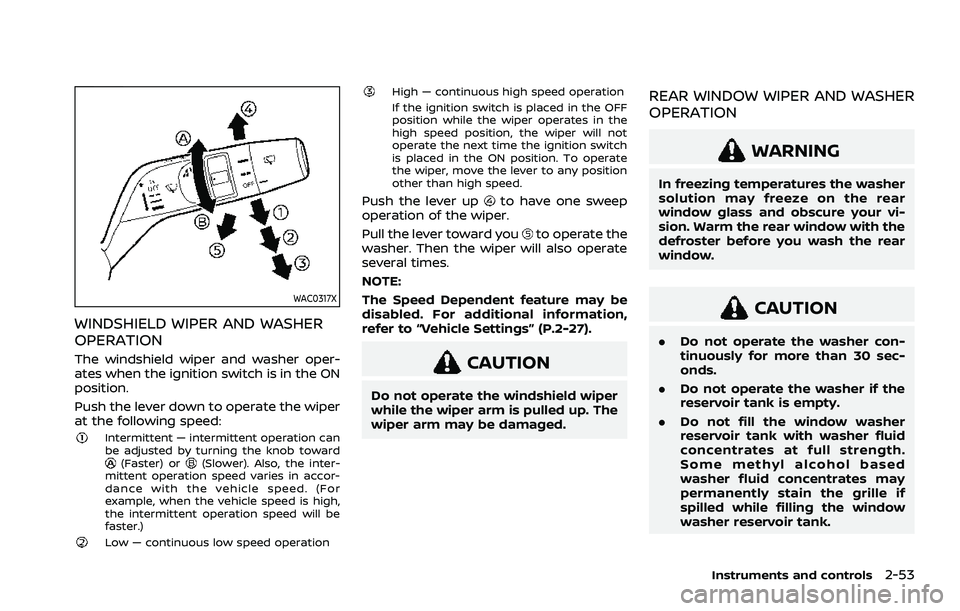
Push the lever down to operate the wiper
at the following speed:
Intermittent — intermittent operation can
be adjusted by turning the knob toward
(Faster) or(Slower). Also, the inter-
mittent operation speed varies in accor-
dance with the vehicle speed. (For
example, when the vehicle speed is high,
the intermittent operation speed will be
faster.)
Low — continuous low speed operation
High — continuous high speed operation
If the ignition switch is placed in the OFF
position while the wiper operates in the
high speed position, the wiper will not
operate the next time the ignition switch
is placed in the ON position. To operate
the wiper, move the lever to any position
other than high speed.
Push the lever upto have one sweep
operation of the wiper.
Pull the lever toward you
to operate the
washer. Then the wiper will also operate
several times.
NOTE:
The Speed Dependent feature may be
disabled. For additional information,
refer to “Vehicle Settings” (P.2-27).
CAUTION
Do not operate the windshield wiper
while the wiper arm is pulled up. The
wiper arm may be damaged.
REAR WINDOW WIPER AND WASHER
OPERATION
WARNING
In freezing temperatures the washer
solution may freeze on the rear
window glass and obscure your vi-
sion. Warm the rear window with the
defroster before you wash the rear
window.
CAUTION
. Do not operate the washer con-
tinuously for more than 30 sec-
onds.
. Do not operate the washer if the
reservoir tank is empty.
. Do not fill the window washer
reservoir tank with washer fluid
concentrates at full strength.
Some methyl alcohol based
washer fluid concentrates may
permanently stain the grille if
spilled while filling the window
washer reservoir tank.
Instruments and controls2-53
Page 142 of 556
2-54Instruments and controls
.Pre-mix washer fluid concen-
trates with water to the manu-
facturer’s recommended levels
before pouring the fluid into the
window washer reservoir tank. Do
not use the window washer re-
servoir tank to mix the washer
fluid concentrate and water.
If the rear window wiper operation is
interrupted by snow or ice, the wiper
may stop moving to protect its motor. If
this occurs, turn the wiper switch to the
OFF position and remove the snow or
ice that is on and around the wiper
arms. In approximately 1 minute, turn
the switch on again to operate the
wiper.
WAC0318X
The rear window wiper and washer
operate when the ignition switch is in
the ON position.
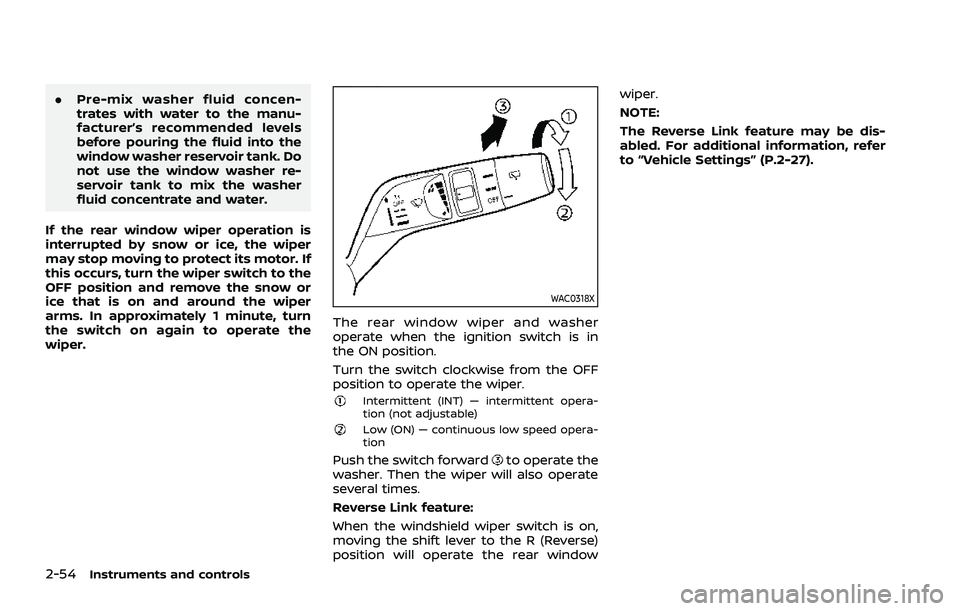
Turn the switch clockwise from the OFF
position to operate the wiper.
Intermittent (INT) — intermittent opera-
tion (not adjustable)
Low (ON) — continuous low speed opera-
tion
Push the switch forwardto operate the
washer. Then the wiper will also operate
several times.
Reverse Link feature:
When the windshield wiper switch is on,
moving the shift lever to the R (Reverse)
position will operate the rear window wiper.
NOTE:
The Reverse Link feature may be dis-
abled. For additional information, refer
to “Vehicle Settings” (P.2-27).
Page 144 of 556
2-56Instruments and controls
WAC0533X
Lighting
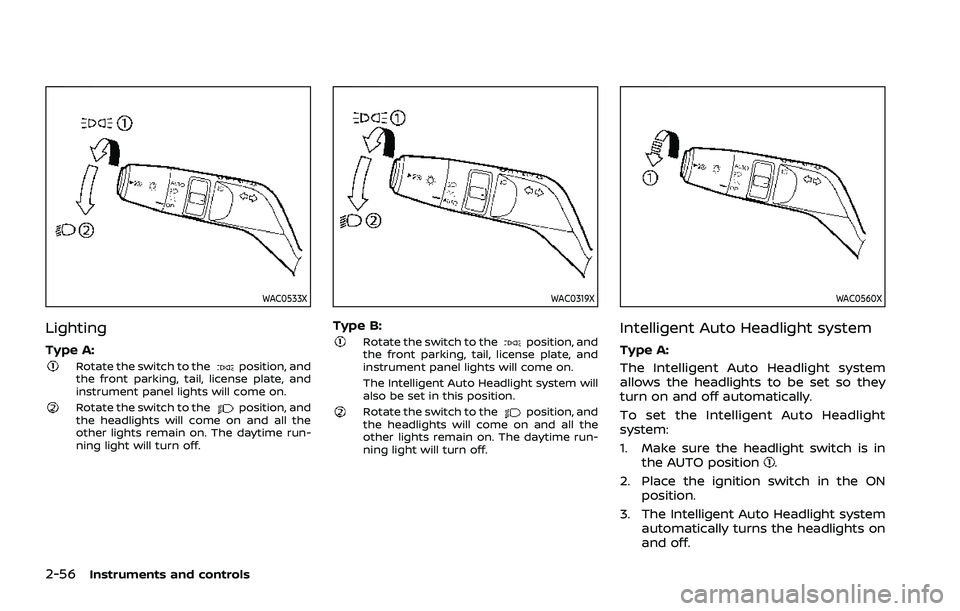
Type A:Rotate the switch to theposition, and
the front parking, tail, license plate, and
instrument panel lights will come on.
Rotate the switch to theposition, and
the headlights will come on and all the
other lights remain on. The daytime run-
ning light will turn off.
WAC0319X
Type B:Rotate the switch to theposition, and
the front parking, tail, license plate, and
instrument panel lights will come on.
The Intelligent Auto Headlight system will
also be set in this position.
Rotate the switch to theposition, and
the headlights will come on and all the
other lights remain on. The daytime run-
ning light will turn off.
WAC0560X
Intelligent Auto Headlight system
Type A:
The Intelligent Auto Headlight system
allows the headlights to be set so they
turn on and off automatically.
To set the Intelligent Auto Headlight
system:
1. Make sure the headlight switch is in
the AUTO position
.
2. Place the ignition switch in the ON position.
3. The Intelligent Auto Headlight system automatically turns the headlights on
and off.
Page 145 of 556
To turn the Intelligent Auto Headlight
system off, turn the switch to the OFF,
orposition.
The Intelligent Auto Headlight system can
turn on the headlights automatically
when it is dark and turn off the headlights
when it is light.
The headlights will also be turned on
automatically at twilight or in rainy
weather (when the windshield wiper is
operated continuously).
If the ignition switch is placed in the OFF
position and one of the doors is opened
and this condition is continued, the head-
lights remain on for 5 minutes.
WAC0320X
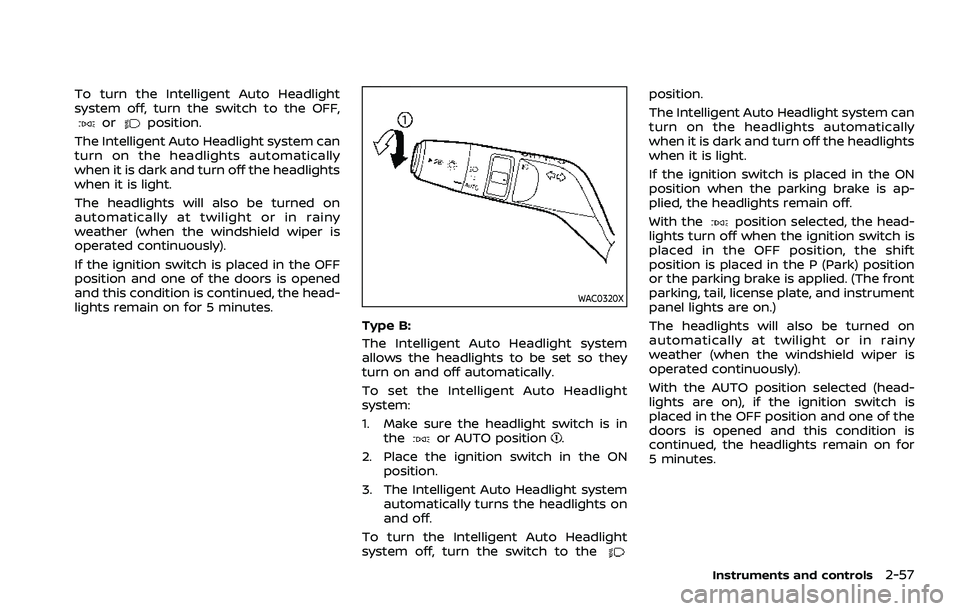
Type B:
The Intelligent Auto Headlight system
allows the headlights to be set so they
turn on and off automatically.
To set the Intelligent Auto Headlight
system:
1. Make sure the headlight switch is in the
or AUTO position.
2. Place the ignition switch in the ON position.
3. The Intelligent Auto Headlight system automatically turns the headlights on
and off.
To turn the Intelligent Auto Headlight
system off, turn the switch to the
position.
The Intelligent Auto Headlight system can
turn on the headlights automatically
when it is dark and turn off the headlights
when it is light.
If the ignition switch is placed in the ON
position when the parking brake is ap-
plied, the headlights remain off.
With the
position selected, the head-
lights turn off when the ignition switch is
placed in the OFF position, the shift
position is placed in the P (Park) position
or the parking brake is applied. (The front
parking, tail, license plate, and instrument
panel lights are on.)
The headlights will also be turned on
automatically at twilight or in rainy
weather (when the windshield wiper is
operated continuously).
With the AUTO position selected (head-
lights are on), if the ignition switch is
placed in the OFF position and one of the
doors is opened and this condition is
continued, the headlights remain on for
5 minutes.
Instruments and controls2-57
Page 146 of 556
2-58Instruments and controls
WAC0522X
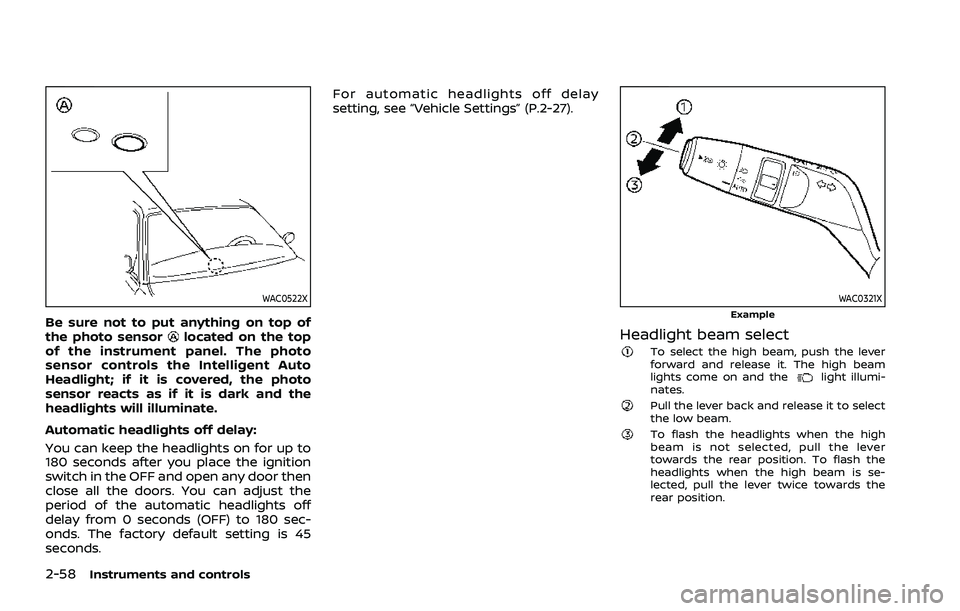
Be sure not to put anything on top of
the photo sensorlocated on the top
of the instrument panel. The photo
sensor controls the Intelligent Auto
Headlight; if it is covered, the photo
sensor reacts as if it is dark and the
headlights will illuminate.
Automatic headlights off delay:
You can keep the headlights on for up to
180 seconds after you place the ignition
switch in the OFF and open any door then
close all the doors. You can adjust the
period of the automatic headlights off
delay from 0 seconds (OFF) to 180 sec-
onds. The factory default setting is 45
seconds. For automatic headlights off delay
setting, see “Vehicle Settings” (P.2-27).
WAC0321XExample
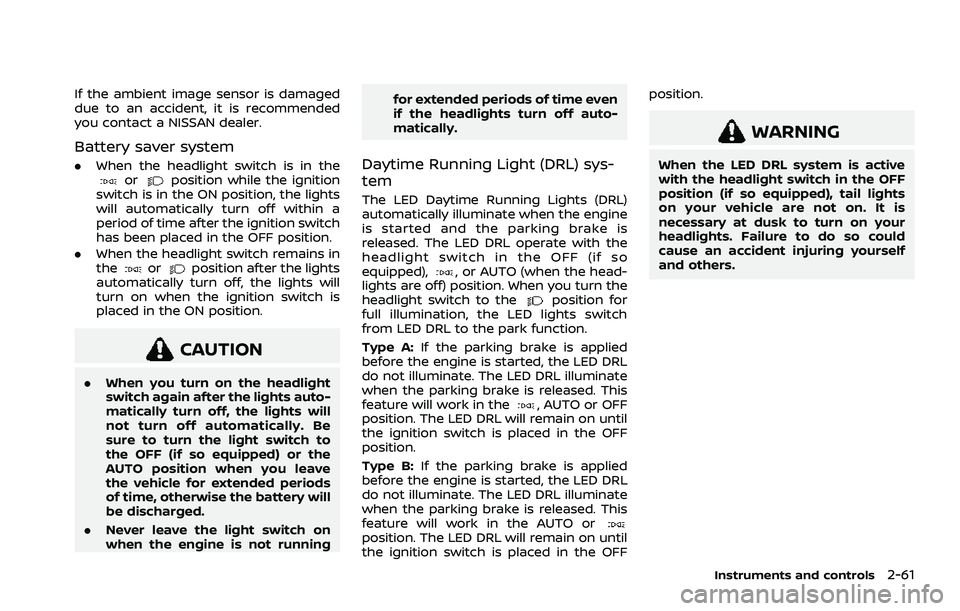
Headlight beam selectTo select the high beam, push the lever
forward and release it. The high beam
lights come on and the
light illumi-
nates.
Pull the lever back and release it to select
the low beam.
To flash the headlights when the high
beam is not selected, pull the lever
towards the rear position. To flash the
headlights when the high beam is se-
lected, pull the lever twice towards the
rear position.
Page 149 of 556
If the ambient image sensor is damaged
due to an accident, it is recommended
you contact a NISSAN dealer.
Battery saver system
.When the headlight switch is in theorposition while the ignition
switch is in the ON position, the lights
will automatically turn off within a
period of time after the ignition switch
has been placed in the OFF position.
. When the headlight switch remains in
the
orposition after the lights
automatically turn off, the lights will
turn on when the ignition switch is
placed in the ON position.
CAUTION
. When you turn on the headlight
switch again after the lights auto-
matically turn off, the lights will
not turn off automatically. Be
sure to turn the light switch to
the OFF (if so equipped) or the
AUTO position when you leave
the vehicle for extended periods
of time, otherwise the battery will
be discharged.
. Never leave the light switch on
when the engine is not running for extended periods of time even
if the headlights turn off auto-
matically.
Daytime Running Light (DRL) sys-
tem
The LED Daytime Running Lights (DRL)
automatically illuminate when the engine
is started and the parking brake is
released. The LED DRL operate with the
headlight switch in the OFF (if so
equipped),
, or AUTO (when the head-
lights are off) position. When you turn the
headlight switch to the
position for
full illumination, the LED lights switch
from LED DRL to the park function.
Type A: If the parking brake is applied
before the engine is started, the LED DRL
do not illuminate. The LED DRL illuminate
when the parking brake is released. This
feature will work in the
, AUTO or OFF
position. The LED DRL will remain on until
the ignition switch is placed in the OFF
position.
Type B: If the parking brake is applied
before the engine is started, the LED DRL
do not illuminate. The LED DRL illuminate
when the parking brake is released. This
feature will work in the AUTO or
position. The LED DRL will remain on until
the ignition switch is placed in the OFF position.
WARNING
When the LED DRL system is active
with the headlight switch in the OFF
position (if so equipped), tail lights
on your vehicle are not on. It is
necessary at dusk to turn on your
headlights. Failure to do so could
cause an accident injuring yourself
and others.
Instruments and controls2-61
Page 155 of 556
.When not in use, be sure to close
the cap. Do not allow water or any
liquid to contact the outlet.
WAC0326X
USB (Universal Serial Bus) CHAR-
GING CONNECTOR (if so equipped)
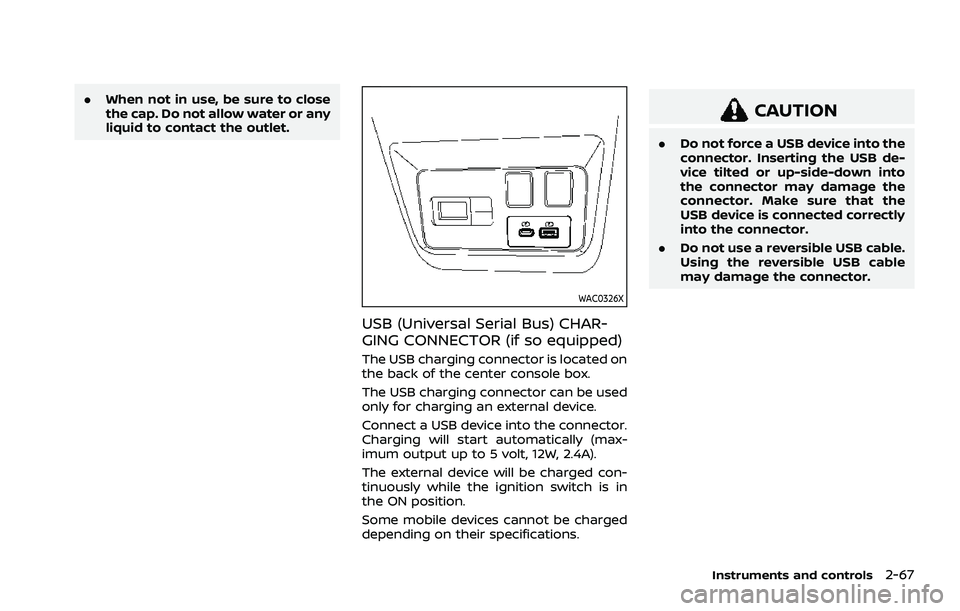
The USB charging connector is located on
the back of the center console box.
The USB charging connector can be used
only for charging an external device.
Connect a USB device into the connector.
Charging will start automatically (max-
imum output up to 5 volt, 12W, 2.4A).
The external device will be charged con-
tinuously while the ignition switch is in
the ON position.
Some mobile devices cannot be charged
depending on their specifications.
CAUTION
.Do not force a USB device into the
connector. Inserting the USB de-
vice tilted or up-side-down into
the connector may damage the
connector. Make sure that the
USB device is connected correctly
into the connector.
. Do not use a reversible USB cable.
Using the reversible USB cable
may damage the connector.
Instruments and controls2-67
Page 156 of 556
2-68Instruments and controls
WAC0327X
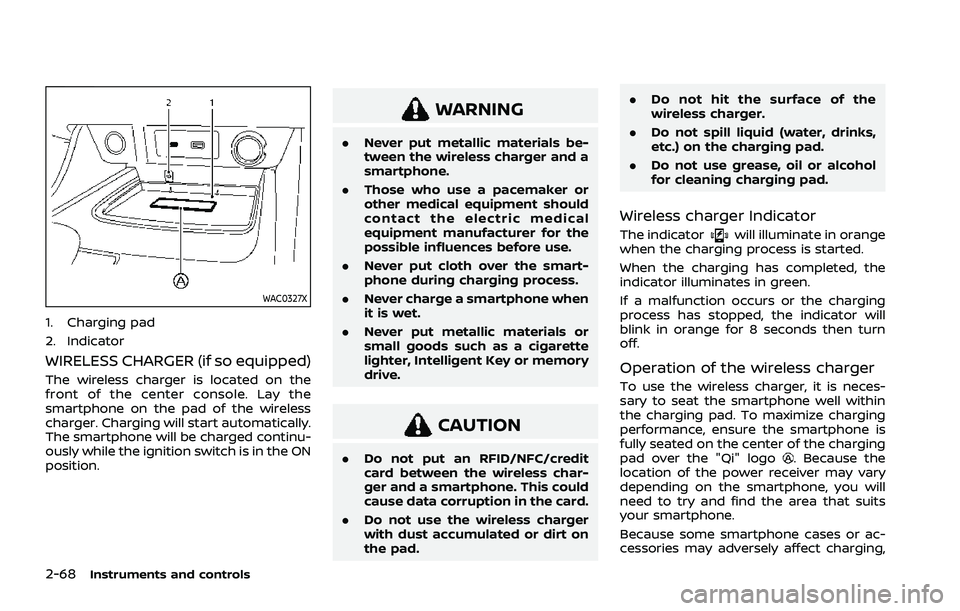
1. Charging pad
2. Indicator
WIRELESS CHARGER (if so equipped)
The wireless charger is located on the
front of the center console. Lay the
smartphone on the pad of the wireless
charger. Charging will start automatically.
The smartphone will be charged continu-
ously while the ignition switch is in the ON
position.
WARNING
.Never put metallic materials be-
tween the wireless charger and a
smartphone.
. Those who use a pacemaker or
other medical equipment should
contact the electric medical
equipment manufacturer for the
possible influences before use.
. Never put cloth over the smart-
phone during charging process.
. Never charge a smartphone when
it is wet.
. Never put metallic materials or
small goods such as a cigarette
lighter, Intelligent Key or memory
drive.
CAUTION
.Do not put an RFID/NFC/credit
card between the wireless char-
ger and a smartphone. This could
cause data corruption in the card.
. Do not use the wireless charger
with dust accumulated or dirt on
the pad. .
Do not hit the surface of the
wireless charger.
. Do not spill liquid (water, drinks,
etc.) on the charging pad.
. Do not use grease, oil or alcohol
for cleaning charging pad.
Wireless charger Indicator
The indicatorwill illuminate in orange
when the charging process is started.
When the charging has completed, the
indicator illuminates in green.
If a malfunction occurs or the charging
process has stopped, the indicator will
blink in orange for 8 seconds then turn
off.
Operation of the wireless charger
To use the wireless charger, it is neces-
sary to seat the smartphone well within
the charging pad. To maximize charging
performance, ensure the smartphone is
fully seated on the center of the charging
pad over the "Qi" logo
. Because the
location of the power receiver may vary
depending on the smartphone, you will
need to try and find the area that suits
your smartphone.
Because some smartphone cases or ac-
cessories may adversely affect charging,
Page 167 of 556
GAWR are located on the F.M.V.S.S. or C.V.
M.S.S. certification label (located on the
driver’s door pillar). For additional infor-
mation regarding GVWR and GAWR, refer
to “Vehicle loading information” (P.10-13).
WARNING
.Always install the cross bars onto
the roof side rails before loading
cargo of any kind. Loading cargo
directly onto the roof side rails or
the vehicle’s roof may cause ve-
hicle damage.
. Drive extra carefully when the
vehicle is loaded at or near the
cargo carrying capacity, espe-
cially if the significant portion of
that load is carried on the cross
bars.
. Heavy loading of the cross bars
has the potential to affect the
vehicle stability and handling
during sudden or unusual hand-
ling maneuvers.
. Roof rack cross bars should be
evenly distributed.
. Do not exceed maximum roof
rack cross bars load. .
Properly secure all cargo with
ropes or straps to help prevent it
from sliding or shifting. In a sud-
den stop or collision, unsecured
cargo could cause personal in-
jury.CAUTION
Use care when placing or removing
items from the roof rack. If you
cannot comfortably lift the items
onto the roof rack from the ground,
use a ladder or a stool.
POWER WINDOWS
WARNING
.Make sure that all passengers
have their hands, etc. inside the
vehicle while it is in motion and
before closing the windows. Use
the window lock switch to pre-
vent unexpected use of the
power windows.
. To help avoid risk of injury or
death through unintended opera-
tion of the vehicle and or its
systems, including entrapment
in windows or inadvertent door
lock activation, do not leave chil-
dren, people who require the
assistance of others or pets un-
attended in your vehicle. Addi-
tionally, the temperature inside a
closed vehicle on a warm day can
quickly become high enough to
cause a significant risk of injury
or death to people and pets.
The power windows operate when the
ignition switch is in the ON position, or for
a period of time after the ignition switch is
placed in the OFF position. If the driver’s
or front passenger’s door is opened dur-
Instruments and controls2-79
WINDOWS