ignition NISSAN ROGUE 2021 Owner´s Manual
[x] Cancel search | Manufacturer: NISSAN, Model Year: 2021, Model line: ROGUE, Model: NISSAN ROGUE 2021Pages: 556, PDF Size: 2.7 MB
Page 224 of 556
4-10Monitor, heater, air conditioner, audio and phone systems
viewed. The four corners of the
vehicle in particular, are areas
where objects do not always ap-
pear in the bird’s-eye, front, or
rear views. Always check your
surroundings to be sure that it is
safe to move before operating
the vehicle. Always operate the
vehicle slowly.
. The driver is always responsible
for safety during parking and
other maneuvers.
CAUTION
Do not scratch the lens when clean-
ing dirt or snow from the front of the
camera.
The Intelligent Around View® Monitor
system is designed as an aid to the driver
in situations such as slot parking or
parallel parking.
The monitor displays various views of the
position of the vehicle in a split screen
format. Not all views are available at all
times. Available views:
.
Front view
A view of the front of the vehicle
. Rear view
A view of the rear of the vehicle
. Bird’s-eye view
The surrounding view of the vehicle
from above
. Front-side view
The view around and ahead of the
front passenger’s side wheel
. Front-wide view
A wider area view of the front view
. Rear-wide view
A wider area view of the rear view
WAE0360X
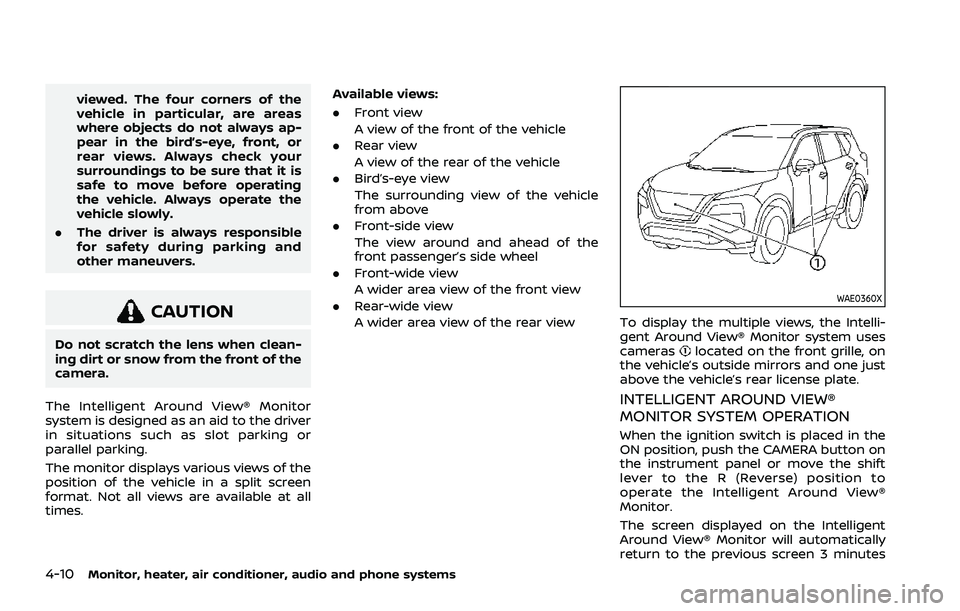
To display the multiple views, the Intelli-
gent Around View® Monitor system uses
cameras
located on the front grille, on
the vehicle’s outside mirrors and one just
above the vehicle’s rear license plate.
INTELLIGENT AROUND VIEW®
MONITOR SYSTEM OPERATION
When the ignition switch is placed in the
ON position, push the CAMERA button on
the instrument panel or move the shift
lever to the R (Reverse) position to
operate the Intelligent Around View®
Monitor.
The screen displayed on the Intelligent
Around View® Monitor will automatically
return to the previous screen 3 minutes
Page 226 of 556
4-12Monitor, heater, air conditioner, audio and phone systems
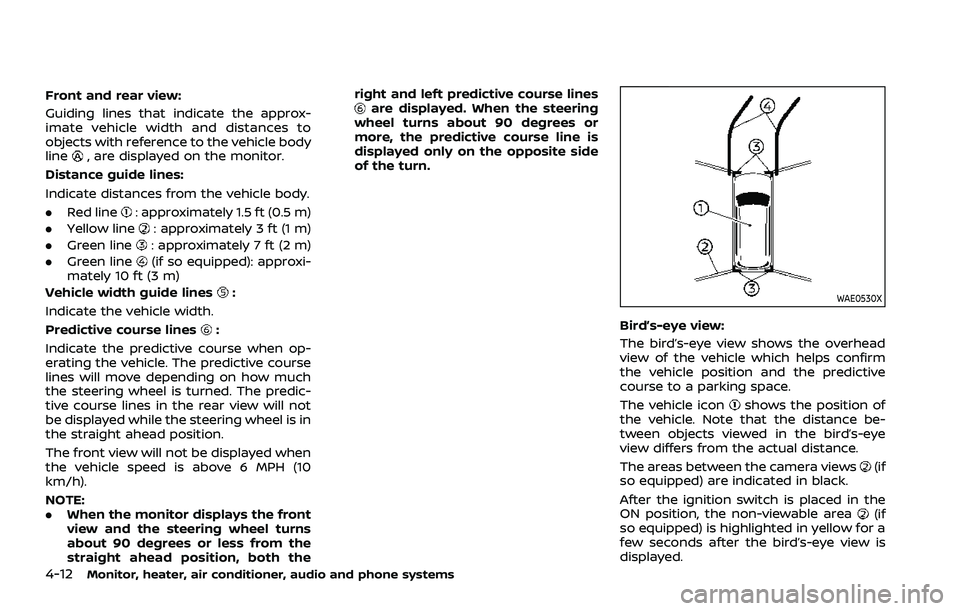
Front and rear view:
Guiding lines that indicate the approx-
imate vehicle width and distances to
objects with reference to the vehicle body
line
, are displayed on the monitor.
Distance guide lines:
Indicate distances from the vehicle body.
. Red line
: approximately 1.5 ft (0.5 m)
. Yellow line
: approximately 3 ft (1 m)
. Green line
: approximately 7 ft (2 m)
. Green line
(if so equipped): approxi-
mately 10 ft (3 m)
Vehicle width guide lines
:
Indicate the vehicle width.
Predictive course lines
:
Indicate the predictive course when op-
erating the vehicle. The predictive course
lines will move depending on how much
the steering wheel is turned. The predic-
tive course lines in the rear view will not
be displayed while the steering wheel is in
the straight ahead position.
The front view will not be displayed when
the vehicle speed is above 6 MPH (10
km/h).
NOTE:
. When the monitor displays the front
view and the steering wheel turns
about 90 degrees or less from the
straight ahead position, both the right and left predictive course lines
are displayed. When the steering
wheel turns about 90 degrees or
more, the predictive course line is
displayed only on the opposite side
of the turn.
WAE0530X
Bird’s-eye view:
The bird’s-eye view shows the overhead
view of the vehicle which helps confirm
the vehicle position and the predictive
course to a parking space.
The vehicle icon
shows the position of
the vehicle. Note that the distance be-
tween objects viewed in the bird’s-eye
view differs from the actual distance.
The areas between the camera views
(if
so equipped) are indicated in black.
After the ignition switch is placed in the
ON position, the non-viewable area
(if
so equipped) is highlighted in yellow for a
few seconds after the bird’s-eye view is
displayed.
Page 230 of 556
4-16Monitor, heater, air conditioner, audio and phone systems
JVH1216X
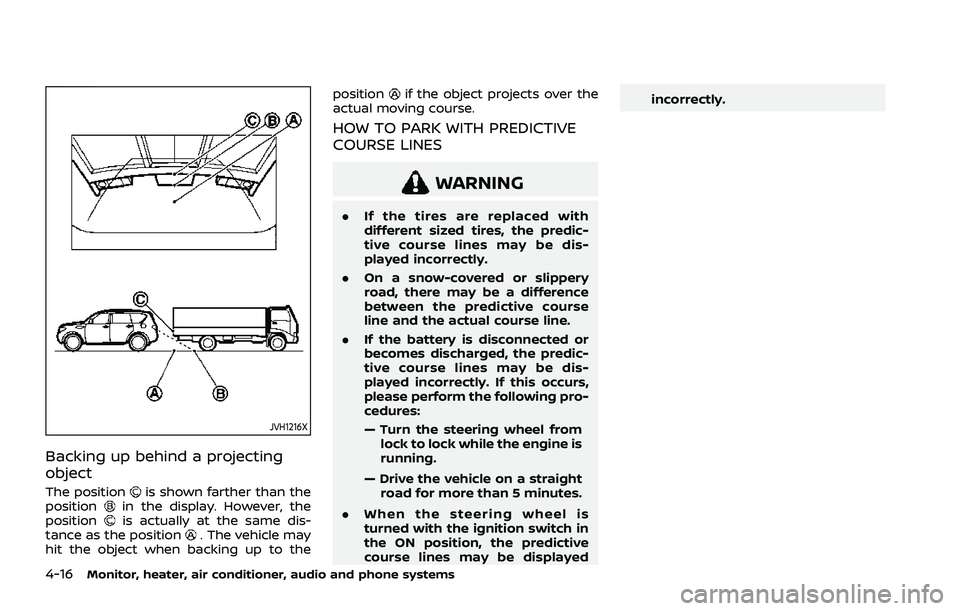
Backing up behind a projecting
object
The positionis shown farther than the
positionin the display. However, the
positionis actually at the same dis-
tance as the position. The vehicle may
hit the object when backing up to the position
if the object projects over the
actual moving course.
HOW TO PARK WITH PREDICTIVE
COURSE LINES
WARNING
. If the tires are replaced with
different sized tires, the predic-
tive course lines may be dis-
played incorrectly.
. On a snow-covered or slippery
road, there may be a difference
between the predictive course
line and the actual course line.
. If the battery is disconnected or
becomes discharged, the predic-
tive course lines may be dis-
played incorrectly. If this occurs,
please perform the following pro-
cedures:
— Turn the steering wheel from
lock to lock while the engine is
running.
— Drive the vehicle on a straight road for more than 5 minutes.
. When the steering wheel is
turned with the ignition switch in
the ON position, the predictive
course lines may be displayed incorrectly.
Page 231 of 556
WAE0546X
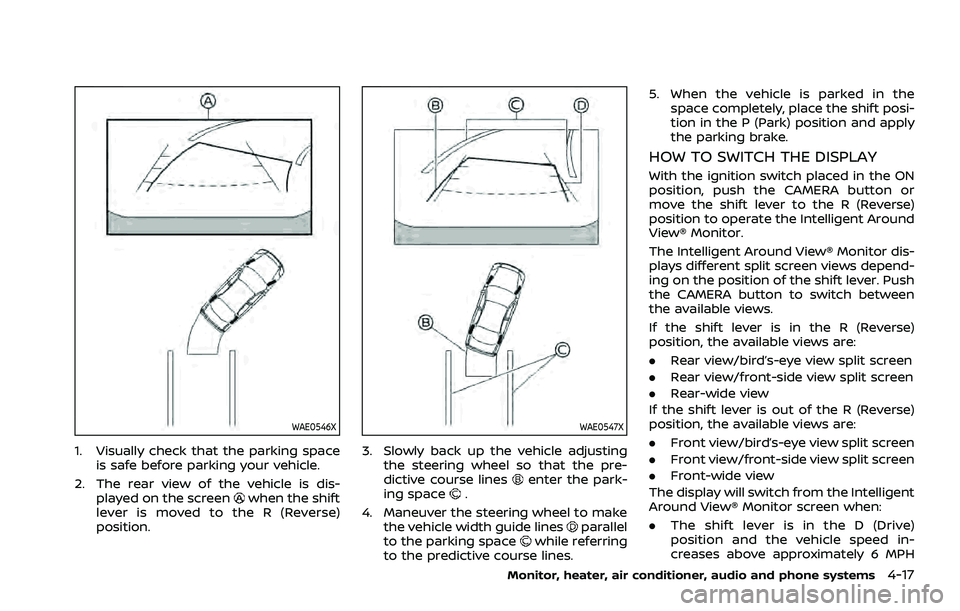
1. Visually check that the parking spaceis safe before parking your vehicle.
2. The rear view of the vehicle is dis- played on the screen
when the shift
lever is moved to the R (Reverse)
position.
WAE0547X
3. Slowly back up the vehicle adjusting the steering wheel so that the pre-
dictive course lines
enter the park-
ing space.
4. Maneuver the steering wheel to make the vehicle width guide lines
parallel
to the parking spacewhile referring
to the predictive course lines. 5. When the vehicle is parked in the
space completely, place the shift posi-
tion in the P (Park) position and apply
the parking brake.
HOW TO SWITCH THE DISPLAY
With the ignition switch placed in the ON
position, push the CAMERA button or
move the shift lever to the R (Reverse)
position to operate the Intelligent Around
View® Monitor.
The Intelligent Around View® Monitor dis-
plays different split screen views depend-
ing on the position of the shift lever. Push
the CAMERA button to switch between
the available views.
If the shift lever is in the R (Reverse)
position, the available views are:
.Rear view/bird’s-eye view split screen
. Rear view/front-side view split screen
. Rear-wide view
If the shift lever is out of the R (Reverse)
position, the available views are:
. Front view/bird’s-eye view split screen
. Front view/front-side view split screen
. Front-wide view
The display will switch from the Intelligent
Around View® Monitor screen when:
. The shift lever is in the D (Drive)
position and the vehicle speed in-
creases above approximately 6 MPH
Monitor, heater, air conditioner, audio and phone systems4-17
Page 241 of 556
WARNING
.The heater and air conditioner
operate only when the engine is
running.
. Never leave children or adults
who would normally require the
support of others alone in the
vehicle. Pets should not be left
alone either. They could unknow-
ingly activate switches or con-
trols and inadvertently become
involved in a serious accident
and injure themselves. On hot,
sunny days, temperatures in a
closed vehicle could quickly be-
come high enough to cause se-
vere or possibly fatal injuries to
people or animals.
. Do not use the recirculation mode
for long periods as it may cause
the interior air to become stale
and the windows to fog up.
. Do not adjust the heating and air
conditioning controls while driv-
ing so that full attention may be
given to vehicle operation.
The heater and air conditioner operate
when the engine is running. The air blower will operate even if the engine is
turned off and the ignition switch is
placed in the ON position.
NOTE:
.
Odors from inside and outside the
vehicle can build up in the air condi-
tioner unit. Odor can enter the pas-
senger compartment through the
ventilators.
. When parking, set the heater and air
conditioner controls to turn off air
recirculation to allow fresh air into
the passenger compartment. This
should help reduce odors inside the
vehicle.
Monitor, heater, air conditioner, audio and phone systems4-27
HEATER AND AIR CONDITIONER
Page 248 of 556
4-34Monitor, heater, air conditioner, audio and phone systems
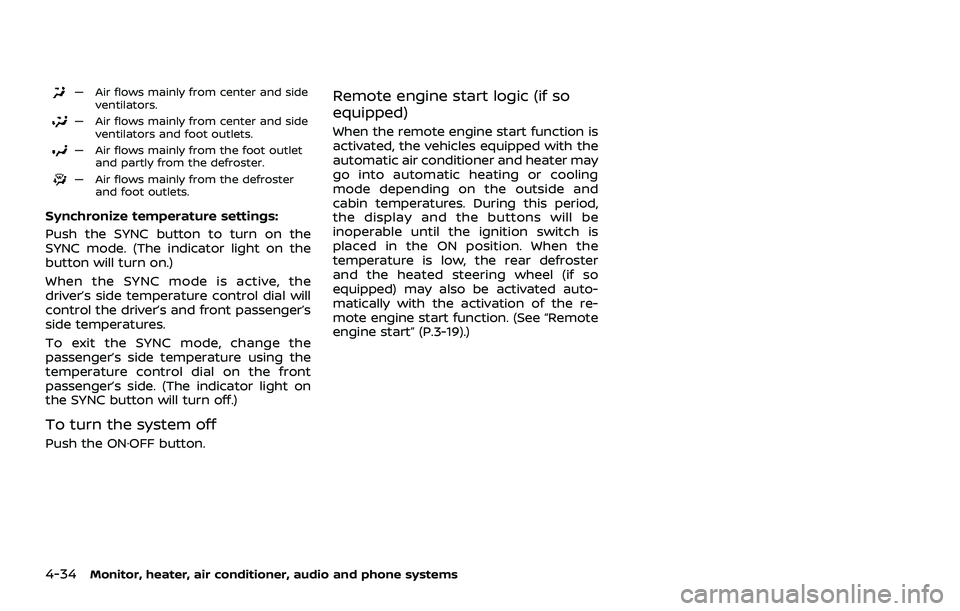
— Air flows mainly from center and sideventilators.
— Air flows mainly from center and sideventilators and foot outlets.
— Air flows mainly from the foot outletand partly from the defroster.
— Air flows mainly from the defrosterand foot outlets.
Synchronize temperature settings:
Push the SYNC button to turn on the
SYNC mode. (The indicator light on the
button will turn on.)
When the SYNC mode is active, the
driver’s side temperature control dial will
control the driver’s and front passenger’s
side temperatures.
To exit the SYNC mode, change the
passenger’s side temperature using the
temperature control dial on the front
passenger’s side. (The indicator light on
the SYNC button will turn off.)
To turn the system off
Push the ON·OFF button.
Remote engine start logic (if so
equipped)
When the remote engine start function is
activated, the vehicles equipped with the
automatic air conditioner and heater may
go into automatic heating or cooling
mode depending on the outside and
cabin temperatures. During this period,
the display and the buttons will be
inoperable until the ignition switch is
placed in the ON position. When the
temperature is low, the rear defroster
and the heated steering wheel (if so
equipped) may also be activated auto-
matically with the activation of the re-
mote engine start function. (See “Remote
engine start” (P.3-19).)
Page 251 of 556
temperature control” (P.4-37).)
To turn the system off
Push the ON·OFF button.
JVH1847X
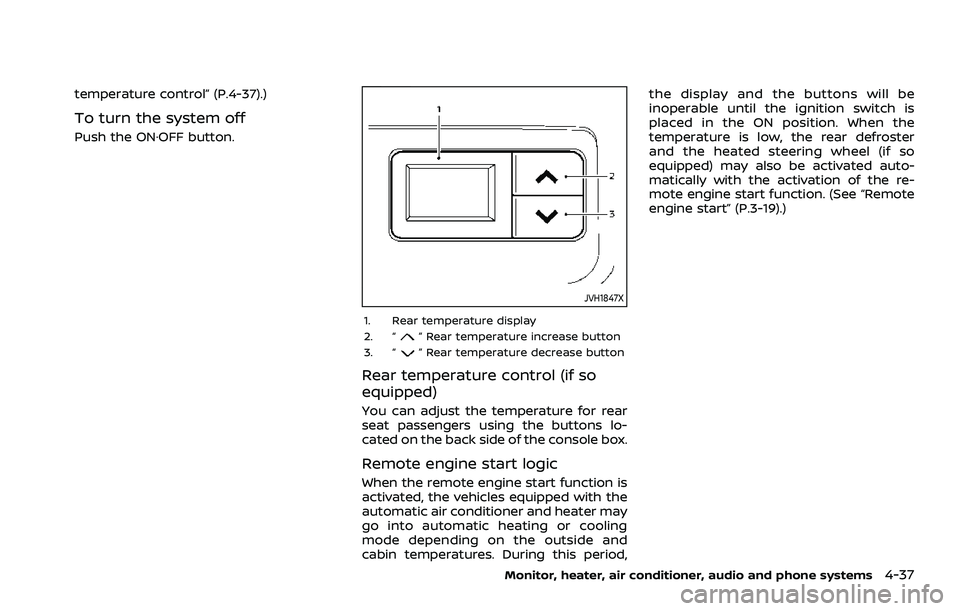
1. Rear temperature display
2. “” Rear temperature increase button
3. “” Rear temperature decrease button
Rear temperature control (if so
equipped)
You can adjust the temperature for rear
seat passengers using the buttons lo-
cated on the back side of the console box.
Remote engine start logic
When the remote engine start function is
activated, the vehicles equipped with the
automatic air conditioner and heater may
go into automatic heating or cooling
mode depending on the outside and
cabin temperatures. During this period, the display and the buttons will be
inoperable until the ignition switch is
placed in the ON position. When the
temperature is low, the rear defroster
and the heated steering wheel (if so
equipped) may also be activated auto-
matically with the activation of the re-
mote engine start function. (See “Remote
engine start” (P.3-19).)
Monitor, heater, air conditioner, audio and phone systems4-37
Page 255 of 556
5 Starting and driving
Precautions when starting and driving ...................... 5-5Exhaust gas (carbon monoxide) ................................ 5-5
Three-way catalyst ............................................................... 5-6
Tire Pressure Monitoring System (TPMS) ........... 5-6
Avoiding collision and rollover ................................. 5-10
On-pavement and off-road
driving precautions ........................................................... 5-10
Off-road recovery ............................................................... 5-10
Rapid air pressure loss ................................................... 5-11
Drinking alcohol/drugs and driving ..................... 5-11
Driving safety precautions .......................................... 5-12
Push-button ignition switch ............................................. 5-14 Operating range for engine start function ...... 5-14
Push-button ignition switch operation ............. 5-15
Push-button ignition switch positions .............. 5-16
Emergency engine shut off ........................................ 5-16
Intelligent Key battery discharge ........................... 5-16
Before starting the engine ................................................. 5-17
Starting the engine .................................................................. 5-17 Remote engine start (if so equipped) ................. 5-18
Driving the vehicle .................................................................... 5-19 Continuously Variable
Transmission (CVT) ............................................................ 5-19
Parking brake ........................................................................\
....... 5-25 Automatic operation ........................................................ 5-25 Manual operation ............................................................. 5-27
Automatic brake hold ........................................................... 5-28 How to activate/deactivate the automatic
brake hold function ........................................................ 5-29
How to use the automatic brake
hold function ........................................................................\
5-29
Drive Mode Selector ............................................................... 5-30 OFF-ROAD mode (AWD models) ........................... 5-31
SNOW mode (AWD models) ...................................... 5-32
STANDARD mode (2WD models)/AUTO
mode (AWD models) ....................................................... 5-32
ECO mode ........................................................................\
...... 5-32
SPORT mode ........................................................................\
5-33
Driver Assistance systems ................................................. 5-34 How to enable/disable the systems ................. 5-37
Common troubleshooting guide ......................... 5-39
Traffic Sign Recognition (TSR) (if
so equipped) ........................................................................\
......... 5-43 System operation ............................................................. 5-43
How to enable/disable the TSR system ........ 5-45
System temporarily unavailable ........................... 5-45
System malfunction ....................................................... 5-45
System maintenance .................................................... 5-46
Lane Departure Warning (LDW) ..................................... 5-46 LDW system operation ................................................. 5-47
How to enable/disable the LDW system ....... 5-48
Page 260 of 556
5-6Starting and driving
THREE-WAY CATALYST
The three-way catalyst is an emission
control device installed in the exhaust
system. Exhaust gases in the three-way
catalyst are burned at high temperatures
to help reduce pollutants.
WARNING
.The exhaust gas and the exhaust
system are very hot. Keep people,
animals and flammable materials
away from the exhaust system
components.
. Do not stop or park the vehicle
over flammable materials such as
dry grass, wastepaper or rags.
They may ignite and cause a fire.
CAUTION
.Do not use leaded gasoline. De-
posits from leaded gasoline will
seriously reduce the three-way
catalyst’s ability to help reduce
exhaust pollutants.
. Keep your engine tuned up. Mal-
functions in the ignition, fuel in-
jection, or electrical systems can cause overrich fuel flow into the
three-way catalyst, causing it to
overheat. Do not keep driving if
the engine misfires, or if notice-
able loss of performance or other
unusual operating conditions are
detected. Have the vehicle in-
spected. It is recommended you
visit a NISSAN dealer for this
service.
. Avoid driving with an extremely
low fuel level. Running out of fuel
could cause the engine to misfire,
damaging the three-way catalyst.
. Do not race the engine while
warming it up.
. Do not push or tow your vehicle
to start the engine.
TIRE PRESSURE MONITORING SYS-
TEM (TPMS)
Each tire, including the spare, should be
checked monthly when cold and inflated
to the inflation pressure recommended
by the vehicle manufacturer on the ve-
hicle placard or tire inflation pressure
label. (If your vehicle has tires of a
different size than the size indicated on
the vehicle placard or tire inflation pres-
sure label, you should determine the
proper tire inflation pressure for those tires.)
As an added safety feature, your vehicle
has been equipped with a Tire Pressure
Monitoring System (TPMS) that illumi-
nates a low tire pressure telltale when
one or more of your tires is significantly
under-inflated. Accordingly, when the low
tire pressure telltale illuminates, you
should stop and check your tires as soon
as possible, and inflate them to the
proper pressure. Driving on a significantly
under-inflated tire causes the tire to
overheat and can lead to tire failure.
Under-inflation also reduces fuel effi-
ciency and tire tread life, and may affect
the vehicle’s handling and stopping abil-
ity.
Please note that the TPMS is not a
substitute for proper tire maintenance,
and it is the driver’s responsibility to
maintain correct tire pressure, even if
under-inflation has not reached the level
to trigger illumination of the TPMS low
tire pressure telltale.
Your vehicle has also been equipped with
a TPMS malfunction indicator to indicate
when the system is not operating prop-
erly. The TPMS malfunction indicator is
combined with the low tire pressure tell-
tale. When the system detects a malfunc-
tion, the telltale will flash for
approximately one minute and then re-
Page 263 of 556
Model: TIS-10DL
IC: 7812D-TIS10DL
Body Control Module (BCM)
Model: 40406556
IC: 7812D-5235RXDP
Continental
This device complies with Industry Ca-
nada licence-exempt RSS standard(s).
Operation is subject to the following
two conditions: (1) this device may not
cause interference, and (2) this device
must accept any interference, including
interference that may cause undesired
operation of the device.
TPMS with Easy Fill Tire Alert
WARNING
After rotating the tires, do not use
the Easy-Fill Tire Alert to adjust the
tire pressure. Instead use a gauge to
adjust the tires to the correct pres-
sure in accordance with Tire and
Loading Information label.
When adding air to an under-inflated tire,
the TPMS with Easy Fill Tire Alert provides
visual and audible signals outside the vehicle to help you inflate the tires to
the recommended COLD tire pressure.
Vehicle set-up:
1. Park the vehicle in a safe and level place.
2. Apply the parking brake and push the park button to shift to the P (Park)
position.
3. Place the ignition switch in the ON position. Do not start the engine.
Operation:
1. Add air to the tire.
2. After a few seconds, the hazard in- dicators will start flashing.
3. When the designated pressure is reached, the horn beeps once and
the hazard indicators stop flashing.
4. Perform the above steps for each tire.
. If the tire is over-inflated more than
approximately 4 psi (30 kPa), the horn
beeps and the hazard indicators flash
3 times. To correct the pressure, push
the core of the valve stem on the tire
briefly to release pressure. When the
pressure reaches the designated
pressure, the horn beeps once.
. If the hazard indicator does not flash
within approximately 15 seconds after
starting to inflate the tire, it indicates that the TPMS with Easy Fill Tire Alert
is not operating.
. The TPMS will not activate the Easy Fill
Tire Alert under the following condi-
tions:
— If there is interference from an
external device or transmitter
— The air pressure from the inflation device such as those using a power
socket is not sufficient to inflate the
tire
— If an electrical equipment is being used in or near the vehicle
— There is a malfunction in the TPMS system
— There is a malfunction in the horn or hazard indicators
. If the TPMS with Easy Fill Tire Alert
does not operate due to TPMS inter-
ference, move the vehicle about 3 ft
(1m) backward or forward and try
again.
If the TPMS with Easy Fill Tire Alert is not
working, use a tire pressure gauge.
Starting and driving5-9