mirror NISSAN ROGUE 2021 Owner´s Manual
[x] Cancel search | Manufacturer: NISSAN, Model Year: 2021, Model line: ROGUE, Model: NISSAN ROGUE 2021Pages: 556, PDF Size: 2.7 MB
Page 311 of 556
WARNING
Failure to follow the warnings and
instructions for proper use of the
BSW system could result in serious
injury or death.
.The BSW system is not a replace-
ment for proper driving proce-
dure and is not designed to
prevent contact with vehicles or
objects. When changing lanes, al-
ways use the side and rear mir-
rors and turn and look in the
direction your vehicle will move
to ensure it is safe to change
lanes. Never rely solely on the
BSW system.
The BSW system helps alert the driver of
other vehicles in adjacent lanes when
changing lanes.
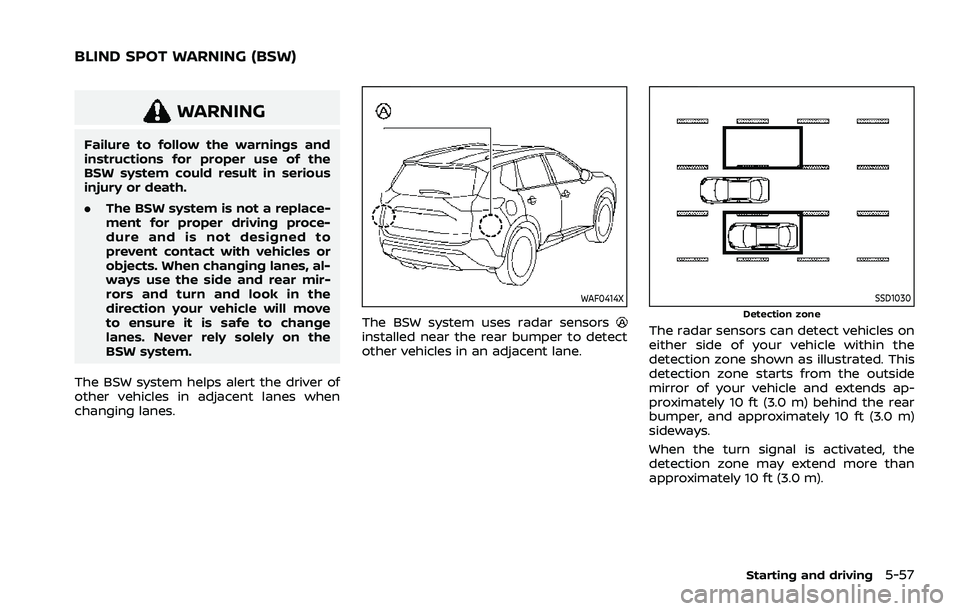
WAF0414X
The BSW system uses radar sensorsinstalled near the rear bumper to detect
other vehicles in an adjacent lane.
SSD1030Detection zone
The radar sensors can detect vehicles on
either side of your vehicle within the
detection zone shown as illustrated. This
detection zone starts from the outside
mirror of your vehicle and extends ap-
proximately 10 ft (3.0 m) behind the rear
bumper, and approximately 10 ft (3.0 m)
sideways.
When the turn signal is activated, the
detection zone may extend more than
approximately 10 ft (3.0 m).
Starting and driving5-57
BLIND SPOT WARNING (BSW)
Page 320 of 556
5-66Starting and driving
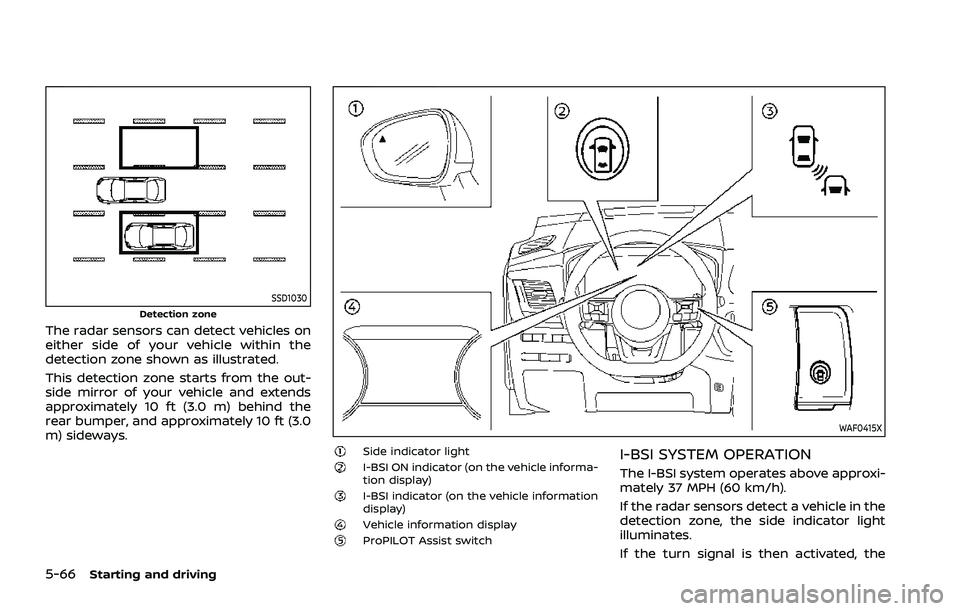
SSD1030Detection zone
The radar sensors can detect vehicles on
either side of your vehicle within the
detection zone shown as illustrated.
This detection zone starts from the out-
side mirror of your vehicle and extends
approximately 10 ft (3.0 m) behind the
rear bumper, and approximately 10 ft (3.0
m) sideways.
WAF0415X
Side indicator lightI-BSI ON indicator (on the vehicle informa-
tion display)
I-BSI indicator (on the vehicle information
display)
Vehicle information displayProPILOT Assist switch
I-BSI SYSTEM OPERATION
The I-BSI system operates above approxi-
mately 37 MPH (60 km/h).
If the radar sensors detect a vehicle in the
detection zone, the side indicator light
illuminates.
If the turn signal is then activated, the
Page 329 of 556
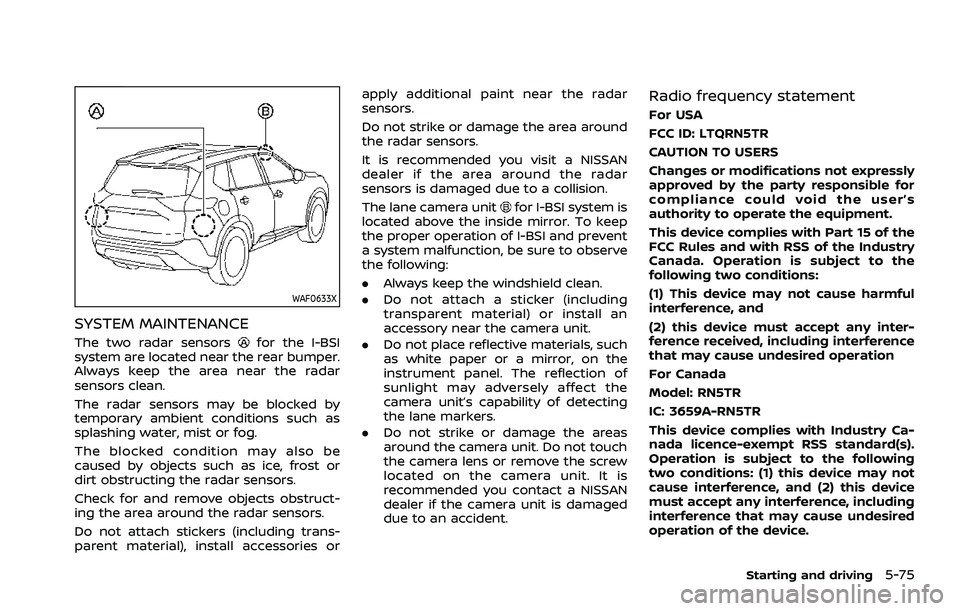
WAF0633X
SYSTEM MAINTENANCE
The two radar sensorsfor the I-BSI
system are located near the rear bumper.
Always keep the area near the radar
sensors clean.
The radar sensors may be blocked by
temporary ambient conditions such as
splashing water, mist or fog.
The blocked condition may also be
caused by objects such as ice, frost or
dirt obstructing the radar sensors.
Check for and remove objects obstruct-
ing the area around the radar sensors.
Do not attach stickers (including trans-
parent material), install accessories or apply additional paint near the radar
sensors.
Do not strike or damage the area around
the radar sensors.
It is recommended you visit a NISSAN
dealer if the area around the radar
sensors is damaged due to a collision.
The lane camera unit
for I-BSI system is
located above the inside mirror. To keep
the proper operation of I-BSI and prevent
a system malfunction, be sure to observe
the following:
. Always keep the windshield clean.
. Do not attach a sticker (including
transparent material) or install an
accessory near the camera unit.
. Do not place reflective materials, such
as white paper or a mirror, on the
instrument panel. The reflection of
sunlight may adversely affect the
camera unit’s capability of detecting
the lane markers.
. Do not strike or damage the areas
around the camera unit. Do not touch
the camera lens or remove the screw
located on the camera unit. It is
recommended you contact a NISSAN
dealer if the camera unit is damaged
due to an accident.
Radio frequency statement
For USA
FCC ID: LTQRN5TR
CAUTION TO USERS
Changes or modifications not expressly
approved by the party responsible for
compliance could void the user’s
authority to operate the equipment.
This device complies with Part 15 of the
FCC Rules and with RSS of the Industry
Canada. Operation is subject to the
following two conditions:
(1) This device may not cause harmful
interference, and
(2) this device must accept any inter-
ference received, including interference
that may cause undesired operation
For Canada
Model: RN5TR
IC: 3659A-RN5TR
This device complies with Industry Ca-
nada licence-exempt RSS standard(s).
Operation is subject to the following
two conditions: (1) this device may not
cause interference, and (2) this device
must accept any interference, including
interference that may cause undesired
operation of the device.
Starting and driving5-75
Page 330 of 556
5-76Starting and driving
WARNING
Failure to follow the warnings and
instructions for proper use of the
RCTA system could result in serious
injury or death.
.The RCTA system is not a replace-
ment for proper driving proce-
dures and is not designed to
prevent contact with vehicles or
objects. When backing out of a
parking space, always use the
side and rear mirrors and turn
and look in the direction your
vehicle will move. Never rely so-
lely on the RCTA system.
The RCTA system will assist you when
backing out from a parking space. When
the vehicle is in reverse, the system is
designed to detect other vehicles ap-
proaching from the right or left of the
vehicle. If the system detects cross traffic,
it will alert you.
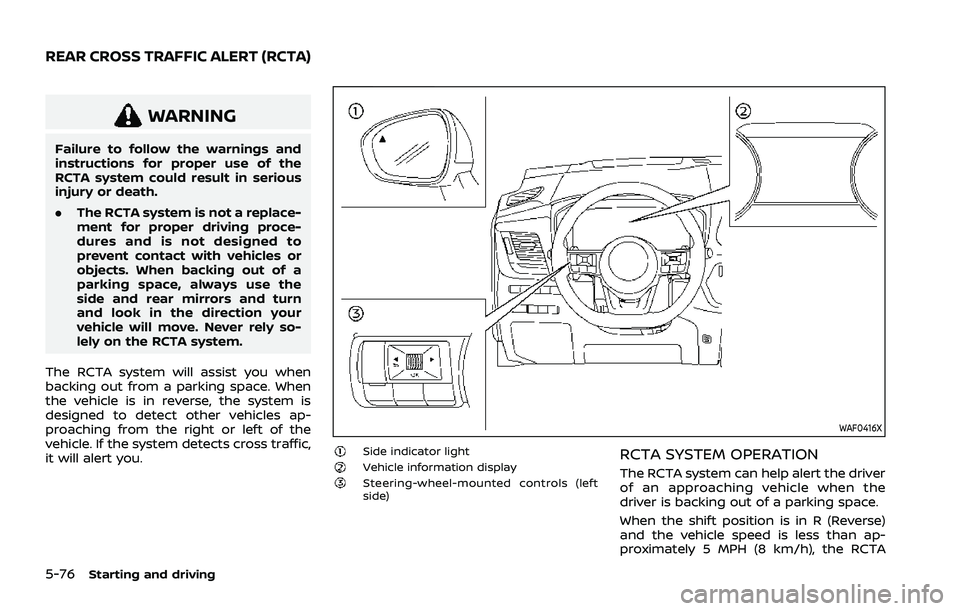
WAF0416X
Side indicator lightVehicle information displaySteering-wheel-mounted controls (left
side)
RCTA SYSTEM OPERATION
The RCTA system can help alert the driver
of an approaching vehicle when the
driver is backing out of a parking space.
When the shift position is in R (Reverse)
and the vehicle speed is less than ap-
proximately 5 MPH (8 km/h), the RCTA
REAR CROSS TRAFFIC ALERT (RCTA)
Page 365 of 556
structed, the ICC system will automati-
cally be canceled.
The chime will sound and the “Forward
Driving Aids temporarily disabled Front
Sensor blocked” warning message will
appear in the vehicle information display.
Action to take:
If the warning message appears, stop the
vehicle in a safe place, push the park
button to engage the P (Park) position,
and turn the engine off. When the radar
signal is temporarily interrupted, clean
the sensor area and restart the engine. If
the warning message continues to ap-
pear, have the system checked. It is
recommended that you visit a NISSAN
dealer for this service.
Condition D:
When driving on roads with limited road
structures or buildings (for example, long
bridges, deserts, snow fields, driving next
to long walls), the system may display the
“Forward Driving Aids temporarily dis-
abled Front Sensor blocked” message.
Action to take:
When the above driving conditions no
longer exist, turn the system back on.ICC system malfunction
If the ICC system malfunctions, it will be
turned off automatically, a chime will
sound, and the speed control status
warning (orange) will illuminate.
Action to take:
If the warning illuminates, stop the vehicle
in a safe place. Turn the engine off, restart
the engine and set the ICC system again.
If it is not possible to set the ICC system or
the warning stays on, it may be a
malfunction. Although the normal driving
can be continued, the ICC system should
be inspected. It is recommended that you
visit a NISSAN dealer for this service.
NOTE:
If the ICC system is temporarily unavail-
able, the conventional cruise control
mode may still be used. For additional
information, see “Conventional (fixed
speed) cruise control mode” (P.5-118).
ICC sensor maintenance
The radar sensor is located on the front of
the vehicle.
To keep the ICC system operating prop-
erly, be sure to observe the following:
.Always keep the sensor area clean.
. Do not strike or damage the areas
around the sensor.
. Do not attach a sticker (including
transparent material) or install an
accessory near the sensor. This could
cause failure or malfunction.
. Do not attach metallic objects near
the sensor area (brush guard, etc.).
This could cause failure or malfunc-
tion.
. Do not alter, remove, or paint the front
bumper.
Before customizing or restoring the front
bumper, it is recommended that you visit
a NISSAN dealer.
The camera sensor is located above the
inside mirror.
To keep the proper operation of the
systems and prevent a system malfunc-
tion, be sure to observe the following:
. Always keep the windshield clean.
. Do not attach a sticker (including
transparent material) or install an
accessory near the camera unit.
Starting and driving5-111
Page 366 of 556
5-112Starting and driving
.Do not place reflective materials, such
as white paper or a mirror, on the
instrument panel. The reflection of
sunlight may adversely affect the
camera unit’s capability of detecting
the lane markers.
. Do not strike or damage the areas
around the camera unit. Do not touch
the camera lens or remove the screw
located on the camera unit.
If the camera unit is damaged due to an
accident, it is recommended that you visit
a NISSAN dealer.
For additional information, see “Common
troubleshooting guide” (P.5-39).
Radio frequency statement:
For USA
Type approval number:
FCC ID: NF3–FR5CPEC
User Manual statement according to
§15.19:
This device complies with Part 15 of the
FCC Rules.
Operation is subject to the following two
conditions:
1. this device may not cause harmful interference, and
2. this device must accept any interfer- ence received, including interference that may cause undesired operation.
User Manual statement according to
§15.21:
Changes or modifications made to this
equipment not expressly approved by
Robert BOSCH GmbH may void the FCC
authorization to operate this equipment.
User Manual statement according to
§15.105:
This equipment has been tested and
found to comply with the limits for a
Class A digital device, pursuant to Part 15
of the FCC Rules. These limits are de-
signed to provide reasonable protection
against harmful interference when the
equipment is operated in a commercial
environment. This equipment generates,
uses, and can radiate radio frequency
energy and, if not installed and used in
accordance with the instruction manual,
may cause harmful interference to radio
communications. Operation of this equip-
ment in a residential area is likely to cause
harmful interference in which case the
user will be required to correct the inter-
ference at his own expense.
RF Exposure Information according
2.1091/2.1093/OET bulletin 65:
Radiofrequency radiation exposure infor-
mation:
This equipment complies with FCC radia- tion exposure limits set forth for an
uncontrolled environment. This equip-
ment should be installed and operated
with minimum distance of 20 cm be-
tween the radiator and your body.
The transmitter must not be co-located
or operating in conjunction with any
other antenna or transmitter.
For Canada
Type approval number:
IC: 3387A-FR5CPEC
Legal warning for RF equipment:
This device complies with Industry Cana-
da licence-exempt RSS standard(s). Op-
eration is subject to the following two
conditions: (1) this device may not cause
interference, and (2) this device must
accept any interference, including inter-
ference that may cause undesired opera-
tion of the device.
Page 372 of 556
5-118Starting and driving
Action to take:
Turn the ICC system off using the CANCEL
switch. When the conditions listed above
are no longer present, turn the ICC
system on again.
Steering Assist malfunction
When the system malfunctions, it turns
off automatically. The Steering Assist
status warning (orange) illuminates. A
chime may sound depending on the
situation.
Action to take:
Stop the vehicle in a safe location, push
the park button to shift to the P (Park)
position, turn the engine off, restart the
engine, resume driving, and set the ICC
system again. If the warning (orange)
continues to illuminate, the Steering As-
sist is malfunctioning. Although the vehi-
cle is still drivable under normal
conditions, have the system checked. It
is recommended that you visit a NISSAN
dealer for this service.
Steering Assist maintenance
The camera is located above the inside
mirror.
To keep the proper operation of the
system and prevent a system malfunc-
tion, be sure to observe the following:.
Always keep the windshield clean.
. Do not attach a sticker (including
transparent material) or install an
accessory near the camera unit.
. Do not place reflective materials, such
as white paper or a mirror, on the
instrument panel. The reflection of
sunlight may adversely affect the
camera unit’s capability of detecting
the lane markers.
. Do not strike or damage the areas
around the camera unit. Do not touch
the camera lens or remove the screw
located on the camera unit.
If the camera unit is damaged due to an
accident, it is recommended that you visit
a NISSAN dealer.
For additional information, see “Common
troubleshooting guide” (P.5-39).
CONVENTIONAL (fixed speed)
CRUISE CONTROL MODE
NOTE:
ProPILOT Assist provides no approach
warnings, automatic braking, or Steer-
ing Assist in the conventional (fixed
speed) cruise control mode.
This mode allows driving at a speed
between 20 to 90 MPH (30 to 144 km/h)
without keeping your foot on the accel-
erator pedal.
WARNING
. In the conventional (fixed speed)
cruise control mode, a warning
chime does not sound to warn
you if you are too close to the
vehicle ahead, as neither the pre-
sence of the vehicle ahead nor
the vehicle-to-vehicle distance is
detected.
. Pay special attention to the dis-
tance between your vehicle and
the vehicle ahead of you or a
collision could occur.
. Always confirm the setting in the
ICC system display.
. Do not use the conventional
(fixed speed) cruise control mode
when driving under the following
conditions:
— When it is not possible to keep
the vehicle at a set speed
— In heavy traffic or in traffic that varies in speed
— On winding or hilly roads
— On slippery roads (rain, snow, ice, etc.)
Page 385 of 556
could cause failure or malfunction.
. Do not attach metallic objects near
the radar sensor area (brush guard,
etc.). This could cause failure or mal-
function.
. Do not place reflective materials, such
as white paper or a mirror, on the
instrument panel. The reflection of
sunlight may adversely affect the
camera unit’s detection capability.
. Do not alter, remove or paint the front
of the vehicle near the sensor area.
Before customizing or restoring the
sensor area, it is recommended that
you visit a NISSAN dealer.
Radio frequency statement
For USA
Type approval number:
FCC ID: NF3–FR5CPEC
User Manual statement according to
§15.19:
This device complies with Part 15 of the
FCC Rules.
Operation is subject to the following two
conditions:
1. this device may not cause harmful
interference, and
2. this device must accept any interfer- ence received, including interference that may cause undesired operation.
User Manual statement according to
§15.21:
Changes or modifications made to this
equipment not expressly approved by
Robert BOSCH GmbH may void the FCC
authorization to operate this equipment.
User Manual statement according to
§15.105:
This equipment has been tested and
found to comply with the limits for a
Class A digital device, pursuant to Part 15
of the FCC Rules. These limits are de-
signed to provide reasonable protection
against harmful interference when the
equipment is operated in a commercial
environment. This equipment generates,
uses, and can radiate radio frequency
energy and, if not installed and used in
accordance with the instruction manual,
may cause harmful interference to radio
communications. Operation of this equip-
ment in a residential area is likely to cause
harmful interference in which case the
user will be required to correct the inter-
ference at his own expense.
RF Exposure Information according
2.1091/2.1093/OET bulletin 65:
Radiofrequency radiation exposure infor-
mation:
This equipment complies with FCC radia- tion exposure limits set forth for an
uncontrolled environment. This equip-
ment should be installed and operated
with minimum distance of 20 cm be-
tween the radiator and your body.
The transmitter must not be co-located
or operating in conjunction with any
other antenna or transmitter.
For Canada
Type approval number:
IC: 3387A-FR5CPEC
Legal warning for RF equipment:
This device complies with Industry Cana-
da licence-exempt RSS standard(s). Op-
eration is subject to the following two
conditions: (1) this device may not cause
interference, and (2) this device must
accept any interference, including inter-
ference that may cause undesired opera-
tion of the device.
Starting and driving5-131
Page 397 of 556
— Vehicle speeds lower than 37mph (60 km/h).
— Short lapses of attention.
— Instantaneous distractions such as dropping an object.
SYSTEM MALFUNCTION
If the I–DA system malfunctions, the
“Driver Attention Alert Malfunction” warn-
ing message will appear in the vehicle
information display and the function will
be stopped automatically.
Action to take
Stop the vehicle in a safe location, place
the vehicle in P (Park) position, turn the
engine off and restart the engine. If the
warning message continues to appear,
have the system checked. It is recom-
mended that you visit a NISSAN dealer for
this service.
WARNING
Failure to follow the warnings and
instructions for proper use of the
RAB system could result in serious
injury or death.
. The RAB system is a supplemen-
tal aid to the driver. It is not a
replacement for proper driving
procedures. Always use the side
and rear mirrors and turn and
look in the direction you will
move before and while backing
up. Never rely solely on the RAB
system. It is the driver’s respon-
sibility to stay alert, drive safely,
and be in control of the vehicle at
all times.
. There is a limitation to the RAB
system capability. The RAB sys-
tem is not effective in all situa-
tions.
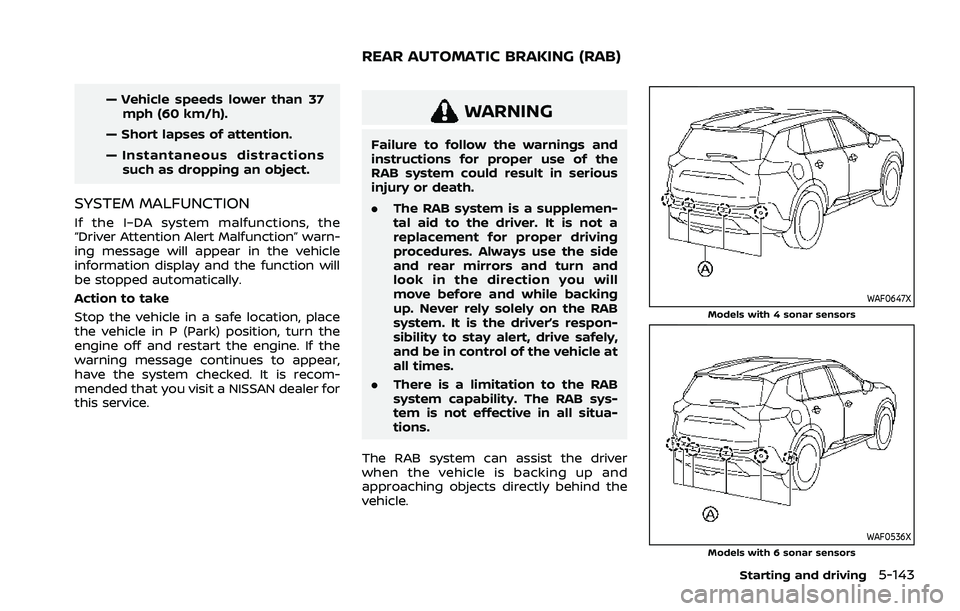
The RAB system can assist the driver
when the vehicle is backing up and
approaching objects directly behind the
vehicle.
WAF0647XModels with 4 sonar sensors
WAF0536XModels with 6 sonar sensors
Starting and driving5-143
REAR AUTOMATIC BRAKING (RAB)
Page 476 of 556
8-22Do-it-yourself
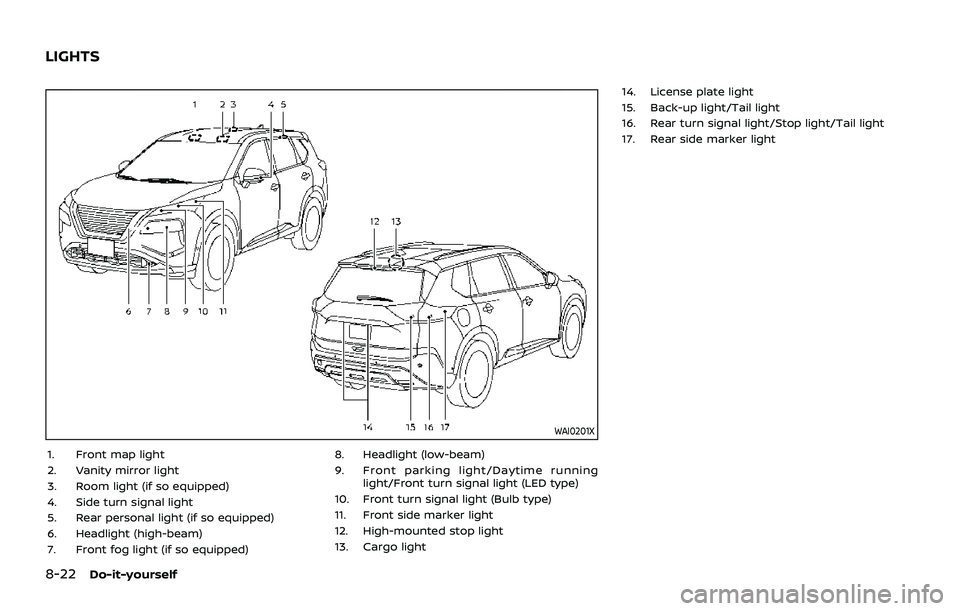
WAI0201X
1. Front map light
2. Vanity mirror light
3. Room light (if so equipped)
4. Side turn signal light
5. Rear personal light (if so equipped)
6. Headlight (high-beam)
7. Front fog light (if so equipped)8. Headlight (low-beam)
9. Front parking light/Daytime running
light/Front turn signal light (LED type)
10. Front turn signal light (Bulb type)
11. Front side marker light
12. High-mounted stop light
13. Cargo light 14. License plate light
15. Back-up light/Tail light
16. Rear turn signal light/Stop light/Tail light
17. Rear side marker light
LIGHTS