display NISSAN ROGUE 2021 Owner´s Manual
[x] Cancel search | Manufacturer: NISSAN, Model Year: 2021, Model line: ROGUE, Model: NISSAN ROGUE 2021Pages: 556, PDF Size: 2.7 MB
Page 189 of 556
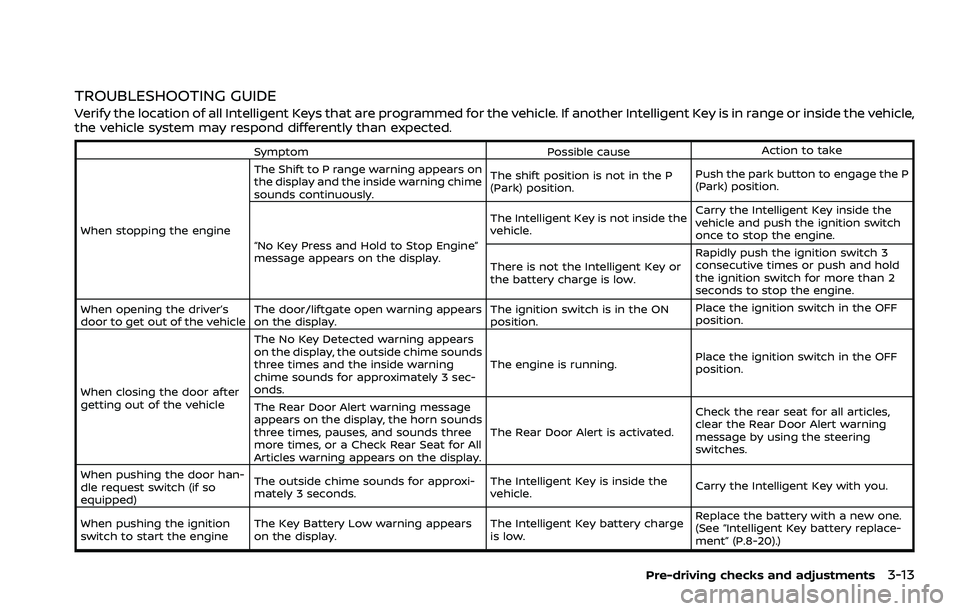
TROUBLESHOOTING GUIDE
Verify the location of all Intelligent Keys that are programmed for the vehicle. If another Intelligent Key is in range or inside the vehicle,
the vehicle system may respond differently than expected.
SymptomPossible causeAction to take
When stopping the engine The Shift to P range warning appears on
the display and the inside warning chime
sounds continuously.
The shift position is not in the P
(Park) position.
Push the park button to engage the P
(Park) position.
“No Key Press and Hold to Stop Engine”
message appears on the display. The Intelligent Key is not inside the
vehicle.
Carry the Intelligent Key inside the
vehicle and push the ignition switch
once to stop the engine.
There is not the Intelligent Key or
the battery charge is low. Rapidly push the ignition switch 3
consecutive times or push and hold
the ignition switch for more than 2
seconds to stop the engine.
When opening the driver’s
door to get out of the vehicle The door/liftgate open warning appears
on the display. The ignition switch is in the ON
position.Place the ignition switch in the OFF
position.
When closing the door after
getting out of the vehicle The No Key Detected warning appears
on the display, the outside chime sounds
three times and the inside warning
chime sounds for approximately 3 sec-
onds.
The engine is running.
Place the ignition switch in the OFF
position.
The Rear Door Alert warning message
appears on the display, the horn sounds
three times, pauses, and sounds three
more times, or a Check Rear Seat for All
Articles warning appears on the display. The Rear Door Alert is activated.
Check the rear seat for all articles,
clear the Rear Door Alert warning
message by using the steering
switches.
When pushing the door han-
dle request switch (if so
equipped) The outside chime sounds for approxi-
mately 3 seconds.
The Intelligent Key is inside the
vehicle.
Carry the Intelligent Key with you.
When pushing the ignition
switch to start the engine The Key Battery Low warning appears
on the display. The Intelligent Key battery charge
is low.Replace the battery with a new one.
(See “Intelligent Key battery replace-
ment” (P.8-20).)
Pre-driving checks and adjustments3-13
Page 190 of 556
3-14Pre-driving checks and adjustments
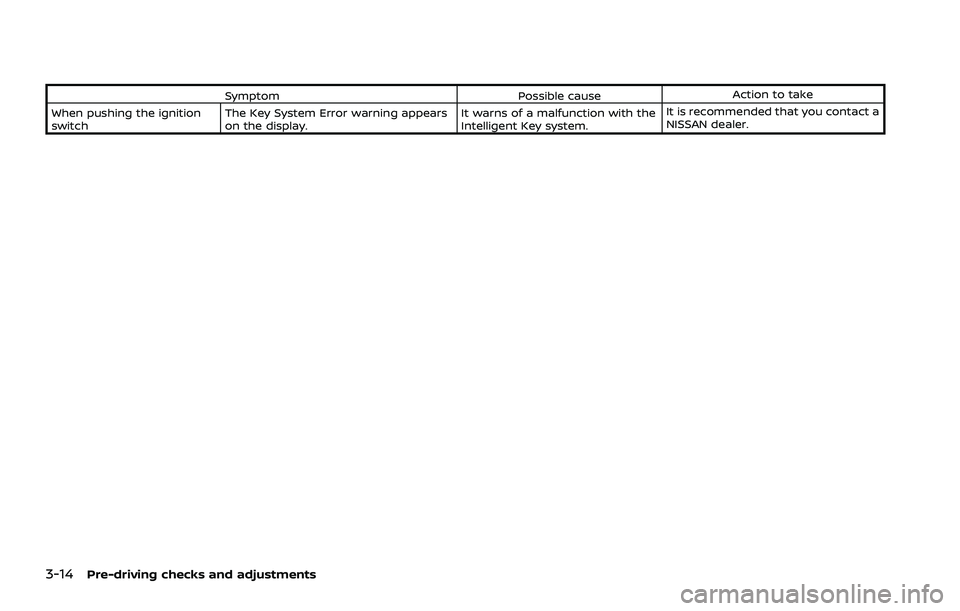
SymptomPossible causeAction to take
When pushing the ignition
switch The Key System Error warning appears
on the display. It warns of a malfunction with the
Intelligent Key system.It is recommended that you contact a
NISSAN dealer.
Page 195 of 556
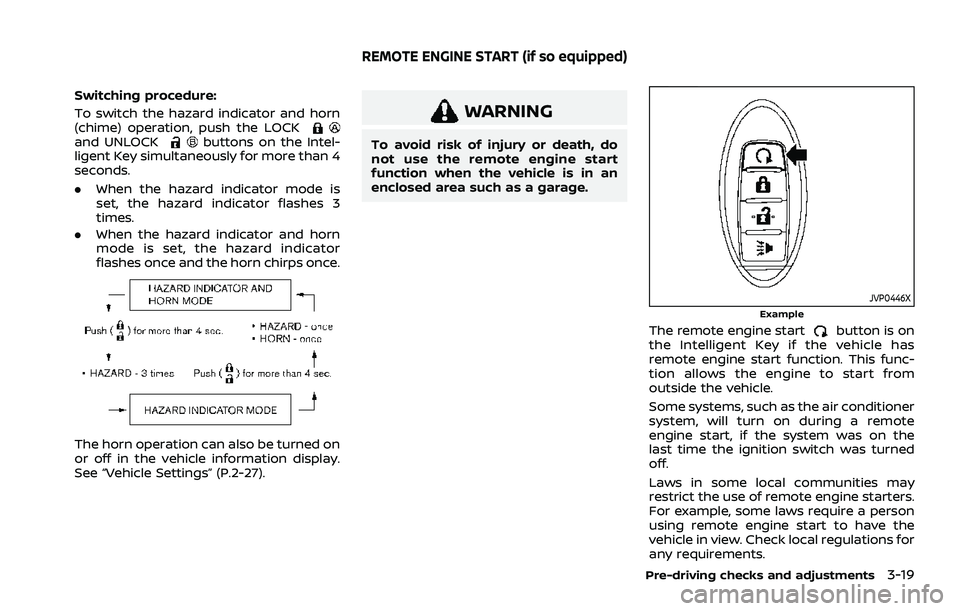
Switching procedure:
To switch the hazard indicator and horn
(chime) operation, push the LOCK
and UNLOCKbuttons on the Intel-
ligent Key simultaneously for more than 4
seconds.
. When the hazard indicator mode is
set, the hazard indicator flashes 3
times.
. When the hazard indicator and horn
mode is set, the hazard indicator
flashes once and the horn chirps once.
The horn operation can also be turned on
or off in the vehicle information display.
See “Vehicle Settings” (P.2-27).
WARNING
To avoid risk of injury or death, do
not use the remote engine start
function when the vehicle is in an
enclosed area such as a garage.
JVP0446XExample
The remote engine startbutton is on
the Intelligent Key if the vehicle has
remote engine start function. This func-
tion allows the engine to start from
outside the vehicle.
Some systems, such as the air conditioner
system, will turn on during a remote
engine start, if the system was on the
last time the ignition switch was turned
off.
Laws in some local communities may
restrict the use of remote engine starters.
For example, some laws require a person
using remote engine start to have the
vehicle in view. Check local regulations for
any requirements.
Pre-driving checks and adjustments3-19
REMOTE ENGINE START (if so equipped)
Page 197 of 556
CANCELING A REMOTE ENGINE
START
To cancel a remote engine start, perform
one of the following:
.Aim the Intelligent Key at the vehicle
and push the remote engine start
button until the front parking lights
turn off.
. Turn on the hazard indicator flashers.
. Cycle the ignition switch ON and then
OFF.
. The extended engine run time has
expired.
. The first 10 minute timer has expired.
. The engine hood has been opened.
. The shift position is shifted out of the
P (Park) position.
. The theft alarm sounds due to illegal
entry into the vehicle.
. The ignition switch is pushed without
an Intelligent Key in the vehicle.
. The ignition switch is pushed with an
Intelligent Key in the vehicle but the
brake pedal is not depressed.
. The accelerator pedal is depressed.
. The vehicle moves after a remote
engine start. (The hazard indicator
flashers blink once and the engine is
stopped.)
CONDITIONS THE REMOTE ENGINE
START WILL NOT WORK
The remote engine start will not operate
if any of the following conditions are
present:
.The ignition switch is placed in the ON
position.
. The hood is not securely closed.
. The hazard indicator flashers are on.
. The engine is still running. The engine
must be completely stopped. This is
not applicable when extending engine
run time.
. The remote engine start
button is
not pushed and held for at least 2
seconds.
. The remote engine start
button is
not pushed and held within 5 seconds
of pushing the LOCK
button.
. The doors are not closed and locked.
(The hazard indicator flashers blink
twice to indicate the function is not
operated.)
. The liftgate is open. (The hazard
indicator flashers blink twice to indi-
cate the function is not operated.)
. The Key System Error warning mes-
sage remains on in the vehicle infor-
mation display. .
The theft alarm sounds due to illegal
entry into the vehicle. (The hazard
indicator flashers blink twice to indi-
cate the function is not operated.)
. Two remote engine starts, or a single
remote engine start with an exten-
sion, have already been used. (To use
the remote engine start function
again, the vehicle needs to be driven
at speeds of 4 MPH (7 km/h).)
. The shift position is not in the P (Park)
position.
Pre-driving checks and adjustments3-21
Page 200 of 556
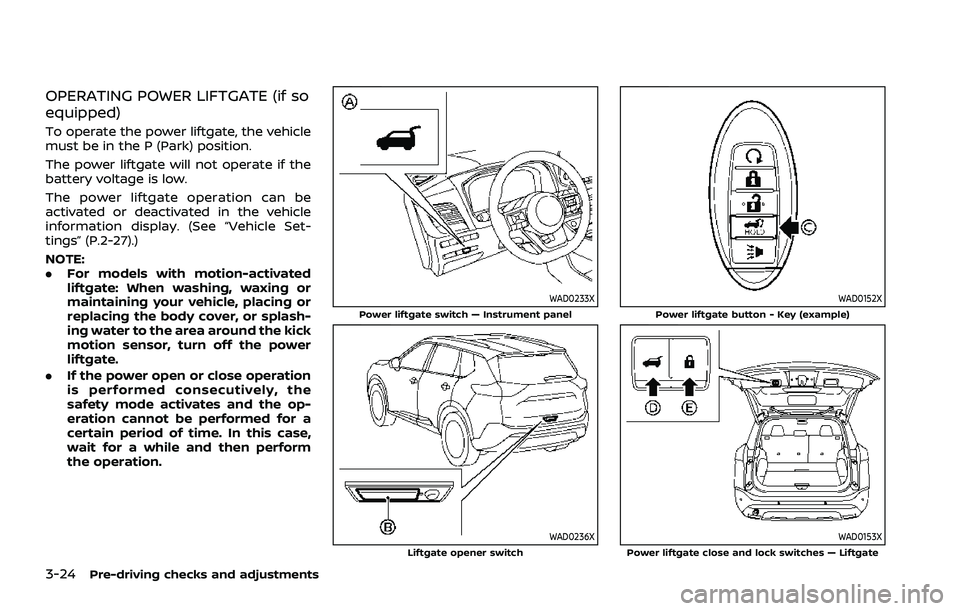
3-24Pre-driving checks and adjustments
OPERATING POWER LIFTGATE (if so
equipped)
To operate the power liftgate, the vehicle
must be in the P (Park) position.
The power liftgate will not operate if the
battery voltage is low.
The power liftgate operation can be
activated or deactivated in the vehicle
information display. (See “Vehicle Set-
tings” (P.2-27).)
NOTE:
.For models with motion-activated
liftgate: When washing, waxing or
maintaining your vehicle, placing or
replacing the body cover, or splash-
ing water to the area around the kick
motion sensor, turn off the power
liftgate.
. If the power open or close operation
is performed consecutively, the
safety mode activates and the op-
eration cannot be performed for a
certain period of time. In this case,
wait for a while and then perform
the operation.
WAD0233XPower liftgate switch — Instrument panel
WAD0236XLiftgate opener switch
WAD0152XPower liftgate button - Key (example)
WAD0153XPower liftgate close and lock switches — Liftgate
Page 213 of 556
3. The indicator light for the pushedmemory switch will come on and stay
on for approximately 5 seconds.
4. The chime will sound if the memory has been stored.
NOTE:
If a new memory position is stored in
the same memory switch, the previous
memory position will be overwritten by
the new stored position.
Confirming memory storage
Push the SET switch. If a memory position
has not been stored in the switch (1 or 2)
the indicator light for the respective
switch will come ON for approximately
0.5 seconds. If a memory position has
been stored in the switch (1 or 2) then the
indicator light for the respective switch
will stay ON for approximately 5 seconds.
Recalling switch memory positions
To recall the manually stored positions,
push the memory switch (1 or 2). The
driver’s seat and the outside mirrors will
move to the positions stored in the
memory switch.
Linking log-in function to a stored
memory position (models with na-
vigation system)
The log-in function can be linked to a
stored memory position with the follow-
ing procedure.
1. Place the ignition switch in the ON position while carrying the Intelligent
Key that was registered to the vehicle
with a log-in function.
NOTE:
Make sure the Intelligent Key is far
apart. Otherwise, the vehicle may
detect the wrong Intelligent Key.
2. Adjust the position of the driver’s seat and outside mirrors. (See “Seats” (P.1-3)
and “Outside mirrors” (P.3-34).)
3. Place the ignition switch in the OFF position.
The next time you log in (selecting the
user on the display) after placing the
ignition switch in the ON position while
carrying the Intelligent Key, the system
will automatically adjust to the memor-
ized driving position. (See the separate
NissanConnect® Owner’s Manual.)
Linking an Intelligent Key to a
stored memory position (models
without navigation system)
Each Intelligent Key can be linked to a
stored memory position (memory switch
1 or 2) with the following procedure.
1. Follow steps 1-3 in the “Memory sto- rage function” (P.3-36) for storing the
memory position.
2. The indicator light for the pushed memory switch will come on. While
the indicator light is on for 5 seconds,
press the
button and thebutton on the Intelligent Key in suc-
cession. The indicator light of the
linked memory switch will blink. After
the indicator light goes off, the Intel-
ligent Key is linked to that memory
setting.
Once it is linked, when ignition switch is
placed in the OFF position, pressing the
button on the Intelligent Key will
move the driver’s seat and outside mir-
rors to the linked memory switch posi-
tion.
NOTE:
If a new memory position is stored in
the linked memory switch, then the
Intelligent Key will link the new position
and overwrites the previous position.
Pre-driving checks and adjustments3-37
Page 214 of 556
3-38Pre-driving checks and adjustments
ENTRY/EXIT FUNCTION
This system is designed so that the
driver’s seat will automatically move
when the shift position is in the P (Park)
position. This allows the driver to get into
and out of the driver’s seat more easily.
The driver’s seat will slide backward:
.When the driver’s door is opened with
the ignition switch placed in the OFF
position.
. When the ignition switch is changed
from ON to OFF with the driver’s door
open.
The driver’s seat will return to the pre-
vious position:
. When the ignition switch is placed in
the ON position while the shift posi-
tion is in the P (Park) position.
The entry/exit function can be canceled
through “Vehicle Settings” in the vehicle
information display by performing the
following:
. Switch the “Exit Seat Slide” from ON to
OFF. For additional information, refer
to “Vehicle Settings” (P.2-27).
SYSTEM OPERATION
The memory seat system will not work or
will stop operating under the following
conditions:
.When the vehicle is moving. (The
driver’s seat returning function can
be operated if the vehicle speed is
below 2 MPH (3 km/h).)
. When any of the memory switches are
pushed while the memory seat sys-
tem is operating.
. When the switch for the driver’s seat is
pushed while the memory seat sys-
tem is operating.
. When the seat has already been
moved to the memorized position.
. When no seat position is stored in the
memory switch.
. When the shift lever is moved from P
(Park) to any other position.
Page 215 of 556
4 Monitor, heater, air conditioner, audioand phone systems
NissanConnect® Owner’s Manual .................................... 4-2
RearView Monitor (if so equipped) ................................. 4-2
RearView Monitor system operation ..................... 4-3
How to read the displayed lines ................................ 4-3
Difference between predictive and
actual distances ...................................................................... 4-4
How to park with predictive course lines .......... 4-5
Adjusting the screen ........................................................... 4-7
How to turn on and off predictive
course lines ........................................................................\
......... 4-7
RearView Monitor system limitations .................... 4-7
System maintenance .......................................................... 4-8
Intelligent Around View® Monitor (if
so equipped) ........................................................................\
............. 4-9 Intelligent Around View® Monitor
system operation ................................................................ 4-10
Difference between predictive and
actual distances ................................................................... 4-14
How to park with predictive course lines ....... 4-16
How to switch the display ........................................... 4-17
Adjusting the screen ........................................................ 4-18
Intelligent Around View® Monitor
system limitations .............................................................. 4-19
System maintenance ....................................................... 4-21 Moving Object Detection (MOD) (if
so equipped) ........................................................................\
......... 4-22
MOD system operation ................................................ 4-22
Turning MOD on and off ............................................ 4-24
MOD system limitations .............................................. 4-24
System maintenance .................................................... 4-25
Ventilators ........................................................................\
.............. 4-26 Center ventilators ............................................................ 4-26
Side ventilators .................................................................. 4-26
Rear ventilators .................................................................. 4-26
Heater and air conditioner ................................................ 4-27 Manual air conditioner and heater .................... 4-28
Automatic air conditioner (models without
rear control) ........................................................................\
.. 4-32
Automatic air conditioner (models with
rear control) ........................................................................\
.. 4-35
Operating tips (for automatic
air conditioner) ................................................................... 4-38
Servicing air conditioner ............................................. 4-38
Antenna ........................................................................\
.................... 4-39 Shark fin antenna ............................................................ 4-39
Car phone or CB radio ......................................................... 4-39
Page 217 of 556
ing the vehicle. Always back up
slowly.
. The system is designed as an aid
to the driver in showing large
stationary objects directly behind
the vehicle, to help avoid dama-
ging the vehicle.
. The distance guide line and the
vehicle width line should be used
as a reference only when the
vehicle is on a level paved sur-
face. The distance viewed on the
monitor is for reference only and
may be different than the actual
distance between the vehicle and
displayed objects.
CAUTION
Do not scratch the camera lens when
cleaning dirt or snow from the front
of the camera.
The RearView Monitor system automati-
cally shows a rear view of the vehicle
when the shift lever is placed in the R
(Reverse) position.
The radio can still be heard while the
RearView Monitor is active.
WAE0335X
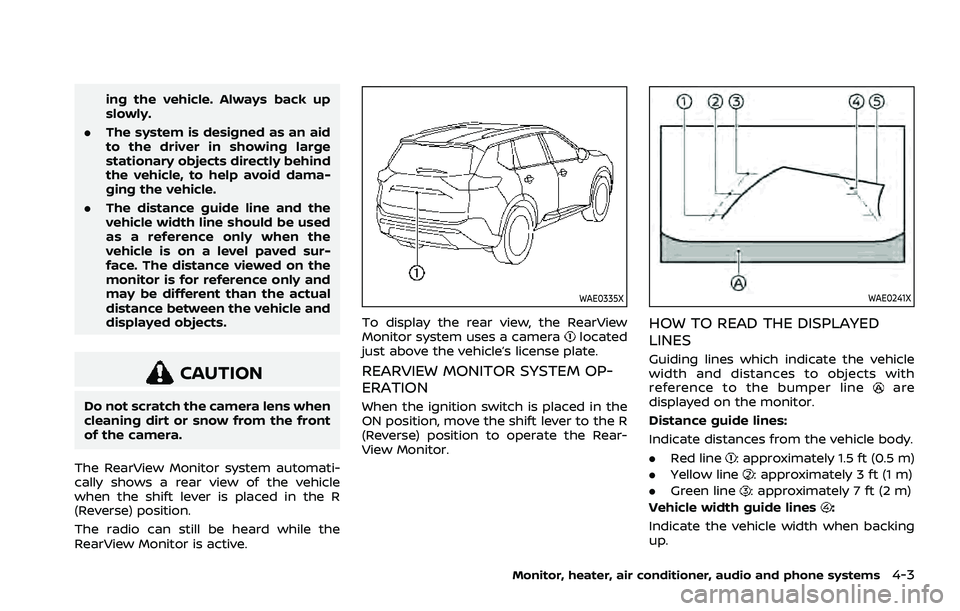
To display the rear view, the RearView
Monitor system uses a cameralocated
just above the vehicle’s license plate.
REARVIEW MONITOR SYSTEM OP-
ERATION
When the ignition switch is placed in the
ON position, move the shift lever to the R
(Reverse) position to operate the Rear-
View Monitor.
WAE0241X
HOW TO READ THE DISPLAYED
LINES
Guiding lines which indicate the vehicle
width and distances to objects with
reference to the bumper line
are
displayed on the monitor.
Distance guide lines:
Indicate distances from the vehicle body.
. Red line
: approximately 1.5 ft (0.5 m)
. Yellow line
: approximately 3 ft (1 m)
. Green line
: approximately 7 ft (2 m)
Vehicle width guide lines
:
Indicate the vehicle width when backing
up.
Monitor, heater, air conditioner, audio and phone systems4-3
Page 218 of 556
4-4Monitor, heater, air conditioner, audio and phone systems
Predictive course lines:
Indicate the predictive course when back-
ing up. The predictive course lines will be
displayed on the monitor when the shift
lever is in the R (Reverse) position and if
the steering wheel is turned. The predic-
tive course lines will move depending on
how much the steering wheel is turned
and will not be displayed while the steer-
ing wheel is in the straight ahead position.
The vehicle width guide lines and the
width of the predictive course lines are
wider than the actual width and course.
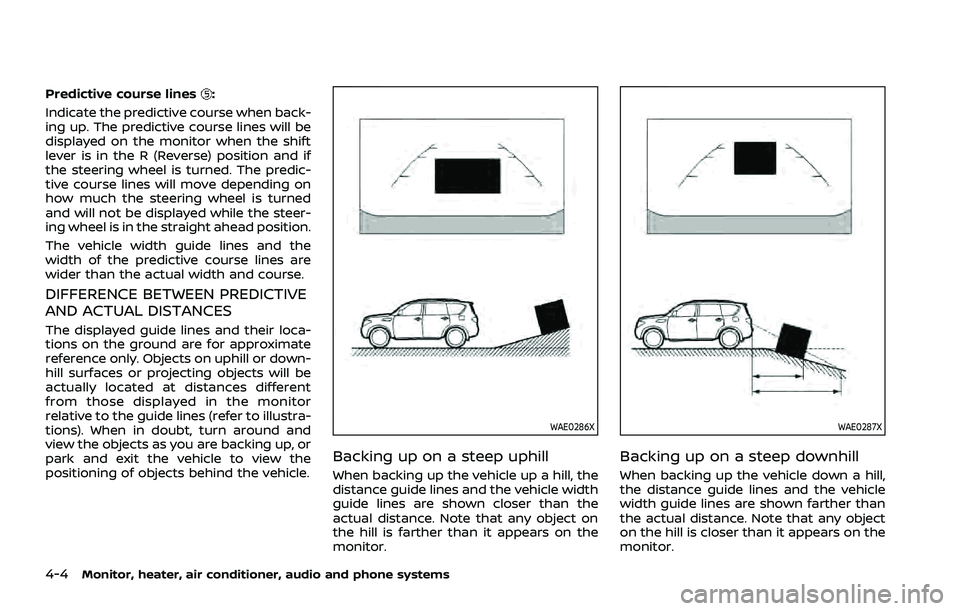
DIFFERENCE BETWEEN PREDICTIVE
AND ACTUAL DISTANCES
The displayed guide lines and their loca-
tions on the ground are for approximate
reference only. Objects on uphill or down-
hill surfaces or projecting objects will be
actually located at distances different
from those displayed in the monitor
relative to the guide lines (refer to illustra-
tions). When in doubt, turn around and
view the objects as you are backing up, or
park and exit the vehicle to view the
positioning of objects behind the vehicle.
WAE0286X
Backing up on a steep uphill
When backing up the vehicle up a hill, the
distance guide lines and the vehicle width
guide lines are shown closer than the
actual distance. Note that any object on
the hill is farther than it appears on the
monitor.
WAE0287X
Backing up on a steep downhill
When backing up the vehicle down a hill,
the distance guide lines and the vehicle
width guide lines are shown farther than
the actual distance. Note that any object
on the hill is closer than it appears on the
monitor.