phone NISSAN ROGUE 2021 Owner´s Manual
[x] Cancel search | Manufacturer: NISSAN, Model Year: 2021, Model line: ROGUE, Model: NISSAN ROGUE 2021Pages: 556, PDF Size: 2.7 MB
Page 5 of 556

NISSAN CARES ...
Both NISSAN and your NISSAN dealer are dedicated to serving all your automotive needs. Your satisfaction with your vehicle and your
NISSAN dealer are our primary concerns. Your NISSAN dealer is always available to assist you with all your automobile sales and
service needs.
However, if there is something that your
NISSAN dealer cannot assist you with or
you would like to provide NISSAN directly
with comments or questions, please con-
tact the NISSAN Consumer Affairs Depart-
ment using our toll-free number:For U.S. customers1-800-NISSAN-1
(1-800-647-7261)
For Canadian customers 1-800-387-0122
The Consumer Affairs Department will
ask for the following information:
. Your name, address, and telephone
number
. Vehicle identification number (at-
tached to the top of the instrument
panel on the driver’s side)
. Date of purchase
. Current odometer reading
. Your NISSAN dealer’s name
. Your comments or questions
OR You can write to NISSAN with the infor-
mation at:
For U.S. customersNissan North America, Inc.
Consumer Affairs Department
P.O. Box 685003
Franklin, TN 37068-5003
or via e-mail at:
nnaconsumeraffairs@nissan-usa.
com
For Canadian customers Nissan Canada Inc.
5290 Orbitor Drive
Mississauga, Ontario L4W 4Z5
or via e-mail at:
information.centre@nissancana-
da.com If you prefer, visit us at:
www.nissanusa.com
(for U.S. customers)
or
www.nissan.ca (for Canadian customers)
We appreciate your interest in NISSAN
and thank you for buying a quality NISSAN
vehicle.
NISSAN CUSTOMER CARE PROGRAM
Page 7 of 556
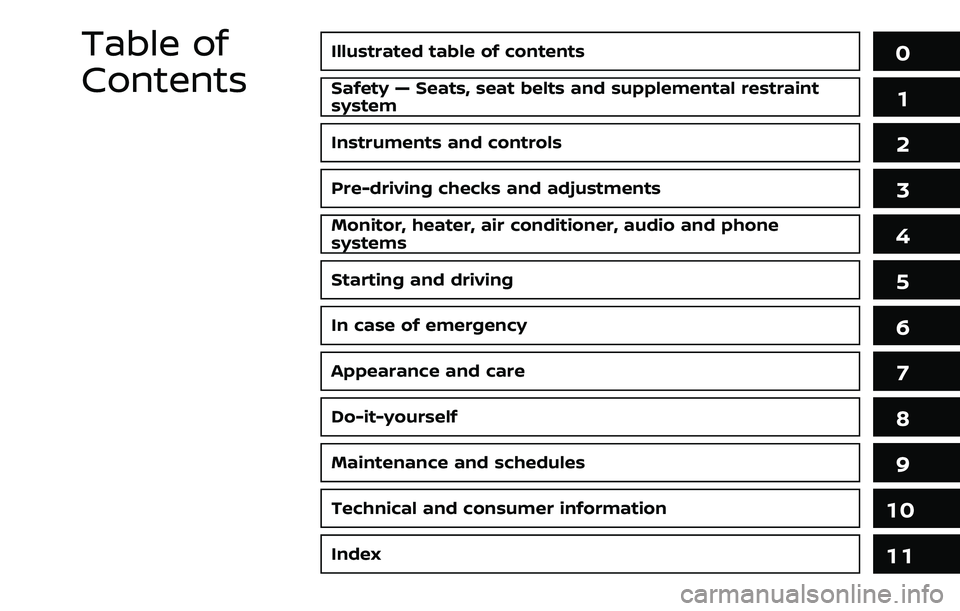
Illustrated table of contents0
Safety — Seats, seat belts and supplemental restraint
system1
Instruments and controls
Pre-driving checks and adjustments
Monitor, heater, air conditioner, audio and phone
systems
Starting and driving
In case of emergency
Appearance and care
Do-it-yourself
Maintenance and schedules
Technical and consumer information
2
3
4
5
6
7
8
9
10
Table of
Contents
Index11
Page 13 of 556
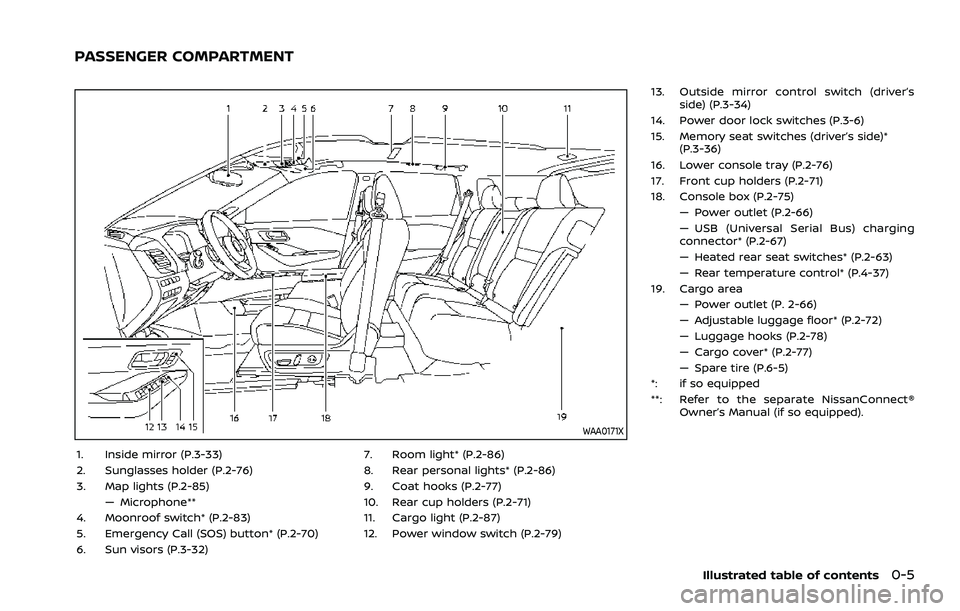
WAA0171X
1. Inside mirror (P.3-33)
2. Sunglasses holder (P.2-76)
3. Map lights (P.2-85)— Microphone**
4. Moonroof switch* (P.2-83)
5. Emergency Call (SOS) button* (P.2-70)
6. Sun visors (P.3-32) 7. Room light* (P.2-86)
8. Rear personal lights* (P.2-86)
9. Coat hooks (P.2-77)
10. Rear cup holders (P.2-71)
11. Cargo light (P.2-87)
12. Power window switch (P.2-79)13. Outside mirror control switch (driver’s
side) (P.3-34)
14. Power door lock switches (P.3-6)
15. Memory seat switches (driver’s side)* (P.3-36)
16. Lower console tray (P.2-76)
17. Front cup holders (P.2-71)
18. Console box (P.2-75) — Power outlet (P.2-66)
— USB (Universal Serial Bus) charging
connector* (P.2-67)
— Heated rear seat switches* (P.2-63)
— Rear temperature control* (P.4-37)
19. Cargo area — Power outlet (P. 2-66)
— Adjustable luggage floor* (P.2-72)
— Luggage hooks (P.2-78)
— Cargo cover* (P.2-77)
— Spare tire (P.6-5)
*: if so equipped
**: Refer to the separate NissanConnect® Owner’s Manual (if so equipped).
Illustrated table of contents0-5
PASSENGER COMPARTMENT
Page 14 of 556
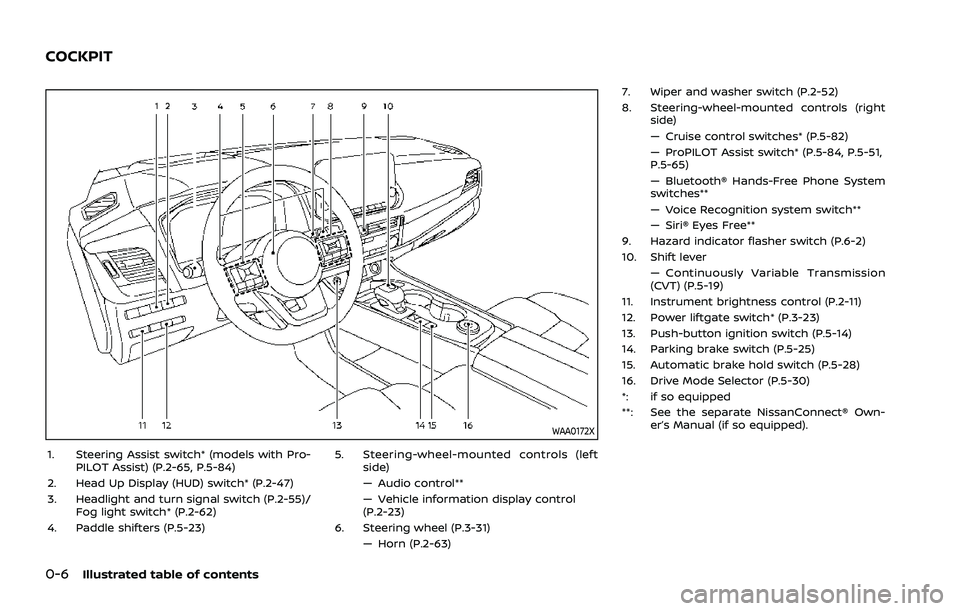
0-6Illustrated table of contents
WAA0172X
1. Steering Assist switch* (models with Pro-PILOT Assist) (P.2-65, P.5-84)
2. Head Up Display (HUD) switch* (P.2-47)
3. Headlight and turn signal switch (P.2-55)/ Fog light switch* (P.2-62)
4. Paddle shifters (P.5-23) 5. Steering-wheel-mounted controls (left
side)
— Audio control**
— Vehicle information display control
(P.2-23)
6. Steering wheel (P.3-31) — Horn (P.2-63) 7. Wiper and washer switch (P.2-52)
8. Steering-wheel-mounted controls (right
side)
— Cruise control switches* (P.5-82)
— ProPILOT Assist switch* (P.5-84, P.5-51,
P.5-65)
— Bluetooth® Hands-Free Phone System
switches**
— Voice Recognition system switch**
— Siri® Eyes Free**
9. Hazard indicator flasher switch (P.6-2)
10. Shift lever — Continuously Variable Transmission
(CVT) (P.5-19)
11. Instrument brightness control (P.2-11)
12. Power liftgate switch* (P.3-23)
13. Push-button ignition switch (P.5-14)
14. Parking brake switch (P.5-25)
15. Automatic brake hold switch (P.5-28)
16. Drive Mode Selector (P.5-30)
*: if so equipped
**: See the separate NissanConnect® Own- er’s Manual (if so equipped).
COCKPIT
Page 15 of 556
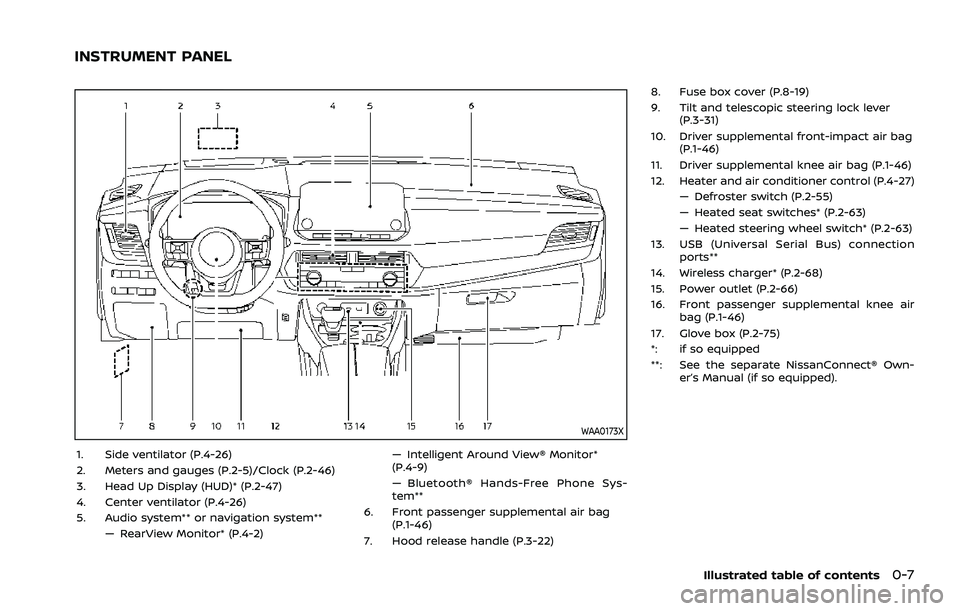
WAA0173X
1. Side ventilator (P.4-26)
2. Meters and gauges (P.2-5)/Clock (P.2-46)
3. Head Up Display (HUD)* (P.2-47)
4. Center ventilator (P.4-26)
5. Audio system** or navigation system**— RearView Monitor* (P.4-2) — Intelligent Around View® Monitor*
(P.4-9)
— Bluetooth® Hands-Free Phone Sys-
tem**
6. Front passenger supplemental air bag (P.1-46)
7. Hood release handle (P.3-22) 8. Fuse box cover (P.8-19)
9. Tilt and telescopic steering lock lever
(P.3-31)
10. Driver supplemental front-impact air bag (P.1-46)
11. Driver supplemental knee air bag (P.1-46)
12. Heater and air conditioner control (P.4-27) — Defroster switch (P.2-55)
— Heated seat switches* (P.2-63)
— Heated steering wheel switch* (P.2-63)
13. USB (Universal Serial Bus) connection ports**
14. Wireless charger* (P.2-68)
15. Power outlet (P.2-66)
16. Front passenger supplemental knee air bag (P.1-46)
17. Glove box (P.2-75)
*: if so equipped
**: See the separate NissanConnect® Own- er’s Manual (if so equipped).
Illustrated table of contents0-7
INSTRUMENT PANEL
Page 91 of 556
WAA0172X
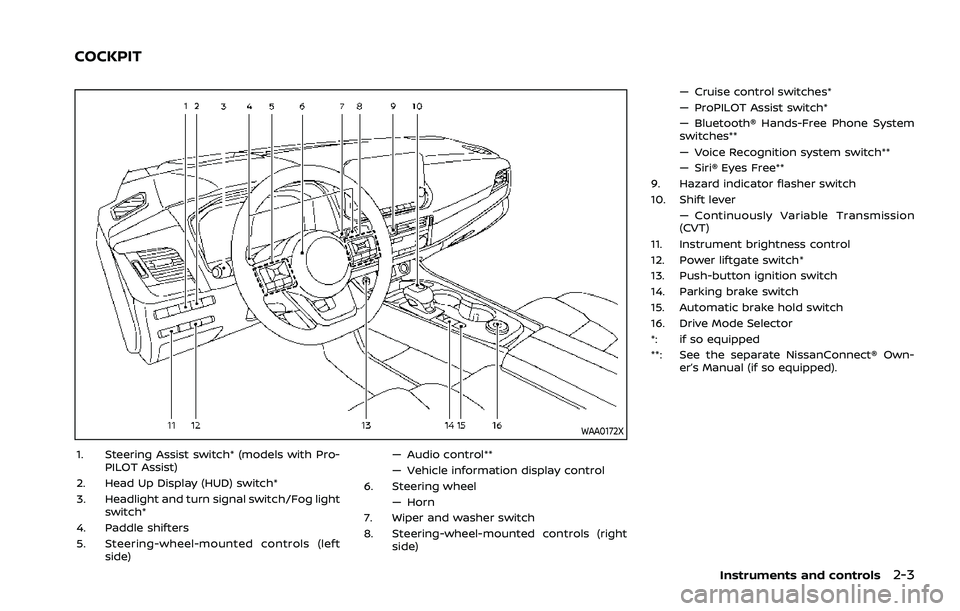
1. Steering Assist switch* (models with Pro-PILOT Assist)
2. Head Up Display (HUD) switch*
3. Headlight and turn signal switch/Fog light switch*
4. Paddle shifters
5. Steering-wheel-mounted controls (left side) — Audio control**
— Vehicle information display control
6. Steering wheel
— Horn
7. Wiper and washer switch
8. Steering-wheel-mounted controls (right side) — Cruise control switches*
— ProPILOT Assist switch*
— Bluetooth® Hands-Free Phone System
switches**
— Voice Recognition system switch**
— Siri® Eyes Free**
9. Hazard indicator flasher switch
10. Shift lever — Continuously Variable Transmission
(CVT)
11. Instrument brightness control
12. Power liftgate switch*
13. Push-button ignition switch
14. Parking brake switch
15. Automatic brake hold switch
16. Drive Mode Selector
*: if so equipped
**: See the separate NissanConnect® Own- er’s Manual (if so equipped).
Instruments and controls2-3
COCKPIT
Page 92 of 556

2-4Instruments and controls
WAA0173X
1. Side ventilator
2. Meters and gauges/Clock
3. Head Up Display (HUD)*
4. Center ventilator
5. Audio system** or navigation system**— RearView Monitor*
— Intelligent Around View® Monitor* — Bluetooth® Hands-Free Phone Sys-
tem**
6. Front passenger supplemental air bag
7. Hood release handle
8. Fuse box cover
9. Tilt and telescopic steering lock lever
10. Driver supplemental front-impact air bag 11. Driver supplemental knee air bag
12. Heater and air conditioner control
— Defroster switch
— Heated seat switches*
— Heated steering wheel switch*
13. USB (Universal Serial Bus) connection ports**
14. Wireless charger*
15. Power outlet
16. Front passenger supplemental knee air bag
17. Glove box
*: if so equipped
**: See the separate NissanConnect® Own- er’s Manual (if so equipped).
INSTRUMENT PANEL
Page 138 of 556
2-50Instruments and controls
DRIVER ASSISTANCE/NAVIGATION/
TRAFFIC SIGN/AUDIO/TEL/SMS
LINKING
The HUD will display Driver Assistance and
navigation information.
The Driver Assistance display will show
warning situations for the following sys-
tems:
.Automatic Emergency Braking (AEB)
with pedestrian detection
. Intelligent Forward Collision Warning
(I-FCW)
. Lane Departure Warning (LDW)
. Intelligent Lane Intervention (I-LI)
. Hands-free warning (for vehicles with
ProPILOT Assist) (if so equipped)
The Navigation System linking display will
show the following items:
. Intersection names
. Arrows indicating turning direction
. Distance to the next intersection
. Recommended lane indicator
The Traffic Signs Recognition (TSR) sys-
tem linking display will show the following
items:
. Speed Limit Sign
. No Entry Sign The Audio System linking display will
show the following items:
.
Songs
. Radio stations
The TEL/SMS linking display will show the
following item:
. Caller’s name or phone number
JVI1587X
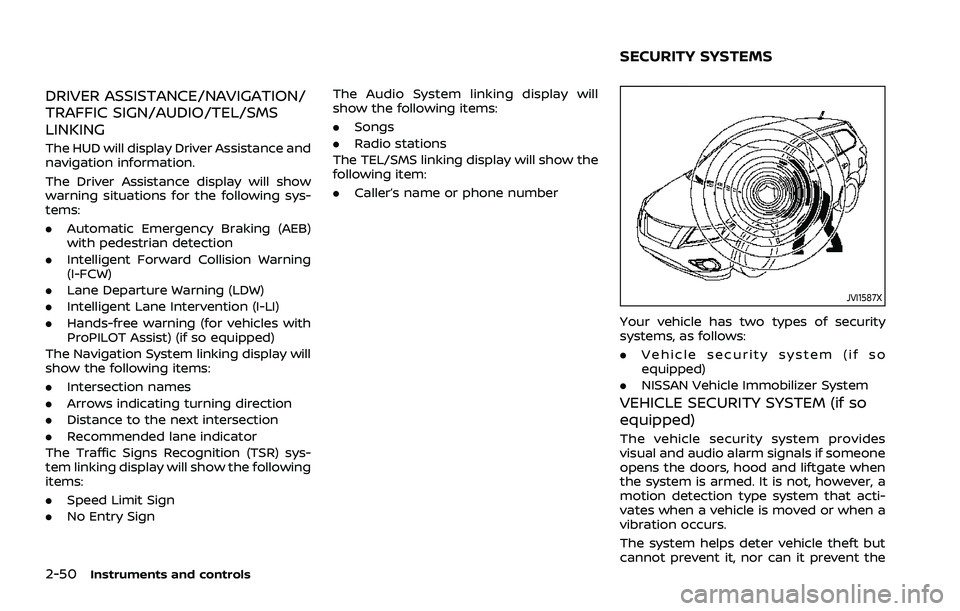
Your vehicle has two types of security
systems, as follows:
.Vehicle security system (if so
equipped)
. NISSAN Vehicle Immobilizer System
VEHICLE SECURITY SYSTEM (if so
equipped)
The vehicle security system provides
visual and audio alarm signals if someone
opens the doors, hood and liftgate when
the system is armed. It is not, however, a
motion detection type system that acti-
vates when a vehicle is moved or when a
vibration occurs.
The system helps deter vehicle theft but
cannot prevent it, nor can it prevent the
SECURITY SYSTEMS
Page 156 of 556
2-68Instruments and controls
WAC0327X
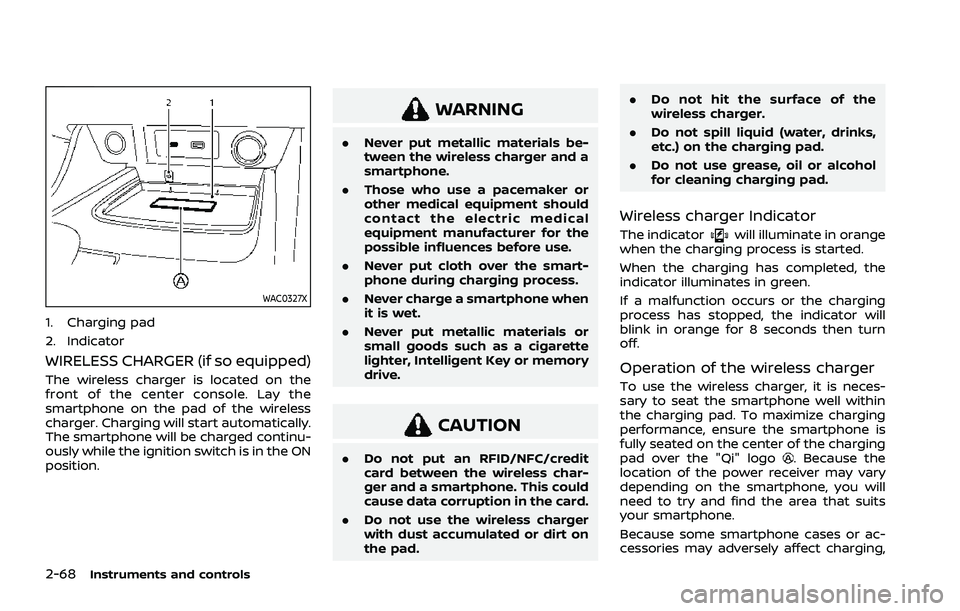
1. Charging pad
2. Indicator
WIRELESS CHARGER (if so equipped)
The wireless charger is located on the
front of the center console. Lay the
smartphone on the pad of the wireless
charger. Charging will start automatically.
The smartphone will be charged continu-
ously while the ignition switch is in the ON
position.
WARNING
.Never put metallic materials be-
tween the wireless charger and a
smartphone.
. Those who use a pacemaker or
other medical equipment should
contact the electric medical
equipment manufacturer for the
possible influences before use.
. Never put cloth over the smart-
phone during charging process.
. Never charge a smartphone when
it is wet.
. Never put metallic materials or
small goods such as a cigarette
lighter, Intelligent Key or memory
drive.
CAUTION
.Do not put an RFID/NFC/credit
card between the wireless char-
ger and a smartphone. This could
cause data corruption in the card.
. Do not use the wireless charger
with dust accumulated or dirt on
the pad. .
Do not hit the surface of the
wireless charger.
. Do not spill liquid (water, drinks,
etc.) on the charging pad.
. Do not use grease, oil or alcohol
for cleaning charging pad.
Wireless charger Indicator
The indicatorwill illuminate in orange
when the charging process is started.
When the charging has completed, the
indicator illuminates in green.
If a malfunction occurs or the charging
process has stopped, the indicator will
blink in orange for 8 seconds then turn
off.
Operation of the wireless charger
To use the wireless charger, it is neces-
sary to seat the smartphone well within
the charging pad. To maximize charging
performance, ensure the smartphone is
fully seated on the center of the charging
pad over the "Qi" logo
. Because the
location of the power receiver may vary
depending on the smartphone, you will
need to try and find the area that suits
your smartphone.
Because some smartphone cases or ac-
cessories may adversely affect charging,
Page 157 of 556
remove them before wireless charging.
Turn off the vibration function of the
smartphone before wireless charging.
NOTE:
.Only a Qi compatible smartphone
can be used.
. The smartphone may be warmed
during charging process and the
charging may stop by the protection
function of the wireless charger. This
is not a malfunction. If this occurs,
restart charging after the smart-
phone cooled down. The indicator
will blink in orange then turn off.
. The wireless charging process may
be stopped by the status of the
smartphone (battery temperature,
etc.).
. If a radio noise interference occurs
during charging process, put the
smartphone onto the center (“Qi”
logo) position of the wireless char-
ger.
. The wireless charging process will
stop during process of searching the
Intelligent Key.
. The wireless charging process will
not be started when a USB (Univer-
sal Serial Bus) cable is connected to
the smartphone. The indicator may
illuminate in orange or blink if the
smartphone is put on the wireless charger with a USB cable connected.
However, charging is not performed.
. Depending on the type of the smart-
phone, the indicator may remain
illuminated in orange even when
the charging process has been com-
pleted.
FCC ID: BEJWC500MNM
IC: 2703H-WC500MNM
This device complies with part 15 of the
FCC Rules and RSS-Gen of IC Rules.
Operation is subject to the following
two conditions:
(1) This device may not cause harmful
interference, and
(2) This device must accept any inter-
ference received, including interference
that may cause undesired operation.
Changes or modifications not expressly
approved by the party responsible for
compliance could void the user’s
authority to operate the equipment.
RF Radiation Exposure Statement: This
equipment complies with FCC RF Radia-
tion exposure limits set forth for an
uncontrolled environment.
This device and its antenna must not be
co-located or operating in conjunction
with any other antenna or transmitter. This equipment should be installed and
operated with a minimum distance of
15cm between the radiator and your
body.
ISED Compliance Statement
This device complies with RSS-Gen of IC
Rules
Operation is subject to the following
two conditions:
(1) This device may not cause harmful
interference, and
(2) This device must accept any inter-
ference received, including interference
that may cause undesired operation.
Changes or modifications made to this
device, not expressly approved by LG
Vehicle Components Company, will void
the user’s authority to operate the
equipment.
ISED RF Radiation Exposure Statement:
This equipment complies with ISED RF
Radiation exposure limits set forth for
an uncontrolled environment. This de-
vice and its antenna must not be co-
located or operating in conjunction with
any other antenna or transmitter. This
equipment should be installed to oper-
ate with a minimum distance of 15cm
between the radiator and the end-
user’s body and arms.
Instruments and controls2-69