headlights NISSAN ROGUE 2023 User Guide
[x] Cancel search | Manufacturer: NISSAN, Model Year: 2023, Model line: ROGUE, Model: NISSAN ROGUE 2023Pages: 508, PDF Size: 2.44 MB
Page 139 of 508
WAC0198X
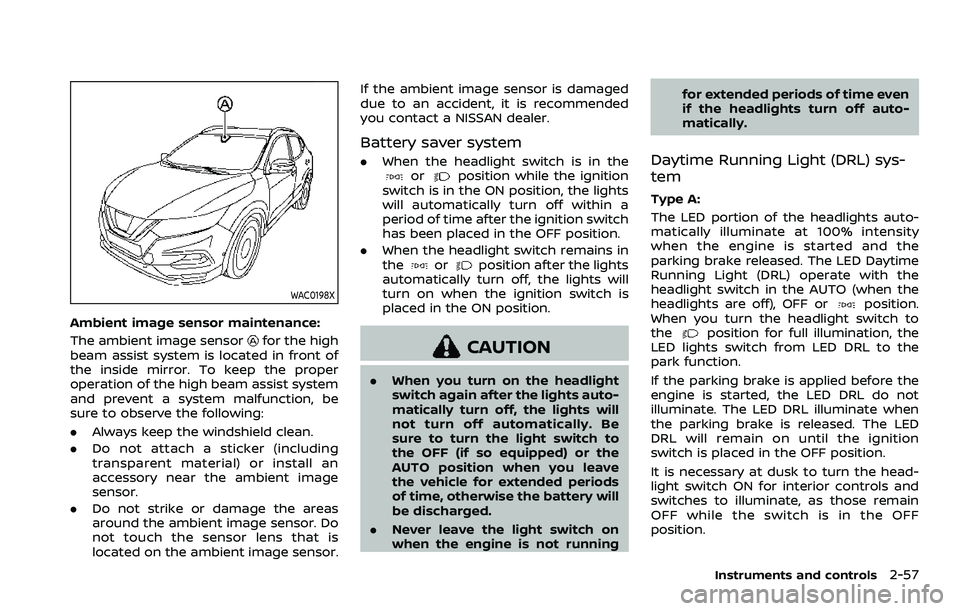
Ambient image sensor maintenance:
The ambient image sensor
for the high
beam assist system is located in front of
the inside mirror. To keep the proper
operation of the high beam assist system
and prevent a system malfunction, be
sure to observe the following:
. Always keep the windshield clean.
. Do not attach a sticker (including
transparent material) or install an
accessory near the ambient image
sensor.
. Do not strike or damage the areas
around the ambient image sensor. Do
not touch the sensor lens that is
located on the ambient image sensor. If the ambient image sensor is damaged
due to an accident, it is recommended
you contact a NISSAN dealer.
Battery saver system
.
When the headlight switch is in theorposition while the ignition
switch is in the ON position, the lights
will automatically turn off within a
period of time after the ignition switch
has been placed in the OFF position.
. When the headlight switch remains in
the
orposition after the lights
automatically turn off, the lights will
turn on when the ignition switch is
placed in the ON position.
CAUTION
. When you turn on the headlight
switch again after the lights auto-
matically turn off, the lights will
not turn off automatically. Be
sure to turn the light switch to
the OFF (if so equipped) or the
AUTO position when you leave
the vehicle for extended periods
of time, otherwise the battery will
be discharged.
. Never leave the light switch on
when the engine is not running for extended periods of time even
if the headlights turn off auto-
matically.
Daytime Running Light (DRL) sys-
tem
Type A:
The LED portion of the headlights auto-
matically illuminate at 100% intensity
when the engine is started and the
parking brake released. The LED Daytime
Running Light (DRL) operate with the
headlight switch in the AUTO (when the
headlights are off), OFF or
position.
When you turn the headlight switch to
the
position for full illumination, the
LED lights switch from LED DRL to the
park function.
If the parking brake is applied before the
engine is started, the LED DRL do not
illuminate. The LED DRL illuminate when
the parking brake is released. The LED
DRL will remain on until the ignition
switch is placed in the OFF position.
It is necessary at dusk to turn the head-
light switch ON for interior controls and
switches to illuminate, as those remain
OFF while the switch is in the OFF
position.
Instruments and controls2-57
Page 140 of 508

2-58Instruments and controls
WARNING
When the LED DRL system is active,
tail lights on your vehicle are not on.
It is necessary at dusk to turn on
your headlights. Failure to do so
could cause an accident injuring
yourself and others.
Type B:
The LED portion of the headlights auto-
matically illuminate at 100% intensity
when the engine is started and the
parking brake released. The DRL operate
with the headlight switch in the AUTO
position or
position, the headlight
must be off. When you turn the headlight
switch to the
position for full illumi-
nation, the LED lights switch from LED
DRL to the park function.
If the parking brake is applied before the
engine is started, the LED DRL do not
illuminate. The LED DRL illuminate when
the parking brake is released. The LED
DRL will remain on until the ignition
switch is placed in the OFF position or
the headlight turns on.
JVI1591X
Example
TURN SIGNAL SWITCH
Turn signal
Move the lever up or down to signal the
turning direction. When the turn is com-
pleted, the turn signals cancel automati-
cally.
Lane change signal
Move the lever up or down until the turn
signal begins to flash, but the lever does
not latch, to signal a lane change. Hold
the lever until the lane change is com-
pleted.
Move the lever up or down until the turn
signal begins to flash, but the lever does not latch, and release the lever. The turn
signal will automatically flash three times.
Choose the appropriate method to signal
a lane change based on road and traffic
conditions.
Page 141 of 508

JVI0980X
Example
FOG LIGHT SWITCH (if so equipped)
To turn the fog lights on, turn the head-
light switch to theposition, then turn
the fog light switch to theposition.
To turn the fog lights on with the head-
light switch in the AUTO position or
position (Type B), the headlights must be
on, then turn the fog light switch to the
position.
To turn them off, turn the fog light switch
to the OFF position.
The headlights must be on for the fog
lights to operate. The fog lights automa-
tically turn off when the high beam
headlights are selected.
JVI1569X
To sound the horn, push the center pad
area of the steering wheel.
WARNING
Do not disassemble the horn. Doing
so could affect proper operation of
the supplemental front air bag sys-
tem. Tampering with the supple-
mental front air bag system may
result in serious personal injury.
JVI1592X
The heated steering wheel system is
designed to operate only when the sur-
face temperature of the steering wheel is
below 68°F (20°C).
Push the heated steering wheel switch to
warm the steering wheel after the engine
starts. The indicator light on the switch
will illuminate.
If the surface temperature of the steering
wheel is below 68°F (20°C), the system will
heat the steering wheel and cycle off and
on to maintain a temperature above 68°F
(20°C). The indicator light will remain on
as long as the system is on.
Push the switch again to turn the heated
steering wheel system off manually. The
Instruments and controls2-59
HORNHEATED STEERING WHEEL (if so equipped)
Page 147 of 508

system.
. The ECO mode system will turn off
automatically if a malfunction occurs
in the system.
. Turn off the ECO mode system when
acceleration is required such as when:
— driving with a heavy load of pas-
sengers or cargo in the vehicle
— driving on a steep uphill slope
WAC0077X
Instrument Panel
WAC0233XCenter Console Box
The power outlet is located in the instru-
ment panel and center console box.
CAUTION
. The outlet and plug may be hot
during or immediately after use.
. Do not use with accessories that
exceed a 12 volt, 120W (10A)
power draw. Do not use double
adapters or more than one elec-
trical accessory.
. Use power outlet with the engine
running to avoid discharging the
vehicle battery.
. Avoid using power outlet when
the air conditioner, headlights or
rear window defroster is on.
. This power outlet is not designed
for use with a cigarette lighter
unit.
. Push the plug in as far as it will
go. If good contact is not made,
the plug may overheat or the
internal temperature fuse may
open.
. Before inserting or disconnecting
a plug, be sure the electrical
accessory being used is turned
OFF.
Instruments and controls2-65
POWER OUTLET
Page 163 of 508
JVI0626X
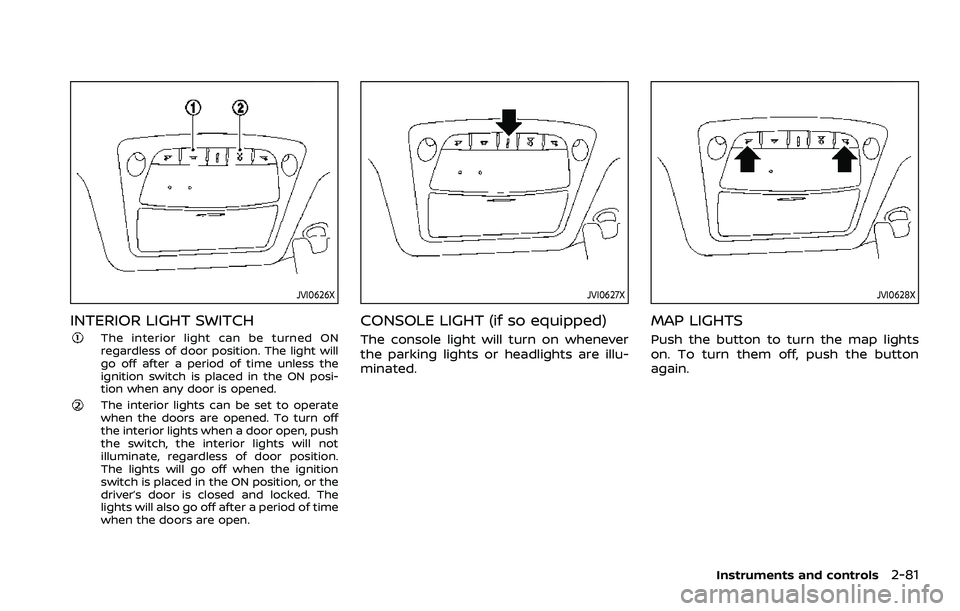
INTERIOR LIGHT SWITCH
The interior light can be turned ON
regardless of door position. The light will
go off after a period of time unless the
ignition switch is placed in the ON posi-
tion when any door is opened.
The interior lights can be set to operate
when the doors are opened. To turn off
the interior lights when a door open, push
the switch, the interior lights will not
illuminate, regardless of door position.
The lights will go off when the ignition
switch is placed in the ON position, or the
driver’s door is closed and locked. The
lights will also go off after a period of time
when the doors are open.
JVI0627X
CONSOLE LIGHT (if so equipped)
The console light will turn on whenever
the parking lights or headlights are illu-
minated.
JVI0628X
MAP LIGHTS
Push the button to turn the map lights
on. To turn them off, push the button
again.
Instruments and controls2-81
Page 202 of 508
3-32Pre-driving checks and adjustments
SPA2447
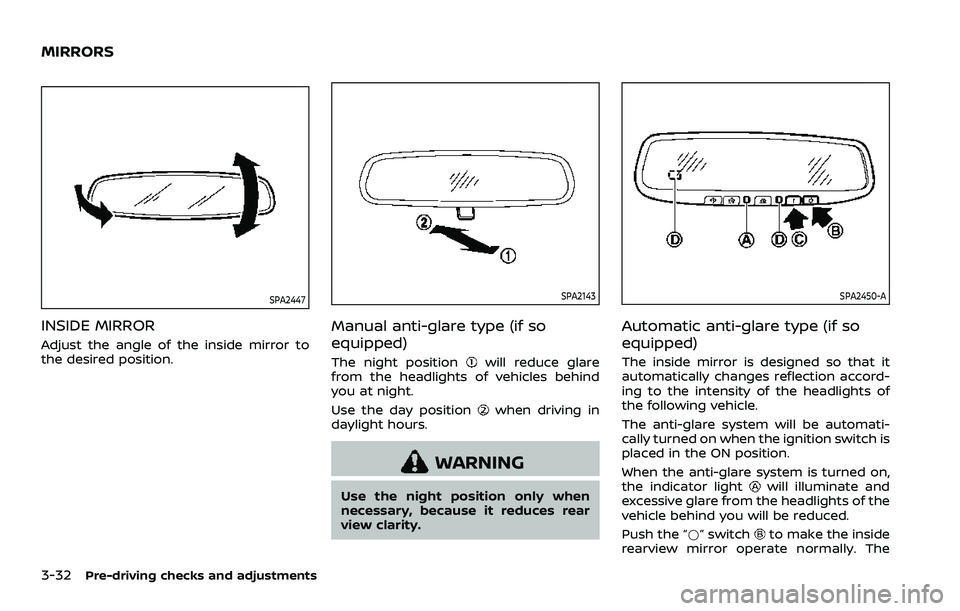
INSIDE MIRROR
Adjust the angle of the inside mirror to
the desired position.
SPA2143
Manual anti-glare type (if so
equipped)
The night positionwill reduce glare
from the headlights of vehicles behind
you at night.
Use the day position
when driving in
daylight hours.
WARNING
Use the night position only when
necessary, because it reduces rear
view clarity.
SPA2450-A
Automatic anti-glare type (if so
equipped)
The inside mirror is designed so that it
automatically changes reflection accord-
ing to the intensity of the headlights of
the following vehicle.
The anti-glare system will be automati-
cally turned on when the ignition switch is
placed in the ON position.
When the anti-glare system is turned on,
the indicator light
will illuminate and
excessive glare from the headlights of the
vehicle behind you will be reduced.
Push the “*” switch
to make the inside
rearview mirror operate normally. The
MIRRORS
Page 278 of 508
5-38Starting and driving
.Do not use the LDW system under
the following conditions as it may
not function properly:
— During bad weather (rain, fog,
snow, etc.).
— When driving on slippery roads, such as on ice or snow.
— When driving on winding or uneven roads.
— When there is a lane closure due to road repairs.
— When driving in a makeshift or temporary lane.
— When driving on roads where the lane width is too narrow.
— When driving without normal tire conditions (for example,
tire wear, low tire pressure,
installation of spare tire (if so
equipped), tire chains, non-
standard wheels).
— When the vehicle is equipped with non-original brake parts
or suspension parts.
. The system may not function
properly under the following con-
ditions: — On roads where there are
multiple parallel lane markers;
lane markers that are faded or
not painted clearly; yellow
painted lane markers; non-
standard lane markers; or
lane markers covered with
water, dirt, snow, etc.
— On roads where discontinued lane markers are still detect-
able.
— On roads where there are sharp curves.
— On roads where there are sharply contrasting objects,
such as shadows, snow,
water, wheel ruts, seams or
lines remaining after road re-
pairs. (The LDW system could
detect these items as lane
markers.)
— On roads where the traveling lane merges or separates.
— When the vehicle’s traveling direction does not align with
the lane marker.
— When traveling close to the vehicle in front of you, which
obstructs the lane camera
unit detection range. — When rain, snow, dirt or object
adheres to the windshield in
front of the lane camera unit.
— When the headlights are not bright due to dirt on the lens
or if the aiming is not adjusted
properly.
— When strong light enters the lane camera unit. (For exam-
ple, the light directly shines on
the front of the vehicle at
sunrise or sunset.)
— When a sudden change in brightness occurs. (For exam-
ple, when the vehicle enters or
exits a tunnel or under a
bridge.)
SYSTEM TEMPORARILY UNAVAIL-
ABLE
Condition A:
If the vehicle is parked in direct sunlight
under high temperature conditions (over
approximately 104°F (40°C)) and then
started, the LDW system may be deacti-
vated automatically, the LDW indicator
will flash and the following message will
appear in the vehicle information display.
- “Unavailable: High Cabin Temperature”
When the interior temperature is reduced,
Page 284 of 508
5-44Starting and driving
pairs. (The I-LI system could
detect these items as lane
markers.)
— On roads where the traveling lane merges or separates.
— When the vehicle’s traveling direction does not align with
the lane marker.
— When traveling close to the vehicle in front of you, which
obstructs the lane camera
unit detection range.
— When rain, snow or dirt ad- heres to the windshield in
front of the lane camera unit.
— When the headlights are not bright due to dirt on the lens
or if the aiming is not adjusted
properly.
— When strong light enters the lane camera unit. (For exam-
ple, the light directly shines on
the front of the vehicle at
sunrise or sunset.)
— When a sudden change in brightness occurs. (For exam-
ple, when the vehicle enters or
exits a tunnel or under a
bridge.) .
Excessive noise will interfere with
the warning chime sound, and
the chime may not be heard.
While the I-LI system is operating, you
may hear a sound of brake operation.
This is normal and indicates that the I-LI
system is operating properly.
SYSTEM TEMPORARILY UNAVAIL-
ABLE
Condition A:
The warning and assist functions of the I-
LI system are not designed to work under
the following conditions:
. When you operate the lane change
signal and change the traveling lanes
in the direction of the signal. (The I-LI
system will be deactivated for ap-
proximately 2 seconds after the lane
change signal is turned off.)
. When the vehicle speed lowers to less
than approximately 37 MPH (60 km/h).
Action to take:
After the above conditions have finished
and the necessary operating conditions
are satisfied, the warning and assist
functions will resume.
Condition B:
The assist function of the I-LI system is
not designed to work under the following conditions (warning is still functional):
.
When the brake pedal is depressed.
. When the steering wheel is turned as
far as necessary for the vehicle to
change lanes.
. When the vehicle is accelerated during
the I-LI system operation.
. When the Intelligent Cruise Control
(ICC) approach warning occurs (if so
equipped).
. When the hazard warning flashers are
operated.
. When driving on a curve at high speed.
Action to take:
After the above conditions have finished
and the necessary operating conditions
are satisfied, the I-LI system application of
the brakes will resume.
Condition C:
If the following message appears in the
vehicle information display, a chime will
sound and the I-LI system will be turned
off automatically.
. "Currently unavailable":
When the VDC system (except Trac-
tion Control System (TCS) function) or
ABS operates or VDC system is turned
off.
Action to take:
When the above conditions no longer
Page 328 of 508
5-88Starting and driving
Steering assist limitations
WARNING
.In the following situations, the
camera may not detect lane mar-
kers correctly or may detect lane
markers incorrectly and the
steering assist may not operate
properly:
— When driving on roads where
there are multiple parallel
lane markers, lane markers
that are faded or not painted
clearly, non-standard lane
markers, or lane markers cov-
ered with water, dirt, snow,
etc.
— When driving on roads with discontinued lane markers
— When driving on roads with a widening or narrowing lane
width
— When driving on roads where there are multiple lanes or
unclear lane markers due to
road construction
— When driving on roads where there are sharply contrasting
objects, such as shadows, snow, water, wheel ruts,
seams, or lines remaining
after road repairs (the steer-
ing assist could detect these
items as lane markers)
— When driving on roads where the traveling lane merges or
separates
. Do not use the steering assist
under the following conditions
because the system may not
properly detect lane markers.
Doing so could cause a loss of
vehicle control and result in an
accident.
— During bad weather (rain, fog,
snow, dust, etc.)
— When rain, snow, sand, etc., is thrown up by the wheels of
other vehicles
— When dirt, oil, ice, snow, water, or another object adheres to
the camera unit
— When the lens of the camera unit is foggy
— When strong light (for exam- ple, sunlight or high beams
from oncoming vehicles)
shines on the camera — When the headlights are not
bright due to dirt on the lens
or the headlights are off in
tunnels or darkness
— When a sudden change in brightness occurs (for exam-
ple, when the vehicle enters or
exits a tunnel or is under a
bridge)
— When driving on roads where the traveling lane merges or
separates or where there are
temporary lane markers be-
cause of road construction
— When there is a lane closure due to road repairs
— When driving on a bumpy road surface, such as an uneven
dirt road
— When driving on sharp curves or winding roads
— When driving on repeated up- hill and downhill roads
. Do not use the steering assist
under the following conditions
because the system will not op-
erate properly:
— When driving with a tire that is
not within normal tire condi-
Page 341 of 508
AEB WITH PEDESTRIAN DETECTION
SYSTEM LIMITATIONS
WARNING
Listed below are the system limita-
tions for the AEB with Pedestrian
Detection system. Failure to operate
the vehicle in accordance with these
system limitations could result in
serious injury or death.
.The AEB with Pedestrian Detec-
tion system cannot detect all
vehicles or pedestrians under all
conditions.
. The AEB with Pedestrian Detec-
tion system does not detect the
following:
— Pedestrians that are small (for
example, children), in a sitting
position, operating toys/ska-
teboards, on scooters or in
wheelchairs, or not in an up-
right standing or walking po-
sition.
— Animals of any size.
— Obstacles (for example, cargo or debris) on the roadway or
roadside. — Oncoming or crossing vehicles
— Vehicles where the tires are
difficult to see or the shape of
the rear of the vehicle is un-
clear or obstructed.
— Parked vehicles.
. The AEB with Pedestrian Detec-
tion system has some perfor-
mance limitations.
— If a stationary vehicle is in the
vehicle’s path, the system will
not function when the vehicle
approaches the stationary ve-
hicle at speeds over approxi-
mately 50 MPH (80 km/h).
— Pedestrian Detection will not function when the vehicle is
driven at speeds over ap-
proximately 37 MPH (60
km/h) or below approxi-
mately 6 MPH (10 km/h).
. For pedestrians, the AEB with
Pedestrian Detection system will
not issue the first warning.
. The FEB with Pedestrian Detec-
tion system may not function
properly or detect a vehicle or
pedestrian ahead in the following
conditions: — In poor visibility conditions
(such as rain, snow, fog, dust
storms, sand storms, smoke,
and road spray from other
vehicles).
— If dirt, ice, snow, fog or other material is covering the radar
sensor area or camera area of
the windshield.
— If strong light (for example, sunlight or high beams) en-
ters the front camera or a
sudden change in brightness
occurs (for example, entering
a tunnel or driving in light-
ning).
— In dark or dimly lit conditions, such as at night or in tunnels,
including cases where your
vehicle’s headlights are off or
dim, or the tail lights of the
vehicle ahead are off.
— When the direction of the camera is misaligned.
— When driving on a steep downhill slope, on roads with
sharp curves, and/or bumpy
or dirt roads.
Starting and driving5-101