roof NISSAN ROGUE 2023 User Guide
[x] Cancel search | Manufacturer: NISSAN, Model Year: 2023, Model line: ROGUE, Model: NISSAN ROGUE 2023Pages: 508, PDF Size: 2.44 MB
Page 72 of 508
1-54Safety — Seats, seat belts and supplemental restraint system
is not illuminated (indicating that the air
bag might inflate in a crash), it could be
that the child restraint or seat belt is not
being used properly. Make sure that the
child restraint is installed properly, the
seat belt is used properly and the occu-
pant is positioned properly. If the front
passenger air bag status light is not
illuminated, reposition the occupant or
child restraint in a rear seat.
If the front passenger air bag status light
will not illuminate even though you be-
lieve that the child restraint, the seat belts
and the occupant are properly positioned,
it is recommended that you take your
vehicle to a NISSAN dealer. A NISSAN
dealer can check the system status by
using a special tool. However, until you
have confirmed with your dealer that
your air bag is working properly, reposi-
tion the occupant or child restraint in a
rear seat.
The NISSAN Advanced Air Bag System
and front passenger air bag status light
will take a few seconds to register a
change in the passenger seat status. This
is normal system operation and does not
indicate a malfunction.
If a malfunction occurs in the front
passenger air bag system, the supple-
mental air bag warning light
, located
in the meters and gauges area, will illuminate. Have the system checked. It is
recommended you visit a NISSAN dealer
for this service.
Normal operation:
In order for the occupant classification
sensor system to classify the front pas-
senger based on weight, please follow the
precautions and steps outlined below:
Precautions:
.
Make sure that there are no objects
weighing over 9.1 lbs (4 kg) hanging on
the seat or placed in the seatback
pocket.
. Make sure that a child restraint or
other object is not pressing against
the rear of the seatback.
. Make sure that a rear passenger is not
pushing or pulling on the back of the
front passenger seat.
. Make sure that the front passenger
seat or seatback is not forced back
against an object on the seat or floor
behind it.
. Make sure that there is no object
placed under the front passenger
seat.
. Make sure that the front passenger
seat head restraint does not contact
the roof when adjusting the front
passenger seat. Steps:
1. Adjust the seat as outlined. (See
“Seats” (P.1-3).) Sit upright, leaning
against the seatback, and centered
on the seat cushion with your feet
comfortably extended to the floor.
2. Make sure there are no objects on your lap.
3. Fasten the seat belt as outlined. (See “Seat belts” (P.1-12).) Front passenger
seat belt buckle status is monitored
by the occupant classification system,
and is used as an input to determine
occupancy status. So, it is highly
recommended that the front passen-
ger fasten their seat belt.
4. Remain in this position for 30 seconds allowing the system to classify the
front passenger before the vehicle is
put into motion.
5. Ensure proper classification by check- ing the front passenger air bag status
light.
NOTE:
This vehicle’s occupant classification
sensor system locks the classification
during driving so it is important that
you confirm that the front passenger is
properly classified prior to driving. Also,
the occupant classification sensor sys-
tem may recalculate the weight of the
Page 73 of 508
occupant under some conditions (both
while driving and when stopped), so the
front passenger seat occupant should
continue to remain seated as outlined
above.
Troubleshooting:
If you think the front passenger air bag
status light is incorrect:
1. If the light is ON with an adult occupyingthe front passenger seat:
.Occupant is a small adult — the front
passenger air bag status light is func-
tioning as intended. The front passen-
ger air bag and front passenger knee
air bag are suppressed.
However, if the occupant is not a small
adult, then this may be due to the
following conditions that may be interfer-
ing with the weight sensors:
. Occupant is not sitting upright, lean-
ing against the seatback, and cen-
tered on the seat cushion with his/her
feet comfortably extended to the
floor.
. A child restraint or other object press-
ing against the rear of the seatback.
. A rear passenger pushing or pulling
on the back of the front passenger
seat.
. Forcing the front seat or seatback
against an object on the seat or floor behind it.
. An object placed under the front
passenger seat.
. An object placed between the seat
cushion and center console or be-
tween the seat cushion and the door.
If the vehicle is moving, please come to a
stop when it is safe to do so. Check and
correct any of the above conditions.
Restart the vehicle and wait 1 minute.
NOTE:
A system check will be performed dur-
ing which the front passenger air bag
status light will remain lit for about 7
seconds initially.
If the light is still ON after this, the person
should be advised not to ride in the front
passenger seat and it is recommended
that the vehicle should be checked by a
NISSAN dealer as soon as possible.
2. If the light is OFF with a small adult, child or child restraint occupying the front
passenger seat.
This may be due to the following condi-
tions that may be interfering with the
weight sensors:
.Small adult or child is not sitting
upright, leaning against the seatback,
and centered on the seat cushion with
his/her feet comfortably extended to
the floor. .
The child restraint is not properly
installed, as outlined. (See “Child re-
straints” (P.1-21).)
. An object weighing over 9.1 lbs (4 kg)
hanging on the seat or placed in the
seatback pocket.
. A child restraint or other object press-
ing against the rear of the seatback.
. A rear passenger pushing or pulling
on the back of the front passenger
seat.
. Forcing the front seat or seatback
against an object on the seat or floor
behind it.
. An object placed under the front
passenger seat.
. An object placed between the seat
cushion and center console.
. The front passenger seat head re-
straint contacting the roof.
If the vehicle is moving, please come to a
stop when it is safe to do so. Check and
correct any of the above conditions.
Restart the vehicle and wait 1 minute.
NOTE:
A system check will be performed dur-
ing which the front passenger air bag
status light will remain lit for about 7
seconds initially.
If the light is still OFF after this, the small
adult, child or child restraint should be
Safety — Seats, seat belts and supplemental restraint system1-55
Page 77 of 508
WAB0049X
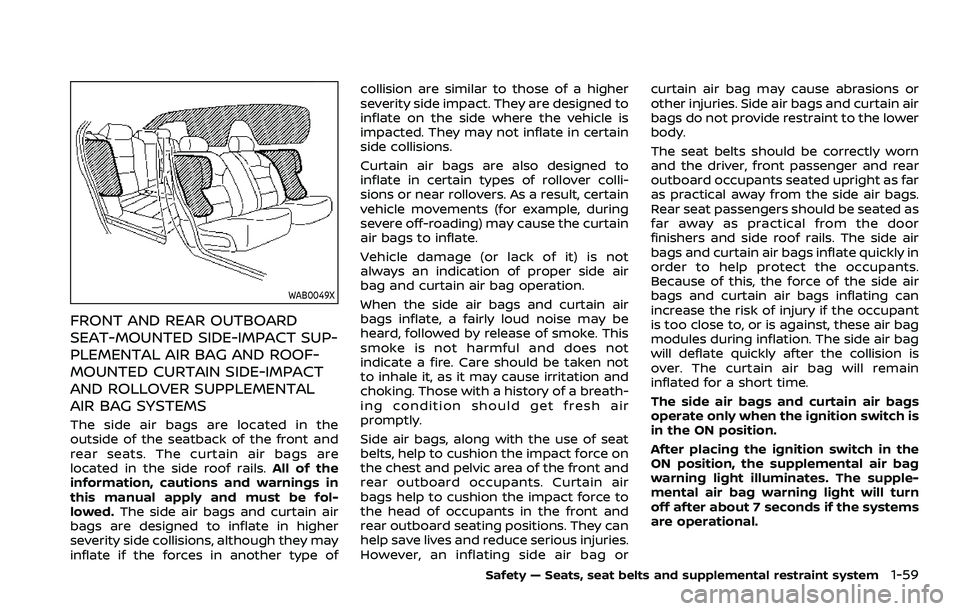
FRONT AND REAR OUTBOARD
SEAT-MOUNTED SIDE-IMPACT SUP-
PLEMENTAL AIR BAG AND ROOF-
MOUNTED CURTAIN SIDE-IMPACT
AND ROLLOVER SUPPLEMENTAL
AIR BAG SYSTEMS
The side air bags are located in the
outside of the seatback of the front and
rear seats. The curtain air bags are
located in the side roof rails.All of the
information, cautions and warnings in
this manual apply and must be fol-
lowed. The side air bags and curtain air
bags are designed to inflate in higher
severity side collisions, although they may
inflate if the forces in another type of collision are similar to those of a higher
severity side impact. They are designed to
inflate on the side where the vehicle is
impacted. They may not inflate in certain
side collisions.
Curtain air bags are also designed to
inflate in certain types of rollover colli-
sions or near rollovers. As a result, certain
vehicle movements (for example, during
severe off-roading) may cause the curtain
air bags to inflate.
Vehicle damage (or lack of it) is not
always an indication of proper side air
bag and curtain air bag operation.
When the side air bags and curtain air
bags inflate, a fairly loud noise may be
heard, followed by release of smoke. This
smoke is not harmful and does not
indicate a fire. Care should be taken not
to inhale it, as it may cause irritation and
choking. Those with a history of a breath-
ing condition should get fresh air
promptly.
Side air bags, along with the use of seat
belts, help to cushion the impact force on
the chest and pelvic area of the front and
rear outboard occupants. Curtain air
bags help to cushion the impact force to
the head of occupants in the front and
rear outboard seating positions. They can
help save lives and reduce serious injuries.
However, an inflating side air bag or
curtain air bag may cause abrasions or
other injuries. Side air bags and curtain air
bags do not provide restraint to the lower
body.
The seat belts should be correctly worn
and the driver, front passenger and rear
outboard occupants seated upright as far
as practical away from the side air bags.
Rear seat passengers should be seated as
far away as practical from the door
finishers and side roof rails. The side air
bags and curtain air bags inflate quickly in
order to help protect the occupants.
Because of this, the force of the side air
bags and curtain air bags inflating can
increase the risk of injury if the occupant
is too close to, or is against, these air bag
modules during inflation. The side air bag
will deflate quickly after the collision is
over. The curtain air bag will remain
inflated for a short time.
The side air bags and curtain air bags
operate only when the ignition switch is
in the ON position.
After placing the ignition switch in the
ON position, the supplemental air bag
warning light illuminates. The supple-
mental air bag warning light will turn
off after about 7 seconds if the systems
are operational.
Safety — Seats, seat belts and supplemental restraint system1-59
Page 84 of 508

charging connector ....................................................")
Power outlet ........................................................................\
.......... 2-65USB (Universal Serial Bus)
charging connector .......................................................... 2-66
Emergency Call (SOS) button (if
so equipped) ........................................................................\
.......... 2-67 Emergency support .......................................................... 2-67
Storage ........................................................................\
...................... 2-69 Cup holders ........................................................................\
..... 2-69
Soft bottle holders ............................................................. 2-70
Flexible luggage boards (if so equipped) ......... 2-70
Glove box ........................................................................\
........... 2-71
Console box ........................................................................\
..... 2-71
Sunglasses holder .............................................................. 2-72
Card holder (driver’s side) ............................................ 2-72
Luggage hooks ..................................................................... 2-73
Parcel shelf (if so equipped) ....................................... 2-73
Roof rack (if so equipped) .................................................. 2-75
Windows ........................................................................\
.................... 2-76
Power windows .................................................................... 2-76
Moonroof (if so equipped) .................................................. 2-78 Power moonroof ................................................................. 2-78 Interior lights ........................................................................\
...... 2-80
Interior light switch ........................................................ 2-81
Console light (if so equipped) ................................. 2-81
Map lights ........................................................................\
....... 2-81
Room light ........................................................................\
.... 2-82
Vanity mirror light (if so equipped) .................... 2-82
Cargo light ........................................................................\
..... 2-83
HomeLink® Universal Transceiver (if
so equipped) ........................................................................\
......... 2-83 Programming HomeLink® ......................................... 2-84
Programming HomeLink® for Canadian
customers and gate openers ................................. 2-85
Operating the HomeLink®
Universal Transceiver .................................................... 2-85
Programming troubleshooting ............................. 2-86
Clearing the programmed information .......... 2-86
Reprogramming a single
HomeLink® button ........................................................... 2-86
If your vehicle is stolen ................................................ 2-86
Page 157 of 508
JVI0889X
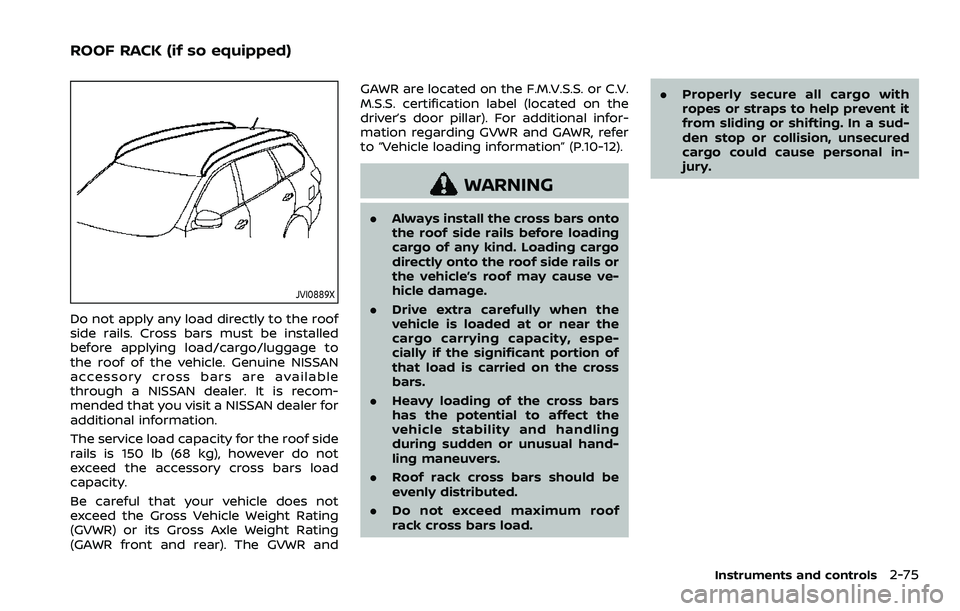
Do not apply any load directly to the roof
side rails. Cross bars must be installed
before applying load/cargo/luggage to
the roof of the vehicle. Genuine NISSAN
accessory cross bars are available
through a NISSAN dealer. It is recom-
mended that you visit a NISSAN dealer for
additional information.
The service load capacity for the roof side
rails is 150 lb (68 kg), however do not
exceed the accessory cross bars load
capacity.
Be careful that your vehicle does not
exceed the Gross Vehicle Weight Rating
(GVWR) or its Gross Axle Weight Rating
(GAWR front and rear). The GVWR andGAWR are located on the F.M.V.S.S. or C.V.
M.S.S. certification label (located on the
driver’s door pillar). For additional infor-
mation regarding GVWR and GAWR, refer
to “Vehicle loading information” (P.10-12).
WARNING
.
Always install the cross bars onto
the roof side rails before loading
cargo of any kind. Loading cargo
directly onto the roof side rails or
the vehicle’s roof may cause ve-
hicle damage.
. Drive extra carefully when the
vehicle is loaded at or near the
cargo carrying capacity, espe-
cially if the significant portion of
that load is carried on the cross
bars.
. Heavy loading of the cross bars
has the potential to affect the
vehicle stability and handling
during sudden or unusual hand-
ling maneuvers.
. Roof rack cross bars should be
evenly distributed.
. Do not exceed maximum roof
rack cross bars load. .
Properly secure all cargo with
ropes or straps to help prevent it
from sliding or shifting. In a sud-
den stop or collision, unsecured
cargo could cause personal in-
jury.
Instruments and controls2-75
ROOF RACK (if so equipped)
Page 160 of 508
2-78Instruments and controls
Auto-reverse function
WARNING
There are some small distances im-
mediately before the closed position
which cannot be detected. Make sure
that all passengers have their hands,
etc., inside the vehicle before closing
the window.
If the control unit detects something
caught in the window as it is closing, the
window will be immediately lowered.
The auto reverse function can be acti-
vated when the window is closed by
automatic operation when the ignition
switch is in the ON position or for 45
seconds after the ignition switch is placed
in the OFF position.
Depending on the environment or driv-
ing conditions, the auto reverse func-
tion may be activated if an impact or
load similar to something being caught
in the window occurs.
If the windows do not close auto-
matically
If the power window automatic function
(closing only) does not operate properly,
perform the following procedure to initi-
alize the power window system.
1. Start the engine.
2. Close the door.
3. After starting the engine, open the window completely by operating the
power window switch.
4. Pull the power window switch and hold it to close the window, and then
hold the switch more than 3 seconds
after the window is closed completely.
5. Release the power window switch. Operate the window by the automatic
function to confirm the initialization is
complete.
If the power window automatic function
does not operate properly after perform-
ing the procedure above, it is recom-
mended you have your vehicle checked
by a NISSAN dealer.
WARNING
. In an accident you could be
thrown from the vehicle through
an open moonroof. Always use
seat belts and child restraints.
. Do not allow anyone to stand up
or extend any portion of their
body out of the moonroof open-
ing while the vehicle is in motion
or while the moonroof is closing.
CAUTION
.Remove water drops, snow, ice or
sand from the moonroof before
opening.
. Do not place any heavy object on
the moonroof or surrounding
area.
POWER MOONROOF
The moonroof only operates when the
ignition switch is in the ON position.
The moonroof is operational for about 45
seconds, even if the ignition switch is
pushed to the OFF position. If the driver’s
door or the passenger’s door is opened
MOONROOF (if so equipped)
Page 161 of 508
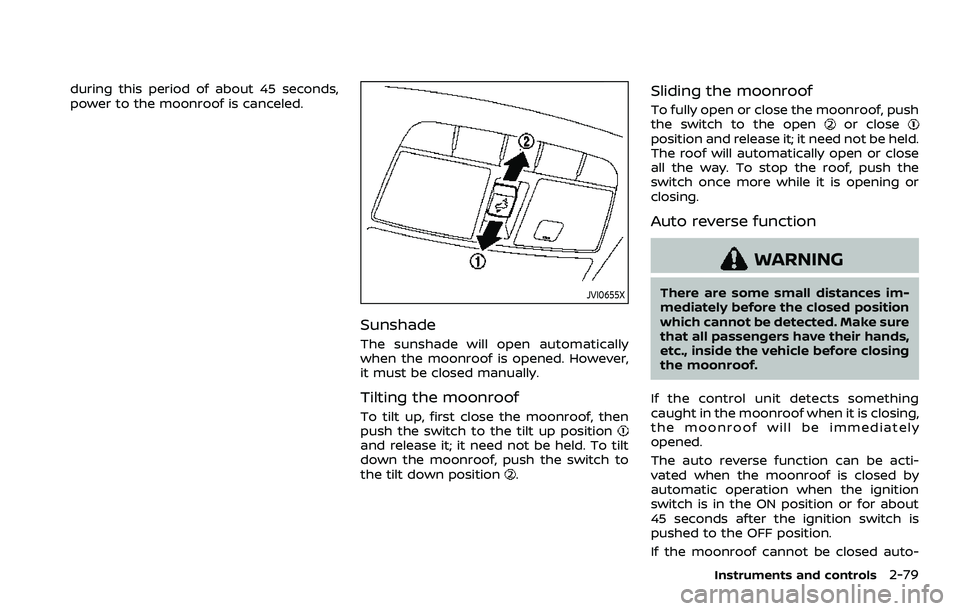
during this period of about 45 seconds,
power to the moonroof is canceled.
JVI0655X
Sunshade
The sunshade will open automatically
when the moonroof is opened. However,
it must be closed manually.
Tilting the moonroof
To tilt up, first close the moonroof, then
push the switch to the tilt up position
and release it; it need not be held. To tilt
down the moonroof, push the switch to
the tilt down position
.
Sliding the moonroof
To fully open or close the moonroof, push
the switch to the openor closeposition and release it; it need not be held.
The roof will automatically open or close
all the way. To stop the roof, push the
switch once more while it is opening or
closing.
Auto reverse function
WARNING
There are some small distances im-
mediately before the closed position
which cannot be detected. Make sure
that all passengers have their hands,
etc., inside the vehicle before closing
the moonroof.
If the control unit detects something
caught in the moonroof when it is closing,
the moonroof will be immediately
opened.
The auto reverse function can be acti-
vated when the moonroof is closed by
automatic operation when the ignition
switch is in the ON position or for about
45 seconds after the ignition switch is
pushed to the OFF position.
If the moonroof cannot be closed auto-
Instruments and controls2-79
Page 162 of 508
2-80Instruments and controls
matically when the auto reverse function
activates due to a malfunction, push and
hold the moonroof switch to the close
position
.
Depending on the environment or driv-
ing conditions, the auto reverse func-
tion may be activated if an impact or
load similar to something being caught
in the moonroof occurs.
If the moonroof does not operate
If the moonroof does not operate prop-
erly, perform the following procedure to
initialize the moonroof operation system.
1. If the moonroof is open, close it fully by repeatedly pushing the moonroof
switch to the close position
to tilt
the moonroof up.
2. Push and hold the switch to the close position
.
3. Release the moonroof switch after the moonroof moves slightly up and
down.
4. Push and hold the switch to the open position
to fully tilt the moonroof
down.
5. Check if the moonroof switch oper- ates normally.
If the moonroof does not operate prop-
erly after performing the procedure
above, have your moonroof checked and repaired. It is recommended you visit a
NISSAN dealer for this service.
CAUTION
.
Do not leave the light switch on
when the engine is not running
for extended periods of time to
prevent the battery from being
discharged.
. Turn off the lights when you leave
the vehicle.
INTERIOR LIGHTS
Page 240 of 508
4-34Monitor, heater, air conditioner, audio and phone systems
— The vehicle is covered with acar cover.
. Be sure that antenna is removed
before the vehicle enters an auto-
matic car wash.
. Always properly tighten the an-
tenna rod during installation.
Otherwise, the antenna rod may
break during vehicle operation.
. A build up of ice on the antenna
can affect radio performance. Re-
move the ice to restore radio
reception.
. When removing snow from the
roof, do not apply strong force to
the antenna. That may cause
broken antenna and roof panel
dent.
. When using a high pressure car
wash, keep the high pressure
nozzle away from the antenna.
The seal may be deformed or
damaged.
. The radio performance may be
affected if cargo carried on the
roof blocks the radio signal. If
possible, do not put cargo near
the antenna.When installing a car phone or a CB radio
in your vehicle, be sure to observe the
following precautions, otherwise the new
equipment may adversely affect the elec-
tronic control modules and electronic
control system harness.
WARNING
.A cellular phone should not be
used for any purpose while driv-
ing so full attention may be given
to vehicle operation. Some juris-
dictions prohibit the use of cellu-
lar phones while driving.
. If you must make a call while your
vehicle is in motion, the hands-
free cellular phone operational
mode (if so equipped) is highly
recommended. Exercise extreme
caution at all times so full atten-
tion may be given to vehicle
operation.
. If a conversation in a moving
vehicle requires you to take
notes, pull off the road to a safe
location and stop your vehicle
before doing so.
CAUTION
.Keep the antenna as far away as
possible from the electronic con-
trol modules.
. Keep the antenna wire more than
8 in (20 cm) away from the
electronic control system har-
ness. Do not route the antenna
wire next to any harness.
. Adjust the antenna standing-
wave ratio as recommended by
the manufacturer.
. Connect the ground wire from the
CB radio chassis to the body.
. For details, it is recommended
you visit a NISSAN dealer.
CAR PHONE OR CB RADIO
Page 251 of 508
keep you and your passengers in
position when driving over rough
terrain.
. Do not drive across steep slopes.
Instead drive either straight up or
straight down the slopes. Off-
road vehicles can tip over side-
ways much more easily than they
can forward or backward.
. Many hills are too steep for any
vehicle. If you drive up them, you
may stall. If you drive down them,
you may not be able to control
your speed. If you drive across
them, you may roll over.
. Do not shift ranges while driving
on downhill grades as this could
cause loss of control of the vehi-
cle.
. Stay alert when driving to the top
of a hill. At the top there could be
a drop-off or other hazard that
could cause an accident.
. If your engine stalls or you cannot
make it to the top of a steep hill,
never attempt to turn around.
Your vehicle could tip or roll over.
Always back straight down in R
(Reverse) range. Never back down
in N (Neutral), using only the
brake, as this could cause loss of control.
. Heavy braking going down a hill
could cause your brakes to over-
heat and fade, resulting in loss of
control and an accident. Apply
brakes lightly and use a low
range to control your speed.
. Unsecured cargo can be thrown
around when driving over rough
terrain. Properly secure all cargo
so it will not be thrown forward
and cause injury to you or your
passengers.
. To avoid raising the center of
gravity excessively, do not exceed
the rated capacity of the roof rack
(if so equipped) and evenly dis-
tribute the load. Secure heavy
loads in the cargo area as far
forward and as low as possible.
Do not equip the vehicle with tires
larger than specified in this man-
ual. This could cause your vehicle
to roll over.
. Do not grip the inside or spokes
of the steering wheel when driv-
ing off-road. The steering wheel
could move suddenly and injure
your hands. Instead drive with
your fingers and thumbs on the
outside of the rim. .
Before operating the vehicle, en-
sure that the driver and all pas-
sengers have their seat belts
fastened.
. Always drive with the floor mats
in place as the floor may became
hot.
. Lower your speed when encoun-
tering strong crosswinds. With a
higher center of gravity, your
vehicle is more affected by strong
side winds. Slower speeds ensure
better vehicle control.
. Do not drive beyond the perfor-
mance capability of the tires,
even with AWD engaged.
. For AWD equipped vehicles, do
not attempt to raise two wheels
off the ground and shift the
transmission to any drive or re-
verse position with the engine
running. Doing so may result in
drivetrain damage or unexpected
vehicle movement which could
result in serious vehicle damage
or personal injury.
. Do not attempt to test an AWD
equipped vehicle on a 2-wheel
dynamometer (such as the dy-
namometers used by some
states for emissions testing), or
Starting and driving5-11