transmission NISSAN ROGUE 2023 User Guide
[x] Cancel search | Manufacturer: NISSAN, Model Year: 2023, Model line: ROGUE, Model: NISSAN ROGUE 2023Pages: 508, PDF Size: 2.44 MB
Page 123 of 508
been driven since the time the ignition
switch was placed in the ON position. (The
elapsed time is also reset at the same
time.)
The elapsed time and trip odometer 2 is
automatically reset each time the ignition
is placed in the OFF position.
Resetting is done by pushing the OK
button. When the OKbutton is pushed,
the following menu items are displayed.
. Cancel
— Return to the previous screen with-
out resetting.
. Distance
— Reset the elapsed time and trip
odometer.
. All
— Reset all items of “Average Speed”,
“Elapsed time and trip odometer”
and “Fuel economy.”
Once the “Elapsed time and trip odometer
1” is displayed, you can use
buttons
to switch between the “Elapsed time and
trip odometer 1” and “Elapsed time and
trip odometer 2.”
4-5. Fuel economy/ECO pedal
guide
Current fuel consumption:
The current fuel consumption mode
shows the current fuel consumption.
Average fuel consumption:
The average fuel consumption 1 mode
shows the average fuel consumption
since the last reset. The average fuel
consumption 2 mode shows the average
fuel consumption since the time the
ignition switch was placed in the ON
position. The average fuel consumption
2 is automatically reset each time the
ignition is placed in the OFF position.
Resetting is done by pushing the OK
button. When the OKbutton is pushed,
the following menu items are displayed.
. Cancel
— Return to the previous screen with-
out resetting.
. Fuel Economy
— Reset the fuel economy.
. All
— Reset all items of “Average Speed”,
“Elapsed time and trip odometer”
and “Fuel economy”.
Once the “Fuel economy 1” is displayed,
you can use
buttons to switch
between the “Fuel economy 1” and “Fuel economy 2”.
The display is updated every 30 seconds.
For about the first 1/3 mile (500 m) after a
reset, the display shows “——”.
6. Audio
The audio mode shows the status of
audio information.
7. Navigation (if so equipped)
When the route guidance is set in the
navigation system, this item shows the
navigation route information.
8. Compass (if so equipped)
This display indicates the heading direc-
tion of the vehicle.
9. Intelligent 4x4 torque distribution
display (if so equipped)
When the Intelligent 4x4 torque distribu-
tion display is selected, you can view the
distribution ratio of the transmission
torque to the front and rear wheels
during driving.
Instruments and controls2-41
Page 124 of 508
2-42Instruments and controls
10. Chassis control
When Intelligent Trace Control, Intelligent
Engine Brake (Continuously Variable
Transmission (CVT) models) or Active Ride
Control system is operated, it shows the
operating condition. It also shows oper-
ating condition of Hill Start Assist. The
operating condition of the automatic
brake hold function (if so equipped) is
also shown. See “Intelligent Trace Control”
(P.5-133), “Intelligent Engine Brake (Con-
tinuously Variable Transmission (CVT)
models)” (P.5-134), “Active Ride Control”
(P.5-135), “Hill Start Assist system” (P.5-136)
or “Automatic brake hold” (P.5-29) for
more details.
11. Tire Pressures
The tire pressure mode shows the pres-
sure of all four tires while the vehicle is
driven.
When the Tire Pressure Low — Add Air
warning appears, the display can be
switched to the tire pressure mode by
pushing the OK
button to reveal addi-
tional details on the displayed warning.
12. Intelligent Driver Alertness (I-DA)
system (if so equipped)
When the “Driver Attention” display is
selected, you can view your attention
level as detected by the system. (See
“Intelligent Driver Alertness (I-DA)” (P.5-
94).)
13. Traffic Sign Recognition (if so
equipped)
The Traffic Sign Recognition (TSR) system
provides the driver with information
about the most recently detected speed
limit. See “Traffic Sign Recognition” (P.2-
43) for more details.
JVI0932X
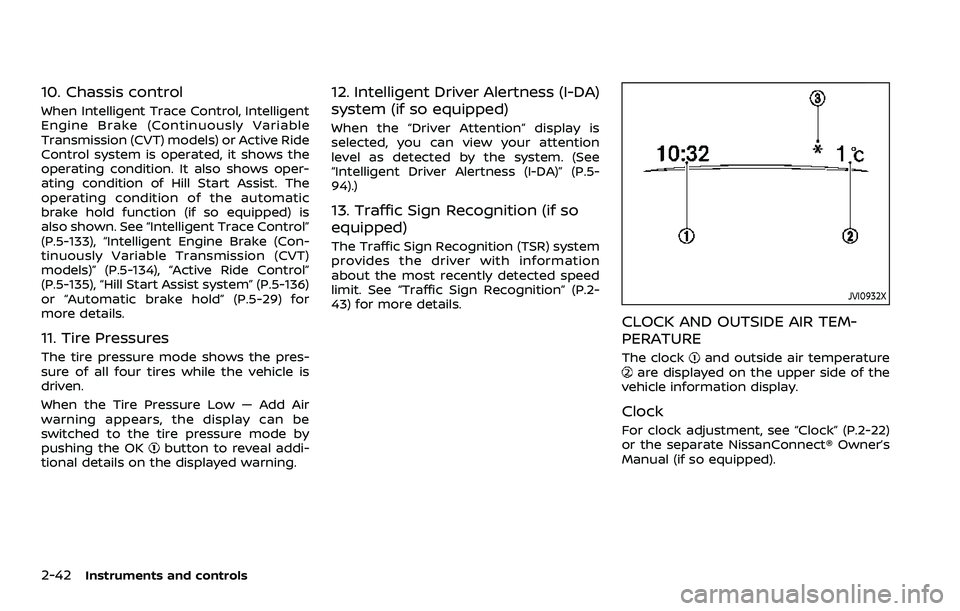
CLOCK AND OUTSIDE AIR TEM-
PERATURE
The clockand outside air temperatureare displayed on the upper side of the
vehicle information display.
Clock
For clock adjustment, see “Clock” (P.2-22)
or the separate NissanConnect® Owner’s
Manual (if so equipped).
Page 167 of 508
4. At the receiver located on the garagedoor opener motor in the garage,
locate the “learn” or “smart” button
(the name and color of the button
may vary by manufacturer but it is
usually located near where the hang-
ing antenna wire is attached to the
unit). If there is difficulty locating the
button, reference the garage door
opener’s manual.
5. Press and release the “learn” or “smart” button.
NOTE:
Once the button is pressed, you have
approximately 30 seconds to initiate
the next step.
6. Return to the vehicle and firmly press and hold the programmed HomeLink®
button for two seconds and release.
Repeat the “press/hold/release” se-
quence up to 3 times to complete
the programming process. HomeLink®
should now activate your rolling code
equipped device.
7. If you have any questions or are having difficulty programming your
HomeLink® buttons, refer to the
HomeLink® web site at: www.
homelink.com/nissan or call 1-800-
355-3515.PROGRAMMING HomeLink® FOR
CANADIAN CUSTOMERS AND GATE
OPENERS
Canadian radio-frequency laws require
transmitter signals to “time-out” (or quit)
after several seconds of transmission –
which may not be long enough for
HomeLink® to pick up the signal during
programming. Similar to this Canadian
law, some U.S. gate operators are de-
signed to “time-out” in the same manner.
If you live in Canada or you are having
difficulties programming a gate operator
or garage door opener by using the
“Programming HomeLink®” procedures,
replace “Programming HomeLink®” Step
2 with the following:
NOTE:
When programming a garage door
opener, etc., unplug the device during
the “cycling” process to prevent possi-
ble damage to the garage door opener
components.
Step 2: Using both hands, simultaneously
press and hold the desired HomeLink®
button and the hand-held transmitter
button. During programming, your hand-
held transmitter may automatically stop
transmitting. Continue to press and hold
the desired HomeLink® button while you
press and re-press (“cycle”) your hand- held transmitter every two seconds until
the frequency signal has been learned.
The HomeLink® indicator light will flash
slowly and then rapidly after several
seconds upon successful programming.
DO NOT
release until the HomeLink®
indicator light flashes slowly and then
rapidly. When the indicator light flashes
rapidly, both buttons may be released.
The rapid flashing indicates successful
programming.
Proceed with “Programming HomeLink®”
step 3 to complete.
Remember to plug the device back in
when programming is completed.
OPERATING THE HomeLink® UNI-
VERSAL TRANSCEIVER
The HomeLink® Universal Transceiver,
after it is programmed, can be used to
activate the programmed device. To op-
erate, simply press and release the appro-
priate programmed HomeLink® Universal
Transceiver button. The amber indicator
light will illuminate while the signal is
being transmitted.
For convenience, the hand-held transmit-
ter of the device may also be used at any
time.
Instruments and controls2-85
Page 185 of 508
Welcome light and farewell light
function
When you lock or unlock the doors or the
liftgate, the daytime running lights, park-
ing lights and the tail lights will illuminate
for a period of time. The welcome light
and farewell light function can be dis-
abled. For information about disabling
the welcome light and farewell light
function, see “Vehicle Settings” (P.2-23).
Locking doors
1. Move the shift lever to the P (Park)position (Continuously Variable Trans-
mission (CVT) models), or the shift
lever in the N (Neutral) position (Man-
ual Transmission (MT) models), place
the ignition switch in the OFF position
and make sure you carry the Intelli-
gent Key with you.
2. Close all doors.
3. Push any door handle request switch while carrying the Intelligent Key with
you.
4. All doors and the liftgate will lock.
5. The hazard indicator lights flash twice and the outside buzzer sounds twice.
NOTE:
. Request switches for all doors and
the liftgate can be deactivated when
the I-Key Door Lock setting is turned off in the Vehicle Settings of the
vehicle information display. For ad-
ditional information, see “Vehicle
Settings” (P.2-23).
. Doors lock with the door handle
request switch while the ignition
switch is not in the LOCK position.
. Doors do not lock by pushing the
door handle request switch while
any door is open. However, doors
lock by pushing the driver’s side
door handle request switch while
the driver’s door is closed.
. Doors do not lock with the door
handle request switch with the In-
telligent Key inside the vehicle and a
beep sounds to warn you. However,
when an Intelligent Key is inside the
vehicle, doors can be locked with
another Intelligent Key.
CAUTION
.After locking the doors using the
request switch, make sure that
the doors have been securely
locked by operating the door
handles or the liftgate opener
switch.
. When locking the doors using the
request switch, make sure to have the Intelligent Key in your
possession before operating the
request switch to prevent the
Intelligent Key from being left in
the vehicle.
. The request switch is operational
only when the Intelligent Key has
been detected by the Intelligent
Key system.
Unlocking doors
1. Push the door handle request switchor the liftgate request switchwhile carrying the Intelligent Key with
you.
2. The hazard indicator flashes once and outside chime sounds once. The cor-
responding door or the liftgate will
unlock.
3. Push the request switch again within 1 minute.
4. The hazard indicator flashes once and outside chime sounds once again. All
the doors and the liftgate will unlock.
All doors will be locked automatically
unless one of the following operations is
performed within 1 minute after pushing
the request switch while the doors are
locked.
Pre-driving checks and adjustments3-15
Page 241 of 508
5 Starting and driving
Precautions when starting and driving ...................... 5-4Exhaust gas (carbon monoxide) ................................ 5-4
Three-way catalyst ............................................................... 5-4
Tire Pressure Monitoring System (TPMS) ........... 5-5
Avoiding collision and rollover .................................... 5-8
On-pavement and off-road
driving precautions .............................................................. 5-9
Off-road recovery .................................................................. 5-9
Rapid air pressure loss ...................................................... 5-9
Drinking alcohol/drugs and driving ..................... 5-10
Driving safety precautions .......................................... 5-10
Ignition switch (models without Intelligent
Key system) ........................................................................\
............ 5-12
Continuously Variable
Transmission (CVT) ............................................................ 5-13
Manual Transmission (MT) ........................................... 5-13
Key positions ........................................................................\
.. 5-14
Push-button ignition switch (model with
Intelligent Key system) .......................................................... 5-14 Operating range for engine start function ...... 5-14
Push-button ignition switch operation ............. 5-15
Push-button ignition switch positions .............. 5-16
Emergency engine shut off ........................................ 5-16
Intelligent Key battery discharge ........................... 5-17
Before starting the engine ................................................. 5-17 Starting the engine (model without Intelligent
Key system) ........................................................................\
........... 5-18
Starting the engine (model with Intelligent
Key system) ........................................................................\
........... 5-19
Remote engine start (if so equipped) .............. 5-20
Driving the vehicle ................................................................... 5-20
Continuously Variable
Transmission (CVT) ......................................................... 5-20
Manual Transmission (MT) ........................................ 5-25
Parking brake ........................................................................\
....... 5-27
Pedal type ........................................................................\
....... 5-27
Switch type (models with electronic
parking brake system) ................................................. 5-27
Automatic brake hold (if so equipped) .................... 5-29 How to activate/deactivate the automatic
brake hold function ........................................................ 5-30
How to use the automatic brake
hold function ........................................................................\
5-31
SPORT mode switch (if so equipped) ....................... 5-32
ECO mode system ................................................................... 5-32
ECO Pedal Guide function ......................................... 5-33
Ambient ECO ........................................................................\
5-34
ECO Drive Report .............................................................. 5-34
Lane Departure Warning (LDW) ..................................... 5-35 LDW system operation ................................................. 5-36
How to enable/disable the LDW system ....... 5-37
Page 243 of 508
Turning the AEB with Pedestrian Detection
system ON/OFF ................................................................ 5-100
AEB with Pedestrian Detection
system limitations .......................................................... 5-101
System temporarily unavailable ......................... 5-105
System malfunction ...................................................... 5-105
System maintenance ................................................... 5-106
Intelligent Forward Collision
Warning (I-FCW) ....................................................................... 5-107 I-FCW system operation ............................................ 5-109
Turning the I-FCW system ON/OFF ................. 5-110
I-FCW system limitations .......................................... 5-112
System temporarily unavailable ......................... 5-114
System malfunction ...................................................... 5-114
System maintenance ................................................... 5-115
Rear Automatic Braking (RAB) .................................... 5-116 RAB system operation ................................................ 5-117
Turning the RAB system ON/OFF ...................... 5-117
RAB system limitations .............................................. 5-118
System malfunction ...................................................... 5-120
System maintenance ................................................... 5-121
Break-in schedule ................................................................. 5-121
Fuel Efficient Driving Tips ................................................ 5-122
Increasing fuel economy ................................................. 5-123
Intelligent 4x4 (if so equipped) ................................... 5-123 Intelligent 4x4 LOCK switch operations ...... 5-125
Parking/parking on hills ................................................... 5-127 Electric power steering .................................................... 5-128
Brake system ........................................................................\
... 5-129
Braking precautions ................................................... 5-129
Brake assist ........................................................................\
....... 5-130
Brake assist ....................................................................... 5-130
Anti-lock Braking System (ABS) ........................ 5-130
Vehicle Dynamic Control (VDC) system .............. 5-131
Chassis control ....................................................................... 5-133
Intelligent Trace Control ......................................... 5-133
Intelligent Engine Brake (Continuously
Variable Transmission (CVT) models) .......... 5-134
Active Ride Control ..................................................... 5-135
Hill Start Assist system ..................................................... 5-136
Rear Sonar System (RSS) ................................................ 5-136
System operation ......................................................... 5-137
How to enable/disable the RSS ........................ 5-139
RSS limitations ................................................................ 5-140
System temporarily unavailable ....................... 5-140
System maintenance ................................................ 5-141
Cold weather driving ......................................................... 5-141 Freeing a frozen door lock ................................... 5-141
Anti-freeze ........................................................................\
.. 5-141
Battery ........................................................................\
........... 5-141
Draining of coolant water ..................................... 5-141
Tire equipment ............................................................... 5-142
Special winter equipment ..................................... 5-142
Driving on snow or ice ............................................. 5-142
Page 251 of 508
keep you and your passengers in
position when driving over rough
terrain.
. Do not drive across steep slopes.
Instead drive either straight up or
straight down the slopes. Off-
road vehicles can tip over side-
ways much more easily than they
can forward or backward.
. Many hills are too steep for any
vehicle. If you drive up them, you
may stall. If you drive down them,
you may not be able to control
your speed. If you drive across
them, you may roll over.
. Do not shift ranges while driving
on downhill grades as this could
cause loss of control of the vehi-
cle.
. Stay alert when driving to the top
of a hill. At the top there could be
a drop-off or other hazard that
could cause an accident.
. If your engine stalls or you cannot
make it to the top of a steep hill,
never attempt to turn around.
Your vehicle could tip or roll over.
Always back straight down in R
(Reverse) range. Never back down
in N (Neutral), using only the
brake, as this could cause loss of control.
. Heavy braking going down a hill
could cause your brakes to over-
heat and fade, resulting in loss of
control and an accident. Apply
brakes lightly and use a low
range to control your speed.
. Unsecured cargo can be thrown
around when driving over rough
terrain. Properly secure all cargo
so it will not be thrown forward
and cause injury to you or your
passengers.
. To avoid raising the center of
gravity excessively, do not exceed
the rated capacity of the roof rack
(if so equipped) and evenly dis-
tribute the load. Secure heavy
loads in the cargo area as far
forward and as low as possible.
Do not equip the vehicle with tires
larger than specified in this man-
ual. This could cause your vehicle
to roll over.
. Do not grip the inside or spokes
of the steering wheel when driv-
ing off-road. The steering wheel
could move suddenly and injure
your hands. Instead drive with
your fingers and thumbs on the
outside of the rim. .
Before operating the vehicle, en-
sure that the driver and all pas-
sengers have their seat belts
fastened.
. Always drive with the floor mats
in place as the floor may became
hot.
. Lower your speed when encoun-
tering strong crosswinds. With a
higher center of gravity, your
vehicle is more affected by strong
side winds. Slower speeds ensure
better vehicle control.
. Do not drive beyond the perfor-
mance capability of the tires,
even with AWD engaged.
. For AWD equipped vehicles, do
not attempt to raise two wheels
off the ground and shift the
transmission to any drive or re-
verse position with the engine
running. Doing so may result in
drivetrain damage or unexpected
vehicle movement which could
result in serious vehicle damage
or personal injury.
. Do not attempt to test an AWD
equipped vehicle on a 2-wheel
dynamometer (such as the dy-
namometers used by some
states for emissions testing), or
Starting and driving5-11
Page 253 of 508
JVS1067X
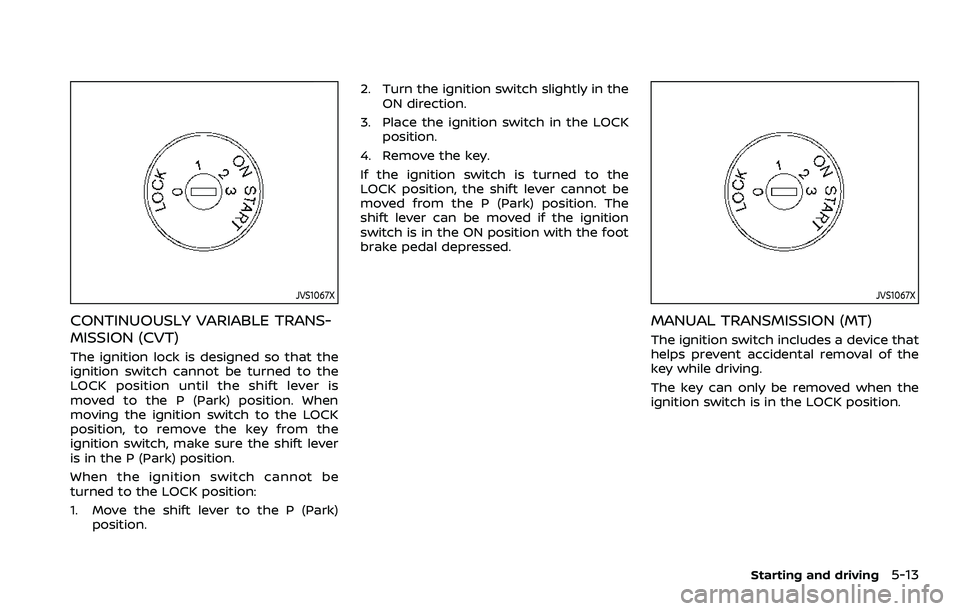
CONTINUOUSLY VARIABLE TRANS-
MISSION (CVT)
The ignition lock is designed so that the
ignition switch cannot be turned to the
LOCK position until the shift lever is
moved to the P (Park) position. When
moving the ignition switch to the LOCK
position, to remove the key from the
ignition switch, make sure the shift lever
is in the P (Park) position.
When the ignition switch cannot be
turned to the LOCK position:
1. Move the shift lever to the P (Park)position. 2. Turn the ignition switch slightly in the
ON direction.
3. Place the ignition switch in the LOCK position.
4. Remove the key.
If the ignition switch is turned to the
LOCK position, the shift lever cannot be
moved from the P (Park) position. The
shift lever can be moved if the ignition
switch is in the ON position with the foot
brake pedal depressed.
JVS1067X
MANUAL TRANSMISSION (MT)
The ignition switch includes a device that
helps prevent accidental removal of the
key while driving.
The key can only be removed when the
ignition switch is in the LOCK position.
Starting and driving5-13
Page 254 of 508
5-14Starting and driving
KEY POSITIONS
LOCK: Normal parking position (0)
OFF: (Not used) (1)
This position activates electrical acces-
sories such as the radio when the engine
is not running.
ON: Normal operating position (2)
This position turns on the ignition system
and the electrical accessories.
START: (3)
This position starts the engine. As soon as
the engine has started, release the key. It
automatically returns to the ON position.
WARNING
Do not operate the push-button
ignition switch while driving the ve-
hicle except in an emergency. (The
engine will stop when the ignition
switch is pushed 3 consecutive times
or the ignition switch is pushed and
held for more than 2 seconds.) If the
engine stops while the vehicle is
being driven, this could lead to a
crash and serious injury.
Before operating the push-button igni-
tion switch, be sure to move the shift
lever to the P (Park) position (for Con-
tinuously Variable Transmission (CVT)
models) or the shift lever to the N
(Neutral) position (for Manual Transmis-
sion (MT) models).
SSD0436
OPERATING RANGE FOR ENGINE
START FUNCTION
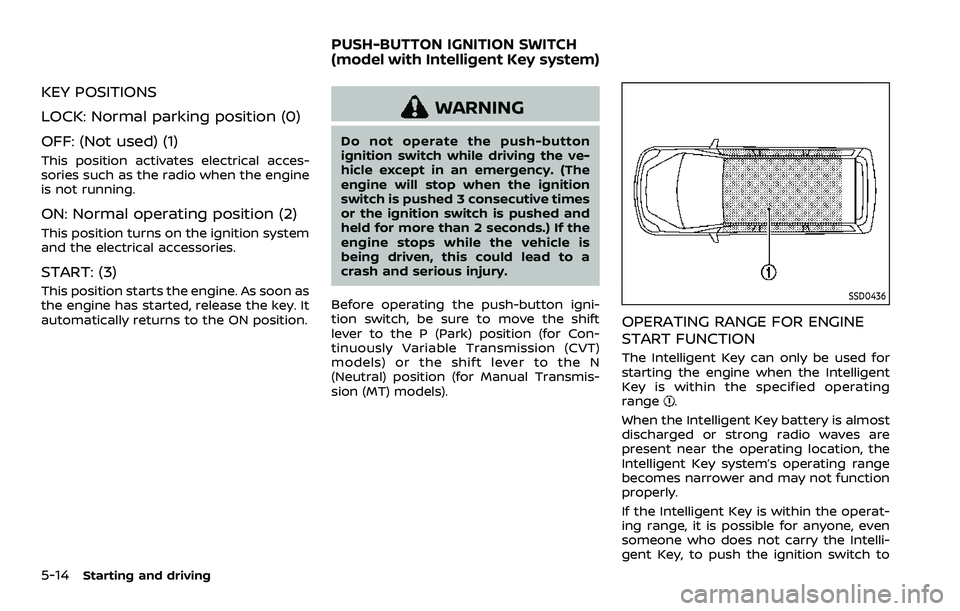
The Intelligent Key can only be used for
starting the engine when the Intelligent
Key is within the specified operating
range
.
When the Intelligent Key battery is almost
discharged or strong radio waves are
present near the operating location, the
Intelligent Key system’s operating range
becomes narrower and may not function
properly.
If the Intelligent Key is within the operat-
ing range, it is possible for anyone, even
someone who does not carry the Intelli-
gent Key, to push the ignition switch to
PUSH-BUTTON IGNITION SWITCH
(model with Intelligent Key system)
Page 258 of 508
5-18Starting and driving
1. Apply the parking brake.
2.Continuously Variable Transmission
(CVT) model:
Move the shift lever to the P (Park) or N
(Neutral) position. (P is recommended.)
The starter is designed so that it does
not operate unless the shift lever is in
either of the above positions.
Manual Transmission (MT) model:
Move the shift lever to the N (Neutral)
position, and depress the clutch pedal
to the floor while starting the engine.
3. Crank the engine with your foot off
the accelerator pedal by turning the
ignition switch to START. Release the
switch when the engine starts. If the
engine starts, but fails to run, repeat
the above procedure.
.If the engine is very hard to start in
extremely cold weather or when
restarting, depress the accelerator
pedal a little (approximately 1/3 to
the floor) and hold it and then
crank the engine. Release the ac-
celerator pedal when the engine
starts.
.If the engine is very hard to startbecause it is flooded, depress the
accelerator pedal all the way to the
floor and hold it. Crank the engine
for 5 - 6 seconds. After cranking the engine, release the accelerator
pedal. Crank the engine
with your
foot off the accelerator pedal by
turning the ignition switch to
START. Release the ignition switch
when the engine starts. If the
engine starts, but fails to run, re-
peat the above procedure.
CAUTION
Do not operate the starter for more
than 15 seconds at a time. If the
engine does not start, turn the igni-
tion switch off and wait 10 seconds
before cranking again, otherwise the
starter could be damaged.
Do not turn the ignition switch to the
START position unless the engine
and starter have stopped moving.
Attempting to start the engine while
the engine or starter is moving may
cause damage.
4. Warm-up
Allow the engine to idle for at least 30
seconds after starting. Do not race the
engine while warming it up. Drive at
moderate speed for a short distance
first, especially in cold weather. In cold
weather, keep the engine running for a minimum of 2 - 3 minutes before
shutting it off. Starting and stopping
the engine over a short period of time
may make the vehicle more difficult to
start.
5. To stop the engine, shift the shift lever to the P (Park) position (CVT model) or
N (Neutral) position (MT model) and
turn the ignition switch to the OFF
position.
NOTE:
Care should be taken to avoid situations
that can lead to potential battery dis-
charge and potential no-start condi-
tions such as:
1. Installation or extended use of elec-
tronic accessories that consume
battery power when the engine is
not running (Phone chargers, GPS,
DVD players, etc.)
2. Vehicle is not driven regularly and/
or only driven short distances.
In these cases, the battery may need to
be charged to maintain battery health.
STARTING THE ENGINE (model
without Intelligent Key system)