maintenance NISSAN ROGUE 2023 Owner's Manual
[x] Cancel search | Manufacturer: NISSAN, Model Year: 2023, Model line: ROGUE, Model: NISSAN ROGUE 2023Pages: 508, PDF Size: 2.44 MB
Page 279 of 508

the LDW system will resume operating
automatically and the LDW indicator will
stop flashing.
Condition B:
The warning function of the LDW system
is not designed to work under the follow-
ing conditions:
.When you operate the lane change
signal and change traveling lanes in
the direction of the signal. (The LDW
system will become operable again
approximately 2 seconds after the
lane change signal is turned off.)
. When the vehicle speed lowers to less
than approximately 37 MPH (60 km/h).
Action to take:
After the above conditions have finished
and the necessary operating conditions
are satisfied, the LDW system will resume.SYSTEM MALFUNCTION
If the LDW system malfunctions, it will
cancel automatically and “Malfunction”
will appear in the vehicle information
display. If the warning message appears
in the vehicle information display, pull off
the road to a safe location and stop the
vehicle. Place the ignition switch in the
OFF position and restart the engine. If the
warning message continues to appear in
the vehicle information display, have the
system checked. It is recommended that
you visit a NISSAN dealer for this service.
WAC0198X
SYSTEM MAINTENANCE
The camera unitfor the LDW system is
located above the inside mirror.
To keep the proper operation of the LDW
system and prevent a system malfunc-
tion, be sure to observe the following:
. Always keep the windshield clean.
. Do not attach a sticker (including
transparent material) or install an
accessory near the camera unit.
. Do not place reflective materials, such
as white paper or a mirror, on the
instrument panel. The reflection of
sunlight may adversely affect the
camera unit’s capability of detecting
the lane markers.
Starting and driving5-39
Page 285 of 508

exist, turn off the I-LI system. Push the
dynamic driver assistance switch (models
without ProPILOT assist) or the ProPILOT
assist switch (models with ProPILOT as-
sist) again to turn the I-LI system back on.
Temporary disabled status at high tem-
perature:
If the vehicle is parked in direct sunlight
under high temperature conditions (over
approximately 104°F (40°C)) and then the
I-LI system is turned on, the I-LI system
may be deactivated automatically and
the following message will appear on
the vehicle information display: “Unavail-
able: High Cabin Temperature.” When the
interior temperature is reduced, the sys-
tem will resume operating automatically.
SYSTEM MALFUNCTION
If the I-LI system malfunctions, it will
cancel automatically. The I-LI indicator
(orange) will illuminate and the “Malfunc-
tion” warning message will appear in the
display.
If the I-LI indicator (orange) illuminates in
the display, pull off the road to a safe
location. Turn the engine off and restart
the engine. If the I-LI indicator (orange)
continues to illuminate, have the I-LI
system checked. It is recommended that
you visit a NISSAN dealer for this service.
WAC0198X
SYSTEM MAINTENANCE
The camera unitfor the I-LI system is
located above the inside mirror. To keep
the proper operation of the I-LI system
and prevent a system malfunction, be
sure to observe the following:
. Always keep the windshield clean.
. Do not attach a sticker (including
transparent material) or install an
accessory near the camera unit.
. Do not place reflective materials, such
as white paper or a mirror, on the
instrument panel. The reflection of
sunlight may adversely affect the
camera unit’s capability of detecting
the lane markers. .
Do not strike or damage the areas
around the camera unit. Do not touch
the camera lens or remove the screw
located on the camera unit. If the
camera unit is damaged due to an
accident, it is recommended that you
visit a NISSAN dealer.
Starting and driving5-45
Page 293 of 508
condition may also be caused by objects
such as ice, frost or dirt obstructing the
radar sensors.
NOTE:
If the BSW system stops working, the
RCTA system will also stop working.
Action to take:
When the above conditions no longer
exist, the system will resume automati-
cally.
If the “Unavailable: Side Radar Obstruc-
tion” warning message continues to ap-
pear, have the system checked. It is
recommended that you visit a NISSAN
dealer for this service.
SYSTEM MALFUNCTION
When the BSW system malfunctions, it will
be turned off automatically and the
system malfunction warning message will
appear in the vehicle information display.
NOTE:
If the BSW system stops working, the
RCTA system will also stop working.
Action to take:
Stop the vehicle in a safe location, turn
the engine off and restart the engine. If
the message continues to appear, have
the BSW system checked. It is recom-
mended that you visit a NISSAN dealer for
this service.
JVS0649X
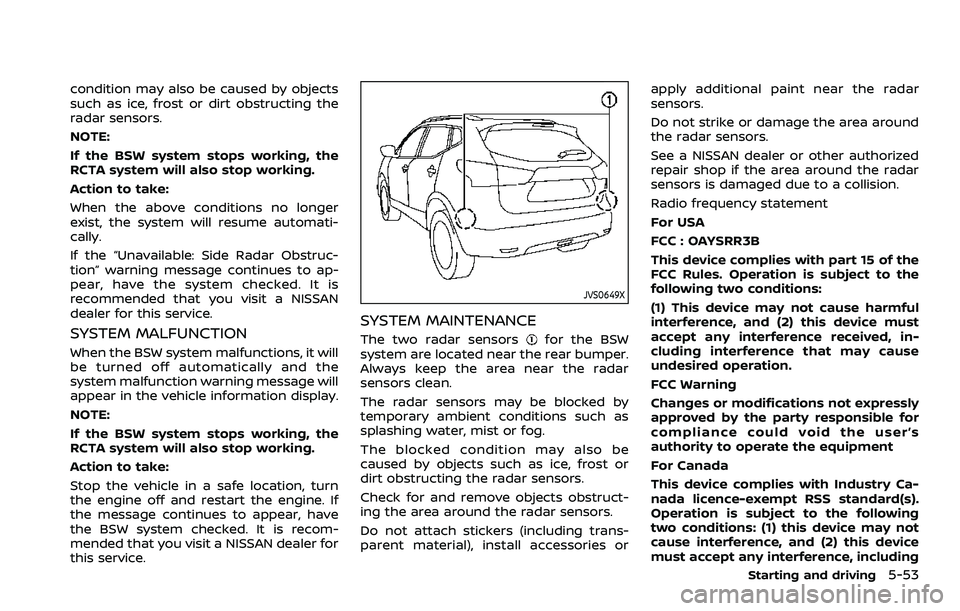
SYSTEM MAINTENANCE
The two radar sensorsfor the BSW
system are located near the rear bumper.
Always keep the area near the radar
sensors clean.
The radar sensors may be blocked by
temporary ambient conditions such as
splashing water, mist or fog.
The blocked condition may also be
caused by objects such as ice, frost or
dirt obstructing the radar sensors.
Check for and remove objects obstruct-
ing the area around the radar sensors.
Do not attach stickers (including trans-
parent material), install accessories or apply additional paint near the radar
sensors.
Do not strike or damage the area around
the radar sensors.
See a NISSAN dealer or other authorized
repair shop if the area around the radar
sensors is damaged due to a collision.
Radio frequency statement
For USA
FCC : OAYSRR3B
This device complies with part 15 of the
FCC Rules. Operation is subject to the
following two conditions:
(1) This device may not cause harmful
interference, and (2) this device must
accept any interference received, in-
cluding interference that may cause
undesired operation.
FCC Warning
Changes or modifications not expressly
approved by the party responsible for
compliance could void the user’s
authority to operate the equipment
For Canada
This device complies with Industry Ca-
nada licence-exempt RSS standard(s).
Operation is subject to the following
two conditions: (1) this device may not
cause interference, and (2) this device
must accept any interference, including
Starting and driving5-53
Page 301 of 508
caused by objects such as ice, frost or dirt
obstructing the radar sensors.
NOTE:
If the BSW system stops working, the
RCTA system will also stop working.
Action to take:
When the above conditions no longer
exist, the system will resume automati-
cally.
SYSTEM MALFUNCTION
When the RCTA system malfunctions, it
will turn off automatically. The system
malfunction warning message will appear
in the vehicle information display.
NOTE:
If the BSW system stops working, the
RCTA system will also stop working.
Action to take:
Stop the vehicle in a safe location, turn
the engine off and restart the engine. If
the message continues to appear, have
the system checked. It is recommended
that you visit a NISSAN dealer for this
service.
JVS0649X
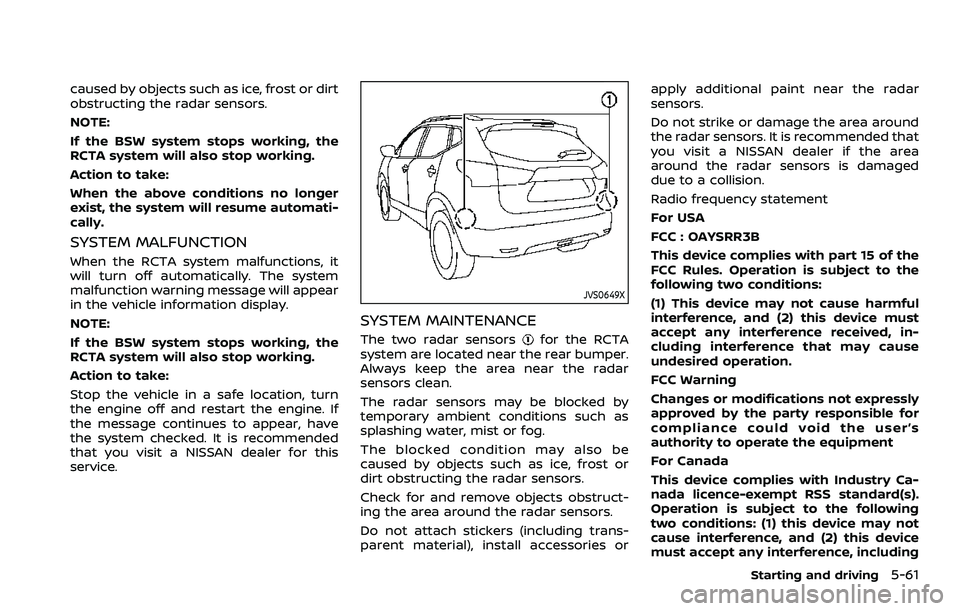
SYSTEM MAINTENANCE
The two radar sensorsfor the RCTA
system are located near the rear bumper.
Always keep the area near the radar
sensors clean.
The radar sensors may be blocked by
temporary ambient conditions such as
splashing water, mist or fog.
The blocked condition may also be
caused by objects such as ice, frost or
dirt obstructing the radar sensors.
Check for and remove objects obstruct-
ing the area around the radar sensors.
Do not attach stickers (including trans-
parent material), install accessories or apply additional paint near the radar
sensors.
Do not strike or damage the area around
the radar sensors. It is recommended that
you visit a NISSAN dealer if the area
around the radar sensors is damaged
due to a collision.
Radio frequency statement
For USA
FCC : OAYSRR3B
This device complies with part 15 of the
FCC Rules. Operation is subject to the
following two conditions:
(1) This device may not cause harmful
interference, and (2) this device must
accept any interference received, in-
cluding interference that may cause
undesired operation.
FCC Warning
Changes or modifications not expressly
approved by the party responsible for
compliance could void the user’s
authority to operate the equipment
For Canada
This device complies with Industry Ca-
nada licence-exempt RSS standard(s).
Operation is subject to the following
two conditions: (1) this device may not
cause interference, and (2) this device
must accept any interference, including
Starting and driving5-61
Page 324 of 508

5-84Starting and driving
ICC system malfunction
If the ICC system malfunctions, it will be
turned off automatically, a chime will
sound, and the speed control status
warning (orange) will illuminate.
Action to take:
If the warning illuminates, stop the vehicle
in a safe place. Turn the engine off, restart
the engine and set the ICC system again.
If it is not possible to set the ICC system or
the warning stays on, it may be a
malfunction. Although the normal driving
can be continued, the ICC system should
be inspected. It is recommended that you
visit a NISSAN dealer for this service.
ICC sensor maintenance
The radar sensor is located on the front of
the vehicle.
To keep the ICC system operating prop-
erly, be sure to observe the following:
.Always keep the sensor area clean.
. Do not strike or damage the areas
around the sensor.
. Do not attach a sticker (including
transparent material) or install an
accessory near the sensor. This could
cause failure or malfunction.
. Do not attach metallic objects near
the sensor area (brush guard, etc.).
This could cause failure or malfunc- tion.
. Do not alter, remove, or paint the front
bumper.
Before customizing or restoring the front
bumper, it is recommended that you visit
a NISSAN dealer.
The camera sensor is located above the
inside mirror.
To keep the proper operation of the
systems and prevent a system malfunc-
tion, be sure to observe the following:
. Always keep the windshield clean.
. Do not attach a sticker (including
transparent material) or install an
accessory near the camera unit.
. Do not place reflective materials, such
as white paper or a mirror, on the
instrument panel. The reflection of
sunlight may adversely affect the
camera unit’s capability of detecting
the lane markers.
. Do not strike or damage the areas
around the camera unit. Do not touch
the camera lens or remove the screw
located on the camera unit.
If the camera unit is damaged due to an
accident, it is recommended that you visit
a NISSAN dealer.
STEERING ASSIST
WARNING
Failure to follow the warnings and
instructions for proper use of the
steering assist could result in serious
injury or death.
. The steering assist is not a repla-
cement for proper driving proce-
dures and is not designed to
correct careless, inattentive or
absent-minded driving. The
steering assist will not always
steer the vehicle to keep it in the
lane. It is not designed to prevent
loss of control. It is the driver’s
responsibility to stay alert, drive
safely, keep the vehicle in the
traveling lane, and be in control
of the vehicle at all times.
. As there is a performance limit to
the steering assist’s capability,
never rely solely on the system.
The steering assist does not func-
tion in all driving, traffic, weather,
and road conditions. Always drive
safely, pay attention to the op-
eration of the vehicle, and manu-
ally control your vehicle
appropriately.
Page 330 of 508

5-90Starting and driving
Action to take:
Stop the vehicle in a safe location, place
the shift lever in the P (Park) position, turn
the engine off, restart the engine, resume
driving, and set the ICC system again. If
the warning (orange) continues to illumi-
nate, the steering assist is malfunctioning.
Although the vehicle is still drivable under
normal conditions, have the system
checked. It is recommended that you visit
a NISSAN dealer for this service.
Steering assist maintenance
The camera is located above the inside
mirror.
To keep the proper operation of the
system and prevent a system malfunc-
tion, be sure to observe the following:
.Always keep the windshield clean.
. Do not attach a sticker (including
transparent material) or install an
accessory near the camera unit.
. Do not place reflective materials, such
as white paper or a mirror, on the
instrument panel. The reflection of
sunlight may adversely affect the
camera unit’s capability of detecting
the lane markers.
. Do not strike or damage the areas
around the camera unit. Do not touch
the camera lens or remove the screw
located on the camera unit. If the camera unit is damaged due to an
accident, it is recommendedthat you visit
a NISSAN dealer.
Radio frequency statement:
For USA
FCC ID OAYARS4B
This device complies with Part 15 of the
FCC Rules. Operation is subject to the
following two conditions:
1. This device may not cause harmful
interference, and
2. This device must accept any interfer- ence received, including interference
that may cause undesired operation.
FCC Warning
Changes or modifications not expressly
approved by the party responsible for
compliance could void the user’s author-
ity to operate the equipment.
For Canada
Model: ARS4–B
IC: 4135A-ARS4B
FCC ID: OAYARS4B
This device complies with Part 15 of the
FCC Rules and with Industry Canada
licence-exempt RSS standard(s). Opera-
tion is subject to the following two con-
ditions: 1. This device may not cause harmful
interference, and
2. This device must accept any interfer- ence received, including interference
that may cause undesired operation.
Le present appareil est conforme aux CNR
d’Industrie Canada applicables aux appa-
reils radio exempts de licence. L’exploita-
tion est autorisee aux deux conditions
suivantes:
1. L’appareil ne doit pas produire de brouillage, et
2. L’utilisateur de l’appareil doit accepter tout brouillage radioelectrique subi,
meme si le brouillage est susceptible
d’en compromettre le fonctionne-
ment.
Radio Frequency Radiation Exposure In-
formation:
This equipment complies with FCC radia-
tion exposure limits set forth for an
uncontrolled environment.
This equipment should be installed and
operated with minimum distance of 30
cm between the radiator and your body.
The transmitter must not be co-located
or operating in conjunction with any
other antenna or transmitter.
Cet equipement est conforme aux limites
d’exposition aux rayonnements IC eta-
Page 346 of 508
5-106Starting and driving
Action to take:
If the warning light (orange) comes on,
stop the vehicle in a safe location. Turn
the engine off and restart the engine. If
the warning light continues to illuminate,
have the AEB with Pedestrian Detection
system checked. It is recommended that
you visit a NISSAN dealer for this service.
WAF0286X
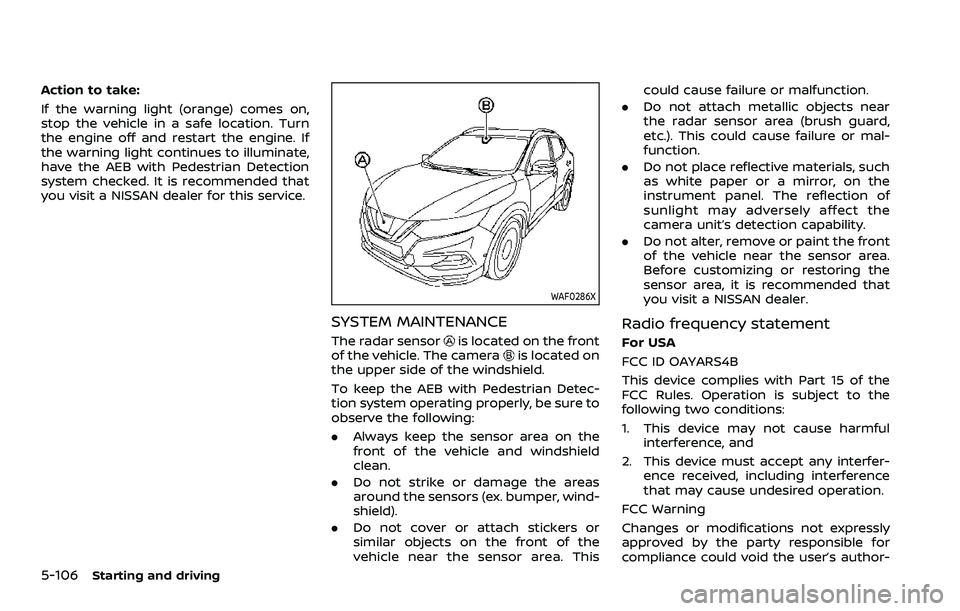
SYSTEM MAINTENANCE
The radar sensoris located on the front
of the vehicle. The camerais located on
the upper side of the windshield.
To keep the AEB with Pedestrian Detec-
tion system operating properly, be sure to
observe the following:
. Always keep the sensor area on the
front of the vehicle and windshield
clean.
. Do not strike or damage the areas
around the sensors (ex. bumper, wind-
shield).
. Do not cover or attach stickers or
similar objects on the front of the
vehicle near the sensor area. This could cause failure or malfunction.
. Do not attach metallic objects near
the radar sensor area (brush guard,
etc.). This could cause failure or mal-
function.
. Do not place reflective materials, such
as white paper or a mirror, on the
instrument panel. The reflection of
sunlight may adversely affect the
camera unit’s detection capability.
. Do not alter, remove or paint the front
of the vehicle near the sensor area.
Before customizing or restoring the
sensor area, it is recommended that
you visit a NISSAN dealer.
Radio frequency statement
For USA
FCC ID OAYARS4B
This device complies with Part 15 of the
FCC Rules. Operation is subject to the
following two conditions:
1. This device may not cause harmful
interference, and
2. This device must accept any interfer- ence received, including interference
that may cause undesired operation.
FCC Warning
Changes or modifications not expressly
approved by the party responsible for
compliance could void the user’s author-
Page 355 of 508
WAF0285X
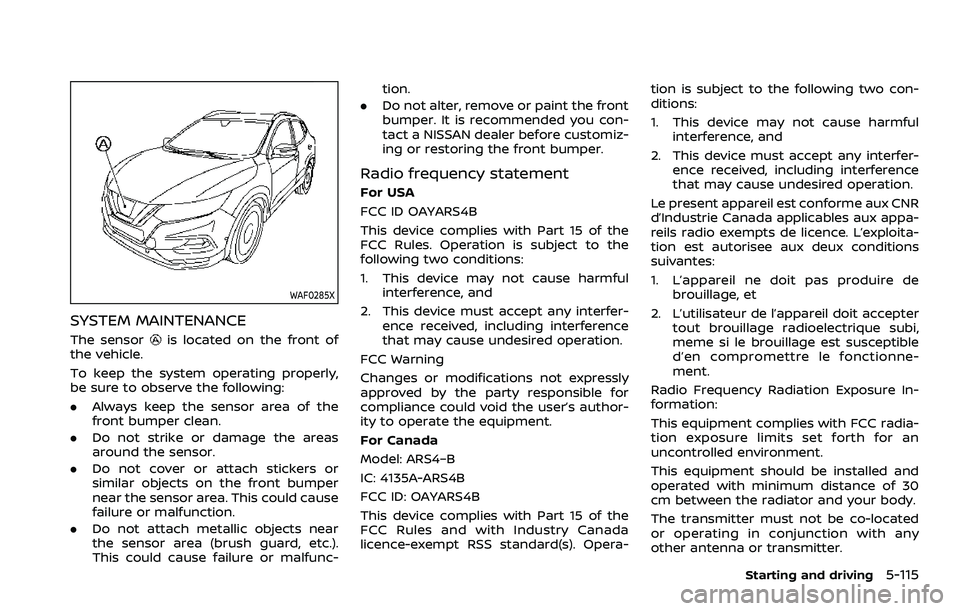
SYSTEM MAINTENANCE
The sensoris located on the front of
the vehicle.
To keep the system operating properly,
be sure to observe the following:
. Always keep the sensor area of the
front bumper clean.
. Do not strike or damage the areas
around the sensor.
. Do not cover or attach stickers or
similar objects on the front bumper
near the sensor area. This could cause
failure or malfunction.
. Do not attach metallic objects near
the sensor area (brush guard, etc.).
This could cause failure or malfunc- tion.
. Do not alter, remove or paint the front
bumper. It is recommended you con-
tact a NISSAN dealer before customiz-
ing or restoring the front bumper.
Radio frequency statement
For USA
FCC ID OAYARS4B
This device complies with Part 15 of the
FCC Rules. Operation is subject to the
following two conditions:
1. This device may not cause harmful
interference, and
2. This device must accept any interfer- ence received, including interference
that may cause undesired operation.
FCC Warning
Changes or modifications not expressly
approved by the party responsible for
compliance could void the user’s author-
ity to operate the equipment.
For Canada
Model: ARS4–B
IC: 4135A-ARS4B
FCC ID: OAYARS4B
This device complies with Part 15 of the
FCC Rules and with Industry Canada
licence-exempt RSS standard(s). Opera- tion is subject to the following two con-
ditions:
1. This device may not cause harmful
interference, and
2. This device must accept any interfer- ence received, including interference
that may cause undesired operation.
Le present appareil est conforme aux CNR
d’Industrie Canada applicables aux appa-
reils radio exempts de licence. L’exploita-
tion est autorisee aux deux conditions
suivantes:
1. L’appareil ne doit pas produire de brouillage, et
2. L’utilisateur de l’appareil doit accepter tout brouillage radioelectrique subi,
meme si le brouillage est susceptible
d’en compromettre le fonctionne-
ment.
Radio Frequency Radiation Exposure In-
formation:
This equipment complies with FCC radia-
tion exposure limits set forth for an
uncontrolled environment.
This equipment should be installed and
operated with minimum distance of 30
cm between the radiator and your body.
The transmitter must not be co-located
or operating in conjunction with any
other antenna or transmitter.
Starting and driving5-115
Page 361 of 508
WAF0077X
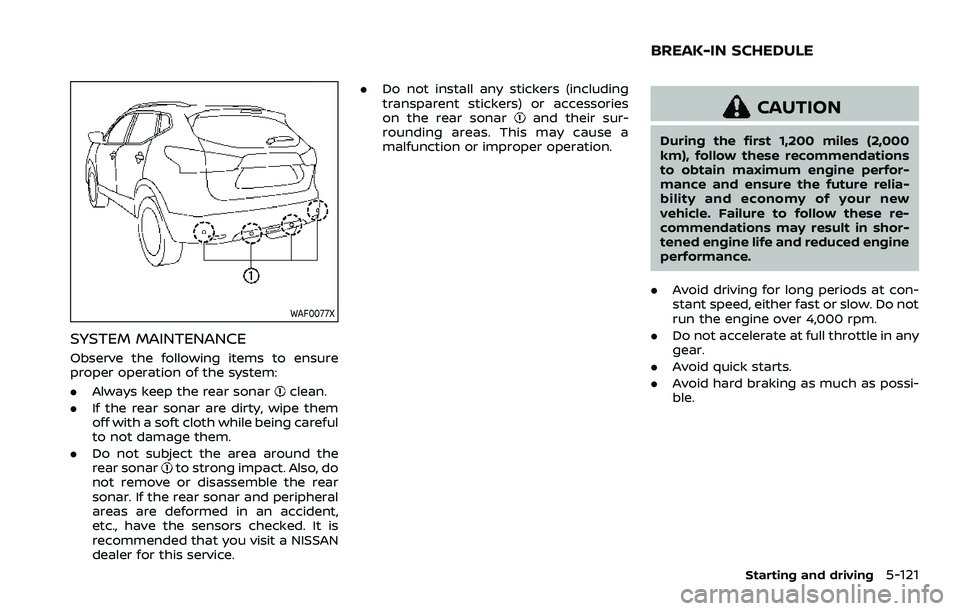
SYSTEM MAINTENANCE
Observe the following items to ensure
proper operation of the system:
.Always keep the rear sonar
clean.
. If the rear sonar are dirty, wipe them
off with a soft cloth while being careful
to not damage them.
. Do not subject the area around the
rear sonar
to strong impact. Also, do
not remove or disassemble the rear
sonar. If the rear sonar and peripheral
areas are deformed in an accident,
etc., have the sensors checked. It is
recommended that you visit a NISSAN
dealer for this service. .
Do not install any stickers (including
transparent stickers) or accessories
on the rear sonar
and their sur-
rounding areas. This may cause a
malfunction or improper operation.CAUTION
During the first 1,200 miles (2,000
km), follow these recommendations
to obtain maximum engine perfor-
mance and ensure the future relia-
bility and economy of your new
vehicle. Failure to follow these re-
commendations may result in shor-
tened engine life and reduced engine
performance.
. Avoid driving for long periods at con-
stant speed, either fast or slow. Do not
run the engine over 4,000 rpm.
. Do not accelerate at full throttle in any
gear.
. Avoid quick starts.
. Avoid hard braking as much as possi-
ble.
Starting and driving5-121
BREAK-IN SCHEDULE
Page 363 of 508
.Keep your engine tuned up.
. Follow the recommended scheduled
maintenance.
. Keep the tires inflated to the correct
pressure. Low tire pressure increases
tire wear and lowers fuel economy.
. Keep the wheels in correct alignment.
Improper alignment increases tire
wear and lowers fuel economy.
. Use the recommended viscosity en-
gine oil. (See “Engine oil and oil filter
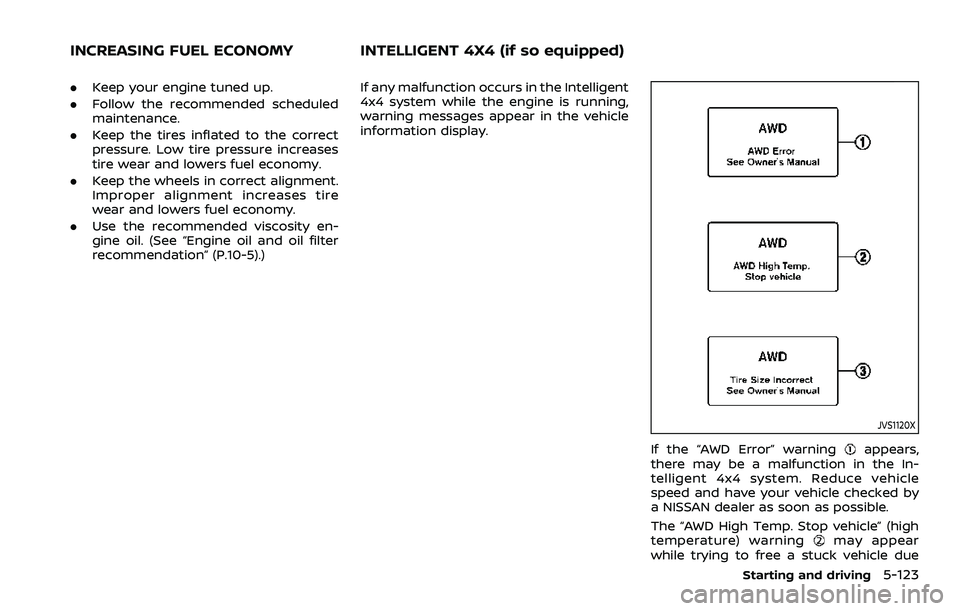
recommendation” (P.10-5).) If any malfunction occurs in the Intelligent
4x4 system while the engine is running,
warning messages appear in the vehicle
information display.
JVS1120X
If the “AWD Error” warningappears,
there may be a malfunction in the In-
telligent 4x4 system. Reduce vehicle
speed and have your vehicle checked by
a NISSAN dealer as soon as possible.
The “AWD High Temp. Stop vehicle” (high
temperature) warning
may appear
while trying to free a stuck vehicle due
Starting and driving5-123
INCREASING FUEL ECONOMY INTELLIGENT 4X4 (if so equipped)