turn signal NISSAN ROGUE 2023 Owner's Manual
[x] Cancel search | Manufacturer: NISSAN, Model Year: 2023, Model line: ROGUE, Model: NISSAN ROGUE 2023Pages: 508, PDF Size: 2.44 MB
Page 319 of 508
Cut-in detection
If a vehicle moves into your traveling lane
near your vehicle, the ICC system may
inform the driver by flashing the vehicle
ahead detection indicator.
Approach warning
If your vehicle comes closer to the vehicle
ahead due to rapid deceleration of that
vehicle or if another vehicle cuts in, the
system warns the driver with the chime
and ICC system display. Decelerate by
depressing the brake pedal to maintain a
safe vehicle distance if:
.The chime sounds.
. The vehicle ahead detection indicator
and set distance indicator blink.
. You judge it necessary to maintain a
safe distance.
The warning chime may not sound in
some cases when there is a short dis-
tance between vehicles. Some examples
are:
. When the vehicles are traveling at the
same speed and the distance be-
tween vehicles is not changing.
. When the vehicle ahead is traveling
faster and the distance between ve-
hicles is increasing.
. When a vehicle cuts in near your
vehicle. The warning chime will not sound when:
.
Your vehicle approaches other vehi-
cles that are parked or moving slowly.
. The accelerator pedal is depressed,
overriding the system.
NOTE:
The approach warning chime may
sound and the system display may
flash when the radar sensor detects
objects on the side of the vehicle or on
the side of the road. This may cause the
ICC system to decelerate or accelerate
the vehicle. The radar sensor may de-
tect these objects when the vehicle is
driven on winding, narrow, or hilly roads
or when the vehicle is entering or
exiting a curve. In these cases, you will
have to manually control the proper
distance ahead of your vehicle.
Also, the sensor sensitivity can be af-
fected by vehicle operation (steering
maneuver or driving position in the
lane) or traffic or vehicle conditions
(for example, if a vehicle is being driven
with some damage).
Acceleration when passing
When the ICC system is engaged above
44 mph (70 km/h) and following a slower
vehicle (below ICC set speed), and the
turn signal is activated to the left, the ICC
system will automatically start to accel-
erate the vehicle to help initiate passing
on the left and will begin to reduce the
distance to vehicle directly ahead. Only
the left side turn signal operates this
feature. As the driver steers the vehicle
and moves into the passing lane, if no
vehicle is detected ahead the ICC system
will continue to accelerate to the ICC
system set speed. If another vehicle is
detected ahead, then the vehicle will
accelerate up to the following speed of
that vehicle. If the vehicle is not steered
into the left lane to pass, the acceleration
will stop after a short time and regain the
set following distance. Acceleration can
be stopped at any point by depressing
the brake pedal or the CANCEL switch on
the steering wheel.
ICC system limitations
WARNING
Listed below are the system limita-
tions for the ICC system. Failure to
operate the vehicle in accordance
Starting and driving5-79
Page 323 of 508
.Any door is open.
. The driver’s seat belt is not fastened.
. The vehicle ahead is not detected and
your vehicle is traveling below the
speed of 15 MPH (24 km/h).
. Your vehicle has been stopped by the
ICC system for approximately 3 min-
utes or longer.
. The shift lever is not in the D (Drive)
position or manual shift mode.
. The electronic parking brake is ap-
plied.
. The VDC system is turned off.
. The AEB applies harder braking
. VDC (including the traction control
system) operates.
. A wheel slips.
. When distance measurement be-
comes impaired due to adhesion of
dirt or obstruction to the sensor.
. When the radar signal is temporarily
interrupted.
Action to take:
When the conditions listed above are no
longer present, turn the system off using
the ProPILOT Assist switch. Turn the
ProPILOT Assist system back on to use
the system. NOTE:
When the ICC system is canceled under
the following conditions at a standstill,
the electronic parking brake is automa-
tically activated:
.
Any door is open.
. The driver’s seat belt is not fastened.
. Your vehicle has been stopped by
the ICC system for approximately 3
minutes or longer.
. The shift lever is not in the D (Drive)
position or manual shift mode.
. The VDC system is turned off.
. When distance measurement be-
comes impaired due to adhesion of
dirt or obstruction to the sensor.
. When the radar signal is temporarily
interrupted.
Condition B:
When the radar sensor of the front
bumper is covered with dirt or is ob-
structed, the ICC system will automati-
cally be canceled.
The chime will sound and the “Forward
Driving Aids Temporarily Disabled Front
Sensor Blocked” or “Unavailable: Front
Radar Obstruction” warning message will
appear in the vehicle information display. Action to take:
If the warning message appears, stop the
vehicle in a safe place, place the shift lever
in the P (Park) position, and turn the
engine off. When the radar signal is
temporarily interrupted, clean the sensor
area of the front bumper and restart the
engine. If the “Forward Driving Aids Tem-
porarily Disabled Front Sensor Blocked” or
“Unavailable: Front Radar Obstruction”
warning message continues to be dis-
played, have the system checked. It is
recommended that you visit a NISSAN
dealer for this service.
Condition C:
When driving on roads with limited road
structures or buildings (for example, long
bridges, deserts, snow fields, driving next
to long walls), the system may illuminate
the system warning light and display the
“Forward Driving Aids Temporarily Dis-
abled Front Sensor Blocked” or “Unavail-
able: Front Radar Obstruction” warning
message.
Action to take:
When the above driving conditions no
longer exist, turn the system back on.
Starting and driving5-83
Page 325 of 508
.The steering assist is intended for
use on well-developed freeways
or highways with gentle (moder-
ate) curves. To avoid risk of an
accident,do not use this system
on local or non-highway roads.
. The steering assist only steers
the vehicle to maintain its posi-
tion in the center of a lane. The
vehicle will not steer to avoid
objects in the road in front of
the vehicle or to avoid a vehicle
moving into your lane.
. It is the driver’s responsibility to
stay alert, drive safely, keep the
vehicle in the traveling lane, and
be in control of the vehicle at all
times. Never take your hands off
the steering wheel when driving.
Always keep your hands on the
steering wheel and drive your
vehicle safely.
. Always drive carefully and atten-
tively when using the steering
assist. Read and understand the
Owner’s Manual thoroughly be-
fore using the steering assist. To
avoid serious injury or death, do
not rely on the system to prevent
accidents or to control the vehi-
cle’s speed in emergency situa-
tions. Do not use the steering assist except in appropriate road
and traffic conditions.
Steering assist operation
The steering assist controls the steering
system to help keep your vehicle near the
center of the lane when driving. The
steering assist is combined with the
Intelligent Cruise Control (ICC) system.
For additional information, see “Intelligent
Cruise Control (ICC)” (P.5-75).
The steering assist can be activated when
the following conditions are met:
.
The ICC system is activated.
. Lane markers on both sides are clearly
detected.
. A vehicle ahead is detected (when the
vehicle is driven at speeds under 37
MPH (60 km/h)).
. The driver grips the steering wheel.
. The vehicle is driven at the center of
the lane.
. The turn signals are not operated.
. The windshield wiper is not operated
in the high speed operation (the
steering assist function is disabled
after the wiper operates for approxi-
mately 10 seconds).
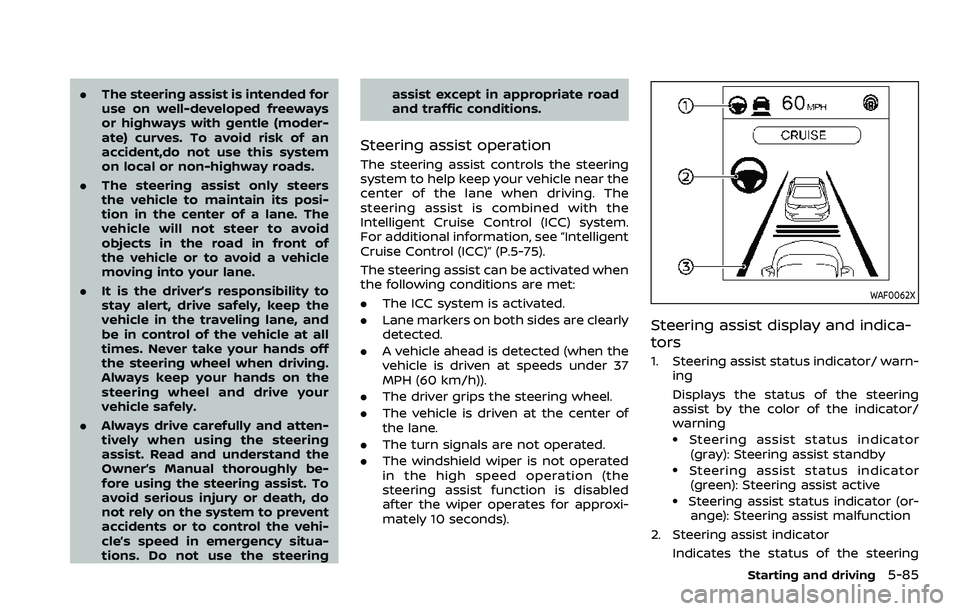
WAF0062X
Steering assist display and indica-
tors
1. Steering assist status indicator/ warn-
ing
Displays the status of the steering
assist by the color of the indicator/
warning
.Steering assist status indicator
(gray): Steering assist standby
.Steering assist status indicator(green): Steering assist active
.Steering assist status indicator (or- ange): Steering assist malfunction
2. Steering assist indicator Indicates the status of the steering
Starting and driving5-85
Page 329 of 508
tions (for example, tire wear,
abnormal tire pressure, instal-
lation of a spare tire (if so
equipped), tire chains, non-
standard wheels)
— When the vehicle is equipped with non-original brake or
suspension parts
— When an object such as a sticker or cargo obstructs the
camera
— When excessively heavy bag- gage is loaded in the rear seat
or luggage area of your vehi-
cle
— When the vehicle load capa- city is exceeded
. Excessive noise will interfere with
the warning chime sound, and
the beep may not be heard.
. For the ProPILOT assist system to
operate properly, the windshield
in front of the camera must be
clean. Replace worn wiper blades.
The correct size wiper blades
must be used to help make sure
the windshield is kept clean. Only
use Genuine NISSAN wiper blades,
or equivalent wiper blades, that
are specifically designed for use on your vehicle model and model
year. It is recommended that you
visit your NISSAN dealer for the
correct parts for your vehicle.
Steering Assist temporary standby
Automatic standby due to driving op-
eration:
When the driver activates the turn signal,
the Steering Assist is temporarily placed
in a standby mode. (The Steering Assist
restarts automatically when the operat-
ing conditions are met again.)
Automatic standby:
In the following cases, a warning mes-
sage is displayed along with the chime,
and the Steering Assist is placed in a
temporary standby mode. (The Steering
Assist restarts automatically when the
operating conditions are met again.)
.
When lane markers on both sides are
no longer detected
. When a vehicle ahead is no longer
detected under approximately 37 MPH
(60 km/h)
Steering assist cancel
Under the following conditions, the steer-
ing assist cancels, and the steering assist
status indicator and the steering assist
indicator turn off:
. When unusual lane markers appear in
the traveling lane or when the lane
marker cannot be correctly detected
for some time due to certain condi-
tions (for example, a snow rut, the
reflection of light on a rainy day, the
presence of several unclear lane mar-
kers)
. When the windshield wiper operates
in the high speed operation (the
steering assist is disabled when the
wiper operates for more than approxi-
mately 10 seconds)
Action to take:
Turn the ICC system off using the CANCEL
switch. When the conditions listed above
are no longer present, turn the ICC
system on again.
Steering assist malfunction
When the system malfunctions, it turns
off automatically. The steering assist
status warning (orange) illuminates. A
chime may sound depending on the
situation.
Starting and driving5-89
Page 384 of 508
6-2In case of emergency
SIC2574
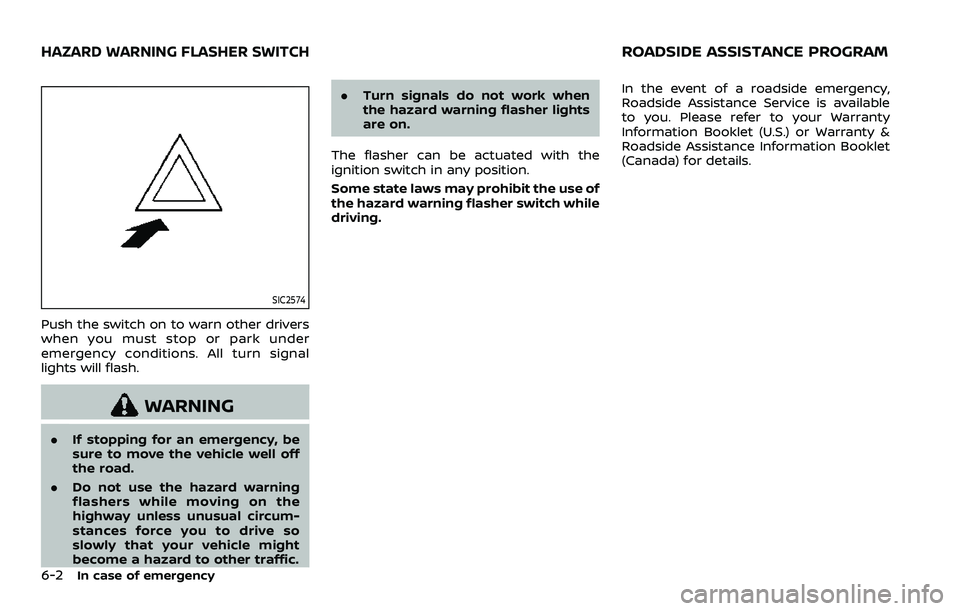
Push the switch on to warn other drivers
when you must stop or park under
emergency conditions. All turn signal
lights will flash.
WARNING
.If stopping for an emergency, be
sure to move the vehicle well off
the road.
. Do not use the hazard warning
flashers while moving on the
highway unless unusual circum-
stances force you to drive so
slowly that your vehicle might
become a hazard to other traffic. .
Turn signals do not work when
the hazard warning flasher lights
are on.
The flasher can be actuated with the
ignition switch in any position.
Some state laws may prohibit the use of
the hazard warning flasher switch while
driving. In the event of a roadside emergency,
Roadside Assistance Service is available
to you. Please refer to your Warranty
Information Booklet (U.S.) or Warranty &
Roadside Assistance Information Booklet
(Canada) for details.
HAZARD WARNING FLASHER SWITCHROADSIDE ASSISTANCE PROGRAM
Page 386 of 508
6-4In case of emergency
.Replacing tires with those not
originally specified by NISSAN
could affect the proper operation
of the TPMS.
. Do not inject any tire liquid or
aerosol tire sealant into the tires,
as this may cause a malfunction
of the tire pressure sensors
(models without emergency tire
puncture repair kit).
. NISSAN recommends using only
Genuine NISSAN Emergency Tire
Sealant provided with your vehi-
cle. Other tire sealants may da-
mage the valve stem seal which
can cause the tire to lose air
pressure. Visit a NISSAN dealer
as soon as possible after using
tire repair sealant (models with
emergency tire puncture repair
kit).CHANGING A FLAT TIRE (models
with spare tire)
If you have a flat tire, follow the instruc-
tions below.
Stopping the vehicle
1. Safely move the vehicle off the road
and away from traffic.
2. Turn on the hazard warning flashers.
3. Park on a level surface and apply the parking brake.
4. Continuously Variable Transmission
(CVT) models:
Move the shift lever to the P (Park)
position.
Manual Transmission (MT) models:
Move the shift lever to the R (Reverse)
position.
5. Turn off the engine.
6. Raise the hood to warn other traffic, and to signal professional road assis-
tance personnel that you need assis-
tance.
7. Have all passengers get out of the vehicle and stand in a safe place, away
from traffic and clear of the vehicle.
WARNING
.Make sure the parking brake is
securely applied and the Manual
Transmission is shifted into R
(Reverse), or the CVT into P (Park).
. Never change tires when the ve-
hicle is on a slope, ice or slippery
areas. This is hazardous.
. Never change tires if oncoming
traffic is close to your vehicle.
Wait for professional road assis-
tance.
Page 437 of 508
WAI0093X
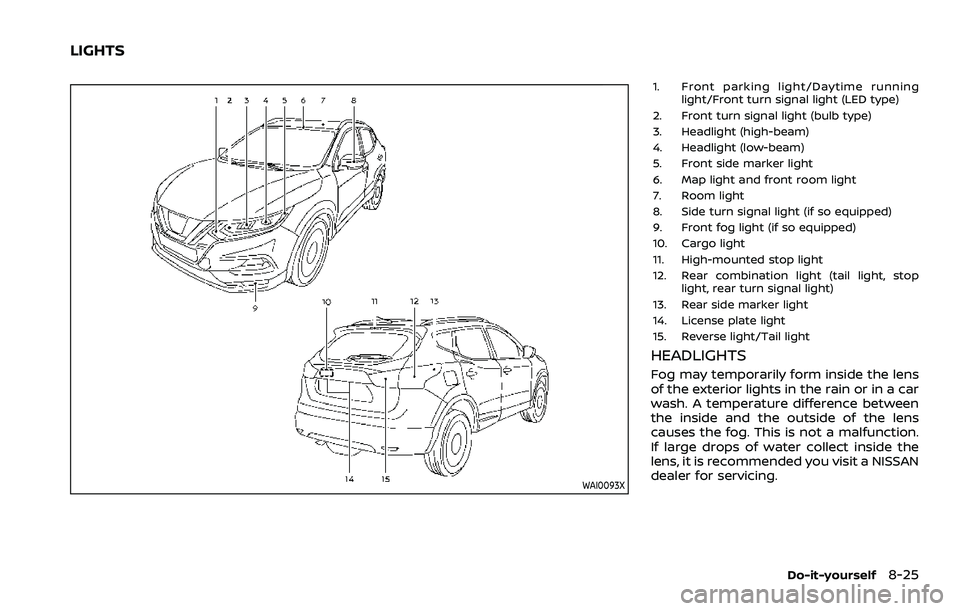
1. Front parking light/Daytime runninglight/Front turn signal light (LED type)
2. Front turn signal light (bulb type)
3. Headlight (high-beam)
4. Headlight (low-beam)
5. Front side marker light
6. Map light and front room light
7. Room light
8. Side turn signal light (if so equipped)
9. Front fog light (if so equipped)
10. Cargo light
11. High-mounted stop light
12. Rear combination light (tail light, stop light, rear turn signal light)
13. Rear side marker light
14. License plate light
15. Reverse light/Tail light
HEADLIGHTS
Fog may temporarily form inside the lens
of the exterior lights in the rain or in a car
wash. A temperature difference between
the inside and the outside of the lens
causes the fog. This is not a malfunction.
If large drops of water collect inside the
lens, it is recommended you visit a NISSAN
dealer for servicing.
Do-it-yourself8-25
LIGHTS
Page 439 of 508
4. Install the new bulb in the reverse order ofremoval.EXTERIOR AND INTERIOR LIGHTS
Item Wattage (W)Bulb No.
Headlight high beam (bulb type) 65H9
Headlight low beam (bulb type) 55H11
Headlight high/low beams (LED type)* LED-
Front turn signal light* 21 or LEDWY21W or -
Front parking light* LED-
Front side marker light* LED-
Front fog light (if so equipped)* 35H8
Side turn signal light (if so equipped)* LED-
Daytime running light* LED-
Rear combination light*
Turn signal light 21W21W
Stop/tail light LED—
Back-up 16W16W
Rear side marker light* LED-
License plate light* 5W5W
Map light* LED-
Vanity mirror light (if so equipped)* 1.8-
High-mounted stop light* LED-
Room light 8-
Cargo light 5-
Glove box light* 1.4-
*: It is recommended you visit a NISSAN dealer for replacement.
NOTE: It is recommended that you check with the Parts Department at a NISSAN dealer for the latest information about parts.
Do-it-yourself8-27
Page 457 of 508
other corrosive materials, check lubrica-
tion frequently.
Lights*:Clean the headlights on a regular
basis. Make sure that the headlights, stop
lights, tail lights, turn signal lights, and
other lights are all operating properly and
installed securely. Also check headlight
aim.
Road wheel nuts (lug nuts)*: When
checking the tires, make sure no wheel
nuts are missing, and check for any loose
wheel nuts. Tighten if necessary.
Tire rotation*: Rotate tires at the speci-
fied interval shown in the maintenance
schedule.
Tires*: Check the pressure with a gauge
often and always prior to long distance
trips. If necessary, adjust the pressure in
all tires, including the spare (if so
equipped), to the pressure specified.
Check carefully for damage, cuts or
excessive wear.
Tire Pressure Monitoring System (TPMS)
transmitter components: Replace the
TPMS transmitter grommet seal, valve
core and cap when the tires are replaced
due to wear or age.
Wheel alignment and balance: If the
vehicle should pull to either side while
driving on a straight and level road, or if
you detect uneven or abnormal tire wear, there may be a need for wheel alignment.
If the steering wheel or seat vibrates at
normal highway speeds, wheel balancing
may be needed.
For additional information regarding tires,
refer to “Important Tire Safety Informa-
tion” (US) or “Tire Safety Information”
(Canada) in the NISSAN Warranty Infor-
mation Booklet.
Windshield:
Clean the windshield on a
regular basis. Check the windshield at
least every six months for cracks or other
damage. Have a damaged windshield
repaired by a qualified repair facility.
It is recommended that you have a
damaged windshield repaired by a
NISSAN dealer, or a NISSAN Certified
Collision Center. To locate a collision
center in your area, refer to http://colli-
sion.nissanusa.com.
Windshield wiper blades*: Check for
cracks or wear if they do not wipe
properly.
Inside the vehicle
The maintenance items listed here should
be checked on a regular basis, such as
when performing scheduled mainte-
nance, cleaning the vehicle, etc.
Accelerator pedal: Check the pedal for
smooth operation and make sure the pedal does not catch or require uneven
effort. Keep the floor mat away from the
pedal.
Brake pedal:
Check the pedal for smooth
operation. If the brake pedal suddenly
goes down further than normal, the pedal
feels spongy or the vehicle seems to take
longer to stop, have your vehicle checked
immediately. It is recommended you visit
a NISSAN dealer for this service. Keep the
floor mat away from the pedal.
Brakes: Check that the brakes do not pull
the vehicle to one side when applied.
Continuously Variable Transmission
(CVT) P (Park) mechanism: On a fairly
steep hill, check that the vehicle is held
securely with the shift lever in the P (Park)
position without applying any brakes.
Parking brake: Check the parking brake
operation regularly. The vehicle should be
securely held on a fairly steep hill with
only the parking brake applied. If the
parking brake needs adjusted, it is re-
commended you visit a NISSAN dealer for
this service.
Seat belts: Check that all parts of the seat
belt system (for example, buckles, an-
chors, adjusters and retractors) operate
properly and smoothly, and are installed
securely. Check the belt webbing for cuts,
fraying, wear or damage.
Maintenance and schedules9-3
Page 504 of 508

11-6
Shoulder belt height adjustment, For
front seats........................................................................\
. 1-17
Soft bottle holders...................................................... 2-70
Spare tire............................................................. 8-40, 10-7
Spark plugs....................................................................... 8-14
Speedometer ...................................................................... 2-6
SPORT mode switch.................................................. 5-32
SRSPrecautions on SRS ............................................ 1-42
Standard maintenance ............................................... 9-8
Starting Before starting the engine............................ 5-17
Jump starting .......................................................... 6-14
Precautions when starting
and driving.................................................................... 5-4
Push starting............................................................ 6-16
Starting the engine.............................. 5-18, 5-19
Status light, Front passenger air bag ......... 1-50
Steering Electric power steering................................ 5-128
Heated steering wheel ..................................... 2-59
Tilt/telescopic steering .................................... 3-30
Steering assist................................................................ 5-84
Steering assist switch (models with
ProPILOT assist) ............................................................ 2-62
Storage ........................................................................\
........ 2-69
Sun visors ........................................................................\
.. 3-31
Sunglasses holder....................................................... 2-72
Supplemental air bag warning labels ......... 1-61
Supplemental air bag
warning light .................................................... 1-62, 2-13
Supplemental Restraint System (SRS) ........ 1-42
Switch Fog light switch ..................................................... 2-59
Hazard warning flasher switch .................... 6-2
Headlight switch ................................................... 2-52
Ignition switch ........................................................ 5-12 Intelligent 4x4 LOCK switch ........................ 2-63
Intelligent Auto Headlight switch ............ 2-52
Power door lock switch ..................................... 3-6
Rear window and outside mirror
defroster switch .................................................... 2-51
Turn signal switch ............................................... 2-58
Vehicle dynamic control (VDC)
off switch .................................................................... 2-62
System maintenance............................................. 5-121
System malfunction ............................................... 5-120
T
Tachometer........................................................................\
.. 2-7
Temperature gauge, Engine coolant
temperature gauge ....................................................... 2-7
Theft (NISSAN Vehicle Immobilizer
System), Engine start ............................................... 2-47
Three-way catalyst......................................................... 5-4
Tilt/telescopic steering ........................................... 3-30
Tire pressure, Low tire pressure
warning light ................................................................... 2-14
Tires Flat tire........................................................................\
..... 6-3
Low tire pressure warning system ........... 5-5
Tire and Loading
information label................................ 8-31, 10-10
Tire chains.................................................................. 8-36
Tire dressing................................................................ 7-4
Tire pressure ............................................................ 8-29
Tire pressure monitoring
system (TPMS)................................................. 5-5, 6-3
Tire rotation.............................................................. 8-37
Types of tires ........................................................... 8-35
Uniform tire quality grading .................... 10-17
Wheel/tire size ........................................................ 10-7
Wheels and tires .................................................... 8-29 Towing
Tow truck towing................................................. 6-17
Towing a trailer.................................................. 10-15
TPMS, Tire pressure monitoring system....... 5-5 TPMS with Easy Fill Tire Alert......................... 5-8
TPMS, Tire pressure warning system .............. 6-3
Traffic Sign Recognition......................................... 2-43
Trailer towing .............................................................. 10-15
Transceiver HomeLink® Universal Transceiver ........... 2-83
Transmission Continuously Variable Transmission ..... 5-13
Continuously Variable Transmission
(CVT) fluid....................................................................... 8-9
Driving with CVT (Continuously
Variable Transmission)..................................... 5-20
Driving with manual transmission.......... 5-25
Transmission shift lever lock release ..... 5-24
Transmitter (See remote keyless
entry system) ...................................................................... 3-7
Transmitter, With Intelligent Key system
(See Intelligent Key system) ................................ 3-19
Traveling or registering in
another country ........................................................... 10-8
Trip computer ................................................................ 2-40
Trip odometer ................................................................ 2-40
Turn signal switch ...................................................... 2-58
Turning the conventional (fixed speed)
cruise control mode ON......................................... 5-69
Turning the RAB system ON/OFF ............... 5-117
U
Underbody cleaning ...................................................... 7-3
Uniform tire quality grading ............................ 10-17