turn signal NISSAN ROGUE HYBRID 2018 Owners Manual
[x] Cancel search | Manufacturer: NISSAN, Model Year: 2018, Model line: ROGUE HYBRID, Model: NISSAN ROGUE HYBRID 2018Pages: 482, PDF Size: 5.79 MB
Page 28 of 482
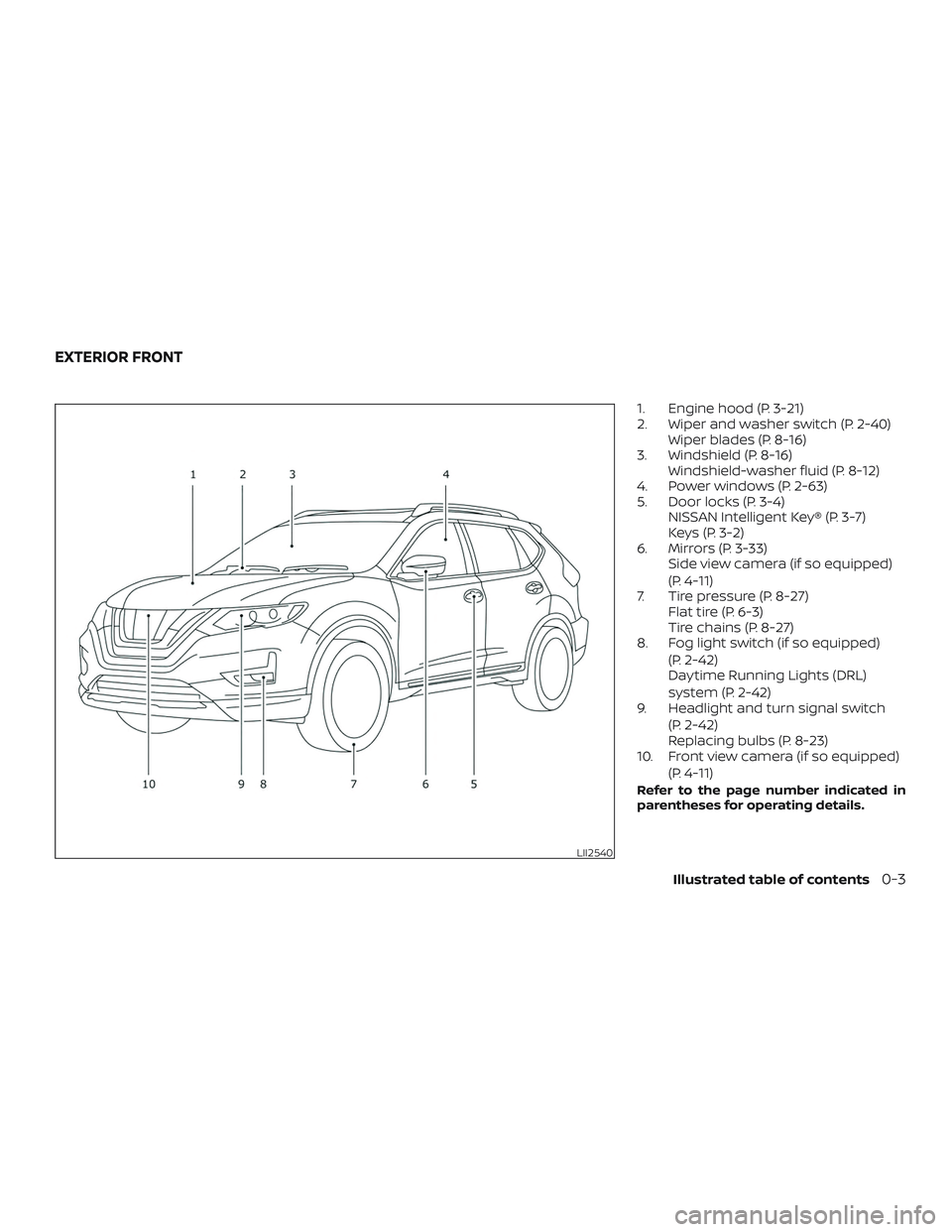
1. Engine hood (P. 3-21)
2. Wiper and washer switch (P. 2-40)Wiper blades (P. 8-16)
3. Windshield (P. 8-16) Windshield-washer fluid (P. 8-12)
4. Power windows (P. 2-63)
5. Door locks (P. 3-4) NISSAN Intelligent Key® (P. 3-7)
Keys (P. 3-2)
6. Mirrors (P. 3-33) Side view camera (if so equipped)
(P. 4-11)
7. Tire pressure (P. 8-27) Flat tire (P. 6-3)
Tire chains (P. 8-27)
8. Fog light switch (if so equipped)
(P. 2-42)
Daytime Running Lights (DRL)
system (P. 2-42)
9. Headlight and turn signal switch
(P. 2-42)
Replacing bulbs (P. 8-23)
10. Front view camera (if so equipped)
(P. 4-11)
Refer to the page number indicated in
parentheses for operating details.
LII2540
EXTERIOR FRONT
Illustrated table of contents0-3
Page 31 of 482
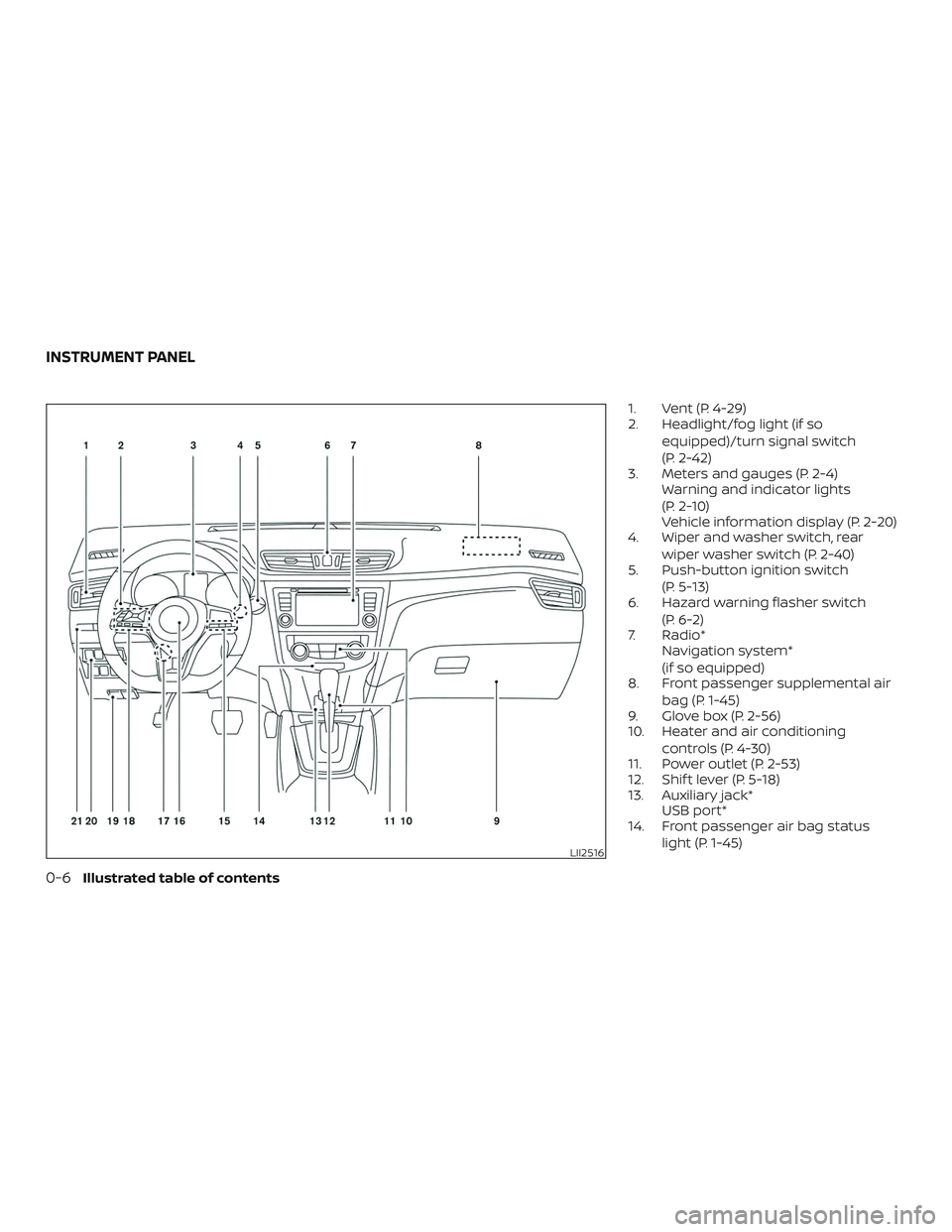
1. Vent (P. 4-29)
2. Headlight/fog light (if soequipped)/turn signal switch
(P. 2-42)
3. Meters and gauges (P. 2-4) Warning and indicator lights
(P. 2-10)
Vehicle information display (P. 2-20)
4. Wiper and washer switch, rear
wiper washer switch (P. 2-40)
5. Push-button ignition switch
(P. 5-13)
6. Hazard warning flasher switch
(P. 6-2)
7. Radio* Navigation system*
(if so equipped)
8. Front passenger supplemental air
bag (P. 1-45)
9. Glove box (P. 2-56)
10. Heater and air conditioning
controls (P. 4-30)
11. Power outlet (P. 2-53)
12. Shif t lever (P. 5-18)
13. Auxiliary jack* USB port*
14. Front passenger air bag status
light (P. 1-45)
LII2516
INSTRUMENT PANEL
0-6Illustrated table of contents
Page 35 of 482
Indicatorlight Name Page
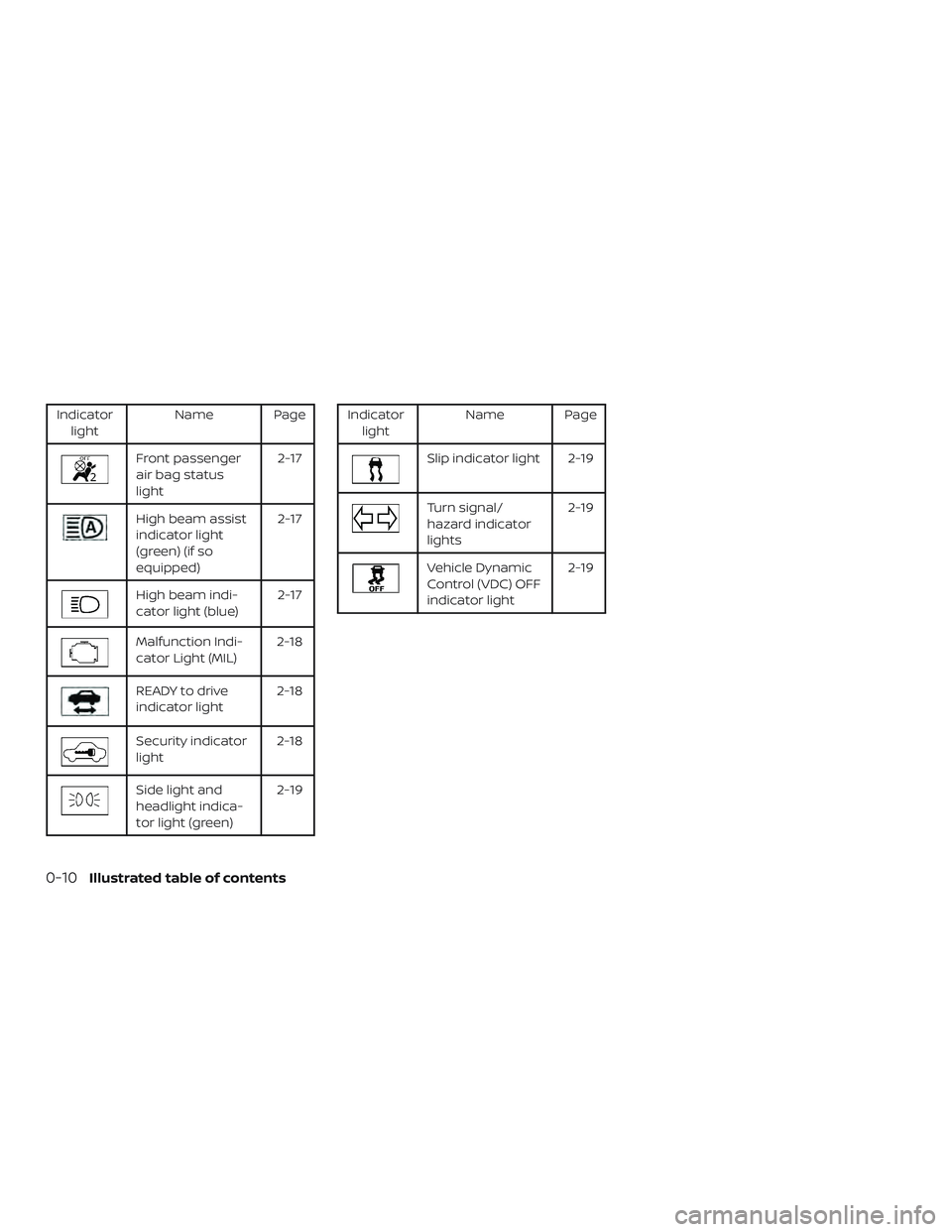
Front passenger
air bag status
light 2-17
High beam assist
indicator light
(green) (if so
equipped)2-17
High beam indi-
cator light (blue)
2-17
Malfunction Indi-
cator Light (MIL)2-18
READY to drive
indicator light2-18
Security indicator
light2-18
Side light and
headlight indica-
tor light (green) 2-19
Indicator
light Name Page
Slip indicator light 2-19
Turn signal/
hazard indicator
lights 2-19
Vehicle Dynamic
Control (VDC) OFF
indicator light2-19
0-10Illustrated table of contents
Page 101 of 482
2 Instruments and controls
Instrument panel................................2-2
Meters and gauges ..............................2-4
Speedometer and odometer .................2-4
Tachometer ..................................2-6
Fuel gauge ...................................2-6
Assist charge gauge .......................... 2-7
Compass (if so equipped) ....................... 2-7
Compass display ............................. 2-7
Warning lights, indicator lights and audible
reminders ...................................... 2-10
Checking lights ............................... 2-11
Warning lights ................................ 2-11
Indicator lights .............................. 2-17
Audible reminders ........................... 2-19
Vehicle information display .....................2-20
How to use the vehicle information
display ...................................... 2-21
Startup display .............................. 2-21
Resetting the drive computer ................2-22
Settings ..................................... 2-22
Vehicle information display warnings
and indicators ............................... 2-32
Security systems ............................... 2-37
Vehicle security system .....................2-37NISSAN Vehicle Immobilizer System
.........2-38
Wiper and washer switch .......................2-40
Switch operation ............................ 2-40
Rear switch operation ....................... 2-41
Rear window and outside mirror defroster
switch .......................................... 2-42
Headlight and turn signal switch ...............2-42
Headlight control switch .....................2-42
LED Daytime Running Lights (DRL)
system ......................................2-47
Instrument brightness control ...............2-47
Turn signal switch ........................... 2-48
Fog light switch (if so equipped) .............2-48
Horn ........................................... 2-49
Heated seat switches .......................... 2-49
Heated steering wheel switch (if so equipped) . . 2-50
Dynamic driver assistance switch
(if so equipped) ................................. 2-51
Vehicle Dynamic Control (VDC) OFF switch ......2-52
All
-wheel drive (AWD) lock switch
(if so equipped) ................................. 2-52
E-call (SOS) switch (if so equipped) ..............2-53
Power outlets .................................. 2-53
12v outlets ................................... 2-53
Page 103 of 482

1. Vent (P. 4-29)
2. Headlight/fog light(if so equipped)/turn signal switch
(P. 2-42)
3. Meters and gauges (P. 2-4) Warning and indicator lights
(P. 2-10)
Vehicle information display (P. 2-20)
4. Wiper and washer switch, rear
wiper washer switch (P. 2-40)
5. Push-button ignition switch
(P. 5-13)
6. Hazard warning flasher switch
(P. 6-2)
7. Radio* Navigation system*
(if so equipped)
8. Front passenger supplemental air
bag (P. 1-45)
9. Glove box (P. 2-56)
10. Heater and air conditioning
controls (P. 4-30)
11. Power outlet (P. 2-53)
12. Shif t lever (P. 5-18)
13. Auxiliary jack* USB port*
14. Front passenger air bag status
light (P. 1-45)
LII2516
INSTRUMENT PANEL
2-2Instruments and controls
Page 111 of 482
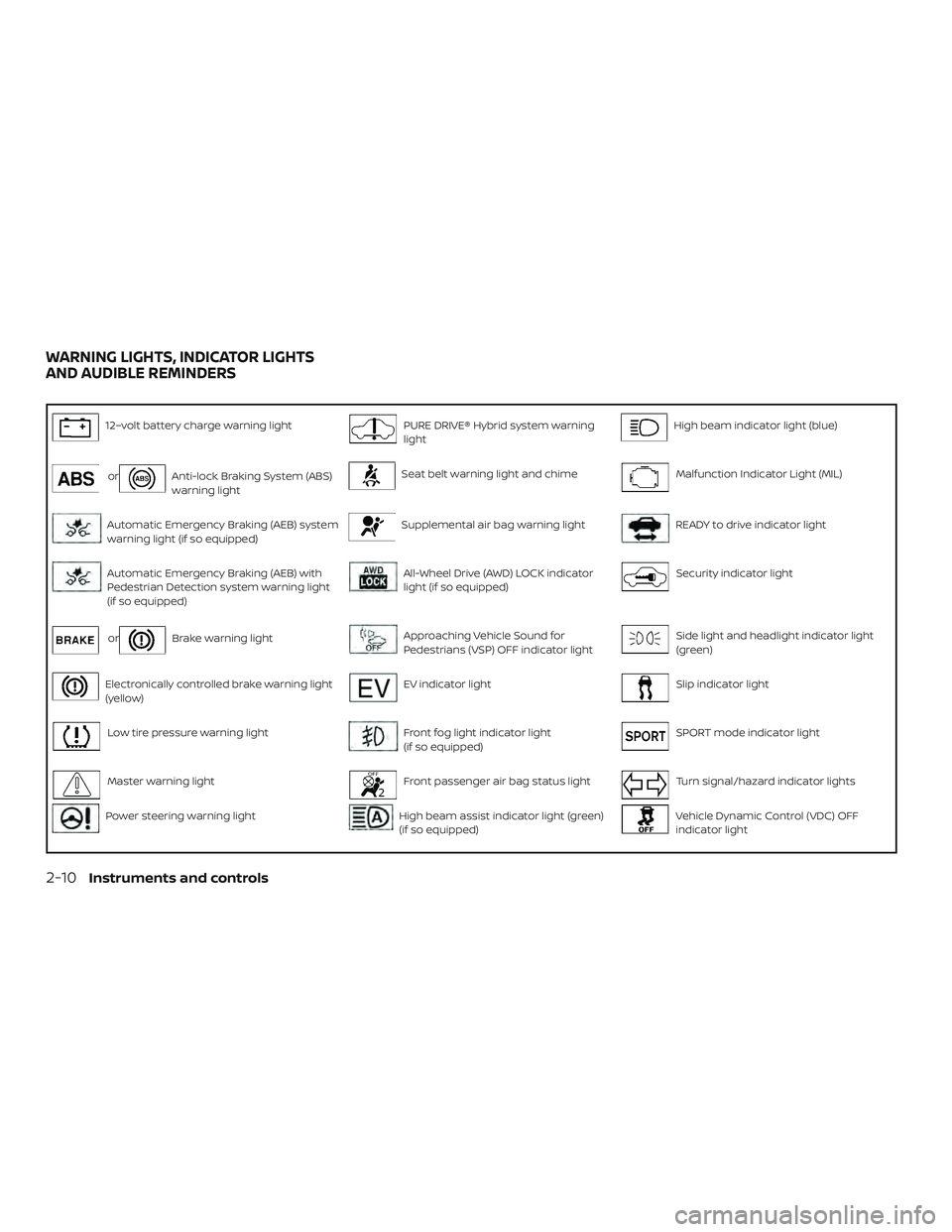
12–volt battery charge warning lightPURE DRIVE® Hybrid system warning
lightHigh beam indicator light (blue)
orAnti-lock Braking System (ABS)
warning lightSeat belt warning light and chimeMalfunction Indicator Light (MIL)
Automatic Emergency Braking (AEB) system
warning light (if so equipped)Supplemental air bag warning lightREADY to drive indicator light
Automatic Emergency Braking (AEB) with
Pedestrian Detection system warning light
(if so equipped)All-Wheel Drive (AWD) LOCK indicator
light (if so equipped)Security indicator light
orBrake warning lightApproaching Vehicle Sound for
Pedestrians (VSP) OFF indicator lightSide light and headlight indicator light
(green)
Electronically controlled brake warning light
(yellow)EV indicator lightSlip indicator light
Low tire pressure warning lightFront fog light indicator light
(if so equipped)SPORT mode indicator light
Master warning lightFront passenger air bag status lightTurn signal/hazard indicator lights
Power steering warning lightHigh beam assist indicator light (green)
(if so equipped)Vehicle Dynamic Control (VDC) OFF
indicator light
WARNING LIGHTS, INDICATOR LIGHTS
AND AUDIBLE REMINDERS
2-10Instruments and controls
Page 118 of 482
WARNING
If the supplemental air bag warning
light is on, it could mean that the front
air bag, side air bag, curtain air bag
and/or pretensioner systems will not
operate in an accident. To help avoid
injury to yourself or others, have your
vehicle checked as soon as possible. It is
recommended that you visit a NISSAN
dealer for this service.
INDICATOR LIGHTS
For additional information, refer to “Vehicle
information display” in this section.
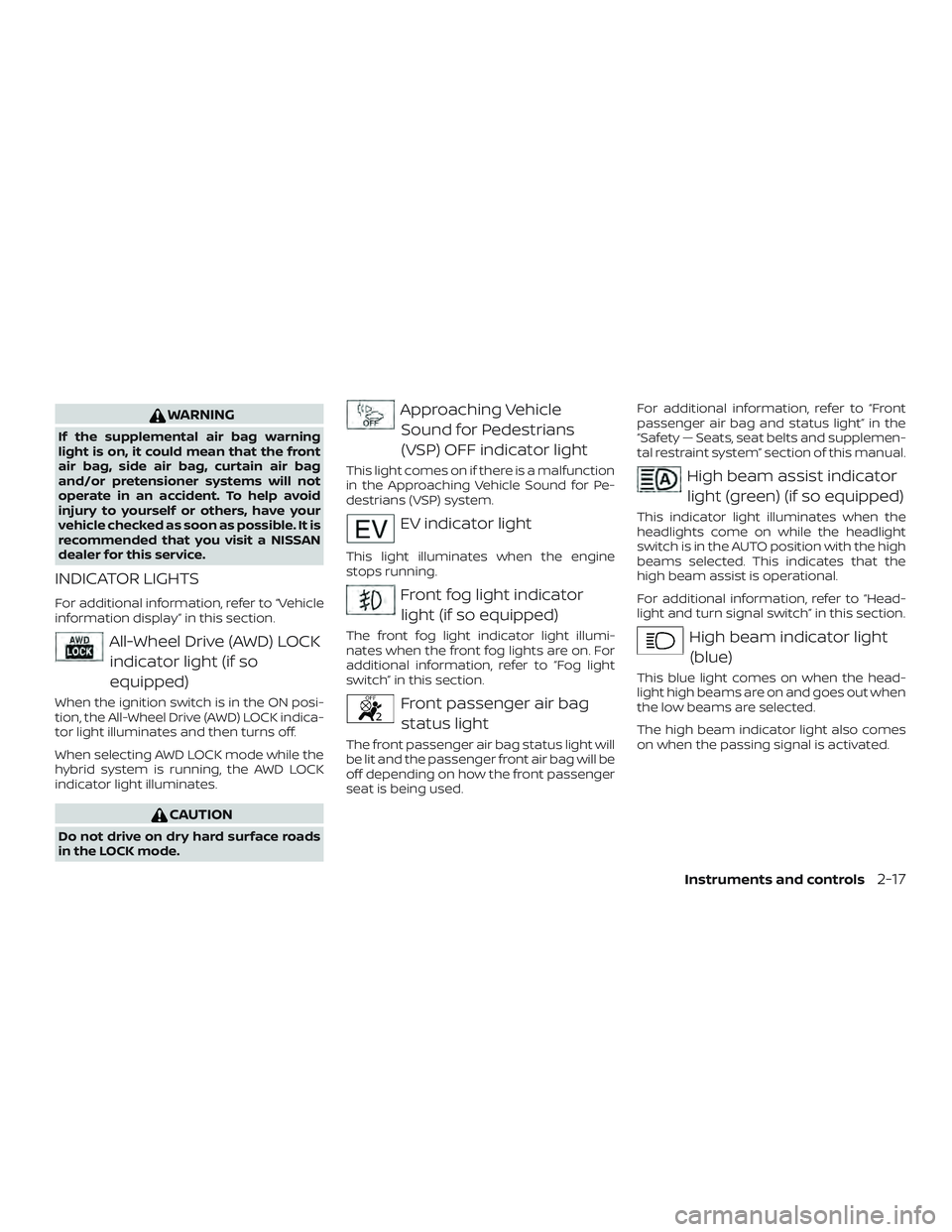
All-Wheel Drive (AWD) LOCKindicator light (if so
equipped)
When the ignition switch is in the ON posi-
tion, the All-Wheel Drive (AWD) LOCK indica-
tor light illuminates and then turns off.
When selecting AWD LOCK mode while the
hybrid system is running, the AWD LOCK
indicator light illuminates.
CAUTION
Do not drive on dry hard surface roads
in the LOCK mode.
Approaching VehicleSound for Pedestrians
(VSP) OFF indicator light
This light comes on if there is a malfunction
in the Approaching Vehicle Sound for Pe-
destrians (VSP) system.
EV indicator light
This light illuminates when the engine
stops running.
Front fog light indicatorlight (if so equipped)
The front fog light indicator light illumi-
nates when the front fog lights are on. For
additional information, refer to “Fog light
switch” in this section.
Front passenger air bagstatus light
The front passenger air bag status light will
be lit and the passenger front air bag will be
off depending on how the front passenger
seat is being used. For additional information, refer to “Front
passenger air bag and status light” in the
“Safety — Seats, seat belts and supplemen-
tal restraint system” section of this manual.
High beam assist indicator
light (green) (if so equipped)
This indicator light illuminates when the
headlights come on while the headlight
switch is in the AUTO position with the high
beams selected. This indicates that the
high beam assist is operational.
For additional information, refer to “Head-
light and turn signal switch” in this section.
High beam indicator light(blue)
This blue light comes on when the head-
light high beams are on and goes out when
the low beams are selected.
The high beam indicator light also comes
on when the passing signal is activated.
Instruments and controls2-17
Page 120 of 482
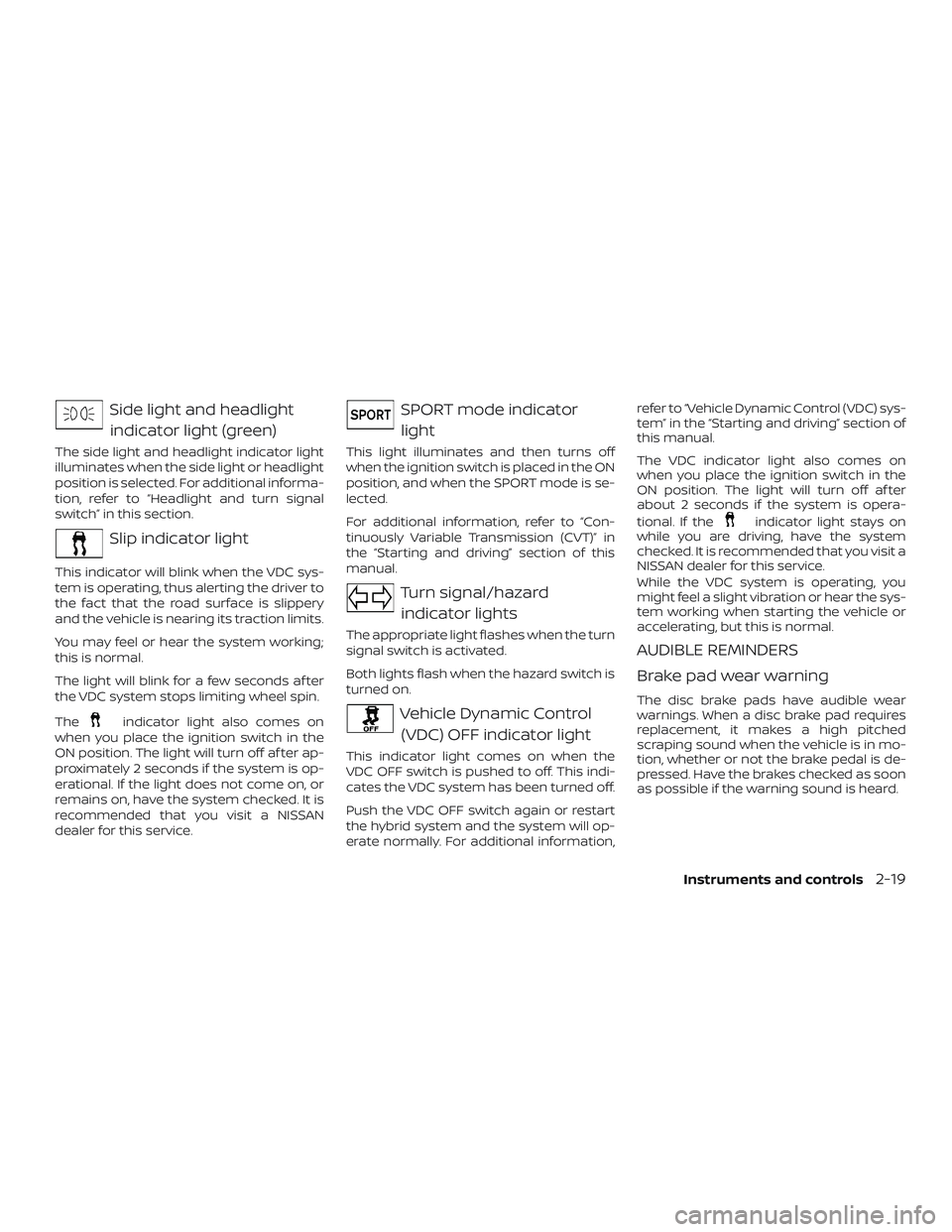
Side light and headlightindicator light (green)
The side light and headlight indicator light
illuminates when the side light or headlight
position is selected. For additional informa-
tion, refer to “Headlight and turn signal
switch” in this section.
Slip indicator light
This indicator will blink when the VDC sys-
tem is operating, thus alerting the driver to
the fact that the road surface is slippery
and the vehicle is nearing its traction limits.
You may feel or hear the system working;
this is normal.
The light will blink for a few seconds af ter
the VDC system stops limiting wheel spin.
The
indicator light also comes on
when you place the ignition switch in the
ON position. The light will turn off af ter ap-
proximately 2 seconds if the system is op-
erational. If the light does not come on, or
remains on, have the system checked. It is
recommended that you visit a NISSAN
dealer for this service.
SPORT mode indicator
light
This light illuminates and then turns off
when the ignition switch is placed in the ON
position, and when the SPORT mode is se-
lected.
For additional information, refer to “Con-
tinuously Variable Transmission (CVT)” in
the “Starting and driving” section of this
manual.
Turn signal/hazard indicator lights
The appropriate light flashes when the turn
signal switch is activated.
Both lights flash when the hazard switch is
turned on.
Vehicle Dynamic Control (VDC) OFF indicator light
This indicator light comes on when the
VDC OFF switch is pushed to off. This indi-
cates the VDC system has been turned off.
Push the VDC OFF switch again or restart
the hybrid system and the system will op-
erate normally. For additional information, refer to “Vehicle Dynamic Control (VDC) sys-
tem” in the “Starting and driving” section of
this manual.
The VDC indicator light also comes on
when you place the ignition switch in the
ON position. The light will turn off af ter
about 2 seconds if the system is opera-
tional. If the
indicator light stays on
while you are driving, have the system
checked. It is recommended that you visit a
NISSAN dealer for this service.
While the VDC system is operating, you
might feel a slight vibration or hear the sys-
tem working when starting the vehicle or
accelerating, but this is normal.
AUDIBLE REMINDERS
Brake pad wear warning
The disc brake pads have audible wear
warnings. When a disc brake pad requires
replacement, it makes a high pitched
scraping sound when the vehicle is in mo-
tion, whether or not the brake pedal is de-
pressed. Have the brakes checked as soon
as possible if the warning sound is heard.
Instruments and controls2-19
Page 136 of 482
Power turned off to save the battery
This message appears af ter the ignition
switch is automatically turned to off to
save the 12–volt battery. For additional in-
formation, refer to “Push-button ignition
switch positions” in the “Starting and driv-
ing” section of this manual.
Reminder: Turn OFF headlights
This warning appears when the headlights
are lef t in the ON position when exiting the
vehicle. Place the headlight switch in the
OFF or AUTO position. For additional infor-
mation, refer to “Headlight and turn signal
switch” in this section.
Timer Alert – Time for a driver break?
This indicator appears when the set time is
reached. The time can be set up to six
hours. For additional information on set-
ting the timer, refer to “Alarm” in this sec-
tion.
Chassis Control System Error: See Own-
er’s Manual
This warning appears if the Integrated
Dynamics-control Module detects an error
in the Intelligent Trace Control, Intelligent
Engine Brake, or the Active Ride Control
systems. Have the system checked. It isrecommended that you visit a NISSAN
dealer for this service. For additional infor-
mation, refer to “Chassis control” in the
“Starting and driving” section of this
manual.
Cruise control indicator (if so equipped)
This indicator shows the cruise control sys-
tem status.
For additional information, refer to “Cruise
control” in the “Starting and driving” section
of this manual.
Intelligent Cruise Control (ICC) indica-
tors (if so equipped)
These indicators show the Intelligent
Cruise Control (ICC) system status. The sta-
tus is shown by color. For additional infor-
mation, refer to “Intelligent Cruise Control
(ICC)” in the “Starting and driving” section of
this manual.
Transmission Shif t Position Indicator
This indicator shows the transmission shif t
position.
CVT Error: See Owner’s Manual
This warning illuminates when there is a
problem with the CVT system. If this warn-
ing comes on, have the system checked. Itis recommended that you visit a NISSAN
dealer for this service.
Malfunction: See Owner’s Manual (if so
equipped)
This warning appears when one or more of
the following systems (if so equipped) is
not functioning properly:
∙ Automatic Emergency Braking (AEB)
∙ Lane Departure Warning (LDW)
∙ Blind Spot Warning (BSW)
∙ Intelligent Cruise Control (ICC)
If one or more of these warning appears,
have the system checked. It is recom-
mended that you visit an NISSAN dealer for
this service.
ECO mode indicator
This indicator shows when the ECO mode
is engaged.
For additional information, refer to “ECO
mode switch” in the “Starting and driving”
section of this manual.
High Coolant Temp Stop Vehicle
This warning appears when the tempera-
ture of the engine coolant is too high. Stop
the vehicle in a safe location as soon as
Instruments and controls2-35
Page 137 of 482
possible. Avoid quick starting or abrupt ac-
celeration. When the warning turns off, the
vehicle can be driven.
If the warning appears again soon af ter it
turns off, have the system checked. It is
recommended that you visit a NISSAN
dealer for this service.
Hybrid System Overheated Stop Vehicle
This warning appears when the tempera-
ture of the hybrid system is too high. Stop
the vehicle in a safe location as soon as
possible. Avoid quick starting or abrupt ac-
celeration. When the warning turns off, the
vehicle can be driven.
If the warning appears again soon af ter it
turns off, have the system checked. It is
recommended that you visit a NISSAN
dealer for this service.
Do not drive the vehicle with the warning
on. Doing so could cause a hybrid system
malfunction.WARNING
If you continue to drive the vehicle while
the warning is displayed, the hybrid
system may become temporarily inop-
erative and the system cannot provide
power to the wheels. This can result in
reduced or zero vehicle speed. The re-
duced speed or zero speed may be
lower than other traffic, which could in-
crease the chance of a collision. If the
vehicle cannot maintain a safe driving
speed, pull to the side of the road in a
safe area. If this occurs, place the shif t
lever in the P (Park) position and the
ignition in the READY to drive position
with the vehicle stopped until the dis-
play turns off. The Hybrid System Over-
heated warning and the SHIFT “P”
warning messages will be alternately
displayed. For additional information,
refer to the “Shif t to Park” warning in
this section.
Headlight System Error: See Owner’s
Manual (if so equipped)
This warning illuminates when there is an
error with the system. For additional infor-
mation, refer to “Headlight and turn signal
switch” in this section. Side Radar Obstruction
This message appears when the Blind
Spot Warning (BSW)/Rear Cross Traffic Alert
(RCTA) systems become unavailable be-
cause a radar blockage is detected. For
additional information, refer to “Blind Spot
Warning (BSW)” or “Rear Cross Traffic Alert
(RCTA)” in the “Starting and driving” section
of this manual.
Unavailable: Front Radar Obstruction (if
so equipped)
This message appears when the Intelligent
Cruise Control (ICC) system or the Auto-
matic Emergency Braking (AEB) system
becomes unavailable because the front ra-
dar is obstructed. For additional informa-
tion, refer to “Intelligent Cruise Control (ICC)”
or “Automatic Emergency Braking (AEB)” in
the “Starting and driving” section of this
manual.
Shif t to Park Li-ion Battery Low
This warning appears when the shif t lever
is in the N (Neutral) position and the level of
remaining charge in the Li-ion battery is
low. When this warning appears, place the
shif t lever in the P (Park) position.
2-36Instruments and controls