display NISSAN ROGUE SELECT 2015 User Guide
[x] Cancel search | Manufacturer: NISSAN, Model Year: 2015, Model line: ROGUE SELECT, Model: NISSAN ROGUE SELECT 2015Pages: 322, PDF Size: 2.21 MB
Page 90 of 322
Front passenger air bag status light
The front passenger air bag status light will be lit
and the passenger front air bag will be OFF
depending on how the front passenger seat is
being used.
For front passenger air bag status light opera-
tion, see “NISSAN Advanced Air Bag System
(front seats)” (P.1-47) of this manual.
High beam indicator light
This light illuminates when the headlight high
beam is on and goes out when the low beam is
selected.
Malfunction Indicator Light (MIL)
If the malfunction indicator light illuminates
steady or blinks while the engine is running, it
may indicate a potential emission control and/or
Continuously Variable Transmission (CVT) mal-
function.
The malfunction indicator light may also illumi-
nate steady if the fuel-filler cap is loose or
missing, or if the vehicle runs out of fuel. Check
to make sure the fuel-filler cap is installed and
closed tightly, and that the vehicle has at least 3
US gallons (11.4 liters) of fuel in the fuel tank.
After a few driving trips, the
light should
turn off if no other potential emission control system malfunction exists.
If this indicator light remains on for 20 seconds
and then blinks for 10 seconds when the engine
is not running, it indicates that the vehicle is not
ready for an emission control system inspection/
maintenance test. (See “Readiness for Inspec-
tion/Maintenance (I/M) test” (P.9-26) .)
Operation:
The malfunction indicator light will illuminate in
one of two ways:
.
Malfunction indicator light illuminated steady
— An emission control system and/or CVT
malfunction has been detected. Check the
fuel-filler cap if the LOOSE FUEL CAP
warning appears in the vehicle information
display. If the fuel-filler cap is loose or
missing, tighten or install the cap and
continue to drive the vehicle. The
light
should turn off after a few driving trips. If the
light does not turn off after a few driving
trips, have the vehicle inspected by a
NISSAN dealer. You do not need to have
your vehicle towed to the dealer.
. Malfunction indicator light blinking — An
engine misfire has been detected which may
damage the emission control system.
To reduce or avoid emission control system
damage: — Do not drive at speeds above 45 MPH
(72 km/h) .
— Avoid hard acceleration or deceleration.
— Avoid steep uphill grades.
— If possible, reduce the amount of cargo being hauled or towed.
The malfunction indicator light may stop
blinking and remain illuminated.
Have the vehicle inspected by a NISSAN
dealer. You do not need to have your vehicle
towed to the dealer.
CAUTION
Continued vehicle operation without
having the emission control system
and/or CVT system checked and re-
paired as necessary could lead to poor
driveability, reduced fuel economy, and
possible damage to the emission con-
trol system.
Instruments and controls2-15
Page 92 of 322
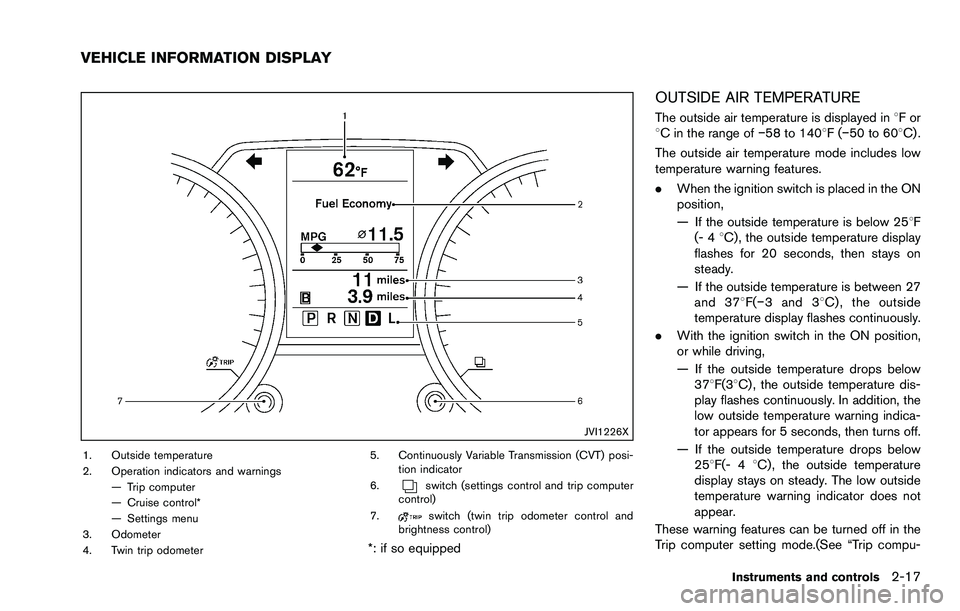
JVI1226X
1. Outside temperature
2. Operation indicators and warnings— Trip computer
— Cruise control*
— Settings menu
3. Odometer
4. Twin trip odometer 5. Continuously Variable Transmission (CVT) posi-
tion indicator
6.
switch (settings control and trip computer
control)
7.
switch (twin trip odometer control and
brightness control)
*: if so equipped
OUTSIDE AIR TEMPERATURE
The outside air temperature is displayed in 8For
8C in the range of í58 to 1408F(í50 to 608C) .
The outside air temperature mode includes low
temperature warning features.
. When the ignition switch is placed in the ON
position,
— If the outside temperature is below 258F
(- 4 8C) , the outside temperature display
flashes for 20 seconds, then stays on
steady.
— If the outside temperature is between 27 and 378 F(í3 and 38 C) , the outside
temperature display flashes continuously.
. With the ignition switch in the ON position,
or while driving,
— If the outside temperature drops below
378F(38C) , the outside temperature dis-
play flashes continuously. In addition, the
low outside temperature warning indica-
tor appears for 5 seconds, then turns off.
— If the outside temperature drops below 258F(- 4 8C) , the outside temperature
display stays on steady. The low outside
temperature warning indicator does not
appear.
These warning features can be turned off in the
Trip computer setting mode.(See “Trip compu-
Instruments and controls2-17
VEHICLE INFORMATION DISPLAY
Page 93 of 322
2-18Instruments and controls
ter” (P.2-21) .)
The outside temperature sensor is located in
front of the radiator. The sensor may be affected
by road or engine heat, wind directions and
other driving conditions. The display may differ
from the actual outside temperature or the
temperature displayed on various signs or bill-
boards.
If the battery was disconnected, when it is
reconnected and the ignition switch is placed in
the ON position,8For8C will flash for one
minute to check the outside temperature sensor.
When the outside temperature sensor is opera-
tional, the outside temperature will be displayed.
If the outside temperature sensor is not opera-
tional, the outside temperature will not be
displayed.
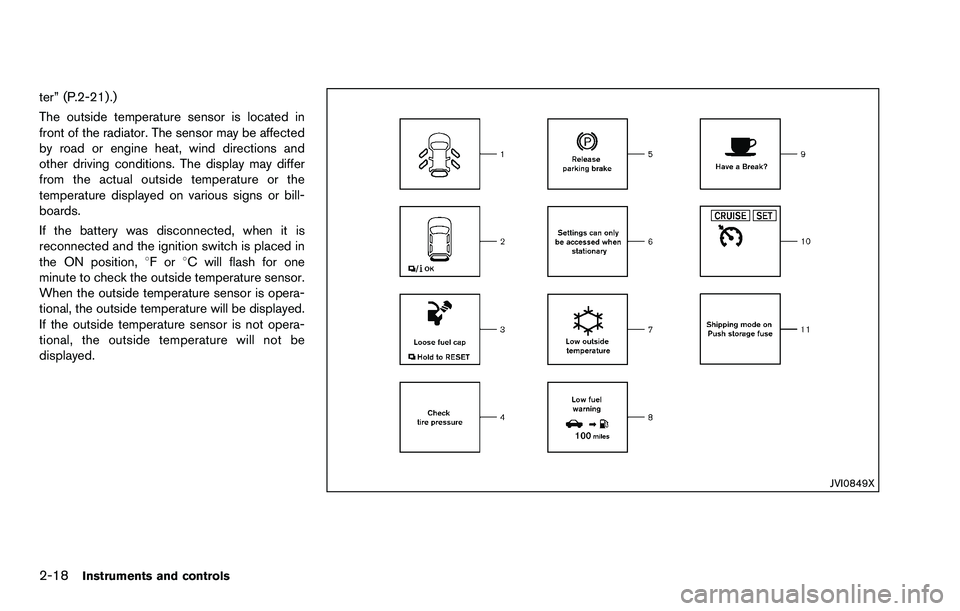
JVI0849X
Page 94 of 322
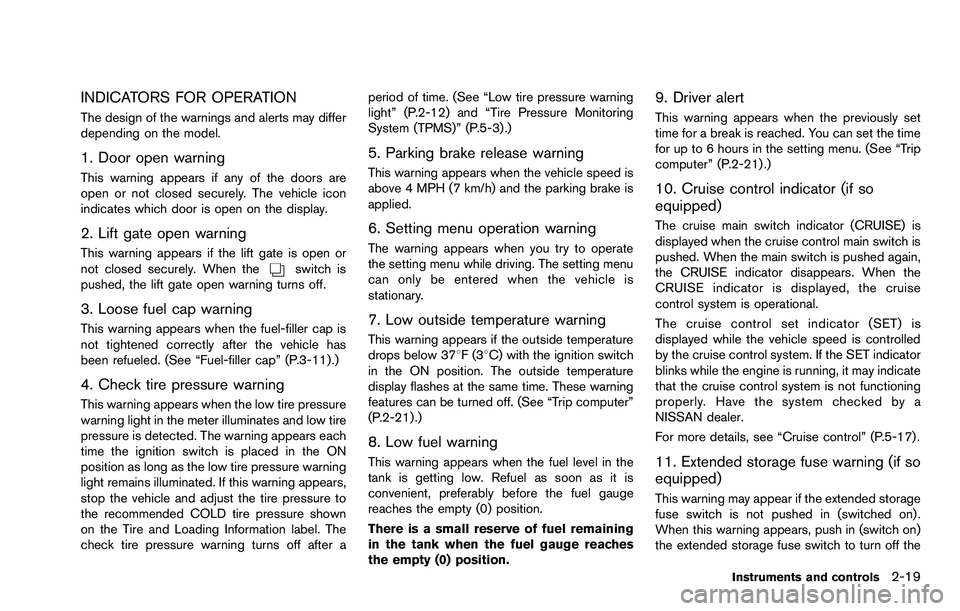
INDICATORS FOR OPERATION
The design of the warnings and alerts may differ
depending on the model.
1. Door open warning
This warning appears if any of the doors are
open or not closed securely. The vehicle icon
indicates which door is open on the display.
2. Lift gate open warning
This warning appears if the lift gate is open or
not closed securely. When theswitch is
pushed, the lift gate open warning turns off.
3. Loose fuel cap warning
This warning appears when the fuel-filler cap is
not tightened correctly after the vehicle has
been refueled. (See “Fuel-filler cap” (P.3-11) .)
4. Check tire pressure warning
This warning appears when the low tire pressure
warning light in the meter illuminates and low tire
pressure is detected. The warning appears each
time the ignition switch is placed in the ON
position as long as the low tire pressure warning
light remains illuminated. If this warning appears,
stop the vehicle and adjust the tire pressure to
the recommended COLD tire pressure shown
on the Tire and Loading Information label. The
check tire pressure warning turns off after a period of time. (See “Low tire pressure warning
light” (P.2-12) and “Tire Pressure Monitoring
System (TPMS)” (P.5-3) .)
5. Parking brake release warning
This warning appears when the vehicle speed is
above 4 MPH (7 km/h) and the parking brake is
applied.
6. Setting menu operation warning
The warning appears when you try to operate
the setting menu while driving. The setting menu
can only be entered when the vehicle is
stationary.
7. Low outside temperature warning
This warning appears if the outside temperature
drops below 378F(3
8C) with the ignition switch
in the ON position. The outside temperature
display flashes at the same time. These warning
features can be turned off. (See “Trip computer”
(P.2-21) .)
8. Low fuel warning
This warning appears when the fuel level in the
tank is getting low. Refuel as soon as it is
convenient, preferably before the fuel gauge
reaches the empty (0) position.
There is a small reserve of fuel remaining
in the tank when the fuel gauge reaches
the empty (0) position.
9. Driver alert
This warning appears when the previously set
time for a break is reached. You can set the time
for up to 6 hours in the setting menu. (See “Trip
computer” (P.2-21).)
10. Cruise control indicator (if so
equipped)
The cruise main switch indicator (CRUISE) is
displayed when the cruise control main switch is
pushed. When the main switch is pushed again,
the CRUISE indicator disappears. When the
CRUISE indicator is displayed, the cruise
control system is operational.
The cruise control set indicator (SET) is
displayed while the vehicle speed is controlled
by the cruise control system. If the SET indicator
blinks while the engine is running, it may indicate
that the cruise control system is not functioning
properly. Have the system checked by a
NISSAN dealer.
For more details, see “Cruise control” (P.5-17) .
11. Extended storage fuse warning (if so
equipped)
This warning may appear if the extended storage
fuse switch is not pushed in (switched on) .
When this warning appears, push in (switch on)
the extended storage fuse switch to turn off the
Instruments and controls2-19
Page 96 of 322
replacement indicator as a guide only
and always perform regular tire checks.
Failure to perform regular tire checks,
including tire pressure checks could
result in tire failure. Serious vehicle
damage could occur and may lead to a
collision, which could result in serious
personal injury or death.
3. “Other” indicator
This indicator appears when the customer set
distance comes for checking or replacing
maintenance items other than the engine oil, oil
filter and tires. Other maintenance items can
include such things as air filter or tire rotation.
You can set or reset the distance for checking or
replacing the items. (See “Trip computer” (P.2-
21) .) For scheduled maintenance items and
intervals, see your NISSAN Service and Main-
tenance Guide.
SIC4551
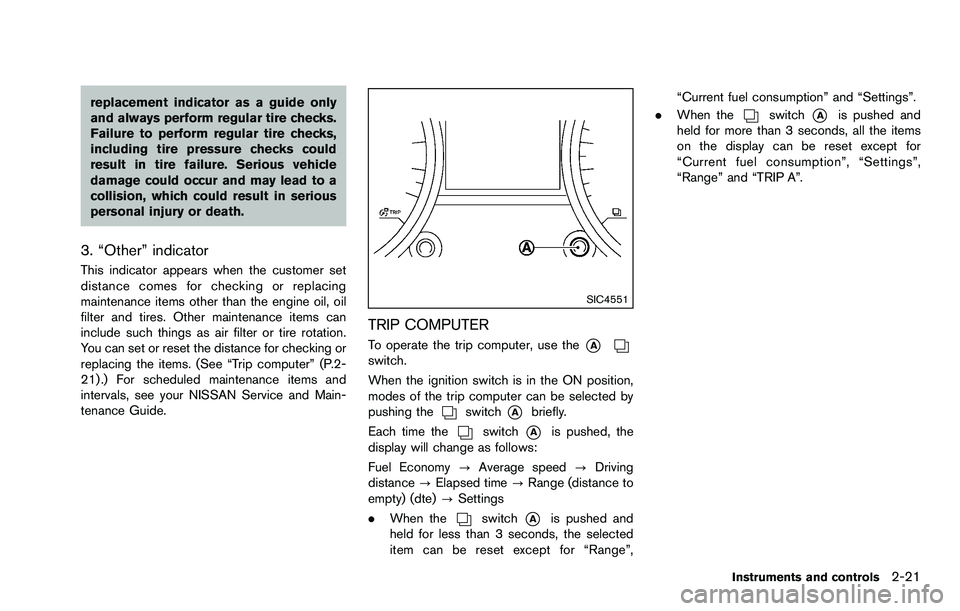
TRIP COMPUTER
To operate the trip computer, use the*Aswitch.
When the ignition switch is in the ON position,
modes of the trip computer can be selected by
pushing the
switch*Abriefly.
Each time the
switch*Ais pushed, the
display will change as follows:
Fuel Economy ?Average speed ?Driving
distance ?Elapsed time ?Range (distance to
empty) (dte) ?Settings
. When the
switch*Ais pushed and
held for less than 3 seconds, the selected
item can be reset except for “Range”, “Current fuel consumption” and “Settings”.
. When the
switch*Ais pushed and
held for more than 3 seconds, all the items
on the display can be reset except for
“Current fuel consumption”, “Settings”,
“Range” and “TRIP A”.
Instruments and controls2-21
Page 97 of 322
2-22Instruments and controls
SIC4541Example*
*: The display unit can be converted or varies
depending on the vehicle.
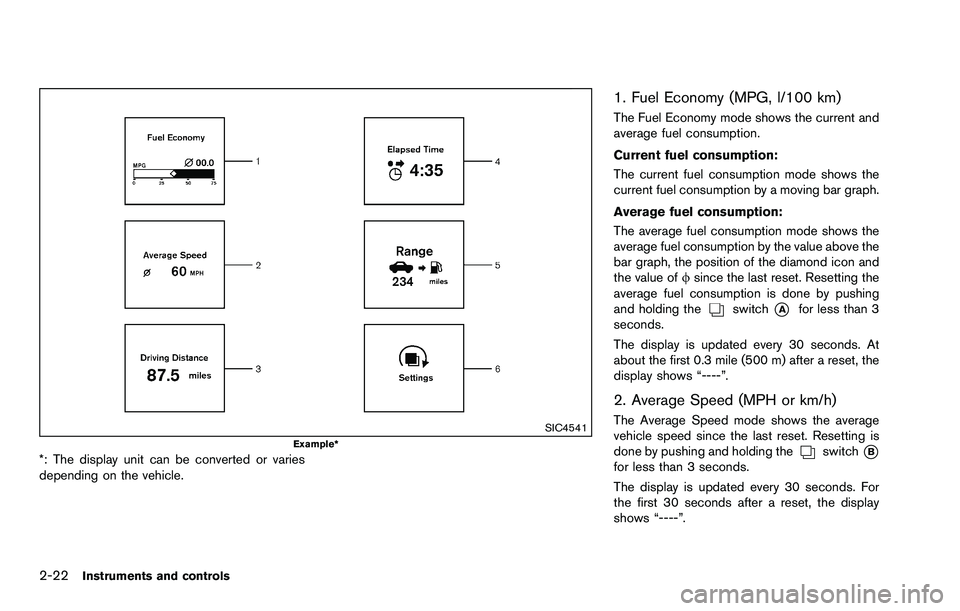
1. Fuel Economy (MPG, l/100 km)
The Fuel Economy mode shows the current and
average fuel consumption.
Current fuel consumption:
The current fuel consumption mode shows the
current fuel consumption by a moving bar graph.
Average fuel consumption:
The average fuel consumption mode shows the
average fuel consumption by the value above the
bar graph, the position of the diamond icon and
the value offsince the last reset. Resetting the
average fuel consumption is done by pushing
and holding the
switch*Afor less than 3
seconds.
The display is updated every 30 seconds. At
about the first 0.3 mile (500 m) after a reset, the
display shows “----”.
2. Average Speed (MPH or km/h)
The Average Speed mode shows the average
vehicle speed since the last reset. Resetting is
done by pushing and holding the
switch*Bfor less than 3 seconds.
The display is updated every 30 seconds. For
the first 30 seconds after a reset, the display
shows “----”.
Page 98 of 322
3. Driving Distance (miles or km)
The Driving Distance mode shows the distance
driven since the last reset. The driving distance
can be reset by pushing and holding the
switch*Afor less than 3 seconds.
4. Elapsed Time
The Elapsed Time mode shows the time since
the last reset. The displayed time can be reset
by pushing and holding the
switch*Afor
less than 3 seconds.
5. Range (distance to empty) (dte —
miles or km)
The distance to empty (dte) mode provides you
with an estimation of the distance that can be
driven before refueling. The dte is constantly
being calculated based on the amount of fuel in
the fuel tank and the actual fuel consumption.
The display is updated every 30 seconds.
The dte mode includes a low range warning
feature. If the fuel level is low, the warning is
displayed on the screen.
When the fuel level drops even lower, the dte
display will change to “----”.
. If the amount of fuel added is small, the
display just before the ignition switch is
turned to the “OFF” position may continue to
be displayed. .
When driving uphill or rounding curves, the
fuel in the tank shifts, which may momenta-
rily change the display.
JVI1227X
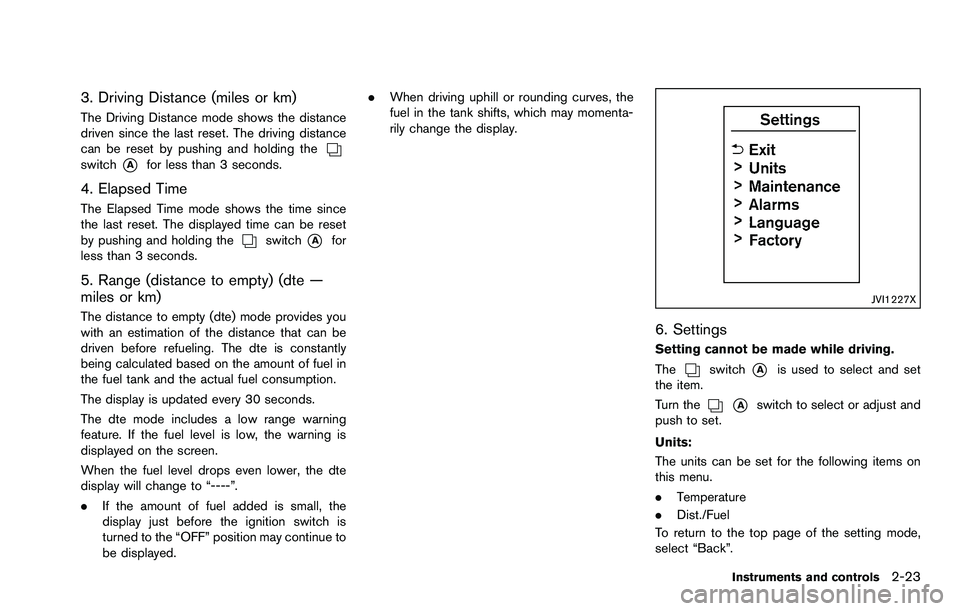
6. Settings
Setting cannot be made while driving.
The
switch*Ais used to select and set
the item.
Turn the
*Aswitch to select or adjust and
push to set.
Units:
The units can be set for the following items on
this menu.
. Temperature
. Dist./Fuel
To return to the top page of the setting mode,
select “Back”.
Instruments and controls2-23
Page 99 of 322
2-24Instruments and controls
Maintenance:
The maintenance intervals of the following items
can be set or reset for the reminders.
.Service
Select this submenu to set or reset the
distance for service due.
. Tire
Select this submenu to set or reset the
distance for replacing tires.
. Other
Select this submenu and set or reset the
distance for items other than service or tires.
To return to the top page of the setting mode,
select “Back”.
Alarms:
Alarms menu can be set to notify the following
items.
. Driver alert
Select this submenu to set the driver alert
period.
. Outside temp
Select this submenu to turn ON or OFF the
low outside temperature warning features.
For a description of the low outside tem-
perature warning features when Outside
Temp is set to ON, see “Outside air
temperature” (P.2-17). With Outside Temp set to OFF,
— The outside temperature display remains
on steady at all outside temperatures and
does not flash.
— The low outside temperature warning indicator does not appear.
To return to the top page of the setting mode,
select “Back”.
Language:
Select the submenu to set the desired language
of the display.
Factory:
Select the submenu to reset the factory settings
of the display.
NOTE:
When resetting Factory, all previous set-
tings made are changed to default.
To return to the top page of the setting mode,
select “Back”.
CONTINUOUSLY VARIABLE TRANS-
MISSION (CVT) POSITION INDICATOR
The Continuously Variable Transmission (CVT)
position indicator indicates the shift lever posi-
tion when the ignition switch is in the ON
position.
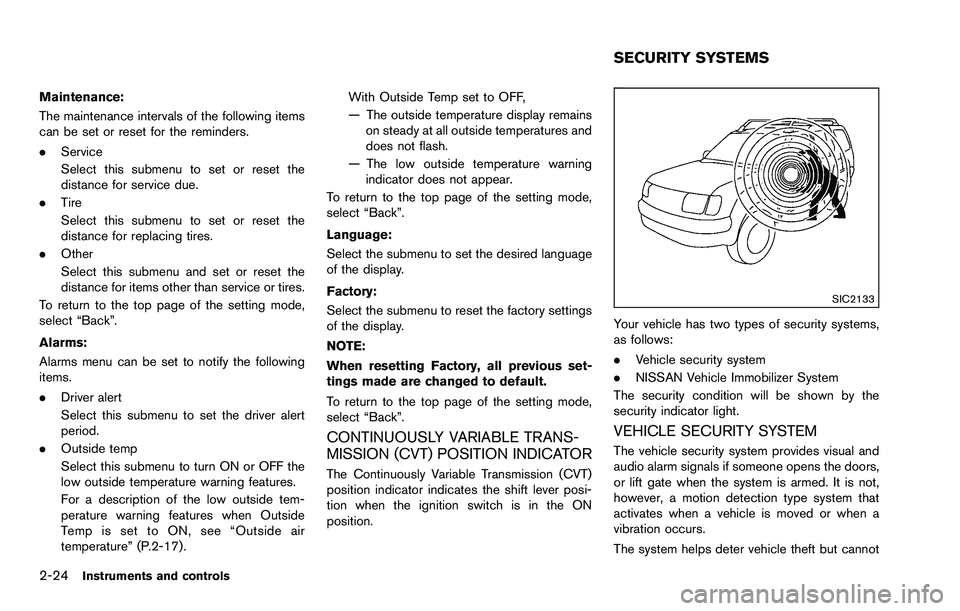
SIC2133
Your vehicle has two types of security systems,
as follows:
. Vehicle security system
. NISSAN Vehicle Immobilizer System
The security condition will be shown by the
security indicator light.
VEHICLE SECURITY SYSTEM
The vehicle security system provides visual and
audio alarm signals if someone opens the doors,
or lift gate when the system is armed. It is not,
however, a motion detection type system that
activates when a vehicle is moved or when a
vibration occurs.
The system helps deter vehicle theft but cannot
SECURITY SYSTEMS
Page 131 of 322

3-12Pre-driving checks and adjustments
.Do not fill a portable fuel container
in the vehicle or trailer. Static elec-
tricity can cause an explosion of
flammable liquid, vapor or gas in
any vehicle or trailer. To reduce the
risk of serious injury or death when
filling portable fuel containers:
— Always place the container on
the ground when filling.
— Do not use electronic devices when filling.
— Keep the pump nozzle in contact with the container while you are
filling it.
— Use only approved portable fuel containers for flammable liquid.
CAUTION
. If fuel is spilled on the vehicle body,
flush it away with water to avoid
paint damage.
. Insert the cap straight into the fuel-
filler tube, then tighten until the
fuel-filler cap clicks. Failure to tight-
en the fuel-filler cap properly may cause the
malfunction indicator
light (MIL) to illuminate. If the
light illuminates because the fuel-
filler cap is loose or missing, tighten
or install the cap and continue to
drive the vehicle. The
light
should turn off after a few driving
trips. If the
light does not turn
off after a few driving trips, have the
vehicle inspected by a NISSAN deal-
er.
For additional information, see
“Malfunction Indicator Light (MIL)”
(P.2-15) .
. The LOOSE FUEL CAP warning will
appear if the fuel-filler cap is not
properly tightened. It may take a few
driving trips for the message to be
displayed. Failure to tighten the
fuel-filler cap properly after the
LOOSE FUEL CAP warning appears
may cause the Malfunction Indicator
Light (MIL) to illuminate.
SPA2807
LOOSE FUEL CAP warning
The LOOSE FUEL CAP warning appears on the
vehicle information display when the fuel-filler
cap is not tightened correctly after the vehicle
has been refueled. It may take a few driving trips
for the message to be displayed. To turn off the
warning, perform the following steps:
1. Remove and install the fuel-filler cap as soon
as possible. (See “FUEL-FILLER CAP”.)
2. Tighten the fuel-filler cap until it clicks.
3. Push the
switch*Afor about 1
second to turn off the LOOSE FUEL CAP
warning after tightening the fuel cap.
Page 136 of 322

4 Heater, air conditioner, audio, phone and voicerecognition systems
Safety note ........................................................................\
.......... 4-2
RearView Monitor (if so equipped) ...................................... 4-2
How to read the displayed lines ..................................... 4-3
Difference between predictive and
actual distances ................................................................... 4-3
How to adjust the screen ................................................. 4-6
Operating tips ...................................................................... 4-6
Ventilators ........................................................................\
............ 4-7
Heater and air conditioner ...................................................... 4-8 Manual air conditioner ........................................................ 4-9
In-cabin microfilter ........................................................... 4-11
Servicing air conditioner ................................................. 4-11
Audio system ........................................................................\
... 4-12
Audio operation precautions ......................................... 4-12
FM-AM radio with Compact Disc (CD) player ......... 4-22
FM-AM-SAT radio with Compact Disc
(CD) player ........................................................................\
4-29 CD/DVD/USB memory care and cleaning .............. 4-37
Steering wheel switch for audio control (if
so equipped) ................................................................... 4-37
Antenna ........................................................................\
.... 4-38
Car phone and CB radio .................................................... 4-39
Bluetooth
ŠHands-Free Phone System (if
so equipped) ........................................................................\
.. 4-40
Regulatory information .................................................. 4-41
Using the system ........................................................... 4-41
Control buttons ............................................................... 4-43
Getting started ............................................................... 4-44
List of voice commands ............................................... 4-45
Speaker Adaptation (SA) mode ................................. 4-49
Troubleshooting guide .................................................. 4-51