horn NISSAN ROGUE SPORT 2017 User Guide
[x] Cancel search | Manufacturer: NISSAN, Model Year: 2017, Model line: ROGUE SPORT, Model: NISSAN ROGUE SPORT 2017Pages: 512, PDF Size: 3.33 MB
Page 156 of 512
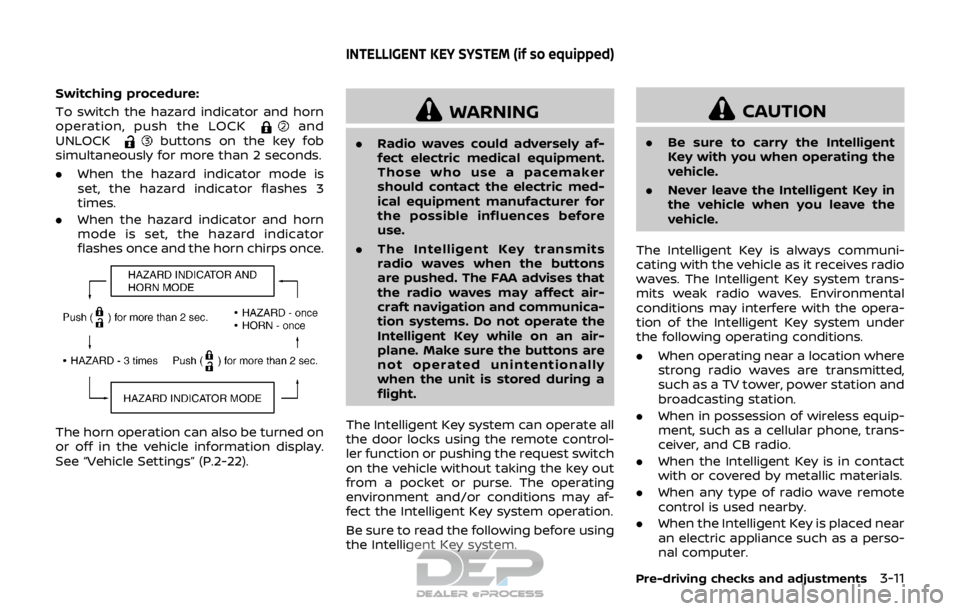
Switching procedure:
To switch the hazard indicator and horn
operation, push the LOCK
and
UNLOCKbuttons on the key fob
simultaneously for more than 2 seconds.
. When the hazard indicator mode is
set, the hazard indicator flashes 3
times.
. When the hazard indicator and horn
mode is set, the hazard indicator
flashes once and the horn chirps once.
The horn operation can also be turned on
or off in the vehicle information display.
See “Vehicle Settings” (P.2-22).
WARNING
.Radio waves could adversely af-
fect electric medical equipment.
Those who use a pacemaker
should contact the electric med-
ical equipment manufacturer for
the possible influences before
use.
. The Intelligent Key transmits
radio waves when the buttons
are pushed. The FAA advises that
the radio waves may affect air-
craft navigation and communica-
tion systems. Do not operate the
Intelligent Key while on an air-
plane. Make sure the buttons are
not operated unintentionally
when the unit is stored during a
flight.
The Intelligent Key system can operate all
the door locks using the remote control-
ler function or pushing the request switch
on the vehicle without taking the key out
from a pocket or purse. The operating
environment and/or conditions may af-
fect the Intelligent Key system operation.
Be sure to read the following before using
the Intelligent Key system.
CAUTION
. Be sure to carry the Intelligent
Key with you when operating the
vehicle.
. Never leave the Intelligent Key in
the vehicle when you leave the
vehicle.
The Intelligent Key is always communi-
cating with the vehicle as it receives radio
waves. The Intelligent Key system trans-
mits weak radio waves. Environmental
conditions may interfere with the opera-
tion of the Intelligent Key system under
the following operating conditions.
. When operating near a location where
strong radio waves are transmitted,
such as a TV tower, power station and
broadcasting station.
. When in possession of wireless equip-
ment, such as a cellular phone, trans-
ceiver, and CB radio.
. When the Intelligent Key is in contact
with or covered by metallic materials.
. When any type of radio wave remote
control is used nearby.
. When the Intelligent Key is placed near
an electric appliance such as a perso-
nal computer.
Pre-driving checks and adjustments3-11
INTELLIGENT KEY SYSTEM (if so equipped)
Page 159 of 512

3-14Pre-driving checks and adjustments
.Do not pull the door handle before
pushing the door handle request
switch. The door will be unlocked but
will not open. Release the door handle
once and pull it again to open the
door.
SPA2408
JVP0099X
JVP0538X
INTELLIGENT KEY OPERATION
You can lock or unlock the doors without
taking the key out from your pocket or
bag.
When you carry the Intelligent Key with
you, you can lock or unlock all doors by
pushing the door handle request switch
(driver’s or front passenger’s)
or liftgate
request switchwithin the range of
operation.
When you lock or unlock the doors, the
hazard indicator will flash and the horn
(or the outside chime) will sound as a
confirmation. For details, see “Setting
hazard indicator and horn mode” (P.3-20).
Page 164 of 512

JVP0541X
Type A
JVP0542XType B
LOCK buttonUNLOCK buttonPANIC buttonRemote engine start button
When you lock or unlock the doors or the
liftgate, the hazard indicator will flash and
the horn (or the outside chime) will sound
as a confirmation. For details, see “Setting
hazard indicator and horn mode” (P.3-20).
Locking doors
1. Place the ignition switch in the OFFposition.
2. Carry the Intelligent Key with you.*
3. Close all the doors.
4. Push the LOCK
buttonon the
Intelligent Key.
5. All the doors and the liftgate will lock.
6. The hazard indicator flashes twice and the horn chirps once.
*: Doors will lock with the Intelligent Key
while the ignition switch is in the ON
position.
Operate the door handles to confirm that
the doors have been securely locked.
Unlocking doors
1. Push the UNLOCKbuttonon
the Intelligent Key once.
2. The hazard indicator flashes once. The driver’s door will unlock.
3. Push the UNLOCK
button again
within 5 seconds.
4. The hazard indicator flashes once. All the doors and the liftgate will unlock.
All doors will be locked automatically
unless one of the following operations is
performed within 1 minute after pushing
the UNLOCK
button while the doors
are locked.
. Opening any door (including the lift-
gate).
. Pushing the ignition switch.
During this 1-minute time period, if the
UNLOCK
button is pushed, all doors
will be locked automatically after another
1 minute.
NOTE:
The unlocking operation can be chan-
ged in selective unlock in the Vehicle
Settings of the vehicle information dis-
play. For additional information, see
“Vehicle Settings” (P.2-22).
Pre-driving checks and adjustments3-19
Page 165 of 512

3-20Pre-driving checks and adjustments
Using panic alarm
If you are near your vehicle and feel
threatened, you may activate the alarm
to call attention as follows:
1. Push the PANIC
buttonon the
Intelligent Key for more than 0.5
seconds.
2. The theft warning alarm and head- lights will stay on for 25 seconds.
3. The panic alarm stops when:
.It has run for 25 seconds, or.Any of the buttons on the Intelligent Key is pushed. (Note: the PANIC
button must be pushed for more
than 0.5 seconds.)
Remote engine start (if so
equipped)
The remote engine startbuttonis
on the Intelligent Key if the vehicle has
remote engine start function. This func-
tion allows the engine to start from
outside the vehicle. See “Remote engine
start” (P.3-22).
Setting hazard indicator and horn
mode
This vehicle is set in hazard indicator and
horn mode when you first receive the
vehicle.
In hazard indicator and horn mode, when
the LOCK
buttonis pushed, the
hazard indicator flashes twice and the
horn chirps once. When the UNLOCK
buttonis pushed, the hazard indicator
flashes once.
If horns are not necessary, the system
can be switched to the hazard indicator
mode.
In hazard indicator mode, when the LOCK
button is pushed, the hazard indica-
tor flashes twice. When the UNLOCK
button is pushed, neither the hazard
indicator nor the horn operates.
Page 166 of 512

Hazard indicator and horn mode:
OperationDOOR LOCKDOOR UNLOCK
Pushing door handle request switch or liftgate request switch HAZARD -
twice
OUTSIDE CHIME - twiceHAZARD -
once
OUTSIDE CHIME - once
Pushing
orbutton HAZARD -
twice
HORN - once HAZARD -
once
HORN - none
Hazard indicator mode:
Operation DOOR LOCKDOOR UNLOCK
Pushing door handle request switch or liftgate request switch HAZARD -
twice
OUTSIDE CHIME - none HAZARD - none
OUTSIDE CHIME - none
Pushing
orbutton HAZARD -
twice
HORN - none HAZARD - none
HORN - none
Switching procedure:
To switch the hazard indicator and horn
(chime) operation, push the LOCK
and UNLOCKbuttons on the Intel-
ligent Key simultaneously for more than 2
seconds.
. When the hazard indicator mode is
set, the hazard indicator flashes 3
times.
. When the hazard indicator and horn
mode is set, the hazard indicator
flashes once and the horn chirps once.
The horn operation can also be turned on
or off in the vehicle information display.
See “Vehicle Settings” (P.2-22).
Pre-driving checks and adjustments3-21
Page 293 of 512

5-8Starting and driving
3. When the designated pressure isreached, the horn beeps once and
the hazard indicators stop flashing.
4. Perform the above steps for each tire.
. If the tire is over-inflated more than
approximately 4 psi (30 kPa), the horn
beeps and the hazard indicators flash
3 times. To correct the pressure, push
the core of the valve stem on the tire
briefly to release pressure. When the
pressure reaches the designated
pressure, the horn beeps once.
. If the hazard indicator does not flash
within approximately 15 seconds after
starting to inflate the tire, it indicates
that the TPMS with Easy Fill Tire Alert
is not operating.
. The TPMS will not activate the Easy Fill
Tire Alert under the following condi-
tions:
— If there is interference from an
external device or transmitter
— The air pressure from the inflation device such as those using a power
socket is not sufficient to inflate the
tire
— If an electrical equipment is being used in or near the vehicle
— There is a malfunction in the TPMS system — There is a malfunction in the horn
or hazard indicators
. If the TPMS with Easy Fill Tire Alert
does not operate due to TPMS inter-
ference, move the vehicle about 3 ft
(1m) backward or forward and try
again.
If the TPMS with Easy Fill Tire Alert is not
working, use a tire pressure gauge.
AVOIDING COLLISION AND ROLL-
OVER
WARNING
Failure to operate this vehicle in a
safe and prudent manner may result
in loss of control or an accident.
Be alert and drive defensively at all times.
Obey all traffic regulations. Avoid exces-
sive speed, high speed cornering, or
sudden steering maneuvers, because
these driving practices could cause you
to lose control of your vehicle. As with
any vehicle, a loss of control could
result in a collision with other vehicles
or objects, or cause the vehicle to roll-
over, particularly if the loss of control
causes the vehicle to slide sideways. Be
attentive at all times, and avoid driving
when tired. Never drive when under the influence of alcohol or drugs (including
prescription or over-the-counter drugs
which may cause drowsiness). Always
wear your seat belt as outlined in “Seat
belts” (P.1-10) of this manual, and also
instruct your passengers to do so.
Seat belts help reduce the risk of injury in
collisions and rollovers.
In a rollover
crash, an unbelted or improperly belted
person is significantly more likely to be
injured or killed than a person properly
wearing a seat belt.
ON-PAVEMENT AND OFF-ROAD
DRIVING PRECAUTIONS
Utility vehicles have a significantly high-
er rollover rate than other types of
vehicles.
They have higher ground clearance than
passenger cars to make them capable of
performing in a variety of on-pavement
and off-road applications. This gives them
a higher center of gravity than ordinary
cars. An advantage of higher ground
clearance is a better view of the road,
allowing you to anticipate problems.
However, they are not designed for cor-
nering at the same speeds as conven-
tional passenger cars any more than low-
slung sports cars are designed to perform
satisfactorily under off-road conditions. If
at all possible, avoid sharp turns or abrupt
Page 506 of 512
FM-AM-SAT radio with Compact Disc (CD)
player (Type A) ............................................................... 4-55
FM-AM-SAT radio with Compact Disc (CD)
player (Type B) ............................................................... 4-63
Fog light switch ............................................................ 2-48
Front manual seat adjustment ............................ 1-3
Front passenger air bag and
status light........................................................................\
1-48
Front seat, Front seat adjustment .................... 1-3
FuelCapacities and
recommended fluids/lubricants............... 10-2
Fuel economy...................................................... 5-100
Fuel information.................................................... 10-3
Fuel octane rating ............................................... 10-3
Fuel-filler cap............................................................ 3-27
Fuel-filler door......................................................... 3-27
Gauge........................................................................\
........ 2-8
Fuel Efficient Driving Tips...................................... 5-99
Fuses........................................................................\
.............. 8-18
Fusible links...................................................................... 8-19
G
Gas cap........................................................................\
........ 3-27
Gauge........................................................................\
................ 2-5 Engine coolant temperature gauge......... 2-7
Fuel gauge .................................................................... 2-8
Odometer....................................................................... 2-6
Speedometer .............................................................. 2-6
Tachometer.................................................................. 2-7
General maintenance................................................... 9-2
Giving voice commands...................................... 4-101
Glove box ........................................................................\
... 2-56
H
Hazard warning flasher switch ............................ 6-2
Head restraints/headrests....................................... 1-6
Headlights Bulb replacement ................................................. 8-25
Headlight switch ................................................... 2-43
Heated seats ................................................................... 2-50
Heated steering wheel ............................................ 2-49
Heater Heater and air
conditioner operation....................................... 4-30
High beam assist ......................................................... 2-45
Hill start assist system ......................................... 5-113
Hood release ................................................................... 3-24
Hook Luggage hook ......................................................... 2-57
Horn........................................................................\
................ 2-49
I
Ignition switch ............................................................... 5-14
Ignition switch (model without Intelligent
Key system) ...................................................................... 5-12
Ignition switch positions ....................................... 5-15
Immobilizer system.................................................... 2-38
Indicator Vehicle information display.......................... 2-18
Indicator lights............................................................... 2-16
Inside mirror .................................................................... 3-31
Inspection/maintenance (I/M) test ............ 10-18
Instrument brightness control ............................. 2-9
Instrument panel ............................................................. 2-4
Intelligent 4x4 ............................................................. 5-100
Intelligent Around View® Monitor................... 4-14
Intelligent Auto Headlight system ................. 2-43
Intelligent Cruise Control (ICC) ......................... 5-62 Intelligent Cruise Control
(ICC) indicator ................................................................. 2-31
Intelligent Engine Brake ...................................... 5-111
Intelligent Key system ............................................. 3-11
Key operating range .......................................... 3-13
Key operation .......................................................... 3-14
Remote keyless operation ............................ 3-18
Intelligent Lane Intervention (I-LI) .................. 5-37
Intelligent Trace Control..................................... 5-110
Interior light replacement..................................... 8-27
Interior light switch.................................................... 2-65
Interior lights................................................................... 2-65
ISOFIX child restraint ................................................ 1-22
J
Jump starting ..................................................................... 6-9
K
Key Ignition switch (model without
Intelligent Key system) ..................................... 5-12
Ignition switch positions ................................ 5-15
Key positions................................................................... 5-14
Keyless entry
(See remote keyless entry system) ........... 3-8
With Intelligent Key system
(See Intelligent Key system) ......................... 3-18
Keys ........................................................................\
.................... 3-2 For Intelligent Key system............................. 3-11
L
LabelsAir bag warning labels ..................................... 1-56
Air conditioner specification label....... 10-10
11-3