phone NISSAN ROGUE SPORT 2017 User Guide
[x] Cancel search | Manufacturer: NISSAN, Model Year: 2017, Model line: ROGUE SPORT, Model: NISSAN ROGUE SPORT 2017Pages: 512, PDF Size: 3.33 MB
Page 157 of 512
3-12Pre-driving checks and adjustments
.When the vehicle is parked near a
parking meter.
In such cases, correct the operating
conditions before using the Intelligent
Key function or use the mechanical key.
Although the life of the battery varies
depending on the operating conditions,
the battery’s life is approximately 2 years.
If the battery is discharged, replace it with
a new one.
Since the Intelligent Key is continuously
receiving radio waves, if the key is left
near equipment which transmits strong
radio waves, such as signals from a TV
and personal computer, the battery life
may become shorter.
For information regarding replacement of
a battery, see “Intelligent Key battery
replacement” (P.8-23).
As many as 4 Intelligent Keys can be
registered and used with one vehicle. For
information about the purchase and use
of additional Intelligent Keys, it is recom-
mended that you contact a NISSAN deal-
er.
CAUTION
. Do not allow the Intelligent Key,
which contains electrical compo-
nents, to come into contact with water or salt water. This could
affect the system function.
. Do not drop the Intelligent Key.
. Do not strike the Intelligent Key
sharply against another object.
. Do not change or modify the
Intelligent Key.
. Wetting may damage the Intelli-
gent Key. If the Intelligent Key
gets wet, immediately wipe until
it is completely dry.
. If the outside temperature is be-
low 14°F (−10°C) degrees, the bat-
tery of the Intelligent Key may not
function properly.
. Do not place the Intelligent Key
for an extended period in an area
where temperatures exceed
140°F (60°C).
. Do not attach the Intelligent Key
with a key holder that contains a
magnet.
. Do not place the Intelligent Key
near equipment that produces a
magnetic field, such as a TV,
audio equipment, personal com-
puters or cellular phone.
If an Intelligent Key is lost or stolen,
NISSAN recommends erasing the ID code of that Intelligent Key from the vehicle.
This may prevent the unauthorized use of
the Intelligent Key to operate the vehicle.
For information regarding the erasing
procedure, it is recommended that you
contact a NISSAN dealer.
The Intelligent Key function can be dis-
abled. For information about disabling
the Intelligent Key function, it is recom-
mended that you contact a NISSAN deal-
er.
Page 163 of 512
3-18Pre-driving checks and adjustments
HOW TO USE REMOTE KEYLESS
ENTRY FUNCTION
WARNING
.Radio waves could adversely af-
fect electric medical equipment.
Those who use a pacemaker
should contact the electric med-
ical equipment manufacturer for
the possible influences before
use.
. The Intelligent Key transmits
radio waves when the buttons
are pushed. The FAA advises that
the radio waves may affect air-
craft navigation and communica-
tion systems. Do not operate the
Intelligent Key while on an air-
plane. Make sure the buttons are
not operated unintentionally
when the unit is stored during a
flight.
CAUTION
.Do not allow the Intelligent Key,
which contains electrical compo-
nents, to come into contact with
water or salt water. This could affect the system function.
. Do not drop the Intelligent Key.
. Do not strike the Intelligent Key
sharply against another object.
. Do not change or modify the
Intelligent Key.
. Wetting may damage the Intelli-
gent Key. If the Intelligent Key
gets wet, immediately wipe until
it is completely dry.
. If the outside temperature is be-
low 14°F (-10°C) degrees, the bat-
tery of the Intelligent Key may not
function properly.
. Do not place the Intelligent Key
for an extended period in an area
where temperatures exceed
140°F (60°C).
. Do not attach the Intelligent Key
with a key holder that contains a
magnet.
. Do not place the Intelligent Key
near equipment that produces a
magnetic field, such as a TV,
audio equipment, personal com-
puters or cellular phone.
The remote keyless entry function can
operate all door locks using the remote
keyless entry function of the Intelligent Key. The remote keyless entry function
can operate at a distance of approxi-
mately 33 ft (10 m) from the vehicle. (The
operating distance depends upon the
conditions around the vehicle.)
The remote keyless entry function will not
operate:
.
When the Intelligent Key is not within
the operational range.
. When the doors are open or not
closed securely.
. When the Intelligent Key battery is
discharged.
The remote keyless entry function can
also operate the vehicle alarm.
Page 180 of 512

4 Heater, air conditioner, audio and phonesystems
Safety note ........................................................................\
................ 4-3
Control buttons and functions (models with
navigation system) ...................................................................... 4-3
How to use touch screen ................................................ 4-4
How to use the BACK button ...................................... 4-5
How to use the APPS·i button ..................................... 4-5
How to use brightness control button ................ 4-8
How to use the POWER/VOLUME dial ................... 4-8
How to use the ENTER
AUDIO/TUNE·SCROLL dial ................................................ 4-8
RearView Monitor (if so equipped) ................................. 4-8 RearView Monitor system operation ..................... 4-9
How to read the displayed lines ................................ 4-9
Difference between predictive and
actual distances ................................................................... 4-10
Adjusting the screen ........................................................ 4-12
RearView Monitor system limitations ................. 4-12
System maintenance ....................................................... 4-13
Intelligent Around View® Monitor (if
so equipped) ........................................................................\
.......... 4-14 Intelligent Around View® Monitor
system operation ................................................................ 4-15
Difference between predictive and
actual distances ................................................................... 4-18
How to park with predictive course lines ....... 4-20
How to switch the display ........................................... 4-21 Adjusting the screen ...................................................... 4-21
Intelligent Around View® Monitor
system limitations ............................................................ 4-22
System maintenance .................................................... 4-24
Moving Object Detection (MOD) (if
so equipped) ........................................................................\
......... 4-25
MOD system operation ................................................ 4-25
Turning MOD on and off ............................................ 4-27
MOD system limitations .............................................. 4-27
System maintenance .................................................... 4-28
Ventilators ........................................................................\
.............. 4-29 Center ventilators ............................................................ 4-29
Side ventilators .................................................................. 4-29
Rear ventilators (if so equipped) .......................... 4-29
Heater and air conditioner ................................................ 4-30 Manual air conditioner and heater .................... 4-31
Automatic air conditioner and heater ............ 4-35
Operating tips (for automatic
air conditioner) ................................................................... 4-37
Servicing air conditioner ............................................. 4-37
Audio system ........................................................................\
....... 4-38 Audio operation precautions .................................. 4-38
FM-AM radio with Compact Disc
(CD) player ........................................................................\
...... 4-48
FM-AM-SAT radio with Compact Disc (CD)
player (Type A) (if so equipped) ............................ 4-55
Page 181 of 512

FM-AM-SAT radio with Compact Disc (CD)
player (Type B) (if so equipped) ............................... 4-63
USB (Universal Serial Bus)
connection port ................................................................... 4-74
AUX (Auxiliary) input jack .............................................. 4-75
Steering wheel switch for audio control ......... 4-75
Antenna ........................................................................\
.............. 4-77
CD/USB memory care and cleaning ................... 4-77
NissanConnect
SMMobile Apps smartphone
integration (if so equipped) ............................................... 4-78
Registering with NissanConnect
SM
Mobile Apps ........................................................................\
..... 4-78
Connect phone ..................................................................... 4-78
Application download ..................................................... 4-78
NissanConnect
SMServices (if so equipped) .......... 4-79
Siri® Eyes Free ........................................................................\
...... 4-79 General Information .......................................................... 4-79
Requirements ........................................................................\
. 4-79
Siri® Eyes Free Activation ............................................. 4-80
Operating Siri® Eyes Free ............................................. 4-80
Changing Siri® Eyes Free Settings
(models with navigation system) ........................... 4-80
Changing Siri® Eyes Free Settings
(models without navigation system) .................. 4-81
Troubleshooting guide ................................................... 4-82
Car phone or CB radio .......................................................... 4-83 Bluetooth® Hands-Free Phone System
(models without navigation system) ........................ 4-83
Regulatory information ............................................... 4-84
Using the system .............................................................. 4-85
Bluetooth® Hands-Free Phone System
(models with navigation system) ................................. 4-93 Regulatory information ............................................... 4-94
Control buttons and microphone ....................... 4-95
Voice command ................................................................ 4-95
Connecting procedure ................................................. 4-96
Vehicle phonebook ......................................................... 4-96
Making a call ........................................................................\
4-97
Receiving a call ................................................................... 4-97
During a call ........................................................................\
.. 4-97
Ending a call ........................................................................\
. 4-97
Text messaging (if so equipped) .......................... 4-97
Phone and Bluetooth® settings ............................ 4-99
NISSAN Voice Recognition system
(models with navigation system) ............................. 4-100 Using the system .......................................................... 4-101
System features ............................................................ 4-102
Phone voice commands ......................................... 4-103
Navigation system voice commands ........... 4-103
Audio system voice commands ....................... 4-104
Information voice commands ............................ 4-104
My APPS voice commands ................................... 4-104
Help voice commands .............................................. 4-104
Troubleshooting guide ............................................ 4-104
Page 182 of 512
WARNING
.Do not disassemble or modify
this system. If you do, it may
result in accidents, fire, or electric
shock.
. Do not use this system if you
notice any abnormality, such as
a frozen screen or lack of sound.
Continued use of the system may
result in accident, fire or electric
shock.
. In case you notice any foreign
object in the system hardware,
spill liquid on it, or notice smoke
or smell coming from it, stop
using the system immediately. It
is recommended you visit a
NISSAN dealer for servicing.
Ignoring such conditions may
lead to accidents, fire, or electric
shock.
Do not attempt to operate the system in
extreme temperature conditions [below
−4°F (−20°C) and above 158°F (70°C)].
Operating this system under these con-
ditions may result in system malfunc-
tions.
JVH1581X
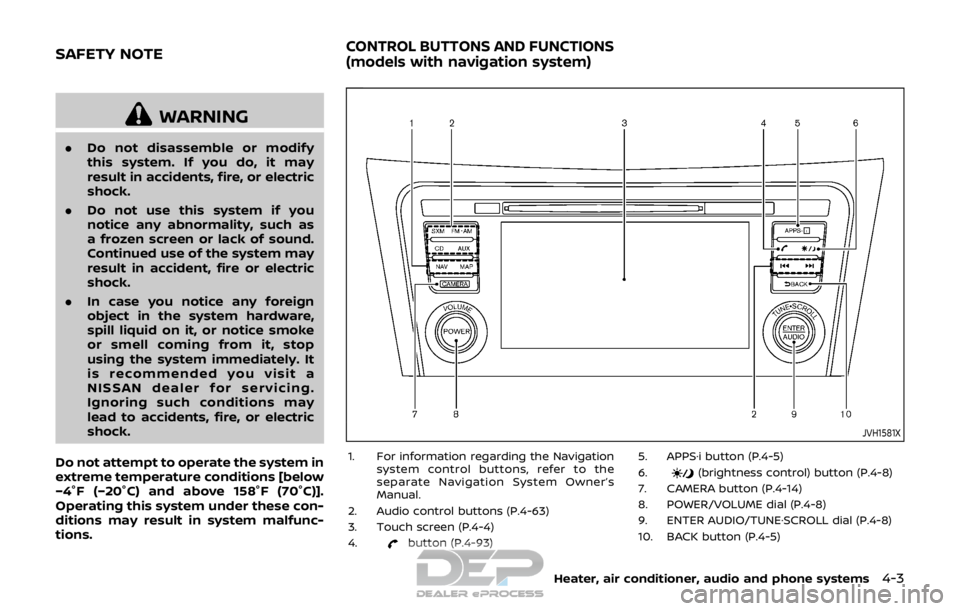
1. For information regarding the Navigation system control buttons, refer to the
separate Navigation System Owner’s
Manual.
2. Audio control buttons (P.4-63)
3. Touch screen (P.4-4)
4.
button (P.4-93) 5. APPS·i button (P.4-5)
6.
(brightness control) button (P.4-8)
7. CAMERA button (P.4-14)
8. POWER/VOLUME dial (P.4-8)
9. ENTER AUDIO/TUNE·SCROLL dial (P.4-8)
10. BACK button (P.4-5)
Heater, air conditioner, audio and phone systems4-3
SAFETY NOTECONTROL BUTTONS AND FUNCTIONS
(models with navigation system)
Page 183 of 512
4-4Heater, air conditioner, audio and phone systems
When you use this system, make sure the
engine is running.
If you use the system with the engine
not running for a long time, it will
discharge the battery, and the engine
will not start.
Reference symbols:
“Example” — Words marked in quotes
refer to a key shown only on the display.
These keys can be selected by touching
the screen.
HOW TO USE TOUCH SCREEN
CAUTION
.The glass screen on the liquid
crystal display may break if it is
hit with a hard or sharp object. If
the glass screen breaks, do not
touch it. Doing so could result in
an injury.
. To clean the display, never use a
rough cloth, alcohol, benzine,
thinner or any kind of solvent or
paper towel with a chemical
cleaning agent. They will scratch
or deteriorate the panel.
. Do not splash any liquid such as
water or car fragrance on the
display. Contact with liquid will cause the system to malfunction.
To help ensure safe driving, some func-
tions cannot be operated while driving.
The on-screen functions that are not
available while driving will be “grayed
out” or muted.
Park the vehicle in a safe location and
then operate the navigation system.
WARNING
. ALWAYS give your full attention to
driving.
. Avoid using vehicle features that
could distract you. If distracted,
you could lose control of your
vehicle and cause an accident.JVH1582X
Touch screen operation
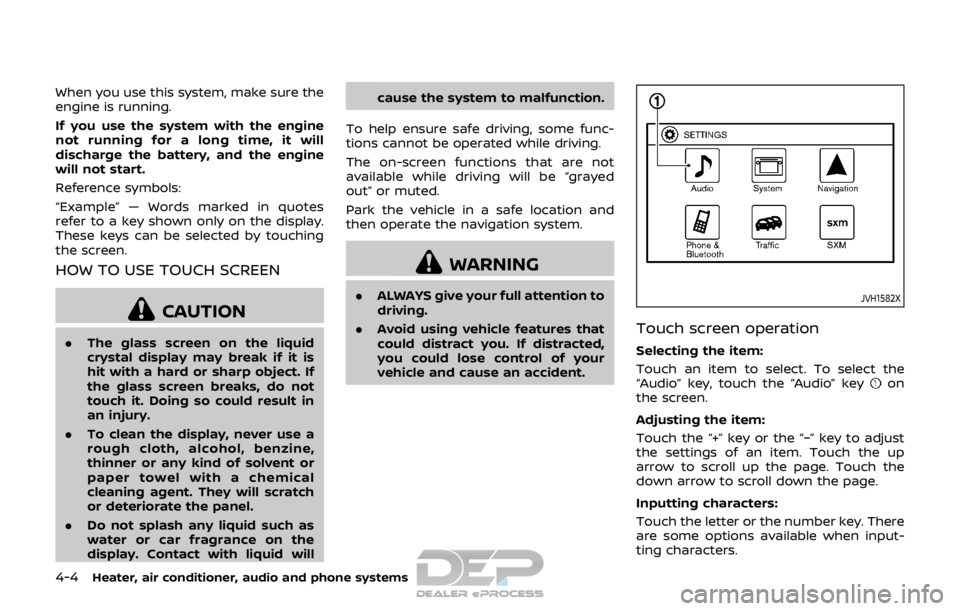
Selecting the item:
Touch an item to select. To select the
“Audio” key, touch the “Audio” key
on
the screen.
Adjusting the item:
Touch the “+” key or the “−” key to adjust
the settings of an item. Touch the up
arrow to scroll up the page. Touch the
down arrow to scroll down the page.
Inputting characters:
Touch the letter or the number key. There
are some options available when input-
ting characters.
Page 184 of 512

.123/ABC:
Changes the keyboard between num-
bers and alphabets.
. Space:
Inserts a space.
. Delete:
Deletes the last inputted character
with one touch. Touch and hold the
“Delete” key to delete all of the char-
acters.
. OK:
Completes the character input.
Touch screen maintenance
If you clean the touch screen, use a dry,
soft cloth. If additional cleaning is neces-
sary, use a small amount of neutral
detergent with a soft cloth. Never spray
the screen with water or detergent.
Dampen the cloth first and then wipe
the screen.
HOW TO USE THE BACK BUTTON
Push the BACK button to return to the
previous screen.
JVH1583X
Example
HOW TO USE THE APPS·i BUTTON
For information about the “SiriusXM Tra-
vel Link”, “SiriusXM Traffic” and “Nissan-
Connect Services” (if so equipped)
features, see the separate Navigation
System Owner’s Manual.
For information about the “My Apps” key,
see “NissanConnect
SMMobile Apps smart-
phone integration” (P.4-78).
For information about the “Voice Com-
mands” key, see “NISSAN Voice Recogni-
tion system (models with navigation
system)” (P.4-100).
JVH1584X
Displaying settings menu
To select and/or adjust several functions,
features and modes that are available for
your vehicle:
1. Push the APPS·i button.
2. Touch the “Settings” key.
3. Touch the desired item.
Available setting items may vary depend-
ing on models and specifications.
Heater, air conditioner, audio and phone systems4-5
Page 185 of 512

4-6Heater, air conditioner, audio and phone systems
Menu ItemResult
Audio For more details, see “Audio main operation” (P.4-63).
System Display Brightness Adjusts the brightness of the display.
Display Mode Adjusts to fit the level of lighting in the vehicle. Touch key to cycle through
options. “Day” and “Night” modes are suited for the respective times of day
while “Auto” controls the display automatically.
Scroll Direction Adjust the scroll direction of ENTER AUDIO/TUNE·SCROLL dial. Choose to
either move up or down.
Clock/Date Time Format The clock can be set to 12 hours or 24 hours.
Date Format The format of the day, month and year display can be selected.
Clock Mode Adjust the mode for the clock. “Auto” uses the system’s GPS to automatically
maintain the time. “Manual” allows you to set the clock using the “Set Clock/
Date Manually” key. Select “Time Zone” to have the time set to a specific time
zone.
Set Clock/Date Manually Adjust the clock manually. Touch the “+” or “-” keys to adjust the hours, minutes, day, month and year up or down. “Clock Mode” must be set to
“Manual” for this option to be available. When the “Time Format” is set to
“12h”, switching between “AM” and “PM” can be done by touching “MODE”.
Daylight Savings Time Adjusts the daylight savings time on or off. “Clock Mode” must be set to “Time Zone” for this option to be available.
Time Zone Choose the applicable time zone from the list.
Language Touch this key to change the language on the display.
NissanConnect Services Settings See the separate Navigation System Owner’s Manual for detail information.
Camera Settings Display Mode Touch this key to select the camera screen display mode (day, night, or
automatic).
Brightness Adjust camera screen brightness.
Contrast Adjust camera screen contrast.
Color Adjust camera screen color.
Page 186 of 512

Menu ItemResult
Temperature Unit Touch this key to change the temperature unit being displayed (Fahrenheit
or Celsius).
Touchscreen Click Toggles the touch screen click feature on or off. When activated, a click
sound will be heard every time a key on the screen is touched.
System Beeps Toggle the system beep tones feature on or off. When activated, a beep
sound will be heard when a pop-up message appears on the screen or a
button on the unit (such as the
button) is pushed and held for a few
seconds.
Return to Factory Settings / Clear Memory Touch this key to return all settings to default and to clear the memory.
Software Licenses Touch this key to display software licensing information.
Minimize Voice Feedback Use this function to minimize the amount of prompts spoken by the system.
System Software Version This displays the software version your navigation system is currently
running.
Navigation See the separate Navigation System Owner’s Manual for detail information.
Phone & Bluetooth For more details, see “Phone and Bluetooth® settings” (P.4-99).
Traffic Touch this key to display traffic settings. See the separate Navigation
System Owner’s Manual for more information.
SXM Touch this key to display SXM status information. For SXM setup, see “Audio
main operation” (P.4-63).
Heater, air conditioner, audio and phone systems4-7
Page 187 of 512
4-8Heater, air conditioner, audio and phone systems
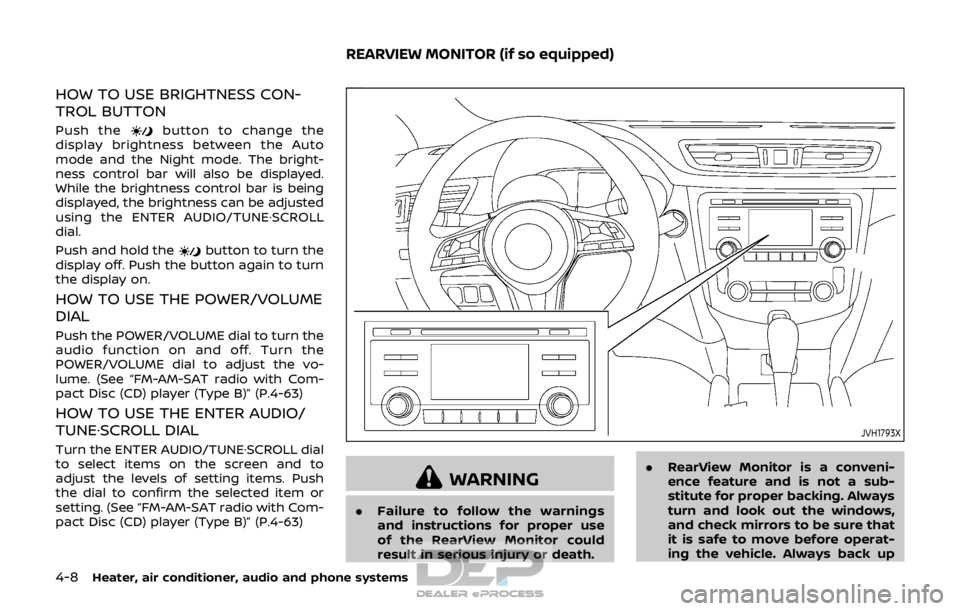
HOW TO USE BRIGHTNESS CON-
TROL BUTTON
Push thebutton to change the
display brightness between the Auto
mode and the Night mode. The bright-
ness control bar will also be displayed.
While the brightness control bar is being
displayed, the brightness can be adjusted
using the ENTER AUDIO/TUNE·SCROLL
dial.
Push and hold the
button to turn the
display off. Push the button again to turn
the display on.
HOW TO USE THE POWER/VOLUME
DIAL
Push the POWER/VOLUME dial to turn the
audio function on and off. Turn the
POWER/VOLUME dial to adjust the vo-
lume. (See “FM-AM-SAT radio with Com-
pact Disc (CD) player (Type B)” (P.4-63)
HOW TO USE THE ENTER AUDIO/
TUNE·SCROLL DIAL
Turn the ENTER AUDIO/TUNE·SCROLL dial
to select items on the screen and to
adjust the levels of setting items. Push
the dial to confirm the selected item or
setting. (See “FM-AM-SAT radio with Com-
pact Disc (CD) player (Type B)” (P.4-63)
JVH1793X
WARNING
. Failure to follow the warnings
and instructions for proper use
of the RearView Monitor could
result in serious injury or death. .
RearView Monitor is a conveni-
ence feature and is not a sub-
stitute for proper backing. Always
turn and look out the windows,
and check mirrors to be sure that
it is safe to move before operat-
ing the vehicle. Always back up
REARVIEW MONITOR (if so equipped)