ECO mode NISSAN ROGUE SPORT 2017 Repair Manual
[x] Cancel search | Manufacturer: NISSAN, Model Year: 2017, Model line: ROGUE SPORT, Model: NISSAN ROGUE SPORT 2017Pages: 512, PDF Size: 3.33 MB
Page 264 of 512

2) this device must accept any inter-ference, including interference
that may cause undesired opera-
tion of the device.
IC Regulatory information
.Operation is subject to the following
two conditions: (1) this device may not
cause interference, and (2) this device
must accept any interference, includ-
ing interference that may cause un-
desired operation of the device.
. This Class B digital apparatus meets
all requirements of the Canadian In-
terference-Causing Equipment Regu-
lations.
Bluetooth® trademark
Bluetooth® is a trademark
owned by Bluetooth SIG, Inc.,
and licensed to Visteon Cor-
poration.
USING THE SYSTEM
The voice recognition system allows
hands-free operation of the Bluetooth®
Hands-Free Phone System.
If the vehicle is in motion, some com-
mands may not be available so full
attention may be given to vehicle opera-
tion.
JVH1627X
Control buttons and microphone
Control buttons:
The control buttons for the Bluetooth®
Hands- Free Phone System are located on
the steering wheel.
1. Volume control buttons
2. Menu control buttons/OK button
While using the voice recognition sys-
tem, push the
/buttons to
manually control the phone system.
3.
button
Push the
button to initiate a voice
recognition operation session or an-
swer an incoming call.
INFO:
If the “Siri” on the Bluetooth® settings
menu is set to “Short Press”, pushing
and holding the
button initiates a
voice recognition operation session
for Hands-Free Phone operation. (See
“Bluetooth® settings” (P.4-92).)
You can also use the
button to
interrupt the system feedback and
give a command at once. See “Giving
voice commands” (P.4-87) in this sec-
tion for more information.
4.
button
Push the
button to reject the call.
While the voice recognition system is
active, push and hold the
button
to quit the voice recognition system at
any time.
Microphone:
Microphone is located near the map
lights.
Manual control:
While using the Voice Recognition system,
it is also possible to select menu options
manually by using the steering wheel
controls instead of speaking voice com-
mands. To activate the manual control
mode, push the
button on the steer-
ing wheel to access the phone menu and
then push the menu control buttons.
Heater, air conditioner, audio and phone systems4-85
Page 265 of 512

4-86Heater, air conditioner, audio and phone systems
The manual control mode does not allow
dialing a phone number by digits. The
user may select an entry from the Phone-
book or Recent Calls lists. To reactivate
Voice Recognition, exit the manual con-
trol mode by pushing and holding the
button. At that time, pushing thebutton will start the Bluetooth® Hands-
Free Phone System.
Choosing a language
You can interact with the Bluetooth®
Hands-Free Phone System using several
languages that are available. For opera-
tions to change the language, see “Audio
main operation” (P.4-48) or “Audio main
operation” (P.4-56).
Changing voice feedback volume
If you want to adjust the volume of the
voice feedback, push the volume control
buttons on the steering wheel while
being provided with feedback. You can
also use the Power/VOL dial on the
control panel.
Initialization
When the ignition switch is placed in the
ACC or ON position, voice recognition is
initialized, which takes a few seconds. If
the
button is pushed before the
initialization completes, the system will
announce “Hands-free phone system not
ready” and will not react to voice com-
mands.
Connecting procedure:
NOTE:
The connecting procedure must be
performed when the vehicle is station-
ary. If the vehicle starts moving during
the procedure, the procedure will be
cancelled.
JVH1626X
To connect a phone to the Bluetooth®
Hands-Free Phone System;
1. Push the ENTER SETTING button
.
2. Use the ENTER SETTING button
to
select “Bluetooth” and then push the
ENTER SETTING button
.
3. Select “Add Phone” and then push the ENTER SETTING button
.
4. When a message with a PIN appears on the screen, operate the Bluetooth®
phone to enter the PIN.
The connecting procedure varies accord-
ing to each phone. See the phone’s own-
er’s manual for details.
Page 272 of 512
standard options when sending a
text message. To set a custom
message, send a text message to
your own phone number while the
phone is connected to the system.
Three custom messages can be set.
Custom messages can only be set
while the vehicle is stationary.
.Auto Reply (if so equipped)Select to turn on or off the Auto
Reply function. When enabled, the
vehicle will automatically send a
predefined text message to the
sender when a text message is
received while driving.
.Auto Reply Message (if so equipped)
Select to choose the message that
is sent when the Auto Reply func-
tion is enabled. Choose from “I’m
Driving” or one of the three custom
messages stored in the system.
.Vehicle Signature On/Off (if soequipped)
Select to choose whether or not
the vehicle signature is added to
outgoing text messages from the
vehicle. This message cannot be
changed or customized.
WARNING
. Use a phone after stopping your
vehicle in a safe location. If you
have to use a phone while driving,
exercise extreme caution at all
times so full attention may be
given to vehicle operation.
. If you are unable to devote full
attention to vehicle operation
while talking on the phone, pull
off the road to a safe location and
stop your vehicle.
CAUTION
To avoid discharging the vehicle
battery, use a phone after starting
the engine.
Your vehicle is equipped with the Blue-
tooth® Hands-Free Phone System. If you
have a compatible Bluetooth® enabled
cellular phone, you can set up the wire-
less connection between your cellular
phone and the in-vehicle phone module.
With Bluetooth® wireless technology, you
can make or receive a hands-free tele-
phone call with your cellular phone in the vehicle.
Once your cellular phone is connected to
the in-vehicle phone module, no other
phone connecting procedure is required.
Your phone is automatically connected
with the in-vehicle phone module when
the ignition switch is placed in the ON
position with the connected cellular
phone turned on and carried in the
vehicle.
You can register up to five different Blue-
tooth® cellular phones to the in-vehicle
phone module. However, you can talk on
only one cellular phone at a time.
NISSAN Voice Recognition system sup-
ports the phone commands, so dialing a
phone number using your voice is possi-
ble. For more details, see “NISSAN Voice
Recognition system (models with naviga-
tion system)” (P.4-100).
Before using the Bluetooth® Hands-Free
Phone System, refer to the following
notes.
.
Set up the wireless connection be-
tween a cellular phone and the in-
vehicle phone module before using
the Hands-Free Phone System.
. Some Bluetooth® enabled cellular
phones may not be recognized by
the in-vehicle phone module. Please
visit www.nissanusa.com/bluetooth
Heater, air conditioner, audio and phone systems4-93
Bluetooth® HANDS-FREE PHONE SYSTEM
(models with navigation system)
Page 279 of 512

4-100Heater, air conditioner, audio and phone systems
.Start Siri by:
Touch “Short Press” or “Long Press” to
set how Siri® is operated on the
steering wheel.
. Sort Phonebook By:
Touch “First Name” or “Last Name” to
choose how phonebook entries are
alphabetically displayed on the
screen.
. Use Phonebook From:
Touch “Handset” to use the phone’s
phonebook. Select “SIM” to use the
phonebook on the SIM card. Touch
“Both” to use both sources.
. Download Phonebook Now:
Touch to download the phonebook to
the vehicle from the chosen source.
. Record Name for Phonebook Entry:
Touch to record a name for a phone-
book entry for use with the NISSAN
Voice Recognition System.
. Phone Notifications for:
Touch “Driver” to have phone notifica-
tions shown in the vehicle information
display. Touch “Both” to have phone
notifications shown in both the vehi-
cle information display and the touch
screen.
. Text Messaging (if so equipped):
Touch to toggle the text message
functionality on or off. .
Show Incoming Text for (if so
equipped):
Touch “Driver” to have incoming text
notifications shown in the vehicle
information display. Touch “Both” to
have text notifications shown in both
the vehicle information display and
the touch screen. Touch “OFF” to turn
off all text notifications.
. Auto Reply (if so equipped):
Touch to toggle the auto reply func-
tionality on or off.
. Auto Reply Message (if so equipped):
Touch to indicate preferred message
to be sent when “Auto Reply” function
is activated.
. Use Vehicle’s Signature (if so
equipped):
Touch to toggle on or off the addition
of the vehicle signature to outgoing
messages
. Custom Text Messages (if so
equipped):
Touch this option to select a custom
message to edit. There are several
custom message slots available. The NISSAN Voice Recognition system
allows hands-free operation of the sys-
tems equipped on this vehicle, such as
the phone and navigation systems.
To operate NISSAN Voice Recognition,
push the
button located on the
steering wheel. When prompted, speak
the command for the system you wish to
activate. The command given is picked up
by the microphone and performed when
it is properly recognized. NISSAN Voice
Recognition will provide a voice response
as well as a message in the touch screen
to inform you of the command results.
NISSAN VOICE RECOGNITION SYSTEM
(models with navigation system)
Page 286 of 512

5 Starting and driving
Precautions when starting and driving ...................... 5-4Exhaust gas (carbon monoxide) ................................ 5-4
Three-way catalyst ............................................................... 5-4
Tire Pressure Monitoring System (TPMS) ........... 5-5
Avoiding collision and rollover .................................... 5-8
On-pavement and off-road
driving precautions .............................................................. 5-8
Off-road recovery .................................................................. 5-9
Rapid air pressure loss ...................................................... 5-9
Drinking alcohol/drugs and driving ..................... 5-10
Driving safety precautions .......................................... 5-10
Ignition switch (models without Intelligent
Key system) ........................................................................\
............ 5-12
Continuously Variable
Transmission (CVT) ............................................................ 5-13
Manual Transmission (MT) ........................................... 5-13
Key positions ........................................................................\
.. 5-14
Push-button ignition switch (model with
Intelligent Key system) .......................................................... 5-14 Operating range for engine start function ...... 5-14
Push-button ignition switch operation ............. 5-15
Push-button ignition switch positions .............. 5-16
Emergency engine shut off ........................................ 5-16
Intelligent Key battery discharge ........................... 5-17
Before starting the engine ................................................. 5-17 Starting the engine (model without Intelligent
Key system) ........................................................................\
........... 5-18
Starting the engine (model with Intelligent
Key system) ........................................................................\
........... 5-19
Remote engine start (if so equipped) .............. 5-20
Driving the vehicle ................................................................... 5-20
Continuously Variable
Transmission (CVT) ......................................................... 5-20
Manual Transmission (MT) ........................................ 5-25
Parking brake ........................................................................\
....... 5-27
Pedal type ........................................................................\
....... 5-27
Switch type (models with electronic
parking brake system) ................................................. 5-27
ECO mode system ................................................................... 5-29 ECO Pedal Guide function ......................................... 5-30
Ambient ECO ........................................................................\
5-30
ECO Drive Report .............................................................. 5-31
Lane Departure Warning (LDW) (if
so equipped) ........................................................................\
......... 5-32 LDW system operation ................................................. 5-33
How to enable/disable the LDW system ....... 5-34
LDW system limitations ............................................... 5-35
System temporarily unavailable ........................... 5-36
System malfunction ....................................................... 5-36
System maintenance .................................................... 5-36
Page 288 of 512

Increasing fuel economy ................................................. 5-100
Intelligent 4x4 (if so equipped) ................................... 5-100Intelligent 4x4 LOCK switch operations ...... 5-102
Parking/parking on hills ................................................... 5-104
Electric power steering ..................................................... 5-105
Brake system ........................................................................\
.... 5-106 Braking precautions ..................................................... 5-106
Brake assist ........................................................................\
........ 5-107
Brake assist ........................................................................\
. 5-107
Anti-lock Braking System (ABS) ........................... 5-107
Vehicle Dynamic Control (VDC) system ............... 5-108
Chassis control ........................................................................\
5-110 Intelligent Trace Control ........................................... 5-110 Intelligent Engine Brake (Continuously
Variable Transmission (CVT) models) .......... 5-111
Active Ride Control ..................................................... 5-112
Hill Start Assist system ..................................................... 5-113
Cold weather driving ......................................................... 5-113 Freeing a frozen door lock ................................... 5-113
Anti-freeze ........................................................................\
.. 5-113
Battery ........................................................................\
........... 5-113
Draining of coolant water ..................................... 5-113
Tire equipment ............................................................... 5-114
Special winter equipment ..................................... 5-114
Driving on snow or ice ............................................. 5-114
Page 289 of 512
5-4Starting and driving
WARNING
.Do not leave children or adults
who would normally require the
support of others alone in your
vehicle. Pets should not be left
alone either. They could acciden-
tally injure themselves or others
through inadvertent operation of
the vehicle. Also, on hot, sunny
days, temperatures in a closed
vehicle could quickly become
high enough to cause severe or
possibly fatal injuries to people or
animals.
. Properly secure all cargo with
ropes or straps to help prevent it
from sliding or shifting. Do not
place cargo higher than the seat-
backs. In a sudden stop or colli-
sion, unsecured cargo could
cause personal injury.
EXHAUST GAS (carbon monoxide)
WARNING
.Do not breathe exhaust gas; it
contains colorless and odorless
carbon monoxide. Carbon mon- oxide is dangerous. It can cause
unconsciousness or death.
. If you suspect that exhaust fumes
are entering the vehicle, drive
with all windows fully open, and
have the vehicle inspected imme-
diately.
. Do not run the engine in closed
spaces such as a garage.
. Do not park the vehicle with the
engine running for an extended
period of time.
. Keep the liftgate closed while
driving, otherwise exhaust gas
could be drawn into the passen-
ger compartment. If you must
drive with the liftgate open, fol-
low these precautions:
— Open all the windows.
— Turn the air recirculation
mode off and set the fan
speed control to the highest
level to circulate the air.
. If a special body or other equip-
ment is added for recreational or
other usage, follow the manufac-
turer’s recommendation to pre-
vent carbon monoxide entry into
the vehicle. (Some recreational
vehicle appliances such as stoves, refrigerators, heaters, etc. may
also generate carbon monoxide.)
. The exhaust system and body
should be inspected by a quali-
fied mechanic whenever:
— Your vehicle is raised while
being serviced.
— You suspect that exhaust fumes are entering into the
passenger compartment.
— You notice a change in the sound of the exhaust system.
— You have had an accident involving damage to the ex-
haust system, underbody, or
rear of the vehicle.
THREE-WAY CATALYST
The three-way catalyst is an emission
control device installed in the exhaust
system. Exhaust gases in the three-way
catalyst are burned at high temperatures
to help reduce pollutants.
WARNING
. The exhaust gas and the exhaust
system are very hot. Keep people,
animals and flammable materials
PRECAUTIONS WHEN STARTING
AND DRIVING
Page 292 of 512
.Replacing tires with those not
originally specified by NISSAN
could affect the proper operation
of the TPMS.
. Do not inject any tire liquid or
aerosol tire sealant into the tires,
as this may cause a malfunction
of the tire pressure sensors.
CAUTION
.The TPMS may not function prop-
erly when the wheels are
equipped with tire chains or the
wheels are buried in snow.
. Do not place metalized film or
any metal parts (antenna, etc.) on
the windows. This may cause
poor reception of the signals
from the tire pressure sensors,
and the TPMS will not function
properly.
Some devices and transmitters may tem-
porarily interfere with the operation of
the TPMS and cause the low tire pressure
warning light to illuminate. Some exam-
ples are: .
Facilities or electric devices using
similar radio frequencies are near the
vehicle.
. If a transmitter set to similar frequen-
cies is being used in or near the
vehicle.
. If a computer (or similar equipment) or
a DC/AC converter is being used in or
near the vehicle.
Low tire pressure warning light may
illuminate in the following cases.
. If the vehicle is equipped with a wheel
and tire without TPMS.
. If the TPMS has been replaced and the
ID has not been registered.
. If the wheel is not originally specified
by NISSAN.
FCC Notice:
For USA:
This device complies with Part 15 of the
FCC Rules. Operation is subject to the
following two conditions: (1) This device
may not cause harmful interference,
and (2) this device must accept any
interference received, including inter-
ference that may cause undesired op-
eration.
Note: Changes or modifications not
expressly approved by the party re-
sponsible for compliance could void
the user’s authority to operate the equipment.
For Canada:
This device complies with Industry Ca-
nada licence-exempt RSS standard(s).
Operation is subject to the following
two conditions: (1) this device may not
cause interference, and (2) this device
must accept any interference, including
interference that may cause undesired
operation of the device.
TPMS with Easy Fill Tire Alert
When adding air to an under-inflated tire,
the TPMS with Easy Fill Tire Alert provides
visual and audible signals outside the
vehicle to help you inflate the tires to
the recommended COLD tire pressure.
Vehicle set-up:
1. Park the vehicle in a safe and level
place.
2. Apply the parking brake and place the shift lever in the P (Park) position (CVT
model) or N (Neutral) position (MT
model).
3. Place the ignition switch in the ON position. Do not start the engine.
Operation:
1. Add air to the tire.
2. After a few seconds, the hazard in- dicators will start flashing.
Starting and driving5-7
Page 299 of 512
5-14Starting and driving
KEY POSITIONS
LOCK: Normal parking position (0)
OFF: (Not used) (1)
This position activates electrical acces-
sories such as the radio when the engine
is not running.
ON: Normal operating position (2)
This position turns on the ignition system
and the electrical accessories.
START: (3)
This position starts the engine. As soon as
the engine has started, release the key. It
automatically returns to the ON position.
WARNING
Do not operate the push-button
ignition switch while driving the ve-
hicle except in an emergency. (The
engine will stop when the ignition
switch is pushed 3 consecutive times
or the ignition switch is pushed and
held for more than 2 seconds.) If the
engine stops while the vehicle is
being driven, this could lead to a
crash and serious injury.
Before operating the push-button igni-
tion switch, be sure to move the shift
lever to the P (Park) position (for Con-
tinuously Variable Transmission (CVT)
models) or the shift lever to the N
(Neutral) position (for Manual Transmis-
sion (MT) models).
SSD0436
OPERATING RANGE FOR ENGINE
START FUNCTION
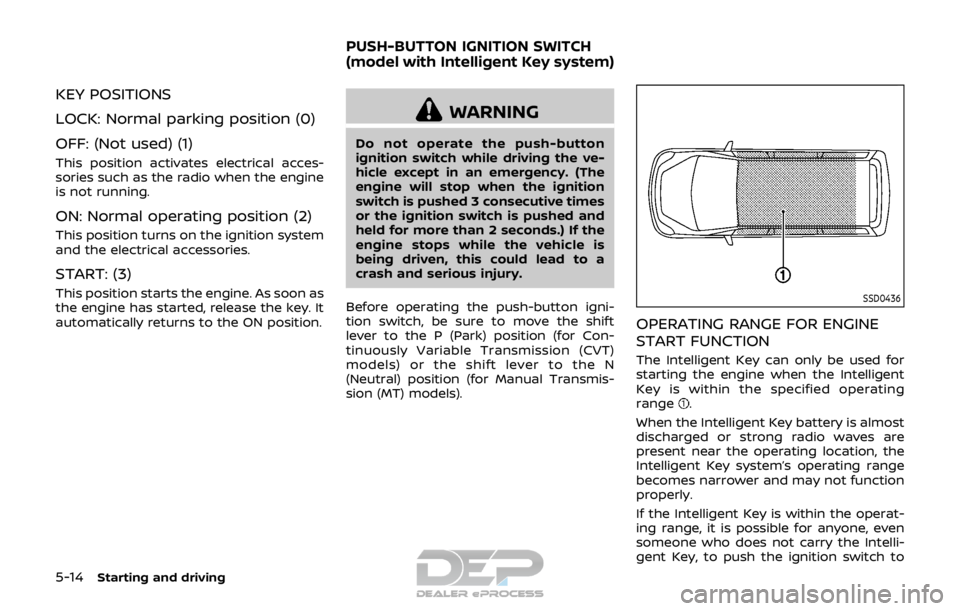
The Intelligent Key can only be used for
starting the engine when the Intelligent
Key is within the specified operating
range
.
When the Intelligent Key battery is almost
discharged or strong radio waves are
present near the operating location, the
Intelligent Key system’s operating range
becomes narrower and may not function
properly.
If the Intelligent Key is within the operat-
ing range, it is possible for anyone, even
someone who does not carry the Intelli-
gent Key, to push the ignition switch to
PUSH-BUTTON IGNITION SWITCH
(model with Intelligent Key system)
Page 301 of 512

5-16Starting and driving
Continuously Variable Transmis-
sion (CVT) models
The ignition lock is designed so that the
ignition switch position cannot be
switched to OFF until the shift lever is
moved to the P (Park) position.
When the ignition switch cannot be
pushed toward the OFF position, proceed
as follows:
1. Move the shift lever into the P (Park)position.
2. Push the ignition switch. The ignition switch position will change to the ON
position.
3. Push the ignition switch again to the OFF position.
The shift lever can be moved from the P
(Park) position if the ignition switch is in
the ON position and the brake pedal is
depressed.
PUSH-BUTTON IGNITION SWITCH
POSITIONS
LOCK (Normal parking position)
The ignition switch can only be locked at
this position.
The ignition switch will lock when any
door is opened or closed with the ignition
switched off.
ON (Normal operating position)
The ignition system and the electrical
accessory power activate at this position
without the engine turned on.
The ON position has a battery saver
feature that will place the ignition switch
in the OFF position, if the vehicle is not
running, after some time under the fol-
lowing conditions:
. all doors are closed.
. shift lever is in P (Park) position (CVT
model) or N (Neutral) position (MT
model).
The battery saver feature will be can-
celled if any of the following occur:
. any door is opened.
. shift lever is moved out of the P (Park)
position (CVT model). .
ignition switch changes position.
OFF position
The engine is turned off in this position.
Auto ACC position
With the vehicle in the P (Park) position
(CVT models) or the N (Neutral) position
(MT models), the Intelligent Key with you
and the ignition placed from ON to OFF,
the radio can still be used for a period of
time, or until the driver’s door is opened.
After a period of time, functions such as
radio, navigation (if so equipped), and
Bluetooth® Hands-Free Phone System
may be restarted by turning on the audio
system (See “Audio system” (P.4-38) in this
manual), or by the UNLOCK button on the
Intelligent Key for up to a total of 30
minutes.
EMERGENCY ENGINE SHUT OFF
To shut off the engine in an emergency
situation while driving, perform the fol-
lowing procedure:
.Rapidly push the push-button ignition
switch 3 consecutive times in less
than 1.5 seconds, or
. Push and hold the push-button igni-
tion switch for more than 2 seconds.