light NISSAN SENTRA 2005 B15 / 5.G Service Manual
[x] Cancel search | Manufacturer: NISSAN, Model Year: 2005, Model line: SENTRA, Model: NISSAN SENTRA 2005 B15 / 5.GPages: 248, PDF Size: 3.87 MB
Page 109 of 248

1. Fan control dial
2. Rear window defroster button (if so
equipped)
3. Air flow control dial
4. Air conditioner button (if so equipped)
5. Air recirculation button (if so equipped)
6. Temperature control dial
CONTROLS
Fan control dial
The fan control dial turns the fan on and off, and
controls fan speed.
Air flow control dial
The air flow control dial allows you to select the
air flow outlets.
— Air flows from center and side
ventilators.
— Air flows from center and side
ventilators and foot outlets.
— Air flows mainly from foot outlets.
— Air flows from defroster outlets
and foot outlets.
— Air flows mainly from defroster
outlets.
The air flow control dial also has intermediate
positions which allow the air flow to be distrib-
uted between two of the icon positions on the air
flow control dial.
Temperature control dial
The temperature control dial allows you to adjust
the temperature of the outlet air. To make the
temperature more cool turn the dial more to the
left to make the temperature more warm turn the
dial more to the right.
Air recirculation button (if so
equipped)
NOTE:
The air recirculation feature is available
only on those vehicles equipped with air
conditioning.
ON position (Indicator light on):
Interior air is recirculated inside the vehicle.
Push the
button to the on position when:
cdriving on a dusty road.
cto prevent traffic fumes from entering the
passenger compartment.
cfor maximum cooling when using the air con-
ditioner.
WHA0288
Heater, air conditioner and audio systems4-3
ZREVIEW COPYÐ2005 Sentra(b15)
Owners Manual(owners)ÐUSA_English(nna)
06/04/04Ðtbrooks
X
Page 110 of 248

OFF position (Indicator light off):
Outside air is drawn into the passenger compart-
ment and distributed through the selected outlet.
Use the off position for normal heater or air con-
ditioner operation.
Air conditioner button (if so
equipped)
The button is provided only on vehicles equipped
with an air conditioner.
Start the engine, turn the fan control dial to the
desired (1 - 4) position and push the
button to turn on the air conditioner. The indicator
light comes on when the air conditioner is oper-
ating. To turn off the air conditioner, push
the
button again.
The air conditioner cooling function oper-
ates only when the engine is running.
Rear window defroster switch
For more information about the rear window de-
froster switch, see “Rear window defroster
switch” in the “Instruments and controls” section
of this manual.
HEATER OPERATION
Heating
This mode is used to direct heated air to the foot
outlets. Some air also flows from the defrost
outlets.
1. Push the
button (if so equipped) to
the off position for normal heating.
2. Turn the air flow control dial to the
position.
3. Turn the fan control dial to the desired posi-
tion.
4. Turn the temperature control dial to the de-
sired position between the middle and the
hot position.
Ventilation
This mode directs outside air to the side and
center ventilators.
1. Push the
button (if so equipped) to
the off position.
2. Turn the air flow control dial to the
position.
3. Turn the fan control dial to the desired posi-
tion.4. Turn the temperature control dial to the de-
sired position.
Defrosting or defogging
This mode directs the air to the defrost outlets to
defrost/defog the windows.
1. Turn the air flow control dial to the
position.
2. Turn the fan control dial to the desired posi-
tion.
3. Turn the temperature control dial to the de-
sired position between the middle and the
hot position.
cTo quickly remove ice or fog from the win-
dows, turn the fan control dial to 4 and the
temperature control lever to the full HOT
position.
cWhen the
position is selected, the air
conditioner automatically turns on (however,
the indicator light will not illuminate) if the
outside temperature is more than 36°F
(2°C) . The air conditioning system will con-
tinue to operate until the fan control dial is
turned to OFF or the vehicle is shut off, even
if the air flow control dial is turned to a
position other than the
position. This
dehumidifies the air which helps defog the
windshield. The
mode automatically
4-4Heater, air conditioner and audio systems
ZREVIEW COPYÐ2005 Sentra(b15)
Owners Manual(owners)ÐUSA_English(nna)
06/04/04Ðtbrooks
X
Page 111 of 248

turns off, allowing outside air to be drawn
into the passenger compartment to further
improve the defogging performance.
Bi-level heating
This mode directs cooler air from the side and
center vents and warmer air from the floor outlets.
When the temperature control dial is moved to
the full hot or full cool position, the air between
the vents and the floor outlets is the same tem-
perature.
1. Push the
button (if so equipped) to
the off position.
2. Turn the air flow control dial to
the
position.
3. Turn the fan control dial to the desired posi-
tion.
4. Turn the temperature control dial to the de-
sired position.
Heating and defogging
This mode heats the interior and defogs the wind-
shield.
1. Turn the air flow control dial to the
position.
cWhen the
position is selected,
thefunction automatically cancels.Outside air is drawn into the passenger
compartment to improve the defogging per-
formance.
2. Turn the fan control dial to the desired posi-
tion.
3. Turn the temperature control dial to the de-
sired position between the middle and the
hot position.
cWhen the
position is selected, the air
conditioner automatically turns on (however,
the indicator light will not illuminate) if the
outside temperature is more than 36°F
(2°C) . The air conditioning system will con-
tinue to operate until the fan control dial is
turned to OFF or the vehicle is shut off, even
if the air flow control dial is turned to a
position other than the
position. This
dehumidifies the air which helps defog the
windshield. The
mode automatically
turns off, allowing outside air to be drawn
into the passenger compartment to further
improve the defogging performance.
Operating tips
Clear snow and ice from the wiper blades
and air inlet in front of the windshield. This
improves heater operation.
AIR CONDITIONER OPERATION (if
so equipped)
Start the engine, turn the fan control dial to the
desired (1 - 4) position, and push in the
button to activate the air conditioner. When the
air conditioner is on, cooling and dehumidifying
functions are added to the heater operation.
The air conditioner cooling function oper-
ates only when the engine is running.
Cooling
This mode is used to cool and dehumidify the air.
1. Push the
button to the off position.
2. Turn the air flow control dial to the
position.
3. Turn the fan control dial to the desired posi-
tion.
4. Push the
button. The indicator light
comes on.
5. Turn the temperature control dial to the de-
sired position.
cFor quick cooling when the outside tem-
perature is high, push the
button to
the on position (indicator light on) . Be sure
to return the
to the off position for
normal cooling.
Heater, air conditioner and audio systems4-5
ZREVIEW COPYÐ2005 Sentra(b15)
Owners Manual(owners)ÐUSA_English(nna)
06/04/04Ðtbrooks
X
Page 112 of 248

Dehumidified heating
This mode is used to heat and dehumidify the air.
1. Push the
button to the off position.
2. Turn the air flow control dial to the
position.
3. Turn the fan control dial to the desired posi-
tion.
4. Push the
button. The indicator light
comes on.
5. Turn the temperature control dial to the de-
sired position.
Dehumidified defogging
This mode is used to defog the windows and
dehumidify the air.
1. Turn the air flow control dial to the
position.
2. Turn the fan control dial to the desired posi-
tion.
3. Push on the air conditioner button. The indi-
cator light comes on.
When the
,or positions in between
are selected, the air conditioner automatically
turns on (however, the indicator light will not
illuminate) if the outside temperature is more than45°F (7°C) . The air conditioning system will con-
tinue to operate until the vehicle is shut OFF, even
if the air flow control dial is turned to a position
other than the
position. This dehumidifies
the air which helps defog the windshield.
The
mode automatically turns off, allowing
outside air to be drawn into the passenger com-
partment to further improve the defogging perfor-
mance.
4. Turn the temperature control dial to the de-
sired position.
Operating tips
cKeep the windows and sunroof closed while
the air conditioner is in operation.
cAfter parking in the sun, drive for 2 or 3
minutes with the windows open to vent hot
air from the passenger compartment. Then,
close the windows. This allows the air con-
ditioner to cool the interior more quickly.
cThe air conditioning system should be
operated for approximately 10 minutes
at least once a month. This helps pre-
vent damage to the system due to lack
of lubrication.
cIf the engine coolant temperature
gauge indicates engine coolant tem-
perature over the normal range, turn
the air conditioner off. See “If yourvehicle overheats” in the “In case of
emergency” section of this manual.
AIRFLOW CHARTS
The following charts show the button and dial
positions forMAXIMUM AND QUICKheating,
cooling or defrosting.The air recirculation
button should always be in the OFF posi-
tion for heating and defrosting.
4-6Heater, air conditioner and audio systems
ZREVIEW COPYÐ2005 Sentra(b15)
Owners Manual(owners)ÐUSA_English(nna)
06/04/04Ðtbrooks
X
Page 116 of 248

RADIO
Turn the ignition key to the ACC or ON position
and press the PWR (power)/VOL (volume) knob
to turn the radio on. If you listen to the radio with
the engine not running, the key should be turned
to the ACC position.
Radio reception is affected by station signal
strength, distance from radio transmitter, build-
ings, bridges, mountains and other external influ-
ences. Intermittent changes in reception quality
normally are caused by these external influences.
Using a cellular phone in or near the ve-
hicle may influence radio reception quality.
Radio reception
Your NISSAN radio system is equipped with
state-of-the-art electronic circuits to enhance ra-
dio reception. These circuits are designed to
extend reception range, and to enhance the qual-
ity of that reception.
However there are some general characteristics
of both FM and AM radio signals that can affect
radio reception quality in a moving vehicle, even
when the finest equipment is used. These char-
acteristics are completely normal in a given re-
ception area, and do not indicate any malfunction
in your NISSAN radio system.Reception conditions will constantly change be-
cause of vehicle movement. Buildings, terrain,
signal distance and interference from other ve-
hicles can work against ideal reception. De-
scribed below are some of the factors that can
affect your radio reception.
FM RADIO RECEPTION
Range: FM range is normally limited to 25 - 30
miles (40 - 48 km) , with monaural (single chan-
nel) FM having slightly more range than stereo
FM. External influences may sometimes interfere
with FM station reception even if the FM station is
within 25 miles (40 km) . The strength of the FM
signal is directly related to the distance between
the transmitter and receiver. FM signals follow a
line-of-sight path, exhibiting many of the same
characteristics as light. For example they will
reflect off objects.
Fade and drift: As your vehicle moves away from
a station transmitter, the signals will tend to fade
and/or drift.
Static and flutter: During signal interference from
buildings, large hills or due to antenna position
(usually in conjunction with increased distance
from the station transmitter) static or flutter can
be heard. This can be reduced by adjusting the
treble control to reduce treble response.Multipath reception: Because of the reflective
characteristics of FM signals, direct and reflected
signals reach the receiver at the same time. The
signals may cancel each other, resulting in mo-
mentary flutter or loss of sound.
AM RADIO RECEPTION
AM signals, because of their low frequency, can
bend around objects and skip along the ground.
In addition, the signals can be bounced off the
ionosphere and bent back to earth. Because of
these characteristics, AM signals are also sub-
ject to interference as they travel from transmitter
to receiver.
Fading: Occurs while the vehicle is passing
through freeway underpasses or in areas with
many tall buildings. It can also occur for several
seconds during ionospheric turbulence even in
areas where no obstacles exist.
Static: Caused by thunderstorms, electrical
power lines, electric signs and even traffic lights.
SATELLITE RADIO RECEPTION (if so
equipped)
When the satellite radio is first installed or the
battery has been replaced, the satellite radio may
not work properly. This is not a malfunction. Wait
more than 10 minutes with satellite radio ON and
AUDIO SYSTEM
4-10Heater, air conditioner and audio systems
ZREVIEW COPYÐ2005 Sentra(b15)
Owners Manual(owners)ÐUSA_English(nna)
06/04/04Ðtbrooks
X
Page 117 of 248

the vehicle outside of any metal or large building
for satellite radio to receive all of the necessary
data.
No satellite radio reception is available and “NO
SAT” is displayed when the SAT band option is
selected unless optional satellite receiver and
antenna are installed (retrofit unavailable without
factory satellite radio pre-wiring) , and an XMTor
SIRIUS™ satellite radio service subscription is
active.
Satellite radio performance may be affected if
cargo carried on the roof blocks the satellite radio
signal.
If possible, do not put cargo over the satellite
antenna.
AUDIO OPERATION PRECAUTIONS
Compact disc (CD) player
cOnly use high quality 4.7 inches (12 cm)
round discs that have the “COMPACTdisc DIGITAL AUDIO” logo on the disc
or packaging.
cDuring cold weather or rainy days, the
player may malfunction due to the hu-
midity. If this occurs, remove the CD
and dehumidify or ventilate the player
completely.
cThe player may skip while driving on
rough roads.
cThe CD player sometimes cannot func-
tion when the compartment tempera-
ture is extremely high. Decrease the
temperature before use.
cDo not expose the CD to direct sun-
light.
cCDs that are in poor condition or are
dirty, scratched or covered with finger-
prints may not work properly.
cThe following CDs may not work prop-
erly:
cCopy control compact discs (CCCD)
cRecordable compact discs (CD-R)
cRewritable compact discs (CD-RW)
LHA0099
Heater, air conditioner and audio systems4-11
ZREVIEW COPYÐ2005 Sentra(b15)
Owners Manual(owners)ÐUSA_English(nna)
06/04/04Ðtbrooks
X
Page 122 of 248

APS (Automatic Pro-
gram Search) FF, APS
REW
When the
button is pushed while the com-
pact disc is playing, the selection following the
present one starts to play from the beginning.
Push the
button several times to skip sev-
eral selections. Each time the button is pushed,
the CD advances one selection. (When the last
selection on the compact disc is skipped, the first
selection is played.)
When the
button is pushed, the selection
being played returns to the beginning. Push
the
button several times to skip back sev-
eral selections. Each time the button is pushed,
the CD moves back one selection.
Repeat button
When the
button is pushed while the com-
pact disc is playing, the play pattern changes as
follows:
1:The current selection is repeated.
Normal(no symbol): All selections are played in
sequence.
When a new compact disc is inserted, the
play pattern automatically changes to the
“Normal” play pattern.
MIX button
When the
button is pushed while the com-
pact disc is playing, the play pattern changes as
follows:
RANDOM:Selections are played at random, not
following the sequence on the compact disc. The
same program may be repeated twice.
Normal(no symbol): All selections are played in
sequence.
When a new compact disc is inserted, the
play pattern automatically changes to the
“Normal” play pattern.
CD EJECT button
When the
button is pushed with a com-
pact disc loaded, the compact disc ejects.
When the
button is pushed while the com-
pact disc is playing, the compact disc ejects and
the system turns off.
DISC indicator light
CD IN appears in the display when a CD is
loaded with the system ON.
4-16Heater, air conditioner and audio systems
ZREVIEW COPYÐ2005 Sentra(b15)
Owners Manual(owners)ÐUSA_English(nna)
06/04/04Ðtbrooks
X
Page 123 of 248
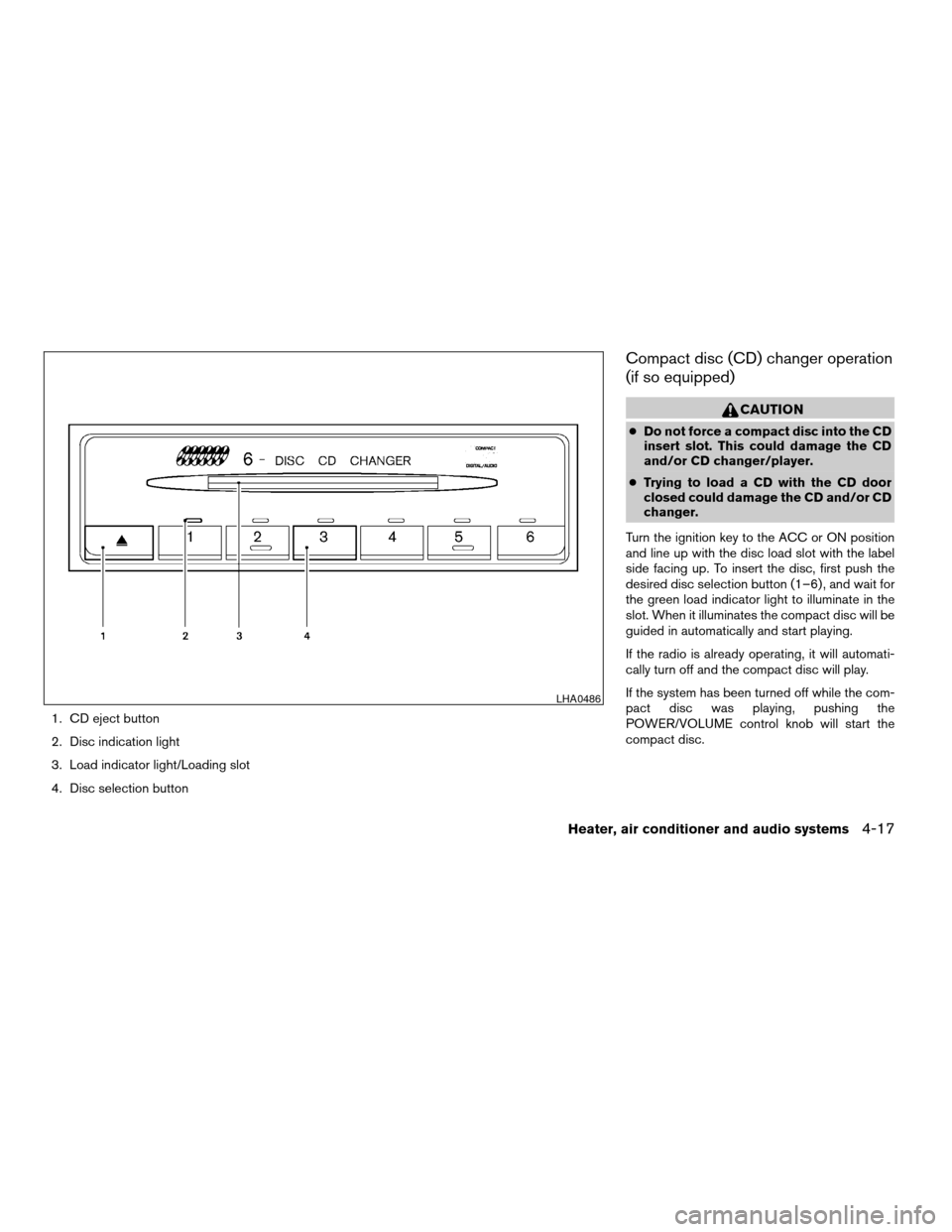
1. CD eject button
2. Disc indication light
3. Load indicator light/Loading slot
4. Disc selection button
Compact disc (CD) changer operation
(if so equipped)
CAUTION
cDo not force a compact disc into the CD
insert slot. This could damage the CD
and/or CD changer/player.
cTrying to load a CD with the CD door
closed could damage the CD and/or CD
changer.
Turn the ignition key to the ACC or ON position
and line up with the disc load slot with the label
side facing up. To insert the disc, first push the
desired disc selection button (1–6) , and wait for
the green load indicator light to illuminate in the
slot. When it illuminates the compact disc will be
guided in automatically and start playing.
If the radio is already operating, it will automati-
cally turn off and the compact disc will play.
If the system has been turned off while the com-
pact disc was playing, pushing the
POWER/VOLUME control knob will start the
compact disc.
LHA0486
Heater, air conditioner and audio systems4-17
ZREVIEW COPYÐ2005 Sentra(b15)
Owners Manual(owners)ÐUSA_English(nna)
06/04/04Ðtbrooks
X
Page 124 of 248
Disc loading — single
CAUTION
Trying to load a CD with the CD door
closed could damage the CD and/or CD
changer.
When a disc selection button is pressed for less
than 1.5 seconds, the CD changer enters the
single disc loading mode. The disc selection
button starts flashing green until the door is
opened. When the door has opened, the green
load indicator light will come on in the loading
slot. Load only one CD at a time. After the CD is
loaded, the door closes, the load indicator lights
turn off and the disc selection button turns a solid
green. The CD that was loaded starts to play
automatically.
Disc loading — all
When a disc selection button is pressed for
longer than 1.5 seconds, the CD changer auto-
matically changes to all disc loading mode. All
disc selection buttons start flashing orange, ex-
cept the disc selection button that was pushed
initially. This button flashes green until the door is
opened. When the door opens and the green
load indicator light comes on only one CD can be
loaded at a time. After the CD is loaded, the next
disc selection button will then change from or-
ange to flashing green for the next CD to beloaded. After all the CDs have been loaded, the
CD that was loaded first starts to play.APS (Automatic Program
Search) , FF, APS REV
When the
button is pushed while the CD
is playing, the selection following the current one
starts to play from the beginning. Push the
button several times to skip several selections.
Each time the button is pushed, the CD advances
one selection. When the last selection on the CD
is skipped, the first selection is played.
When the
button is pushed, the current
selection returns to the beginning. Push
the
button several times to skip back sev-
eral selections. Each time the button is pushed,
the CD moves back one selection. Went the first
selection on the CD is skipped, the last selection
is played.
Repeat Button
When the
button is pushed while a CD is
playing, the play pattern will change as follows.
ALL — All disc repeat:All CDs are played
repeatedly in sequence.
BLANK (no symbol) — One disc repeat:The
current CD is repeated.1 — One track repeat:The current selection is
repeated.
When a new CD is inserted, the play pattern
automatically changes to the “ALL” play
pattern.
CD Eject — Single
When the
button is pressed for less than
1.5 seconds, the current CD that is playing (or if
the CD changer is off, the last CD that was
played) ejects. The disc indicator light starts
flashing orange until the CD is ejected. When the
CD is ejected, the disc indicator light turns off to
show that the disc selection button is empty.
When the CD is removed from the unit, the CD
changer automatically changes to single disc
loading mode so a new CD can be loaded into
the empty holder. The disc indicator light will start
flashing green until a CD is loaded, if no CD is
loaded within 15 seconds the single disc loading
mode is cancelled. The single disc loading mode
is also cancelled if another disc selection button
is pushed.
CD Eject — ALL
When the
button is pressed for longer than
1.5 seconds, the CD changer automatically
changes to all disc eject mode. The disc indicator
light for the current CD (or the last CD that was
played) starts flashing orange until the CD ejects.
4-18Heater, air conditioner and audio systems
ZREVIEW COPYÐ2005 Sentra(b15)
Owners Manual(owners)ÐUSA_English(nna)
06/04/04Ðtbrooks
X
Page 125 of 248
When the CD ejects, the disc indicator light turns
off showing that disc selection button as empty.
When the CD is removed from the unit, the next
CD starts to eject. After all the CDs are ejected,
the CD changer turns off.
If a CD is ejected and is not removed within
10 seconds, it will be pulled back into the
slot.
CD CARE AND CLEANING
cHandle a CD by its edges. Do not bend the
disc. Never touch the surface of the disc.
cAlways place the discs in the storage case
when they are not being used.
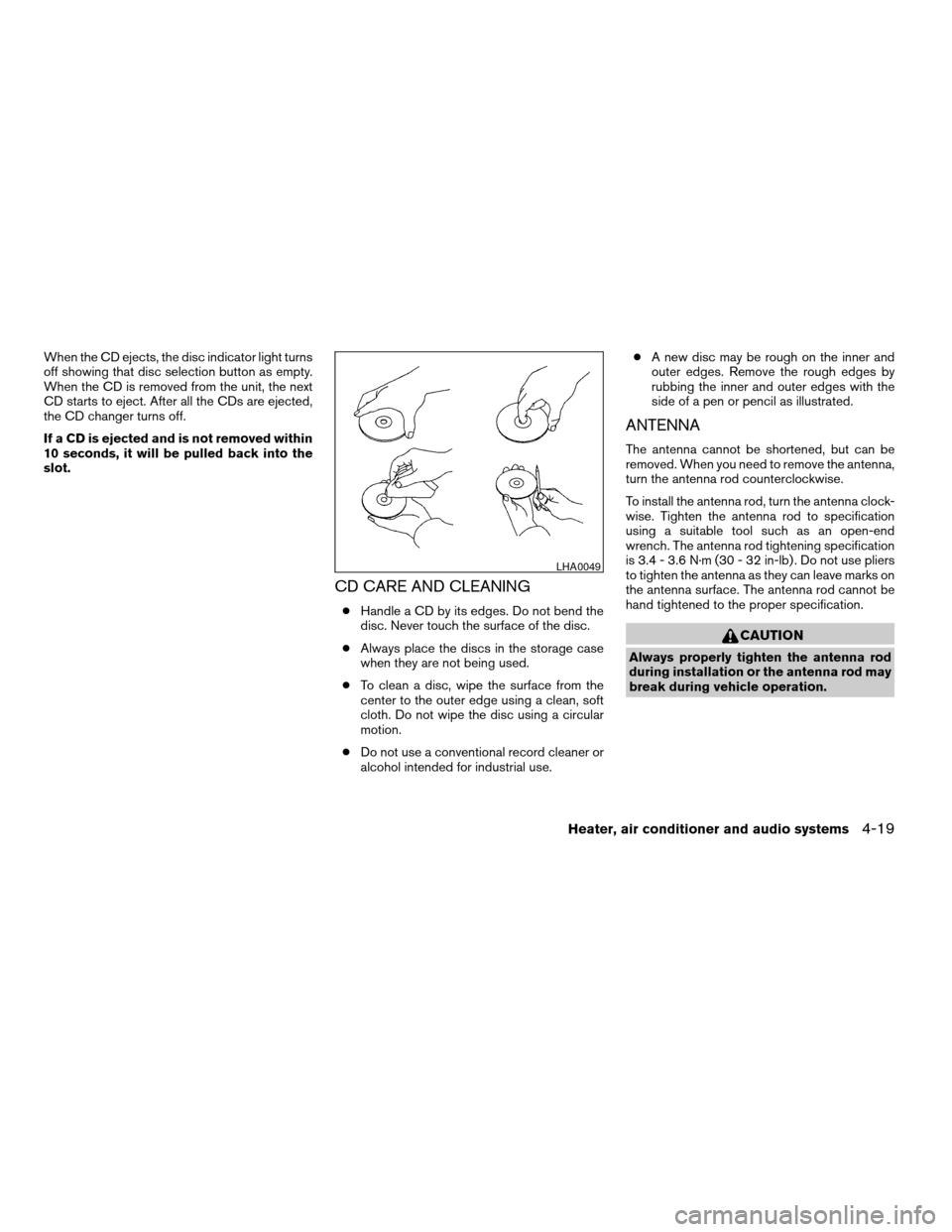
cTo clean a disc, wipe the surface from the
center to the outer edge using a clean, soft
cloth. Do not wipe the disc using a circular
motion.
cDo not use a conventional record cleaner or
alcohol intended for industrial use.cA new disc may be rough on the inner and
outer edges. Remove the rough edges by
rubbing the inner and outer edges with the
side of a pen or pencil as illustrated.
ANTENNA
The antenna cannot be shortened, but can be
removed. When you need to remove the antenna,
turn the antenna rod counterclockwise.
To install the antenna rod, turn the antenna clock-
wise. Tighten the antenna rod to specification
using a suitable tool such as an open-end
wrench. The antenna rod tightening specification
is 3.4 - 3.6 N·m (30 - 32 in-lb) . Do not use pliers
to tighten the antenna as they can leave marks on
the antenna surface. The antenna rod cannot be
hand tightened to the proper specification.
CAUTION
Always properly tighten the antenna rod
during installation or the antenna rod may
break during vehicle operation.
LHA0049
Heater, air conditioner and audio systems4-19
ZREVIEW COPYÐ2005 Sentra(b15)
Owners Manual(owners)ÐUSA_English(nna)
06/04/04Ðtbrooks
X