air condition NISSAN SENTRA 2007 B16 / 6.G Service Manual
[x] Cancel search | Manufacturer: NISSAN, Model Year: 2007, Model line: SENTRA, Model: NISSAN SENTRA 2007 B16 / 6.GPages: 320, PDF Size: 4.88 MB
Page 168 of 320

Audio main operation
POWER/VOLUME control:
Turn the ignition key to ACC or ON, and then
push the POWER/VOLUME control knob while
the system is off to call up the mode (radio or CD)
which was playing immediately before the system
was turned off.
To turn the system off, press the
POWER/VOLUME control knob.
Turn the POWER/VOLUME control knob to ad-
just the volume.
This vehicle may be equipped with Speed Sen-
sitive Volume (SSV) for audio. The audio volume
changes as the driving speed changes.
AUDIO button (Bass, Mid, Treble,
Fade, Balance, SSV, Beep and
Language):
Press the
AUDIO button to change the
mode as follows:
Bass!Mid!Treble!Fade!Balance!
Speed Sense Volume (if so equipped)!Beep
ON/OFF!Language!Audio or OFF!Bass
To adjust Bass, Treble, Fade and Balance, press
the
AUDIO button until the desired mode
appears in the display. Press the TUNE button to
adjust Bass and Treble to the desired level. Youcan also use the TUNE button to adjust Fader
and Balance modes. Fader adjusts the sound
level between the front and rear speakers and
Balance adjusts the sound between the right and
left speakers.
To change the SSV mode to OFF, LEVEL1 to
LEVEL5 press the TUNE button left or right.
To change the Beep to ON or OFF, press the
TUNE button left or right. This will enable or
disable the beep sound heard during menu se-
lection.
To change the Language to English or Français,
press the TUNE button left or right.
Once you have adjusted the sound quality to the
desired level, press the
AUDIO button re-
peatedly until the radio or CD display reappears.
Otherwise, the radio or CD display will automati-
cally reappear after about 5 seconds.
CLOCK DISP (display) button:
Pressing the CLOCK DISP (display) button will
show text information about CD or MP3 and SAT
(satellite, if so equipped) in the audio display.
CD display mode
To change the text displayed while playing a CD
with text, press the CLOCK DISP button. The
CLOCK DISP button will allow you to scrollthrough CD text as follows: Track number and
Track timeÃ!Album titleÃ!Song title.
cTrack number displays the track number se-
lected on the disc.
cTrack time displays the amount of time the
track has played.
cAlbum title displays the title of the CD being
played.
cSong title displays the title of the selected
CD track.
MP3 display mode
To change the text displayed when listening to a
CD with MP3s and ID3 tags, press the CLOCK
DISP button. The CLOCK DISP button will scroll
through the CD text as follows: Disc number,
Track number and Folder numberÃ!Folder title
Ã!Album titleÃ!Artist nameÃ!Song title.
cDisc number displays the number of the
current disc playing.
cTrack number displays the number of the
track playing on the selected disc.
cFolder number displays the number of the
current folder on the MP3 CD.
cFolder title displays the title of the folder.
4-30Display screen, heater, air conditioner, audio and phone systems
ZREVIEW COPYÐ2007 Sentra(sen)
Owners ManualÐUSA_English(nna)
11/28/06Ðarosenma
X
Page 169 of 320

cAlbum title displays the title of the album of
the song playing.
cArtist name displays the name of the artist of
the song playing.
cSong title displays the title of the song play-
ing.
Display satellite radio display mode (if so
equipped)
To change the text displayed when listening to
satellite radio (if so equipped) press the CLOCK
DISP button. The CLOCK DISP button will scroll
through the broadcast information as follows:
Channel numberÃ!Category nameÃ!
Channel nameÃ!Artist nameÃ!Song title.
cChannel number displays the channel num-
ber of the selected satellite radio station.
cCategory name displays the category name
of the selected satellite radio station.
cChannel name displays the channel name of
the selected satellite radio station.
cArtist name displays the name of the artist,
host or weather condition of the selected
satellite radio station.
cSong title displays the song title, show
name, or temperature of the selected satel-
lite radio station.Clock operation
Pressing the CLOCK DISP button displays the
clock with the radio on or off. Press the CLOCK
DISP button again to turn off the clock display.
For additional information on setting the clock,
see “Adjusting the time” earlier in this section.
FM/AM/SAT radio operation
FM/AM/SAT band select:
Pressing the RADIO button will change the band
as follows:
AMÃ!FMÃ!SAT (satellite, if so equipped)
When the RADIO button is pressed while the
ignition switch is in the ACC or ON position, the
radio will come on at the station last played.
No satellite radio reception is available when the
RADIO button is pressed to access satellite radio
stations unless optional satellite receiver and an-
tenna are installed and an XMTor SIRIUS™ sat-
ellite radio service subscription is active. Satellite
radio can only be installed in vehicles that were
factory pre-wired for satellite radio. Satellite radio
is not available in Alaska, Hawaii and Guam. If
satellite radio is not operational then the RADIO
button is used to toggle between AM and FM
bands.If a compact disc is playing when the RADIO
button is pressed, the compact disc will auto-
matically be turned off and the last radio station
played will come on.
The FM stereo indicator ST will glow during FM
stereo reception. When the stereo broadcast
signal is weak, the radio will automatically change
from stereo to monaural reception.TUNE (tuning) button:
To manually tune the radio, press the TUNE
button
or.
To move quickly through the channels, press and
hold either the
orbutton.
SEEK (tuning) button:
Press the SEEK button
orfor less
than 1.5 seconds to tune from high to low or low
to high frequencies and stop at the next broad-
casting station.
SCAN (tuning) button:
Press the
SCAN button to stop at each
broadcasting station for 5 seconds. Pressing the
button again during this 5 second period will stop
scan tuning and the radio will remain tuned to that
Display screen, heater, air conditioner, audio and phone systems4-31
ZREVIEW COPYÐ2007 Sentra(sen)
Owners ManualÐUSA_English(nna)
11/28/06Ðarosenma
X
Page 170 of 320

station. If theSCAN button is not pressed
within 5 seconds, scan tuning moves to the next
station.
PRESET A·B·C (Station memory opera-
tions):
18 stations can be set for the FM, AM and SAT
(satellite, if so equipped) radio to the A, B and C
preset button in any combination of FM, AM or
SAT stations.
1. Choose preset bank A, B or C using the
PRESET A·B·C select button.
2. Select the desired FM, AM or SAT station
band.
3. Tune to the desired station using manual,
SEEK or SCAN tuning. Press and hold any
of the desired station memory buttons (1 –
6) until a beep sound is heard.
4. The channel indicator will then come on and
the sound will resume. Programming is now
complete.
5. Other buttons can be set in the same man-
ner.
If the battery cable is disconnected, or if the fuse
opens, the radio memory will be canceled. In that
case, reset the desired stations.Radio data system (RDS):
RDS stands for Radio Data System, and is a data
information service transmitted by some radio
stations on the FM band (not AM band) . Cur-
rently, most RDS stations are in large cities, but
many stations are now considering broadcasting
RDS data.
RDS can display:
cStation call sign, such as “WHFR 98.3”.
cStation name, such as “The Groove”.
cMusic or programming type such as “Clas-
sical”, “Country”, or “Rock”.
cArtist and song information.
If the station broadcasts RDS information, the
RDS icon is displayed.
Compact disc (CD) changer operation
Turn the ignition key to the ACC or ON position
and insert the compact disc into the slot with the
label side facing up. The compact disc will be
guided automatically into the slot and start play-
ing. To insert the disc, first press the
but-
ton.
If the radio is already operating, it will automati-
cally turn off and the compact disc will play.If the system has been turned off while the com-
pact disc was playing, pressing the POWER
button will start the compact disc.
Do not use 3.1 in (8 cm) diameter compact discs
in the CD changer.
LOAD button:
To insert a CD in the CD changer, press the load
button
for less than 1.5 seconds. Select
the loading slot by pressing the CD insert select
button (1 – 6) , then insert the CD.
To insert 6 CDs to the CD changer, press the
load button for more than 1.5 seconds.
The slot numbers (1 – 6) will illuminate on the
display when CDs are loaded into the changer.
CD/AUX button:
When the CD/AUX button is pressed with the
system off and the compact disc loaded, the
system will turn on and the compact disc will start
to play.
When the CD/AUX button is pressed with the
compact disc loaded but the radio playing, the
radio will automatically be turned off and the
compact disc will start to play.
4-32Display screen, heater, air conditioner, audio and phone systems
ZREVIEW COPYÐ2007 Sentra(sen)
Owners ManualÐUSA_English(nna)
11/28/06Ðarosenma
X
Page 171 of 320

TUNE (Rewind and Fast
Forward) button:
While playing a compact disc without MP3 press
the TUNE button
(rewind) or(fast
forward) , the compact disc will play while rewind-
ing or fast forwarding. When the button is re-
leased, the compact disc will return to normal
play speed.
MP3 TUNE
(CAT•FOLDER) button:
While playing an MP3, press the TUNE
button
orto scan forward or back-
ward through available folders.
To fast forward or rewind through an audio track,
press the TUNE button
orfor more
than 1.5 seconds.
SEEK button:
When the SEEK button
is pressed for less
than 1.5 seconds while a CD or MP3 CD is
playing, the track or file being played returns to its
beginning. Press
button several times to
skip back through tracks or files. The CD or MP3
CD will go back the number of times the button is
pressed.
When the SEEK button
button is pressed
for less than 1.5 seconds while a CD or MP3 CD
is playing, the next track or file will start to playfrom its beginning. Press
button several
times to skip through tracks or files. The CD or
MP3 CD will advance the number of times the
button is pressed. When the last track or file on
the CD or MP3 CD is skipped through, the first
track or file will be played. If there are multiple
CDs in the CD changer, when the last track or file
is skipped through, the next CD will start to play.
CD select buttons:
To play another CD that has been loaded, press a
CD select button (1 – 6) .
MIX/RPT button:
When the MIX/RPT button is pressed while a
compact disc is being played, the play pattern
can be changed as follows:
Repeat All!Repeat Disc!Repeat Track!Mix
All Discs!Mix Disc!Repeat All
Repeat Disc: The disc that is currently playing will
be repeated.
Repeat Track: The track that is currently playing
will be repeated.
Mix All Disc: Tracks from all discs will be played
randomly.
Mix Disc: Tracks from the disc that is currently
playing will be played randomly.
Repeat All: All discs will be played normally, with
no special play pattern enabled.MP3 MIX/RPT mode:
When the MIX/RPT button is pressed while an
MP3 compact disc is being played, the play
pattern can be changed as follows:
Repeat All!Repeat Disc!Repeat Folder!
Repeat Track!Mix All Disc!Mix Disc!Mix
Folder!Repeat All
Repeat Disc: The disc that is currently playing will
be repeated.
Repeat Folder: The folder selected that is cur-
rently playing will be repeated.
Repeat Track: The track that is currently playing
will be repeated.
Mix All Disc: Tracks from all discs will be played
randomly.
Mix Disc: Tracks from the disc that is currently
playing will be played randomly.
Mix Folder: Tracks from that folder that is cur-
rently accessed will be played randomly.
Repeat All: All discs will be played normally, with
no special play pattern enabled.
SCAN button:
While listening to a CD, press the
SCAN
button to preview the first 10 seconds of each
track on the CD playing. Pressing the
SCAN button again during this 10 second period
stops the scan and the CD remains on that track.
Display screen, heater, air conditioner, audio and phone systems4-33
ZREVIEW COPYÐ2007 Sentra(sen)
Owners ManualÐUSA_English(nna)
11/28/06Ðarosenma
X
Page 172 of 320

MP3 SCAN mode:
While listening to an MP3 CD, press the
SCAN button to preview the first 10 seconds of
each file in the current folder. The scan will con-
tinue on to the next folder and files if there is more
than one folder on the MP3 CD. Pressing
the
SCAN button again during this 10
second period stops the scan and the MP3 CD
remains in that folder.
CD/AUX (Auxiliary) button:
The AUX jack is located on the CD player. The
AUX audio input jack accepts any standard ana-
log audio input such as from a portable cassette
tape/CD player, MP3 player or laptop computers.
Press the CD/AUX button to play a compatible
device when it is plugged into the AUX jack.
CD EJECT:
Current/Selected disc:
cPress the
button, then press the slot
number (1 – 6) for the desired disc. The
compact disc will be ejected. If no slot num-
ber (1 – 6) is pressed, the current loaded
disc will be ejected. Also, if the ejected disc
is not removed within 15 seconds, the disc
will reload.All discs:
cPress and hold the
button for more
than 1.5 seconds. The compact discs will be
ejected one by one. If a disc is not removed
within 15 seconds, or the
button is
pressed again during the eject sequence,
the entire disc eject sequence will be can-
celed.
When this button is pressed while the compact
disc is being played, the compact disc will eject
and the last source will be played.
CD IN indicator:
The slot numbers (1 – 6) will illuminate if CDs
have been loaded into the changer in CD mode
only.
CD CARE AND CLEANING
cHandle a CD by its edges. Do not bend the
disc. Never touch the surface of the disc.
cAlways place the discs in the storage case
when they are not being used.
c
To clean a disc, wipe the surface from the center
to the outer edge using a clean, soft cloth. Do
not wipe the disc using a circular motion.
cDo not use a conventional record cleaner or
alcohol intended for industrial use.
cA new disc may be rough on the inner and
outer edges. Remove the rough edges by
rubbing the inner and outer edges with the
side of a pen or pencil as illustrated.
LHA0049
4-34Display screen, heater, air conditioner, audio and phone systems
ZREVIEW COPYÐ2007 Sentra(sen)
Owners ManualÐUSA_English(nna)
11/28/06Ðarosenma
X
Page 173 of 320

1. Tuning switch
2. MODE select switch
3. POWER on/off switch
4. Volume control switch1. Tuning switch
2. Phone operation switch
3. POWER on and MODE select switch
4. Volume control switch
STEERING WHEEL SWITCH FOR
AUDIO CONTROL (If so equipped)
The audio system can be operated using the
controls on the steering wheel.
POWER on/off switch
With the ignition key turned to the ACC or ON
position, push the POWER switch to turn the
audio system on or off.If you have the Type B switch, with the ignition key
turned to the ACC or ON position push the
MODE switch to turn the audio system on.
MODE select switch
Push the mode select switch to change the mode
in the following sequence: Preset A!Preset B
!Preset C!CD*!AUX**.
*This mode is only available when a CD is loaded.
**This mode is only available when a compatible
auxiliary device is plugged into the AUX jack.
Volume control switch
Push the volume control switch up or down to
increase or decrease the volume.
Tuning
Memory change (radio):
Push the tuning switch (
or) for less
than 1.5 seconds to change presets.
Seek tuning (radio):
Push the tuning switch (
or) for more
than 1.5 seconds to seek the next or previous
radio station.
Type A
LHA0692
Type B
WHA0693
Display screen, heater, air conditioner, audio and phone systems4-35
ZREVIEW COPYÐ2007 Sentra(sen)
Owners ManualÐUSA_English(nna)
11/28/06Ðarosenma
X
Page 174 of 320
Next/Previous track (CD):
Push the tuning switch
orfor less
than 1.5 seconds to return to the beginning of the
present track or skip to the next track. Push
several times to skip back or skip through tracks.
Change disc (CD) (if so equipped):
Push the tuning switch
orfor more
than 1.5 seconds to change the playing disc up
or down.
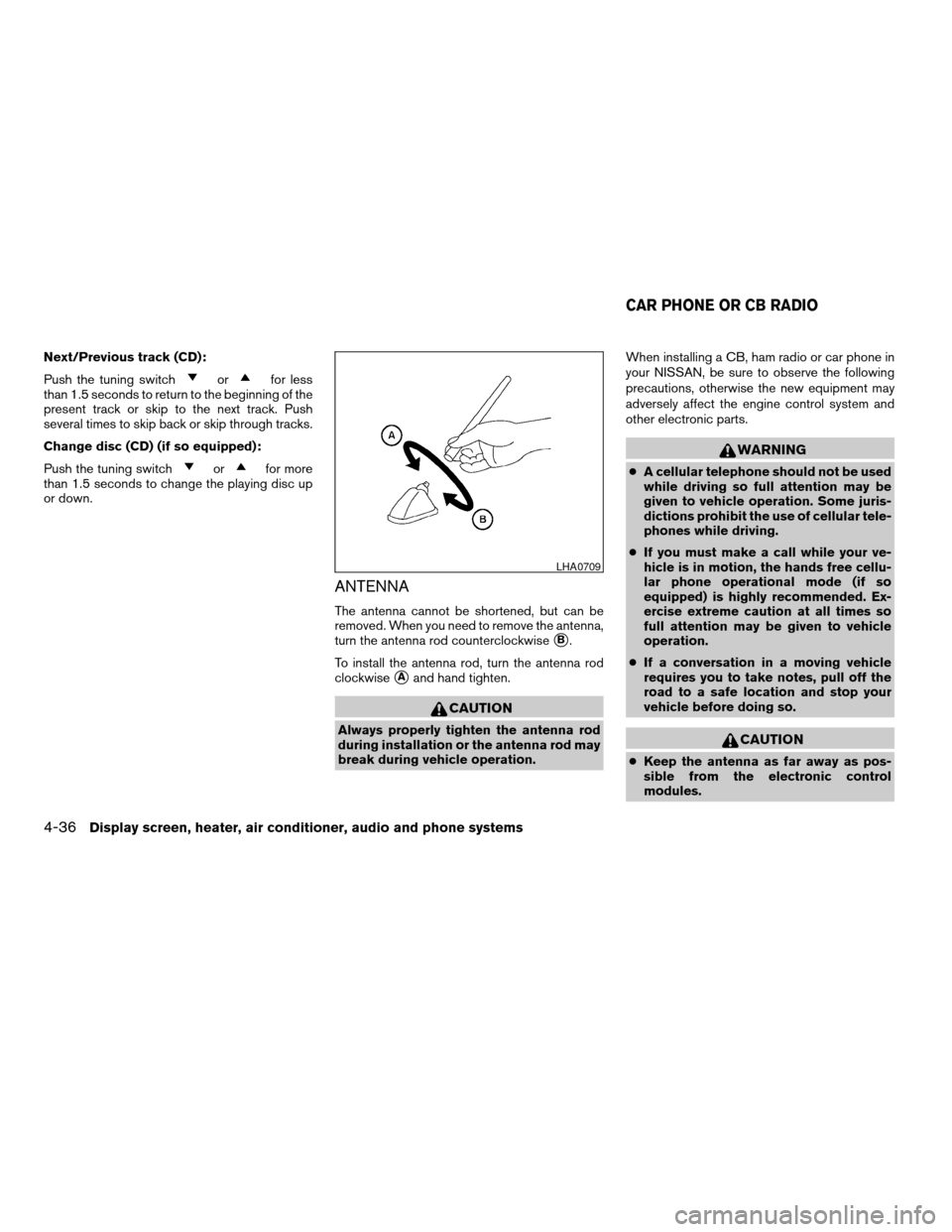
ANTENNA
The antenna cannot be shortened, but can be
removed. When you need to remove the antenna,
turn the antenna rod counterclockwise
sB.
To install the antenna rod, turn the antenna rod
clockwise
sAand hand tighten.
CAUTION
Always properly tighten the antenna rod
during installation or the antenna rod may
break during vehicle operation.When installing a CB, ham radio or car phone in
your NISSAN, be sure to observe the following
precautions, otherwise the new equipment may
adversely affect the engine control system and
other electronic parts.
WARNING
cA cellular telephone should not be used
while driving so full attention may be
given to vehicle operation. Some juris-
dictions prohibit the use of cellular tele-
phones while driving.
cIf you must make a call while your ve-
hicle is in motion, the hands free cellu-
lar phone operational mode (if so
equipped) is highly recommended. Ex-
ercise extreme caution at all times so
full attention may be given to vehicle
operation.
cIf a conversation in a moving vehicle
requires you to take notes, pull off the
road to a safe location and stop your
vehicle before doing so.
CAUTION
cKeep the antenna as far away as pos-
sible from the electronic control
modules.
LHA0709
CAR PHONE OR CB RADIO
4-36Display screen, heater, air conditioner, audio and phone systems
ZREVIEW COPYÐ2007 Sentra(sen)
Owners ManualÐUSA_English(nna)
11/28/06Ðarosenma
X
Page 175 of 320
cKeep the antenna wire more than 8 in
(20 cm) away from the electronic con-
trol system harnesses. Do not route the
antenna wire next to any harness.
cAdjust the antenna standing-wave ratio
as recommended by the manufacturer.
cConnect the ground wire from the CB
radio chassis to the body.
cFor details, consult a NISSAN dealer.WARNING
cUse a phone after stopping your vehicle
in a safe location. If you have to use a
phone while driving, exercise extreme
caution at all times so full attention may
be given to vehicle operation.
cIf a conversation in a moving vehicle
requires you to take notes, pull off the
road to a safe location and stop your
vehicle before doing so.
CAUTION
To avoid draining the vehicle battery, use
a phone after starting the engine.
BLUETOOTHTHANDS-FREE PHONE
SYSTEM (if so equipped)
Display screen, heater, air conditioner, audio and phone systems4-37
ZREVIEW COPYÐ2007 Sentra(sen)
Owners ManualÐUSA_English(nna)
11/28/06Ðarosenma
X
Page 176 of 320

Your NISSAN is equipped with the BluetoothT
Hands-Free Phone System. If you are an owner
of a BluetoothTenabled cellular phone, you can
set up the wireless connection between your
cellular phone and the in-vehicle phone module.
With BluetoothTwireless technology, you canmake or receive a hands-free telephone call with
your cellular phone in the vehicle.
Once your cellular phone is paired to the in-
vehicle phone module, no other phone connect-
ing procedure is required. Your phone is auto-
matically connected with the in-vehicle phonemodule when the ignition switch is turned to the
ON position with the paired cellular phone turned
on and carried in the vehicle.
You can register up to 5 different BluetoothT
cellular phones to the in-vehicle phone module.
However, you can talk on only one cellular phone
at a time.
Before using the BluetoothTHands-Free Phone
System, refer to the following notes.
cSet up the wireless connection between a
cellular phone and the in-vehicle phone
module before using the hands-free phone
system.
cSome BluetoothTenabled cellular phones
may not be recognized by the in-vehicle
phone module. Please visit
www.nissanusa.com/bluetooth for a recom-
mended phone list.
cYou will not be able to use a hands-free
phone under the following conditions:
– Your vehicle is outside of the cellular ser-
vice area.
– Your vehicle is in an area where it is
difficult to receive cellular signal; such as
in a tunnel, in an underground parking
garage, near a tall building or in a moun-
tainous area.
LHA0706
4-38Display screen, heater, air conditioner, audio and phone systems
ZREVIEW COPYÐ2007 Sentra(sen)
Owners ManualÐUSA_English(nna)
11/28/06Ðarosenma
X
Page 177 of 320

– Your cellular phone is locked to prevent it
from being dialed.
When the radio wave condition is not ideal or
ambient sound is too loud, it may be difficult to
hear the other person’s voice during a call.
Do not place the cellular phone in an area sur-
rounded by metal or far away from the in-vehicle
phone module to prevent tone quality degrada-
tion and wireless connection disruption.
While a cellular phone is connected through the
BluetoothTwireless connection, the battery
power of the cellular phone may discharge
quicker than usual. The BluetoothTHands-Free
Phone System cannot charge cellular phones.
If the hands-free phone system seems to be
malfunctioning, please refer to “Troubleshooting
guide” later in this section. You can also visit
www.nissanusa.com/bluetooth for troubleshoot-
ing help.
Refer to the cellular phone Owner’s Manual re-
garding the telephone charges, cellular phone
antenna and body, etc.This device complies with Part 15 of the
FCC Rules. Operation is subject to the fol-
lowing two conditions: (1) this device may
not cause harmful interference, and (2) this
device must accept any interference re-
ceived, including interference that may
cause undesired operation.
FCC Radiation Exposure Statement:
This equipment complies with FCC radiation ex-
posure limits set forth for an uncontrolled envi-
ronment. This equipment should be installed and
operated with minimum distance of 8 inches (20
cm) between the radiator and your body. This
Transmitter must not be co-located or operating
in conjunction with any other antenna or transmit-
ter.
USING THE SYSTEM
The NISSAN Voice Recognition system allows
hands-free operation of the BluetoothTPhone
System.
If the vehicle is in motion, some commands may
not be available so full attention may be given to
vehicle operation.
Initialization
When the ignition switch is turned to the ON
position, NISSAN Voice Recognition is initialized,
which takes a few seconds. When completed,
the amber light on the overhead console illumi-
nates and the system is ready to accept voice
commands. If the
button is pressed before
the initialization completes, the system will an-
nounce “Hands-free phone system not ready”
and will not react to voice commands.
Operating tips
To get the best performance out of the NISSAN
Voice Recognition system, observe the following:
cKeep the interior of the vehicle as quiet as
possible. Close the windows to eliminate
surrounding noises (traffic noises, vibration
sounds, etc.) , which may prevent the system
from recognizing voice commands correctly.
cWait until the tone sounds before speaking a
command. Otherwise, the command will not
be received properly.
cStart speaking a command within 5 seconds
after the tone sounds.
cSpeak in a natural voice without pausing
between words.
Display screen, heater, air conditioner, audio and phone systems4-39
ZREVIEW COPYÐ2007 Sentra(sen)
Owners ManualÐUSA_English(nna)
11/28/06Ðarosenma
X