Key NISSAN SENTRA 2008 B16 / 6.G Workshop Manual
[x] Cancel search | Manufacturer: NISSAN, Model Year: 2008, Model line: SENTRA, Model: NISSAN SENTRA 2008 B16 / 6.GPages: 328, PDF Size: 4.36 MB
Page 163 of 328
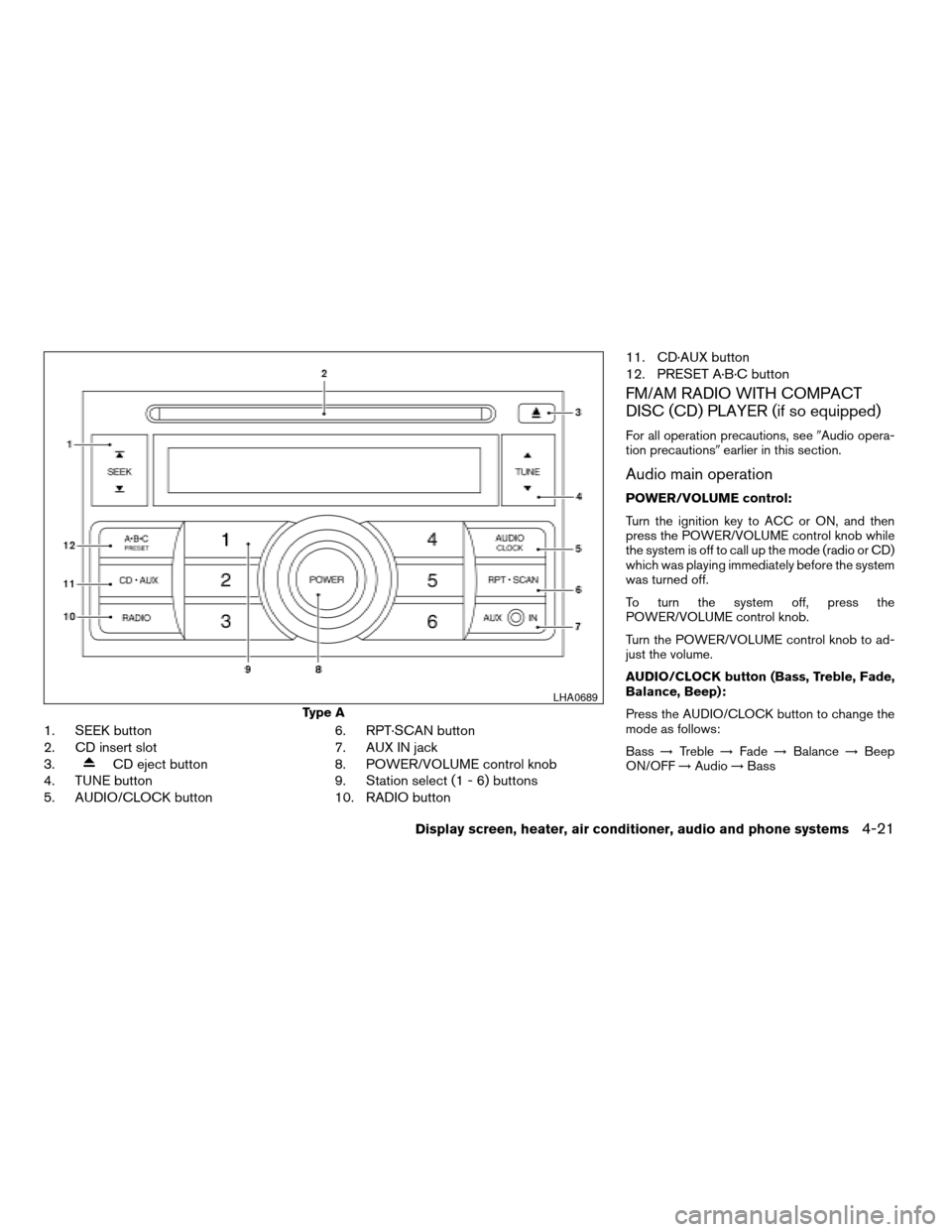
1. SEEK button
2. CD insert slot
3.
CD eject button
4. TUNE button
5. AUDIO/CLOCK button6. RPT·SCAN button
7. AUX IN jack
8. POWER/VOLUME control knob
9. Station select (1 - 6) buttons
10. RADIO button11. CD·AUX button
12. PRESET A·B·C button
FM/AM RADIO WITH COMPACT
DISC (CD) PLAYER (if so equipped)
For all operation precautions, see9Audio opera-
tion precautions9earlier in this section.
Audio main operation
POWER/VOLUME control:
Turn the ignition key to ACC or ON, and then
press the POWER/VOLUME control knob while
the system is off to call up the mode (radio or CD)
which was playing immediately before the system
was turned off.
To turn the system off, press the
POWER/VOLUME control knob.
Turn the POWER/VOLUME control knob to ad-
just the volume.
AUDIO/CLOCK button (Bass, Treble, Fade,
Balance, Beep):
Press the AUDIO/CLOCK button to change the
mode as follows:
Bass!Treble!Fade!Balance!Beep
ON/OFF!Audio!Bass
Type A
LHA0689
Display screen, heater, air conditioner, audio and phone systems4-21
ZREVIEW COPYÐ2008 Sentra(sen)
Owners ManualÐUSA_English(nna)
01/22/08Ðdebbie
X
Page 165 of 328

1. Press the PRESET A·B·C button to change
between storage banks. The radio displays
the icon A, B or C to indicate which set of
presets are active.
2. Tune to the desired station using manual
TUNE or SEEK tuning. Press and hold any of
the desired station memory buttons (1 – 6)
until a beep sound is heard. (The radio mutes
when the select button is pressed.)
3. The channel indicator will then come on and
the sound will resume. Programming is now
complete.
4. Other buttons can be set in the same man-
ner.
If the battery cable is disconnected, or if the fuse
opens, the radio memory will be canceled. In that
case, reset the desired stations.
Compact disc (CD) player operation
Turn the ignition key to the ACC or ON position,
and carefully insert the compact disc into the slot
with the label side up. The compact disc is auto-
matically pulled into the slot and starts to play.
If the radio is already operating, it automatically
turns off and the compact disc begins to play.CD·AUX button:
When the CD·AUX button is pressed with a
compact disc loaded and the radio playing, the
radio turns off and the compact disc starts to
play.
TUNE (Rewind or Fast
Forward) button:
When the TUNE button
oris
pressed while the compact disc is playing, the
compact disc plays at an increased speed while
rewinding or fast forwarding. When the button is
released, the compact disc returns to normal play
speed.
SEEK button:
When the SEEK button
is pressed while
the compact disc is playing, the next track follow-
ing the present one starts to play from the begin-
ning. Press the SEEK button
several times
to skip several tracks. Each time the button is
pressed, the CD advances 1 additional track. The
track number appears in the display window.
(When the last track on the compact disc is
skipped, the first track is played.)
When the SEEK button
is pressed, the
track being played returns to the beginning.
Press the SEEK button
several times toskip back several tracks. Each time the button is
pressed the CD moves back 1 track.
RPT·SCAN button:
When the RPT·SCAN button is pressed while the
compact disc is being played, the play pattern
can be changed as follows:
RPT TRACKÃ!MIX DISCÃ!Normal
RPT TRACK: The track that is currently playing
will be repeated.
MIX DISC: The order of the tracks on the disc will
be mixed during play.
RPT·SCAN (CDs) button:
Press and hold the RPT·SCAN button for more
than 1.5 seconds to scan through the first 10
seconds of a track on the compact disc. The
SCAN icon is flashed during scan mode.
The scan mode is canceled once it scans through
all the tracks on the disc, or if the RPT·SCAN
button is pressed during the scan mode.
CD·AUX (Auxiliary) button:
The AUX IN jack is located on the CD player. The
AUX IN audio input jack accepts any standard
analog audio input such as from a portable cas-
sette tape/CD player, MP3 player or laptop com-
puters.
Display screen, heater, air conditioner, audio and phone systems4-23
ZREVIEW COPYÐ2008 Sentra(sen)
Owners ManualÐUSA_English(nna)
01/22/08Ðdebbie
X
Page 167 of 328

9. POWER/VOLUME control knob
10.
SCAN button
11. Station select (1 - 6) buttons
12. SEEK (CHANNEL) button
13. RADIO* button
14. CD/AUX button
15. PRESET A·B·C button
*No satellite radio reception is available
when the RADIO button is pressed to
access satellite radio stations unless
optional satellite receiver and antenna
are installed and an XMTsatellite radio
service subscription is active. Satellite
radio is not available in Alaska, Hawaii
and Guam.
FM/AM/SAT RADIO WITH
COMPACT DISC (CD) PLAYER (if so
equipped)
For all operation precautions, see9Audio opera-
tion precautions9earlier in this section.
No satellite radio reception is available when the
RADIO button is pressed to access satellite radio
stations unless optional satellite receiver and an-
tenna are installed and an XMTsatellite radio
service subscription is active. Satellite radio is
not available in Alaska, Hawaii and Guam.
Audio main operation
POWER/VOLUME control:
Turn the ignition key to ACC or ON, and then
push the POWER/VOLUME control knob while
the system is off to call up the mode (radio or CD)
which was playing immediately before the system
was turned off.
To turn the system off, press the
POWER/VOLUME control knob.
Turn the POWER/VOLUME control knob to ad-
just the volume.
This vehicle may be equipped with Speed Sen-
sitive Volume (SSV) for audio. The audio volume
changes as the driving speed changes.
AUDIO button (Bass, Mid, Treble,
Fade, Balance, SSV, Beep and
Language):
Press the
AUDIO button to change the
mode as follows:
Bass!Mid!Treble!Fade!Balance!
Speed Sense Volume (if so equipped)!Beep
ON/OFF!Language!Audio!Bass
To adjust Bass, Treble, Fade and Balance, press
the
AUDIO button until the desired mode
appears in the display. Press the TUNE button to
adjust Bass and Treble to the desired level. Youcan also use the TUNE button to adjust Fader
and Balance modes. Fader adjusts the sound
level between the front and rear speakers and
Balance adjusts the sound between the right and
left speakers.
To change the SSV mode to OFF, LEVEL1 to
LEVEL5 press the TUNE button left or right.
To change the Beep to ON or OFF, press the
TUNE button left or right. This will enable or
disable the beep sound heard during menu se-
lection.
To change the Language to “English”, “Français”
or “Español”, press the TUNE button left or right.
Once you have adjusted the sound quality to the
desired level, press the
AUDIO button re-
peatedly until the radio or CD display reappears.
Otherwise, the radio or CD display will automati-
cally reappear after about 5 seconds.
CLOCK DISP (display) button:
Pressing the CLOCK DISP (display) button will
show text information about CD or SAT (satellite,
if so equipped) in the audio display.
CD display mode
To change the text displayed while playing a CD
with text, press the CLOCK DISP button. The
CLOCK DISP button will allow you to scroll
Display screen, heater, air conditioner, audio and phone systems4-25
ZREVIEW COPYÐ2008 Sentra(sen)
Owners ManualÐUSA_English(nna)
01/22/08Ðdebbie
X
Page 169 of 328

SCAN (tuning) button:
Press the
SCAN button to stop at each
broadcasting station for 5 seconds. Pressing the
button again during this 5 second period will stop
scan tuning and the radio will remain tuned to that
station. If the
SCAN button is not pressed
within 5 seconds, scan tuning moves to the next
station.
PRESET A·B·C (Station memory opera-
tions):
18 stations can be set for the FM, AM and SAT
(satellite, if so equipped) radio to the A, B and C
preset button in any combination of FM, AM or
SAT stations.
1. Choose preset bank A, B or C using the
PRESET A·B·C select button.
2. Select the desired FM, AM or SAT station
band.
3. Tune to the desired station using manual,
SEEK or SCAN tuning. Press and hold any
of the desired station memory buttons (1 –
6) until a beep sound is heard.
4. The channel indicator will then come on and
the sound will resume. Programming is now
complete.5. Other buttons can be set in the same man-
ner.
If the battery cable is disconnected, or if the fuse
opens, the radio memory will be canceled. In that
case, reset the desired stations.
Radio data system (RDS):
RDS stands for Radio Data System, and is a data
information service transmitted by some radio
stations on the FM band (not AM band) . Cur-
rently, most RDS stations are in large cities, but
many stations are now considering broadcasting
RDS data.
RDS can display:
cStation call sign, such as “WHFR 98.3”.
cStation name, such as “The Groove”.
cMusic or programming type such as “Clas-
sical”, “Country”, or “Rock”.
cArtist and song information.
If the station broadcasts RDS information, the
RDS icon is displayed.
Compact disc (CD) player operation
Turn the ignition key to the ACC or ON position
and insert the compact disc into the slot with thelabel side facing up. The compact disc will be
guided automatically into the slot and start play-
ing.
If the radio is already operating, it will automati-
cally turn off and the compact disc will play.
If the system has been turned off while the com-
pact disc was playing, pressing the
POWER/VOLUME control knob will start the
compact disc.
CD/AUX button:
When the CD/AUX button is pressed with the
system off and the compact disc loaded, the
system will turn on and the compact disc will start
to play.
When the CD/AUX button is pressed with the
compact disc loaded but the radio playing, the
radio will automatically be turned off and the
compact disc will start to play.
TUNE (Rewind and Fast
Forward) button:
When the TUNE button
oris
pressed while the compact disc is being played,
the compact disc will play while rewinding or fast
forwarding. When the button is released, the
compact disc will return to normal play speed.
Display screen, heater, air conditioner, audio and phone systems4-27
ZREVIEW COPYÐ2008 Sentra(sen)
Owners ManualÐUSA_English(nna)
01/22/08Ðdebbie
X
Page 172 of 328

Audio main operation
POWER/VOLUME control:
Turn the ignition key to ACC or ON, and then
push the POWER/VOLUME control knob while
the system is off to call up the mode (radio or CD)
which was playing immediately before the system
was turned off.
To turn the system off, press the
POWER/VOLUME control knob.
Turn the POWER/VOLUME control knob to ad-
just the volume.
This vehicle may be equipped with Speed Sen-
sitive Volume (SSV) for audio. The audio volume
changes as the driving speed changes.
AUDIO button (Bass, Mid, Treble,
Fade, Balance, SSV, Beep and
Language):
Press the
AUDIO button to change the
mode as follows:
Bass!Mid!Treble!Fade!Balance!
Speed Sense Volume (if so equipped)!Beep
ON/OFF!Language!Audio!Bass
To adjust Bass, Treble, Fade and Balance, press
the
AUDIO button until the desired mode
appears in the display. Press the TUNE button to
adjust Bass and Treble to the desired level. Youcan also use the TUNE button to adjust Fader
and Balance modes. Fader adjusts the sound
level between the front and rear speakers and
Balance adjusts the sound between the right and
left speakers.
To change the SSV mode to OFF, LEVEL1 to
LEVEL5 press the TUNE button left or right.
To change the Beep to ON or OFF, press the
TUNE button left or right. This will enable or
disable the beep sound heard during menu se-
lection.
To change the Language to “English”, “Français”
or “Español”, press the TUNE button left or right.
Once you have adjusted the sound quality to the
desired level, press the
AUDIO button re-
peatedly until the radio or CD display reappears.
Otherwise, the radio or CD display will automati-
cally reappear after about 5 seconds.
CLOCK DISP (display) button:
Pressing the CLOCK DISP (display) button will
show text information about CD or MP3 and SAT
(satellite, if so equipped) in the audio display.
CD display mode
To change the text displayed while playing a CD
with text, press the CLOCK DISP button. The
CLOCK DISP button will allow you to scrollthrough CD text as follows: Track number and
Track timeÃ!Album titleÃ!Song title.
cTrack number displays the track number se-
lected on the disc.
cTrack time displays the amount of time the
track has played.
cAlbum title displays the title of the CD being
played.
cSong title displays the title of the selected
CD track.
MP3 display mode
To change the text displayed when listening to a
CD with MP3s and ID3 tags, press the CLOCK
DISP button. The CLOCK DISP button will scroll
through the CD text as follows: Disc number,
Track number and Folder numberÃ!Folder title
Ã!Album titleÃ!Artist nameÃ!Song title.
cDisc number displays the number of the
current disc playing.
cTrack number displays the number of the
track playing on the selected disc.
cFolder number displays the number of the
current folder on the MP3 CD.
cFolder title displays the title of the folder.
4-30Display screen, heater, air conditioner, audio and phone systems
ZREVIEW COPYÐ2008 Sentra(sen)
Owners ManualÐUSA_English(nna)
01/22/08Ðdebbie
X
Page 174 of 328

PRESET A·B·C (Station memory opera-
tions):
18 stations can be set for the FM, AM and SAT
(satellite, if so equipped) radio to the A, B and C
preset button in any combination of FM, AM or
SAT stations.
1. Choose preset bank A, B or C using the
PRESET A·B·C select button.
2. Select the desired FM, AM or SAT station
band.
3. Tune to the desired station using manual,
SEEK or SCAN tuning. Press and hold any
of the desired station memory buttons (1 –
6) until a beep sound is heard.
4. The channel indicator will then come on and
the sound will resume. Programming is now
complete.
5. Other buttons can be set in the same man-
ner.
If the battery cable is disconnected, or if the fuse
opens, the radio memory will be canceled. In that
case, reset the desired stations.
Radio data system (RDS):
RDS stands for Radio Data System, and is a data
information service transmitted by some radio
stations on the FM band (not AM band) . Cur-rently, most RDS stations are in large cities, but
many stations are now considering broadcasting
RDS data.
RDS can display:
cStation call sign, such as “WHFR 98.3”.
cStation name, such as “The Groove”.
cMusic or programming type such as “Clas-
sical”, “Country”, or “Rock”.
cArtist and song information.
If the station broadcasts RDS information, the
RDS icon is displayed.
Compact disc (CD) changer operation
Turn the ignition key to the ACC or ON position
and insert the compact disc into the slot with the
label side facing up. The compact disc will be
guided automatically into the slot and start play-
ing. To insert the disc, first press the
but-
ton.
If the radio is already operating, it will automati-
cally turn off and the compact disc will play.
If the system has been turned off while the com-
pact disc was playing, pressing the POWER
button will start the compact disc.
Do not use 3.1 in (8 cm) diameter compact discs
in the CD changer.
LOAD button:
To insert a CD in the CD changer, press the load
button
for less than 1.5 seconds. Select
the loading slot by pressing the CD insert select
button (1 – 6) , then insert the CD.
To insert 6 CDs to the CD changer, press the
load button for more than 1.5 seconds.
The slot numbers (1 – 6) will illuminate on the
display when CDs are loaded into the changer.
CD/AUX button:
When the CD/AUX button is pressed with the
system off and the compact disc loaded, the
system will turn on and the compact disc will start
to play.
When the CD/AUX button is pressed with the
compact disc loaded but the radio playing, the
radio will automatically be turned off and the
compact disc will start to play.
TUNE (Rewind and Fast
Forward) button:
While playing a compact disc without MP3 press
the TUNE button
(rewind) or(fast
forward) , the compact disc will play while rewind-
ing or fast forwarding. When the button is re-
leased, the compact disc will return to normal
play speed.
4-32Display screen, heater, air conditioner, audio and phone systems
ZREVIEW COPYÐ2008 Sentra(sen)
Owners ManualÐUSA_English(nna)
01/22/08Ðdebbie
X
Page 177 of 328

1. Tuning switch
2. MODE select switch
3. POWER on/off switch
4. Volume control switch1. Tuning switch
2. Phone operation switch
3. POWER on and MODE select switch
4. Volume control switch
STEERING WHEEL SWITCH FOR
AUDIO CONTROL (If so equipped)
The audio system can be operated using the
controls on the steering wheel.
POWER on/off switch
With the ignition key turned to the ACC or ON
position, push the POWER switch to turn the
audio system on or off.If you have the Type B switch, with the ignition key
turned to the ACC or ON position, push the
MODE switch to turn the audio system on.
MODE select switch
Push the mode select switch to change the mode
in the following sequence: Preset A!Preset B
!Preset C!CD*!AUX**.
*This mode is only available when a CD is loaded.
**This mode is only available when a compatible
auxiliary device is plugged into the AUX jack.
Volume control switch
Push the volume control switch up or down to
increase or decrease the volume.
Tuning
Memory change (radio):
Push the tuning switch (
or) for less
than 1.5 seconds to change presets.
Seek tuning (radio):
Push the tuning switch (
or) for more
than 1.5 seconds to seek the next or previous
radio station.
Type A
LHA0692
Type B
WHA0693
Display screen, heater, air conditioner, audio and phone systems4-35
ZREVIEW COPYÐ2008 Sentra(sen)
Owners ManualÐUSA_English(nna)
01/22/08Ðdebbie
X
Page 185 of 328

3. Say: “Pair phone”sB. The system acknowl-
edges the command and announces the
next set of available commands.
4. Say: “New phone”
sC. The system acknowl-
edges the command and asks you to initiate
pairing from the phone handset
sD.
The pairing procedure of the cellular phone
varies according to each cellular phone
model. See the cellular phone Owner’s
Manual for details. You can also visit
www.nissanusa.com/bluetooth for instruc-
tions on pairing NISSAN recommended cel-
lular phones.
When prompted for a Passkey code, enter
“1234” from the handset. The Passkey code
“1234” has been assigned by NISSAN and
cannot be changed.
5. The system asks you to say a name for the
phone
sE.
If the name is too long or too short, the
system tells you, then prompts you for a
name again.
Also, if more than one phone is paired and
the name sounds too much like a name
already used, the system tells you, then
prompts you for a name again.6. The system asks you to assign a priority level
sF. The priority level determines which
phone is active when more than one paired
BluetoothTphone is in the vehicle. Follow
the instructions provided by the system or
refer to “Setup” later in this section for more
information on changing priorities.
7. The system will ask if you would like to select
a custom ring tone
sG. Follow the instruc-
tions provided by the system or refer to
“Setup” later in this section for more infor-
mation on selecting ringtones.
Making a call by entering a phone
number
Main Menu
“Call”
sA
Number (speak digits)sB
“Dial”sC
1. Press thebutton on steering wheel. A
tone will sound.
2. Say: “Call”
sA. The system acknowledges
the command and announces the next set of
available commands.
Say: “Call International” to dial more than 10
digits or any special characters.3. Say the number you wish to call starting with
the area code in single digit format
sB.Ifthe
system has trouble recognizing the correct
phone number, try entering the number in
the following groups: 3-digit area code,
3-digit prefix and the last 4-digits. For ex-
ample, 555-121-3354 can be said as “five
five five” as the 1st group, then “one two
one” as the 2nd group, and “three three five
four” as the 3rd group. For dialing more than
10 digits or any special characters, say “In-
ternational”. See “How to say numbers” ear-
lier in this section, for more information.
4. When you have finished speaking the phone
number, the system repeats it back and an-
nounces the available commands.
5. Say: “Dial”
sC. The system acknowledges
the command and makes the call.
For additional command options, see “List of
voice commands” later in this section.
Receiving a call
When you hear the ring tone, press thebutton on the steering wheel.
Once the call has ended, press the
button
on the steering wheel.
Display screen, heater, air conditioner, audio and phone systems4-43
ZREVIEW COPYÐ2008 Sentra(sen)
Owners ManualÐUSA_English(nna)
01/22/08Ðdebbie
X
Page 186 of 328

NOTE:
If you do not wish to take the call when you
hear the ring tone, press the
button
on the steering wheel.
For additional command options, see “List of
voice commands” later in this section.
LIST OF VOICE COMMANDS
Main Menu
“Call” or “Call International”
“Phone Book”
“Memo Pad”
“Setup”
When you press and release thebutton on
the steering wheel, you can choose from the
commands on the Main Menu. The following
pages describe these commands and the com-
mands in each sub-menu.
Remember to wait for the tone before
speaking.
You can say “Help” to hear the list of commands
currently available any time the system is waiting
for a response.
If you want to end an action without completing it,
you can say “Cancel” or “Quit” at any time thesystem is waiting for a response. The system will
end the VR session. Whenever the VR session is
cancelled, a double beep is played to indicate
you have exited the system.
If you want to go back to the previous command,
you can say “Go back” or “Correction” any time
the system is waiting for a response.
When you get used to the menus in the system,
you can talk ahead by saying more than one
command at a time. For example, say, “Call five
five five one two one two” or “Memo pad record.”
Also, when you get used to the system re-
sponses, you can skip ahead to the tone by
pressing the
button on the steering wheel.
However, if you press thebutton when the
system is waiting for a response from you it will
end the VR session.
“Call”
Main Menu
“Call” or “Call International”
Name (speak name)
sA
Number (speak digits)sB
“Redial”sC
“Call Back”sD
Name (speak name)sA
If you have stored entries in the Phone Book, you
can dial a number associated with a name and
location.
See “Phone book” later in this section to learn
how to store entries.
When prompted by the system, say the name of
the phone book entry you wish to call. The system
acknowledges the name.
If there are multiple locations associated with the
name, the system asks you to choose the loca-
tion.
Once you have confirmed the name and location,
the system begins the call.
Number (speak digits)
sB
When prompted by the system, say the number
you wish to call. Refer to “How to say numbers”
and “Making a call by entering a phone number”
earlier in this section for more details.
“Redial”
sC
Use the Redial command to call the last number
that was dialed within the vehicle.
NOTE:
The system will not redial the last number
dialed by the handset keypad.
4-44Display screen, heater, air conditioner, audio and phone systems
ZREVIEW COPYÐ2008 Sentra(sen)
Owners ManualÐUSA_English(nna)
01/22/08Ðdebbie
X
Page 195 of 328

5 Starting and driving
Precautions when starting and driving................5-2
Exhaust gas (carbon monoxide)..................5-2
Three-way catalyst..............................5-2
Tire Pressure Monitoring System (TPMS)
(if so equipped)................................5-3
Avoiding collision and rollover....................5-5
Drinking alcohol/drugs and driving................5-5
Ignition switch.....................................5-6
Intelligent Key System (if so equipped)............5-6
Continuously Variable Transmission (CVT).........5-7
Manual transmission............................5-8
Key positions..................................5-8
Nissan vehicle immobilizer system................5-9
Before starting the engine..........................5-9
Starting the engine................................5-9
Driving the vehicle................................5-11
Continuously Variable Transmission (CVT)
(if so equipped)...............................5-11
Manual transmission (if so equipped)............5-16
Parking brake....................................5-17Cruise control (if so equipped).....................5-18
Precautions on cruise control...................5-18
Cruise control operations.......................5-19
Break-in schedule................................5-20
Increasing fuel economy...........................5-20
Parking/parking on hills............................5-21
Power steering...................................5-22
Brake system....................................5-22
Brake precautions.............................5-22
Anti-lock Braking System (ABS)
(if so equipped)...............................5-23
Cold weather driving..............................5-24
Freeing a frozen door lock......................5-24
Anti-freeze....................................5-24
Battery.......................................5-24
Draining of coolant water.......................5-25
Tire equipment................................5-25
Special winter equipment.......................5-25
Driving on snow or ice.........................5-25
Engine block heater (if so equipped).............5-26
ZREVIEW COPYÐ2008 Sentra(sen)
Owners ManualÐUSA_English(nna)
01/22/08Ðdebbie
X