AUX NISSAN SENTRA 2018 Owner´s Manual
[x] Cancel search | Manufacturer: NISSAN, Model Year: 2018, Model line: SENTRA, Model: NISSAN SENTRA 2018Pages: 507, PDF Size: 5.59 MB
Page 276 of 507
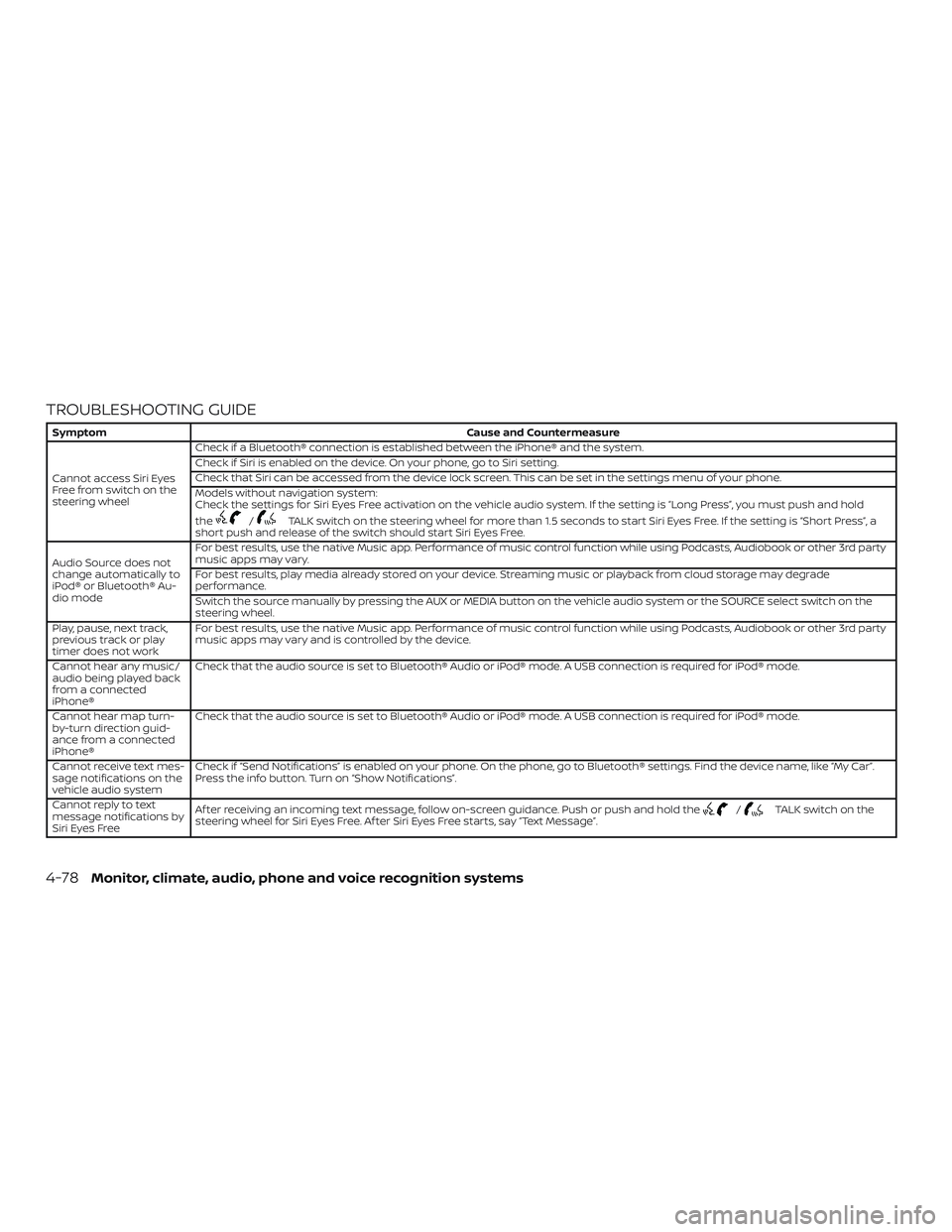
TROUBLESHOOTING GUIDE
SymptomCause and Countermeasure
Cannot access Siri Eyes
Freefromswitchonthe
steering wheel Check if a Bluetooth® connection is established between the iPhone® and the system.
Check if Siri is enabled on the device. On your phone, go to Siri setting.
Check that Siri can be accessed from the device lock screen. This can be set in the settings menu of your phone.
Models without navigation system:
Check the settings for Siri Eyes Free activation on the vehicle audio system. If the setting is “Long Press”, you must push and hold
the
/TALK switch on the steering wheel for more than 1.5 seconds to start Siri Eyes Free. If the setting is “Short Press”, a
short push and release of the switch should start Siri Eyes Free.
Audio Source does not
change automatically to
iPod® or Bluetooth® Au-
dio mode For best results, use the native Music app. Performance of music control function while using Podcasts, Audiobook or other 3rd party
music apps may vary.
For best results, play media already stored on your device. Streaming music or playback from cloud storage may degrade
performance.
Switch the source manually by pressing the AUX or MEDIA button on the vehicle audio system or the SOURCE select switch on the
steering wheel.
Play, pause, next track,
previous track or play
timer does not work For best results, use the native Music app. Performance of music control function while using Podcasts, Audiobook or other 3rd party
music apps may vary and is controlled by the device.
Cannot hear any music/
audio being played back
from a connected
iPhone® Check that the audio source is set to Bluetooth® Audio or iPod® mode. A USB connection is required for iPod® mode.
Cannot hear map turn-
by-turn direction guid-
ance from a connected
iPhone® Check that the audio source is set to Bluetooth® Audio or iPod® mode. A USB connection is required for iPod® mode.
Cannot receive text mes-
sage notifications on the
vehicle audio system Check if “Send Notifications” is enabled on your phone. On the phone, go to Bluetooth® settings. Find the device name, like “My Car”.
Press the info button. Turn on “Show Notifications”.
Cannot reply to text
message notifications by
Siri Eyes Free Af ter receiving an incoming text message, follow on-screen guidance. Push or push and hold the
/TALK switch on the
steering wheel for Siri Eyes Free. Af ter Siri Eyes Free starts, say “Text Message”.
4-78Monitor, climate, audio, phone and voice recognition systems
Page 374 of 507
For Canada
This device complies with Industry Canada
licence-exempt RSS standard(s). Operation
is subject to the following two conditions:1. This device may not cause interference,
2. This device must accept any interfer- ence, including interference that may
cause undesired operation of the de-
vice.
Le présent appareil est conforme aux CNR
d’Industrie Canada applicables aux appar-
eils radio exempts de licence. L’exploitation
est autorisée aux deux conditions suiv-
antes: (1) l’appareil ne doit pas produire de
brouillage, et (2) l’utilisateur de l’appareil
doit accepter tout brouillage radioélec-
trique subi, même si le brouillage est sus-
ceptible d’en compromettre le fonctionne-
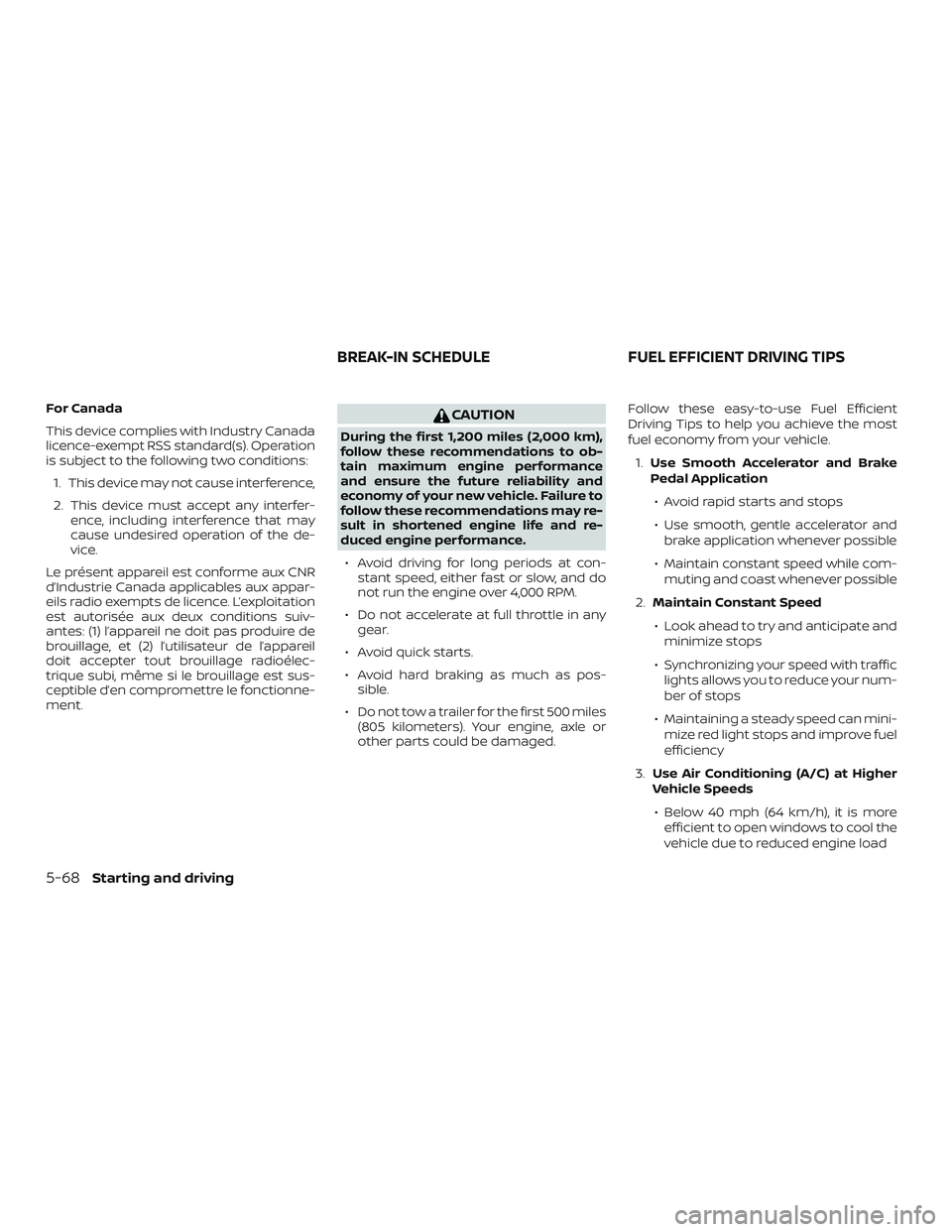
ment.CAUTION
During the first 1,200 miles (2,000 km),
follow these recommendations to ob-
tain maximum engine performance
and ensure the future reliability and
economy of your new vehicle. Failure to
follow these recommendations may re-
sult in shortened engine life and re-
duced engine performance.
∙ Avoid driving for long periods at con- stant speed, either fast or slow, and do
not run the engine over 4,000 RPM.
∙ Do not accelerate at full throttle in any gear.
∙ Avoid quick starts.
∙ Avoid hard braking as much as pos- sible.
∙ Do not tow a trailer for the first 500 miles (805 kilometers). Your engine, axle or
other parts could be damaged. Follow these easy-to-use Fuel Efficient
Driving Tips to help you achieve the most
fuel economy from your vehicle.
1. Use Smooth Accelerator and Brake
Pedal Application
∙ Avoid rapid starts and stops
∙ Use smooth, gentle accelerator and brake application whenever possible
∙ Maintain constant speed while com- muting and coast whenever possible
2. Maintain Constant Speed
∙ Look ahead to try and anticipate and minimize stops
∙ Synchronizing your speed with traffic lights allows you to reduce your num-
ber of stops
∙ Maintaining a steady speed can mini- mize red light stops and improve fuel
efficiency
3. Use Air Conditioning (A/C) at Higher
Vehicle Speeds
∙ Below 40 mph (64 km/h), it is more efficient to open windows to cool the
vehicle due to reduced engine load
BREAK-IN SCHEDULE FUEL EFFICIENT DRIVING TIPS
5-68Starting and driving
Page 497 of 507
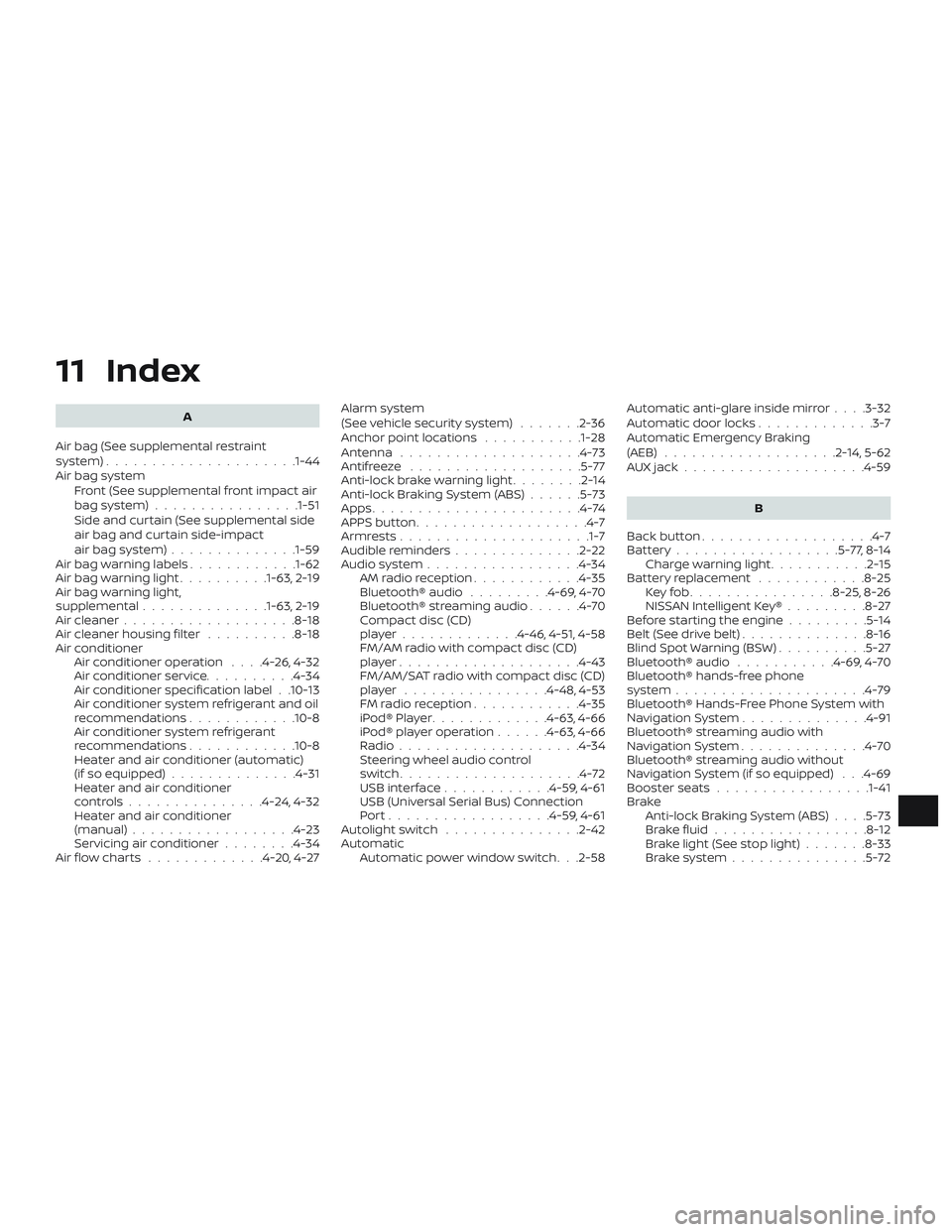
11 Index
A
Air bag (See supplemental restraint
system) .................... .1-44
Air bag system Front (See supplemental front impact air
bagsystem)................1-51
Side and curtain (See supplemental side
air bag and curtain side-impact
airbagsystem)..............1-59
Air bag warning labels ............1-62
Airbagwarninglight..........1-63, 2-19
Air bag warning light,
supplemental ..............1-63, 2-19
Air cleaner ...................8-18
Air cleaner housing filter ..........8-18
Air conditioner Air conditioner operation ....4-26,4-32
Air conditioner service ..........4-34
Air conditioner specification label . .10-13
Air conditioner system refrigerant and oil
recommendations ............10-8
Air conditioner system refrigerant
recommendations ............10-8
Heater and air conditioner (automatic)
(if so equipped) ..............4-31
Heater and air conditioner
controls...............4-24,4-32
Heater and air conditioner
(manual) ..................4-23
Servicing air conditioner ........4-34
Air flow charts .............4-20,4-27 Alarm system
(See vehicle security system)
.......2-36
Anchor point locations ...........1-28
Antenna ....................4-73
Antifreeze ...................5-77
Anti-lock brake warning light ........2-14
Anti-lock Braking System (ABS) ......5-73
Apps .......................4-74
APPS button ...................4-7
Armrests.................... .1-7
Audible reminders ..............2-22
Audiosystem.................4-34 AMradioreception............4-35
Bluetooth® audio .........4-69,4-70
Bluetooth® streaming audio ......4-70
Compact disc (CD)
player.............4-46,4-51,4-58
FM/AM radio with compact disc (CD)
player....................4-43
FM/AM/SAT radio with compact disc (CD)
player ................4-48,4-53
FMradioreception............4-35
iPod®Player.............4-63,4-66
iPod® player operation ......4-63,4-66
Radio ....................4-34
Steering wheel audio control
switch....................4-72
USBinterface............4-59,4-61
USB (Universal Serial Bus) Connection
Port..................4-59,4-61
Autolightswitch ...............2-42
Automatic Automatic power window switch . . .2-58 Automatic anti-glare inside mirror
....3-32
Automatic door locks .............3-7
Automatic Emergency Braking
(AEB) ...................2-14,5-62
AUXjack....................4-59
B
Back button ...................4-7
Battery..................5-77,8-14 Charge warning light ...........2-15
Battery replacement ............8-25
Keyfob................8-25,8-26
NISSAN Intelligent Key® .........8-27
Before starting the engine .........5-14
Belt(Seedrivebelt)..............8-16
Blind Spot Warning (BSW) ..........5-27
Bluetooth® audio ...........4-69,4-70
Bluetooth® hands-free phone
system .....................4-79
Bluetooth® Hands-Free Phone System with
N
avigationSystem..............4-91
Bluetooth® streaming audio with
NavigationSystem..............4-70
Bluetooth® streaming audio without
Navigation System (if so equipped) . . .4-69
Booster seats .................1-41
Brake Anti-lock Braking System (ABS) ....5-73
Brakefluid.................8-12
Brakelight(Seestoplight).......8-33
Brakesystem...............5-72