clutch NISSAN SENTRA 2018 Owner´s Manual
[x] Cancel search | Manufacturer: NISSAN, Model Year: 2018, Model line: SENTRA, Model: NISSAN SENTRA 2018Pages: 507, PDF Size: 5.59 MB
Page 26 of 507
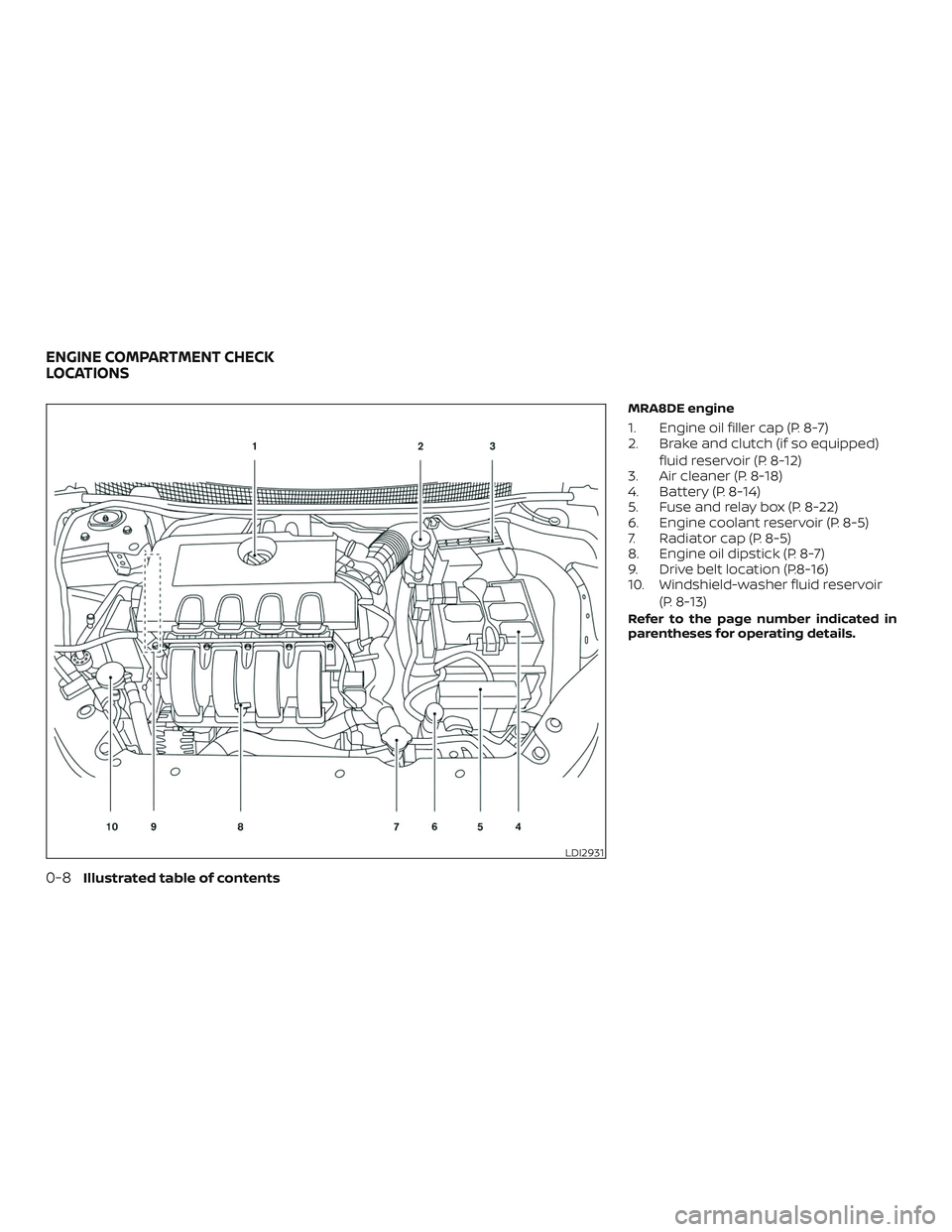
MRA8DE engine
1. Engine oil filler cap (P. 8-7)
2. Brake and clutch (if so equipped)fluid reservoir (P. 8-12)
3. Air cleaner (P. 8-18)
4. Battery (P. 8-14)
5. Fuse and relay box (P. 8-22)
6. Engine coolant reservoir (P. 8-5)
7. Radiator cap (P. 8-5)
8. Engine oil dipstick (P. 8-7)
9. Drive belt location (P.8-16)
10. Windshield-washer fluid reservoir
(P. 8-13)
Refer to the page number indicated in
parentheses for operating details.
LDI2931
ENGINE COMPARTMENT CHECK
LOCATIONS
0-8Illustrated table of contents
Page 27 of 507
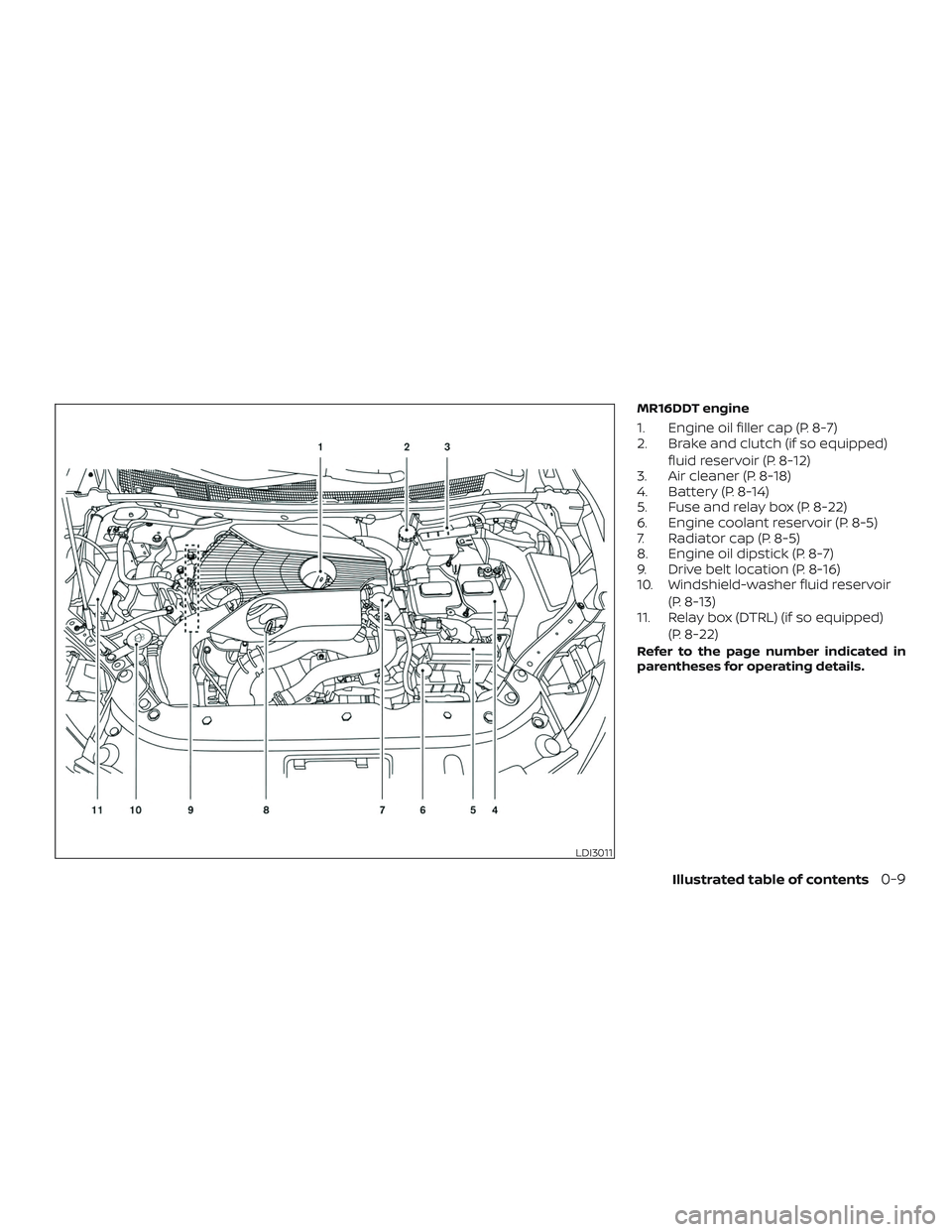
MR16DDT engine
1. Engine oil filler cap (P. 8-7)
2. Brake and clutch (if so equipped)fluid reservoir (P. 8-12)
3. Air cleaner (P. 8-18)
4. Battery (P. 8-14)
5. Fuse and relay box (P. 8-22)
6. Engine coolant reservoir (P. 8-5)
7. Radiator cap (P. 8-5)
8. Engine oil dipstick (P. 8-7)
9. Drive belt location (P. 8-16)
10. Windshield-washer fluid reservoir
(P. 8-13)
11. Relay box (DTRL) (if so equipped)
(P. 8-22)
Refer to the page number indicated in
parentheses for operating details.
LDI3011
Illustrated table of contents0-9
Page 116 of 507
Cruise indicator light (if soequipped)
The light comes on when the cruise control
ON/OFF switch is pushed. The light goes
out when the ON/OFF switch is pushed
again. When the cruise indicator light
comes on, the cruise control system is op-
erational. For additional information, refer
to “Cruise control” in the “Starting and driv-
ing” section of this manual.
ECO mode indicator light (ifso equipped)
This light comes on when the ECO mode
has been selected. For additional informa-
tion, refer to “ECO mode switch” in the
“Starting and driving” section of this
manual.
Engine start operationindicator light (if so
equipped)
For vehicles equipped with push-button ig-
nition this indicator illuminates when the
ignition switch is in the LOCK, OFF, ACC or
ON position with the shif t lever in the P
(Park) position. Continuously Variable Transmission
(CVT) models:
This indicator means that
the engine will start by pushing the push-
button ignition switch with the brake pedal
depressed.
Manual transmission models: This indi-
cator means that the engine will start by
pushing the ignition switch with the clutch
and the brake pedal depressed
Front fog light indicator
light (if so equipped)
The front fog light indicator light illumi-
nates when the front fog lights are on. For
additional information, refer to “Fog light
switch” in this section.
Front passenger air bagstatus light
The front passenger air bag status light will
be lit and the passenger front air bag will be
off depending on how the front passenger
seat is being used.
For additional information, refer to “Front
passenger air bag and status light” in the
“Safety — Seats, seat belts and supplemen-
tal restraint system” section of this manual.
High beam indicator light(blue)
This blue light comes on when the head-
light high beams are on and goes out when
the low beams are selected.
The high beam indicator light also comes
on when the passing signal is activated.
Malfunction Indicator Light(MIL)
If this indicator light comes on steady or
blinks while the engine is running, it may
indicate a potential emission control mal-
function.
The MIL may also come on steady if the
fuel-filler cap is loose or missing, or if the
vehicle runs out of fuel. Check to make sure
the fuel-filler cap is installed and closed
tightly, and that the vehicle has at least
3 gallons (11.4 liters) of fuel in the fuel tank.
Af ter a few driving trips, the
light
should turn off if no other potential emis-
sion control system malfunction exists.
If this indicator light comes on steady for
20 seconds and then blinks for 10 seconds
when the engine is not running, it indicates
that the vehicle is not ready for an emission
control system inspection/maintenance
2-20Instruments and controls
Page 128 of 507
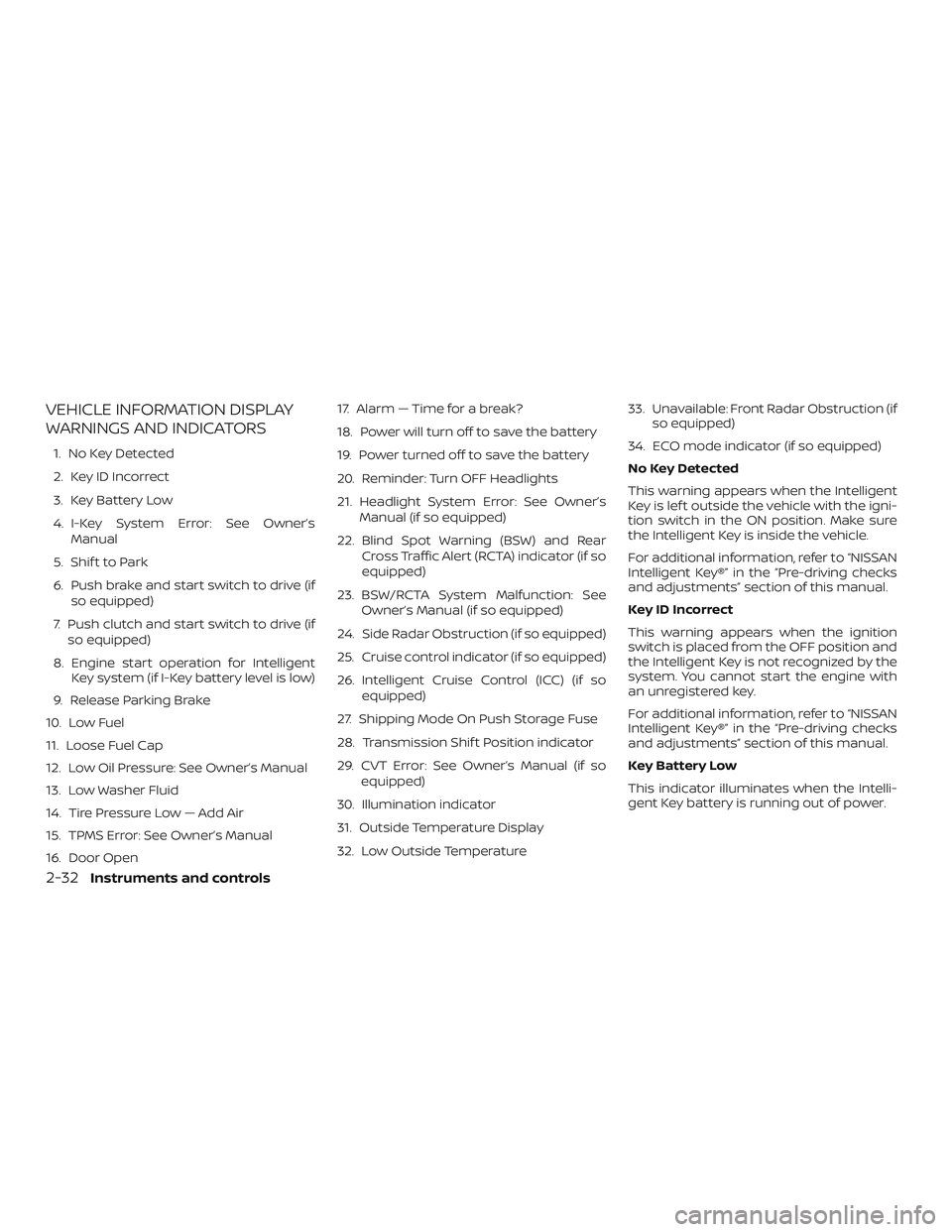
VEHICLE INFORMATION DISPLAY
WARNINGS AND INDICATORS
1. No Key Detected
2. Key ID Incorrect
3. Key Battery Low
4. I-Key System Error: See Owner’sManual
5. Shif t to Park
6. Push brake and start switch to drive (if so equipped)
7. Push clutch and start switch to drive (if so equipped)
8. Engine start operation for Intelligent Key system (if I-Key battery level is low)
9. Release Parking Brake
10. Low Fuel
11. Loose Fuel Cap
12. Low Oil Pressure: See Owner’s Manual
13. Low Washer Fluid
14. Tire Pressure Low — Add Air
15. TPMS Error: See Owner’s Manual
16. Door Open 17. Alarm — Time for a break?
18. Power will turn off to save the battery
19. Power turned off to save the battery
20. Reminder: Turn OFF Headlights
21. Headlight System Error: See Owner’s
Manual (if so equipped)
22. Blind Spot Warning (BSW) and Rear Cross Traffic Alert (RCTA) indicator (if so
equipped)
23. BSW/RCTA System Malfunction: See Owner’s Manual (if so equipped)
24. Side Radar Obstruction (if so equipped)
25. Cruise control indicator (if so equipped)
26. Intelligent Cruise Control (ICC) (if so equipped)
27. Shipping Mode On Push Storage Fuse
28. Transmission Shif t Position indicator
29. CVT Error: See Owner’s Manual (if so equipped)
30. Illumination indicator
31. Outside Temperature Display
32. Low Outside Temperature 33. Unavailable: Front Radar Obstruction (if
so equipped)
34. ECO mode indicator (if so equipped)
No Key Detected
This warning appears when the Intelligent
Key is lef t outside the vehicle with the igni-
tion switch in the ON position. Make sure
the Intelligent Key is inside the vehicle.
For additional information, refer to “NISSAN
Intelligent Key®” in the “Pre-driving checks
and adjustments” section of this manual.
Key ID Incorrect
This warning appears when the ignition
switch is placed from the OFF position and
the Intelligent Key is not recognized by the
system. You cannot start the engine with
an unregistered key.
For additional information, refer to “NISSAN
Intelligent Key®” in the “Pre-driving checks
and adjustments” section of this manual.
Key Battery Low
This indicator illuminates when the Intelli-
gent Key battery is running out of power.
2-32Instruments and controls
Page 129 of 507
If this indicator illuminates, replace the bat-
tery with a new one. For additional infor-
mation, refer to “Battery replacement” in
the “Do-it-yourself ” section of this manual.
I-Key System Error: See Owner’s Manual
Af ter the ignition switch is pushed to the
ON position, this light comes on for a period
of time and then turns off.
The I-Key System Error message warns of
a malfunction with the Intelligent Key sys-
tem. If the light comes on while the engine
is stopped, it may be impossible to start
the engine.
If the light comes on while the engine is
running, you can drive the vehicle. However,
in these cases, have the system checked. It
is recommended that you visit a NISSAN
dealer for this service.
Shif t to Park
This warning illuminates when the ignition
switch is in the ACC or OFF position and the
shif t lever is not in the P (Park) position. Also,
a chime sounds when the ignition switch is
in the ACC or OFF position.
If this warning illuminates, move the shif t
lever to the P (Park) position and start the
engine.Push brake and start switch to drive (if
so equipped)
This indicator appears when the shif t lever
is in the P (Park) position.
This indicator means that the engine will
start by pushing the ignition switch with
the brake pedal depressed. You can start
the engine from any position of the ignition
switch.
Push clutch and start switch to drive (if
so equipped)
This indicator appears when the shif t lever
is in the N (Neutral) position.
This indicator means that the engine will
start by pushing the ignition switch with
the clutch and brake pedal depressed. You
can start the engine from any position of
the ignition switch.
Engine start operation for Intelligent
Key system (if I-Key battery level is low)
This indicator appears when the battery of
the Intelligent Key is low and when the In-
telligent Key system and the vehicle are not
communicating normally.
If this appears, touch the ignition switch
with the Intelligent Key while depressing
the brake pedal. For additional information,refer to “NISSAN Intelligent Key® battery dis-
charge” in the “Starting and driving” section
of this manual.
Release Parking Brake
This warning illuminates in the message
area of the vehicle information display
when the parking brake is set and the ve-
hicle is driven.
Low Fuel
This warning illuminates when the fuel level
in the fuel tank is getting low. Refuel as
soon as it is convenient, preferably before
the fuel gauge reaches 0 (Empty).
There
will be a small reserve of fuel in the tank
when the fuel gauge needle reaches 0
(Empty).
Loose Fuel Cap
This warning appears when the fuel-filler
cap is not tightened correctly af ter the ve-
hicle has been refueled. For additional in-
formation, refer to “Fuel-filler cap” in the
“Pre-driving checks and adjustments” sec-
tion of this manual.
Low Oil Pressure: See Owner’s Manual
This warning appears in the message area
of the vehicle information display if low oil
pressure is detected. This gauge is not de-
Instruments and controls2-33
Page 317 of 507
NISSAN VEHICLE IMMOBILIZER
SYSTEM
The NISSAN Vehicle Immobilizer System
will not allow the engine to start without
the use of the registered key.
If the engine fails to start using a registered
key (for example, when interference is
caused by another registered key, an auto-
mated toll road device or automatic pay-
ment device on the key ring), restart the
engine using the following procedure:1. Leave the ignition switch in the ON po- sition for approximately 5 seconds.
2. Place the ignition switch in the OFF or LOCK position, and wait approximately
10 seconds.
3. Repeat steps 1 and 2.
4. Restart the engine while holding the device (which may have caused the in-
terference) separate from the regis-
tered key.
If the no start condition re-occurs, NISSAN
recommends placing the registered key on
a separate key ring to avoid interference
from other devices.
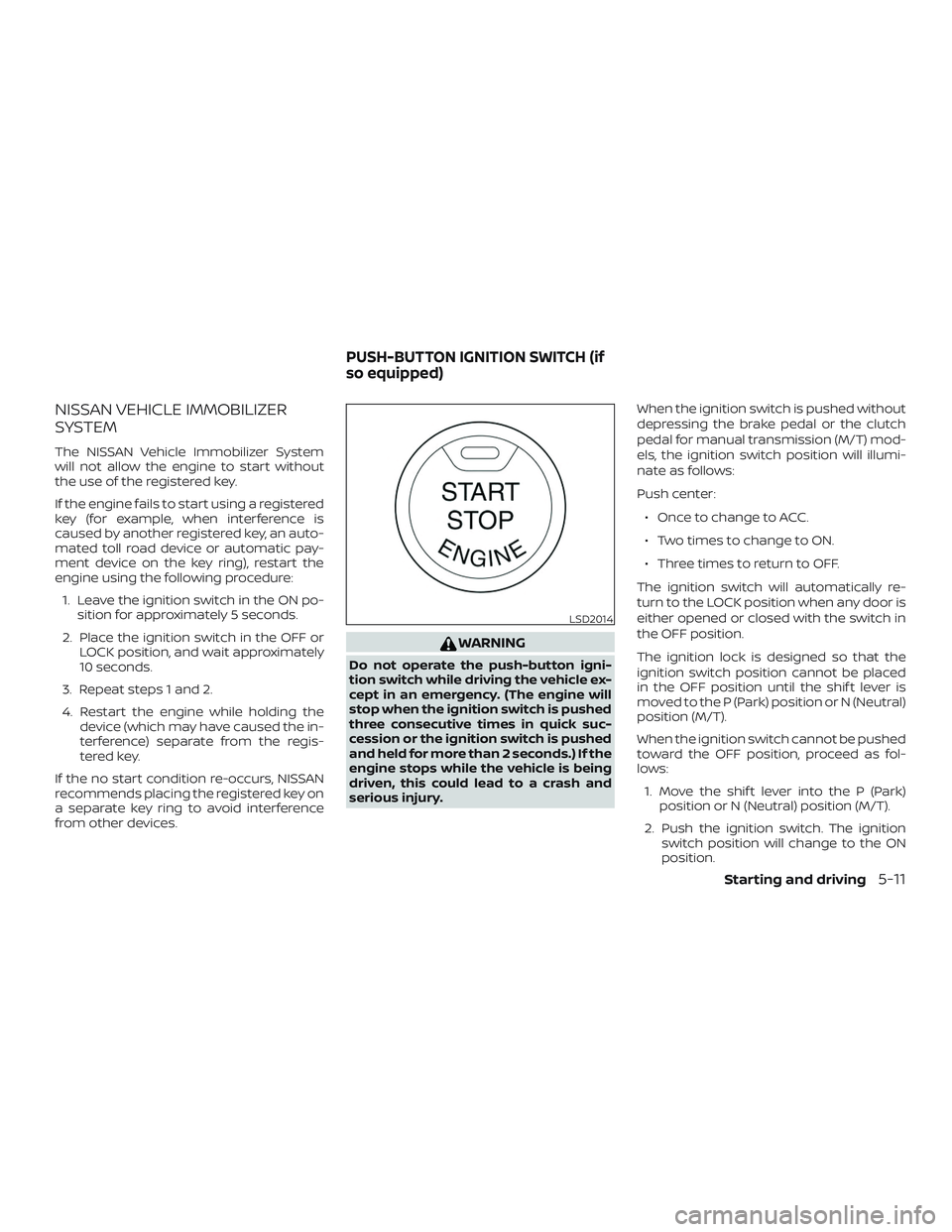
WARNING
Do not operate the push-button igni-
tion switch while driving the vehicle ex-
cept in an emergency. (The engine will
stop when the ignition switch is pushed
three consecutive times in quick suc-
cession or the ignition switch is pushed
and held for more than 2 seconds.) If the
engine stops while the vehicle is being
driven, this could lead to a crash and
serious injury. When the ignition switch is pushed without
depressing the brake pedal or the clutch
pedal for manual transmission (M/T) mod-
els, the ignition switch position will illumi-
nate as follows:
Push center:
∙ Once to change to ACC.
∙ Two times to change to ON.
∙ Three times to return to OFF.
The ignition switch will automatically re-
turn to the LOCK position when any door is
either opened or closed with the switch in
the OFF position.
The ignition lock is designed so that the
ignition switch position cannot be placed
in the OFF position until the shif t lever is
moved to the P (Park) position or N (Neutral)
position (M/T).
When the ignition switch cannot be pushed
toward the OFF position, proceed as fol-
lows: 1. Move the shif t lever into the P (Park) position or N (Neutral) position (M/T).
2. Push the ignition switch. The ignition switch position will change to the ON
position.
LSD2014
PUSH-BUTTON IGNITION SWITCH (if
so equipped)
Starting and driving5-11
Page 320 of 507
Af ter Step 3 is performed, when the
ignition switch is pushed without de-
pressing the brake pedal, the ignition
switch position will change to the ACC
position.
4. Push the ignition switch while depress- ing the brake pedal within 10 seconds
af ter the chime sounds. The engine will
start.
NOTE: ∙ When the ignition switch is pushed to
the ACC or ON position or the engine
is started by the above procedure, the
Intelligent Key battery discharge in-
dicator appears in the vehicle infor-
mation display even when the Intelli-
gent Key is inside the vehicle. This is
not a malfunction. To turn off the In-
telligent Key battery discharge indi-
cator, touch the ignition switch with
the Intelligent Key again.
∙ If the Intelligent Key battery dis-
charge indicator appears, replace the
battery as soon as possible. For addi-
tional information, refer to “Battery
replacement” in the “Do-it-yourself ”
section of this manual.NISSAN VEHICLE IMMOBILIZER
SYSTEM
The NISSAN Vehicle Immobilizer System
will not allow the engine to start without
the use of the registered key.
If the engine fails to start using a registered
key (for example, when interference is
caused by another registered key, an auto-
mated toll road device or automatic pay-
ment device on the key ring), restart the
engine using the following procedure:
1. Leave the ignition switch in the ON po- sition for approximately 5 seconds.
2. Place the ignition switch in the OFF or LOCK position, and wait approximately
10 seconds.
3. Repeat steps 1 and 2.
4. Restart the engine while holding the device (which may have caused the in-
terference) separate from the regis-
tered key.
If the no start condition re-occurs, NISSAN
recommends placing the registered key on
a separate key ring to avoid interference
from other devices. ∙ Make sure the area around the vehicle is
clear.
∙ Check fluid levels such as engine oil, coolant, brake and clutch fluid (if so
equipped), and windshield-washer fluid
as frequently as possible, or at least
whenever you refuel.
∙ Check that all windows and lights are clean.
∙ Visually inspect tires for their appear- ance and condition. Also check tires for
proper inflation.
∙ Lock all doors.
∙ Position seat and adjust head restraints/headrests.
∙ Adjust inside and outside mirrors.
∙ Fasten seat belts and ask all passen- gers to do likewise.
∙ Check the operation of warning lights when the ignition switch is placed in the
ON position. For additional information,
refer to “Warning lights, indicator lights
and audible reminders” in the “Instru-
ments and controls” section of this
manual.
BEFORE STARTING THE ENGINE
5-14Starting and driving
Page 321 of 507
1. Apply the parking brake.
2.Continuously Variable Transmission
model:
Move the shif t lever to P (Park) or N
(Neutral). P (Park) is recommended.
The shif t lever cannot be moved out
of P (Park) and into any of the other
gear positions if the ignition switch
is turned to the OFF position or if the
key is removed from the ignition
switch.
The starter is designed not to oper-
ate if the shif t lever is in any of the
driving positions.
Manual transmission model:
Move the shif t lever to N (Neutral). De-
press the clutch pedal to the floor
while cranking the engine.
The starter is designed not to oper-
ate unless the clutch pedal is fully
depressed.
The Intelligent Key must be carried
when operating the ignition switch. 3. Crank the engine
with your foot off
the accelerator pedal by turning the
ignition switch to the START position.
Release the switch when the engine
starts. If the engine starts, but fails to
run, repeat the above procedure.
∙ If the engine is very hard to start in extremely cold weather or when re-
starting, depress the accelerator
pedal a little (approximately 1/3 to the
floor) and hold it and then crank the
engine. Release the switch and the
accelerator pedal when the engine
starts.
∙ If the engine is very hard to start be- cause it is flooded, depress the accel-
erator pedal all the way to the floor
and hold it. Crank the engine for
5-6 seconds. Af ter cranking the en-
gine, release the accelerator pedal.
Crank the engine with your foot off
the accelerator pedal by turning the
ignition switch to the START position.
Release the key when the engine
starts. If the engine starts, but fails to
run, repeat the above procedure.CAUTION
Do not operate the starter for more
than 15 seconds at a time. If the engine
does not start, turn the ignition switch
to the OFF position and wait 10 seconds
before cranking again, otherwise the
starter could be damaged.
4. Warm-up
Allow the engine to idle for at least
30 seconds af ter starting. Do not race
the engine while warming it up. Drive at
a moderate speed for a short distance
first, especially in cold weather.
NOTE:
Care should be taken to avoid situations
that can lead to potential battery dis-
charge and potential no-start conditions
such as: 1. Installation or extended use of elec-
tronic accessories that consume bat-
tery power when the engine is not
running (phone chargers, GPS, DVD
players, etc.).
2. The vehicle is not driven regularly
and/or only driven short distances.
In these cases, the battery may need to
be charged to maintain battery health.
STARTING THE ENGINE (models
without NISSAN Intelligent Key®
system)
Starting and driving5-15
Page 322 of 507
1. Apply the parking brake.
2.Continuously Variable Transmission:
Move the shif t lever to P (Park) or N
(Neutral). P (Park) is recommended.
The starter is designed not to oper-
ate if the shif t lever is in any of the
driving positions.
Manual Transmission (M/T):
Move the shif t lever to N (Neutral). De-
press the clutch pedal to the floor.
The starter is designed not to oper-
ate unless the clutch pedal is fully
depressed.
3. Push the ignition switch to the ON po- sition. Depress the brake pedal and the
clutch pedal (if so equipped) and push
the ignition switch to start the engine.
To start the engine immediately, push
and release the ignition switch while
depressing the brake pedal with the
ignition switch in any position.
∙ If the engine is very hard to start in extremely cold weather or when re-
starting, depress the accelerator
pedal a little (approximately 1/3 to the
floor) and while holding, crank the en- gine. Release the accelerator pedal
when the engine starts.
∙ If the engine is very hard to start be- cause it is flooded, depress the accel-
erator pedal all the way to the floor
and hold it. Push the ignition switch
to the ON position to start cranking
the engine. Af ter 5 or 6 seconds, stop
cranking by pushing the ignition
switch to the LOCK position. Af ter
cranking the engine, release the ac-
celerator pedal. Crank the engine
with your foot off the accelerator
pedal by depressing the brake pedal
and pushing the ignition switch to
start the engine. If the engine starts,
but fails to run, repeat the above pro-
cedure.
CAUTION
Do not operate the starter for more
than 15 seconds at a time. If the engine
does not start, push the ignition switch
to the OFF position and wait 10 seconds
before cranking again, otherwise the
starter could be damaged.
4. Warm-up
Allow the engine to idle for at least
30 seconds af ter starting. Do not race the engine while warming it up. Drive at
a moderate speed for a short distance
first, especially in cold weather. In cold
weather, keep the engine running for a
minimum of2-3minutes before shut-
ting it off. Starting and stopping the
engine over a short period of time may
make the vehicle more difficult to start.
5. To stop the engine, move the shif t lever to the P (Park) position or to N (Neutral)
and apply the parking brake (M/T) and
push the ignition switch to the OFF po-
sition.
NOTE:
Care should be taken to avoid situations
that can lead to potential battery dis-
charge and potential no-start conditions
such as: 1. Installation or extended use of elec-
tronic accessories that consume bat-
tery power when the engine is not
running (phone chargers, GPS, DVD
players, etc.).
2. The vehicle is not driven regularly
and/or only driven short distances.
In these cases, the battery may need to
be charged to maintain battery health.
STARTING THE ENGINE (models with
NISSAN Intelligent Key® system)
5-16Starting and driving
Page 329 of 507
normal operating condition, have the
transmission checked and repaired, if
necessary. It is recommended that you
visit a NISSAN dealer for this service.
WARNING
When the high fluid temperature pro-
tection mode or fail-safe operation oc-
curs, vehicle speed may be gradually re-
duced. The reduced speed may be lower
than other traffic, which could increase
the chance of a collision. Be especially
careful when driving. If necessary, pull
to the side of the road at a safe place
and allow the transmission to return to
normal operation, or have it repaired if
necessary.
MANUAL TRANSMISSION (if so
equipped)
WARNING
∙ Do not downshif t abruptly on slipperyroads. This may cause a loss of
control.
∙ Do not over-rev the engine when shif ting to a lower gear. This may
cause a loss of control or engine
damage. ∙ Do not shif t to the N (Neutral) position
while driving. Doing so may result in
an accident due to loss of engine
braking.
CAUTION
∙ Do not rest your foot on the clutchpedal while driving. This may cause
clutch damage.
∙ Fully depress the clutch pedal before shif ting to help prevent transmission
damage.
∙ Stop your vehicle completely before shif ting into R (Reverse).
∙ When the vehicle is stopped with the engine running (for example, at a stop
light), shif t to N (Neutral) and release
the clutch pedal with the foot brake
applied.
∙ Do not shif t to the N (Neutral) position while driving. Doing so may result in
an accident due to loss of engine
braking.
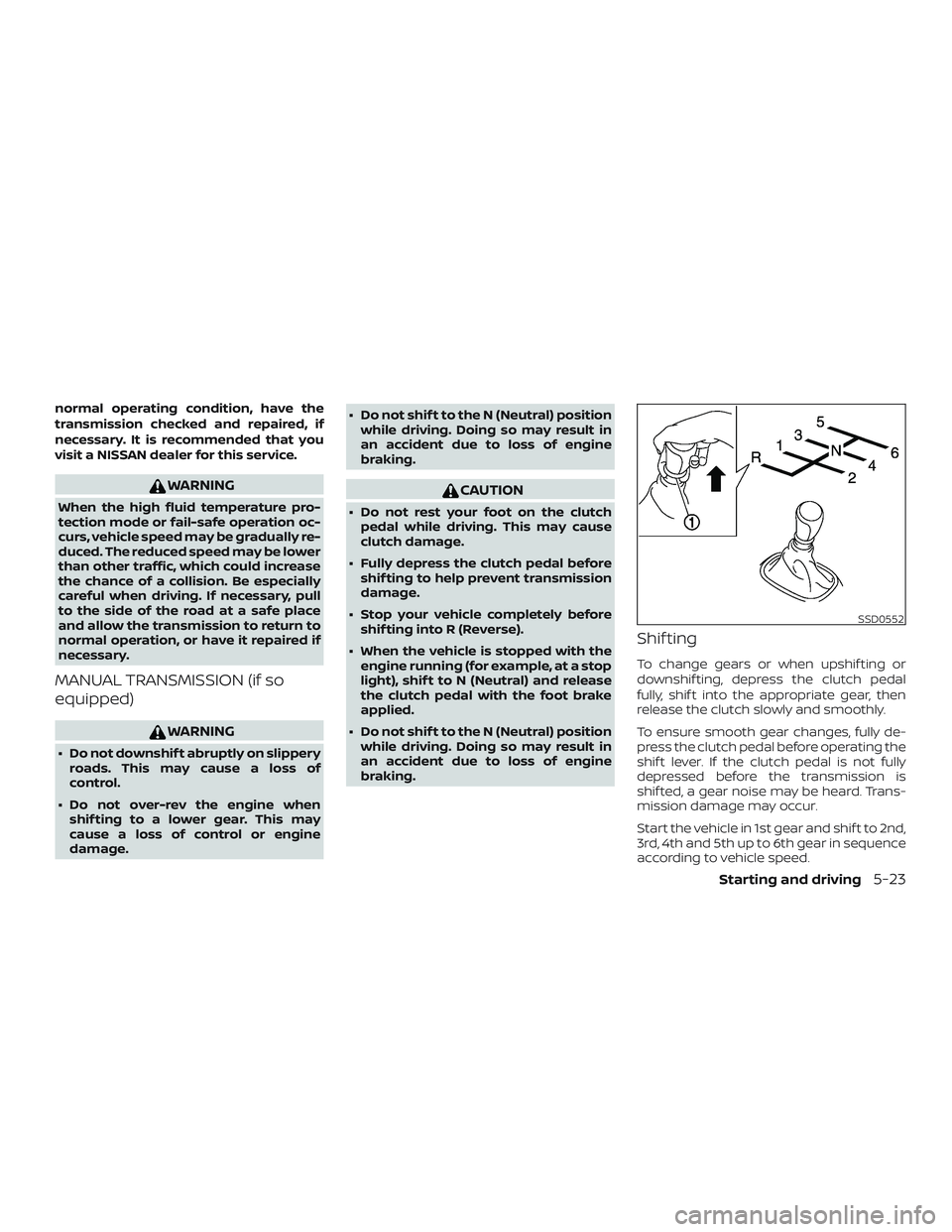
Shif ting
To change gears or when upshif ting or
downshif ting, depress the clutch pedal
fully, shif t into the appropriate gear, then
release the clutch slowly and smoothly.
To ensure smooth gear changes, fully de-
press the clutch pedal before operating the
shif t lever. If the clutch pedal is not fully
depressed before the transmission is
shif ted, a gear noise may be heard. Trans-
mission damage may occur.
Start the vehicle in 1st gear and shif t to 2nd,
3rd, 4th and 5th up to 6th gear in sequence
according to vehicle speed.
SSD0552
Starting and driving5-23