interior lights NISSAN SENTRA 2019 Owner´s Manual
[x] Cancel search | Manufacturer: NISSAN, Model Year: 2019, Model line: SENTRA, Model: NISSAN SENTRA 2019Pages: 461, PDF Size: 5.79 MB
Page 158 of 461
WARNING
∙ Radio waves could adversely affectelectric medical equipment. Those
who use a pacemaker should contact
the electric medical equipment
manufacturer for the possible influ-
ences before use.
∙ The remote keyless entry key fob transmits radio waves when the but-
tons are pressed. The FAA advises ra-
dio waves may affect aircraf t naviga-
tion and communication systems. Do
not operate the remote keyless entry
key fob while on an airplane. Make
sure the buttons are not operated un-
intentionally when the unit is stored
for a flight.
It is possible to lock/unlock all doors, turn
the interior lights on, and activate the panic
alarm by using the key fob from outside the
vehicle.
Be sure to remove the key from the ve-
hicle before locking the doors.
The key fob can operate at a distance of
approximately 33 f t (10 m) from the vehicle.
The effective distance depends on the
conditions around the vehicle. As many as four key fobs can be used with
one vehicle. For information concerning
the purchase and use of additional key
fobs, it is recommended that you visit a
NISSAN dealer.
The key fob will not function when:
∙ The battery is discharged.
∙ The distance between the vehicle and the key fob is over 33 f t (10 m).
The panic alarm will not activate when
the key is in the ignition switch.
CAUTION
Listed below are conditions or occur-
rences which will damage the key fob:
∙ Do not allow the key fob, which con- tains electrical components, to come
into contact with water or salt water.
This could affect the system function.
∙ Do not drop the key fob.
∙ Do not strike the key fob sharply against another object.
∙ Do not change or modif y the key fob.
∙ Wetting may damage the key fob. If the key fob gets wet, immediately
wipe until it is completely dry. ∙ Do not place the key fob for an ex-
tended period in an area where tem-
peratures exceed 140°F (60°C).
∙ Do not attach the key fob with a key holder that contains a magnet.
∙ Do not place the key fob near equip- ment that produces a magnetic field,
such as a TV, audio equipment and
personal computers.
If a key fob is lost or stolen, NISSAN rec-
ommends erasing the ID code of that
key fob. This will prevent the key fob
from unauthorized use to unlock the
vehicle. For information regarding the
erasing procedure, it is recommended
that you visit a NISSAN dealer.
REMOTE KEYLESS ENTRY SYSTEM (if
so equipped)
3-8Pre-driving checks and adjustments
Page 160 of 461
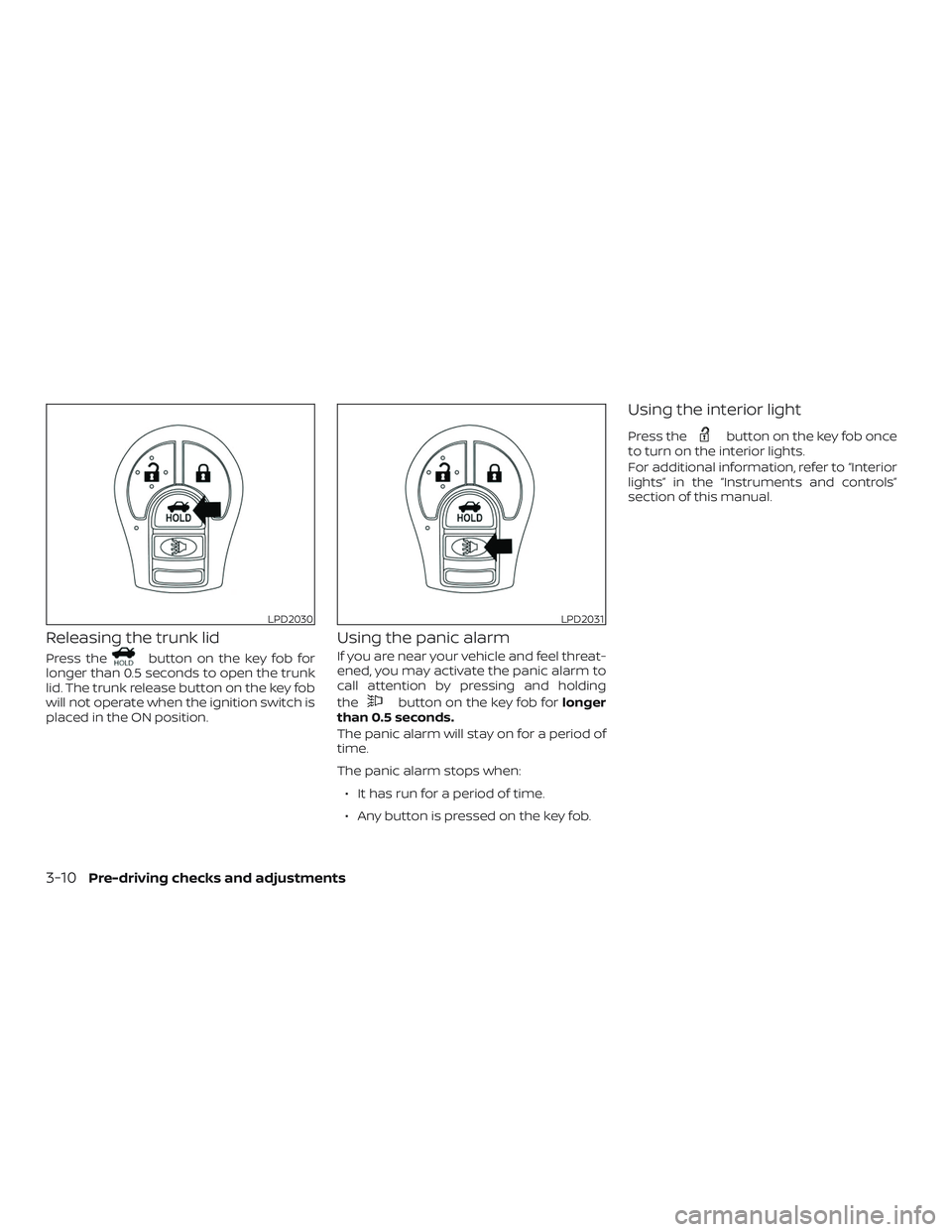
Releasing the trunk lid
Press thebutton on the key fob for
longer than 0.5 seconds to open the trunk
lid. The trunk release button on the key fob
will not operate when the ignition switch is
placed in the ON position.
Using the panic alarm
If you are near your vehicle and feel threat-
ened, you may activate the panic alarm to
call attention by pressing and holding
the
button on the key fob for longer
than 0.5 seconds.
The panic alarm will stay on for a period of
time.
The panic alarm stops when:
∙ It has run for a period of time.
∙ Any button is pressed on the key fob.
Using the interior light
Press thebutton on the key fob once
to turn on the interior lights.
For additional information, refer to “Interior
lights” in the “Instruments and controls”
section of this manual.
LPD2030LPD2031
3-10Pre-driving checks and adjustments
Page 169 of 461
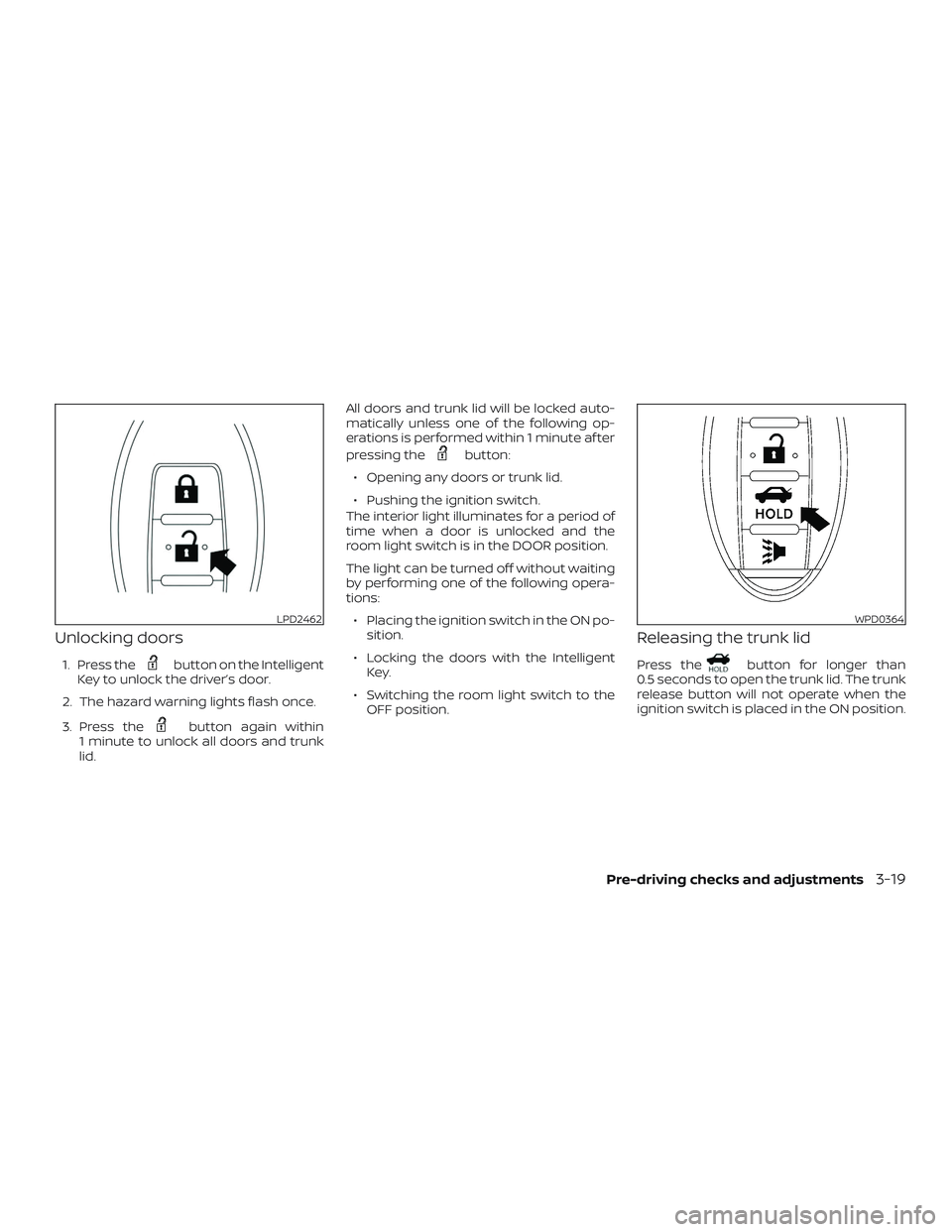
Unlocking doors
1. Press thebutton on the Intelligent
Key to unlock the driver’s door.
2. The hazard warning lights flash once.
3. Press the
button again within
1 minute to unlock all doors and trunk
lid. All doors and trunk lid will be locked auto-
matically unless one of the following op-
erations is performed within 1 minute af ter
pressing the
button:
∙ Opening any doors or trunk lid.
∙ Pushing the ignition switch.
The interior light illuminates for a period of
time when a door is unlocked and the
room light switch is in the DOOR position.
The light can be turned off without waiting
by performing one of the following opera-
tions:
∙ Placing the ignition switch in the ON po- sition.
∙ Locking the doors with the Intelligent Key.
∙ Switching the room light switch to the OFF position.
Releasing the trunk lid
Press thebutton for longer than
0.5 seconds to open the trunk lid. The trunk
release button will not operate when the
ignition switch is placed in the ON position.
LPD2462WPD0364
Pre-driving checks and adjustments3-19
Page 214 of 461
∙ When thefront defroster button is
pressed, the air conditioner will auto-
matically be turned on at outside tem-
peratures above 36°F (2°C). The air recir-
culate mode automatically turns off,
allowing outside air to be drawn into the
passenger compartment to further im-
prove the defogging performance.
MANUAL OPERATION
Fan speed control
Press thefan speed control buttons
to manually control the fan speed.
Press the AUTO button to return to auto-
matic control of the fan speed.
Temperature control
Press the temperature control
buttons
,to set the desired
temperature.
Air recirculation
Press the air recirculation buttonto
recirculate interior air inside the vehicle.
Press the AUTO button to return to auto-
matic mode.
The air recirculation cannot be activated
when the air conditioner is in the
front defrosting mode.
Fresh air intake
Press thefresh air intake button to
draw outside air into the passenger com-
partment.
Automatic intake air control
In the AUTO mode, the intake air will be
controlled automatically. To manually con-
trol the intake air, press the
air recir-
culation button. To return to the automatic
control mode, press and hold the
air
recirculation button or press and hold
the
fresh air intake button for about
2 seconds. The indicator lights (both air re-
circulation and fresh air intake buttons) will
flash twice and then the intake air will be
controlled automatically.
A/C (air conditioner) button
Start the engine, press thefan speed
control buttons to the desired position and
press the
button to turn on the air
conditioner. To turn off the air conditioner,
press the
button again.
The air conditioner cooling function op-
erates only when the engine is running.
Air flow control
Pressing the MODE button manually con-
trols air flow and selects the air outlet:
— Air flows from center and side vents.
— Air flows from center and sidevents and foot outlets.
— Air flows mainly from footoutlets.
— Air flows from defroster andfoot outlets.
To turn system off
Press the ON-OFF button.
Rear window and outside mirror
(if so equipped) defroster switch
For additional information, refer to “Rear
window and outside mirror (if so equipped)
defroster switch” in the “Instruments and
controls” section of this manual.
4-30Monitor, climate, audio, phone and voice recognition systems
Page 365 of 461
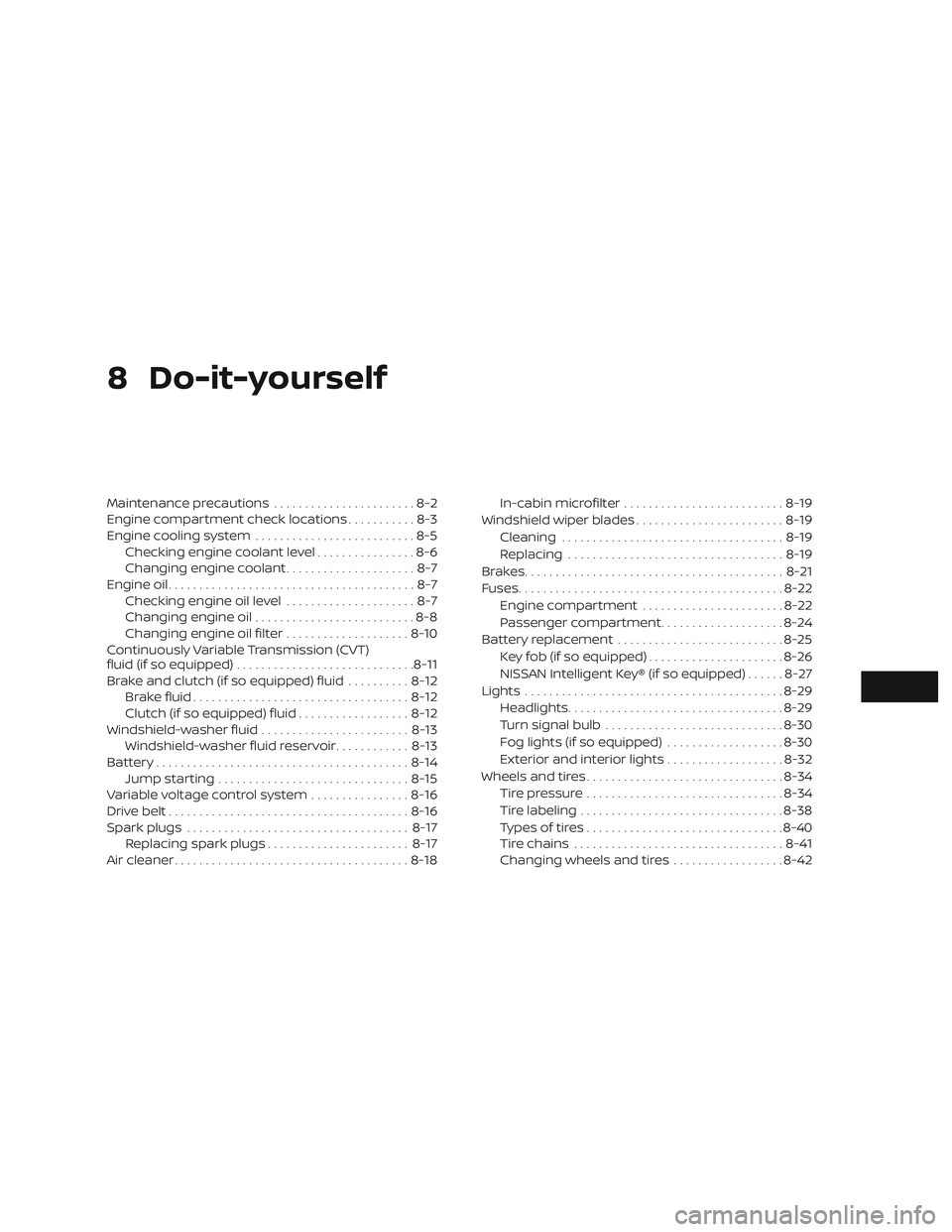
8 Do-it-yourself
Maintenance precautions.......................8-2
Engine compartment check locations ...........8-3
Engine cooling system ..........................8-5
Checking engine coolant level ................8-6
Changing engine coolant .....................8-7
Engine oil ........................................8-7
Checking engine oil level .....................8-7
Changing engine oil ..........................8-8
Changing engine oil filter ....................8-10
Continuously Variable Transmission (CVT)
fluid (if so equipped) ............................. 8-11
Brake and clutch (if so equipped) fluid ..........8-12
Brake fluid ................................... 8-12
Clutch (if so equipped) fluid ..................8-12
Windshield-washer fluid ........................8-13
Windshield-washer fluid reservoir ............8-13
Battery......................................... 8-14
Jump starting ............................... 8-15
Variable voltage control system ................8-16
Drive belt ....................................... 8-16
Spark plugs .................................... 8-17
Replacing spark plugs ....................... 8-17
Air cleaner ...................................... 8-18In-cabin microfilter
.......................... 8-19
Windshield wiper blades ........................8-19
Cleaning .................................... 8-19
Replacing ................................... 8-19
Brakes.......................................... 8-21
Fuses ........................................... 8-22
Engine compartment .......................8-22
Passenger compartment ....................8-24
Battery replacement ........................... 8-25
Key fob (if so equipped) ......................8-26
NISSAN Intelligent Key® (if so equipped) ......8-27
Lights .......................................... 8-29
Headlights ................................... 8-29
Turn signal bulb ............................. 8-30
Fog lights (if so equipped) ...................8-30
Ex
terior and interior lights ...................8-32
Wheels and tires ................................ 8-34
Tire pressure ................................ 8-34
Tire labeling ................................. 8-38
Types of tires ................................ 8-40
Tire chains .................................. 8-41
Changing wheels and tires ..................8-42
Page 396 of 461
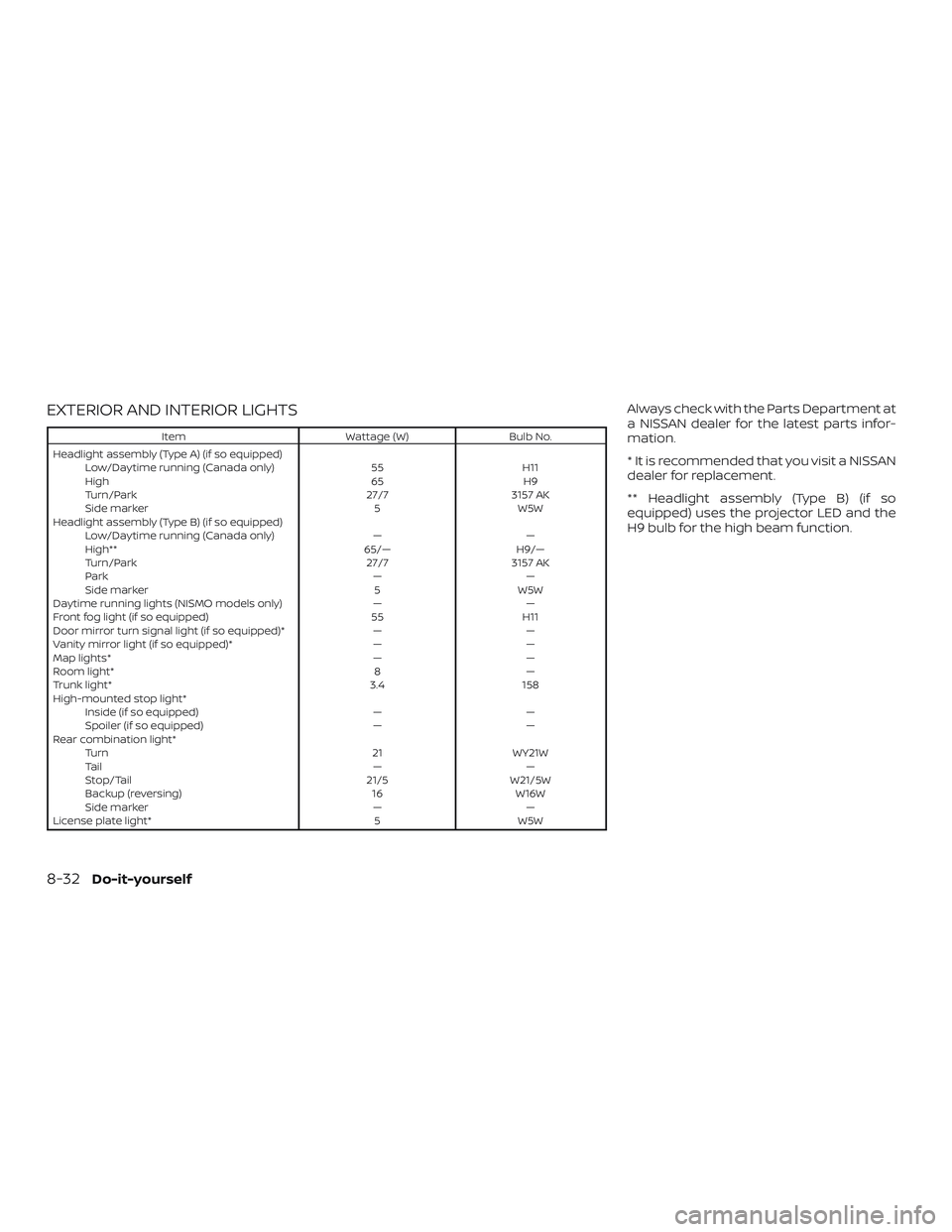
EXTERIOR AND INTERIOR LIGHTS
ItemWattage (W)Bulb No.
Headlight assembly (Type A) (if so equipped) Low/Daytime running (Canada only) 55H11
High 65H9
Turn/Park 27/73157 AK
Side marker 5W5W
Headlight assembly (Type B) (if so equipped) Low/Daytime running (Canada only) ——
High** 65/—H9/—
Turn/Park 27/73157 AK
Park ——
Side marker 5W5W
Daytime running lights (NISMO models only) ——
Front fog light (if so equipped) 55H11
Door mirror turn signal light (if so equipped)* ——
Vanity mirror light (if so equipped)* ——
Map lights* ——
Room light* 8—
Trunk light* 3.4158
High-mounted stop light* Inside (if so equipped) ——
Spoiler (if so equipped) ——
Rear combination light* Turn 21WY21W
Ta i l ——
Stop/Tail 21/5W21/5W
Backup (reversing) 16W16W
Side marker ——
License plate light* 5W5W
Always check with the Parts Department at
a NISSAN dealer for the latest parts infor-
mation.
* It is recommended that you visit a NISSAN
dealer for replacement.
** Headlight assembly (Type B) (if so
equipped) uses the projector LED and the
H9 bulb for the high beam function.
8-32Do-it-yourself
Page 452 of 461
Indicator lights and audible reminders
(See warning/indicator lights and
audible reminders)...........2-20,3-21
Inside automatic anti-glare mirror .....3-31
Instrument brightness control .......2-44
Instrument panel .............0-6,2-2
Instrument panel dimmer switch .....2-44
Intelligent Cruise Control (ICC) .......5-47
Intelligent Key system Key operating range ............3-13
Key operation ................3-14
Mechanical key ...............3-4
Remote keyless entry operation . .3-9, 3-18
Troubleshooting guide .......3-23,3-24
Warning signals ...........3-23,3-24
Interiorlight ...............2-59,2-61
Interiortrunklidrelease...........3-26
iPod®Player...................4-43
ISOFIX child restraints .............1-25
J
Jumpstarting...............6-9,8-15
K
Key.........................3-2
Key fob battery replacement .....8-25,8-26
Keyless entry With Intelligent Key system
(See Intelligent Key system) .....3-9,3-18
Without Intelligent Key system
(See remote keyless entry system) . . .3-8 Keys
NISSAN Intelligent Key® ........3-2,3-11
NISSAN Vehicle Immobilizer System
keys......................3-4
L
Labels Air conditioner specification label . . .10-13
C.M.V.S.S. certification label .......10-12
Emission control information label . .10-12
Engine serial number ..........10-12
F.M.V.S.S. certification label .......10-12
Tire and Loading Information label . .10-13
Vehicle identification number (VIN) . .10-11
Vehicle identification number (VIN)
plate.....................10-11
Warning labels (for SRS) ..........1-61
LATCH (Lower Anchors and Tethers for
CHildren)System................1-25
Launch bar menu ................4-7
License plate Installing the license plate .......10-13
Light Airbagwarninglight........1-62, 2-19
Brakelight(Seestoplight)........8-32
Bulb check/instrument panel ......2-14
Bulb replacement .............8-32
Charge warning light ...........2-15
Console light ................2-60
ExteriorandInteriorlights........8-32
Foglights..................8-30
Foglightswitch..............2-45
Headlight and turn signal switch ....2-40
Headlightcontrolswitch.........2-40 Headlights .................8-29
Interiorlight .............2-59,2-61
Lightbulbs.................8-29
Low tire pressure warning light
.....2-16
Low windshield-washer fluid
warninglight.............2-18,2-33
Passenger air bag and status light . . .1-53
Security indicator light ..........2-22
Spotlights(Seemaplight)........2-60
Trunklight..................2-62
Warning/indicator lights and
audible reminders ..........2-20,3-21
Lights......................8-29 Maplights..................2-60
Lock Child safety rear door lock ........3-7
Door locks ..................3-5
Fuel-filler door lock opener lever ....3-27
Power door locks ..............3-6
Trunk lid lock opener lever ........3-26
Loose fuel cap warning .........2-6,2-33
Lowfuelwarninglight......2-16, 2-18, 2-32
Low tire pressure warning light .......2-16
L
ow windshield-washer fluid
warninglight...............2-18,2-33
Luggage
(See vehicle loading information) .....10-14
M
Maintenance General maintenance ...........9-2
Insidethevehicle..............9-3
Maintenance precautions .........8-2
Outsidethevehicle.............9-2
11-4