warning NISSAN SENTRA 2020 Owner´s Manual
[x] Cancel search | Manufacturer: NISSAN, Model Year: 2020, Model line: SENTRA, Model: NISSAN SENTRA 2020Pages: 528, PDF Size: 3.56 MB
Page 166 of 528
The light illuminates when the trunk lid is
opened. When the trunk lid is closed, the
light goes off.
The light will go off af ter a period of time if
the trunk lid is lef t open, unless the ignition
switch is placed in the ON position.
For additional information, refer to “Exterior
and interior lights” in the “Do-it-yourself ”
section of this manual.The HomeLink® Universal Transceiver pro-
vides a convenient way to consolidate the
functions of up to three individual hand-
held transmitters into one built-in device.
HomeLink® Universal Transceiver:
• Will operate most radio frequency de-
vices such as garage doors, gates, home
and office lighting, entry door locks and
security systems.
• Is powered by your vehicle's battery. No separate batteries are required. If the ve-
hicle's battery is discharged or is discon-
nected, HomeLink® will retain all pro-
gramming.
When the HomeLink® Universal Trans-
ceiver is programmed, retain the original
transmitter for future programming pro-
cedures (Example: new vehicle pur-
chases). Upon sale of the vehicle, the
programmed HomeLink® Universal
Transceiver buttons should be erased for
security purposes. For additional infor-
mation, refer to “Programming
HomeLink®” in this section.WARNING
• Your vehicle's engine should be
turned off while programming the
HomeLink® Universal Transceiver. Do
not breathe exhaust gases; they con-
tain colorless and odorless carbon
monoxide. Carbon monoxide is dan-
gerous. It can cause unconscious-
ness or death.
• Do not use the HomeLink® Universal
Transceiver with any garage door
opener that lacks safety stop and re-
verse features as required by federal
safety standards. (These standards
became effective for opener models
manufactured af ter April 1, 1982). A
garage door opener which cannot
detect an object in the path of a clos-
ing garage door and then automati-
cally stop and reverse, does not meet
current federal safety standards. Us-
ing a garage door opener without
these features increases the risk of
serious injury or death.
TRUNK LIGHT HOMELINK® UNIVERSAL
TRANSCEIVER (if so equipped)
2-76Instruments and controls
Page 171 of 528
3 Pre-driving checks and adjustments
Keys.............................................3-2NISSAN Intelligent Key® .......................3-2
NISSAN Vehicle Immobilizer System
keys..........................................3-4
Doors ...........................................3-4
Locking with key .............................3-5
Locking with inside lock knob ................3-6
Locking with power door lock switch .........3-6
Automatic door locks ........................3-6
Child safety rear door lock .................... 3-7
NISSAN Intelligent Key® .......................... 3-7
Operating range .............................3-9
Door locks/unlocks precaution ..............3-10
NISSAN Intelligent Key® Operation ...........3-10
How to use the remote keyless entry
function ..................................... 3-14
Warning lights and audible reminders .......3-16
Warning signals ............................. 3-16
Troubleshooting guide (Continuously
Variable Transmission only) .................3-18
Troubleshooting guide
(Manual Transmission only) ..................3-19
Remote Engine Start (if so equipped) ...........3-20
Remote Engine Start operating range .......3-20
Remote starting the vehicle .................3-21Extending engine run time
..................3-21
Canceling a Remote Engine Start ...........3-21
Conditions the Remote Engine Start will
notwork .................................... 3-22
Hood ........................................... 3-23
Trunk lid ........................................ 3-24
Trunk lid release switch .....................3-24
Interior trunk lid release .....................3-24
Interior trunk access ........................ 3-25
Fuel-filler door .................................. 3-25
Opener operation ........................... 3-25
Fuel-filler cap ................................ 3-26
Steering wheel ................................. 3-28
Tilt operation ................................ 3-28
Telescopic operation ........................ 3-28
Sun visors ...................................... 3-28
Vanity mirrors ............................... 3-29
Mirrors ......................................... 3-29
Manual anti-glare rearview mirror
(if so equipped) .............................. 3-29
Automatic
anti-glare rearview mirror
(if so equipped) .............................. 3-29
Outside mirrors ............................. 3-30
Page 174 of 528
NISSAN VEHICLE IMMOBILIZER
SYSTEM KEYS
You can only drive your vehicle using the
keys which are registered to the NISSAN
Vehicle Immobilizer System components
in your vehicle.
A mechanical key can be used for all the
locks.
Never leave the keys in the vehicle.
Additional or replacement keys:
If you still have a key, the key number is not
necessary when you need extra NISSAN
Vehicle Immobilizer System keys. Your ex-
isting key can be duplicated without know-
ing the key number. As many as four
NISSAN Vehicle Immobilizer System keys
can be used with one vehicle. You should
bring all NISSAN Vehicle Immobilizer Sys-
tem keys that you have to a NISSAN dealer
for registration. This is because the regis-
tration process will erase the memory of all
key codes previously registered into the
NISSAN Vehicle Immobilizer System. Af ter
the registration process, these compo-
nents will only recognize keys coded into
the NISSAN Vehicle Immobilizer System
during registration. Any key that is notgiven to the dealer at the time of registra-
tion will no longer be able to start your
vehicle.
CAUTION
Do not allow the immobilizer system
key, which contains an electrical tran-
sponder, to come into contact with wa-
ter or salt water. This could affect sys-
tem function. When the doors are locked using one of the
following methods, the doors cannot be
opened using the inside or outside door
handles. The doors must be unlocked to
open the doors.
WARNING
• Always have the doors locked while
driving. Along with the use of seat
belts, this provides greater safety in
the event of an accident by helping to
prevent persons from being thrown
from the vehicle. This also helps keep
children and others from uninten-
tionally opening the doors, and will
help keep out intruders.
• Before opening any door, always look
for and avoid oncoming traffic.
DOORS
3-4Pre-driving checks and adjustments
Page 177 of 528
NOTE:
The Auto Door Unlock feature can be
changed using “Vehicle Settings” of the
vehicle information display. For addi-
tional information, refer to “Vehicle in-
formation display ” in the “Instruments
and controls” section of this manual.
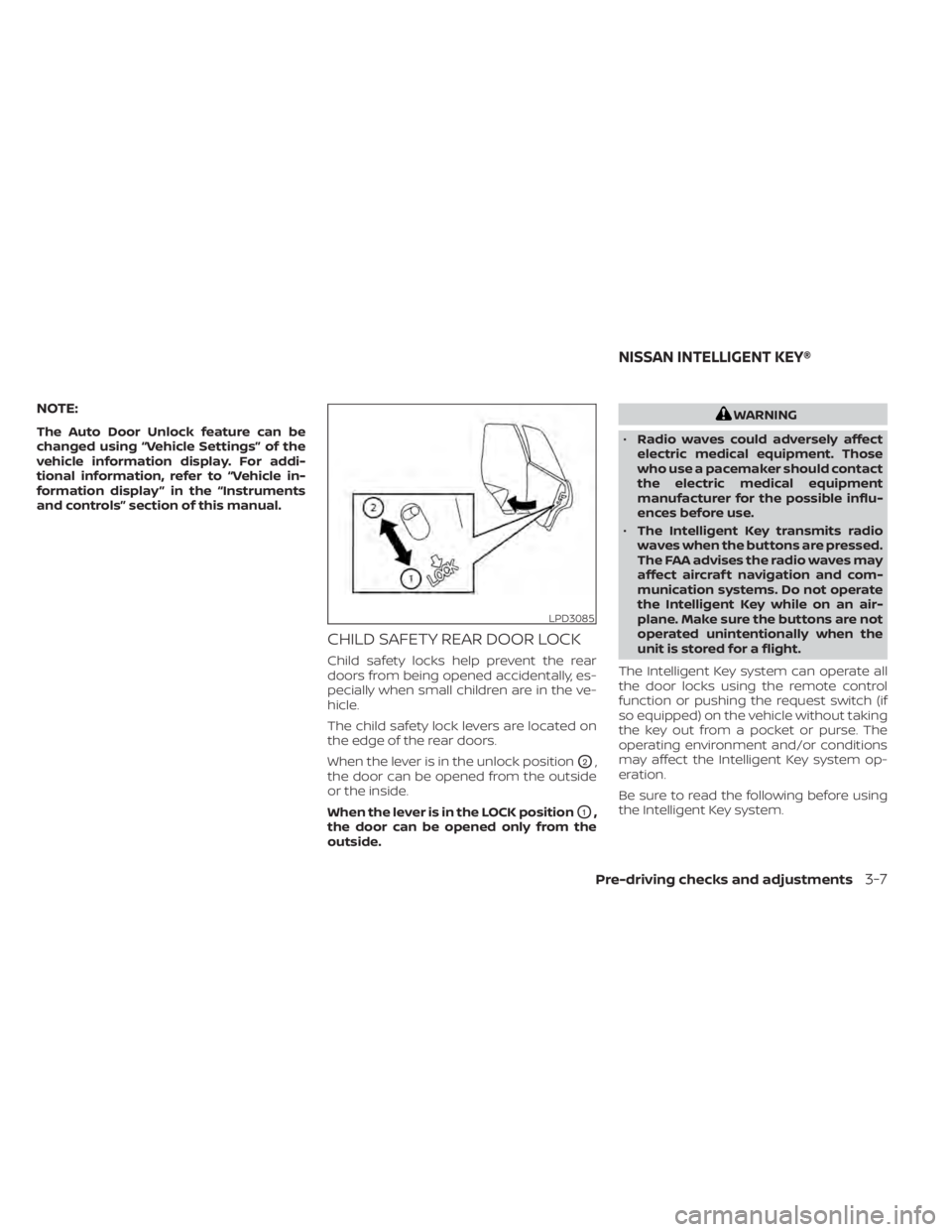
CHILD SAFETY REAR DOOR LOCK
Child safety locks help prevent the rear
doors from being opened accidentally, es-
pecially when small children are in the ve-
hicle.
The child safety lock levers are located on
the edge of the rear doors.
When the lever is in the unlock position
O2,
the door can be opened from the outside
or the inside.
When the lever is in the LOCK position
O1,
the door can be opened only from the
outside.
WARNING
• Radio waves could adversely affect
electric medical equipment. Those
who use a pacemaker should contact
the electric medical equipment
manufacturer for the possible influ-
ences before use.
• The Intelligent Key transmits radio
waves when the buttons are pressed.
The FAA advises the radio waves may
affect aircraf t navigation and com-
munication systems. Do not operate
the Intelligent Key while on an air-
plane. Make sure the buttons are not
operated unintentionally when the
unit is stored for a flight.
The Intelligent Key system can operate all
the door locks using the remote control
function or pushing the request switch (if
so equipped) on the vehicle without taking
the key out from a pocket or purse. The
operating environment and/or conditions
may affect the Intelligent Key system op-
eration.
Be sure to read the following before using
the Intelligent Key system.
LPD3085
NISSAN INTELLIGENT KEY®
Pre-driving checks and adjustments3-7
Page 178 of 528
CAUTION
• Be sure to carry the Intelligent Key
with you when operating the vehicle.
• Never leave the Intelligent Key in the
vehicle when you leave the vehicle.
The Intelligent Key is always communicat-
ing with the vehicle as it receives radio
waves. The Intelligent Key system trans-
mits weak radio waves. Environmental
conditions may interfere with the opera-
tion of the Intelligent Key system under the
following operating conditions:
• When operating near a location where strong radio waves are transmitted, such
as a TV tower, power station and broad-
casting station.
• When in possession of wireless equip- ment, such as a cellular telephone, trans-
ceiver or a CB radio.
• When the Intelligent Key is in contact with or covered by metallic materials.
• When any type of radio wave remote con- trol is used nearby.
• When the Intelligent Key is placed near an electric appliance such as a personal
computer.
• When the vehicle is parked near a parking meter. In such cases, correct the operating condi-
tions before using the Intelligent Key func-
tion or use the mechanical key.
Although the life of the battery varies de-
pending on the operating conditions, the
battery’s life is approximately two years. If
the battery is discharged, replace it with a
new one.
When the Intelligent Key battery is low, the
Intelligent Key system warning (
) will
show on the vehicle information display af-
ter the ignition switch is placed in the ON
position.
Since the Intelligent Key is continuously re-
ceiving radio waves, if the key is lef t near
equipment which transmits strong radio
waves, such as signals from a TV and per-
sonal computer, the battery life may be-
come shorter.
For information regarding replacement of
a battery, refer to “Battery replacement” in
the “Do-it-yourself ” section of this manual.
As many as four Intelligent Keys can be
registered and used with one vehicle. For
information about the purchase and use of
additional Intelligent Keys, it is recom-
mended that you visit a NISSAN dealer.
CAUTION
Listed below are conditions or occur-
rences which will damage the Intelli-
gent Key:
• Do not allow the Intelligent Key,
which contains electrical compo-
nents, to come into contact with wa-
ter or salt water. This could affect the
system function.
• Do not drop the Intelligent Key.
• Do not strike the Intelligent Key
sharply against another object.
• Do not change or modif y the Intelli-
gent Key.
• Wetting may damage the Intelligent
Key. If the Intelligent Key gets wet,
immediately wipe until it is com-
pletely dry.
• Do not place the Intelligent Key for an
extended period in an area where
temperatures exceed 140°F (60°C).
• Do not attach the Intelligent Key with
a key holder that contains a magnet.
• Do not place the Intelligent Key near
equipment that produces a magnetic
field, such as a TV, audio equipment
and personal computers.
3-8Pre-driving checks and adjustments
Page 181 of 528
Locking doors
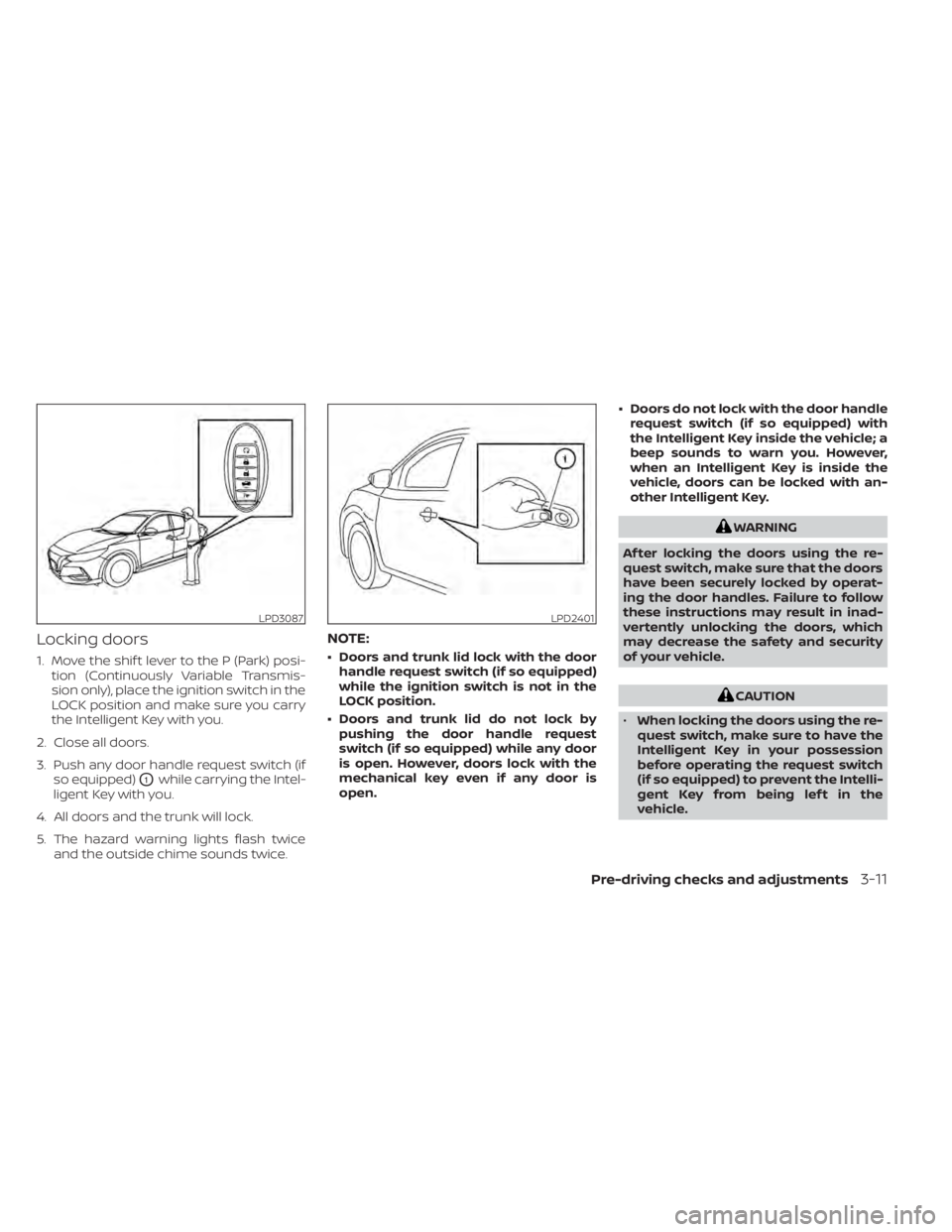
1. Move the shif t lever to the P (Park) posi-tion (Continuously Variable Transmis-
sion only), place the ignition switch in the
LOCK position and make sure you carry
the Intelligent Key with you.
2. Close all doors.
3. Push any door handle request switch (if so equipped)
O1while carrying the Intel-
ligent Key with you.
4. All doors and the trunk will lock.
5. The hazard warning lights flash twice and the outside chime sounds twice.
NOTE:
• Doors and trunk lid lock with the doorhandle request switch (if so equipped)
while the ignition switch is not in the
LOCK position.
• Doors and trunk lid do not lock by pushing the door handle request
switch (if so equipped) while any door
is open. However, doors lock with the
mechanical key even if any door is
open. • Doors do not lock with the door handle
request switch (if so equipped) with
the Intelligent Key inside the vehicle; a
beep sounds to warn you. However,
when an Intelligent Key is inside the
vehicle, doors can be locked with an-
other Intelligent Key.
WARNING
Af ter locking the doors using the re-
quest switch, make sure that the doors
have been securely locked by operat-
ing the door handles. Failure to follow
these instructions may result in inad-
vertently unlocking the doors, which
may decrease the safety and security
of your vehicle.
CAUTION
• When locking the doors using the re-
quest switch, make sure to have the
Intelligent Key in your possession
before operating the request switch
(if so equipped) to prevent the Intelli-
gent Key from being lef t in the
vehicle.
LPD3087LPD2401
Pre-driving checks and adjustments3-11
Page 182 of 528
•The request switch is operational
only when the Intelligent Key has
been detected by the Intelligent Key
system.
Lockout protection
To prevent the Intelligent Key from being
accidentally locked in the vehicle, lockout
protection is equipped with the Intelligent
Key.
When the driver’s side door is open, the
doors are locked and then the Intelligent
Key is put inside the vehicle and all the
doors are closed; the lock will automati-
cally unlock and the door buzzer sounds.
NOTE:
The doors may not lock when the Intelli-
gent Key is in the same hand that is op-
erating the request switch (if so
equipped) to lock the door. Put the Intel-
ligent Key in a purse, pocket or your
other hand.
CAUTION
The lockout protection may not func-
tion under the following conditions:
• When the Intelligent Key is placed on
top of the instrument panel.
• When the Intelligent Key is placed on
top of the rear parcel shelf.
• When the Intelligent Key is placed in-
side the glove box or a storage bin.
• When the Intelligent Key is placed in-
side the door pockets.
• When the Intelligent Key is placed on
or under the spare tire area.
• When the Intelligent Key is placed in-
side or near metallic materials.
Unlocking doors
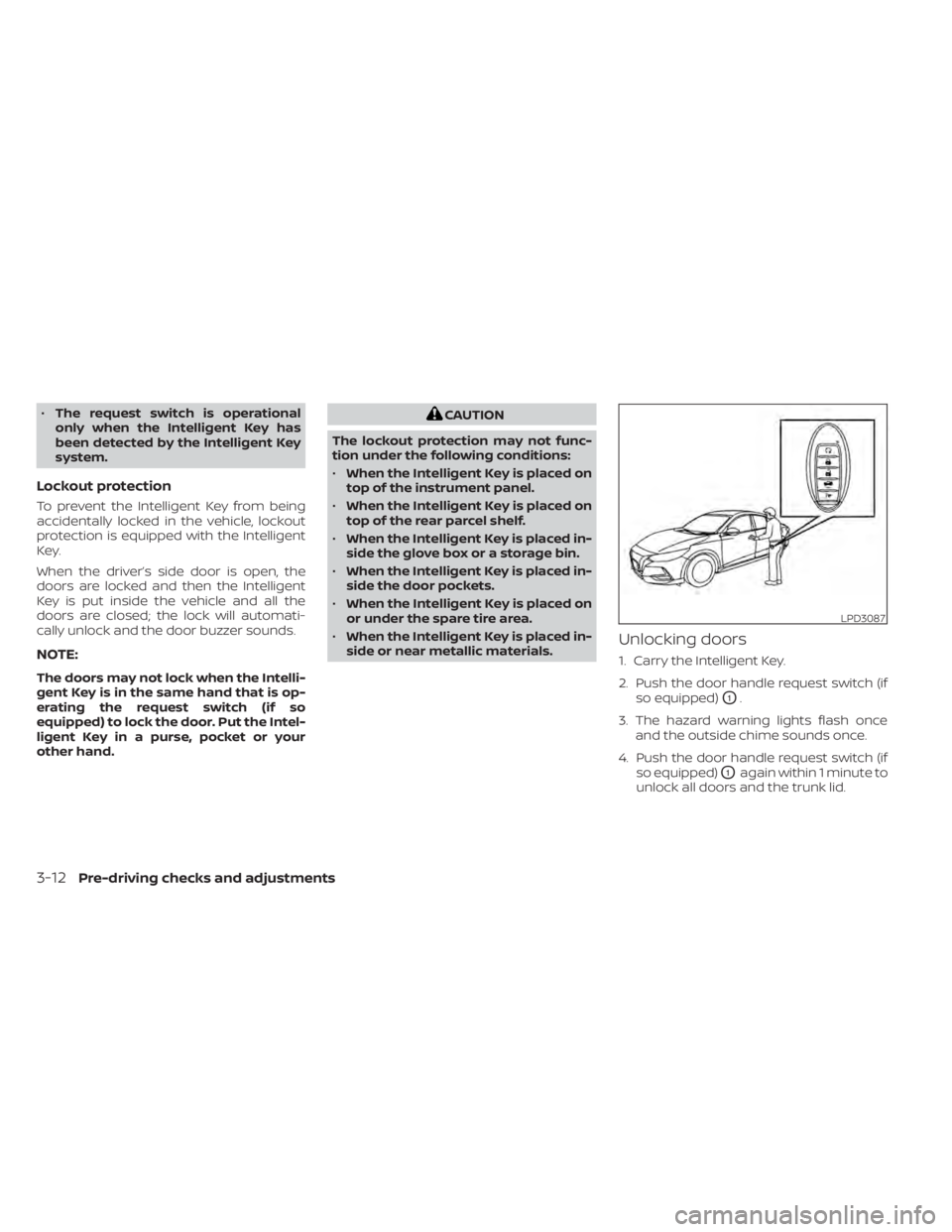
1. Carry the Intelligent Key.
2. Push the door handle request switch (if so equipped)
O1.
3. The hazard warning lights flash once and the outside chime sounds once.
4. Push the door handle request switch (if so equipped)
O1again within 1 minute to
unlock all doors and the trunk lid.
LPD3087
3-12Pre-driving checks and adjustments
Page 185 of 528
Locking doors
1. Place the power switch in the LOCKposition.
2. Close all doors.
3. Press the
button on the Intelli-
gent Key.
4. The hazard warning lights flash twice and the horn beeps once.
5. All doors and the rear hatch will be locked.
WARNING
Af ter locking the doors using the Intel-
ligent Key, be sure that the doors have
been securely locked by operating the
door handles. Failure to follow these in-
structions may result in inadvertently
unlocking the doors, which may de-
crease the safety and security of your
vehicle.
Unlocking doors
1. Press thebutton on the Intelligent
Key to unlock the driver’s door.
2. The hazard warning lights flash once. 3. Press the
button again within 1
minute to unlock all doors and rear
hatch.
All doors and trunk lid will be locked auto-
matically unless one of the following op-
erations is performed within 1 minute af ter
pressing the
button:
• Opening any doors or trunk lid.
• Pushing the power switch.
The interior light illuminates for a period of
time when a door is unlocked and the
room light switch is in the DOOR position.
The light can be turned off without waiting
by performing one of the following opera-
tions:
• Placing the power switch in the ON posi- tion.
• Locking the doors with the Intelligent Key.
• Switching the room light switch to the OFF position.
Releasing the trunk lid
Press thebutton for longer than 1
second to open the trunk lid. The trunk
release button will not operate when the
ignition switch is placed in the ON position.
Using the panic alarm
If you are near your vehicle and feel threat-
ened, you may activate the panic alarm to
call attention by pressing and holding the
button on the Intelligent Key for lon-
ger than 0.5 seconds.
The panic alarm and headlights will stay on
for a period of time.
The panic alarm stops when:
• It has run for a period of time.
• Any button is pressed on the Intelligent Key.
• The request switch (if so equipped) on the driver or passenger door is pushed and
the Intelligent Key is in range of the door
handle.
Silencing the horn beep feature
If desired, the horn beep feature can be
deactivated using the Intelligent Key.
To deactivate: Press and hold the
andbuttonsfor at least 2 seconds.
The hazard warning lights will flash three
times to confirm that the horn beep fea-
ture has been deactivated.
Pre-driving checks and adjustments3-15
Page 186 of 528
To activate:Press and hold theandbuttonsfor at least 2 seconds once
more.
The hazard warning lights will flash once
and the horn will sound once to confirm
that the horn beep feature has been reac-
tivated.
Deactivating the horn beep feature does
not silence the horn if the alarm is trig-
gered.
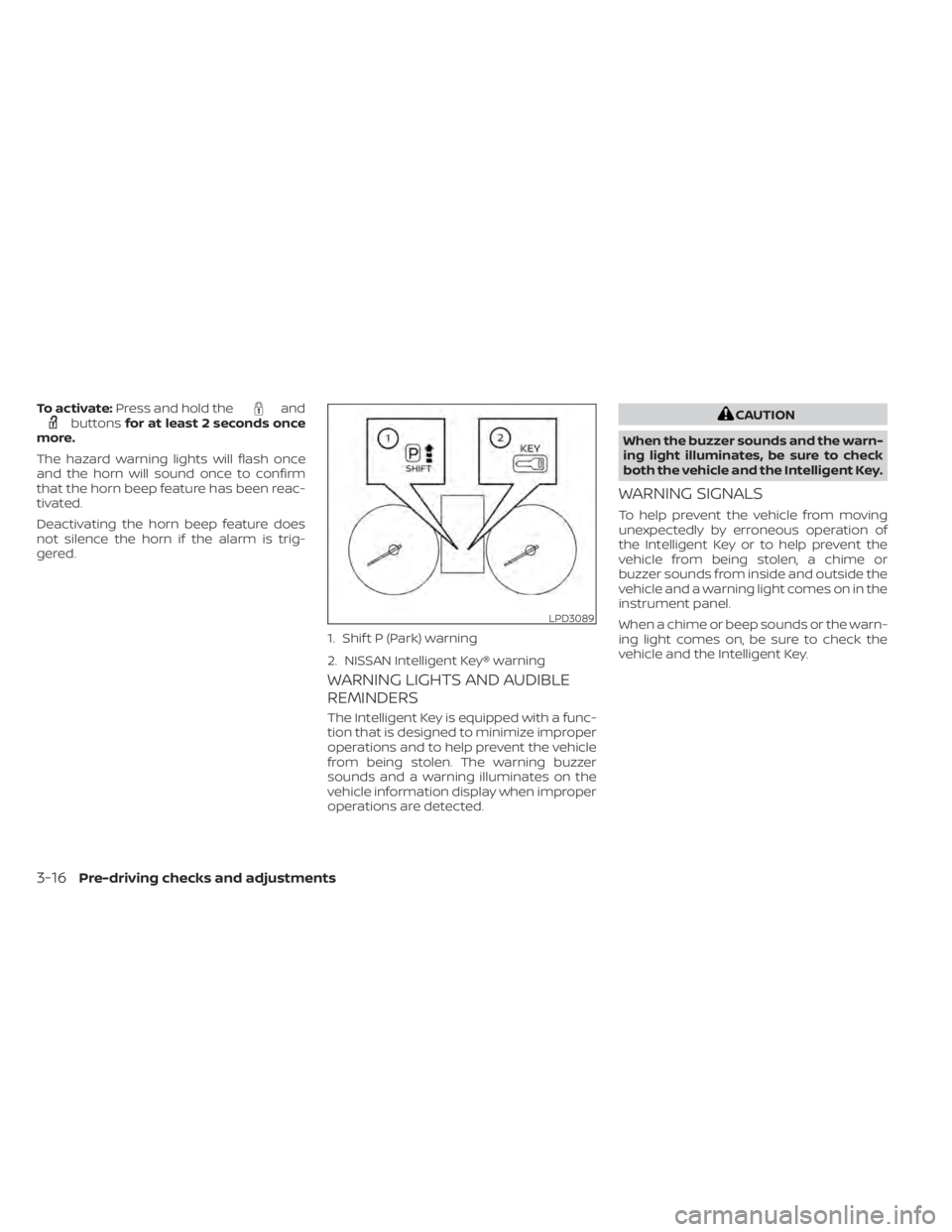
WARNING LIGHTS AND AUDIBLE
REMINDERS
The Intelligent Key is equipped with a func-
tion that is designed to minimize improper
operations and to help prevent the vehicle
from being stolen. The warning buzzer
sounds and a warning illuminates on the
vehicle information display when improper
operations are detected.
CAUTION
When the buzzer sounds and the warn-
ing light illuminates, be sure to check
both the vehicle and the Intelligent Key.
WARNING SIGNALS
To help prevent the vehicle from moving
unexpectedly by erroneous operation of
the Intelligent Key or to help prevent the
vehicle from being stolen, a chime or
buzzer sounds from inside and outside the
vehicle and a warning light comes on in the
instrument panel.
When a chime or beep sounds or the warn-
ing light comes on, be sure to check the
vehicle and the Intelligent Key.
LPD3089
1. Shif t P (Park) warning
2. NISSAN Intelligent Key® warning
3-16Pre-driving checks and adjustments
Page 187 of 528
Audible reminder and warning
when locking the doors (if so
equipped)
When the chime or buzzer sounds from
inside and outside the vehicle, check for
the following:
• The ignition switch is placed in the LOCKposition.
• The Intelligent Key is not lef t inside the vehicle.
• The shif t lever is in the P (Park) position.
Audible reminder and warning
when the engine stops (if so
equipped)
When the Shif t P (Park) warning ()
shows in the vehicle information display:
• Make sure the shif t lever is in the P (Park) position.
When the chime sounds intermittently:
• Make sure the shif t lever is in the P (Park) position and the ignition switch is placed
in the LOCK position. If the chime sounds continuously when the
driver’s door is opened, check the following:
• The shif t lever is placed in the P (Park)
position and the ignition switch is placed
in the LOCK position.
• The warning chime may stop when one of the following is performed:
Returning the ignition switch to the LOCK
position.
Closing the doors.
Alarm and warning when the
engine starts
When the Intelligent Key system warning () shows and the outside buzzer
sounds, make sure the Intelligent Key is in-
side the vehicle.
Warning for low battery power
When the Intelligent Key battery is low, the
Intelligent Key system warning () will
show in the vehicle information display af-
ter the ignition switch is placed in the ON
position. This warning is to let you know
that the battery of the Intelligent Key will
run down soon. Replace it with a new one.
For additional information, refer to “Battery
replacement” in the “Do-it-yourself ” section
of this manual. It is recommended that you visit a NISSAN
dealer for battery replacement.
Preventing the Intelligent Key
from being lef t in the vehicle
If you lock all doors using the power door
lock switch with the Intelligent Key in the
vehicle, all of the doors unlock immediately
and the buzzer will warn you when the door
is closed.
Pre-driving checks and adjustments3-17