instrument panel NISSAN SENTRA 2023 Owner's Manual
[x] Cancel search | Manufacturer: NISSAN, Model Year: 2023, Model line: SENTRA, Model: NISSAN SENTRA 2023Pages: 556, PDF Size: 6.11 MB
Page 150 of 556
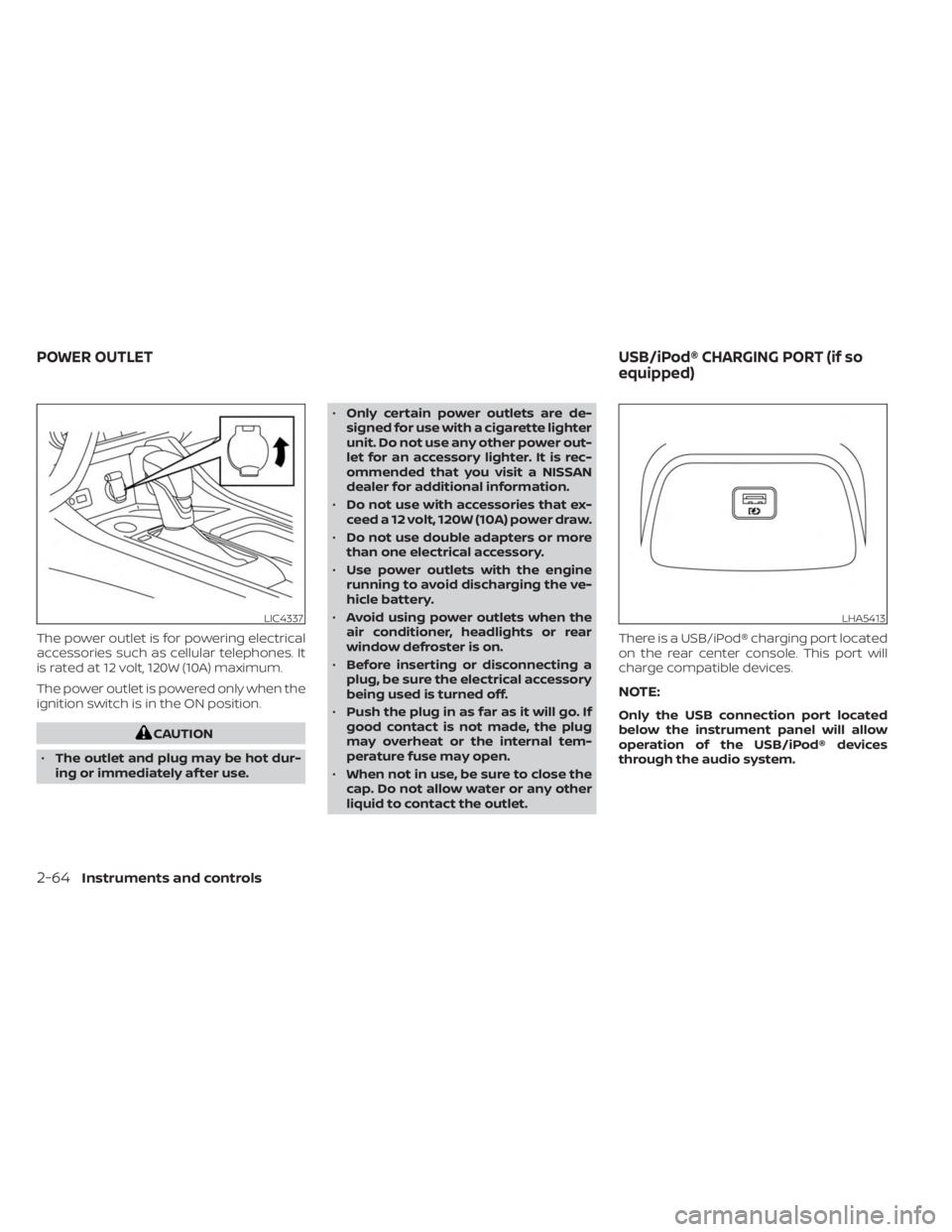
The power outlet is for powering electrical
accessories such as cellular telephones. It
is rated at 12 volt, 120W (10A) maximum.
The power outlet is powered only when the
ignition switch is in the ON position.
CAUTION
• The outlet and plug may be hot dur-
ing or immediately af ter use. •
Only certain power outlets are de-
signed for use with a cigarette lighter
unit. Do not use any other power out-
let for an accessory lighter. It is rec-
ommended that you visit a NISSAN
dealer for additional information.
• Do not use with accessories that ex-
ceed a 12 volt, 120W (10A) power draw.
• Do not use double adapters or more
than one electrical accessory.
• Use power outlets with the engine
running to avoid discharging the ve-
hicle battery.
• Avoid using power outlets when the
air conditioner, headlights or rear
window defroster is on.
• Before inserting or disconnecting a
plug, be sure the electrical accessory
being used is turned off.
• Push the plug in as far as it will go. If
good contact is not made, the plug
may overheat or the internal tem-
perature fuse may open.
• When not in use, be sure to close the
cap. Do not allow water or any other
liquid to contact the outlet. There is a USB/iPod® charging port located
on the rear center console. This port will
charge compatible devices.
NOTE:
Only the USB connection port located
below the instrument panel will allow
operation of the USB/iPod® devices
through the audio system.
LIC4337LHA5413
POWER OUTLET
USB/iPod® CHARGING PORT (if so
equipped)
2-64Instruments and controls
Page 151 of 556
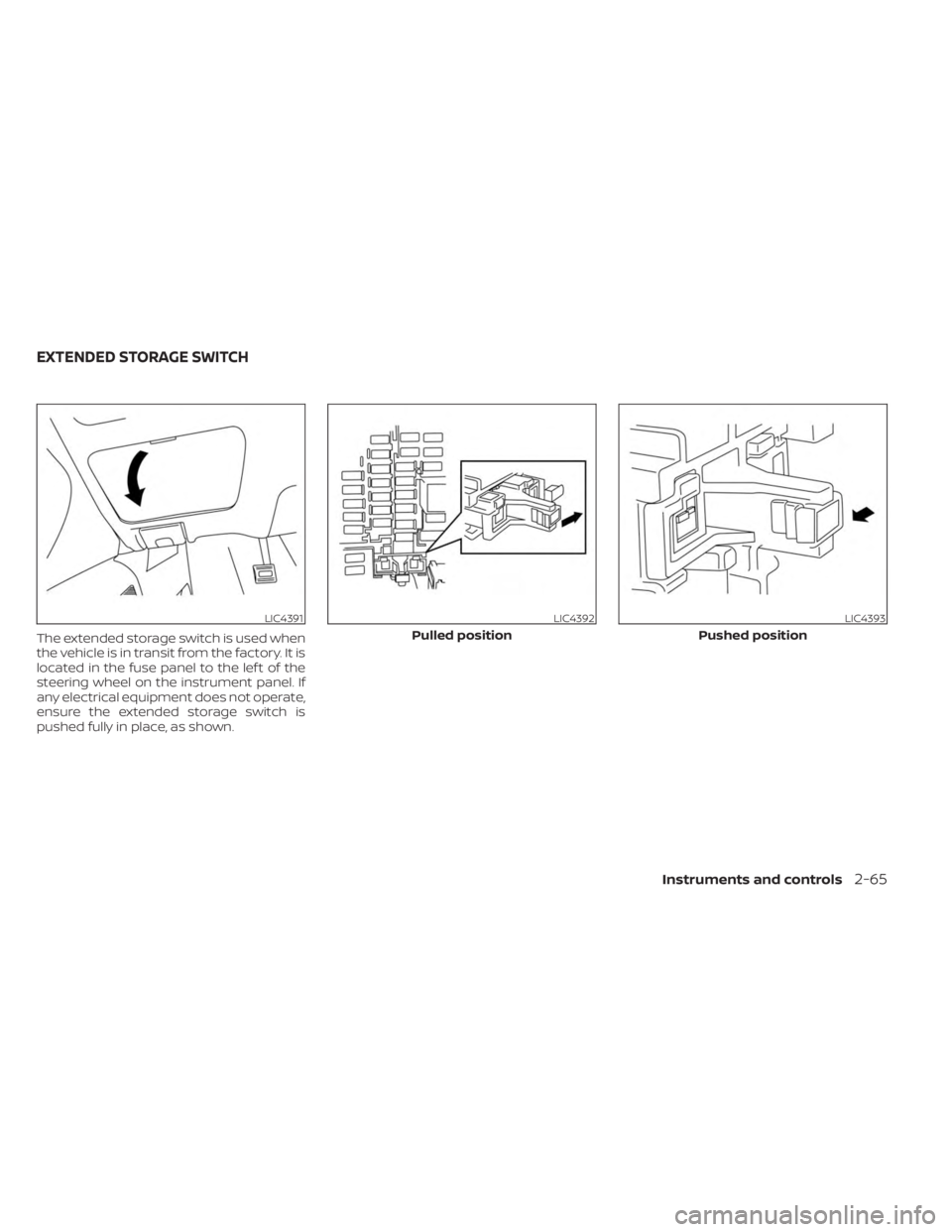
The extended storage switch is used when
the vehicle is in transit from the factory. It is
located in the fuse panel to the lef t of the
steering wheel on the instrument panel. If
any electrical equipment does not operate,
ensure the extended storage switch is
pushed fully in place, as shown.
LIC4391LIC4392
Pulled position
LIC4393
Pushed position
EXTENDED STORAGE SWITCH
Instruments and controls2-65
Page 156 of 556
POWER WINDOWS
WARNING
• Make sure that all passengers have
their hands, etc., inside the vehicle
while it is in motion and before clos-
ing the windows. Use the window
lock switch to prevent unexpected
use of the power windows.
• To help avoid risk of injury or death
through unintended operation of the
vehicle and/or its systems, including
entrapment in windows or inadver-
tent door lock activation, do not
leave children, people who require
the assistance of others or pets unat-
tended in your vehicle. Additionally,
the temperature inside a closed ve-
hicle on a warm day can quickly be-
come high enough to cause a signifi-
cant risk of injury or death to people
and pets.
The power windows operate when the ig-
nition switch is placed in the ON position or
for a period of time af ter the ignition switch
is placed in the OFF position. If the driver's
door is opened during this period of time,
the power to the windows is canceled.
Driver's side power window
switch
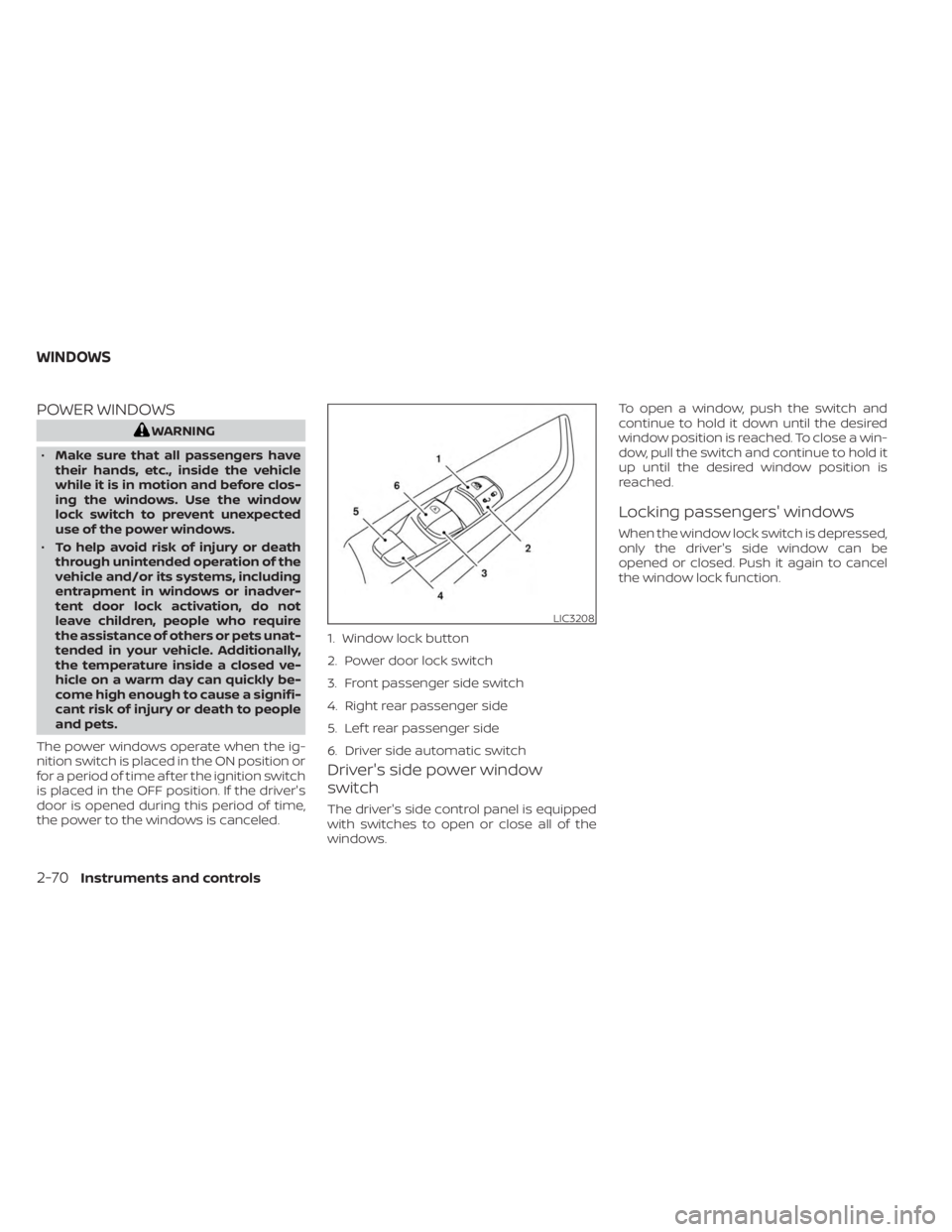
The driver's side control panel is equipped
with switches to open or close all of the
windows. To open a window, push the switch and
continue to hold it down until the desired
window position is reached. To close a win-
dow, pull the switch and continue to hold it
up until the desired window position is
reached.
Locking passengers' windows
When the window lock switch is depressed,
only the driver's side window can be
opened or closed. Push it again to cancel
the window lock function.
LIC3208
1. Window lock button
2. Power door lock switch
3. Front passenger side switch
4. Right rear passenger side
5. Lef t rear passenger side
6. Driver side automatic switch
WINDOWS
2-70Instruments and controls
Page 174 of 556
NOTE:
The doors may not lock when the Intelli-
gent Key is in the same hand that is op-
erating the request switch (if so
equipped) to lock the door. Put the Intel-
ligent Key in a purse, pocket or your
other hand.
CAUTION
The lockout protection may not func-
tion under the following conditions:
• When the Intelligent Key is placed on
top of the instrument panel.
• When the Intelligent Key is placed on
top of the rear parcel shelf.
• When the Intelligent Key is placed in-
side the glove box or a storage bin.
• When the Intelligent Key is placed in-
side the door pockets.
• When the Intelligent Key is placed on
or under the spare tire area.
• When the Intelligent Key is placed in-
side or near metallic materials.
• When the Intelligent Key battery is
discharged.
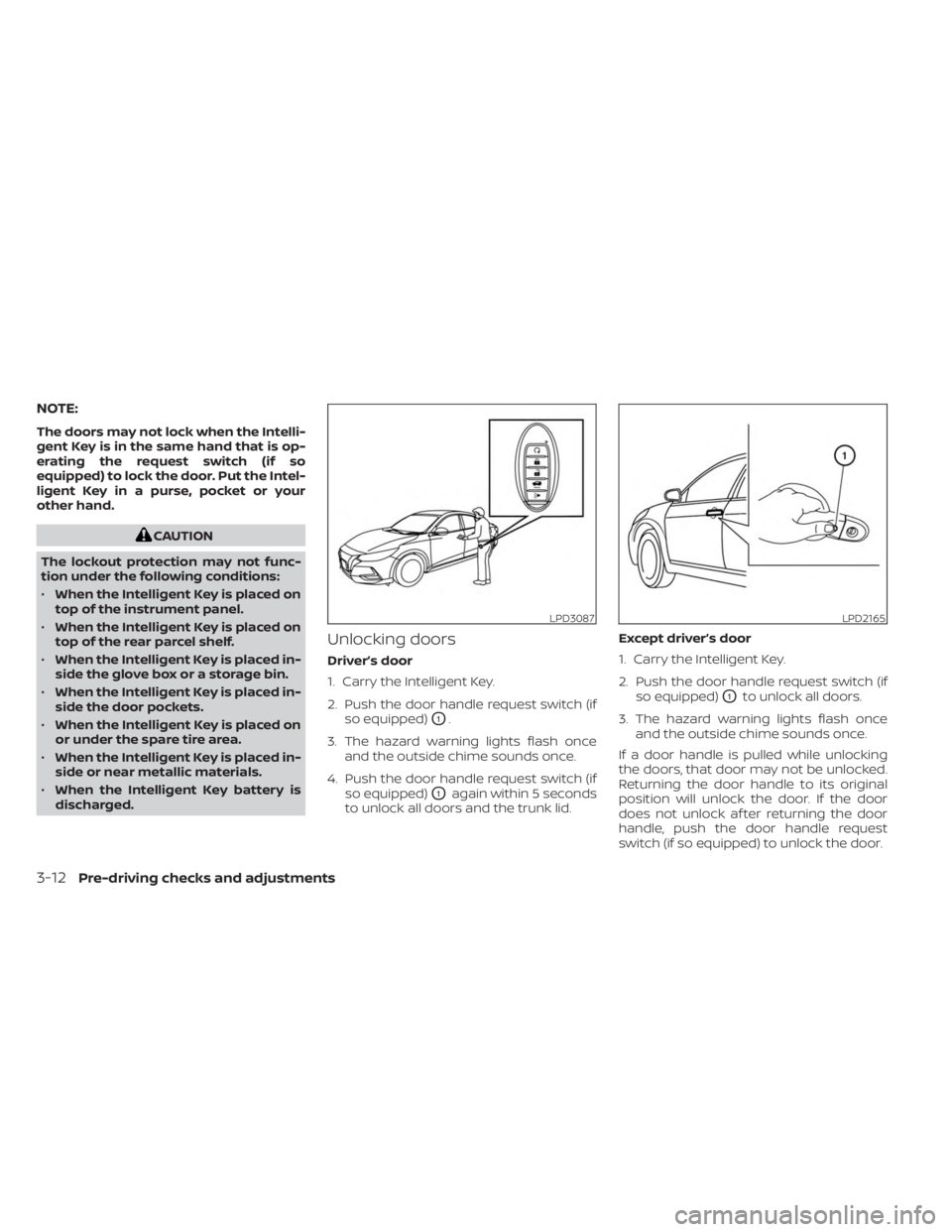
Unlocking doors
Driver’s door
1. Carry the Intelligent Key.
2. Push the door handle request switch (if so equipped)
O1.
3. The hazard warning lights flash once and the outside chime sounds once.
4. Push the door handle request switch (if so equipped)
O1again within 5 seconds
to unlock all doors and the trunk lid. Except driver’s door
1. Carry the Intelligent Key.
2. Push the door handle request switch (if
so equipped)
O1to unlock all doors.
3. The hazard warning lights flash once and the outside chime sounds once.
If a door handle is pulled while unlocking
the doors, that door may not be unlocked.
Returning the door handle to its original
position will unlock the door. If the door
does not unlock af ter returning the door
handle, push the door handle request
switch (if so equipped) to unlock the door.
LPD3087LPD2165
3-12Pre-driving checks and adjustments
Page 177 of 556
Using the interior lights
The interior lights illuminate for a period of
time when a door is unlocked and the inte-
rior lights switch is not in the OFF position.
The interior lights can be turned off without
waiting by performing one of the following
operations:
• Placing the ignition switch in the ONposition.
• Locking the doors with the request switch (if so equipped) or the Intelligent
Key.
• Switching the interior light switch to the OFF position.
For additional information, see “Interior
lights” (P. 2-74).
Releasing the trunk lid
Press thebutton for 0.5 seconds to
open the trunk lid. The trunk release button
will not operate when the ignition switch is
placed in the ON position.
Using the panic alarm
If you are near your vehicle and feel threat-
ened, you may activate the panic alarm to
call attention by pressing and holding the
button on the Intelligent Key for lon-
ger than 0.5 seconds.
The panic alarm and headlights will stay on
for a period of time.
The panic alarm stops when:
• It has run for a period of time.
•
(unlock) button is pressed on the
Intelligent Key.
Silencing the horn beep feature
If desired, the horn beep feature can be
deactivated using the Intelligent Key.
To deactivate: Press and hold the
andbuttonsfor at least 4 seconds.
The hazard warning lights will flash three
times to confirm that the horn beep fea-
ture has been deactivated.
To activate: Press and hold the
andbuttonsfor at least 4 seconds once
more.
The hazard warning lights will flash once
and the horn will sound once to confirm
that the horn beep feature has been
reactivated.
Deactivating the horn beep feature does
not silence the horn if the alarm is
triggered.
WARNING SIGNALS
To help prevent the vehicle from moving
unexpectedly by erroneous operation of
the Intelligent Key or to help prevent the
vehicle from being stolen, a chime or
buzzer sounds from inside and outside the
vehicle and a warning is displayed in the
instrument panel.
When a chime or beep sounds or a warning
is displayed, be sure to check the vehicle
and the Intelligent Key.
For additional information, see “Trouble-
shooting guide” (P. 3-16) and “Vehicle infor-
mation display 4.2 inch (11 cm) Type A”
(P. 2-18) or “Vehicle information display 7
inch (18 cm) Type B” (P. 2-32)
Pre-driving checks and adjustments3-15
Page 178 of 556
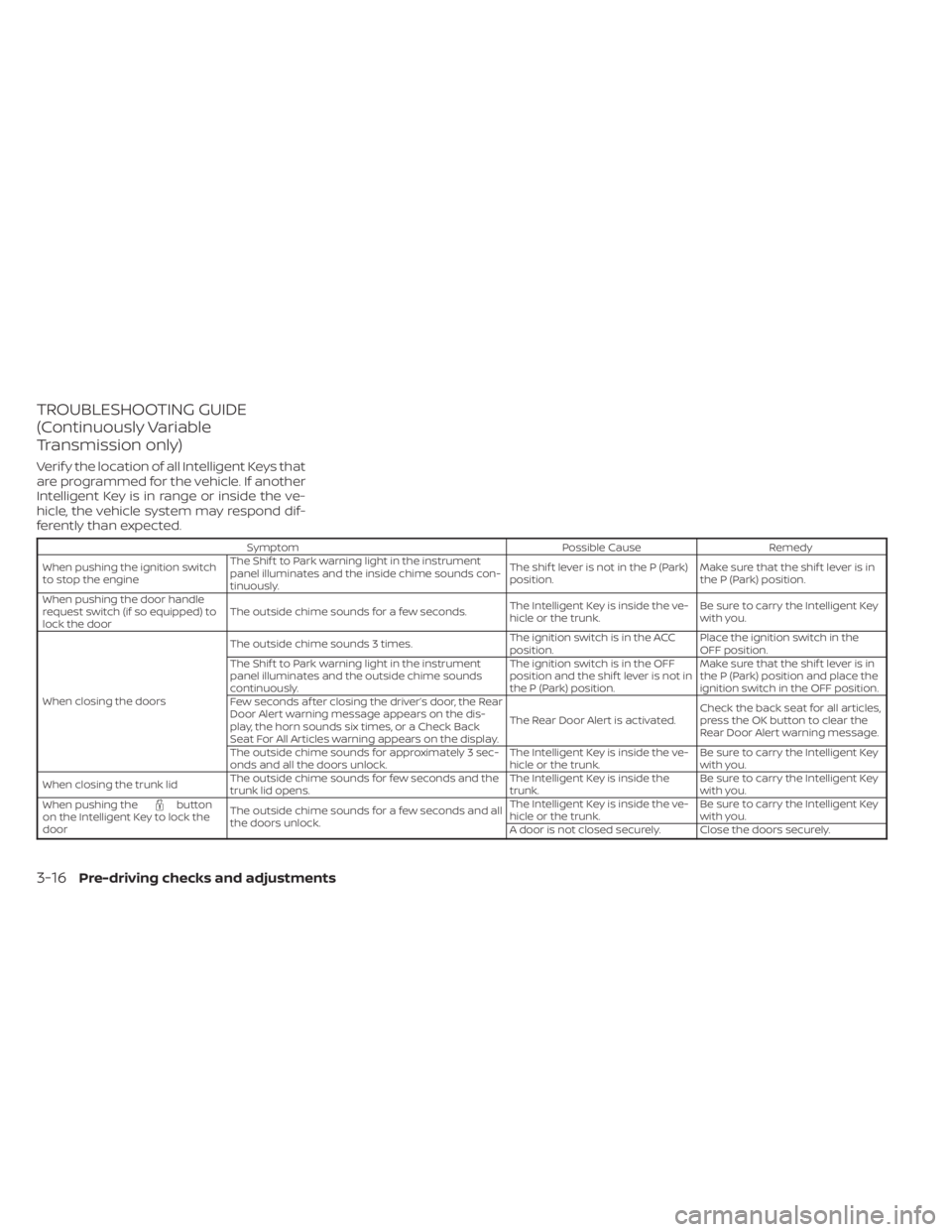
TROUBLESHOOTING GUIDE
(Continuously Variable
Transmission only)
Verif y the location of all Intelligent Keys that
are programmed for the vehicle. If another
Intelligent Key is in range or inside the ve-
hicle, the vehicle system may respond dif-
ferently than expected.
SymptomPossible CauseRemedy
When pushing the ignition switch
to stop the engine The Shif t to Park warning light in the instrument
panel illuminates and the inside chime sounds con-
tinuously. The shif t lever is not in the P (Park)
position.
Make sure that the shif t lever is in
the P (Park) position.
When pushing the door handle
request switch (if so equipped) to
lock the door The outside chime sounds for a few seconds.
The Intelligent Key is inside the ve-
hicle or the trunk.Be sure to carry the Intelligent Key
with you.
When closing the doors The outside chime sounds 3 times.
The ignition switch is in the ACC
position.Place the ignition switch in the
OFF position.
The Shif t to Park warning light in the instrument
panel illuminates and the outside chime sounds
continuously. The ignition switch is in the OFF
position and the shif t lever is not in
the P (Park) position.Make sure that the shif t lever is in
the P (Park) position and place the
ignition switch in the OFF position.
Few seconds af ter closing the driver’s door, the Rear
Door Alert warning message appears on the dis-
play, the horn sounds six times, or a Check Back
Seat For All Articles warning appears on the display. The Rear Door Alert is activated.
Check the back seat for all articles,
press the OK button to clear the
Rear Door Alert warning message.
The outside chime sounds for approximately 3 sec-
onds and all the doors unlock. The Intelligent Key is inside the ve-
hicle or the trunk.Be sure to carry the Intelligent Key
with you.
When closing the trunk lid The outside chime sounds for few seconds and the
trunk lid opens. The Intelligent Key is inside the
trunk.Be sure to carry the Intelligent Key
with you.
When pushing the
button
on the Intelligent Key to lock the
door The outside chime sounds for a few seconds and all
the doors unlock. The Intelligent Key is inside the ve-
hicle or the trunk.
Be sure to carry the Intelligent Key
with you.
A door is not closed securely. Close the doors securely.
3-16Pre-driving checks and adjustments
Page 184 of 556
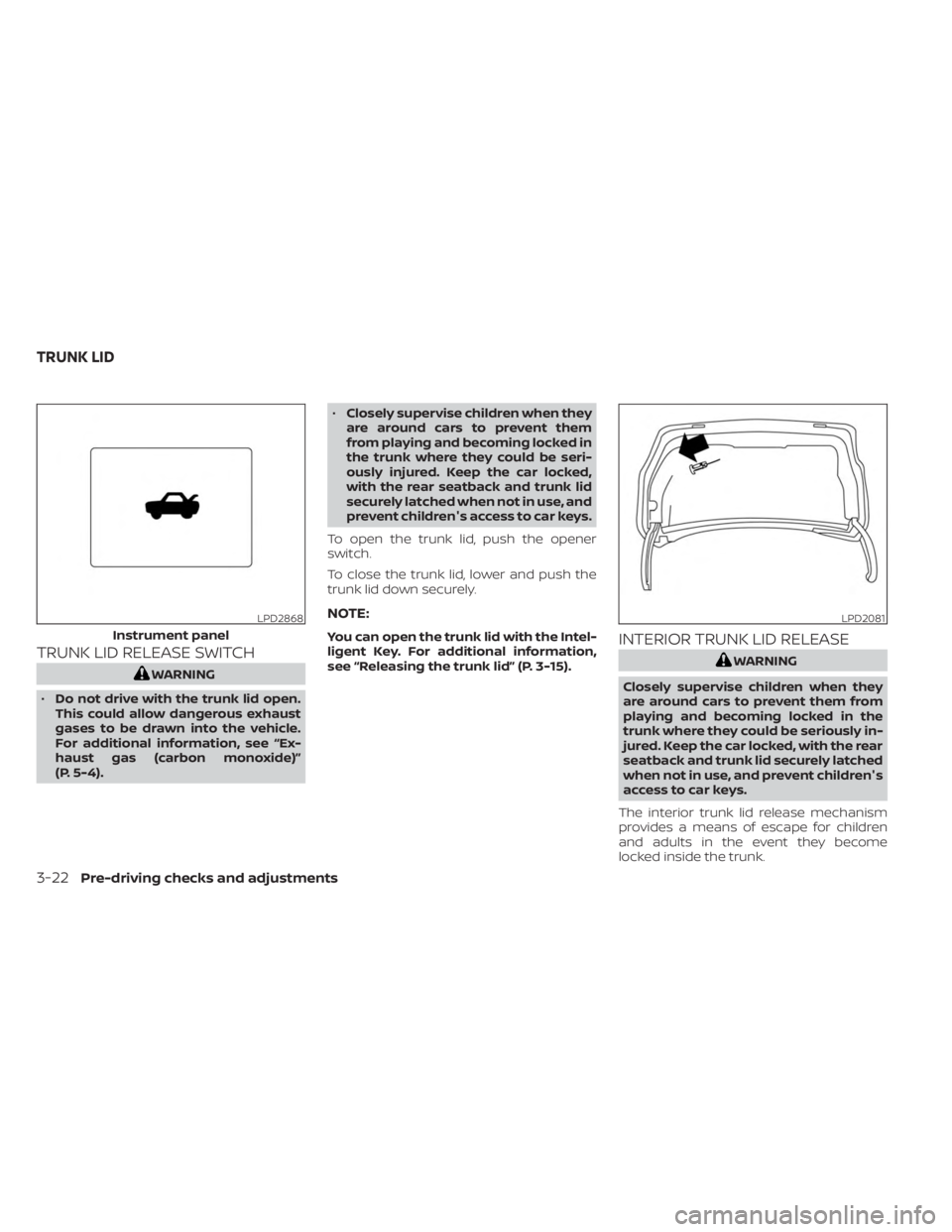
TRUNK LID RELEASE SWITCH
WARNING
• Do not drive with the trunk lid open.
This could allow dangerous exhaust
gases to be drawn into the vehicle.
For additional information, see “Ex-
haust gas (carbon monoxide)”
(P. 5-4). •
Closely supervise children when they
are around cars to prevent them
from playing and becoming locked in
the trunk where they could be seri-
ously injured. Keep the car locked,
with the rear seatback and trunk lid
securely latched when not in use, and
prevent children's access to car keys.
To open the trunk lid, push the opener
switch.
To close the trunk lid, lower and push the
trunk lid down securely.
NOTE:
You can open the trunk lid with the Intel-
ligent Key. For additional information,
see “Releasing the trunk lid” (P. 3-15).INTERIOR TRUNK LID RELEASE
WARNING
Closely supervise children when they
are around cars to prevent them from
playing and becoming locked in the
trunk where they could be seriously in-
jured. Keep the car locked, with the rear
seatback and trunk lid securely latched
when not in use, and prevent children's
access to car keys.
The interior trunk lid release mechanism
provides a means of escape for children
and adults in the event they become
locked inside the trunk.
LPD2868
Instrument panel
LPD2081
TRUNK LID
3-22Pre-driving checks and adjustments
Page 185 of 556
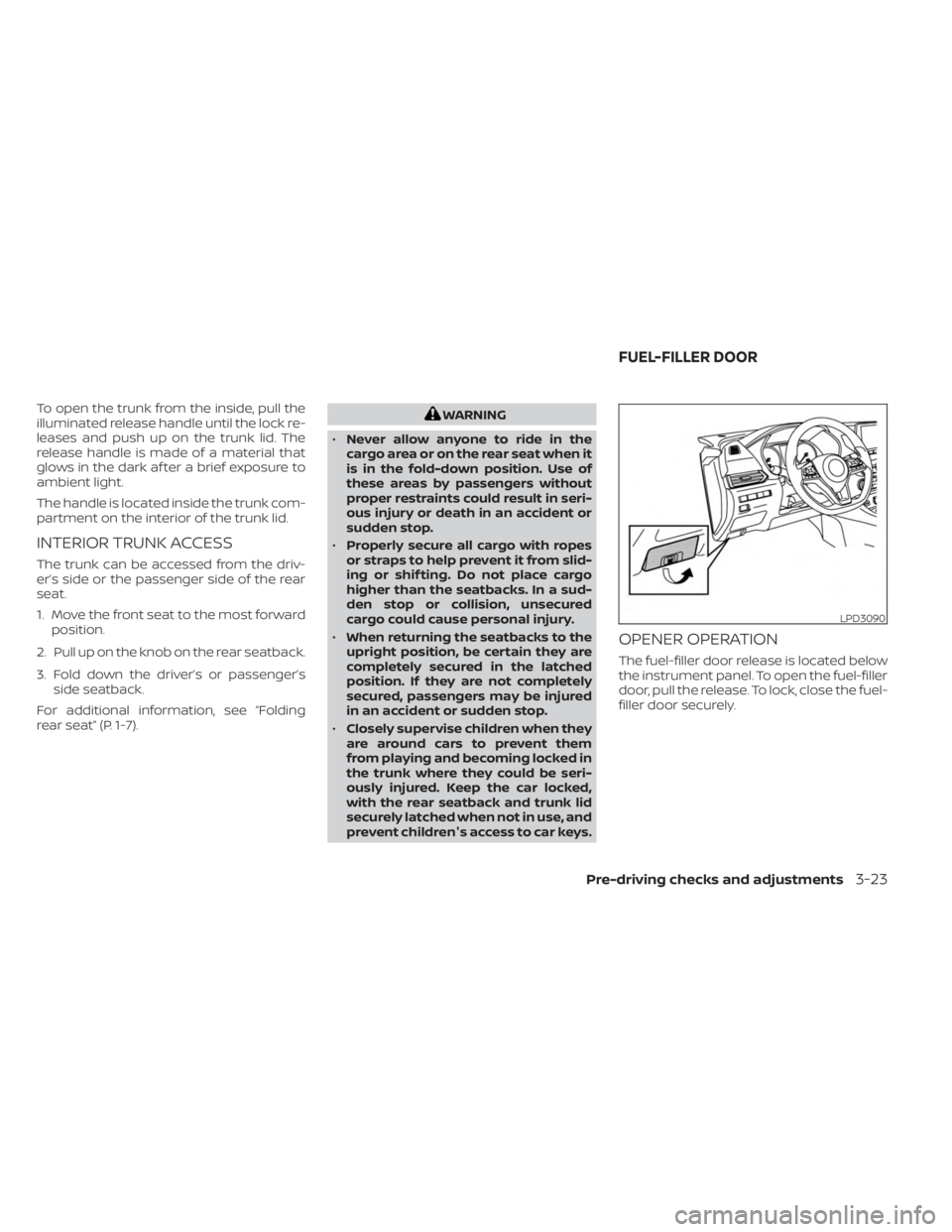
To open the trunk from the inside, pull the
illuminated release handle until the lock re-
leases and push up on the trunk lid. The
release handle is made of a material that
glows in the dark af ter a brief exposure to
ambient light.
The handle is located inside the trunk com-
partment on the interior of the trunk lid.
INTERIOR TRUNK ACCESS
The trunk can be accessed from the driv-
er’s side or the passenger side of the rear
seat.
1. Move the front seat to the most forwardposition.
2. Pull up on the knob on the rear seatback.
3. Fold down the driver’s or passenger’s side seatback.
For additional information, see “Folding
rear seat” (P. 1-7).
WARNING
• Never allow anyone to ride in the
cargo area or on the rear seat when it
is in the fold-down position. Use of
these areas by passengers without
proper restraints could result in seri-
ous injury or death in an accident or
sudden stop.
• Properly secure all cargo with ropes
or straps to help prevent it from slid-
ing or shif ting. Do not place cargo
higher than the seatbacks. In a sud-
den stop or collision, unsecured
cargo could cause personal injury.
• When returning the seatbacks to the
upright position, be certain they are
completely secured in the latched
position. If they are not completely
secured, passengers may be injured
in an accident or sudden stop.
• Closely supervise children when they
are around cars to prevent them
from playing and becoming locked in
the trunk where they could be seri-
ously injured. Keep the car locked,
with the rear seatback and trunk lid
securely latched when not in use, and
prevent children's access to car keys.
OPENER OPERATION
The fuel-filler door release is located below
the instrument panel. To open the fuel-filler
door, pull the release. To lock, close the fuel-
filler door securely.
LPD3090
FUEL-FILLER DOOR
Pre-driving checks and adjustments3-23
Page 234 of 556
Synchronize climate settings
Press the SYNC button to synchronize cli-
mate settings. The sync indicator will turn
on.
Pressing SYNC will synchronize driver's and
front passenger's climate settings.
To change climate settings when SYNC is
active (the SYNC indicator is on):
• The driver's side temperature control dialwill control the driver and front passenger
temperatures.
• The fan speed control dial will control the fan speeds.
To exit SYNC:
• To remove the front passenger from SYNC, turn the passenger's side tem-
perature control dial.
• Pressing SYNC multiple times will re- activate SYNC.
To turn system off
Press the ON-OFF button.
Rear window and outside mirror
(if so equipped) defroster switch
For additional information, see “Rear win-
dow and outside mirror (if so equipped)
defroster switch” (P. 2-51).
Heated seat switches (if so
equipped)
For additional information, see “Heated
seat switches” (P. 2-60).
Heated steering wheel switch (if
so equipped)
For additional information, see “Heated
steering wheel switch” (P. 2-61).
OPERATING TIPS
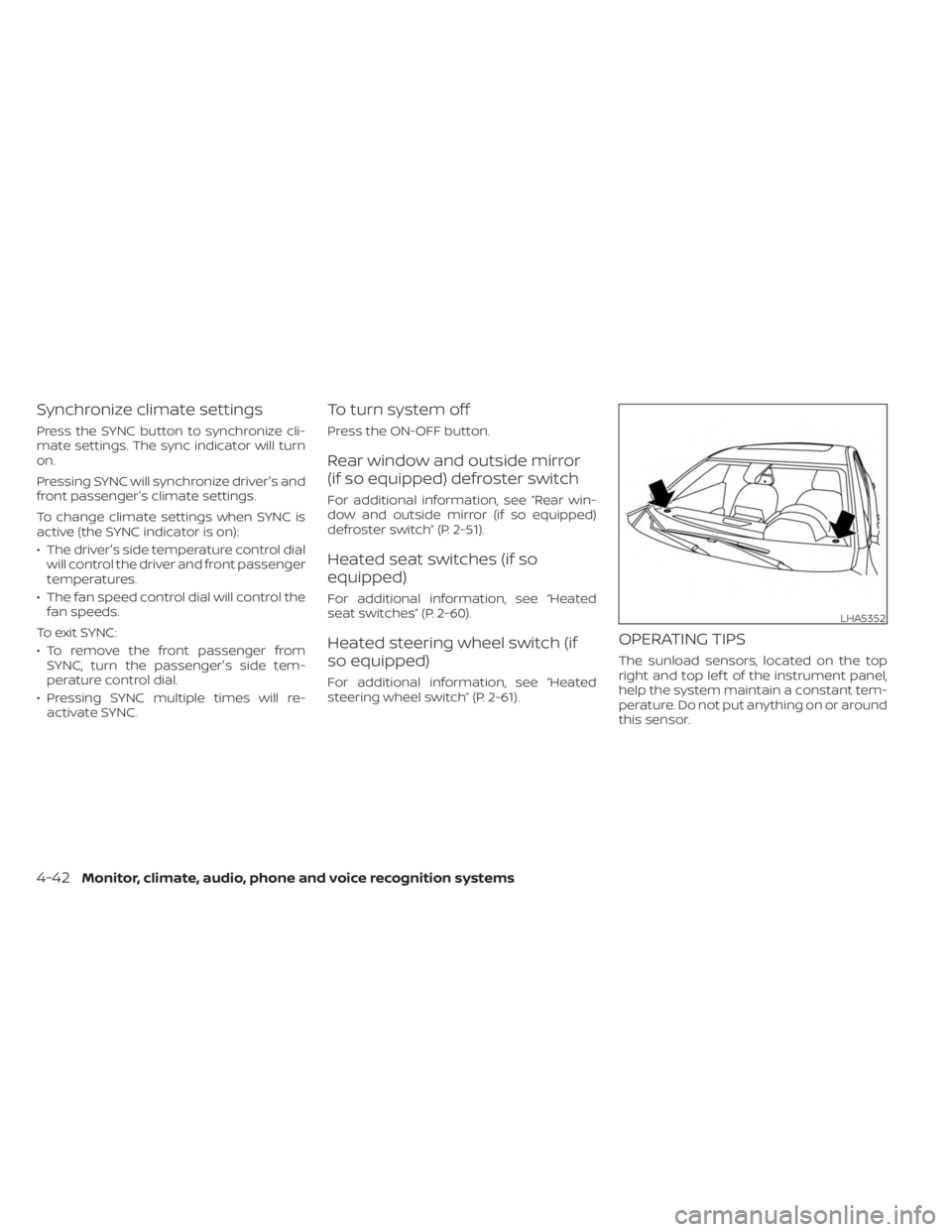
The sunload sensors, located on the top
right and top lef t of the instrument panel,
help the system maintain a constant tem-
perature. Do not put anything on or around
this sensor.
LHA5352
4-42Monitor, climate, audio, phone and voice recognition systems
Page 307 of 556
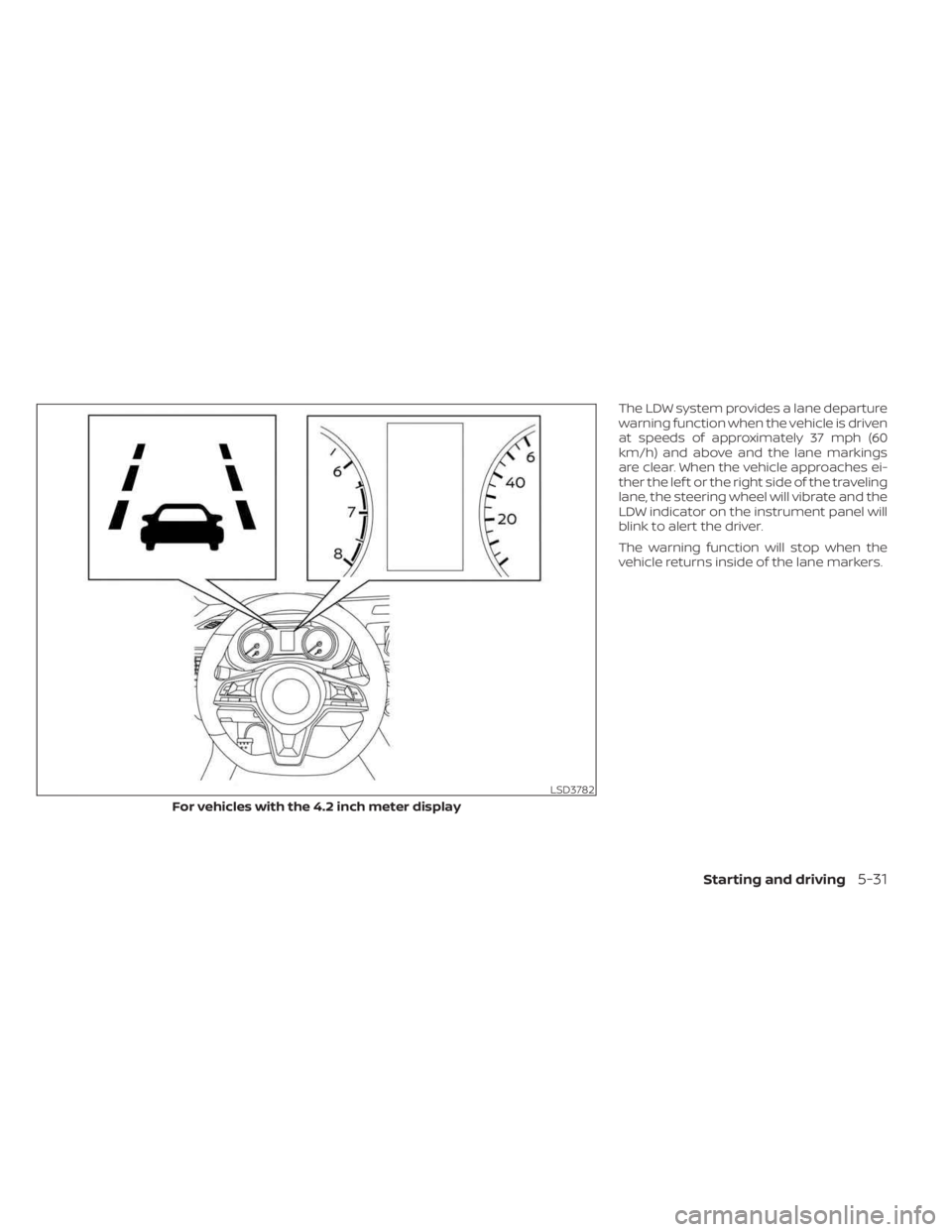
The LDW system provides a lane departure
warning function when the vehicle is driven
at speeds of approximately 37 mph (60
km/h) and above and the lane markings
are clear. When the vehicle approaches ei-
ther the lef t or the right side of the traveling
lane, the steering wheel will vibrate and the
LDW indicator on the instrument panel will
blink to alert the driver.
The warning function will stop when the
vehicle returns inside of the lane markers.
LSD3782
For vehicles with the 4.2 inch meter display
Starting and driving5-31