instrument panel NISSAN SENTRA 2023 Owner's Guide
[x] Cancel search | Manufacturer: NISSAN, Model Year: 2023, Model line: SENTRA, Model: NISSAN SENTRA 2023Pages: 556, PDF Size: 6.11 MB
Page 336 of 556
• If the cruise control system malfunctions,it cancels automatically. Theindica-
tor in the instrument panel then blinks to
warn the driver. For additional informa-
tion, see “Vehicle information display 4.2
inch (11 cm) TYPE A” (P. 2-18) or “Vehicle
information display 7 inch (18 cm) Type B”
(P. 2-32).
• If the
indicator blinks, push the
Cruise control switch off and have the
system checked. It is recommended that
you visit a NISSAN dealer for this service.
• The
indicator may blink when the
Cruise control switch is pushed on while
pushing the RES +, SET-, or CANCEL
switch. To properly set the cruise control
system, use the following procedures.
WARNING
Do not use the cruise control when driv-
ing under the following conditions:
• When it is not possible to keep the
vehicle at a set speed.
• In heavy traffic or in traffic that varies
in speed.
• On winding or hilly roads.
• On slippery roads (rain, snow, ice,
etc.).
• In very windy areas. Doing so could cause a loss of vehicle
control and result in an accident.
CRUISE CONTROL OPERATIONS
The cruise control allows driving at a speed
between 25 - 89 mph (40 - 144 km/h) with-
out keeping your foot on the accelerator
pedal.
To turn on the cruise control,
push the
Cruise control switch. The
indicator in
the instrument panel comes on.
To set cruising speed, accelerate the ve-
hicle to the desired speed, push the SET—
switch and release it. Take your foot off the
accelerator pedal. Your vehicle maintains
the set speed.
• To pass another vehicle, depress the ac-
celerator pedal. When you release the
pedal, the vehicle returns to the previ-
ously set speed.
• The vehicle may not maintain the set speed when going up or down steep hills.
If this happens, drive without the cruise
control.
To cancel the preset speed, use one of the
following three methods:
• Push the CANCEL switch.
• Tap the brake pedal. • Push the Cruise control switch off. The
indicator in the instrument panel
goes out.
The cruise control is automatically can-
celed if:
• You depress the brake or clutch pedal (for Manual Transmission models) while
pushing the RES+ or SET- switch. The pre-
set speed is deleted from memory.
• The vehicle slows down more than 8 mph (13 km/h) below the set speed.
• You depress the clutch pedal (for Manual Transmission models), or move the shif t
lever to N (Neutral) (for Continuously Vari-
able Transmission models).
To reset at a faster cruising speed, use
one of the following three methods:
• Depress the accelerator pedal. When the vehicle attains the desired speed, push
and release the SET— switch.
• Push and hold the RES+ switch. When the vehicle attains the speed you desire, re-
lease the switch.
• Push and release the RES+ switch. Each time you do this, the set speed increases
by about 1 mph (1.6 km/h).
5-60Starting and driving
Page 406 of 556
•Tire type and condition may also af-
fect braking effectiveness.
– When replacing tires, install the
specified size of tires on all four
wheels.
– When installing a spare tire, make
sure that it is the proper size and
type as specified on the Tire and
Loading Information label. For ad-
ditional information, see “Tire and
Loading Information label”
(P. 8-31).
– For additional information, see
“Wheels and tires” (P. 8-29).
The ABS controls the brakes so the wheels
do not lock during hard braking or when
braking on slippery surfaces. The system
detects the rotation speed at each wheel
and varies the brake fluid pressure to pre-
vent each wheel from locking and sliding.
By preventing each wheel from locking, the
system helps the driver maintain steering
control and helps to minimize swerving
and spinning on slippery surfaces.Using the system
Depress the brake pedal and hold it down.
Depress the brake pedal with firm steady
pressure, but do not pump the brakes. The
Anti-lock Braking System will operate to
prevent the wheels from locking up. Steer
the vehicle to avoid obstacles.
WARNING
Do not pump the brake pedal. Doing so
may result in increased stopping
distances.
Self-test feature
The Anti-lock Braking System (ABS) in-
cludes electronic sensors, electric pumps,
hydraulic solenoids and a computer. The
computer has a built-in diagnostic feature
that tests the system each time you start
the engine and move the vehicle at a low
speed in forward or reverse. When the self-
test occurs, you may hear a “clunk” noise
and/or feel a pulsation in the brake pedal.
This is normal and does not indicate a mal-
function. If the computer senses a mal-
function, it switches the ABS off and illumi-
nates the ABS warning light on the instrument panel. The brake system then
operates normally, but without anti-lock
assistance.
If the ABS warning light illuminates during
the self-test or while driving, have the ve-
hicle checked. It is recommended that you
visit a NISSAN dealer for this service.
Normal operation
The Anti-lock Braking System (ABS) oper-
ates at speeds abov
e3-6mph(5-10
km/h). The speed varies according to road
conditions.
When the ABS senses that one or more
wheels are close to locking up, the actuator
rapidly applies and releases hydraulic pres-
sure. This action is similar to pumping the
brakes very quickly. You may feel a pulsa-
tion in the brake pedal and hear a noise
from under the hood or feel a vibration
from the actuator when it is operating. This
is normal and indicates that the ABS is op-
erating properly. However, the pulsation
may indicate that road conditions are haz-
ardous and extra care is required while
driving.
5-130Starting and driving
Page 407 of 556
BRAKE ASSIST
When the force applied to the brake pedal
exceeds a certain level, the Brake Assist is
activated generating greater braking force
than a conventional brake booster even
with light pedal force.
WARNING
The Brake Assist is only an aid to assist
braking operation and is not a collision
warning or avoidance device. It is the
driver’s responsibility to stay alert,
drive safely and be in control of the ve-
hicle at all times. The VDC system uses various sensors to
monitor driver inputs and vehicle motion.
Under certain driving conditions, the VDC
system helps to perform the following
functions:
• Controls brake pressure to reduce wheel
slip on one slipping drive wheel so power
is transferred to a non-slipping drive
wheel on the same axle.
• Controls brake pressure and engine out- put to reduce drive wheel slip based on
vehicle speed (traction control function).
• Controls brake pressure at individual wheels and engine output to help the
driver maintain control of the vehicle in
the following conditions:– Understeer (vehicle tends to not follow the steered path despite increased
steering input)
– Oversteer (vehicle tends to spin due to certain road or driving conditions)
The VDC system can help the driver to
maintain control of the vehicle, but it can-
not prevent loss of vehicle control in all driv-
ing situations.
When the VDC system operates, the
indicator light in the instrument panel
flashes to note the following: • The road may be slippery or the system
may determine some action is required
to help keep the vehicle on the steered
path.
• You may feel a pulsation in the brake pedal and hear a noise or vibration from
under the hood. This is normal and indi-
cates that the VDC system is working
properly.
• Adjust your speed and driving to the road conditions.
For additional information, see “Slip indica-
tor light” (P. 2-16) and ”Vehicle Dynamic Con-
trol (VDC) OFF indicator light” (P. 2-16).
If a malfunction occurs in the system, the
indicator light comes on in the instru-
ment panel. The VDC system automatically
turns off when the indicator light is off.
The vehicle information display is used to
turn off the VDC system. The
indicator
light and the AEB system warning light illu-
minates to indicate the VDC system is off.
When the vehicle information display is
used to turn off the VDC system, the sys-
tem still operates to prevent one drive
wheel from slipping by transferring power
to a non-slipping drive wheel. The
indicator light flashes if this occurs. All
VEHICLE DYNAMIC CONTROL (VDC)
SYSTEM
Starting and driving5-131
Page 468 of 556
PASSENGER COMPARTMENT
WARNING
Never use a fuse of higher or lower am-
perage rating than that specified on
the fuse box cover. This could damage
the electrical system or electronic con-
trol units or cause a fire.
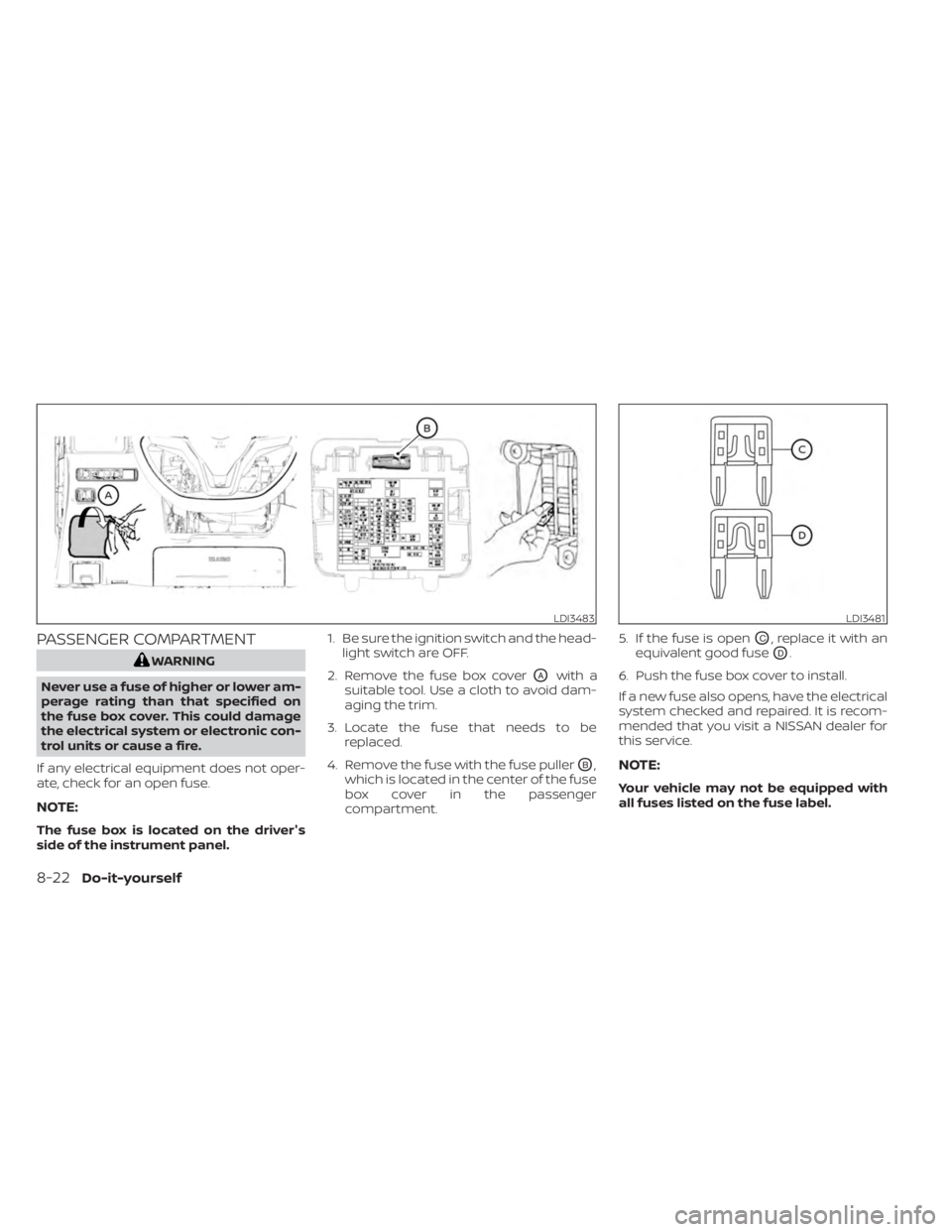
If any electrical equipment does not oper-
ate, check for an open fuse.
NOTE:
The fuse box is located on the driver's
side of the instrument panel. 1. Be sure the ignition switch and the head-
light switch are OFF.
2. Remove the fuse box cover
OAwith a
suitable tool. Use a cloth to avoid dam-
aging the trim.
3. Locate the fuse that needs to be replaced.
4. Remove the fuse with the fuse puller
OB,
which is located in the center of the fuse
box cover in the passenger
compartment. 5. If the fuse is open
OC, replace it with an
equivalent good fuse
OD.
6. Push the fuse box cover to install.
If a new fuse also opens, have the electrical
system checked and repaired. It is recom-
mended that you visit a NISSAN dealer for
this service.
NOTE:
Your vehicle may not be equipped with
all fuses listed on the fuse label.
LDI3483LDI3481
8-22Do-it-yourself
Page 539 of 556
11 Index
A
Active Ride Control.............5-134Air bag (See supplemental restraint
system).....................1-44Air bag system
Front (See supplemental front impact
air bag system)
..............1-52Air bag warning labels............1-65Air bag warning light.........1-65, 2-12Air bag warning light,
supplemental..............1-65, 2-12Air cleaner...................8-17Air cleaner housing filter..........8-17Air conditionerAir conditioner operation. . . .4-35, 4-40Air conditioner service..........4-43Air conditioner specification label. .10-14Air conditioner system refrigerant
recommendations............10-8Air conditioner system refrigerant
and oil recommendations.......10-8Heater and air conditioner
controls...............4-32, 4-40Servicing air conditioner........4-43Air flow charts................4-36Alarm system (See vehicle security
system)................... .2-48Anchor point locations...........1-28Antenna....................4-63Anti-lock Braking System (ABS).....5-129
Antifreeze...................5-141Armrests.....................1-7Audio system.................4-44AM radio operation............4-50AM radio reception............4-44AM/FM radio............4-48, 4-50Auxiliary (AUX) devices operation. . .4-52Bluetooth® audio.............4-59FM radio operation............4-51FM radio reception............4-44iPod® Player................4-56iPod® player operation.........4-56Radio................... .4-44USB (Universal Serial Bus) Connection
Port.................... .4-53USB Connections.............4-54USB interface...............4-53Autolight switch...............2-53Automatic
Automatic power window switch. . .2-71Automatic anti-glare inside mirror. . . .3-28Automatic door locks.............3-6Automatic Emergency Braking (AEB)
with Pedestrian Detection......2-13, 5-92
B
Battery.................5- 141, 8-13Charge warning light...........2-11Battery replacement............8-23
Key fob...................8-23NISSAN Intelligent Key®.........8-23Before starting the engine.........5-14Belt (See drive belt)..............8-15Blind Spot Warning (BSW)..........5-36Bluetooth® audio..............4-59Bluetooth® hands-free phone
system.................... .4-66Bluetooth® connections.........4-81Connecting procedure..........4-71Phone indicators.............4-70Text messaging..............4-77Voice commands.............4-73Booster seats.................1-40Brake
Anti-lock Braking System (ABS). . . .5-129Brake fluid.................8-10Brake light (See stop light).......8-27Brake system...............5-129Brake warning light............2-10Brake wear indicators.......2-17,8-19Self-adjusting brakes...........8-19Brake and clutch fluid............8-10Brake Assist..................5-131Brake fluid...................8-10Brake system................5-129Brakes.....................8-19Break-in schedule.............5-125Brightness controlInstrument panel.............2-58Brightness/contrast button.........4-7
Page 540 of 556
Bulb check/instrument panel........2-10Bulb replacement...............8-27
C
C.M.V.S.S. certification label.........10-13Capacities and recommended
fuel/lubricants.................10-2Car phone or CB radio............4-66Cargo
(See vehicle loading information).....10-16Chassis control................5-133Check tire pressure..........2-29,2-44Child restraints.......1-21,1-22,1-23,1-25LATCH (Lower Anchors and Tethers for
CHildren) System..............1-25Precautions on child
restraints............1-30, 1-36, 1-40Top tether strap anchor point
locations...................1-28Child safety rear door lock..........3-7Cleaning exterior and interior......7-2,7-5Clock set/adjustment.............4-5Clutch
Clutch fluid..................8-11Cold weather driving............5-141Console box................. .2-67Continuously Variable Transmission
(CVT).......................5-16Continuously Variable Transmission
(CVT) fluid..................8-10Driving with Continuously Variable
Transmission (CVT)............5-16
Control panel buttons.............4-3Brightness/contrast button........4-7Controls
Audio controls (steering wheel).....4-62Heater and air conditioner
controls................4-32, 4-40CoolantCapacities and recommended
fuel/lubricants
...............10-2Changing engine coolant.........8-5Checking engine coolant level......8-5Engine coolant temperature gauge. . .2-6Corrosion protection..............7-8Cruise control................ .5-59Cup holders...............2-68, 2-69
D
Daytime Running Light System......2-57Defroster switch
Rear window and outside mirror
defroster switch
..............2-51Dimensions and weights..........10-11Dimmer switch for instrument panel. . .2-58Display controls (see control panel
buttons).................... .4-3Door locks....................3-4Drive belt....................8-15Driving
Cold weather driving...........5-141Driving with Continuously Variable
Transmission (CVT)............5-16Driving with manual transmission. . .5-21
Precautions when starting and
driving.................... .5-4Driving the vehicle...............5-16
E
ECO mode switch...............5-24Economy - fuel................5-126Emergency call (SOS) button........2-62Emergency engine shutoff.......5-13,6-2Emission control information label. . . .10-13Emission control system warranty. . . .10-22Engine
Before starting the engine........5-14Capacities and recommended
fuel/lubricants...............10-2Changing engine coolant.........8-5Changing engine oil............8-6Changing engine oil filter.........8-6Checking engine coolant level......8-5Checking engine oil level.........8-6Engine compartment check
locations.................. .8-3Engine coolant temperature gauge. . .2-6Engine cooling system...........8-4Engine oil...................8-6Engine oil and oil filter
recommendation.............10-7Engine oil pressure warning light. . . .2-11Engine oil viscosity.............10-7Engine serial number..........10-13Engine specifications...........10-9Starting the engine............5-14
11-2
Page 541 of 556
Engine Block Heater.............5-142Engine coolant temperature gauge. . . .2-6Event Data recorders............10-24Exhaust gas (Carbon monoxide)......5-4Explanation of maintenance items.....9-2Explanation of scheduled maintenance
items.......................9-5Extended storage switch..........2-65Eyeglass case.................2-68
F
F.M.V.S.S. certification label.........10-13Flashers (See hazard warning flasher
switch)......................6-2Flat tire..................... .6-3Floor mat positioning aid...........7-6Fluid
Brake fluid..................8-10Capacities and recommended
fuel/lubricants...............10-2Clutch fluid..................8-11Continuously Variable Transmission
(CVT) fluid..................8-10Engine coolant................8-4Engine oil.................. .8-6Windshield-washer fluid..........8-11Fog light switch................2-59Front air bag system
(See supplemental restraint system). . .1-52Front power seat adjustment........1-5Front seats....................1-2Front-door pocket..............2-66
Fuel
Capacities and recommended
fuel/lubricants
...............10-2Fuel economy...............5-126Fuel gauge..................2-7Fuel octane rating.............10-6Fuel recommendation..........10-4Fuel-filler cap................3-24Fuel-filler door lock opener lever. . . .3-23Fuel-filler lid.................3-24Loose fuel cap warning......2-28, 2-42Fuel efficient driving tips..........5-125Fuel gauge....................2-7Fuel-filler door.................3-23Fuses......................8-20Fusible links...................8-21
G
Gas cap.....................3-24Gauge
Engine coolant temperature gauge. . .2-6Fuel gauge..................2-7Speedometer..............2-4, 2-5Tachometer................ .2-6Trip odometer................2-5General maintenance.............9-2Glove box................... .2-67
H
Hands-free phone system, Bluetooth®. .4-66Hazard warning flasher switch........6-2
Head restraints.................1-8Headlight and turn signal switch.....2-52Headlight control switch...........2-52Headlights...................8-25Heated seat switches............2-60Heated steering wheel switch.......2-61Heater
Heater and air conditioner
controls
................4-32, 4-40Heater operation..........4-33, 4-41Hill start assist system...........5-135Hood.......................3-21Horn...................... .2-59
I
Ignition switch
Push-button ignition switch.......5-11Immobilizer system..........2-49, 5-14Important vehicle information label. . .10-13In-cabin microfilter..............8-17Increasing fuel economy..........5-126IndicatorNISSAN Intelligent Key® battery
discharge indicator
............5-13Inside automatic anti-glare mirror. . . .3-28Instrument brightness control.......2-58Instrument panel.............0-6, 2-2Instrument panel dimmer switch.....2-58Intelligent Around View® Monitor......4-16Intelligent Cruise Control (ICC).......5-61Intelligent Driver Alertness (I-DA).....5-121Intelligent Engine Brake...........5-134
11-3
Page 542 of 556
Intelligent Forward Collision Warning
(I-FCW).....................5-106Intelligent Key systemKey operating range............3-9Key operation................3-10Mechanical key................3-3Remote keyless entry operation. . . .3-13Troubleshooting guide.......3-16,3-17Warning signals...........3-16,3-17Intelligent Trace Control..........5-133Interior light...............2-74,2-75Interior trunk lid release...........3-22iPod® Player................. .4-56ISOFIX child restraints.............1-25
J
Jump starting..............6-9, 8-14
K
Key.........................3-2Key fob battery replacement........8-23Keyless entry
With Intelligent Key system
(See Intelligent Key system)
.......3-13KeysNISSAN Intelligent Key®........3-2,3-7NISSAN Vehicle Immobilizer System
keys..................... .3-3
L
Labels
Air conditioner specification label. . .10-14C.M.V.S.S. certification label.......10-13Emission control information label. .10-13Engine serial number..........10-13F.M.V.S.S. certification label........10-13Tire and Loading Information label. .10-14Vehicle identification number (VIN)
plate.................... .10-12Warning labels (for SRS)..........1-65Lane Departure Warning (LDW).......5-29LATCH (Lower Anchors and Tethers for
CHildren) System...............1-25Launch bar menu................4-7License plate
Installing the license plate........10-15LightAir bag warning light........1-65, 2-12Brake light (See stop light)........8-27Bulb check/instrument panel......2-10Bulb replacement.............8-27Charge warning light............2-11Exterior and Interior lights........8-27Fog light switch..............2-59Fog lights..................8-26Headlight and turn signal switch. . . .2-52Headlight control switch.........2-52Headlights..................8-25Interior light..............2-74,2-75Light bulbs.................8-25Low tire pressure warning light.....2-13
Low windshield-washer fluid
warning light.............2-28, 2-43Spotlights (See map light)........2-75Trunk light..................2-76Lights......................8-25Map lights..................2-75Lock
Child safety rear door lock.........3-7Door locks................. .3-4Fuel-filler door lock opener lever. . . .3-23Power door locks...........3-5, 3-6Trunk lid lock opener lever........3-22Loose fuel cap warning........2-28,2-42Low fuel warning light.........2-28, 2-43Low tire pressure warning light.......2-13Low windshield-washer fluid
warning light..............2-28, 2-43Luggage (See vehicle loading
information)................. .10-16
M
Maintenance
General maintenance...........9-2Inside the vehicle..............9-3Maintenance precautions.........8-2Outside the vehicle.............9-2Seat belt maintenance..........1-20Under the hood and vehicle.......9-4Maintenance requirements..........9-2Maintenance schedules............9-7Malfunction indicator light..........2-11Manual front seat adjustment........1-3
11-4