Head light switch NISSAN SENTRA 2023 Owners Manual
[x] Cancel search | Manufacturer: NISSAN, Model Year: 2023, Model line: SENTRA, Model: NISSAN SENTRA 2023Pages: 556, PDF Size: 6.11 MB
Page 11 of 556
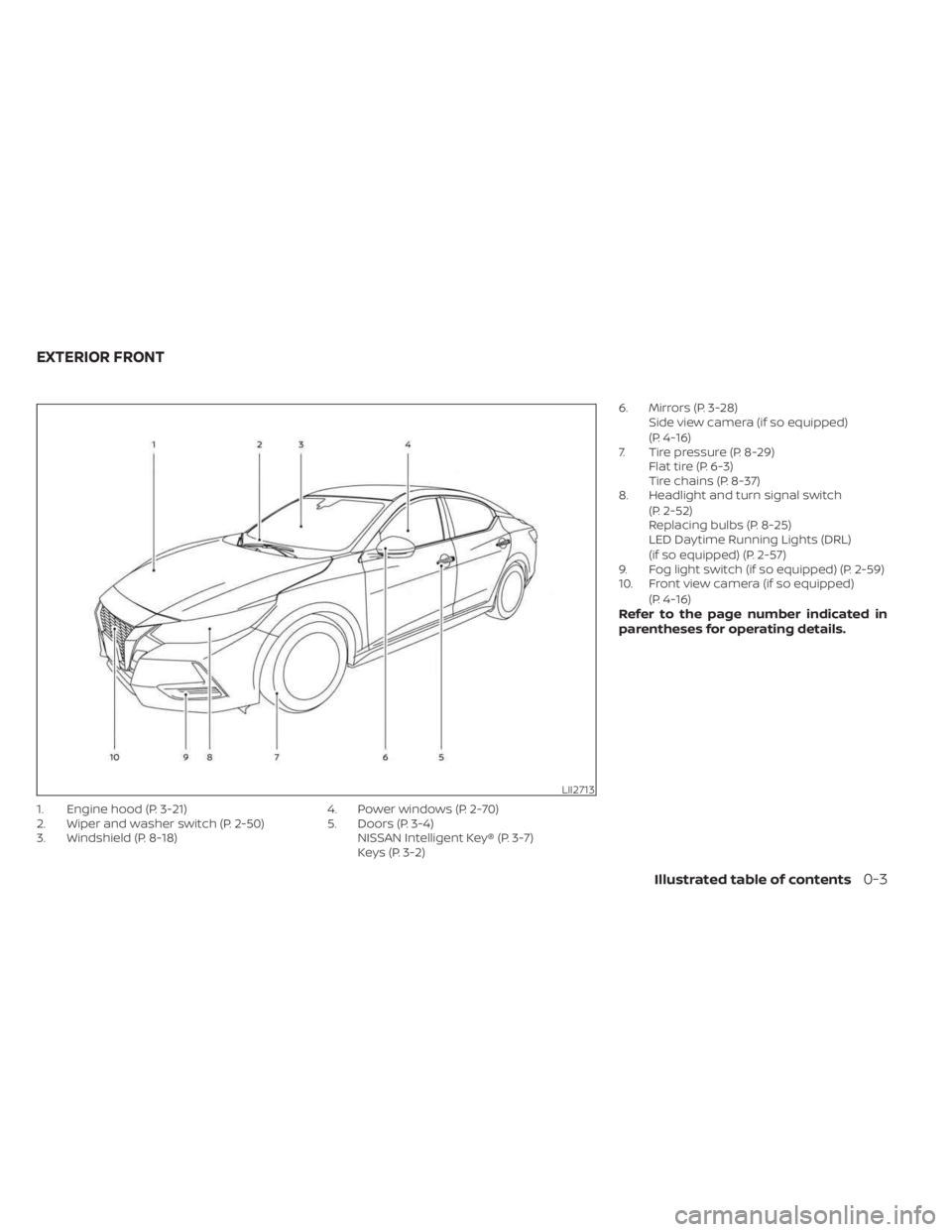
1. Engine hood (P. 3-21)
2. Wiper and washer switch (P. 2-50)
3. Windshield (P. 8-18)4. Power windows (P. 2-70)
5. Doors (P. 3-4)
NISSAN Intelligent Key® (P. 3-7)
Keys (P. 3-2) 6. Mirrors (P. 3-28)
Side view camera (if so equipped)
(P. 4-16)
7. Tire pressure (P. 8-29) Flat tire (P. 6-3)
Tire chains (P. 8-37)
8. Headlight and turn signal switch
(P. 2-52)
Replacing bulbs (P. 8-25)
LED Daytime Running Lights (DRL)
(if so equipped) (P. 2-57)
9. Fog light switch (if so equipped) (P. 2-59)
10. Front view camera (if so equipped)
(P. 4-16)
Refer to the page number indicated in
parentheses for operating details.
LII2713
EXTERIOR FRONT
Illustrated table of contents0-3
Page 14 of 556
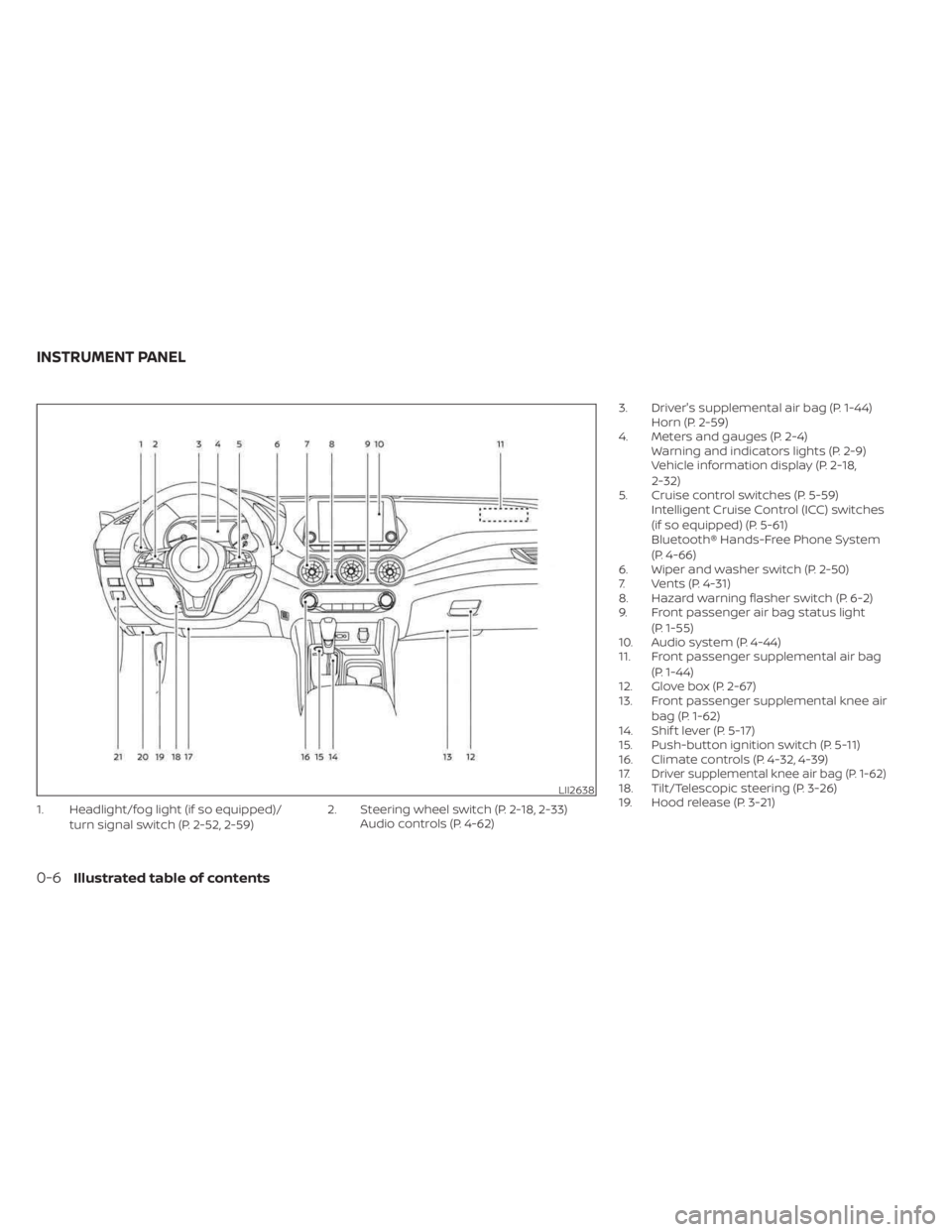
1. Headlight/fog light (if so equipped)/turn signal switch (P. 2-52, 2-59) 2. Steering wheel switch (P. 2-18, 2-33)
Audio controls (P. 4-62) 3. Driver's supplemental air bag (P. 1-44)
Horn (P. 2-59)
4. Meters and gauges (P. 2-4) Warning and indicators lights (P. 2-9)
Vehicle information display (P. 2-18,
2-32)
5. Cruise control switches (P. 5-59) Intelligent Cruise Control (ICC) switches
(if so equipped) (P. 5-61)
Bluetooth® Hands-Free Phone System
(P. 4-66)
6. Wiper and washer switch (P. 2-50)
7. Vents (P. 4-31)
8. Hazard warning flasher switch (P. 6-2)
9. Front passenger air bag status light
(P. 1-55)
10. Audio system (P. 4-44)
11. Front passenger supplemental air bag
(P. 1-44)
12. Glove box (P. 2-67)
13. Front passenger supplemental knee air
bag (P. 1-62)
14. Shif t lever (P. 5-17)
15. Push-button ignition switch (P. 5-11)
16. Climate controls (P. 4-32, 4-39)
17.
Driver supplemental knee air bag (P. 1-62)18. Tilt/Telescopic steering (P. 3-26)
19. Hood release (P. 3-21)LII2638
INSTRUMENT PANEL
0-6Illustrated table of contents
Page 62 of 556
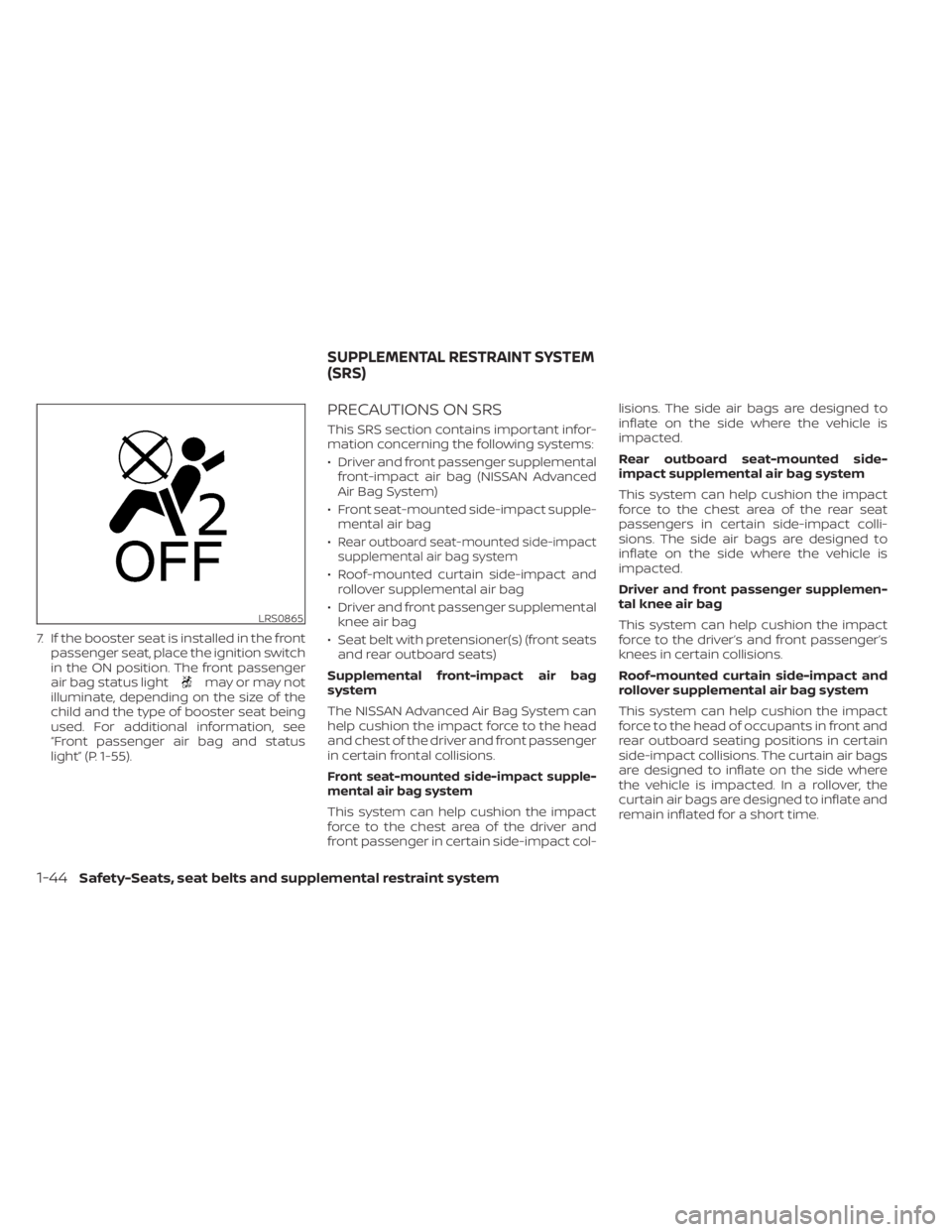
7. If the booster seat is installed in the frontpassenger seat, place the ignition switch
in the ON position. The front passenger
air bag status light
may or may not
illuminate, depending on the size of the
child and the type of booster seat being
used. For additional information, see
“Front passenger air bag and status
light” (P. 1-55).
PRECAUTIONS ON SRS
This SRS section contains important infor-
mation concerning the following systems:
• Driver and front passenger supplemental front-impact air bag (NISSAN Advanced
Air Bag System)
• Front seat-mounted side-impact supple- mental air bag
•
Rear outboard seat-mounted side-impact
supplemental air bag system
• Roof-mounted curtain side-impact and rollover supplemental air bag
• Driver and front passenger supplemental knee air bag
• Seat belt with pretensioner(s) (front seats and rear outboard seats)
Supplemental front-impact air bag
system
The NISSAN Advanced Air Bag System can
help cushion the impact force to the head
and chest of the driver and front passenger
in certain frontal collisions.
Front seat-mounted side-impact supple-
mental air bag system
This system can help cushion the impact
force to the chest area of the driver and
front passenger in certain side-impact col- lisions. The side air bags are designed to
inflate on the side where the vehicle is
impacted.
Rear outboard seat-mounted side-
impact supplemental air bag system
This system can help cushion the impact
force to the chest area of the rear seat
passengers in certain side-impact colli-
sions. The side air bags are designed to
inflate on the side where the vehicle is
impacted.
Driver and front passenger supplemen-
tal knee air bag
This system can help cushion the impact
force to the driver’s and front passenger’s
knees in certain collisions.
Roof-mounted curtain side-impact and
rollover supplemental air bag system
This system can help cushion the impact
force to the head of occupants in front and
rear outboard seating positions in certain
side-impact collisions. The curtain air bags
are designed to inflate on the side where
the vehicle is impacted. In a rollover, the
curtain air bags are designed to inflate and
remain inflated for a short time.
LRS0865
SUPPLEMENTAL RESTRAINT SYSTEM
(SRS)
1-44Safety-Seats, seat belts and supplemental restraint system
Page 79 of 556
inflate in higher severity side collisions, al-
though they may inflate if the forces in an-
other type of collision are similar to those of
a higher severity impact. They are de-
signed to inflate on the side where the ve-
hicle is impacted. They may not inflate in
certain side collisions.
Curtain air bags are also designed to inflate
in certain types of rollover collisions or near
rollovers. As a result, certain vehicle move-
ments (for example, during severe off-
roading) may cause the curtain air bags to
inflate.
Vehicle damage (or lack of it) is not always
an indication of proper side air bag and
curtain air bag operation.
When the side air bags and curtain air bags
inflate, a fairly loud noise may be heard,
followed by the release of smoke. This
smoke is not harmful and does not indi-
cate a fire. Care should be taken not to
inhale it, as it may cause irritation and
choking. Those with a history of a breath-
ing condition should get fresh air promptly.
Side air bags, along with the use of seat
belts, help to cushion the impact force on
the chest and pelvic area of the front and
rear outboard occupants. Curtain air bagshelp to cushion the impact force to the
head of occupants in the front and rear
outboard seating positions. They can help
save lives and reduce serious injuries. How-
ever, an inflating side air bag and curtain air
bag may cause abrasions or other injuries.
Side air bags and curtain air bags do not
provide restraint to the lower body.
The seat belts should be correctly worn
and the driver, front passenger and rear
outboard occupants seated upright as far
as practical away from the side air bag.
Rear seat passengers should be seated as
far away as practical from the door finish-
ers and side roof rails. The side air bags and
curtain air bags inflate quickly in order to
help protect the occupants. Because of
this, the force of the side air bag and curtain
air bag inflating can increase the risk of
injury if the occupant is too close to, or is
against, these air bag modules during in-
flation. The side air bag will deflate quickly
af ter the collision is over.
The curtain air bag will remain inflated for a
short time.
The side air bags and curtain air bags
operate only when the ignition switch is
placed in the ON position.
Af ter placing the ignition switch in the
ON position, the supplemental air bag
warning light illuminates. The supple-
mental air bag warning light will turn off
af ter about 7 seconds if the system is
operational.
WARNING
• Do not place any objects near the
seatback of the front and rear seats.
Also, do not place any objects (an
umbrella, bag, etc.) between the front
and rear door finisher and the front
and rear seat. Such objects may be-
come dangerous projectiles and
cause injury if a side air bag inflate.
•
Right af ter inflation, several side air
bag and curtain air bag system com-
ponents will be hot. Do not touch
them; you may severely burn yourself.
• No unauthorized changes should be
made to any components or wiring
of the side air bag and curtain air bag
systems. This is to prevent damage
to or accidental inflation of the side
air bag and curtain air bag or dam-
age to the side air bag and curtain air
bag systems.
Safety-Seats, seat belts and supplemental restraint system1-61
Page 86 of 556
2 Instruments and controls
Instrument panel................................2-2
Meters and gauges .............................2-4
Speedometer and odometer .................2-4
Tachometer ..................................2-6
Engine coolant temperature gauge ..........2-6
Fuel gauge ................................... 2-7
Distance To Empty (DTE) .....................2-8
Warning lights, indicator lights and audible
reminders .......................................2-9
Checking lights .............................. 2-10
Warning/Indicator lights (red) ...............2-10
Warning/Indicator lights (yellow) ............2-12
Warning/Indicator lights (other) .............2-16
Audible reminders ........................... 2-17
Vehicle information display 4.2 inch (11 cm)
TYPE A (if so equipped) ......................... 2-18
How to use the vehicle information
display ...................................... 2-18
Startup display .............................. 2-18
Settings ..................................... 2-19
Vehicle information display warnings
and indicators ............................... 2-26
Vehicle information display– 7 inch (18 cm)
Type B (if so equipped) ......................... 2-32
How to use the vehicle information
display ...................................... 2-33
Startup display .............................. 2-33Resetting the drive computer
...............2-34
Settings ..................................... 2-34
Vehicle information display warnings
and indicators ............................... 2-41
Security systems ............................... 2-48
Vehicle security system (if so equipped) .....2-48
NISSAN Vehicle Immobilizer System .........2-49
Wiper and washer switch .......................2-50
Switch operation ............................ 2-50
Rear window and outside mirror
(if so equipped) defroster switch ...............2-51
Headlight and turn signal switch ...............2-52
Headlight control switch ....................2-52
LED Daytime Running Lights (DRL)
system (if so equipped) ......................2-57
Instrument brightness control ..............2-58
Turn signal switch ........................... 2-58
Fog light switch (if so equipped) .............2-59
Horn ........................................... 2-59
He
ated seat switches (if so equipped) ..........2-60
Heated steering wheel switch (if so equipped) . . . 2-61
Emergency call (SOS) button (if so equipped) . . . 2-62
Rear Door Alert ................................. 2-62
Power outlet ................................... 2-64
USB/iPod® charging port (if so equipped) .......2-64
Extended storage switch .......................2-65
Page 88 of 556
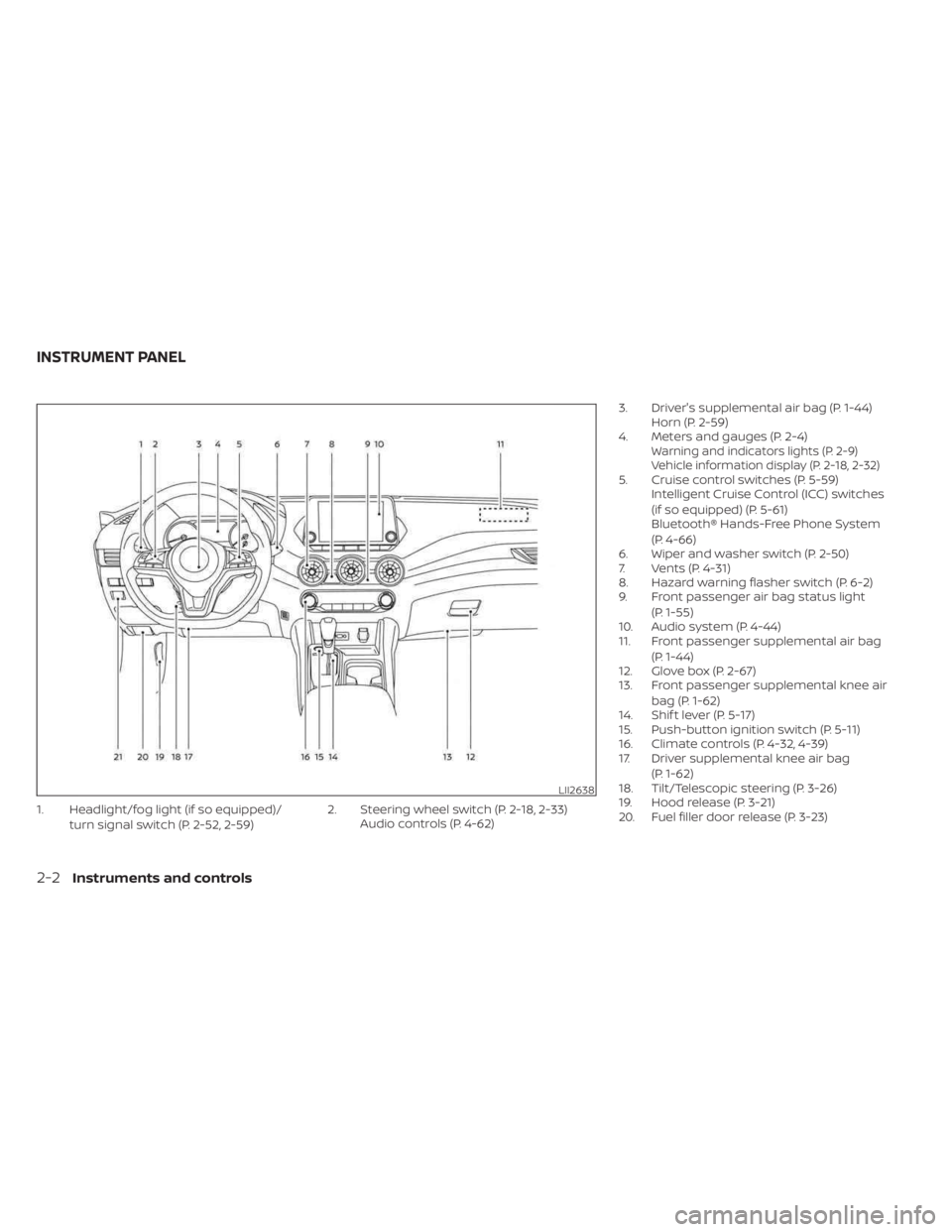
1. Headlight/fog light (if so equipped)/turn signal switch (P. 2-52, 2-59) 2. Steering wheel switch (P. 2-18, 2-33)
Audio controls (P. 4-62) 3. Driver's supplemental air bag (P. 1-44)
Horn (P. 2-59)
4. Meters and gauges (P. 2-4)
Warning and indicators lights (P. 2-9)
Vehicle information display (P. 2-18, 2-32)
5. Cruise control switches (P. 5-59) Intelligent Cruise Control (ICC) switches
(if so equipped) (P. 5-61)
Bluetooth® Hands-Free Phone System
(P. 4-66)
6. Wiper and washer switch (P. 2-50)
7. Vents (P. 4-31)
8. Hazard warning flasher switch (P. 6-2)
9. Front passenger air bag status light
(P. 1-55)
10. Audio system (P. 4-44)
11. Front passenger supplemental air bag
(P. 1-44)
12. Glove box (P. 2-67)
13. Front passenger supplemental knee air
bag (P. 1-62)
14. Shif t lever (P. 5-17)
15. Push-button ignition switch (P. 5-11)
16. Climate controls (P. 4-32, 4-39)
17. Driver supplemental knee air bag
(P. 1-62)
18. Tilt/Telescopic steering (P. 3-26)
19. Hood release (P. 3-21)
20. Fuel filler door release (P. 3-23)
LII2638
INSTRUMENT PANEL
2-2Instruments and controls
Page 101 of 556
Master warning light
When the ignition switch is in the ON posi-
tion, the master warning light illuminates if
any of the following are displayed on the
vehicle information display:
• Low washer fluid warning
• Loose fuel cap warning
• Low tire pressure warning
• Emergency brake warning
• Lock warning
• Shipping mode warning
• Door/Trunk open warning (when vehicleis moving)
• LED Headlight system warning (if so equipped)
• Chassis Control system fault warning (if so equipped)
• Service CVT warnings
• Service engine warnings
• Rear emergency braking warning (If so equipped)
• Parking sensor error warning
• Driver Attention Alert warning (if so equipped)
• ITS system malfunction warning • Traffic Sign Recognition warnings (if so
equipped)
• I-Key system warnings
For additional information, see “Vehicle in-
formation display 4.2 inch (11 cm) Type A”
(P. 2-18) or “Vehicle information display 7
inch (18 cm) Type B” (P. 2-32).
Power steering warning
light
WARNING
• If the engine is not running or is
turned off while driving, the power
assist for the steering will not work.
Steering will be harder to operate.
• When the power steering warning
light illuminates with the engine run-
ning, there will be no power assist for
the steering. You will still have control
of the vehicle but the steering will be
harder to operate. Have the power
steering system checked. It is recom-
mended that you visit a NISSAN
dealer for this service. When the ignition switch is placed in the ON
position, the power steering warning light
illuminates. Af ter starting the engine, the
power steering warning light turns off. This
indicates the power steering system is
operational.
If the power steering warning light illumi-
nates while the engine is running, it may
indicate the power steering system is not
functioning properly and may need servic-
ing. Have the power steering system
checked. It is recommended that you visit a
NISSAN dealer for this service.
When the power steering warning light illu-
minates with the engine running, there will
be no power assist for the steering but you
will still have control of the vehicle. At this
time, greater steering effort is required to
operate the steering wheel, especially in
sharp turns and at low speeds.
For additional information, see “Power
steering” (P. 5-128).
Rear Automatic Braking
(RAB) OFF warning light (if
so equipped)
This light comes on when the ignition
switch is placed in the ON position. It turns
off af ter the engine is started.
Instruments and controls2-15
Page 103 of 556
High Beam Assist indicator
light (green) (if so equipped)
This indicator light illuminates when the
headlights come on while the headlight
switch is in the AUTO position with the high
beams selected. This indicates that the
high beam assist is operational.
For additional information, see “Headlight
and turn signal switch” (P. 2-52).
High beam indicator light
(blue)
This blue light comes on when the head-
light high beams are on and goes out when
the low beams are selected.
The high beam indicator light also comes
on when the passing signal is activated.
Side light and headlight
indicator light (green)
The side light and headlight indicator light
illuminates when the side light or headlight
position is selected. For additional informa-
tion, see “Headlight and turn signal switch”
(P. 2-52).
Turn signal/hazard
indicator lights (green)
The appropriate light flashes when the turn
signal switch is activated.
Both lights flash when the hazard switch is
turned on.
AUDIBLE REMINDERS
Brake pad wear warning
The disc brake pads have audible wear
warnings. When a disc brake pad requires
replacement, it makes a high pitched
scraping sound when the vehicle is in mo-
tion, whether or not the brake pedal is de-
pressed. Have the brakes checked as soon
as possible if the warning sound is heard.
Light reminder chime
With the ignition switch placed in the OFF
position, a chime sounds when the driver's
door is opened if the headlights or parking
lights are on.
Turn the headlight control switch off before
leaving the vehicle.
NISSAN Intelligent Key® door
buzzer
The Intelligent Key door buzzer sounds if
any one of the following improper opera-
tions is found.
• The Intelligent Key is lef t inside the vehiclewhen locking the doors and trunk.
• The Intelligent Key is taken outside the vehicle when operating the vehicle.
• Any doors are not closed securely when locking the doors.
When the buzzer sounds, be sure to check
both the vehicle and the Intelligent Key.
For additional information, see “NISSAN In-
telligent Key®” (P. 3-2).
Parking brake reminder chime
A chime sounds if the parking brake is set
and the vehicle is driven. The chime will
stop if the parking brake is released or the
vehicle speed returns to zero.
Instruments and controls2-17
Page 108 of 556
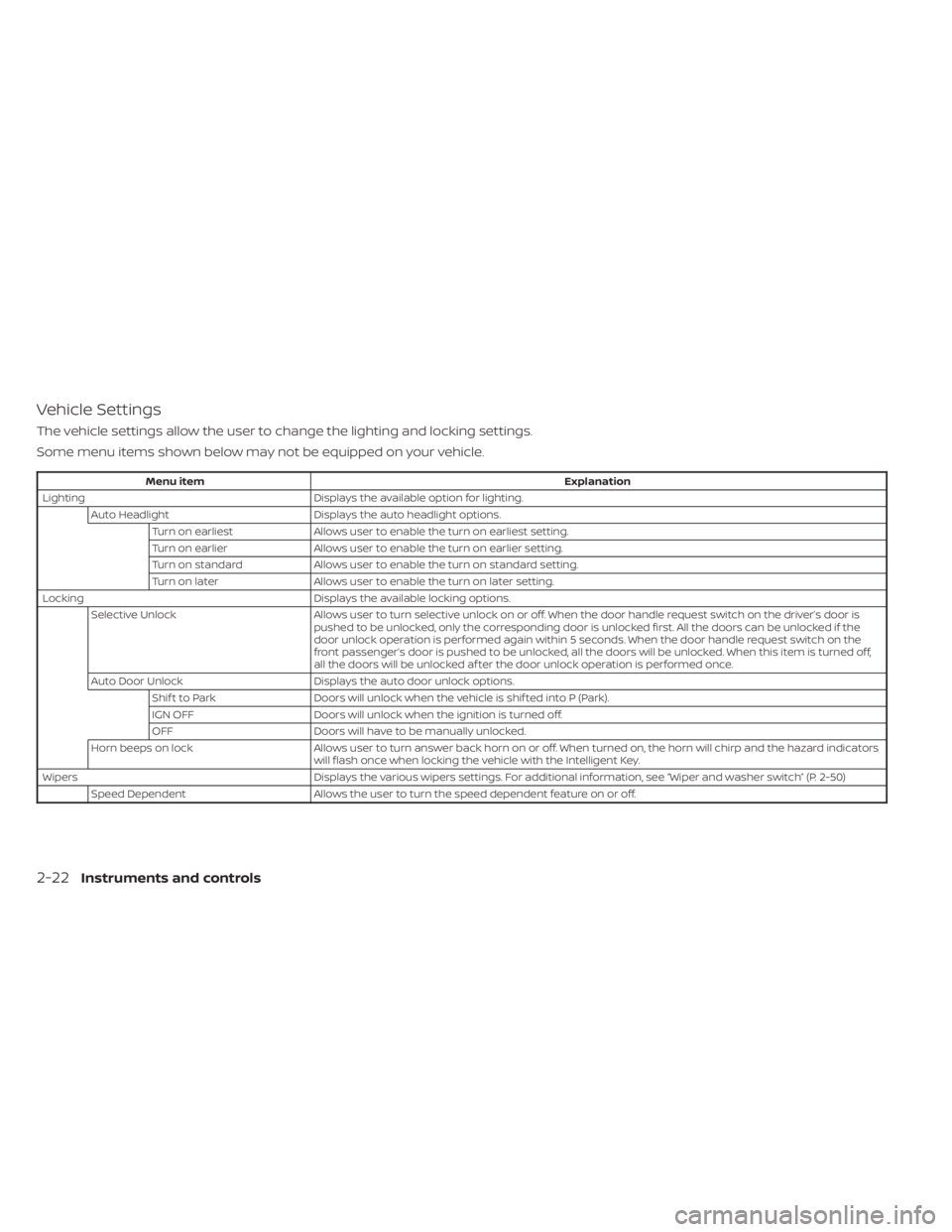
Vehicle Settings
The vehicle settings allow the user to change the lighting and locking settings.
Some menu items shown below may not be equipped on your vehicle.
Menu itemExplanation
Lighting Displays the available option for lighting.
Auto Headlight Displays the auto headlight options.
Turn on earliest Allows user to enable the turn on earliest setting.
Turn on earlier Allows user to enable the turn on earlier setting.
Turn on standard Allows user to enable the turn on standard setting.
Turn on later Allows user to enable the turn on later setting.
Locking Displays the available locking options.
Selective Unlock Allows user to turn selective unlock on oroff. When the door handle request switch on the driver’s door is
pushed to be unlocked, only the corresponding door is unlocked first. All the doors can be unlocked if the
door unlock operation is performed again within 5 seconds. When the door handle request switch on the
front passenger’s door is pushed to be unlocked, all the doors will be unlocked. When this item is turned off,
all the doors will be unlocked af ter the door unlock operation is performed once.
Auto Door Unlock Displays the auto door unlock options.
Shif t to Park Doors will unlock when the vehicle is shif ted into P (Park).
IGN OFF Doors will unlock when the ignition is turned off.
OFF Doors will have to be manually unlocked.
Horn beeps on lock Allows user to turn answer back horn on or off. When turned on, the horn will chirp and the hazard indicators
will flash once when locking the vehicle with the Intelligent Key.
Wipers Displays the various wipers settings. For additional information, see “Wiper and washer switch” (P. 2-50)
Speed Dependent Allows the user to turn the speed dependent feature on or off.
2-22Instruments and controls
Page 113 of 556
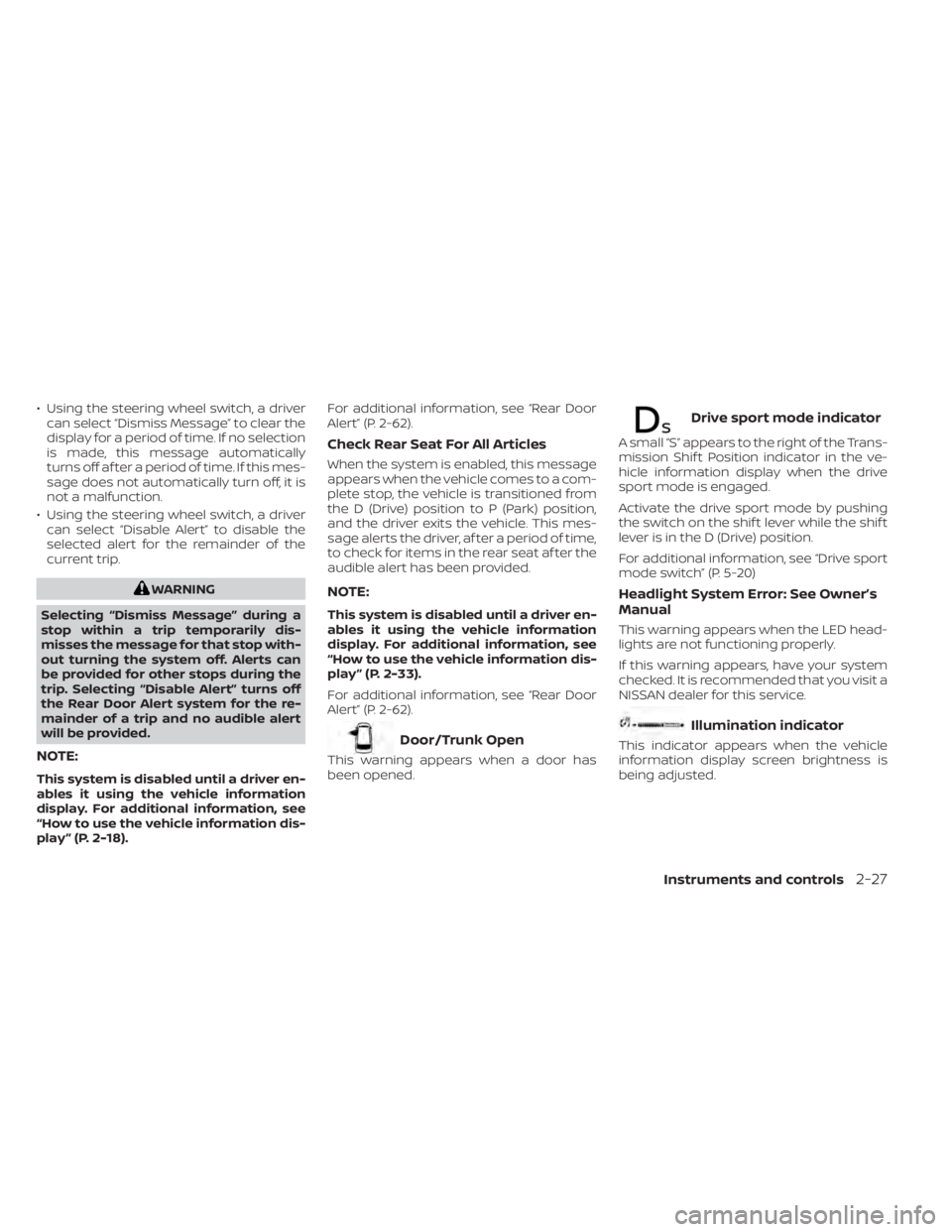
• Using the steering wheel switch, a drivercan select “Dismiss Message” to clear the
display for a period of time. If no selection
is made, this message automatically
turns off af ter a period of time. If this mes-
sage does not automatically turn off, it is
not a malfunction.
• Using the steering wheel switch, a driver can select “Disable Alert” to disable the
selected alert for the remainder of the
current trip.
WARNING
Selecting “Dismiss Message” during a
stop within a trip temporarily dis-
misses the message for that stop with-
out turning the system off. Alerts can
be provided for other stops during the
trip. Selecting “Disable Alert” turns off
the Rear Door Alert system for the re-
mainder of a trip and no audible alert
will be provided.
NOTE:
This system is disabled until a driver en-
ables it using the vehicle information
display. For additional information, see
“How to use the vehicle information dis-
play ” (P. 2-18). For additional information, see “Rear Door
Alert” (P. 2-62).
Check Rear Seat For All Articles
When the system is enabled, this message
appears when the vehicle comes to a com-
plete stop, the vehicle is transitioned from
the D (Drive) position to P (Park) position,
and the driver exits the vehicle. This mes-
sage alerts the driver, af ter a period of time,
to check for items in the rear seat af ter the
audible alert has been provided.
NOTE:
This system is disabled until a driver en-
ables it using the vehicle information
display. For additional information, see
“How to use the vehicle information dis-
play ” (P. 2-33).
For additional information, see “Rear Door
Alert” (P. 2-62).
Door/Trunk Open
This warning appears when a door has
been opened.
Drive sport mode indicator
A small “S” appears to the right of the Trans-
mission Shif t Position indicator in the ve-
hicle information display when the drive
sport mode is engaged.
Activate the drive sport mode by pushing
the switch on the shif t lever while the shif t
lever is in the D (Drive) position.
For additional information, see “Drive sport
mode switch” (P. 5-20)
Headlight System Error: See Owner’s
Manual
This warning appears when the LED head-
lights are not functioning properly.
If this warning appears, have your system
checked. It is recommended that you visit a
NISSAN dealer for this service.
Illumination indicator
This indicator appears when the vehicle
information display screen brightness is
being adjusted.
Instruments and controls2-27