engine NISSAN SENTRA 2023 Owners Manual
[x] Cancel search | Manufacturer: NISSAN, Model Year: 2023, Model line: SENTRA, Model: NISSAN SENTRA 2023Pages: 556, PDF Size: 6.11 MB
Page 2 of 556
CALIFORNIA PROPOSITION 65 WARNING
WARNING
Operating, servicing and maintaining a passenger
vehicle or off-highway motor vehicle can expose you to
chemicals including engine exhaust, carbon monoxide,
phthalates, and lead, which are known to the State of
California to cause cancer and birth defects or other
reproductive harm. To minimize exposure, avoid
breathing exhaust, do not idle the engine except as
necessary, service your vehicle in a well-ventilated area
and wear gloves or wash your hands frequently when
servicing your vehicle. For more information go to
www.P65Warnings.ca.gov/passenger-vehicle.
Page 4 of 556
MODIFICATION OF YOUR VEHICLE
This vehicle should not be modified.
Modification could affect its perfor-
mance, safety, emissions or durability
and may even violate governmental
regulations. In addition, damage or
performance problems resulting from
modifications may not be covered un-
der NISSAN warranties.
WARNING
Installing an af termarket On-Board
Diagnostic (OBD) plug-in device that
uses the port during normal driving, for
example remote insurance company
monitoring, remote vehicle diagnos-
tics, telematics or engine reprogram-
ming, may cause interference or dam-
age to vehicle systems. We do not
recommend or endorse the use of any
af termarket OBD plug-in devices, un-
less specifically approved by NISSAN.
The vehicle warranty may not cover
damage caused by any af termarket
plug-in device. This manual includes information for all
features and equipment available on this
model. Features and equipment in your ve-
hicle may vary depending on model, trim
level, options selected, order, date of pro-
duction, region or availability. Therefore,
you may find information about features or
equipment that are not included or in-
stalled on your vehicle.
All information, specifications and illustra-
tions in this manual are those in effect at the
time of printing. NISSAN reserves the right
to change specifications, performance, de-
sign or component suppliers without notice
and without obligation. From time to time,
NISSAN may update or revise this manual to
provide Owners with the most accurate in-
formation currently available. Please care-
fully read and retain with this manual all
revision updates sent to you by NISSAN to
ensure you have access to accurate and
up-to-date information regarding your ve-
hicle. Current versions of vehicle Owner's
Manuals and any updates can also be found
in the Owner section of the NISSAN web-
site at
https://owners.nissanusa.com/
nowners/navigation/manualsGuide.
If you have questions concerning any infor-
mation in your Owner's Manual, contact NISSAN Consumer Affairs. For contact infor-
mation, refer to the NISSAN CUSTOMER CARE
PROGRAM page in this Owner’s Manual.
IMPORTANT INFORMATION ABOUT
THIS MANUAL
You will see various symbols in this manual.
They are used in the following ways:
WARNING
This is used to indicate the presence
of a hazard that could cause death or
serious personal injury. To avoid or re-
duce the risk, the procedures must be
followed precisely.
CAUTION
This is used to indicate the presence of
a hazard that could cause minor or
moderate personal injury or damage
to your vehicle. To avoid or reduce the
risk, the procedures must be followed
carefully.
WHEN READING THE MANUAL
Page 9 of 556
0 Illustrated table of contents
Air bags, seat belts and child restraints..........0-2
Exterior front ....................................0-3
Exterior rear .....................................0-4
Passenger compartment .......................0-5 Instrument panel
................................0-6
Engine compartment check locations ...........0-8
Warning/Indicator lights .........................0-9
Page 11 of 556
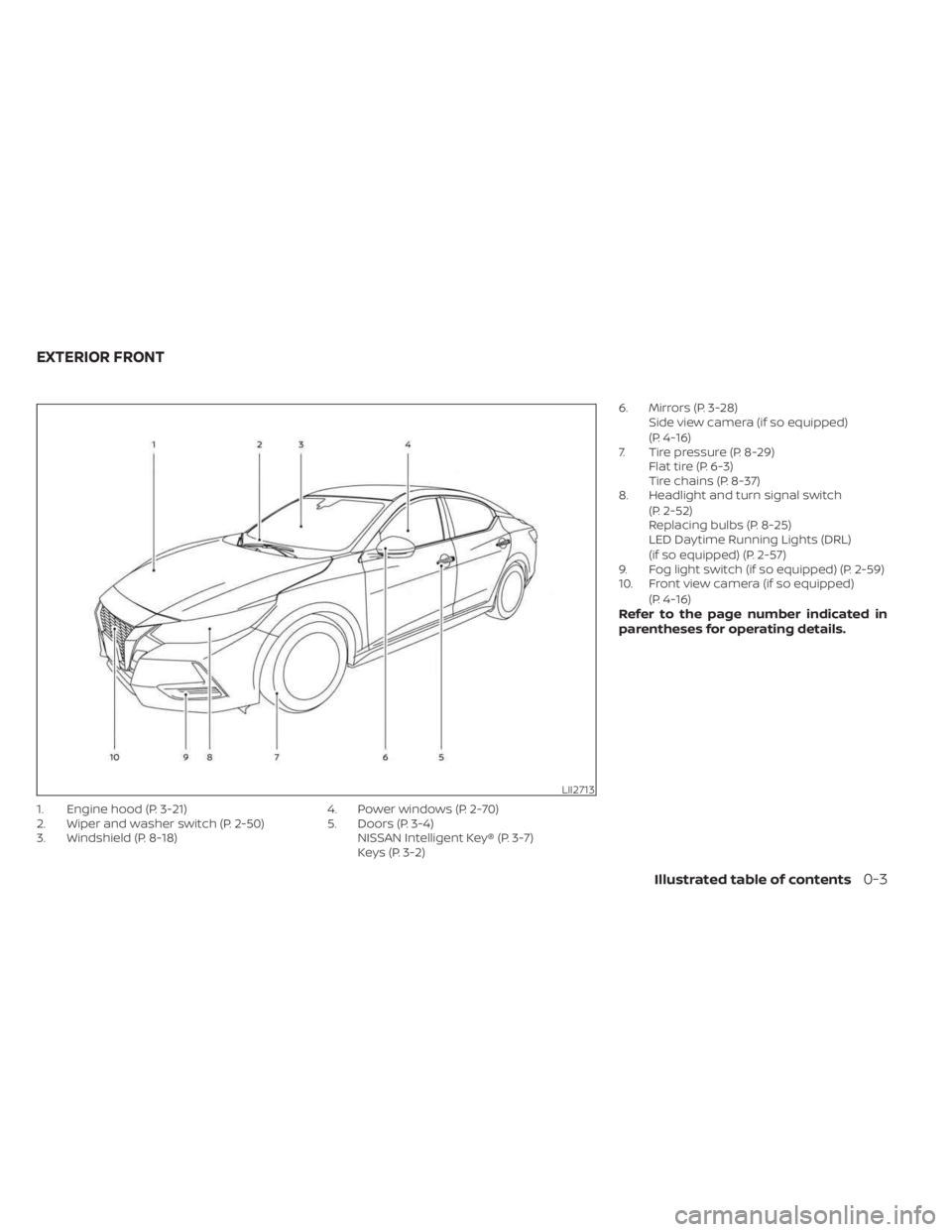
1. Engine hood (P. 3-21)
2. Wiper and washer switch (P. 2-50)
3. Windshield (P. 8-18)4. Power windows (P. 2-70)
5. Doors (P. 3-4)
NISSAN Intelligent Key® (P. 3-7)
Keys (P. 3-2) 6. Mirrors (P. 3-28)
Side view camera (if so equipped)
(P. 4-16)
7. Tire pressure (P. 8-29) Flat tire (P. 6-3)
Tire chains (P. 8-37)
8. Headlight and turn signal switch
(P. 2-52)
Replacing bulbs (P. 8-25)
LED Daytime Running Lights (DRL)
(if so equipped) (P. 2-57)
9. Fog light switch (if so equipped) (P. 2-59)
10. Front view camera (if so equipped)
(P. 4-16)
Refer to the page number indicated in
parentheses for operating details.
LII2713
EXTERIOR FRONT
Illustrated table of contents0-3
Page 16 of 556
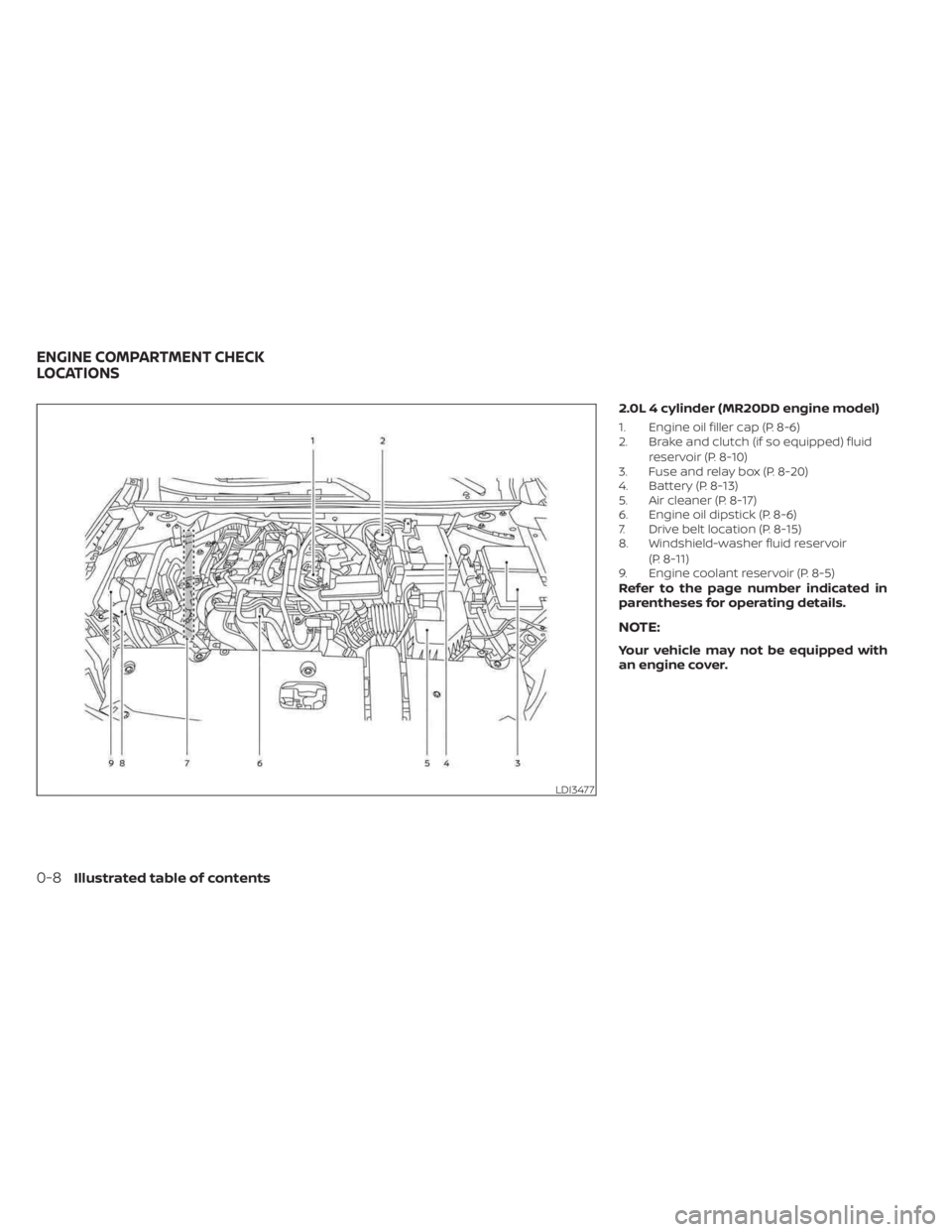
2.0L 4 cylinder (MR20DD engine model)
1. Engine oil filler cap (P. 8-6)
2. Brake and clutch (if so equipped) fluidreservoir (P. 8-10)
3. Fuse and relay box (P. 8-20)
4. Battery (P. 8-13)
5. Air cleaner (P. 8-17)
6. Engine oil dipstick (P. 8-6)
7. Drive belt location (P. 8-15)
8. Windshield-washer fluid reservoir
(P. 8-11)
9. Engine coolant reservoir (P. 8-5)
Refer to the page number indicated in
parentheses for operating details.
NOTE:
Your vehicle may not be equipped with
an engine cover.
LDI3477
ENGINE COMPARTMENT CHECK
LOCATIONS
0-8Illustrated table of contents
Page 17 of 556
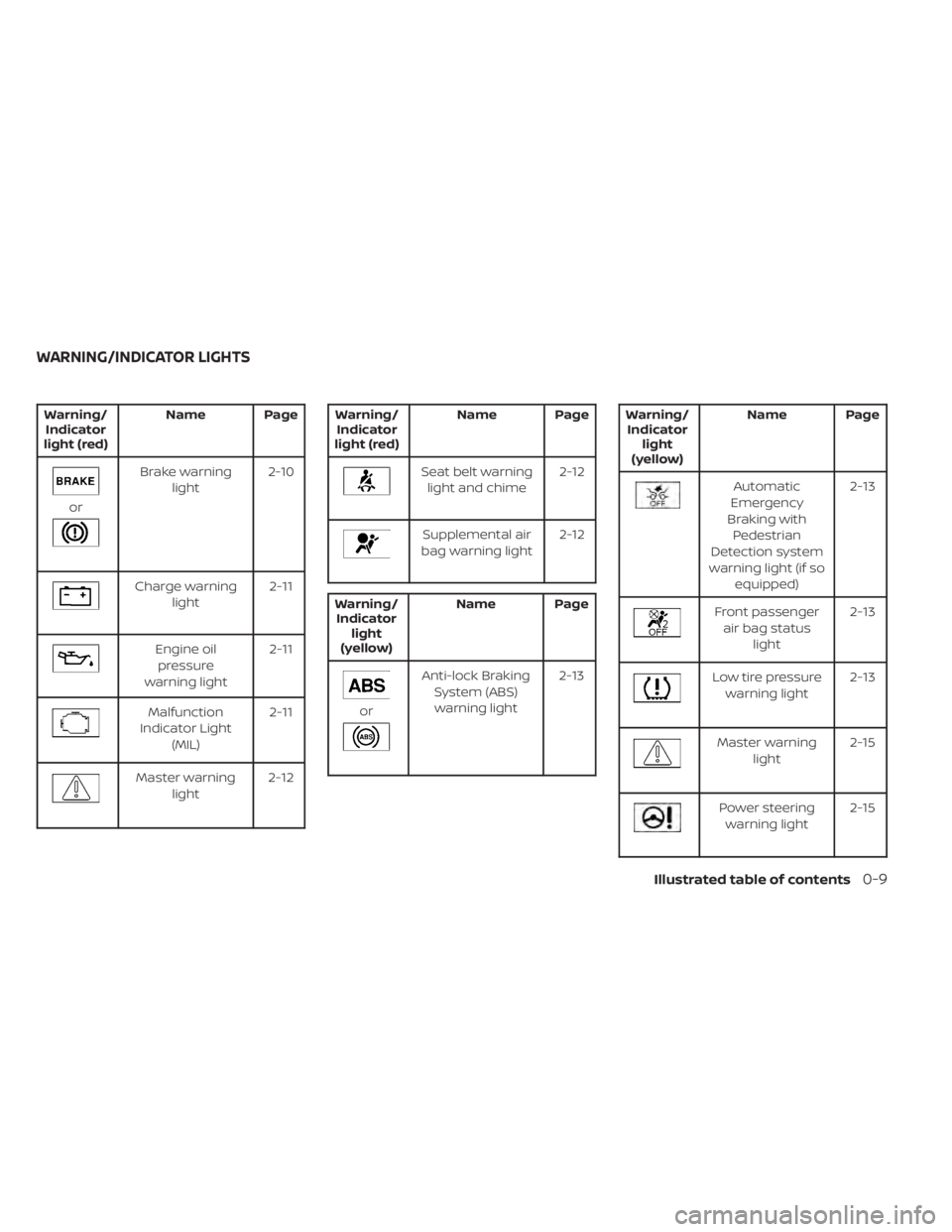
Warning/Indicator
light (red) Name Page
or
Brake warning
light 2-10
Charge warning
light 2-11
Engine oil
pressure
warning light 2-11
Malfunction
Indicator Light (MIL) 2-11
Master warning
light 2-12
Warning/
Indicator
light (red) Name Page
Seat belt warning
light and chime 2-12
Supplemental air
bag warning light 2-12
Warning/
Indicator light
(yellow) Name Page
or
Anti-lock Braking
System (ABS)warning light 2-13
Warning/
Indicator light
(yellow) Name Page
Automatic
Emergency
Braking with Pedestrian
Detection system
warning light (if so equipped) 2-13
Front passenger
air bag status light 2-13
Low tire pressure
warning light 2-13
Master warning
light 2-15
Power steering
warning light 2-15
WARNING/INDICATOR LIGHTS
Illustrated table of contents0-9
Page 23 of 556
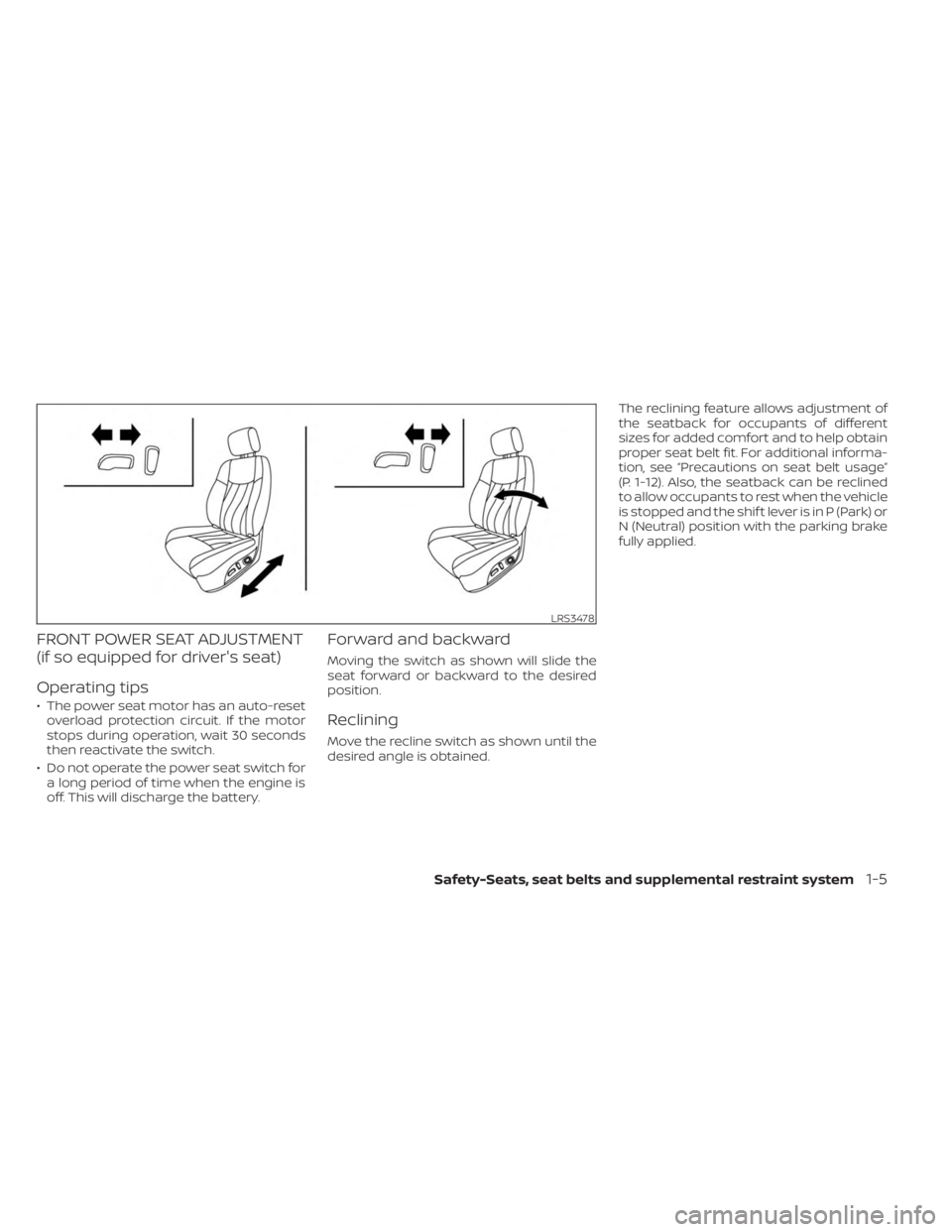
FRONT POWER SEAT ADJUSTMENT
(if so equipped for driver's seat)
Operating tips
• The power seat motor has an auto-resetoverload protection circuit. If the motor
stops during operation, wait 30 seconds
then reactivate the switch.
• Do not operate the power seat switch for a long period of time when the engine is
off. This will discharge the battery.
Forward and backward
Moving the switch as shown will slide the
seat forward or backward to the desired
position.
Reclining
Move the recline switch as shown until the
desired angle is obtained. The reclining feature allows adjustment of
the seatback for occupants of different
sizes for added comfort and to help obtain
proper seat belt fit. For additional informa-
tion, see “Precautions on seat belt usage”
(P. 1-12). Also, the seatback can be reclined
to allow occupants to rest when the vehicle
is stopped and the shif t lever is in P (Park) or
N (Neutral) position with the parking brake
fully applied.
LRS3478
Safety-Seats, seat belts and supplemental restraint system1-5
Page 86 of 556
2 Instruments and controls
Instrument panel................................2-2
Meters and gauges .............................2-4
Speedometer and odometer .................2-4
Tachometer ..................................2-6
Engine coolant temperature gauge ..........2-6
Fuel gauge ................................... 2-7
Distance To Empty (DTE) .....................2-8
Warning lights, indicator lights and audible
reminders .......................................2-9
Checking lights .............................. 2-10
Warning/Indicator lights (red) ...............2-10
Warning/Indicator lights (yellow) ............2-12
Warning/Indicator lights (other) .............2-16
Audible reminders ........................... 2-17
Vehicle information display 4.2 inch (11 cm)
TYPE A (if so equipped) ......................... 2-18
How to use the vehicle information
display ...................................... 2-18
Startup display .............................. 2-18
Settings ..................................... 2-19
Vehicle information display warnings
and indicators ............................... 2-26
Vehicle information display– 7 inch (18 cm)
Type B (if so equipped) ......................... 2-32
How to use the vehicle information
display ...................................... 2-33
Startup display .............................. 2-33Resetting the drive computer
...............2-34
Settings ..................................... 2-34
Vehicle information display warnings
and indicators ............................... 2-41
Security systems ............................... 2-48
Vehicle security system (if so equipped) .....2-48
NISSAN Vehicle Immobilizer System .........2-49
Wiper and washer switch .......................2-50
Switch operation ............................ 2-50
Rear window and outside mirror
(if so equipped) defroster switch ...............2-51
Headlight and turn signal switch ...............2-52
Headlight control switch ....................2-52
LED Daytime Running Lights (DRL)
system (if so equipped) ......................2-57
Instrument brightness control ..............2-58
Turn signal switch ........................... 2-58
Fog light switch (if so equipped) .............2-59
Horn ........................................... 2-59
He
ated seat switches (if so equipped) ..........2-60
Heated steering wheel switch (if so equipped) . . . 2-61
Emergency call (SOS) button (if so equipped) . . . 2-62
Rear Door Alert ................................. 2-62
Power outlet ................................... 2-64
USB/iPod® charging port (if so equipped) .......2-64
Extended storage switch .......................2-65
Page 90 of 556
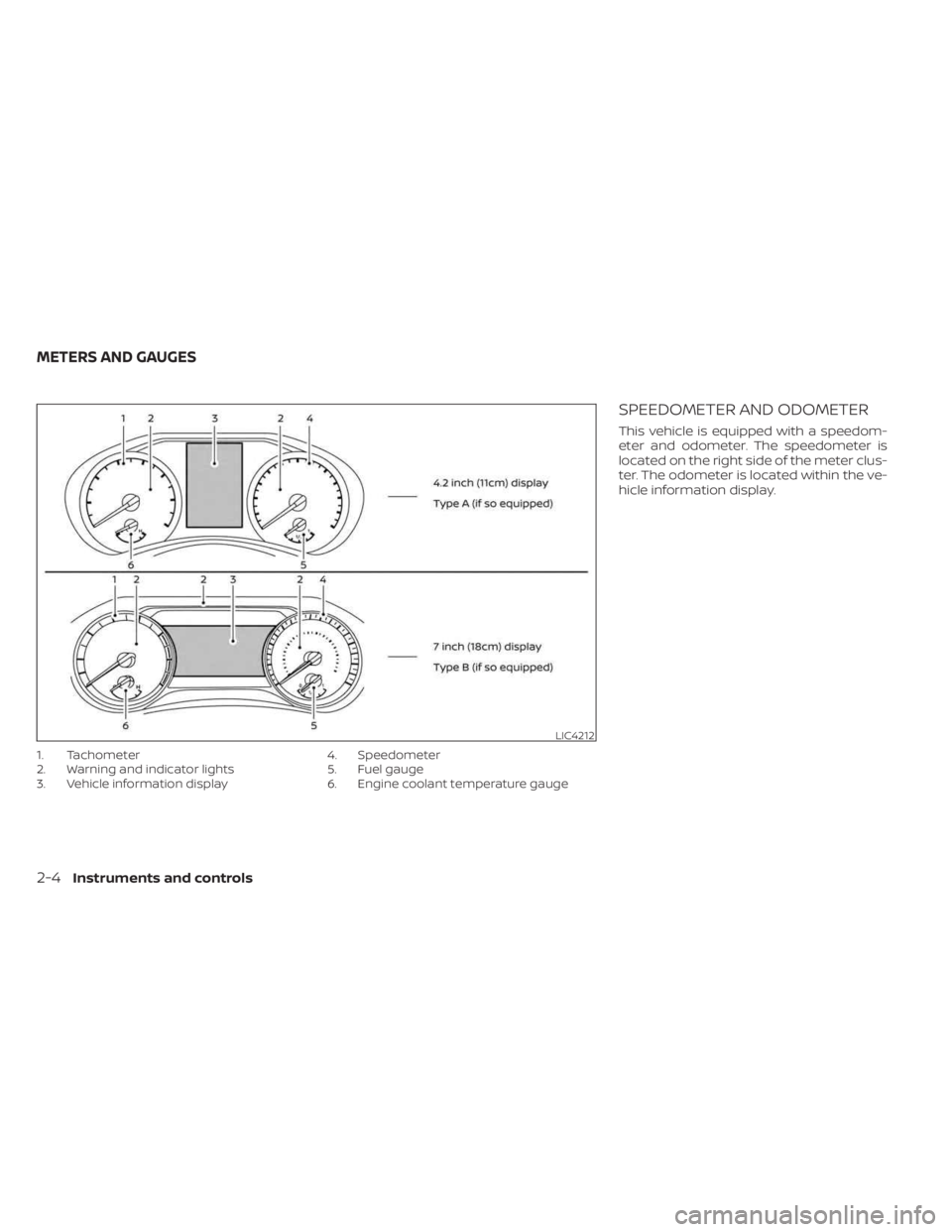
1. Tachometer
2. Warning and indicator lights
3. Vehicle information display4. Speedometer
5. Fuel gauge
6. Engine coolant temperature gauge
SPEEDOMETER AND ODOMETER
This vehicle is equipped with a speedom-
eter and odometer. The speedometer is
located on the right side of the meter clus-
ter. The odometer is located within the ve-
hicle information display.
LIC4212
METERS AND GAUGES
2-4Instruments and controls
Page 92 of 556
TACHOMETER
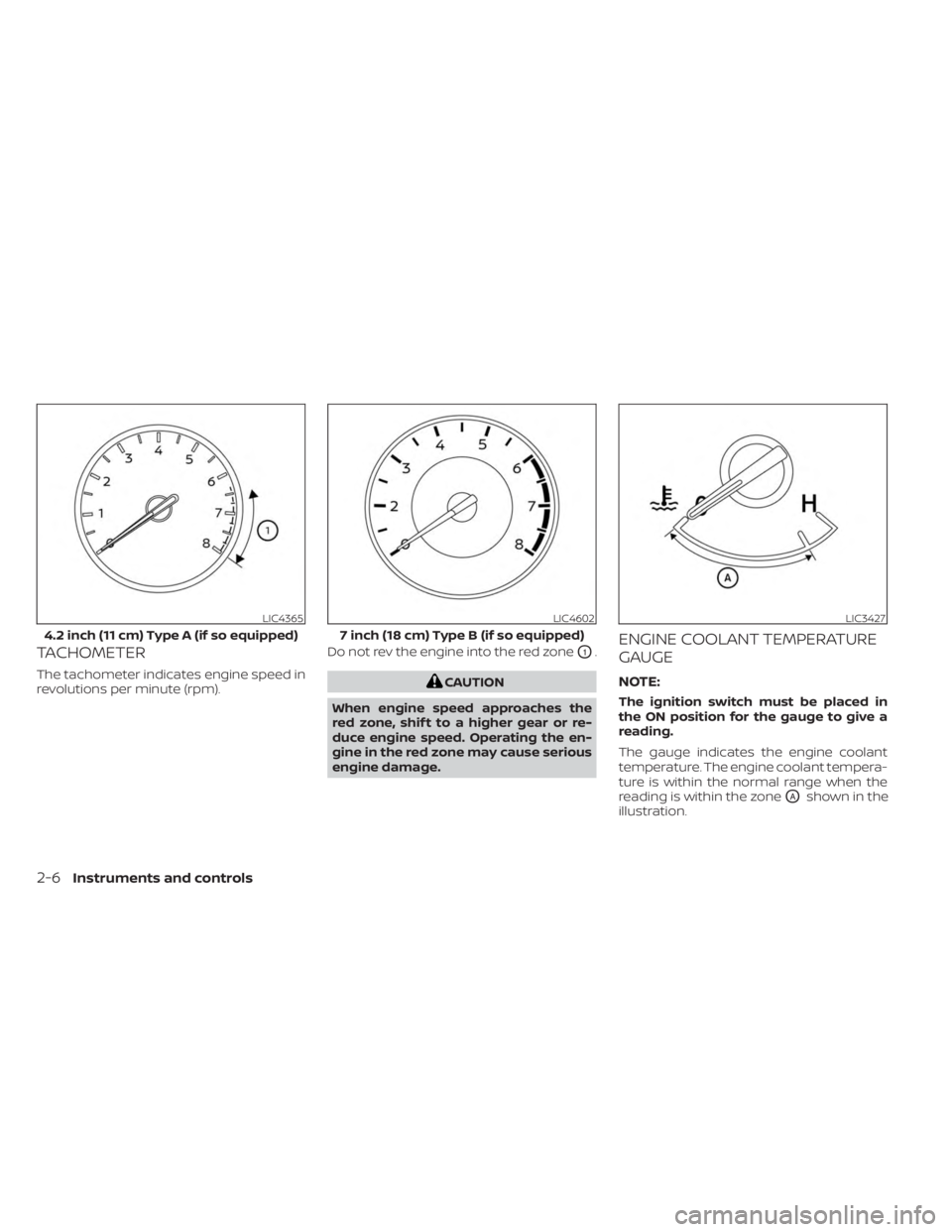
The tachometer indicates engine speed in
revolutions per minute (rpm).Do not rev the engine into the red zone
O1.
CAUTION
When engine speed approaches the
red zone, shif t to a higher gear or re-
duce engine speed. Operating the en-
gine in the red zone may cause serious
engine damage.
ENGINE COOLANT TEMPERATURE
GAUGE
NOTE:
The ignition switch must be placed in
the ON position for the gauge to give a
reading.
The gauge indicates the engine coolant
temperature. The engine coolant tempera-
ture is within the normal range when the
reading is within the zone
OAshown in the
illustration.
LIC4365
4.2 inch (11 cm) Type A (if so equipped)
LIC4602
7 inch (18 cm) Type B (if so equipped)
LIC3427
2-6Instruments and controls