bluetooth NISSAN SENTRA 2023 Owners Manual
[x] Cancel search | Manufacturer: NISSAN, Model Year: 2023, Model line: SENTRA, Model: NISSAN SENTRA 2023Pages: 556, PDF Size: 6.11 MB
Page 5 of 556
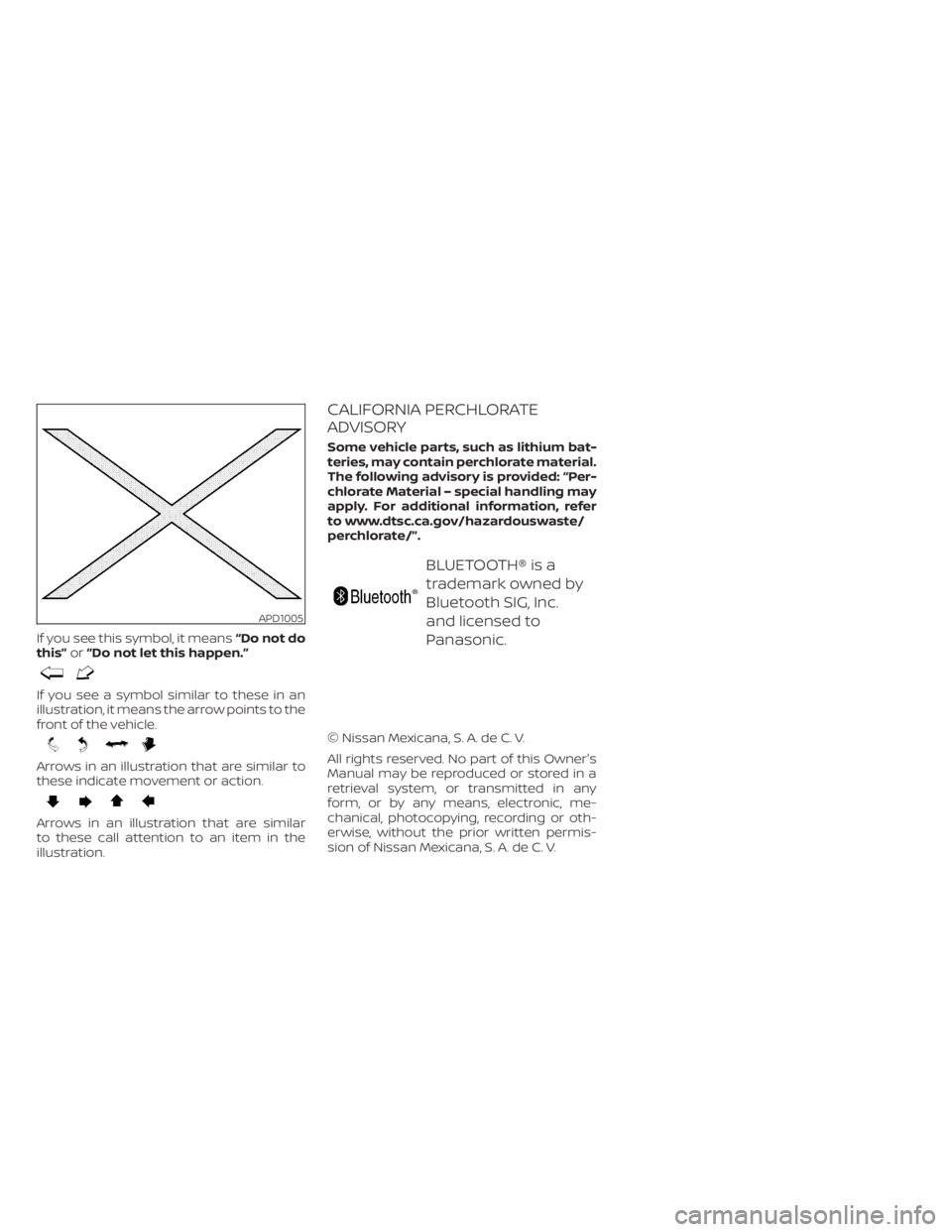
If you see this symbol, it means“Do not do
this” or“Do not let this happen.”
If you see a symbol similar to these in an
illustration, it means the arrow points to the
front of the vehicle.
Arrows in an illustration that are similar to
these indicate movement or action.
Arrows in an illustration that are similar
to these call attention to an item in the
illustration.
CALIFORNIA PERCHLORATE
ADVISORY
Some vehicle parts, such as lithium bat-
teries, may contain perchlorate material.
The following advisory is provided: “Per-
chlorate Material – special handling may
apply. For additional information, refer
to www.dtsc.ca.gov/hazardouswaste/
perchlorate/”.
BLUETOOTH® is a
trademark owned by
Bluetooth SIG, Inc.
and licensed to
Panasonic.
© Nissan Mexicana, S. A. de C. V.
All rights reserved. No part of this Owner's
Manual may be reproduced or stored in a
retrieval system, or transmitted in any
form, or by any means, electronic, me-
chanical, photocopying, recording or oth-
erwise, without the prior written permis-
sion of Nissan Mexicana, S. A. de C. V.
APD1005
Page 14 of 556
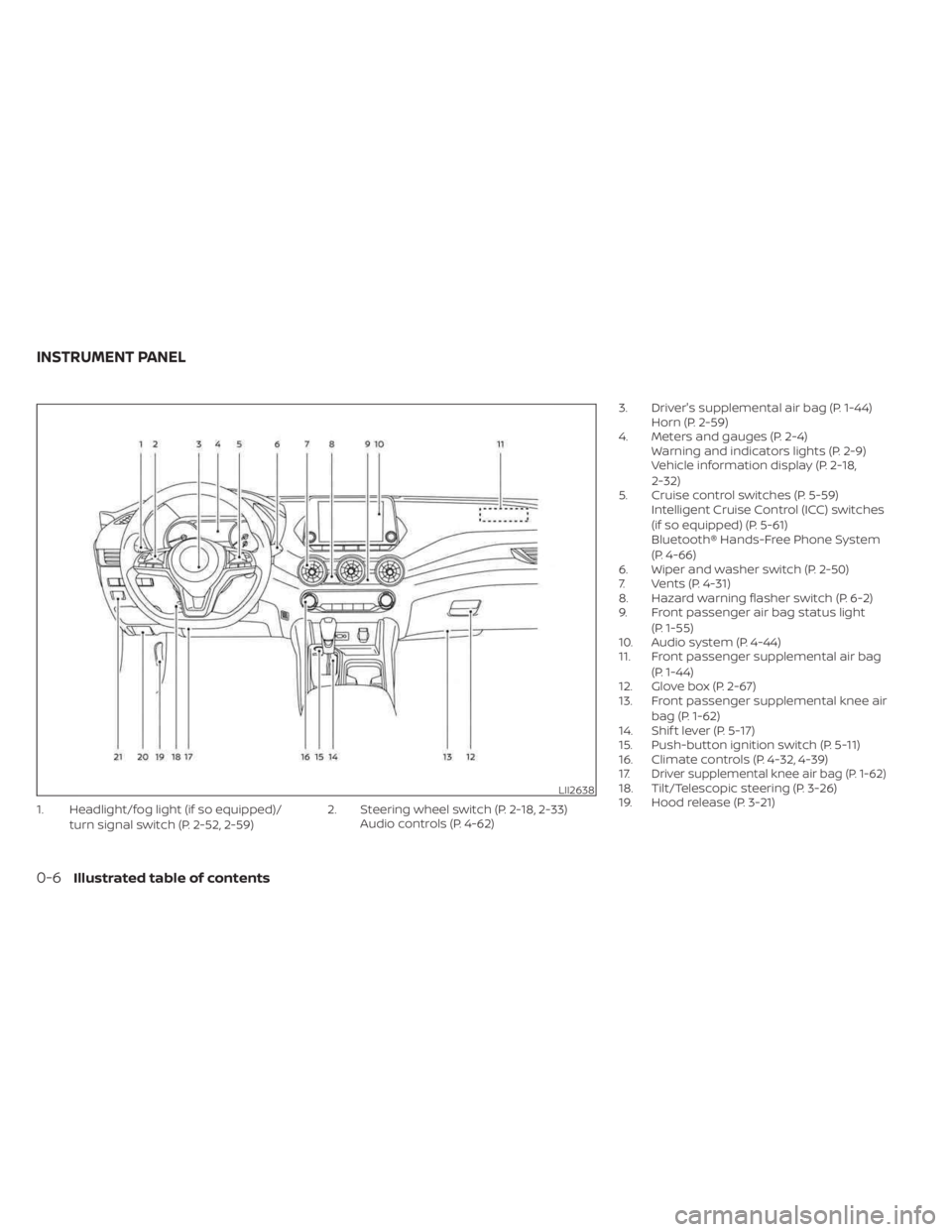
1. Headlight/fog light (if so equipped)/turn signal switch (P. 2-52, 2-59) 2. Steering wheel switch (P. 2-18, 2-33)
Audio controls (P. 4-62) 3. Driver's supplemental air bag (P. 1-44)
Horn (P. 2-59)
4. Meters and gauges (P. 2-4) Warning and indicators lights (P. 2-9)
Vehicle information display (P. 2-18,
2-32)
5. Cruise control switches (P. 5-59) Intelligent Cruise Control (ICC) switches
(if so equipped) (P. 5-61)
Bluetooth® Hands-Free Phone System
(P. 4-66)
6. Wiper and washer switch (P. 2-50)
7. Vents (P. 4-31)
8. Hazard warning flasher switch (P. 6-2)
9. Front passenger air bag status light
(P. 1-55)
10. Audio system (P. 4-44)
11. Front passenger supplemental air bag
(P. 1-44)
12. Glove box (P. 2-67)
13. Front passenger supplemental knee air
bag (P. 1-62)
14. Shif t lever (P. 5-17)
15. Push-button ignition switch (P. 5-11)
16. Climate controls (P. 4-32, 4-39)
17.
Driver supplemental knee air bag (P. 1-62)18. Tilt/Telescopic steering (P. 3-26)
19. Hood release (P. 3-21)LII2638
INSTRUMENT PANEL
0-6Illustrated table of contents
Page 88 of 556
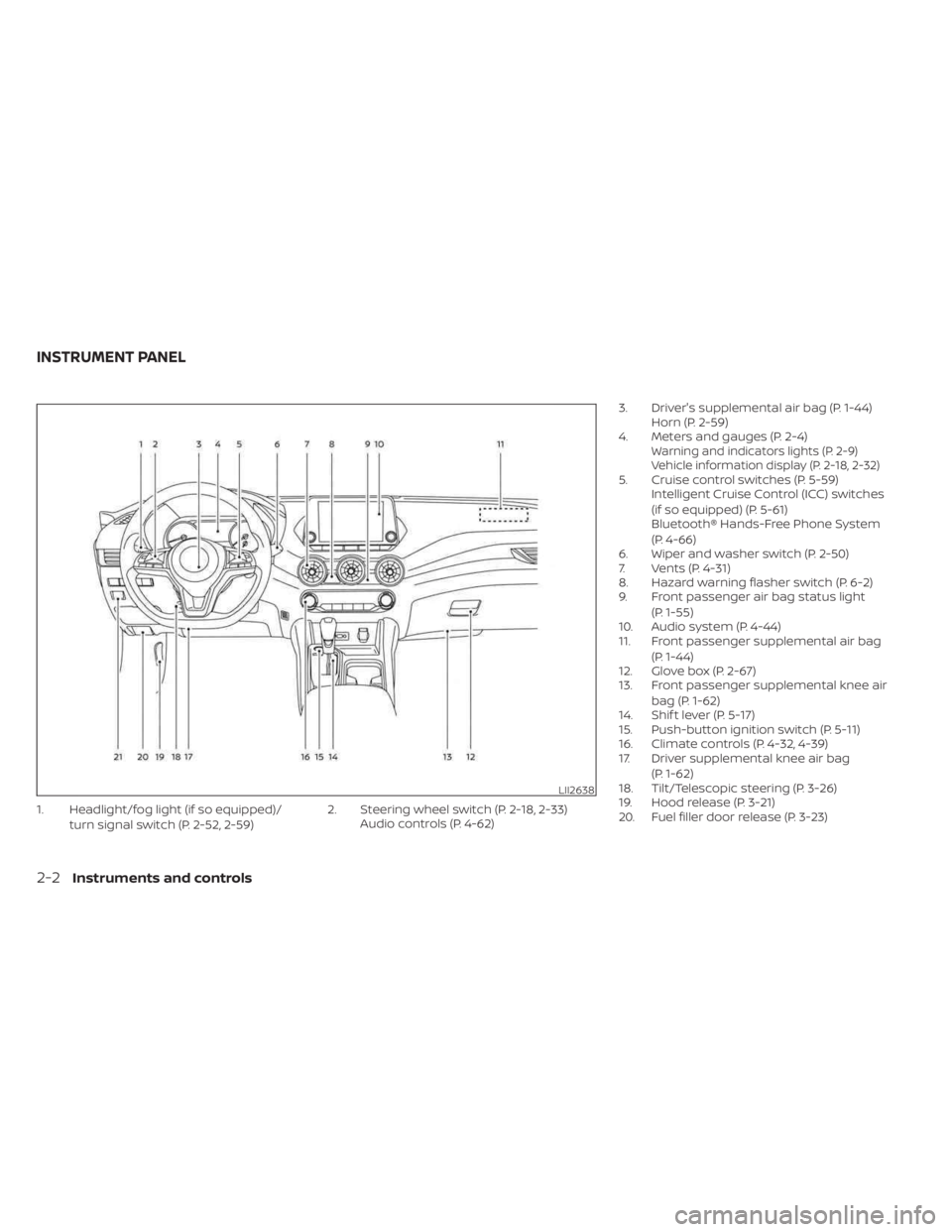
1. Headlight/fog light (if so equipped)/turn signal switch (P. 2-52, 2-59) 2. Steering wheel switch (P. 2-18, 2-33)
Audio controls (P. 4-62) 3. Driver's supplemental air bag (P. 1-44)
Horn (P. 2-59)
4. Meters and gauges (P. 2-4)
Warning and indicators lights (P. 2-9)
Vehicle information display (P. 2-18, 2-32)
5. Cruise control switches (P. 5-59) Intelligent Cruise Control (ICC) switches
(if so equipped) (P. 5-61)
Bluetooth® Hands-Free Phone System
(P. 4-66)
6. Wiper and washer switch (P. 2-50)
7. Vents (P. 4-31)
8. Hazard warning flasher switch (P. 6-2)
9. Front passenger air bag status light
(P. 1-55)
10. Audio system (P. 4-44)
11. Front passenger supplemental air bag
(P. 1-44)
12. Glove box (P. 2-67)
13. Front passenger supplemental knee air
bag (P. 1-62)
14. Shif t lever (P. 5-17)
15. Push-button ignition switch (P. 5-11)
16. Climate controls (P. 4-32, 4-39)
17. Driver supplemental knee air bag
(P. 1-62)
18. Tilt/Telescopic steering (P. 3-26)
19. Hood release (P. 3-21)
20. Fuel filler door release (P. 3-23)
LII2638
INSTRUMENT PANEL
2-2Instruments and controls
Page 118 of 556
Rear Automatic Braking
(RAB) system warning
indicator
This indicator appears to indicate the sta-
tus of the Rear Automatic Braking (RAB)
system. For additional information, see
“Rear Automatic Braking (RAB)” (P. 5-85).
Side Radar Obstruction
This message appears when the Blind
Spot Warning (BSW) or Rear Cross Traffic
Alert (RCTA) systems become unavailable
because a radar blockage is detected. For
additional information, see “Blind Spot
Warning (BSW)” (P. 5-36) and “Rear Cross
Traffic Alert (RCTA)” (P. 5-48).
Speed Limit Sign indicator
This message may appear when the Traffic
Sign Recognition system is engaged.
For additional information, see “Traffic Sign
Recognition (TSR)” (P. 5-25).
System Fault
This warning appears if there is a malfunc-
tion in the Rear Automatic Braking (RAB)
system. For additional information, see
“Rear Automatic Braking (RAB)” (P. 5-85).
Unavailable: High Cabin Temperature
This message appears when the camera
detects an interior temperature of more
than approximately 104°F (40°C). For addi-
tional information, see “Lane Departure
Warning (LDW)” (P. 5-29).
Unavailable: High Camera
Temperature
This message appears when the camera
detects an interior temperature of more
than 104°F (40°C). For additional informa-
tion, see “Traffic Sign Recognition (TSR)”
(P. 5-25).
Vehicle ahead detection
indicator
This indicator appears when the following
systems are engaged and have detected a
vehicle:
• Automatic Emergency Braking (AEB) withPedestrian Detection
• Intelligent Forward Collision Warning (I-FCW)
For additional information, see “Automatic
Emergency Braking (AEB) with Pedestrian
Detection” (P. 5-92) and “Intelligent Forward
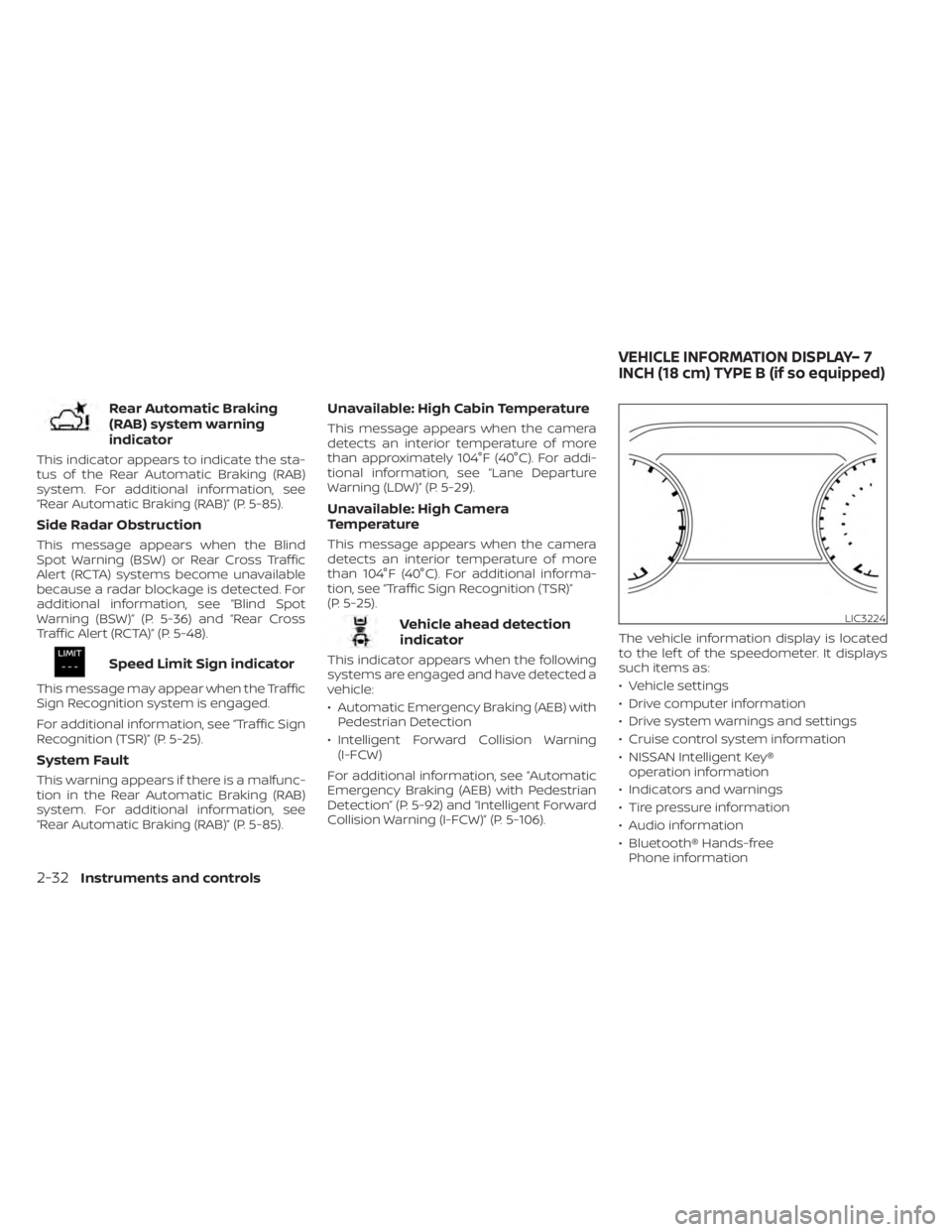
Collision Warning (I-FCW)” (P. 5-106). The vehicle information display is located
to the lef t of the speedometer. It displays
such items as:
• Vehicle settings
• Drive computer information
• Drive system warnings and settings
• Cruise control system information
• NISSAN Intelligent Key®
operation information
• Indicators and warnings
• Tire pressure information
• Audio information
• Bluetooth® Hands-free Phone information
LIC3224
VEHICLE INFORMATION DISPLAY– 7
INCH (18 cm) TYPE B (if so equipped)
2-32Instruments and controls
Page 193 of 556
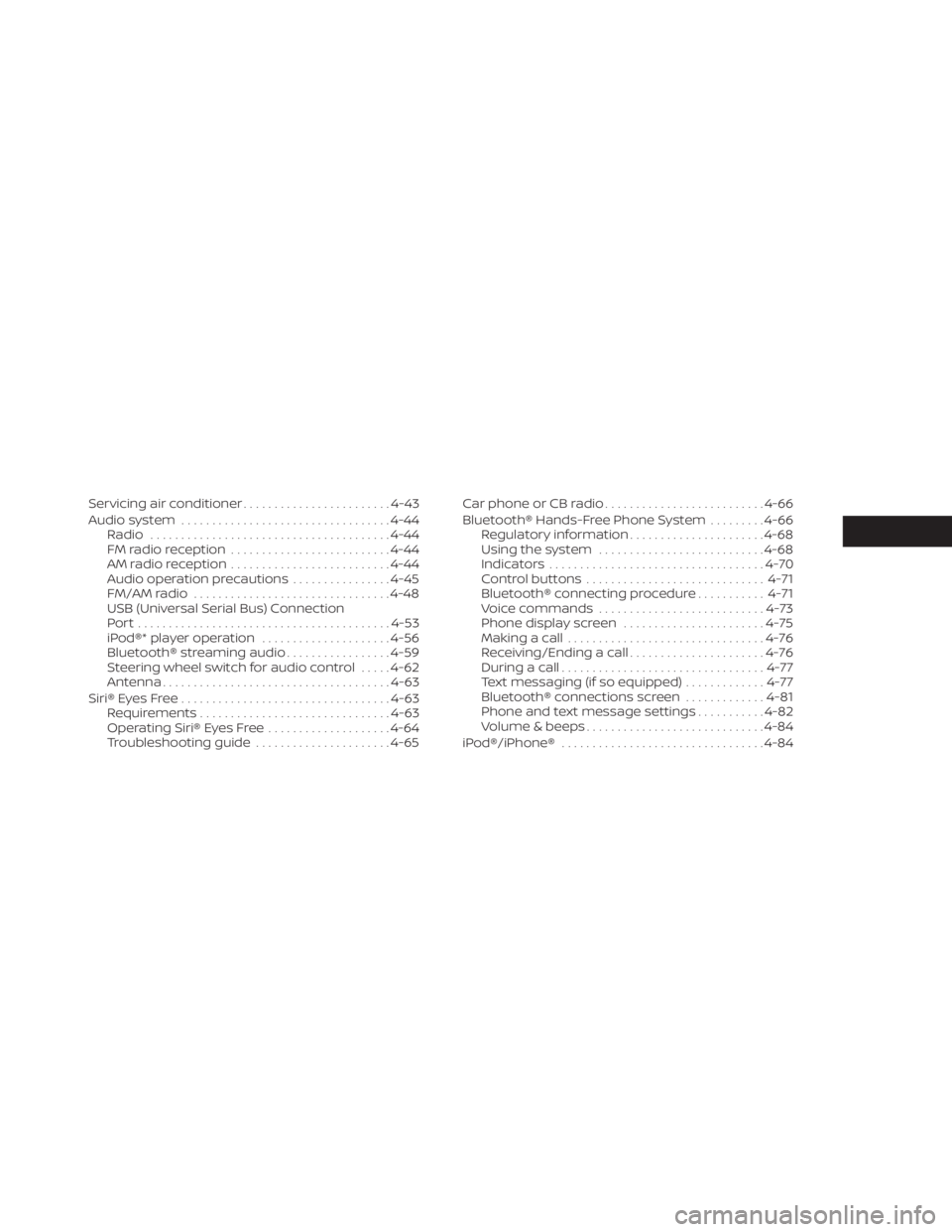
Servicing air conditioner........................4-43
Audio system .................................. 4-44
Radio ....................................... 4-44
FM radio reception .......................... 4-44
AM radio reception .......................... 4-44
Audio operation precautions ................4-45
FM/AM radio ................................ 4-48
USB (Universal Serial Bus) Connection
Port......................................... 4-53
iPod®* player operation .....................4-56
Bluetooth® streaming audio .................4-59
Steering wheel switch for audio control .....4-62
Antenna ..................................... 4-63
Siri® Eyes Free .................................. 4-63
Requirements ............................... 4-63
Operating Siri® Eyes Free ....................4-64
Troubleshooting guide ......................4-65Car phone or CB radio
.......................... 4-66
Bluetooth® Hands-Free Phone System .........4-66
Regulatory information ......................4-68
Using the system ........................... 4-68
Indicators ................................... 4-70
Control buttons ............................. 4-71
Bluetooth® connecting procedure ...........4-71
Voice commands ........................... 4-73
Phone display screen .......................4-75
Making a call ................................ 4-76
Receiving/Ending a call ......................4-76
During a call ................................. 4-77
Text messaging (if so equipped) .............4-77
Bluetooth® connections screen .............4-81
Phone and text message settings ...........4-82
Volume & beeps ............................. 4-84
iPod®/iPhone® ................................. 4-84
Page 194 of 556
Refer to the digital NissanConnect® Own-
er’s manual using the QR code on this
page, or your printed NissanConnect®
Owner’s manual (if so equipped). This
manual includes the following information:
• NissanConnect® Services (if so equipped)
• Audio system
• Apple CarPlay®
• Android Auto
TM
• Bluetooth® Hands-Free Phone system
• Viewing information
• Other settings• Voice recognition
• General system information
LHA5548
NISSANCONNECT® OWNER’S
MANUAL
4-2Monitor, climate, audio, phone and voice recognition systems
Page 195 of 556
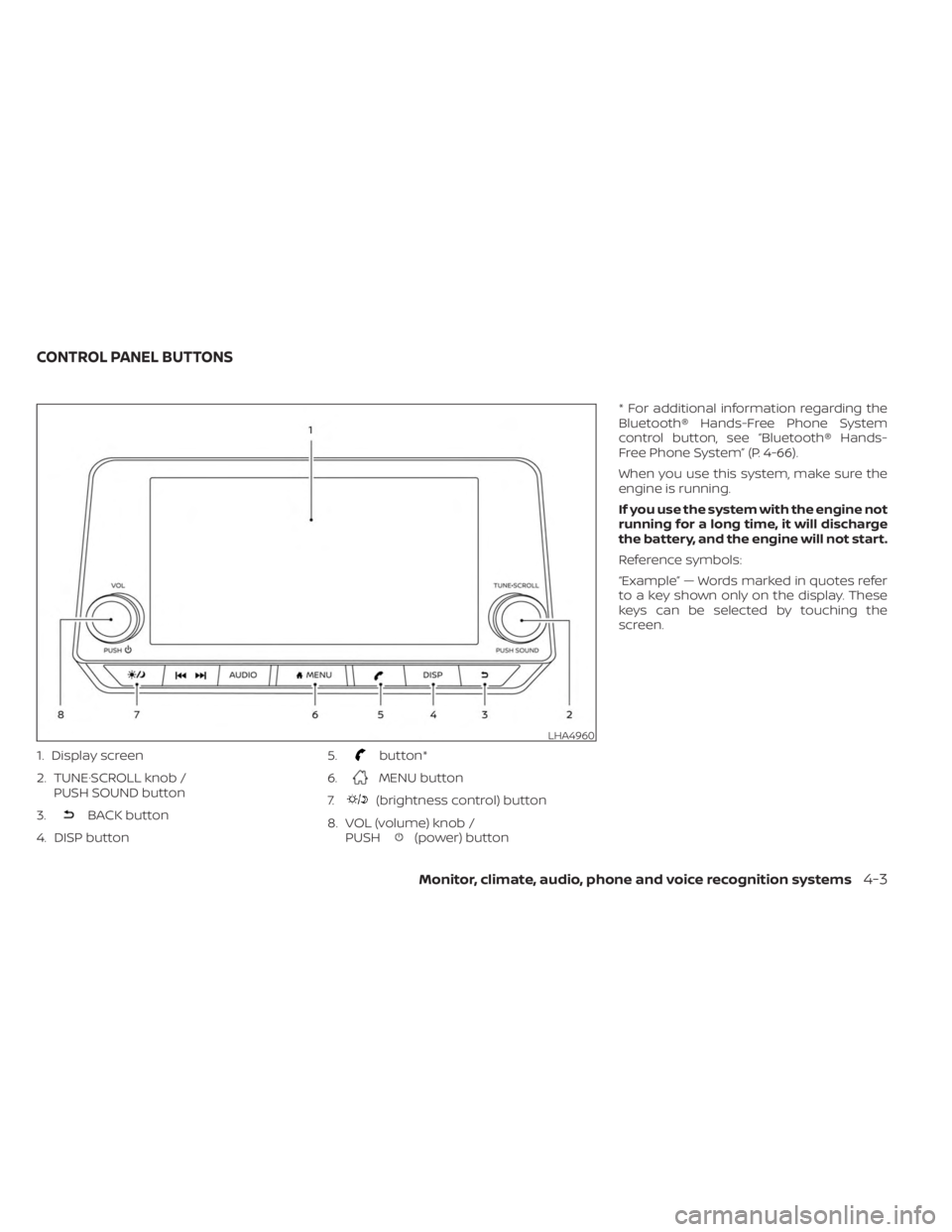
1. Display screen
2. TUNE·SCROLL knob /PUSH SOUND button
3.
BACK button
4. DISP button 5.
button*
6.
MENU button
7.
(brightness control) button
8. VOL (volume) knob / PUSH
(power) button * For additional information regarding the
Bluetooth® Hands-Free Phone System
control button, see “Bluetooth® Hands-
Free Phone System” (P. 4-66).
When you use this system, make sure the
engine is running.
If you use the system with the engine not
running for a long time, it will discharge
the battery, and the engine will not start.
Reference symbols:
“Example” — Words marked in quotes refer
to a key shown only on the display. These
keys can be selected by touching the
screen.
LHA4960
CONTROL PANEL BUTTONS
Monitor, climate, audio, phone and voice recognition systems4-3
Page 198 of 556
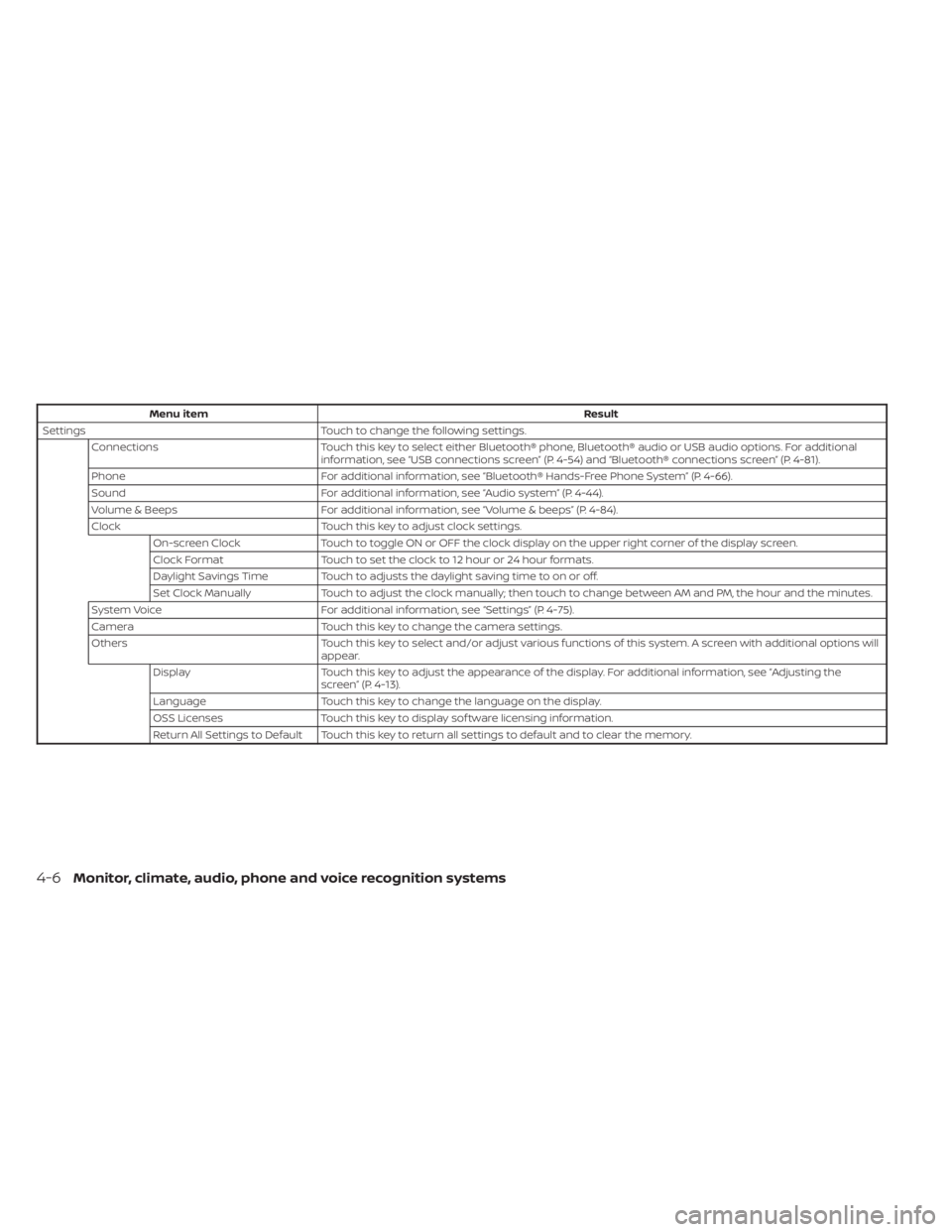
Menu itemResult
Settings Touch to change the following settings.
Connections Touch this key to select either Bluetooth® phone, Bluetooth® audio or USB audio options. For additional
information, see “USB connections screen” (P. 4-54) and “Bluetooth® connections screen” (P. 4-81).
Phone For additional information, see “Bluetooth® Hands-Free Phone System” (P. 4-66).
Sound For additional information, see “Audio system” (P. 4-44).
Volume & Beeps For additional information, see “Volume & beeps” (P. 4-84).
Clock Touch this key to adjust clock settings.
On-screen Clock Touch to toggle ON or OFF the clock display on the upper right corner of the display screen.
Clock Format Touch to set the clock to 12 hour or 24 hour formats.
Daylight Savings Time Touch to adjusts the daylight saving time to on or off.
Set Clock Manually Touch to adjust the clock manually; then touch to change between AM and PM, the hour and the minutes.
System Voice For additional information, see “Settings” (P. 4-75).
Camera Touch this key to change the camera settings.
Others Touch this key to select and/or adjust various functions of this system. A screen with additional options will
appear.
Display Touch this key to adjust the appearance of the display. For additional information, see “Adjusting the
screen” (P. 4-13).
Language Touch this key to change the language on the display.
OSS Licenses Touch this key to display sof tware licensing information.
Return All Settings to Default Touch this key to return all settings to default and to clear the memory.
4-6Monitor, climate, audio, phone and voice recognition systems
Page 199 of 556
(brightness control) BUTTON
To change the display brightness, press thebutton. Pressing the button again will
change the display to the day or the night
display.
Press and hold the
button for more
than 2 seconds to turn the display off. Press
and hold the button again to turn the dis-
play on.
HOW TO USE THE VOL (volume)
KNOB / PUSH
(power)
BUTTON
Press the PUSH(power) button to turn
audio function on and off. Turn the VOL
(volume) knob to adjust audio volume.
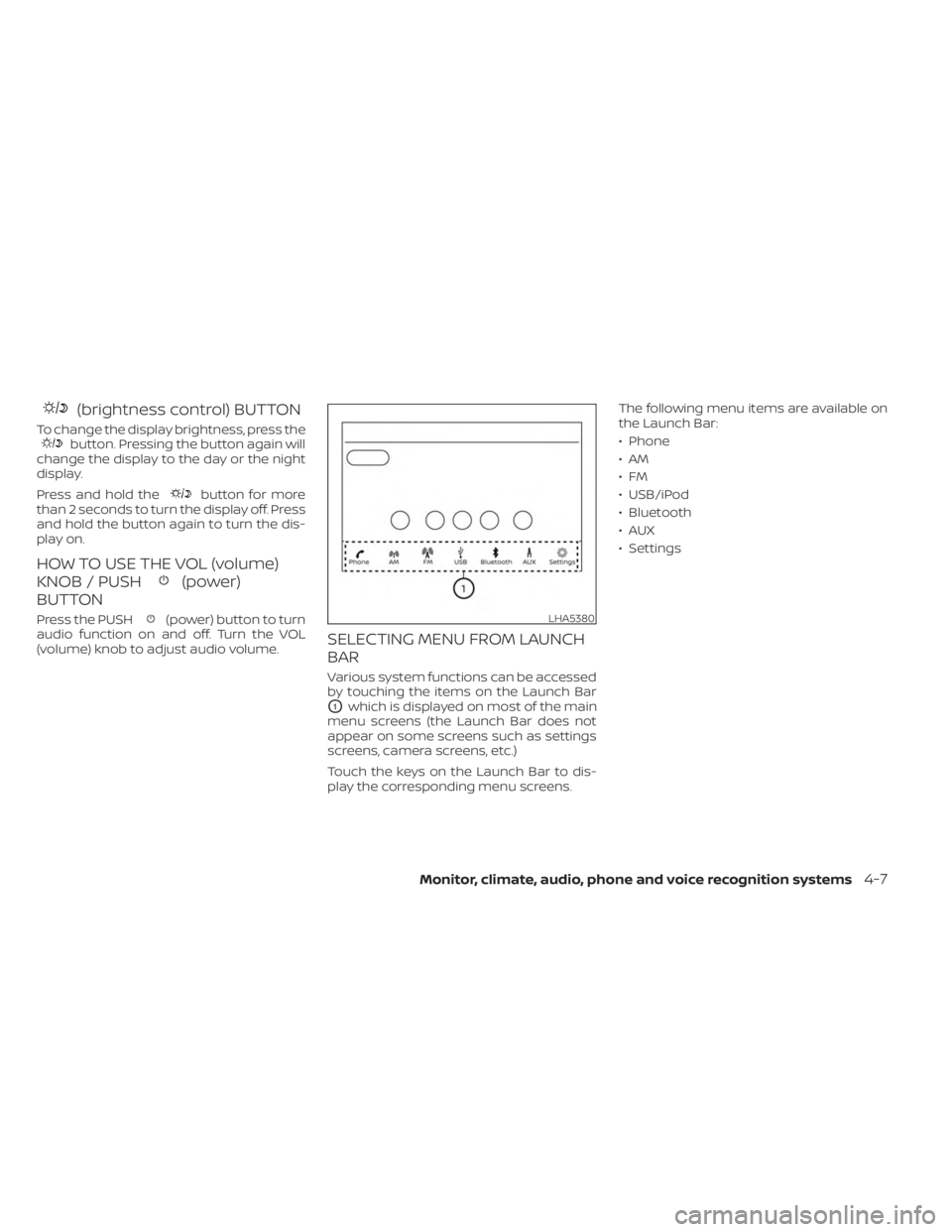
SELECTING MENU FROM LAUNCH
BAR
Various system functions can be accessed
by touching the items on the Launch Bar
O1which is displayed on most of the main
menu screens (the Launch Bar does not
appear on some screens such as settings
screens, camera screens, etc.)
Touch the keys on the Launch Bar to dis-
play the corresponding menu screens. The following menu items are available on
the Launch Bar:
• Phone
•AM
•FM
• USB/iPod
• Bluetooth
•AUX
• Settings
LHA5380
Monitor, climate, audio, phone and voice recognition systems4-7
Page 239 of 556
– Do not force the iPod® cable connectorinto the device port.
– Close the center console lid on the cable or connectors.
– Store objects with sharp edges in the storage where the cable is stored.
– Spill liquids on the cable and connectors.
• Do not connect the cable to the iPod® if the cable and/or connectors are wet. It
may damage the iPod®.
• If the cable and connectors are exposed to water, allow the cable and/or connec-
tors to dry completely before connecting
the cable to the iPod® (wait 24 hours for it
to dry).
• If the connector is exposed to fluids other than water, evaporative residue may
cause a short between the connector
pins. In this case, replace the cable, other-
wise damage to the iPod® and a loss of
function may occur.
• If the cable is damaged (insulation cut, connectors cracked, contamination such
as liquids, dust, dirt, etc. in the connec-
tors), do not use the cable. It is recom-
mended that you visit a NISSAN dealer to
replace the cable with a new one. • When not in use for extended periods of
time, store the cable in a clean, dust free
environment at room temperature and
without direct sun exposure.
• Do not use the cable for any other pur- poses other than its intended use in the
vehicle.
*iPod® is a trademark of Apple Inc., regis-
tered in the U.S. and other countries.
Bluetooth® streaming audio
• Some Bluetooth® audio devices may not be recognized by the in-vehicle audio
system.
• It is necessary to set up the wireless con- nection between a compatible
Bluetooth® audio device and the in-
vehicle Bluetooth® module before using
the Bluetooth® audio.
• Operating procedure of the Bluetooth® audio will vary depending on the devices.
Make sure how to operate your audio de-
vice before using it with this system.
• The Bluetooth® audio may be stopped under the following conditions:– Receiving a call on the Bluetooth® Hands-Free Phone System.
– Checking the connection to the hands-free phone. • Do not place the Bluetooth® audio device
in an area surrounded by metal or far
away from the in-vehicle Bluetooth®
module to prevent tone quality degrada-
tion and wireless connection disruption.
• While an audio device is connected through the Bluetooth® wireless connec-
tion, the battery power of the device may
discharge quicker than usual.
• This system supports the Bluetooth® Audio Distribution Profile (A2DP, AVRCP).BLUETOOTH® is a
trademark owned by
Bluetooth SIG, Inc. and
licensed to
Panasonic.
Monitor, climate, audio, phone and voice recognition systems4-47