low beam NISSAN TEANA 2003 Owner's Manual
[x] Cancel search | Manufacturer: NISSAN, Model Year: 2003, Model line: TEANA, Model: NISSAN TEANA 2003Pages: 3502, PDF Size: 74.56 MB
Page 2708 of 3502

LT-20
HEADLAMP - XENON TYPE -
NOTE:
This item is displayed, but cannot be monitored.
ACTIVE TEST
Operation Procedure
1. Touch “HEAD LAMP” on “SELECT TEST ITEM” screen.
2. Touch “ACTIVE TEST” on “SELECT DIAG MODE” screen.
3. Touch item to be tested and check operation of the selected item.
4. During the operation check, touching “OFF” deactivates the operation.
Display Item List
NOTE:
This item is displayed, but cannot be monitored.
CONSULT-II Functions (IPDM E/R)BKS001N5
CONSULT-II can display each diagnostic item using the diagnostic test mode shown following.
CONSULT-II OPERATION
Refer to GI-34, "CONSULT-II Start Procedure" .
DOOR SW - DR “ON/OFF”Displays status of the driver door as judged from the driver door switch signal. (Door is open:
ON/door is closed: OFF)
DOOR SW - AS “ON/OFF”Displays status of the passenger door as judged from the passenger door switch signal. (Door
is open: ON/door is closed: OFF)
DOOR SW - RR “ON/OFF”Displays status of the rear door as judged from the rear door switch (RH) signal. (Door is open:
ON/door is closed: OFF)
DOOR SW - RL “ON/OFF”Displays status of the rear door as judged from the rear door switch (LH) signal. (Door is open:
ON/door is closed: OFF)
BACK DOOR SW
NOTE “OFF” —
TURN SIGNAL R “ON/OFF” Displays status (Turn right: ON/others: OFF) as judged from lighting switch signal.
TURN SIGNAL L “ON/OFF” Displays status (Turn left: ON/others: OFF) as judged from lighting switch signal.
OPTICAL SENSOR “0 - 5V ”Displays “outside brightness (close to 5V when light/close to 0V when dark)” judged from opti-
cal sensor signal.
VEHICLE SPEED “km/h” Displays vehicle speed as judged from vehicle speed signal.Monitor item Contents
CONSULT-II screen
displayTest item Description
TAIL LAMPParking, license plate and tail
lamps operationTail lamp relay is operated by switching operation ON-OFF.
HEAD LAMP High beam headlamp and low
beam headlamp operationHeadlamp high relay and headlamp low relay are operated by switching
operation (OFF: OFF, HI: high beam, LO: low beam).
RR FOG LAMP Rear fog lamp operation Rear fog lamp is operated by switching operation ON-OFF.
FR FOG LAMP Front fog lamp operation Front fog lamp relay is operated by switching operation ON-OFF.
CORNERING LAMP
Cornering lamp operation
NOTE—
ILL DIM SIGNALCombination meter and dis-
play dimming operationDimming function by MR output signal from BCM, it is operated by switch-
ing operation ON-OFF.
Diagnosis Mode Description
SELF-DIAGNOSTIC RESULTS Refer to PG-19, "
SELF-DIAG RESULTS" .
DATA MONITOR The input/output data of the IPDM E/R is displayed in real time.
CAN DIAG SUPPORT MNTR The result of transmit/receive diagnosis of CAN communication can be read.
ACTIVE TEST IPDM E/R sends a drive signal to electronic components to check their operation.
Page 2709 of 3502
HEADLAMP - XENON TYPE -
LT-21
C
D
E
F
G
H
I
J
L
MA
B
LT
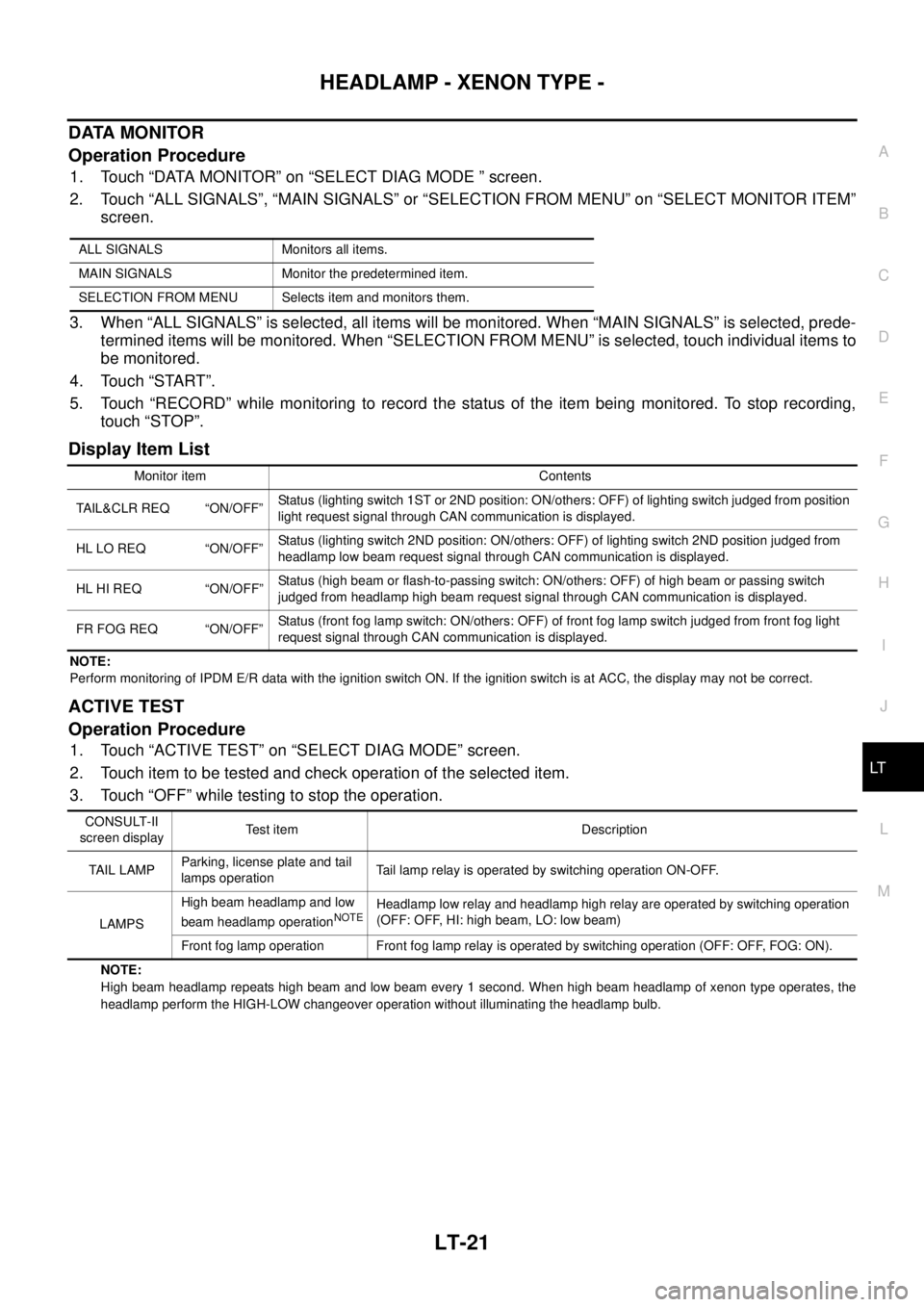
DATA MONITOR
Operation Procedure
1. Touch “DATA MONITOR” on “SELECT DIAG MODE ” screen.
2. Touch “ALL SIGNALS”, “MAIN SIGNALS” or “SELECTION FROM MENU” on “SELECT MONITOR ITEM”
screen.
3. When “ALL SIGNALS” is selected, all items will be monitored. When “MAIN SIGNALS” is selected, prede-
termined items will be monitored. When “SELECTION FROM MENU” is selected, touch individual items to
be monitored.
4. Touch “START”.
5. Touch “RECORD” while monitoring to record the status of the item being monitored. To stop recording,
touch “STOP”.
Display Item List
NOTE:
Perform monitoring of IPDM E/R data with the ignition switch ON. If the ignition switch is at ACC, the display may not be correct.
ACTIVE TEST
Operation Procedure
1. Touch “ACTIVE TEST” on “SELECT DIAG MODE” screen.
2. Touch item to be tested and check operation of the selected item.
3. Touch “OFF” while testing to stop the operation.
NOTE:
High beam headlamp repeats high beam and low beam every 1 second. When high beam headlamp of xenon type operates, the
headlamp perform the HIGH-LOW changeover operation without illuminating the headlamp bulb. ALL SIGNALS Monitors all items.
MAIN SIGNALS Monitor the predetermined item.
SELECTION FROM MENU Selects item and monitors them.
Monitor item Contents
TAIL&CLR REQ “ON/OFF”Status (lighting switch 1ST or 2ND position: ON/others: OFF) of lighting switch judged from position
light request signal through CAN communication is displayed.
HL LO REQ “ON/OFF”Status (lighting switch 2ND position: ON/others: OFF) of lighting switch 2ND position judged from
headlamp low beam request signal through CAN communication is displayed.
HL HI REQ “ON/OFF”Status (high beam or flash-to-passing switch: ON/others: OFF) of high beam or passing switch
judged from headlamp high beam request signal through CAN communication is displayed.
FR FOG REQ “ON/OFF”Status (front fog lamp switch: ON/others: OFF) of front fog lamp switch judged from front fog light
request signal through CAN communication is displayed.
CONSULT-II
screen displayTest item Description
TAIL LAMPParking, license plate and tail
lamps operationTail lamp relay is operated by switching operation ON-OFF.
LAMPSHigh beam headlamp and low
beam headlamp operation
NOTEHeadlamp low relay and headlamp high relay are operated by switching operation
(OFF: OFF, HI: high beam, LO: low beam)
Front fog lamp operation Front fog lamp relay is operated by switching operation (OFF: OFF, FOG: ON).
Page 2710 of 3502
LT-22
HEADLAMP - XENON TYPE -
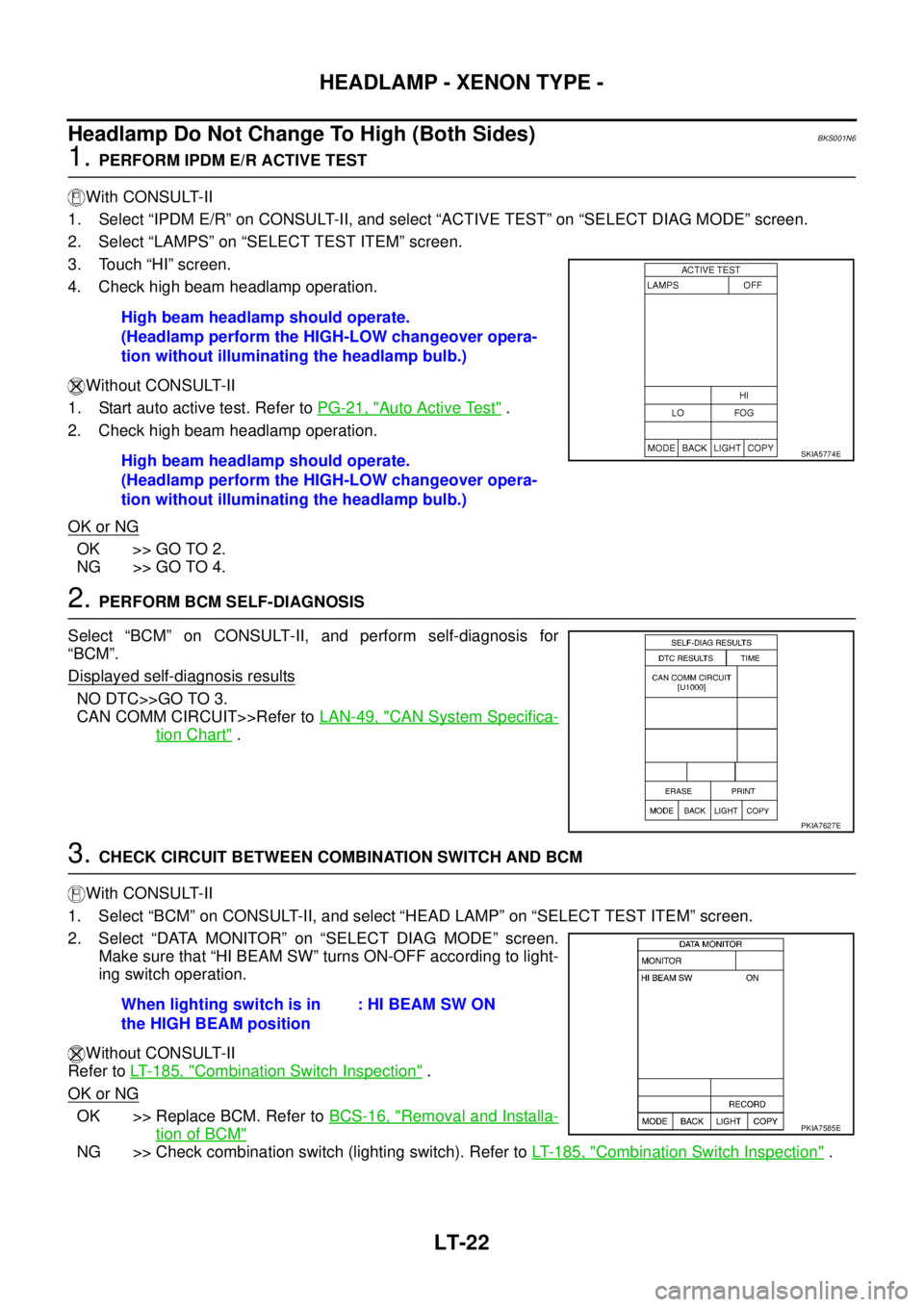
Headlamp Do Not Change To High (Both Sides)BKS001N6
1. PERFORM IPDM E/R ACTIVE TEST
With CONSULT-II
1. Select “IPDM E/R” on CONSULT-II, and select “ACTIVE TEST” on “SELECT DIAG MODE” screen.
2. Select “LAMPS” on “SELECT TEST ITEM” screen.
3. Touch “HI” screen.
4. Check high beam headlamp operation.
Without CONSULT-II
1. Start auto active test. Refer to PG-21, "
Auto Active Test" .
2. Check high beam headlamp operation.
OK or NG
OK >> GO TO 2.
NG >> GO TO 4.
2. PERFORM BCM SELF-DIAGNOSIS
Select “BCM” on CONSULT-II, and perform self-diagnosis for
“BCM”.
Displayed self
-diagnosis results
NO DTC>>GO TO 3.
CAN COMM CIRCUIT>>Refer to LAN-49, "
CAN System Specifica-
tion Chart" .
3. CHECK CIRCUIT BETWEEN COMBINATION SWITCH AND BCM
With CONSULT-II
1. Select “BCM” on CONSULT-II, and select “HEAD LAMP” on “SELECT TEST ITEM” screen.
2. Select “DATA MONITOR” on “SELECT DIAG MODE” screen.
Make sure that “HI BEAM SW” turns ON-OFF according to light-
ing switch operation.
Without CONSULT-II
Refer to LT- 1 8 5 , "
Combination Switch Inspection" .
OK or NG
OK >> Replace BCM. Refer to BCS-16, "Removal and Installa-
tion of BCM"
NG >> Check combination switch (lighting switch). Refer to LT- 1 8 5 , "Combination Switch Inspection" . High beam headlamp should operate.
(Headlamp perform the HIGH-LOW changeover opera-
tion without illuminating the headlamp bulb.)
High beam headlamp should operate.
(Headlamp perform the HIGH-LOW changeover opera-
tion without illuminating the headlamp bulb.)
SKIA5774E
PKIA7627E
When lighting switch is in
the HIGH BEAM position: HI BEAM SW ON
PKIA7585E
Page 2712 of 3502
LT-24
HEADLAMP - XENON TYPE -
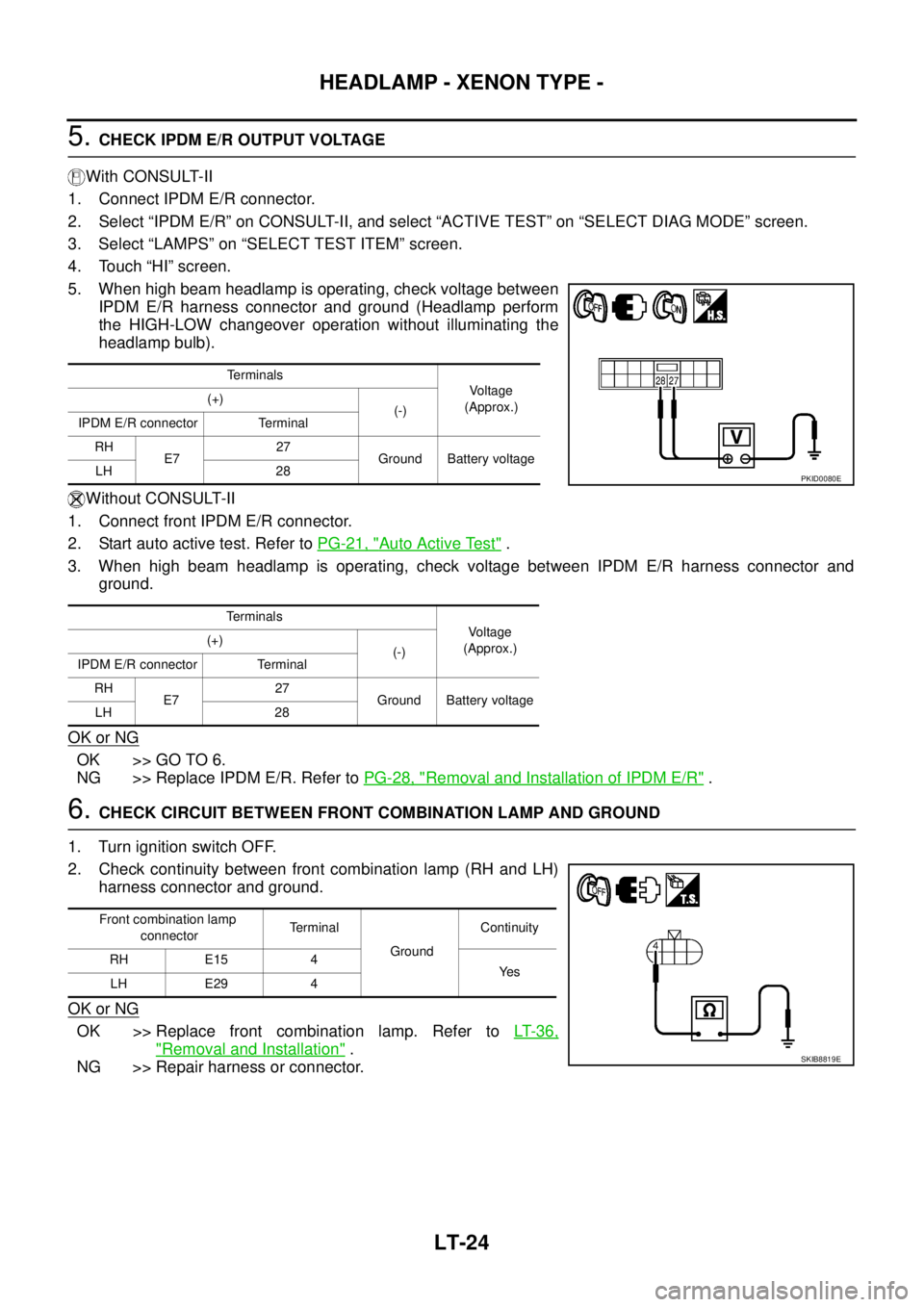
5. CHECK IPDM E/R OUTPUT VOLTAGE
With CONSULT-II
1. Connect IPDM E/R connector.
2. Select “IPDM E/R” on CONSULT-II, and select “ACTIVE TEST” on “SELECT DIAG MODE” screen.
3. Select “LAMPS” on “SELECT TEST ITEM” screen.
4. Touch “HI” screen.
5. When high beam headlamp is operating, check voltage between
IPDM E/R harness connector and ground (Headlamp perform
the HIGH-LOW changeover operation without illuminating the
headlamp bulb).
Without CONSULT-II
1. Connect front IPDM E/R connector.
2. Start auto active test. Refer to PG-21, "
Auto Active Test" .
3. When high beam headlamp is operating, check voltage between IPDM E/R harness connector and
ground.
OK or NG
OK >> GO TO 6.
NG >> Replace IPDM E/R. Refer to PG-28, "
Removal and Installation of IPDM E/R" .
6. CHECK CIRCUIT BETWEEN FRONT COMBINATION LAMP AND GROUND
1. Turn ignition switch OFF.
2. Check continuity between front combination lamp (RH and LH)
harness connector and ground.
OK or NG
OK >> Replace front combination lamp. Refer to LT- 3 6 ,
"Removal and Installation" .
NG >> Repair harness or connector.
Te r m i n a l s
Voltage
(Approx.) (+)
(-)
IPDM E/R connector Terminal
RH
E727
Ground Battery voltage
LH 28
Te r m i n a l s
Voltage
(Approx.) (+)
(-)
IPDM E/R connector Terminal
RH
E727
Ground Battery voltage
LH 28
PKID0080E
Front combination lamp
connectorTerminal
GroundContinuity
RH E15 4
Ye s
LH E29 4
SKIB8819E
Page 2713 of 3502
HEADLAMP - XENON TYPE -
LT-25
C
D
E
F
G
H
I
J
L
MA
B
LT
Headlamp Does Not Change To High (One Side)BKS001N7
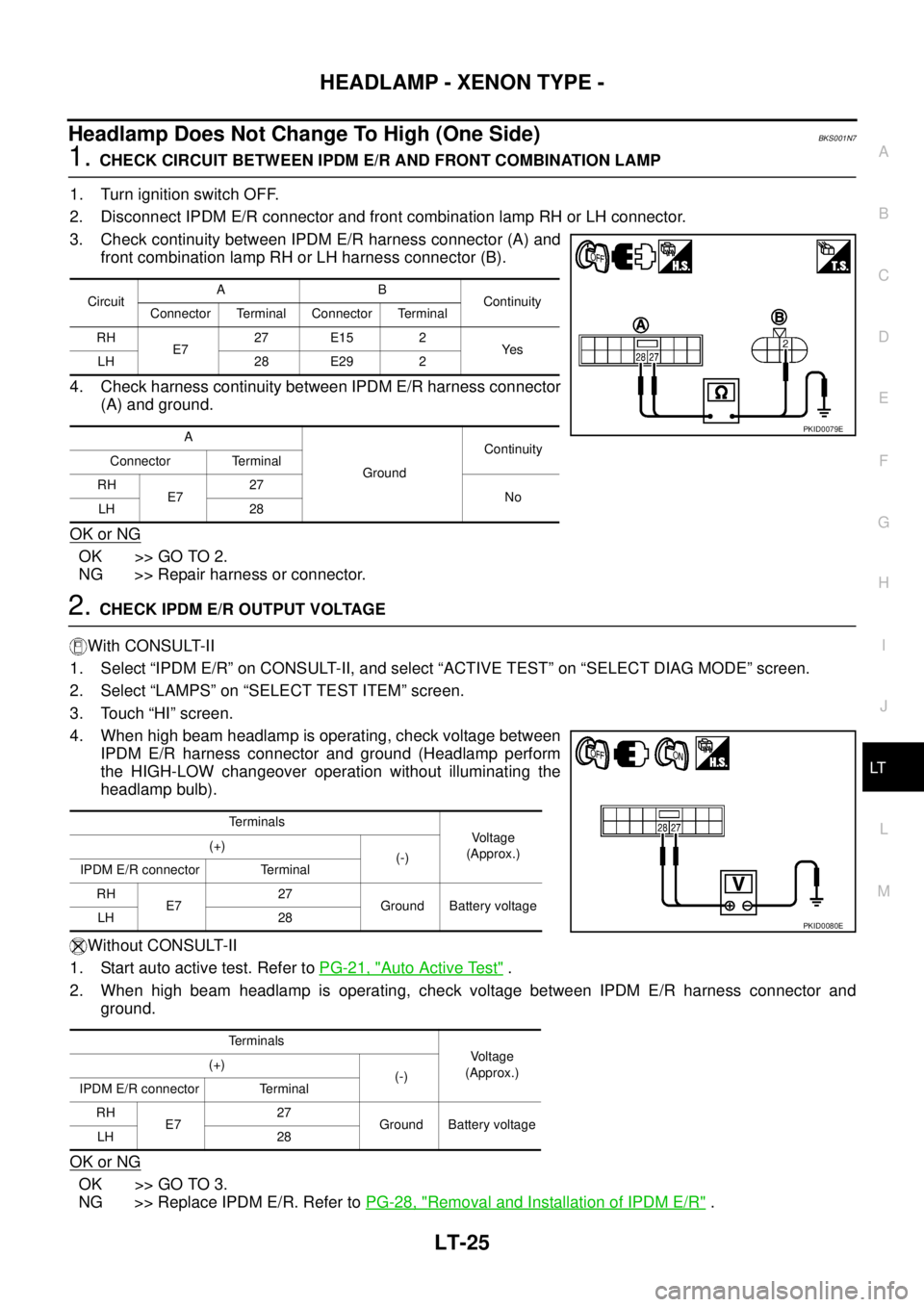
1. CHECK CIRCUIT BETWEEN IPDM E/R AND FRONT COMBINATION LAMP
1. Turn ignition switch OFF.
2. Disconnect IPDM E/R connector and front combination lamp RH or LH connector.
3. Check continuity between IPDM E/R harness connector (A) and
front combination lamp RH or LH harness connector (B).
4. Check harness continuity between IPDM E/R harness connector
(A) and ground.
OK or NG
OK >> GO TO 2.
NG >> Repair harness or connector.
2. CHECK IPDM E/R OUTPUT VOLTAGE
With CONSULT-II
1. Select “IPDM E/R” on CONSULT-II, and select “ACTIVE TEST” on “SELECT DIAG MODE” screen.
2. Select “LAMPS” on “SELECT TEST ITEM” screen.
3. Touch “HI” screen.
4. When high beam headlamp is operating, check voltage between
IPDM E/R harness connector and ground (Headlamp perform
the HIGH-LOW changeover operation without illuminating the
headlamp bulb).
Without CONSULT-II
1. Start auto active test. Refer to PG-21, "
Auto Active Test" .
2. When high beam headlamp is operating, check voltage between IPDM E/R harness connector and
ground.
OK or NG
OK >> GO TO 3.
NG >> Replace IPDM E/R. Refer to PG-28, "
Removal and Installation of IPDM E/R" .
CircuitAB
Continuity
Connector Terminal Connector Terminal
RH
E727 E15 2
Ye s
LH 28 E29 2
A
GroundContinuity
Connector Terminal
RH
E727
No
LH 28
PKID0079E
Terminals
Voltage
(Approx.) (+)
(-)
IPDM E/R connector Terminal
RH
E727
Ground Battery voltage
LH 28
Terminals
Voltage
(Approx.) (+)
(-)
IPDM E/R connector Terminal
RH
E727
Ground Battery voltage
LH 28
PKID0080E
Page 2715 of 3502
HEADLAMP - XENON TYPE -
LT-27
C
D
E
F
G
H
I
J
L
MA
B
LT
Headlamp Do Not Illuminate (Both Sides)BKS001N9
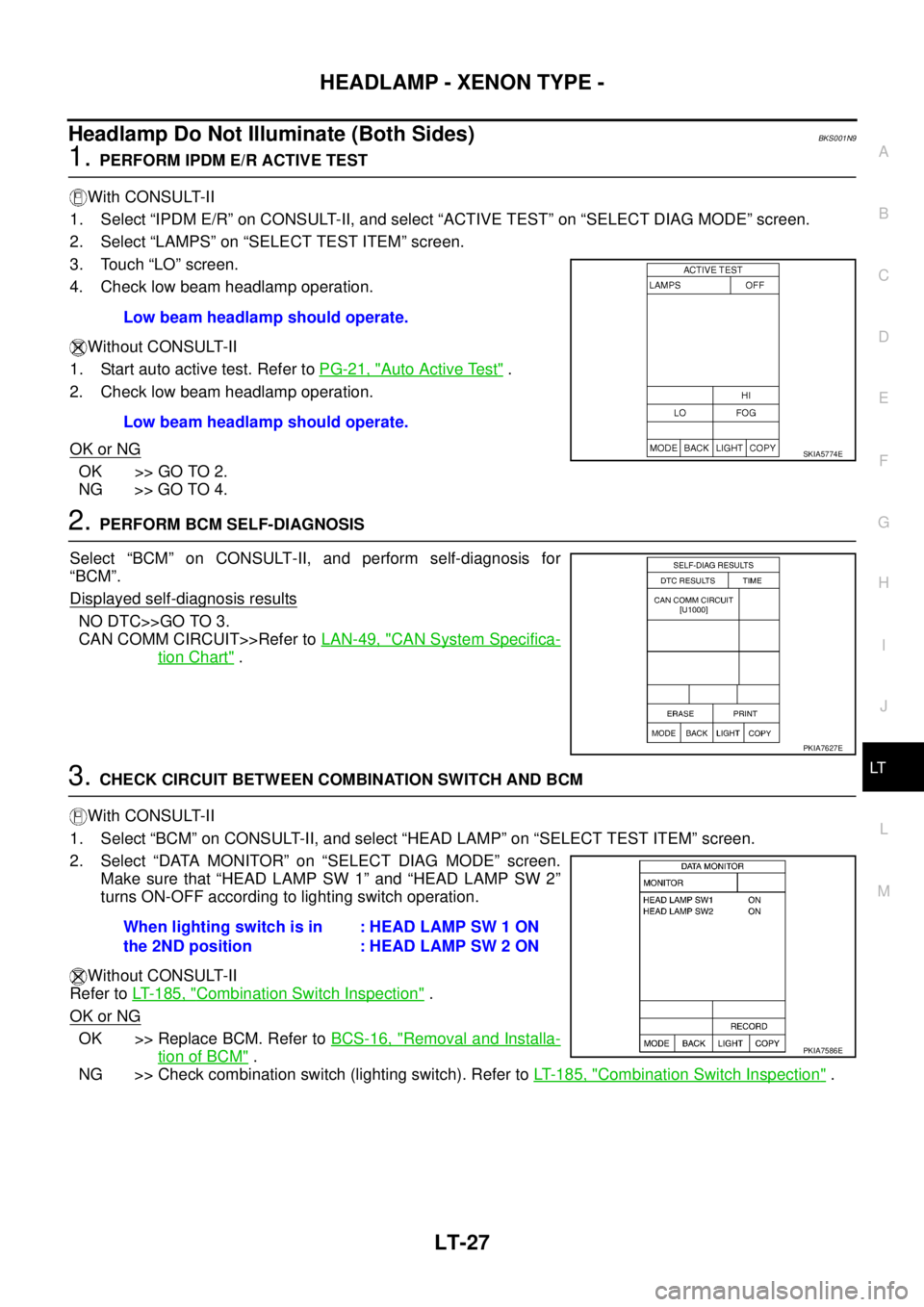
1. PERFORM IPDM E/R ACTIVE TEST
With CONSULT-II
1. Select “IPDM E/R” on CONSULT-II, and select “ACTIVE TEST” on “SELECT DIAG MODE” screen.
2. Select “LAMPS” on “SELECT TEST ITEM” screen.
3. Touch “LO” screen.
4. Check low beam headlamp operation.
Without CONSULT-II
1. Start auto active test. Refer to PG-21, "
Auto Active Test" .
2. Check low beam headlamp operation.
OK or NG
OK >> GO TO 2.
NG >> GO TO 4.
2. PERFORM BCM SELF-DIAGNOSIS
Select “BCM” on CONSULT-II, and perform self-diagnosis for
“BCM”.
Displayed self
-diagnosis results
NO DTC>>GO TO 3.
CAN COMM CIRCUIT>>Refer to LAN-49, "
CAN System Specifica-
tion Chart" .
3. CHECK CIRCUIT BETWEEN COMBINATION SWITCH AND BCM
With CONSULT-II
1. Select “BCM” on CONSULT-II, and select “HEAD LAMP” on “SELECT TEST ITEM” screen.
2. Select “DATA MONITOR” on “SELECT DIAG MODE” screen.
Make sure that “HEAD LAMP SW 1” and “HEAD LAMP SW 2”
turns ON-OFF according to lighting switch operation.
Without CONSULT-II
Refer to LT- 1 8 5 , "
Combination Switch Inspection" .
OK or NG
OK >> Replace BCM. Refer to BCS-16, "Removal and Installa-
tion of BCM" .
NG >> Check combination switch (lighting switch). Refer to LT- 1 8 5 , "
Combination Switch Inspection" . Low beam headlamp should operate.
Low beam headlamp should operate.
SKIA5774E
PKIA7627E
When lighting switch is in
the 2ND position: HEAD LAMP SW 1 ON
: HEAD LAMP SW 2 ON
PKIA7586E
Page 2716 of 3502
LT-28
HEADLAMP - XENON TYPE -
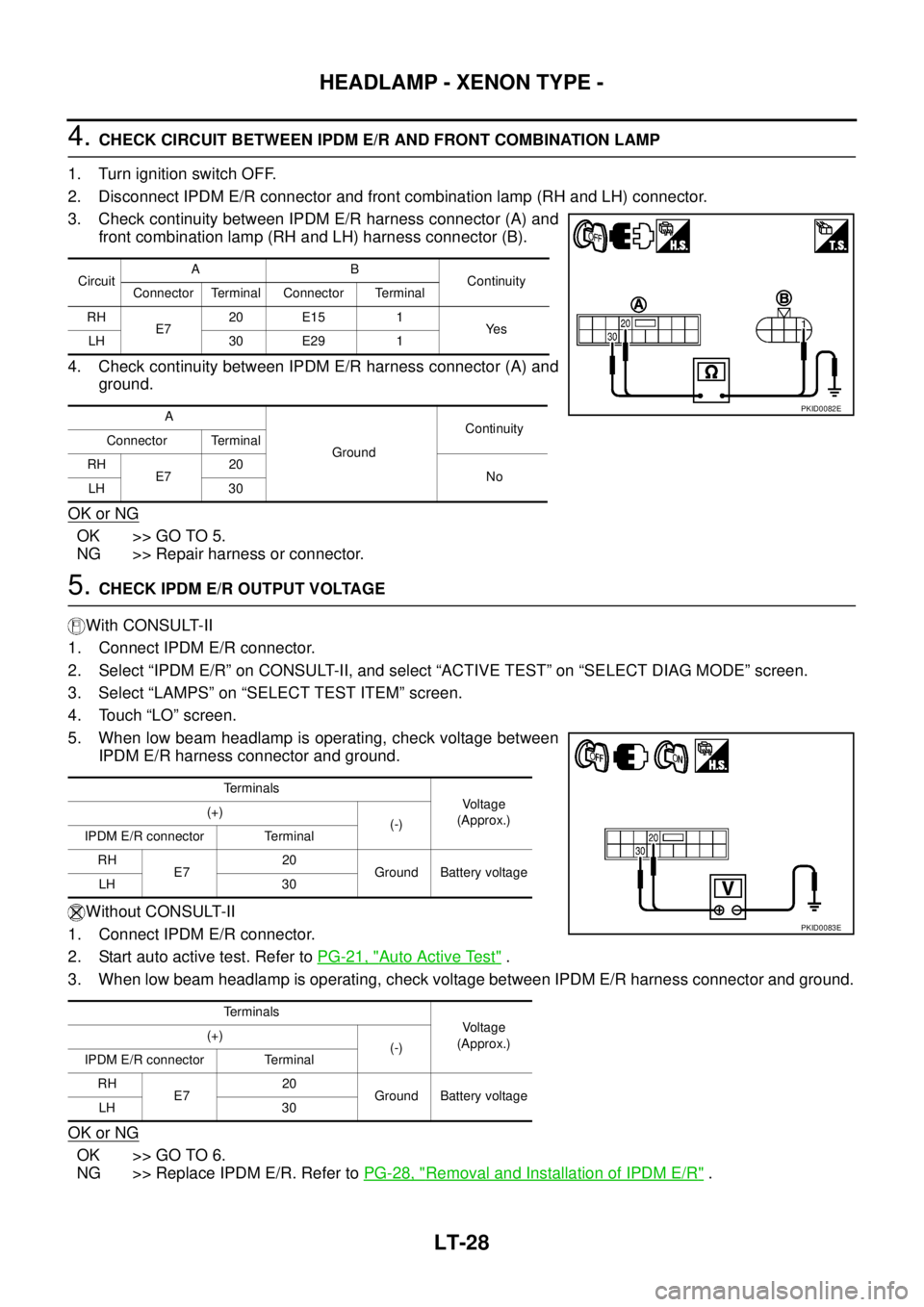
4. CHECK CIRCUIT BETWEEN IPDM E/R AND FRONT COMBINATION LAMP
1. Turn ignition switch OFF.
2. Disconnect IPDM E/R connector and front combination lamp (RH and LH) connector.
3. Check continuity between IPDM E/R harness connector (A) and
front combination lamp (RH and LH) harness connector (B).
4. Check continuity between IPDM E/R harness connector (A) and
ground.
OK or NG
OK >> GO TO 5.
NG >> Repair harness or connector.
5. CHECK IPDM E/R OUTPUT VOLTAGE
With CONSULT-II
1. Connect IPDM E/R connector.
2. Select “IPDM E/R” on CONSULT-II, and select “ACTIVE TEST” on “SELECT DIAG MODE” screen.
3. Select “LAMPS” on “SELECT TEST ITEM” screen.
4. Touch “LO” screen.
5. When low beam headlamp is operating, check voltage between
IPDM E/R harness connector and ground.
Without CONSULT-II
1. Connect IPDM E/R connector.
2. Start auto active test. Refer to PG-21, "
Auto Active Test" .
3. When low beam headlamp is operating, check voltage between IPDM E/R harness connector and ground.
OK or NG
OK >> GO TO 6.
NG >> Replace IPDM E/R. Refer to PG-28, "
Removal and Installation of IPDM E/R" .
CircuitAB
Continuity
Connector Terminal Connector Terminal
RH
E720 E15 1
Ye s
LH 30 E29 1
A
GroundContinuity
Connector Terminal
RH
E720
No
LH 30
PKID0082E
Terminals
Voltage
(Approx.) (+)
(-)
IPDM E/R connector Terminal
RH
E720
Ground Battery voltage
LH 30
Terminals
Voltage
(Approx.) (+)
(-)
IPDM E/R connector Terminal
RH
E720
Ground Battery voltage
LH 30
PKID0083E
Page 2718 of 3502
LT-30
HEADLAMP - XENON TYPE -
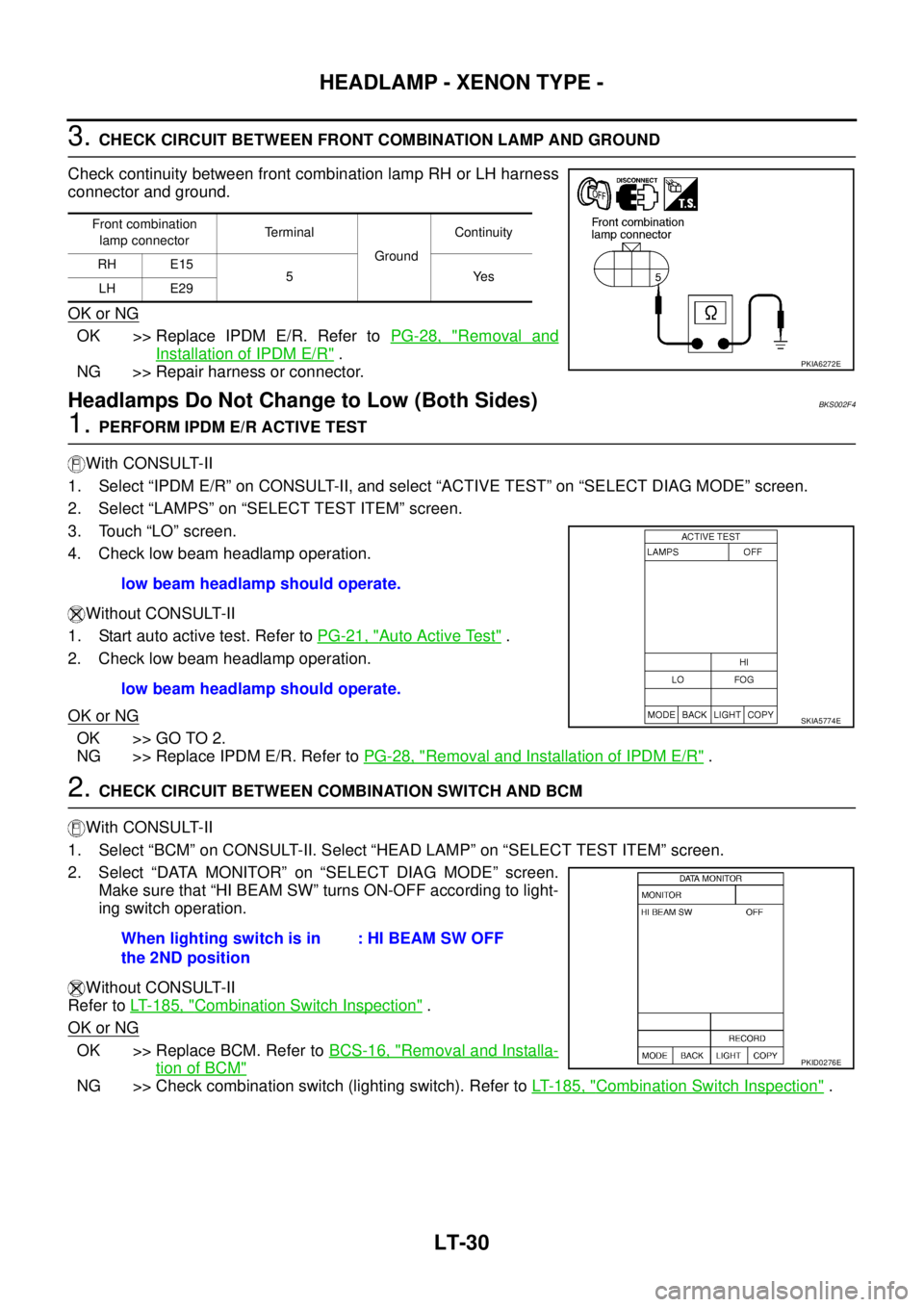
3. CHECK CIRCUIT BETWEEN FRONT COMBINATION LAMP AND GROUND
Check continuity between front combination lamp RH or LH harness
connector and ground.
OK or NG
OK >> Replace IPDM E/R. Refer to PG-28, "Removal and
Installation of IPDM E/R" .
NG >> Repair harness or connector.
Headlamps Do Not Change to Low (Both Sides)BKS002F4
1. PERFORM IPDM E/R ACTIVE TEST
With CONSULT-II
1. Select “IPDM E/R” on CONSULT-II, and select “ACTIVE TEST” on “SELECT DIAG MODE” screen.
2. Select “LAMPS” on “SELECT TEST ITEM” screen.
3. Touch “LO” screen.
4. Check low beam headlamp operation.
Without CONSULT-II
1. Start auto active test. Refer to PG-21, "
Auto Active Test" .
2. Check low beam headlamp operation.
OK or NG
OK >> GO TO 2.
NG >> Replace IPDM E/R. Refer to PG-28, "
Removal and Installation of IPDM E/R" .
2. CHECK CIRCUIT BETWEEN COMBINATION SWITCH AND BCM
With CONSULT-II
1. Select “BCM” on CONSULT-II. Select “HEAD LAMP” on “SELECT TEST ITEM” screen.
2. Select “DATA MONITOR” on “SELECT DIAG MODE” screen.
Make sure that “HI BEAM SW” turns ON-OFF according to light-
ing switch operation.
Without CONSULT-II
Refer to LT- 1 8 5 , "
Combination Switch Inspection" .
OK or NG
OK >> Replace BCM. Refer to BCS-16, "Removal and Installa-
tion of BCM"
NG >> Check combination switch (lighting switch). Refer to LT- 1 8 5 , "Combination Switch Inspection" .
Front combination
lamp connectorTerminal
Ground Continuity
RH E15
5Yes
LH E29
PKIA6272E
low beam headlamp should operate.
low beam headlamp should operate.
SKIA5774E
When lighting switch is in
the 2ND position: HI BEAM SW OFF
PKID0276E
Page 2721 of 3502
HEADLAMP - XENON TYPE -
LT-33
C
D
E
F
G
H
I
J
L
MA
B
LT
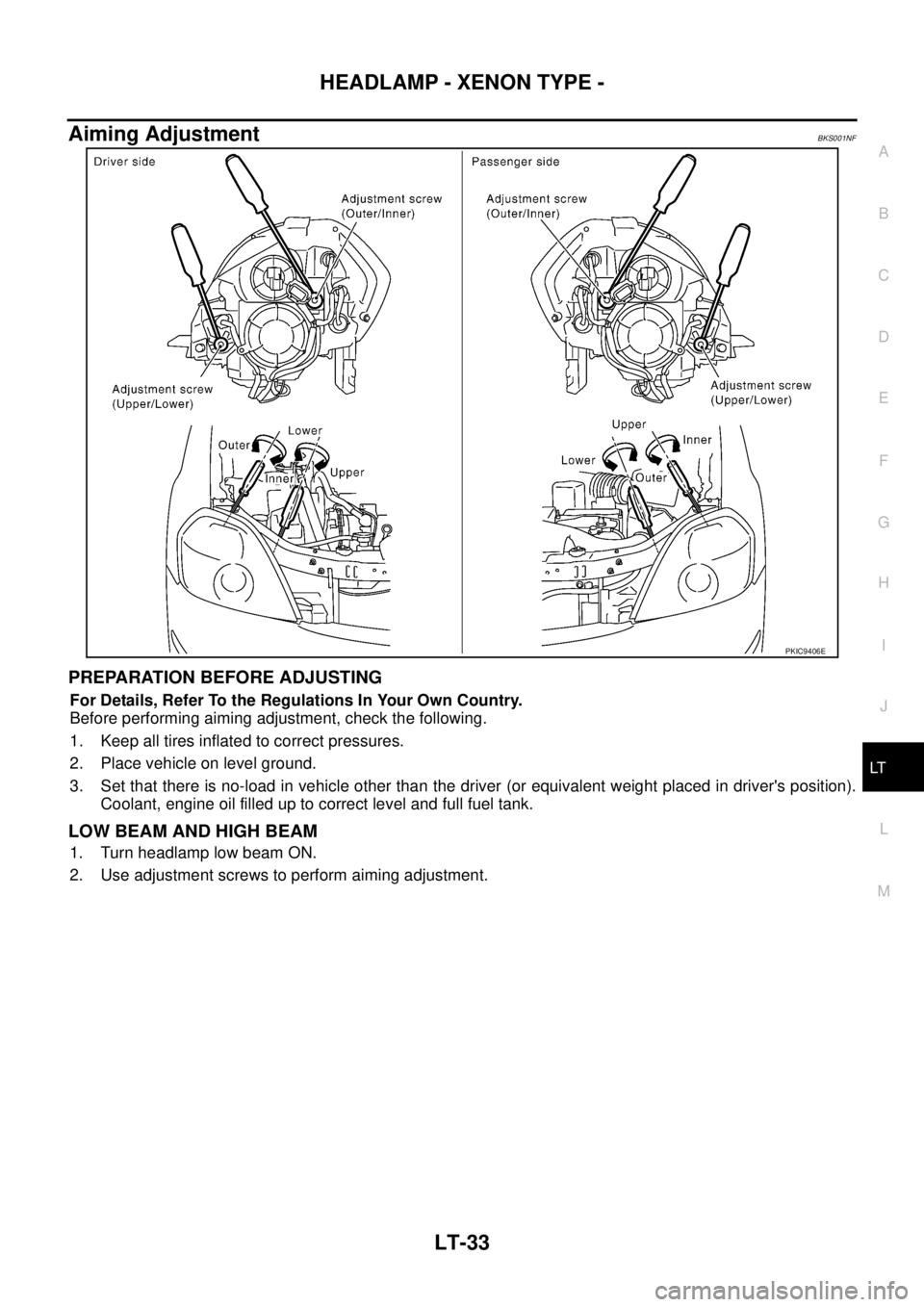
Aiming AdjustmentBKS001NF
PREPARATION BEFORE ADJUSTING
For Details, Refer To the Regulations In Your Own Country.
Before performing aiming adjustment, check the following.
1. Keep all tires inflated to correct pressures.
2. Place vehicle on level ground.
3. Set that there is no-load in vehicle other than the driver (or equivalent weight placed in driver's position).
Coolant, engine oil filled up to correct level and full fuel tank.
LOW BEAM AND HIGH BEAM
1. Turn headlamp low beam ON.
2. Use adjustment screws to perform aiming adjustment.
PKIC9406E
Page 2723 of 3502
HEADLAMP - XENON TYPE -
LT-35
C
D
E
F
G
H
I
J
L
MA
B
LT
Bulb ReplacementBKS001NG
HEADLAMP HIGH/LOW BEAM
1. Turn lighting switch OFF.
2. Disconnect negative battery cable or remove circuit fuse.
3. Remove washer tank inlet when replacing bulb RH. Refer to WW-38, "
Removal and Installation of Washer
Ta n k" .
Remove air cleaner case when replacing bulb LH. Refer to EM-17, "
Removal and Installation" (models
with QR engine), or EM-131, "
Removal and Installation" (models with VQ engine).
4. Turn plastic cap counterclockwise and unlock it.
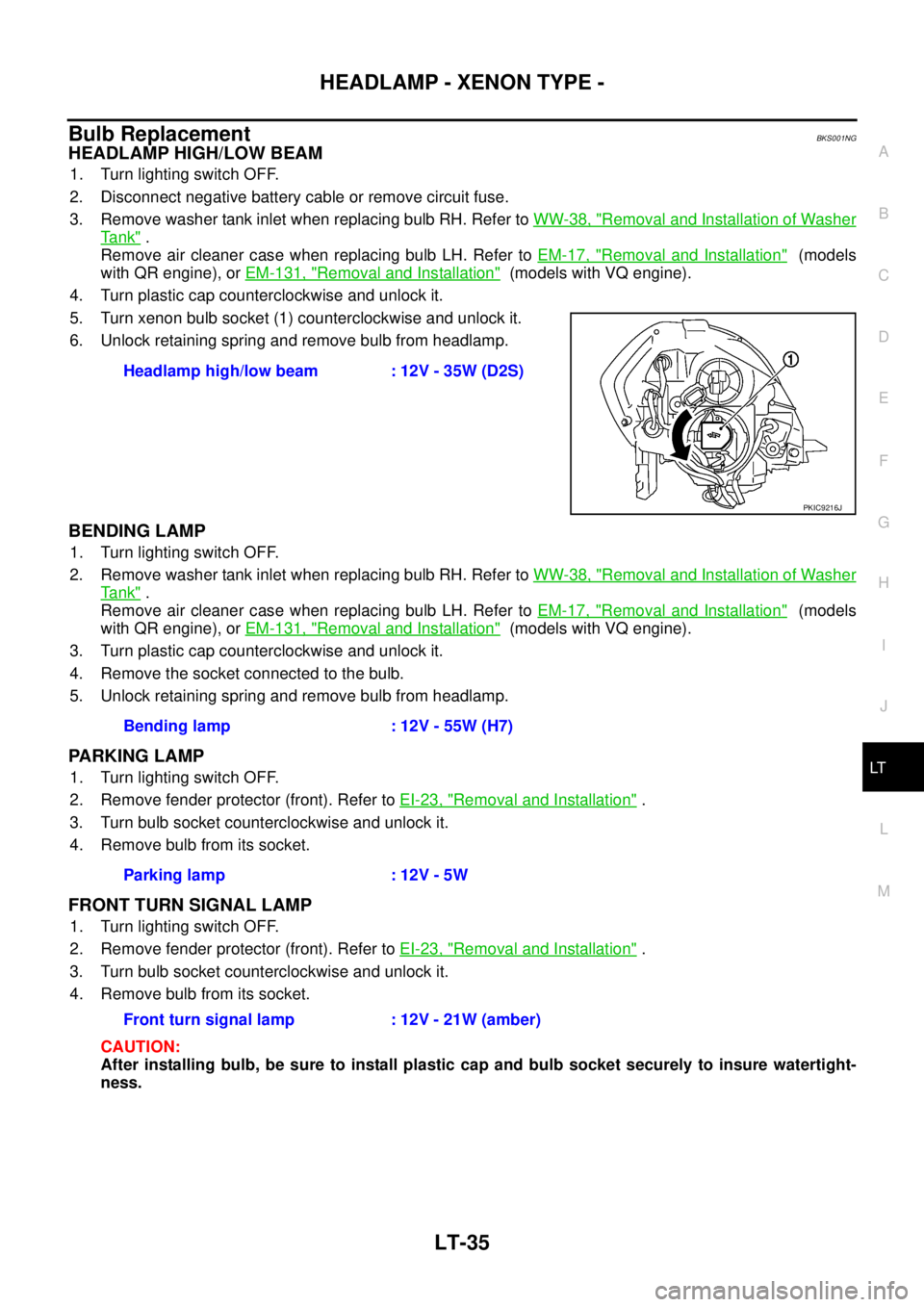
5. Turn xenon bulb socket (1) counterclockwise and unlock it.
6. Unlock retaining spring and remove bulb from headlamp.
BENDING LAMP
1. Turn lighting switch OFF.
2. Remove washer tank inlet when replacing bulb RH. Refer to WW-38, "
Removal and Installation of Washer
Ta n k" .
Remove air cleaner case when replacing bulb LH. Refer to EM-17, "
Removal and Installation" (models
with QR engine), or EM-131, "
Removal and Installation" (models with VQ engine).
3. Turn plastic cap counterclockwise and unlock it.
4. Remove the socket connected to the bulb.
5. Unlock retaining spring and remove bulb from headlamp.
PARKING LAMP
1. Turn lighting switch OFF.
2. Remove fender protector (front). Refer to EI-23, "
Removal and Installation" .
3. Turn bulb socket counterclockwise and unlock it.
4. Remove bulb from its socket.
FRONT TURN SIGNAL LAMP
1. Turn lighting switch OFF.
2. Remove fender protector (front). Refer to EI-23, "
Removal and Installation" .
3. Turn bulb socket counterclockwise and unlock it.
4. Remove bulb from its socket.
CAUTION:
After installing bulb, be sure to install plastic cap and bulb socket securely to insure watertight-
ness.Headlamp high/low beam : 12V - 35W (D2S)
PKIC9216J
Bending lamp : 12V - 55W (H7)
Parking lamp : 12V - 5W
Front turn signal lamp : 12V - 21W (amber)