service indicator NISSAN TEANA 2003 Owner's Manual
[x] Cancel search | Manufacturer: NISSAN, Model Year: 2003, Model line: TEANA, Model: NISSAN TEANA 2003Pages: 3502, PDF Size: 74.56 MB
Page 3219 of 3502

SC-1
STARTING & CHARGING SYSTEM
K ELECTRICAL
CONTENTS
C
D
E
F
G
H
I
J
L
M
SECTION SC
A
B
SC
STARTING & CHARGING SYSTEM
PRECAUTIONS .......................................................... 2
Precautions for Supplemental Restraint System
(SRS) “AIR BAG” and “SEAT BELT PRE-TEN-
SIONER” .................................................................. 2
PREPARATION ........................................................... 3
Commercial Service Tools ........................................ 3
BATTERY .................................................................... 4
How to Handle Battery ............................................. 4
METHODS OF PREVENTING OVER-DIS-
CHARGE ............................................................... 4
CHECKING ELECTROLYTE LEVEL .................... 5
SPECIFIC GRAVITY CHECK ............................... 5
Battery Test and Charging Chart .............................. 7
CHART I ................................................................ 7
CHART II ............................................................... 8
A: SLOW CHARGE ............................................... 9
B: STANDARD CHARGE .................................... 10
C: QUICK CHARGE ............................................ 12
Removal and Installation ........................................ 13
REMOVAL ........................................................... 13
INSTALLATION ................................................... 13
STARTING SYSTEM ................................................ 14
System Description ................................................ 14
Wiring Diagram — START — ................................. 15
A/T MODELS ...................................................... 15
CVT MODELS ..................................................... 16
Trouble Diagnosis .................................................. 17
Removal and Installation ........................................ 18VQ23DE AND VQ35DE MODELS ...................... 18
REMOVAL ........................................................... 18
INSTALLATION ................................................... 18
QR20DE MODELS .............................................. 19
REMOVAL ........................................................... 19
INSTALLATION ................................................... 19
Disassembly and Assembly .................................... 20
DISASSEMBLY ................................................... 20
INSPECTION ...................................................... 23
ASSEMBLY ......................................................... 26
CHARGING SYSTEM ............................................... 27
System Description ................................................. 27
MALFUNCTION INDICATOR .............................. 27
Wiring Diagram — CHARGE — ............................. 28
Trouble Diagnosis ................................................... 29
WITH IC REGULATOR ........................................ 29
Removal and Installation ........................................ 30
VQ23DE AND VQ35DE MODELS ...................... 30
QR20DE MODELS .............................................. 32
Disassembly and Assembly .................................... 33
DISASSEMBLY ................................................... 34
INSPECTION ...................................................... 35
ASSEMBLY ......................................................... 36
SERVICE DATA AND SPECIFICATIONS (SDS) ...... 38
Battery .................................................................... 38
Starter ..................................................................... 38
Alternator ................................................................ 38
Page 3257 of 3502

SE-1
SEAT
I BODY
CONTENTS
C
D
E
F
G
H
J
K
L
M
SECTION SE
A
B
SE
SEAT
INDEX FOR DTC ........................................................ 3
DTC No. Index (AUTO DRIVE POS.) ....................... 3
PRECAUTIONS .......................................................... 4
Precautions for Supplemental Restraint System
(SRS) “AIR BAG” and “SEAT BELT PRE-TEN-
SIONER” .................................................................. 4
Service Notice .......................................................... 4
Precautions .............................................................. 4
PREPARATION ........................................................... 5
Commercial Service Tools ........................................ 5
SQUEAK AND RATTLE TROUBLE DIAGNOSES ..... 6
Work Flow ................................................................ 6
CUSTOMER INTERVIEW ..................................... 6
DUPLICATE THE NOISE AND TEST DRIVE ....... 7
CHECK RELATED SERVICE BULLETINS ........... 7
LOCATE THE NOISE AND IDENTIFY THE
ROOT CAUSE ...................................................... 7
REPAIR THE CAUSE ........................................... 7
CONFIRM THE REPAIR ....................................... 8
Generic Squeak and Rattle Troubleshooting ........... 8
INSTRUMENT PANEL .......................................... 8
CENTER CONSOLE ............................................. 8
DOORS ................................................................. 8
TRUNK .................................................................. 9
SUNROOF/HEADLINING ..................................... 9
SEATS ................................................................... 9
UNDERHOOD ....................................................... 9
Diagnostic Worksheet ............................................ 10
AUTOMATIC DRIVE POSITIONER .......................... 12
System Description ................................................ 12
MANUAL OPERATION ....................................... 12
AUTOMATIC OPERATION ................................. 12
MEMORY STORING AND KEYFOB INTER-
LOCK STORING ................................................. 13
MEMORY SWITCH OPERATION ....................... 14
ENTRY OPERATION .......................................... 14
EXITING OPERATION ........................................ 14
KEYFOB INTERLOCK OPERATION .................. 15
FAIL- SAFE MODE ............................................. 15
CANCEL OF FAIL-SAFE MODE ......................... 15Component Parts and Harness Connector Location ... 16
CAN Communication System Description .............. 16
CAN Communication Unit ....................................... 16
Schematic ............................................................... 17
Wiring Diagram — AUT/DP — ............................... 19
Terminals and Reference Values for BCM .............. 28
Terminals and Reference Values for Driver Seat
Control Unit ............................................................. 28
Work Flow ............................................................... 30
Preliminary Check .................................................. 31
SETTING CHANGE FUNCTION ......................... 31
CHECK POWER SUPPLY AND GROUND ......... 31
CONSULT-II Function (AUTO DRIVE POS.) .......... 33
CONSULT-II OPERATION ................................... 33
SELF-DIAGNOSIS RESULTS ............................. 33
DATA MONITOR ................................................. 34
ACTIVE TEST ..................................................... 34
Check CAN Communication System ...................... 35
Symptom Chart ....................................................... 35
Check Sliding Motor Circuit .................................... 36
Check Reclining Motor Circuit ................................ 37
Check Front Lifting Motor Circuit ............................ 39
Check Rear Lifting Motor Circuit ............................. 40
Check Sliding Sensor Circuit .................................. 42
Check Reclining Sensor Circuit .............................. 43
Check Front Lifting Sensor Circuit .......................... 44
Check Rear Lifting Sensor Circuit .......................... 45
Check Front Door Switch (Driver Side) Circuit ....... 46
Check Sliding Switch Circuit ................................... 47
Check Reclining Switch Circuit ............................... 48
Check Front Lifting Switch Circuit ........................... 50
Check Rear Lifting Switch Circuit ........................... 51
Check Power Seat Switch Ground Circuit .............. 52
Check Detention Key Switch (P Range Switch) Cir-
cuit .......................................................................... 53
Check Key Switch Circuit ....................................... 54
Check Seat Memory Switch Circuit ........................ 56
Check Memory Indicator Lamp Circuit ................... 57
POWER SEAT ........................................................... 59
Wiring Diagram — SEAT — ................................... 59
Page 3291 of 3502
AUTOMATIC DRIVE POSITIONER
SE-35
C
D
E
F
G
H
J
K
L
MA
B
SE
Check CAN Communication System BIS0012R
1. CHECK SELF-DIAGNOSTIC RESULT
CAUTION:
If CONSULT-II is used with no connection of CONSULT-II CONVERTER, malfunctions might be
detected in self-diagnosis depending on control unit which carry out CAN communication.
With CONSULT-II
1. Connect CONSULT-II, and turn ignition switch ON.
2. Touch “AUTO DRIVE POS” on “SELECT SYSTEM” screen.
3. Touch “SELF-DIAG RESULTS” on “SELECT DIAG MODE” screen.
4. Check display content in self-diagnostic results.
Displayed U1000?
Ye s > > G O T O LAN-49, "CAN System Specification Chart" .
No >> Inspection END.
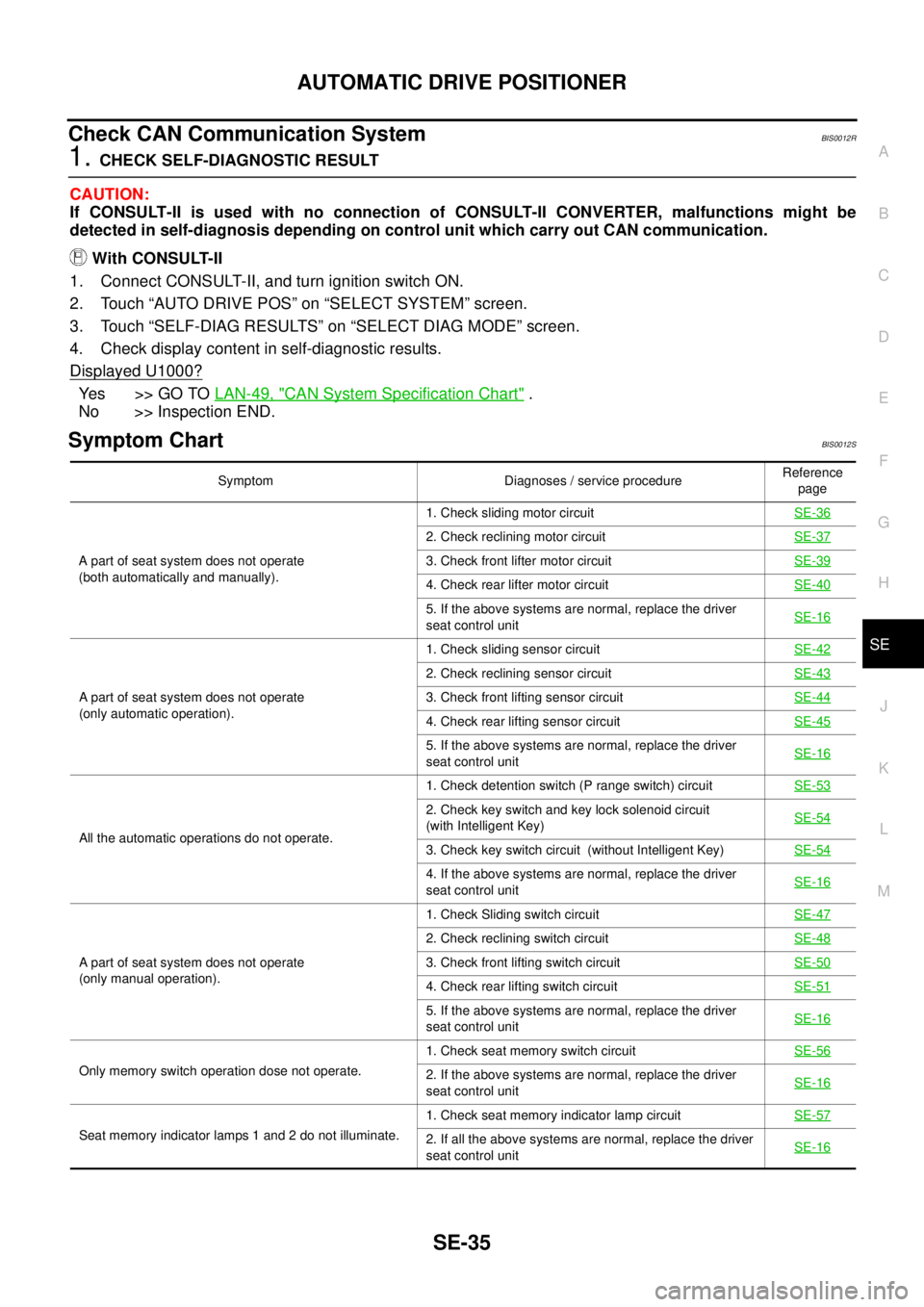
Symptom ChartBIS0012S
Symptom Diagnoses / service procedureReference
page
A part of seat system does not operate
(both automatically and manually).1. Check sliding motor circuit SE-36
2. Check reclining motor circuit SE-37
3. Check front lifter motor circuit SE-39
4. Check rear lifter motor circuit SE-40
5. If the above systems are normal, replace the driver
seat control unitSE-16
A part of seat system does not operate
(only automatic operation).1. Check sliding sensor circuit SE-42
2. Check reclining sensor circuit SE-43
3. Check front lifting sensor circuit SE-44
4. Check rear lifting sensor circuit SE-45
5. If the above systems are normal, replace the driver
seat control unitSE-16
All the automatic operations do not operate.1. Check detention switch (P range switch) circuit SE-53
2. Check key switch and key lock solenoid circuit
(with Intelligent Key)SE-54
3. Check key switch circuit (without Intelligent Key)SE-54
4. If the above systems are normal, replace the driver
seat control unitSE-16
A part of seat system does not operate
(only manual operation).1. Check Sliding switch circuit SE-47
2. Check reclining switch circuit SE-48
3. Check front lifting switch circuit SE-50
4. Check rear lifting switch circuit SE-51
5. If the above systems are normal, replace the driver
seat control unitSE-16
Only memory switch operation dose not operate.1. Check seat memory switch circuit SE-562. If the above systems are normal, replace the driver
seat control unitSE-16
Seat memory indicator lamps 1 and 2 do not illuminate.1. Check seat memory indicator lamp circuitSE-572. If all the above systems are normal, replace the driver
seat control unitSE-16
Page 3435 of 3502
ROAD WHEEL
WT-3
C
D
F
G
H
I
J
K
L
MA
B
WT
ROAD WHEELPFP:40300
InspectionBES0004H
ALUMINUM WHEEL
1. Check tyres for wear and improper inflation.
2. Check wheels for deformation, cracks and other damage. If deformed, remove wheel and check wheel
runout.
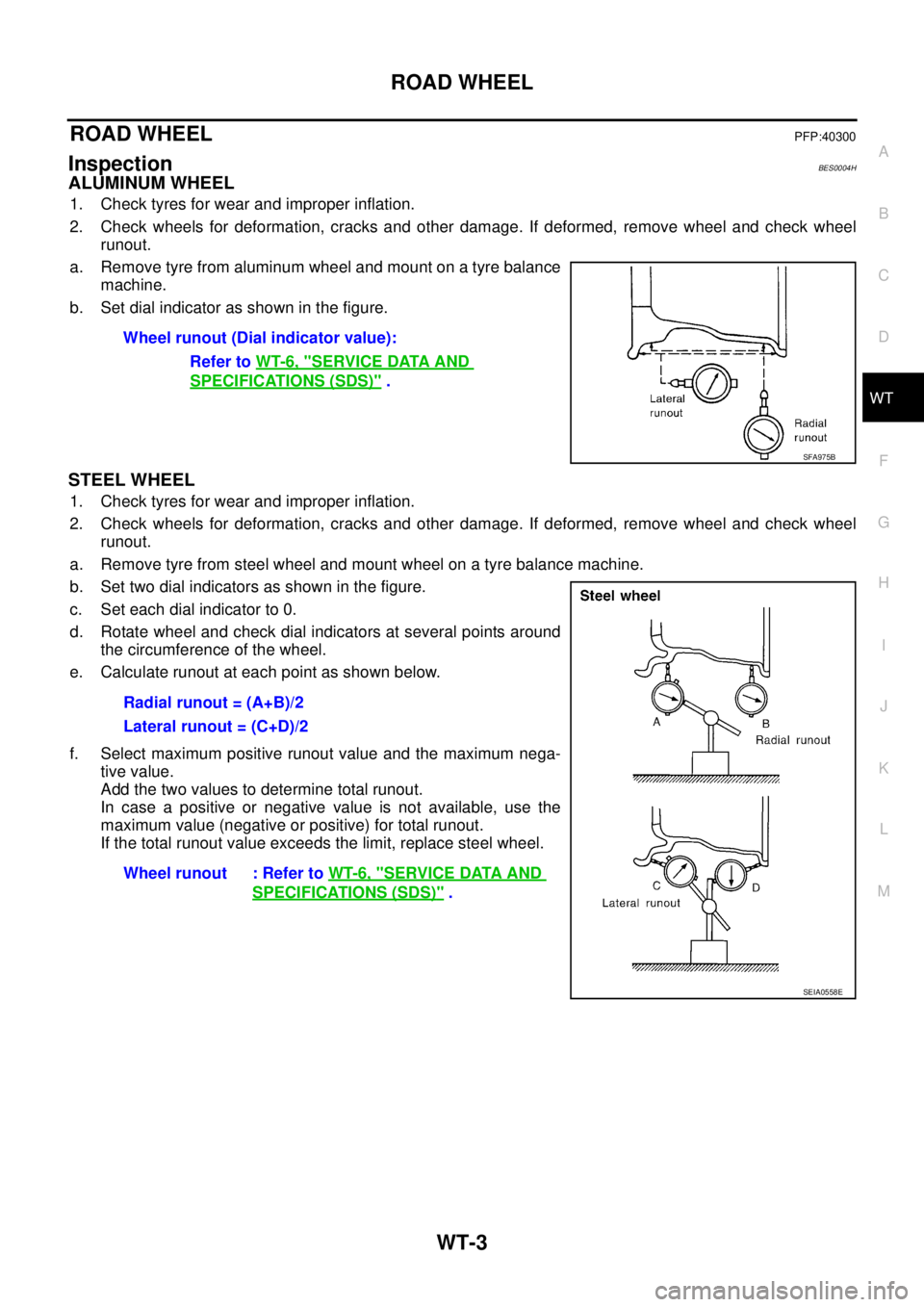
a. Remove tyre from aluminum wheel and mount on a tyre balance
machine.
b. Set dial indicator as shown in the figure.
STEEL WHEEL
1. Check tyres for wear and improper inflation.
2. Check wheels for deformation, cracks and other damage. If deformed, remove wheel and check wheel
runout.
a. Remove tyre from steel wheel and mount wheel on a tyre balance machine.
b. Set two dial indicators as shown in the figure.
c. Set each dial indicator to 0.
d. Rotate wheel and check dial indicators at several points around
the circumference of the wheel.
e. Calculate runout at each point as shown below.
f. Select maximum positive runout value and the maximum nega-
tive value.
Add the two values to determine total runout.
In case a positive or negative value is not available, use the
maximum value (negative or positive) for total runout.
If the total runout value exceeds the limit, replace steel wheel.Wheel runout (Dial indicator value):
Refer to WT-6, "
SERVICE DATA AND
SPECIFICATIONS (SDS)" .
SFA975B
Radial runout = (A+B)/2
Lateral runout = (C+D)/2
Wheel runout : Refer to WT-6, "
SERVICE DATA AND
SPECIFICATIONS (SDS)" .
SEIA0558E