display NISSAN TEANA 2003 Service Manual
[x] Cancel search | Manufacturer: NISSAN, Model Year: 2003, Model line: TEANA, Model: NISSAN TEANA 2003Pages: 3502, PDF Size: 74.56 MB
Page 3490 of 3502

WW-52
HEADLAMP WASHER
CONSULT-II Functions (IPDM E/R)BKS002CJ
CONSULT-II can display each diagnostic item using the diagnostic test mode shown following.
CONSULT-II BASIC OPERATION
Refer to GI-34, "CONSULT-II Start Procedure" .
DATA MONITOR
Operation Procedure
1. Touch “DATA MONITOR” on “SELECT DIAG MODE ” screen.
2. Touch “ALL SIGNALS”, “MAIN SIGNALS” or “SELECTION FROM MENU” on “SELECT MONITOR ITEM”
screen.
3. When “ALL SIGNALS” is selected, all items will be monitored. When “MAIN SIGNALS” is selected, prede-
termined items will be monitored. When “SELECTION FROM MENU” is selected, touch individual items to
be monitored.
4. Touch “START”.
5. Touch “RECORD” while monitoring to record the status of the item being monitored. To stop recording,
touch “STOP”.
Display Item List
NOTE:
Perform monitoring of IPDM E/R data with ignition switch ON. When ignition switch is at ACC, the display may not be correct.
ACTIVE TEST
Operation Procedure
1. Touch “ACTIVE TEST” on “SELECT DIAG MODE” screen.
2. Touch “HEAD LAMP WASHER” on “SELECT TEST ITEM” screen.
3. Touch “ON” screen.
Diagnosis Mode Description
SELF-DIAGNOSTIC RESULTS Refer to PG-19, "
SELF-DIAG RESULTS" .
DATA MONITOR The input/output data of the IPDM E/R is displayed in real time.
CAN DIAG SUPPORT MNTR The result of transmit/receive diagnosis of CAN communication can be read.
ACTIVE TEST IPDM E/R sends a drive signal to electronic components to check their operation.
ALL SIGNALS Monitors all items.
MAIN SIGNALS Monitor the predetermined item.
SELECTION FROM MENU Select items and monitor them.
Monitor item Contents
HL LO REQ “ON/OFF”Status (lighting switch 2ND position: ON/others: OFF) of lighting switch 2ND position judged
from headlamp low beam request signal through CAN communication is displayed.
HL HI REQ “ON/OFF”Status (high beam or flash-to-passing switch: ON/others: OFF) of high beam or passing switch
judged from headlamp high beam request signal through CAN communication is displayed.
HL WASHER REQ “ON/OFF”Status (headlamp washer switch ON position: ON/others: OFF) of headlamp washer switch
judged from headlamp washer request signal through CAN communication is displayed.
CONSULT-II screen display Test item Description
HEAD LAMP WASHER Headlamp washer operation Headlamp washer relay is operated by switching operation ON-OFF.
Page 3491 of 3502
HEADLAMP WASHER
WW-53
C
D
E
F
G
H
I
J
L
MA
B
WW
Headlamp Washer Does Not OperateBKS002ER
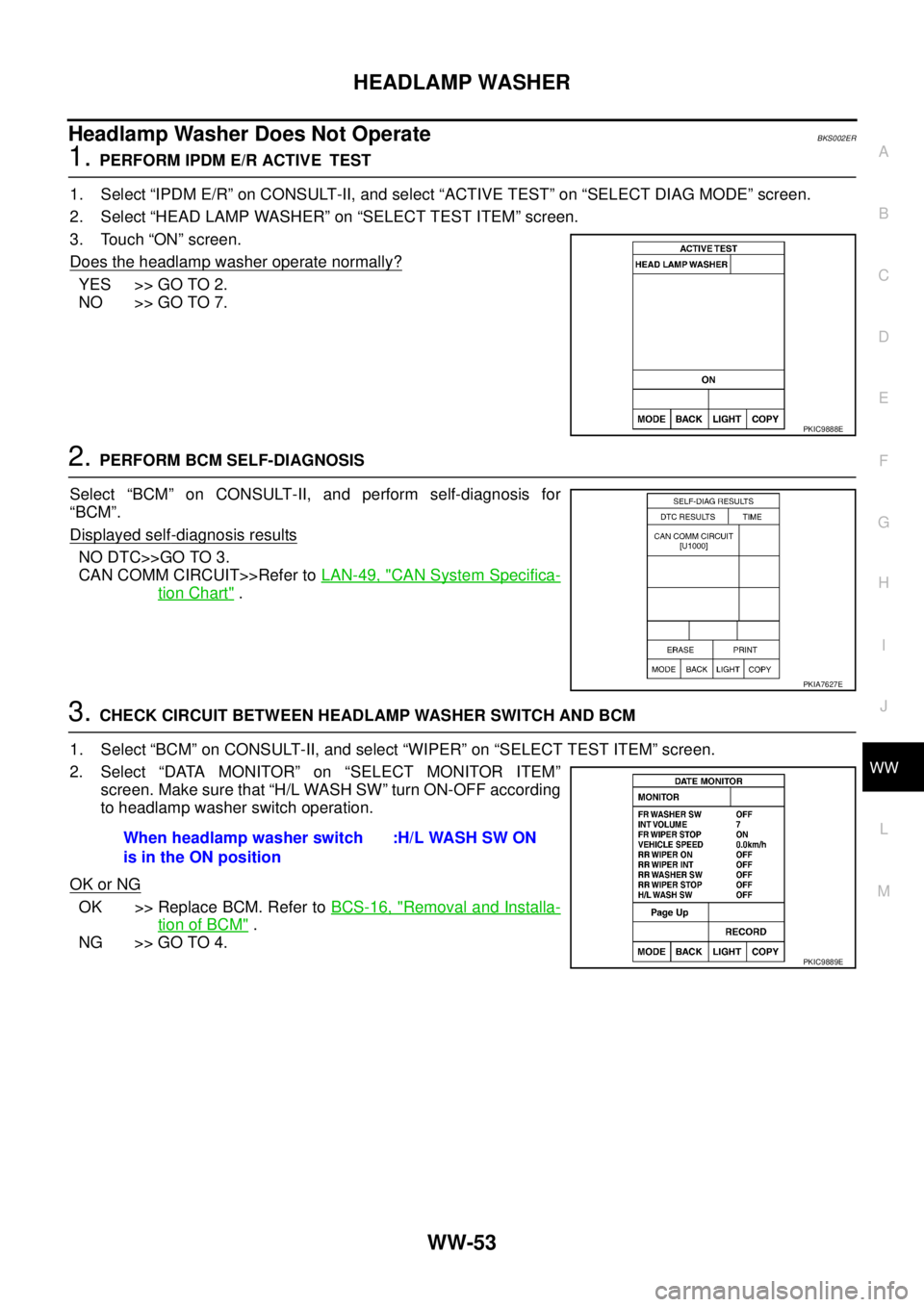
1. PERFORM IPDM E/R ACTIVE TEST
1. Select “IPDM E/R” on CONSULT-II, and select “ACTIVE TEST” on “SELECT DIAG MODE” screen.
2. Select “HEAD LAMP WASHER” on “SELECT TEST ITEM” screen.
3. Touch “ON” screen.
Does the headlamp washer operate normally?
YES >> GO TO 2.
NO >> GO TO 7.
2. PERFORM BCM SELF-DIAGNOSIS
Select “BCM” on CONSULT-II, and perform self-diagnosis for
“BCM”.
Displayed self
-diagnosis results
NO DTC>>GO TO 3.
CAN COMM CIRCUIT>>Refer to LAN-49, "
CAN System Specifica-
tion Chart" .
3. CHECK CIRCUIT BETWEEN HEADLAMP WASHER SWITCH AND BCM
1. Select “BCM” on CONSULT-II, and select “WIPER” on “SELECT TEST ITEM” screen.
2. Select “DATA MONITOR” on “SELECT MONITOR ITEM”
screen. Make sure that “H/L WASH SW” turn ON-OFF according
to headlamp washer switch operation.
OK or NG
OK >> Replace BCM. Refer to BCS-16, "Removal and Installa-
tion of BCM" .
NG >> GO TO 4.
PKIC9888E
PKIA7627E
When headlamp washer switch
is in the ON position:H/L WASH SW ON
PKIC9889E