battery NISSAN TEANA 2003 Service Manual
[x] Cancel search | Manufacturer: NISSAN, Model Year: 2003, Model line: TEANA, Model: NISSAN TEANA 2003Pages: 3502, PDF Size: 74.56 MB
Page 3298 of 3502
SE-42
AUTOMATIC DRIVE POSITIONER
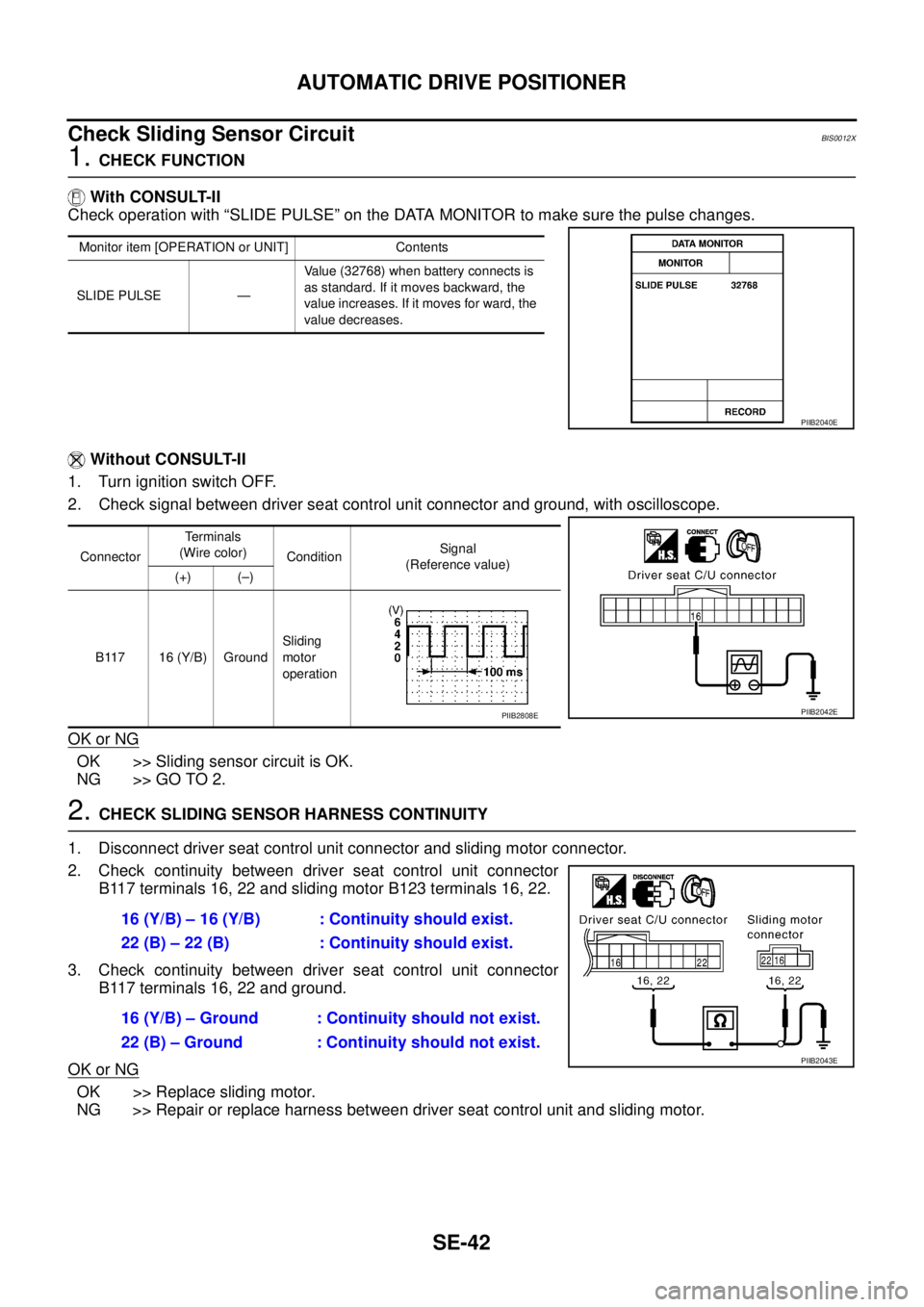
Check Sliding Sensor Circuit BIS0012X
1. CHECK FUNCTION
With CONSULT-II
Check operation with “SLIDE PULSE” on the DATA MONITOR to make sure the pulse changes.
Without CONSULT-II
1. Turn ignition switch OFF.
2. Check signal between driver seat control unit connector and ground, with oscilloscope.
OK or NG
OK >> Sliding sensor circuit is OK.
NG >> GO TO 2.
2. CHECK SLIDING SENSOR HARNESS CONTINUITY
1. Disconnect driver seat control unit connector and sliding motor connector.
2. Check continuity between driver seat control unit connector
B117 terminals 16, 22 and sliding motor B123 terminals 16, 22.
3. Check continuity between driver seat control unit connector
B117 terminals 16, 22 and ground.
OK or NG
OK >> Replace sliding motor.
NG >> Repair or replace harness between driver seat control unit and sliding motor.
Monitor item [OPERATION or UNIT] Contents
SLIDE PULSE —Value (32768) when battery connects is
as standard. If it moves backward, the
value increases. If it moves for ward, the
value decreases.
PIIB2040E
ConnectorTerminals
(Wire color)
ConditionSignal
(Reference value)
(+) (–)
B117 16 (Y/B) GroundSliding
motor
operation
PIIB2042EPIIB2808E
16 (Y/B) – 16 (Y/B) : Continuity should exist.
22 (B) – 22 (B) : Continuity should exist.
16 (Y/B) – Ground : Continuity should not exist.
22 (B) – Ground : Continuity should not exist.
PIIB2043E
Page 3299 of 3502
AUTOMATIC DRIVE POSITIONER
SE-43
C
D
E
F
G
H
J
K
L
MA
B
SE
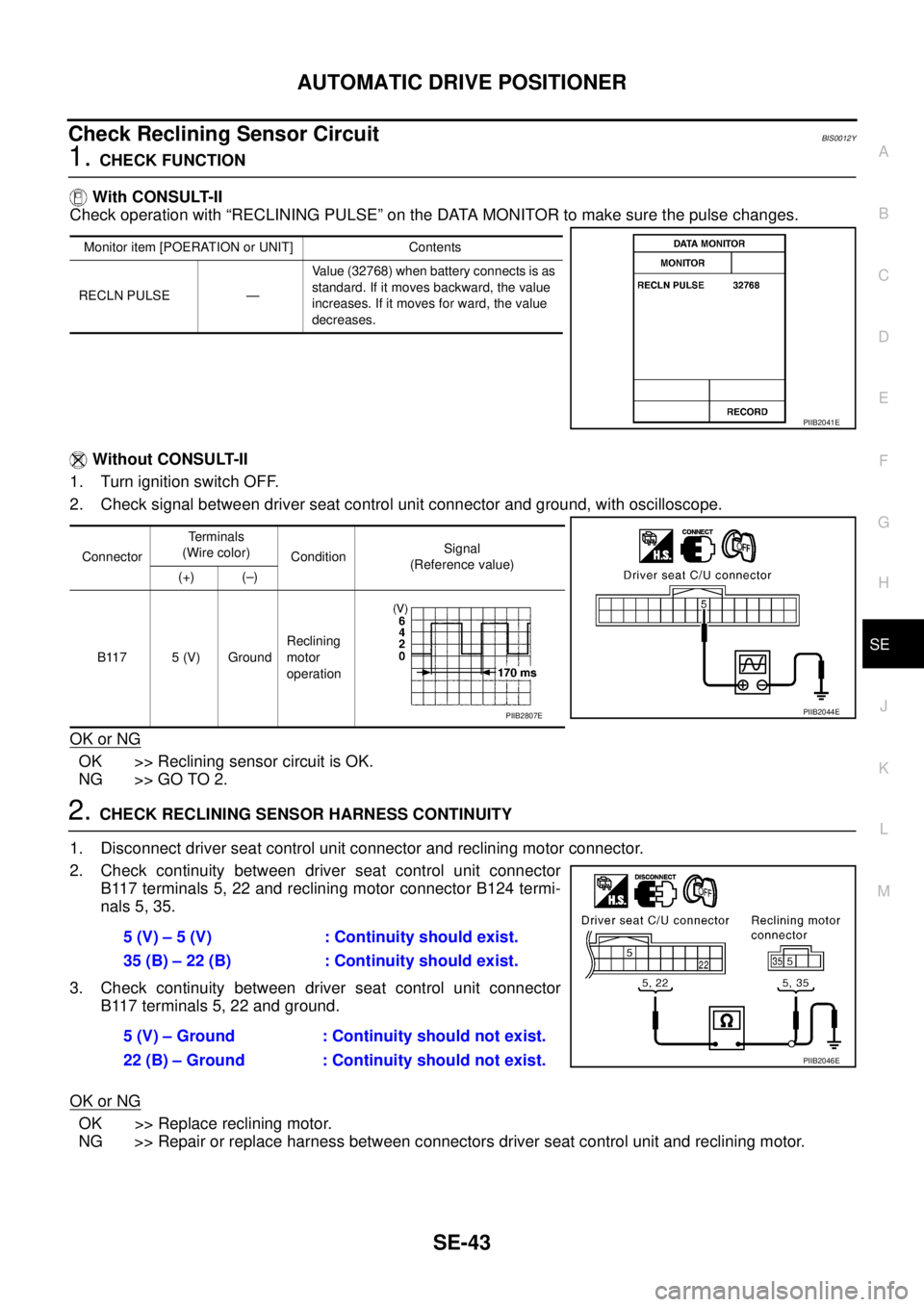
Check Reclining Sensor Circuit BIS0012Y
1. CHECK FUNCTION
With CONSULT-II
Check operation with “RECLINING PULSE” on the DATA MONITOR to make sure the pulse changes.
Without CONSULT-II
1. Turn ignition switch OFF.
2. Check signal between driver seat control unit connector and ground, with oscilloscope.
OK or NG
OK >> Reclining sensor circuit is OK.
NG >> GO TO 2.
2. CHECK RECLINING SENSOR HARNESS CONTINUITY
1. Disconnect driver seat control unit connector and reclining motor connector.
2. Check continuity between driver seat control unit connector
B117 terminals 5, 22 and reclining motor connector B124 termi-
nals 5, 35.
3. Check continuity between driver seat control unit connector
B117 terminals 5, 22 and ground.
OK or NG
OK >> Replace reclining motor.
NG >> Repair or replace harness between connectors driver seat control unit and reclining motor.
Monitor item [POERATION or UNIT] Contents
RECLN PULSE —Value (32768) when battery connects is as
standard. If it moves backward, the value
increases. If it moves for ward, the value
decreases.
PIIB2041E
ConnectorTerminals
(Wire color)
ConditionSignal
(Reference value)
(+) (–)
B117 5 (V) GroundReclining
motor
operation
PIIB2044EPIIB2807E
5 (V) – 5 (V) : Continuity should exist.
35 (B) – 22 (B) : Continuity should exist.
5 (V) – Ground : Continuity should not exist.
22 (B) – Ground : Continuity should not exist.
PIIB2046E
Page 3300 of 3502
SE-44
AUTOMATIC DRIVE POSITIONER
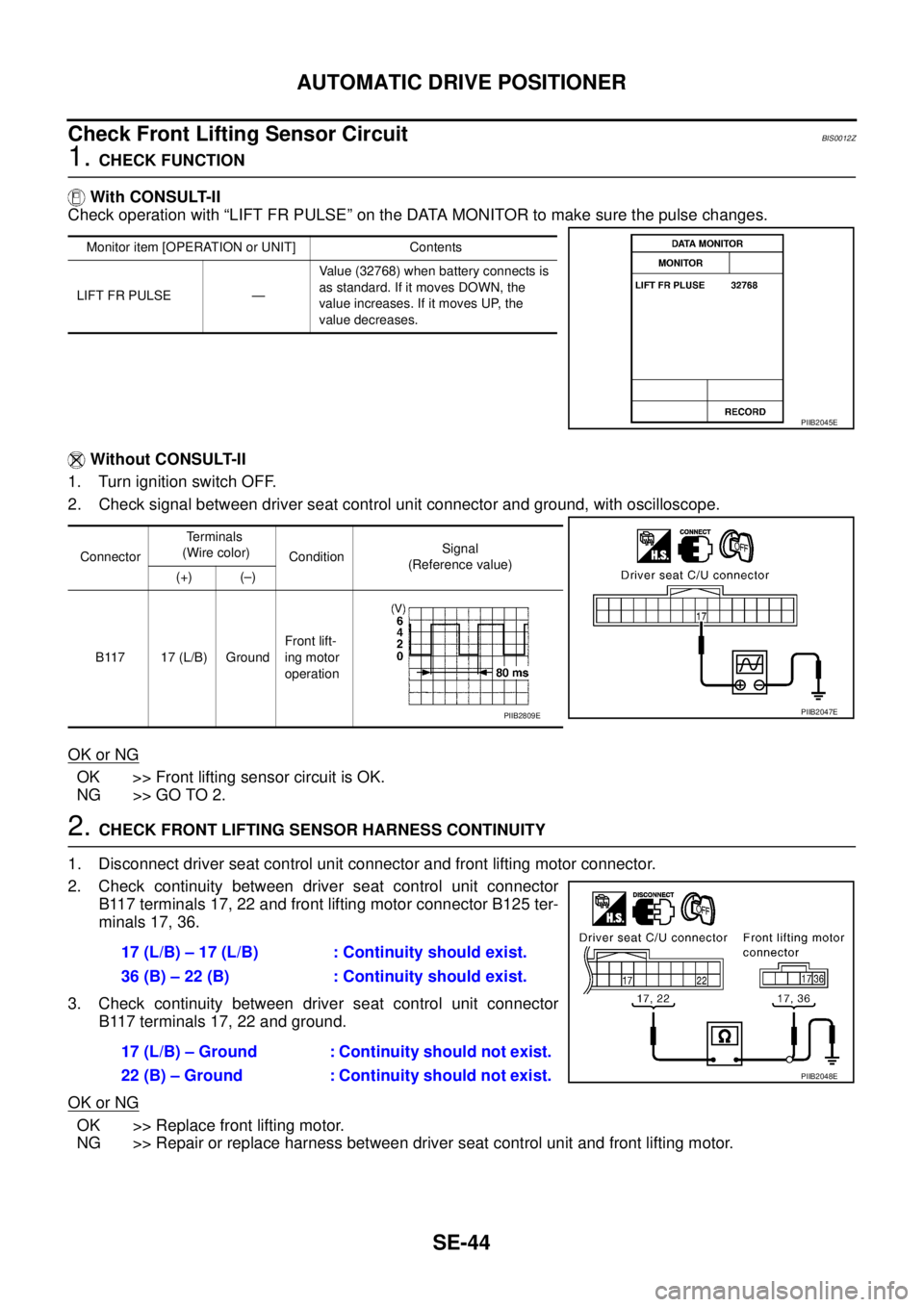
Check Front Lifting Sensor Circuit BIS0012Z
1. CHECK FUNCTION
With CONSULT-II
Check operation with “LIFT FR PULSE” on the DATA MONITOR to make sure the pulse changes.
Without CONSULT-II
1. Turn ignition switch OFF.
2. Check signal between driver seat control unit connector and ground, with oscilloscope.
OK or NG
OK >> Front lifting sensor circuit is OK.
NG >> GO TO 2.
2. CHECK FRONT LIFTING SENSOR HARNESS CONTINUITY
1. Disconnect driver seat control unit connector and front lifting motor connector.
2. Check continuity between driver seat control unit connector
B117 terminals 17, 22 and front lifting motor connector B125 ter-
minals 17, 36.
3. Check continuity between driver seat control unit connector
B117 terminals 17, 22 and ground.
OK or NG
OK >> Replace front lifting motor.
NG >> Repair or replace harness between driver seat control unit and front lifting motor.
Monitor item [OPERATION or UNIT] Contents
LIFT FR PULSE —Value (32768) when battery connects is
as standard. If it moves DOWN, the
value increases. If it moves UP, the
value decreases.
PIIB2045E
ConnectorTe r m i n a l s
(Wire color)
ConditionSignal
(Reference value)
(+) (–)
B117 17 (L/B) GroundFront lift-
ing motor
operation
PIIB2047EPIIB2809E
17 (L/B) – 17 (L/B) : Continuity should exist.
36 (B) – 22 (B) : Continuity should exist.
17 (L/B) – Ground : Continuity should not exist.
22 (B) – Ground : Continuity should not exist.
PIIB2048E
Page 3301 of 3502
AUTOMATIC DRIVE POSITIONER
SE-45
C
D
E
F
G
H
J
K
L
MA
B
SE
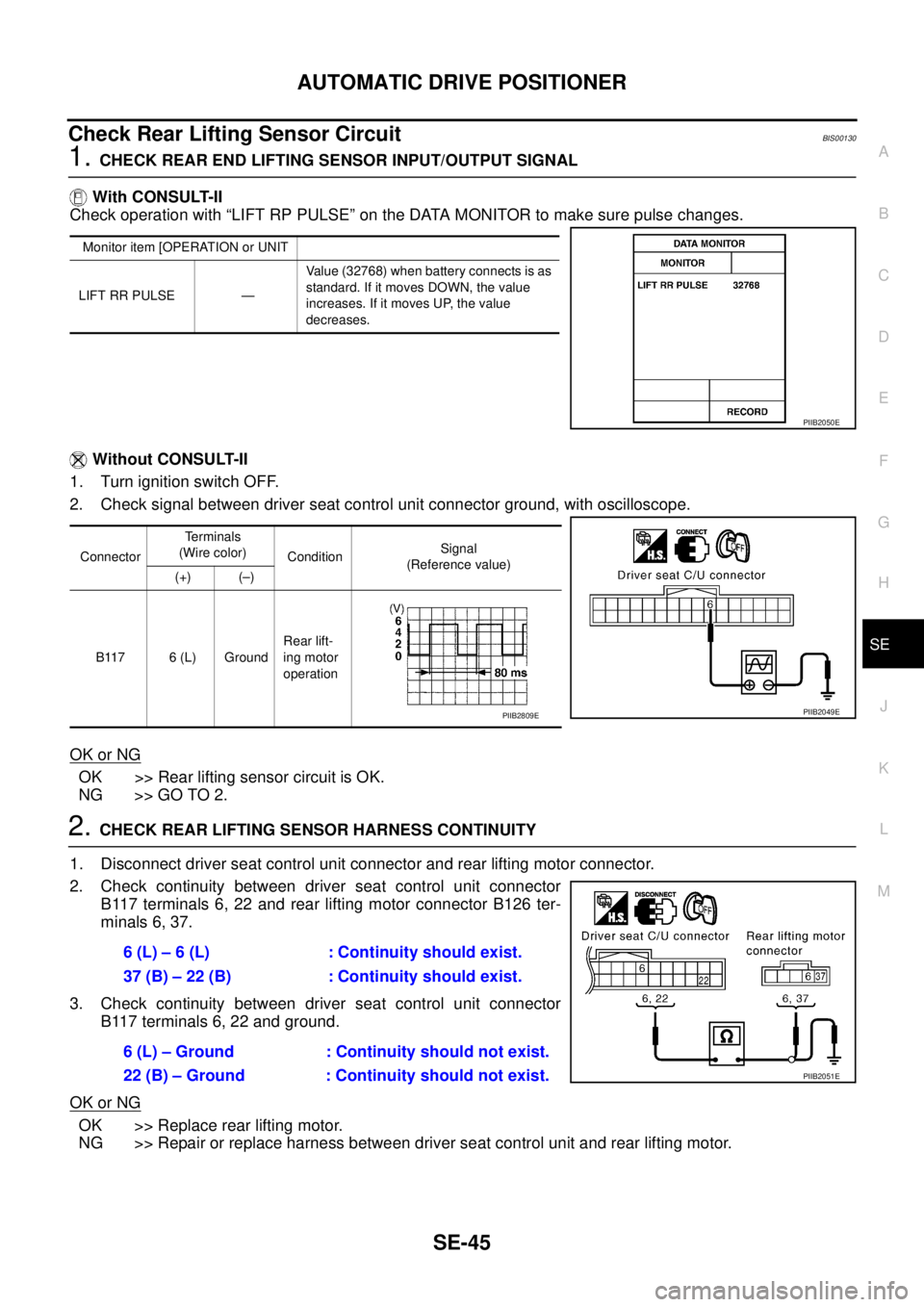
Check Rear Lifting Sensor Circuit BIS00130
1. CHECK REAR END LIFTING SENSOR INPUT/OUTPUT SIGNAL
With CONSULT-II
Check operation with “LIFT RP PULSE” on the DATA MONITOR to make sure pulse changes.
Without CONSULT-II
1. Turn ignition switch OFF.
2. Check signal between driver seat control unit connector ground, with oscilloscope.
OK or NG
OK >> Rear lifting sensor circuit is OK.
NG >> GO TO 2.
2. CHECK REAR LIFTING SENSOR HARNESS CONTINUITY
1. Disconnect driver seat control unit connector and rear lifting motor connector.
2. Check continuity between driver seat control unit connector
B117 terminals 6, 22 and rear lifting motor connector B126 ter-
minals 6, 37.
3. Check continuity between driver seat control unit connector
B117 terminals 6, 22 and ground.
OK or NG
OK >> Replace rear lifting motor.
NG >> Repair or replace harness between driver seat control unit and rear lifting motor.
Monitor item [OPERATION or UNIT
LIFT RR PULSE —Value (32768) when battery connects is as
standard. If it moves DOWN, the value
increases. If it moves UP, the value
decreases.
PIIB2050E
ConnectorTe r m i n a l s
(Wire color)
ConditionSignal
(Reference value)
(+) (–)
B117 6 (L) GroundRear lift-
ing motor
operation
PIIB2049EPIIB2809E
6 (L) – 6 (L) : Continuity should exist.
37 (B) – 22 (B) : Continuity should exist.
6 (L) – Ground : Continuity should not exist.
22 (B) – Ground : Continuity should not exist.
PIIB2051E
Page 3303 of 3502

AUTOMATIC DRIVE POSITIONER
SE-47
C
D
E
F
G
H
J
K
L
MA
B
SE
Check Sliding Switch Circuit BIS00132
1. CHECK FUNCTION
With CONSULT-II
With “SLIDE SW-FR, SLIDE SW-RR” on the DATA MONITOR, operate the sliding switch to check ON/OFF
operation.
Without CONSULT-II
1. Turn ignition switch OFF.
2. Sliding switch operate, check voltage between driver seat control unit connector and ground.
OK or NG
OK >> Sliding switch circuit is OK.
NG >> GO TO 2.
2. CHECK HARNESS CONTINUITY
1. Disconnect driver seat control unit connector and power seat switch (driver side) connector.
2. Check continuity between driver seat control unit connector
B117 terminals 7, 18 and driver power seat switch connector
B119 terminals 7, 18.
3. Check continuity between driver seat control unit connector
B117 terminals 7, 18 and ground.
OK or NG
OK >> GO TO 3.
NG >> Repair or replace harness between driver seat control unit and power seat switch.
Monitor item
[OPERATION or UNIT]Contents
SLIDE SW – FR“ON/
OFF”ON/OFF status judged from the sliding switch
(FR) signal is displayed.
SLIDE SW – RR“ON/
OFF”ON/OFF status judged from the sliding switch
(RR) signal is displayed.
PIIB2055E
ConnectorTe r m i n a l s
(Wire color)
Sliding switch conditionVoltage (V)
(Approx.)
(+) (-)
B11718 (LG/B)
GroundFORWARD 0
Other than above Battery voltage
7 (G/R)BACKWARD 0
Other than above Battery voltage
PIIB2057E
7 (GR) – 7 (GR) : Continuity should exist.
18 (LG/B) – 18 (LG/B) : Continuity should exist.
7 (GR) – Ground : Continuity should not exist.
18 (LG/B) – Ground : Continuity should not exist.
PIIB2058E
Page 3304 of 3502
SE-48
AUTOMATIC DRIVE POSITIONER
3. CHECK SLIDING SWITCH
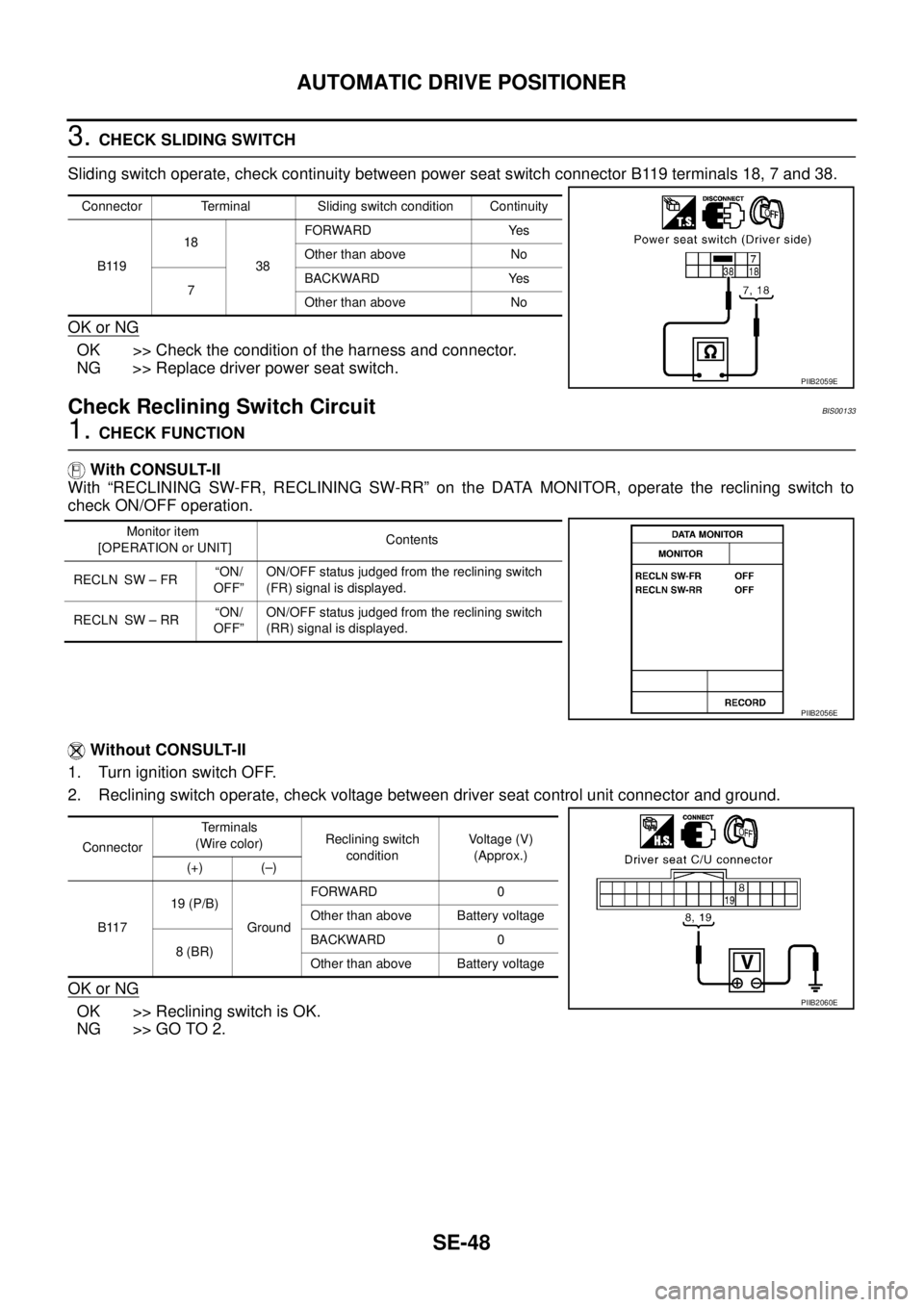
Sliding switch operate, check continuity between power seat switch connector B119 terminals 18, 7 and 38.
OK or NG
OK >> Check the condition of the harness and connector.
NG >> Replace driver power seat switch.
Check Reclining Switch CircuitBIS00133
1. CHECK FUNCTION
With CONSULT-II
With “RECLINING SW-FR, RECLINING SW-RR” on the DATA MONITOR, operate the reclining switch to
check ON/OFF operation.
Without CONSULT-II
1. Turn ignition switch OFF.
2. Reclining switch operate, check voltage between driver seat control unit connector and ground.
OK or NG
OK >> Reclining switch is OK.
NG >> GO TO 2.
Connector Terminal Sliding switch condition Continuity
B11918
38FORWARD Yes
Other than above No
7BACKWARD Yes
Other than above No
PIIB2059E
Monitor item
[OPERATION or UNIT]Contents
RECLN SW – FR“ON/
OFF”ON/OFF status judged from the reclining switch
(FR) signal is displayed.
RECLN SW – RR“ON/
OFF”ON/OFF status judged from the reclining switch
(RR) signal is displayed.
PIIB2056E
ConnectorTe r m i n a l s
(Wire color)Reclining switch
conditionVoltage (V)
(Approx.)
(+) (–)
B11719 (P/B)
GroundFORWARD 0
Other than above Battery voltage
8 (BR)BACKWARD 0
Other than above Battery voltage
PIIB2060E
Page 3306 of 3502
SE-50
AUTOMATIC DRIVE POSITIONER
Check Front Lifting Switch Circuit BIS00134
1. CHECK FUNCTION
With CONSULT-II
With “LIFT FR SW-UP, LIFT FR SW-DN” on the DATA MONITOR, operate the front lifting switch to check ON/
OFF operation.
Without CONSULT-II
1. Turn ignition switch OFF.
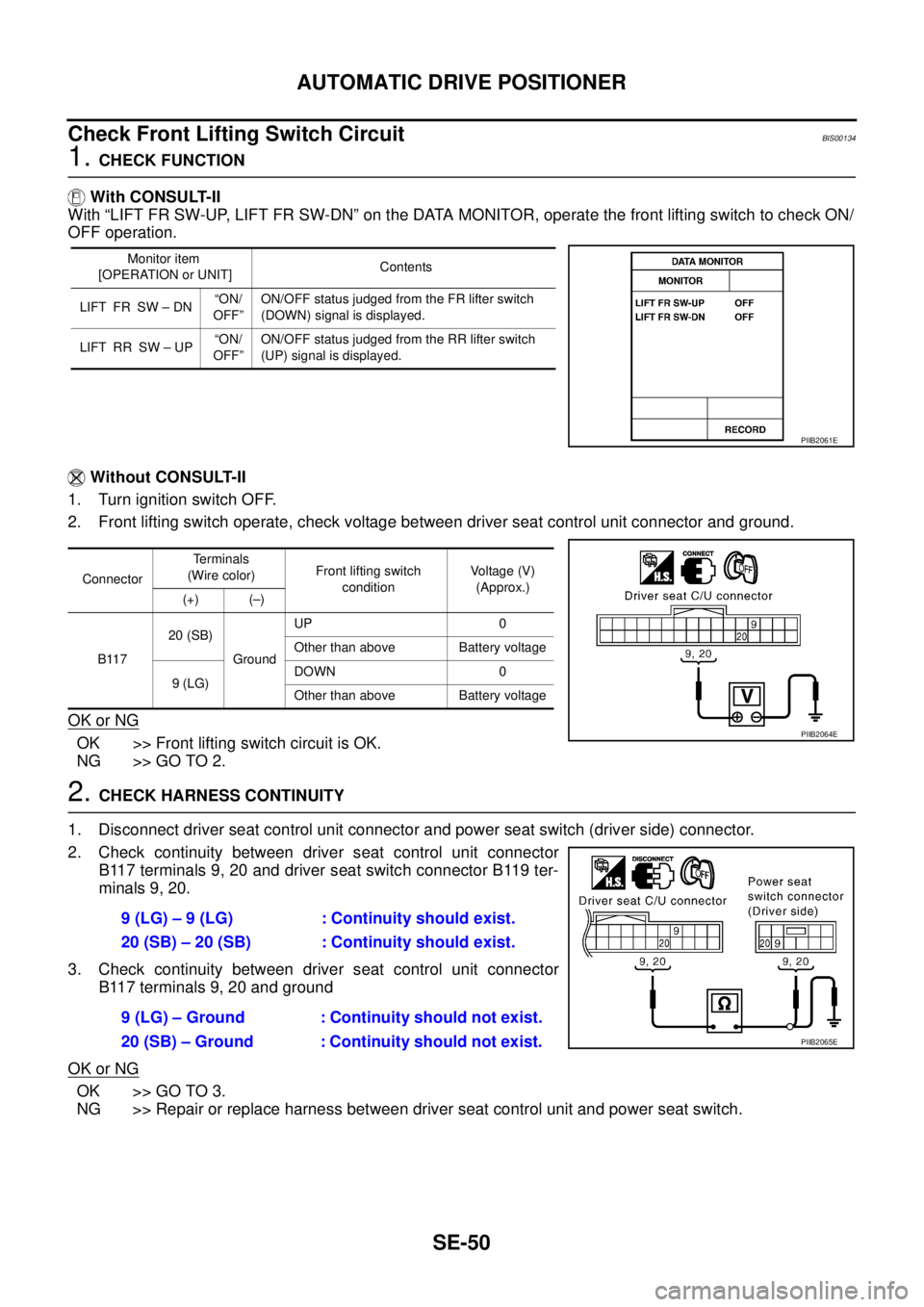
2. Front lifting switch operate, check voltage between driver seat control unit connector and ground.
OK or NG
OK >> Front lifting switch circuit is OK.
NG >> GO TO 2.
2. CHECK HARNESS CONTINUITY
1. Disconnect driver seat control unit connector and power seat switch (driver side) connector.
2. Check continuity between driver seat control unit connector
B117 terminals 9, 20 and driver seat switch connector B119 ter-
minals 9, 20.
3. Check continuity between driver seat control unit connector
B117 terminals 9, 20 and ground
OK or NG
OK >> GO TO 3.
NG >> Repair or replace harness between driver seat control unit and power seat switch.
Monitor item
[OPERATION or UNIT]Contents
LIFT FR SW – DN“ON/
OFF”ON/OFF status judged from the FR lifter switch
(DOWN) signal is displayed.
LIFT RR SW – UP“ON/
OFF”ON/OFF status judged from the RR lifter switch
(UP) signal is displayed.
PIIB2061E
ConnectorTerminals
(Wire color)Front lifting switch
conditionVoltage (V)
(Approx.)
(+) (–)
B11720 (SB)
GroundUP 0
Other than above Battery voltage
9 (LG)DOWN 0
Other than above Battery voltage
PIIB2064E
9 (LG) – 9 (LG) : Continuity should exist.
20 (SB) – 20 (SB) : Continuity should exist.
9 (LG) – Ground : Continuity should not exist.
20 (SB) – Ground : Continuity should not exist.
PIIB2065E
Page 3307 of 3502
AUTOMATIC DRIVE POSITIONER
SE-51
C
D
E
F
G
H
J
K
L
MA
B
SE
3. CHECK FRONT END LIFTING SWITCH
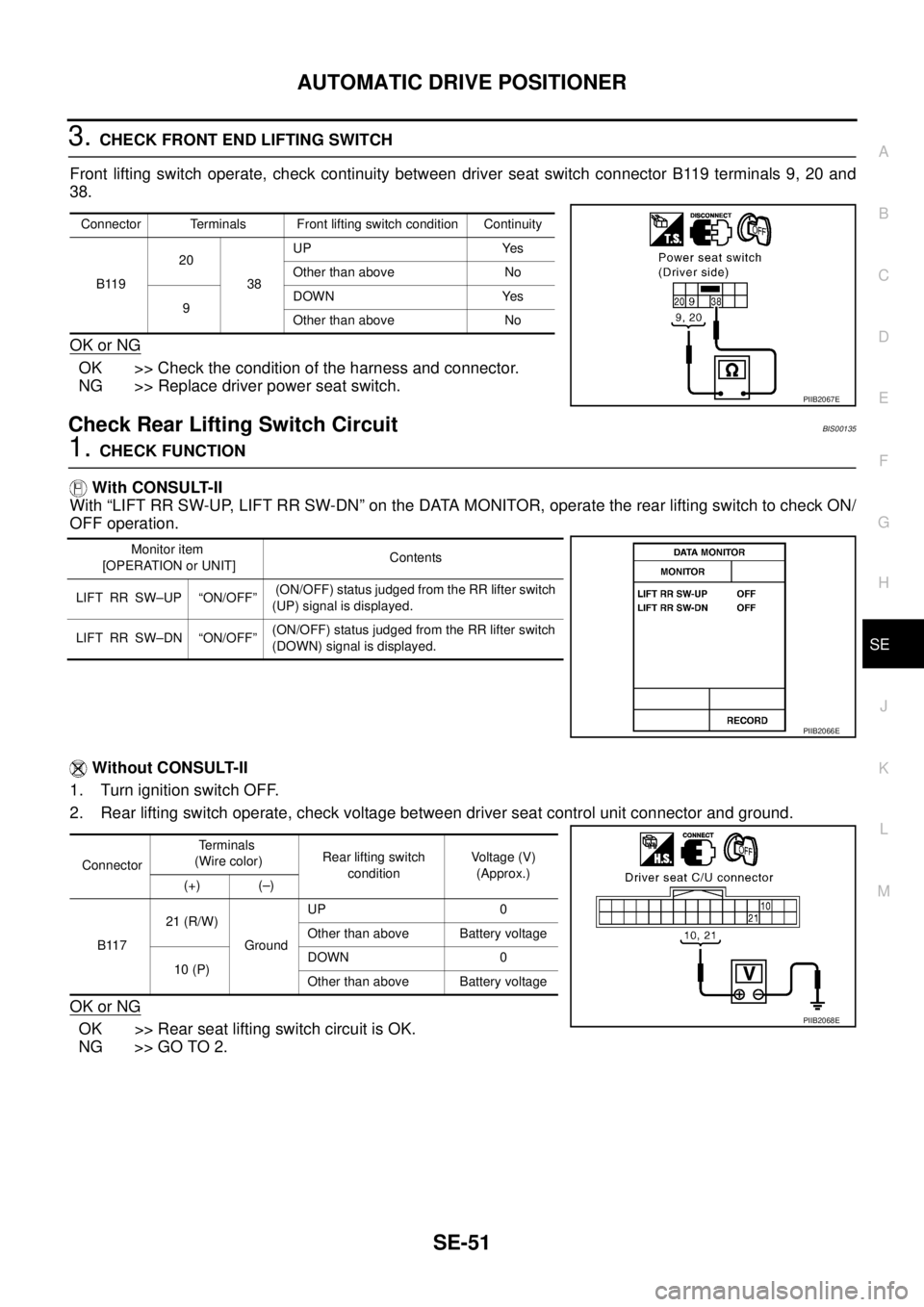
Front lifting switch operate, check continuity between driver seat switch connector B119 terminals 9, 20 and
38.
OK or NG
OK >> Check the condition of the harness and connector.
NG >> Replace driver power seat switch.
Check Rear Lifting Switch Circuit BIS00135
1. CHECK FUNCTION
With CONSULT-II
With “LIFT RR SW-UP, LIFT RR SW-DN” on the DATA MONITOR, operate the rear lifting switch to check ON/
OFF operation.
Without CONSULT-II
1. Turn ignition switch OFF.
2. Rear lifting switch operate, check voltage between driver seat control unit connector and ground.
OK or NG
OK >> Rear seat lifting switch circuit is OK.
NG >> GO TO 2.
Connector Terminals Front lifting switch condition Continuity
B11920
38UP Yes
Other than above No
9DOWN Yes
Other than above No
PIIB2067E
Monitor item
[OPERATION or UNIT]Contents
LIFT RR SW–UP “ON/OFF” (ON/OFF) status judged from the RR lifter switch
(UP) signal is displayed.
LIFT RR SW–DN “ON/OFF”(ON/OFF) status judged from the RR lifter switch
(DOWN) signal is displayed.
PIIB2066E
ConnectorTerminals
(Wire color)Rear lifting switch
conditionVoltage (V)
(Approx.)
(+) (–)
B11721 (R/W)
GroundUP 0
Other than above Battery voltage
10 (P)DOWN 0
Other than above Battery voltage
PIIB2068E
Page 3309 of 3502
AUTOMATIC DRIVE POSITIONER
SE-53
C
D
E
F
G
H
J
K
L
MA
B
SE
Check Detention Key Switch (P Range Switch) Circuit BIS00137
1. CHECK FUNCTION
With CONSULT-II
Make sure when the A/T or CVT selector lever is in P position, “DETENT SW” on the DATA MONITOR
becomes ON.
Without CONSULT-II
1. Turn ignition switch OFF.
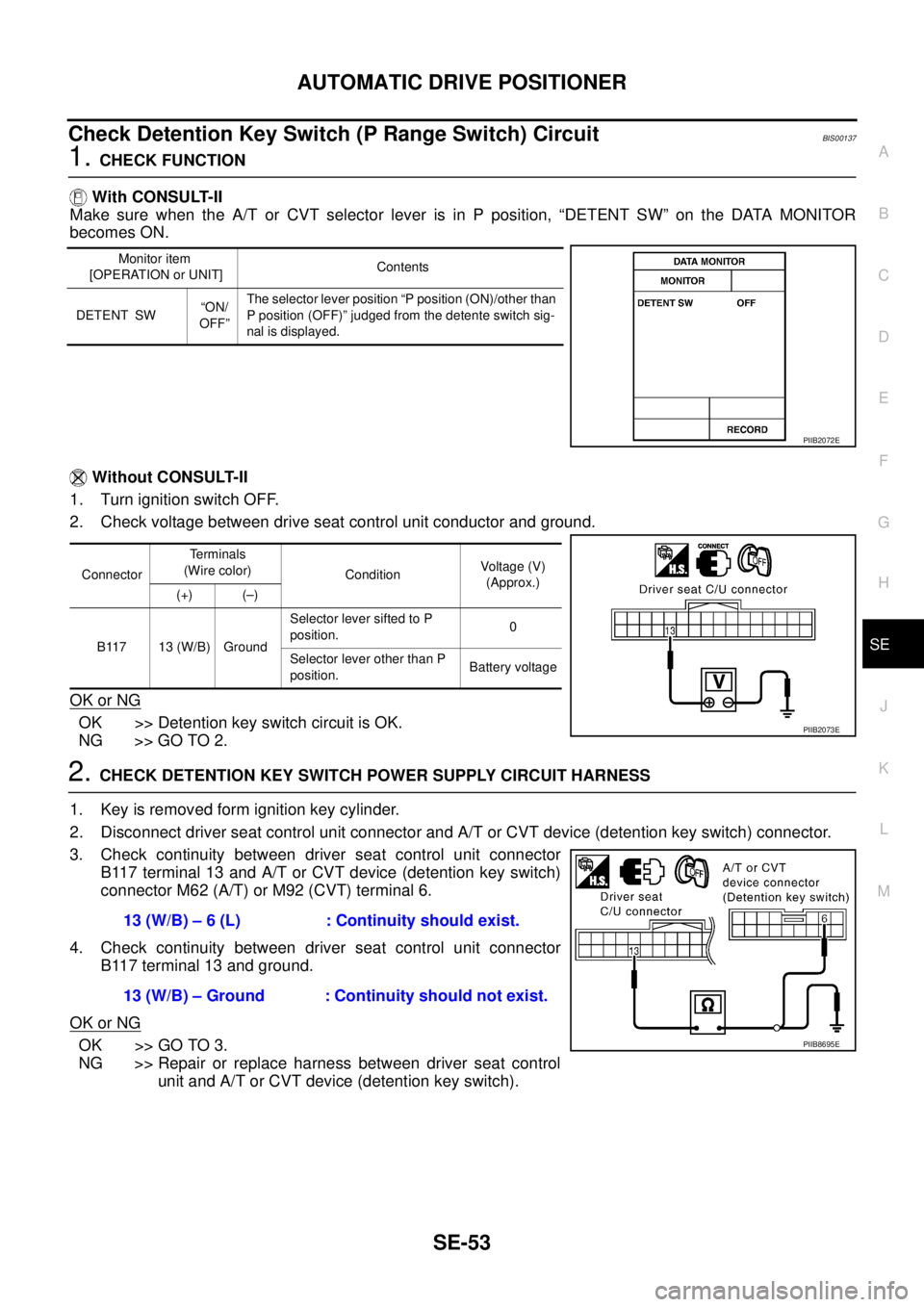
2. Check voltage between drive seat control unit conductor and ground.
OK or NG
OK >> Detention key switch circuit is OK.
NG >> GO TO 2.
2. CHECK DETENTION KEY SWITCH POWER SUPPLY CIRCUIT HARNESS
1. Key is removed form ignition key cylinder.
2. Disconnect driver seat control unit connector and A/T or CVT device (detention key switch) connector.
3. Check continuity between driver seat control unit connector
B117 terminal 13 and A/T or CVT device (detention key switch)
connector M62 (A/T) or M92 (CVT) terminal 6.
4. Check continuity between driver seat control unit connector
B117 terminal 13 and ground.
OK or NG
OK >> GO TO 3.
NG >> Repair or replace harness between driver seat control
unit and A/T or CVT device (detention key switch).
Monitor item
[OPERATION or UNIT]Contents
DETENT SW“ON/
OFF”The selector lever position “P position (ON)/other than
P position (OFF)” judged from the detente switch sig-
nal is displayed.
PIIB2072E
ConnectorTerminals
(Wire color)
ConditionVoltage (V)
(Approx.)
(+) (–)
B117 13 (W/B) GroundSelector lever sifted to P
position.0
Selector lever other than P
position.Battery voltage
PIIB2073E
13 (W/B) – 6 (L) : Continuity should exist.
13 (W/B) – Ground : Continuity should not exist.
PIIB8695E
Page 3310 of 3502
SE-54
AUTOMATIC DRIVE POSITIONER
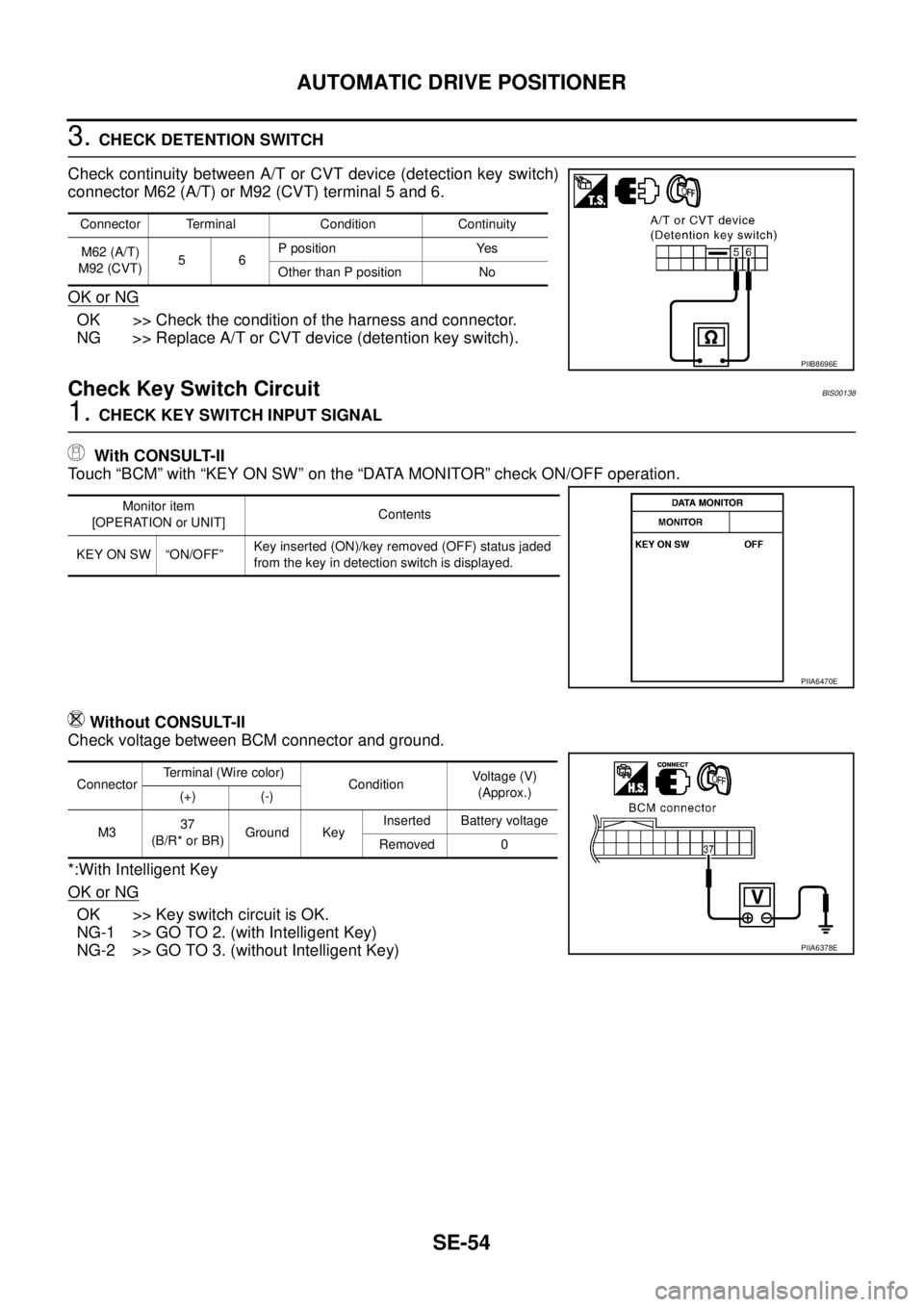
3. CHECK DETENTION SWITCH
Check continuity between A/T or CVT device (detection key switch)
connector M62 (A/T) or M92 (CVT) terminal 5 and 6.
OK or NG
OK >> Check the condition of the harness and connector.
NG >> Replace A/T or CVT device (detention key switch).
Check Key Switch CircuitBIS00138
1. CHECK KEY SWITCH INPUT SIGNAL
With CONSULT-II
Touch “BCM” with “KEY ON SW” on the “DATA MONITOR” check ON/OFF operation.
Without CONSULT-II
Check voltage between BCM connector and ground.
*:With Intelligent Key
OK or NG
OK >> Key switch circuit is OK.
NG-1 >> GO TO 2. (with Intelligent Key)
NG-2 >> GO TO 3. (without Intelligent Key)
Connector Terminal Condition Continuity
M62 (A/T)
M92 (CVT)56P position Yes
Other than P position No
PIIB8696E
Monitor item
[OPERATION or UNIT]Contents
KEY ON SW “ON/OFF”Key inserted (ON)/key removed (OFF) status jaded
from the key in detection switch is displayed.
PIIA6470E
ConnectorTerminal (Wire color)
ConditionVoltage (V)
(Approx.)
(+) (-)
M337
(B/R* or BR)Ground KeyInserted Battery voltage
Removed 0
PIIA6378E